www.immobilienscout24.dewww.immobilienscout24.de
The Multi-Device Nightmare
- and how to clear the Elm Street
Android Developer Days | Ankara | 15.06.2013 | Hasan Hosgel
About me
Hasan Hosgel
Twitter: @alosdev
Github: alosdev
Google+: Hasan Hosgel
Slideshare: hosgel
developer @ ImmobilienScout24,
CO-Organizer @ GDG Berlin Android,
Organizer @ community events &
Speaker
Android Developer Days 2013 | Mutli-Device Nightmare | Hasan Hosgel
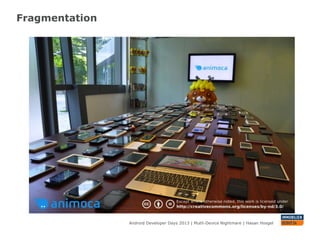
Fragmentation
Android Developer Days 2013 | Mutli-Device Nightmare | Hasan Hosgel
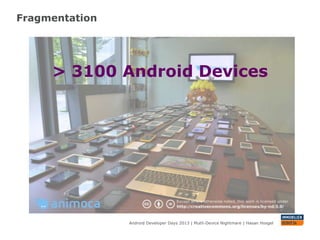
Fragmentation
Android Developer Days 2013 | Mutli-Device Nightmare | Hasan Hosgel
> 3100 Android Devices
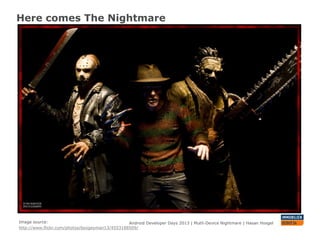
Here comes The Nightmare
Android Developer Days 2013 | Mutli-Device Nightmare | Hasan HosgelImage source:
http://www.flickr.com/photos/boogeyman13/4553188509/
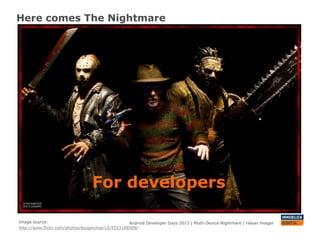
Here comes The Nightmare
Android Developer Days 2013 | Mutli-Device Nightmare | Hasan Hosgel
For developers
Image source:
http://www.flickr.com/photos/boogeyman13/4553188509/
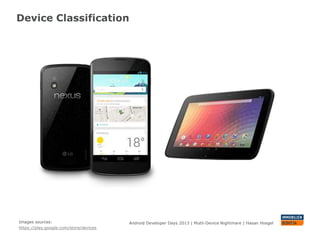
Device Classification
Android Developer Days 2013 | Mutli-Device Nightmare | Hasan HosgelImages sources:
https://play.google.com/store/devices
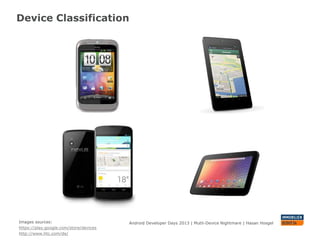
Device Classification
Android Developer Days 2013 | Mutli-Device Nightmare | Hasan HosgelImages sources:
https://play.google.com/store/devices
http://www.htc.com/de/
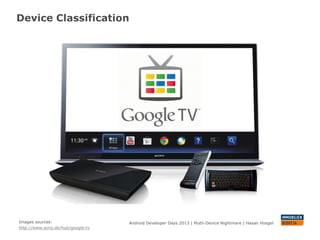
Device Classification
Android Developer Days 2013 | Mutli-Device Nightmare | Hasan HosgelImages sources:
http://www.sony.de/hub/google-tv
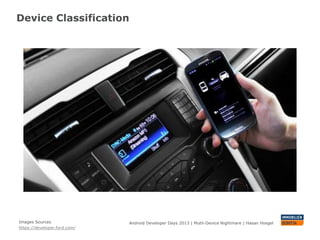
Device Classification
Android Developer Days 2013 | Mutli-Device Nightmare | Hasan HosgelImages Sources
https://developer.ford.com/
Resource Folders
Android Developer Days 2013 | Mutli-Device Nightmare | Hasan Hosgel
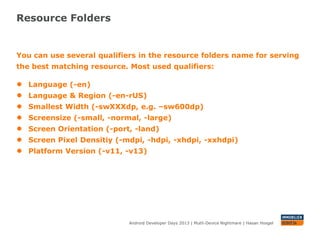
You can use several qualifiers in the resource folders name for serving
the best matching resource. Most used qualifiers:
● Language (-en)
● Language & Region (-en-rUS)
● Smallest Width (-swXXXdp, e.g. –sw600dp)
● Screensize (-small, -normal, -large)
● Screen Orientation (-port, -land)
● Screen Pixel Densitiy (-mdpi, -hdpi, -xhdpi, -xxhdpi)
● Platform Version (-v11, -v13)
Resource Folders
Android Developer Days 2013 | Mutli-Device Nightmare | Hasan Hosgel
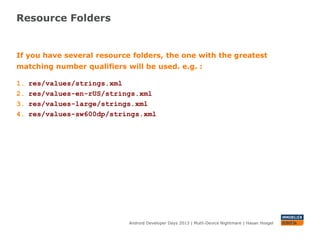
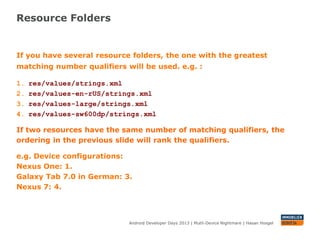
If you have several resource folders, the one with the greatest
matching number qualifiers will be used. e.g. :
1. res/values/strings.xml
2. res/values-en-rUS/strings.xml
3. res/values-large/strings.xml
4. res/values-sw600dp/strings.xml
Resource Folders
Android Developer Days 2013 | Mutli-Device Nightmare | Hasan Hosgel
If you have several resource folders, the one with the greatest
matching number qualifiers will be used. e.g. :
1. res/values/strings.xml
2. res/values-en-rUS/strings.xml
3. res/values-large/strings.xml
4. res/values-sw600dp/strings.xml
If two resources have the same number of matching qualifiers, the
ordering in the previous slide will rank the qualifiers.
e.g. Device configurations:
Nexus One, Turkish: 1.
Galaxy Tab 7.0 in German: 3.
Nexus 7: 4.
Images
Android Developer Days 2013 | Mutli-Device Nightmare | Hasan Hosgel
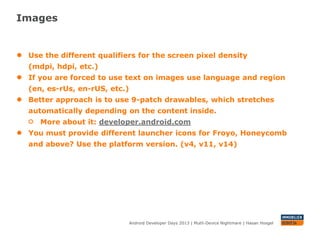
● Use the different qualifiers for the screen pixel density (mdpi, hdpi,
etc.)
● If you are forced to use text on images use language and region
(en, es-rUs, en-rUS, etc.)
● Better approach is to use 9-patch drawables, which stretches
automatically depending on the content inside.
More about it: developer.android.com
● You must provide different launcher icons for Froyo, Honeycomb
and above? Use the platform version. (v4, v11, v14)
Classifications For Layouts
Android Developer Days 2013 | Mutli-Device Nightmare | Hasan Hosgel
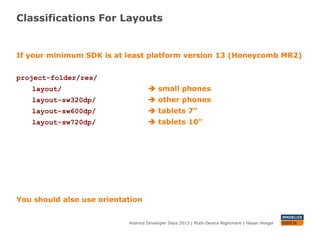
If your minimum SDK is at least platform version 13 (Honeycomb MR2)
project-folder/res/
layout/  small phones
layout-sw320dp/  other phones
layout-sw600dp/  tablets 7”
layout-sw720dp/  tablets 10”
You should also use orientation
Classifications For Layouts
Android Developer Days 2013 | Mutli-Device Nightmare | Hasan Hosgel
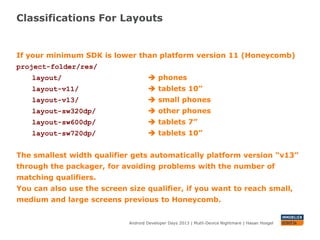
If your minimum SDK is lower than platform version 11 (Honeycomb)
project-folder/res/
layout/  phones
layout-v11/  tablets 10”
layout-v13/  small phones
layout-sw320dp/  other phones
layout-sw600dp/  tablets 7”
layout-sw720dp/  tablets 10”
The smallest width qualifier gets automatically platform version “v13”
through the packager, for avoiding problems with the number of
matching qualifiers.
You can also use the screen size qualifier, if you want to reach small,
medium and large screens previous to Honeycomb.
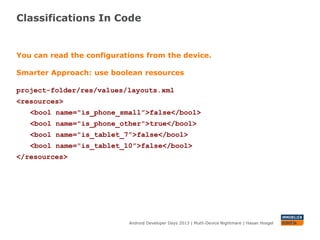
Classifications In Code
Android Developer Days 2013 | Mutli-Device Nightmare | Hasan Hosgel
You can read the configurations from the device.
Smarter Approach: use boolean resources
project-folder/res/values/layouts.xml
<resources>
<bool name="is_phone_small”>false</bool>
<bool name="is_phone_other">true</bool>
<bool name="is_tablet_7”>false</bool>
<bool name="is_tablet_10”>false</bool>
</resources>
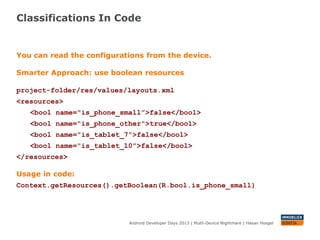
Classifications In Code
Android Developer Days 2013 | Mutli-Device Nightmare | Hasan Hosgel
You can read the configurations from the device.
Smarter Approach: use boolean resources
project-folder/res/values/layouts.xml
<resources>
<bool name="is_phone_small”>false</bool>
<bool name="is_phone_other">true</bool>
<bool name="is_tablet_7”>false</bool>
<bool name="is_tablet_10”>false</bool>
</resources>
Usage in code:
getResources().getBoolean(R.bool.is_phone_small)
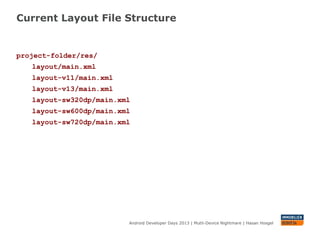
Current Layout File Structure
Android Developer Days 2013 | Mutli-Device Nightmare | Hasan Hosgel
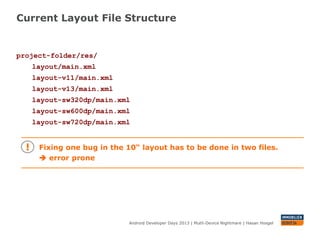
project-folder/res/
layout/main.xml
layout-v11/main.xml
layout-v13/main.xml
layout-sw320dp/main.xml
layout-sw600dp/main.xml
layout-sw720dp/main.xml
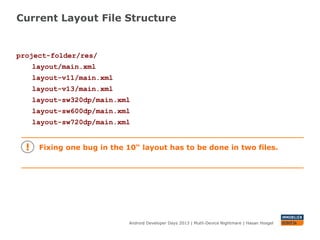
Current Layout File Structure
Android Developer Days 2013 | Mutli-Device Nightmare | Hasan Hosgel
project-folder/res/
layout/main.xml
layout-v11/main.xml
layout-v13/main.xml
layout-sw320dp/main.xml
layout-sw600dp/main.xml
layout-sw720dp/main.xml
Fixing one bug in the 10“ layout has to be done in two files.
Current Layout File Structure
Android Developer Days 2013 | Mutli-Device Nightmare | Hasan Hosgel
project-folder/res/
layout/main.xml
layout-v11/main.xml
layout-v13/main.xml
layout-sw320dp/main.xml
layout-sw600dp/main.xml
layout-sw720dp/main.xml
Fixing one bug in the 10“ layout has to be done in two files.
 error prone
Resource Alias
Android Developer Days 2013 | Mutli-Device Nightmare | Hasan Hosgel
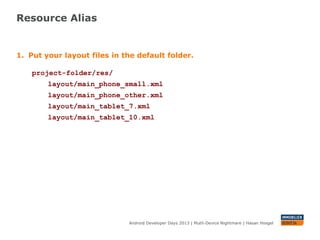
1. Put your layout files in the default folder.
project-folder/res/
layout/main_phone_small.xml
layout/main_phone_other.xml
layout/main_tablet_7.xml
layout/main_tablet_10.xml
Resource Alias
Android Developer Days 2013 | Mutli-Device Nightmare | Hasan Hosgel
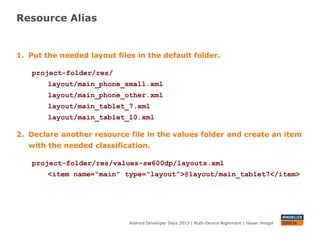
1. Put your layout files in the default folder.
project-folder/res/
layout/main_phone_small.xml
layout/main_phone_other.xml
layout/main_tablet_7.xml
layout/main_tablet_10.xml
2. Create an item with the needed classification in the previously
defined values folder.
project-folder/res/values-sw600dp/layouts.xml
<item name=“main” type=“layout”>@layout/main_tablet7</item>
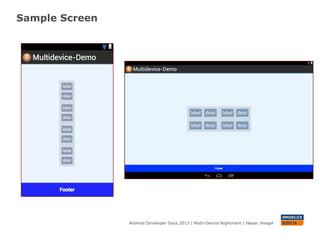
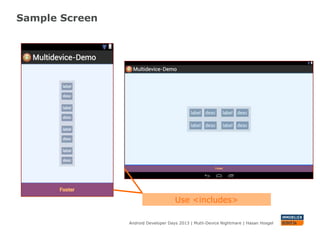
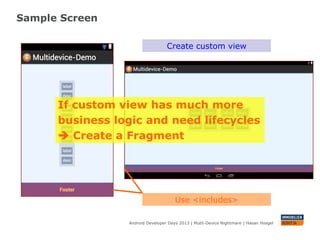
Sample Screen
Android Developer Days 2013 | Mutli-Device Nightmare | Hasan Hosgel
Sample Screen
Android Developer Days 2013 | Mutli-Device Nightmare | Hasan Hosgel
Use <includes>
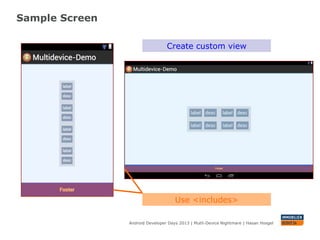
Sample Screen
Android Developer Days 2013 | Mutli-Device Nightmare | Hasan Hosgel
Use <includes>
Create custom view
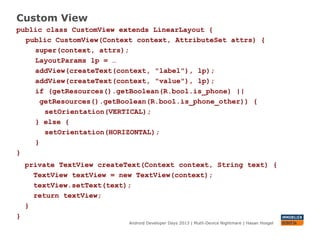
Custom View
Android Developer Days 2013 | Mutli-Device Nightmare | Hasan Hosgel
public class CustomView extends LinearLayout {
public CustomView(Context context, AttributeSet attrs) {
super(context, attrs);
LayoutParams lp = …
addView(createText(context, "label"), lp);
addView(createText(context, ”desc"), lp);
if (getResources().getBoolean(R.bool.is_phone_small) ||
getResources().getBoolean(R.bool.is_phone_other)) {
setOrientation(VERTICAL);
} else {
setOrientation(HORIZONTAL);
}
}
private TextView createText(Context context, String text) {
TextView textView = new TextView(context);
textView.setText(text);
return textView;
}
}
Sample Screen
Android Developer Days 2013 | Mutli-Device Nightmare | Hasan Hosgel
Use <includes>
Create custom view
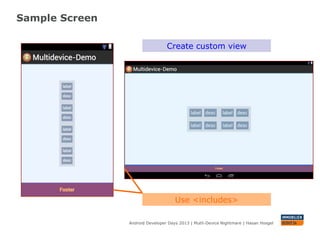
Sample Screen
Android Developer Days 2013 | Mutli-Device Nightmare | Hasan Hosgel
Use <includes>
Create custom view
If custom view has much more
business logic and need lifecycles
 Create a Fragment
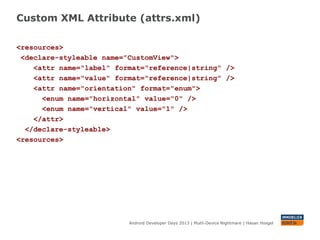
Custom XML Attribute (attrs.xml)
Android Developer Days 2013 | Mutli-Device Nightmare | Hasan Hosgel
<resources>
<declare-styleable name=”CustomView">
<attr name="label" format="reference|string" />
<attr name="value" format="reference|string" />
<attr name="orientation" format="enum">
<enum name="horizontal" value="0" />
<enum name="vertical" value="1" />
</attr>
</declare-styleable>
<resources>
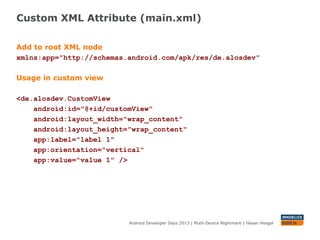
Custom XML Attribute (main.xml)
Android Developer Days 2013 | Mutli-Device Nightmare | Hasan Hosgel
Add to root XML node
xmlns:app="http://schemas.android.com/apk/res/de.alosdev"
Usage in custom view
<de.alosdev.CustomView
android:id="@+id/customView"
android:layout_width="wrap_content"
android:layout_height="wrap_content"
app:label="label 1"
app:orientation="vertical"
app:value="value 1" />
Custom XML Attribute (CustomView.java)
Android Developer Days 2013 | Mutli-Device Nightmare | Hasan Hosgel
public class CustomView extends LinearLayout {
static final int[] ORIENTATION = new int[] { HORIZONTAL, VERTICAL
};
public CustomView(Context context, AttributeSet attrs) {
super(context, attrs);
…
TypedArray a = context.obtainStyledAttributes(attrs,
R.styleable.CustomView);
try {
setOrientation(ORIENTATION[
a.getInt(R.styleable.CustomView_orientation, 0)]);
} finally {
a.recycle();
}
}
…
}
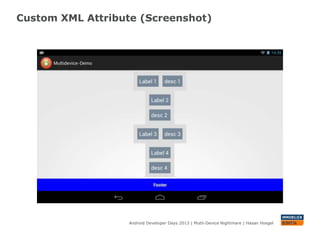
Custom XML Attribute (Screenshot)
Android Developer Days 2013 | Mutli-Device Nightmare | Hasan Hosgel
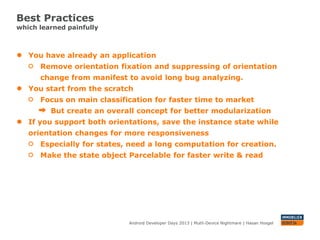
Best Practices
which learned painfully
Android Developer Days 2013 | Mutli-Device Nightmare | Hasan Hosgel
● You have already an application
Remove orientation fixation and suppressing of orientation
change from manifest to avoid long bug analyzing.
● You start from the scratch
Focus on main classification for faster time to market
But create an overall concept for better modularization
● If you support both orientations, save the instance state while
orientation changes for more responsiveness
Especially for states, need a long computation for creation.
Make the state object Parcelable for faster write & read and also
to have a smaller memory footprint
Mission Accomplished
Android Developer Days 2013 | Mutli-Device Nightmare | Hasan Hosgelhttp://www.flickr.com/photos/ianaberle/5729561934/
Mission Accomplished
Android Developer Days 2013 | Mutli-Device Nightmare | Hasan Hosgelhttp://www.flickr.com/photos/ianaberle/5729561934/
Q & A
Source: http://www.flickr.com/photos/21496790@N06/5065834411/ Droidcon 2013 | Mutli-Device Nightmare | Hasan Hosgel
Page 37
Android Developer Days 2013 | Mutli-Device Nightmare | Hasan Hosgel
www.immobilienscout24.dewww.immobilienscout24.de
Thanks for your attention
& we are hiring!
Contact:
Hasan Hosgel
Twitter: @alosdev
Github: alosdev
Multidevice Nightmare
Repo: https://github.com/alosdev/multidevice-nightmare-demo
SlideShare: http://de.slideshare.net/hosgel/add-2013-multidevice-nightmare

Android Developer Days 2013 - MultiDevice Nightmare

  • 1.
    www.immobilienscout24.dewww.immobilienscout24.de The Multi-Device Nightmare -and how to clear the Elm Street Android Developer Days | Ankara | 15.06.2013 | Hasan Hosgel
  • 2.
    About me Hasan Hosgel Twitter:@alosdev Github: alosdev Google+: Hasan Hosgel Slideshare: hosgel developer @ ImmobilienScout24, CO-Organizer @ GDG Berlin Android, Organizer @ community events & Speaker Android Developer Days 2013 | Mutli-Device Nightmare | Hasan Hosgel
  • 3.
    Fragmentation Android Developer Days2013 | Mutli-Device Nightmare | Hasan Hosgel
  • 4.
    Fragmentation Android Developer Days2013 | Mutli-Device Nightmare | Hasan Hosgel > 3100 Android Devices
  • 5.
    Here comes TheNightmare Android Developer Days 2013 | Mutli-Device Nightmare | Hasan HosgelImage source: http://www.flickr.com/photos/boogeyman13/4553188509/
  • 6.
    Here comes TheNightmare Android Developer Days 2013 | Mutli-Device Nightmare | Hasan Hosgel For developers Image source: http://www.flickr.com/photos/boogeyman13/4553188509/
  • 7.
    Device Classification Android DeveloperDays 2013 | Mutli-Device Nightmare | Hasan HosgelImages sources: https://play.google.com/store/devices
  • 8.
    Device Classification Android DeveloperDays 2013 | Mutli-Device Nightmare | Hasan HosgelImages sources: https://play.google.com/store/devices http://www.htc.com/de/
  • 9.
    Device Classification Android DeveloperDays 2013 | Mutli-Device Nightmare | Hasan HosgelImages sources: http://www.sony.de/hub/google-tv
  • 10.
    Device Classification Android DeveloperDays 2013 | Mutli-Device Nightmare | Hasan HosgelImages Sources https://developer.ford.com/
  • 11.
    Resource Folders Android DeveloperDays 2013 | Mutli-Device Nightmare | Hasan Hosgel You can use several qualifiers in the resource folders name for serving the best matching resource. Most used qualifiers: ● Language (-en) ● Language & Region (-en-rUS) ● Smallest Width (-swXXXdp, e.g. –sw600dp) ● Screensize (-small, -normal, -large) ● Screen Orientation (-port, -land) ● Screen Pixel Densitiy (-mdpi, -hdpi, -xhdpi, -xxhdpi) ● Platform Version (-v11, -v13)
  • 12.
    Resource Folders Android DeveloperDays 2013 | Mutli-Device Nightmare | Hasan Hosgel If you have several resource folders, the one with the greatest matching number qualifiers will be used. e.g. : 1. res/values/strings.xml 2. res/values-en-rUS/strings.xml 3. res/values-large/strings.xml 4. res/values-sw600dp/strings.xml
  • 13.
    Resource Folders Android DeveloperDays 2013 | Mutli-Device Nightmare | Hasan Hosgel If you have several resource folders, the one with the greatest matching number qualifiers will be used. e.g. : 1. res/values/strings.xml 2. res/values-en-rUS/strings.xml 3. res/values-large/strings.xml 4. res/values-sw600dp/strings.xml If two resources have the same number of matching qualifiers, the ordering in the previous slide will rank the qualifiers. e.g. Device configurations: Nexus One, Turkish: 1. Galaxy Tab 7.0 in German: 3. Nexus 7: 4.
  • 14.
    Images Android Developer Days2013 | Mutli-Device Nightmare | Hasan Hosgel ● Use the different qualifiers for the screen pixel density (mdpi, hdpi, etc.) ● If you are forced to use text on images use language and region (en, es-rUs, en-rUS, etc.) ● Better approach is to use 9-patch drawables, which stretches automatically depending on the content inside. More about it: developer.android.com ● You must provide different launcher icons for Froyo, Honeycomb and above? Use the platform version. (v4, v11, v14)
  • 15.
    Classifications For Layouts AndroidDeveloper Days 2013 | Mutli-Device Nightmare | Hasan Hosgel If your minimum SDK is at least platform version 13 (Honeycomb MR2) project-folder/res/ layout/  small phones layout-sw320dp/  other phones layout-sw600dp/  tablets 7” layout-sw720dp/  tablets 10” You should also use orientation
  • 16.
    Classifications For Layouts AndroidDeveloper Days 2013 | Mutli-Device Nightmare | Hasan Hosgel If your minimum SDK is lower than platform version 11 (Honeycomb) project-folder/res/ layout/  phones layout-v11/  tablets 10” layout-v13/  small phones layout-sw320dp/  other phones layout-sw600dp/  tablets 7” layout-sw720dp/  tablets 10” The smallest width qualifier gets automatically platform version “v13” through the packager, for avoiding problems with the number of matching qualifiers. You can also use the screen size qualifier, if you want to reach small, medium and large screens previous to Honeycomb.
  • 17.
    Classifications In Code AndroidDeveloper Days 2013 | Mutli-Device Nightmare | Hasan Hosgel You can read the configurations from the device. Smarter Approach: use boolean resources project-folder/res/values/layouts.xml <resources> <bool name="is_phone_small”>false</bool> <bool name="is_phone_other">true</bool> <bool name="is_tablet_7”>false</bool> <bool name="is_tablet_10”>false</bool> </resources>
  • 18.
    Classifications In Code AndroidDeveloper Days 2013 | Mutli-Device Nightmare | Hasan Hosgel You can read the configurations from the device. Smarter Approach: use boolean resources project-folder/res/values/layouts.xml <resources> <bool name="is_phone_small”>false</bool> <bool name="is_phone_other">true</bool> <bool name="is_tablet_7”>false</bool> <bool name="is_tablet_10”>false</bool> </resources> Usage in code: getResources().getBoolean(R.bool.is_phone_small)
  • 19.
    Current Layout FileStructure Android Developer Days 2013 | Mutli-Device Nightmare | Hasan Hosgel project-folder/res/ layout/main.xml layout-v11/main.xml layout-v13/main.xml layout-sw320dp/main.xml layout-sw600dp/main.xml layout-sw720dp/main.xml
  • 20.
    Current Layout FileStructure Android Developer Days 2013 | Mutli-Device Nightmare | Hasan Hosgel project-folder/res/ layout/main.xml layout-v11/main.xml layout-v13/main.xml layout-sw320dp/main.xml layout-sw600dp/main.xml layout-sw720dp/main.xml Fixing one bug in the 10“ layout has to be done in two files.
  • 21.
    Current Layout FileStructure Android Developer Days 2013 | Mutli-Device Nightmare | Hasan Hosgel project-folder/res/ layout/main.xml layout-v11/main.xml layout-v13/main.xml layout-sw320dp/main.xml layout-sw600dp/main.xml layout-sw720dp/main.xml Fixing one bug in the 10“ layout has to be done in two files.  error prone
  • 22.
    Resource Alias Android DeveloperDays 2013 | Mutli-Device Nightmare | Hasan Hosgel 1. Put your layout files in the default folder. project-folder/res/ layout/main_phone_small.xml layout/main_phone_other.xml layout/main_tablet_7.xml layout/main_tablet_10.xml
  • 23.
    Resource Alias Android DeveloperDays 2013 | Mutli-Device Nightmare | Hasan Hosgel 1. Put your layout files in the default folder. project-folder/res/ layout/main_phone_small.xml layout/main_phone_other.xml layout/main_tablet_7.xml layout/main_tablet_10.xml 2. Create an item with the needed classification in the previously defined values folder. project-folder/res/values-sw600dp/layouts.xml <item name=“main” type=“layout”>@layout/main_tablet7</item>
  • 24.
    Sample Screen Android DeveloperDays 2013 | Mutli-Device Nightmare | Hasan Hosgel
  • 25.
    Sample Screen Android DeveloperDays 2013 | Mutli-Device Nightmare | Hasan Hosgel Use <includes>
  • 26.
    Sample Screen Android DeveloperDays 2013 | Mutli-Device Nightmare | Hasan Hosgel Use <includes> Create custom view
  • 27.
    Custom View Android DeveloperDays 2013 | Mutli-Device Nightmare | Hasan Hosgel public class CustomView extends LinearLayout { public CustomView(Context context, AttributeSet attrs) { super(context, attrs); LayoutParams lp = … addView(createText(context, "label"), lp); addView(createText(context, ”desc"), lp); if (getResources().getBoolean(R.bool.is_phone_small) || getResources().getBoolean(R.bool.is_phone_other)) { setOrientation(VERTICAL); } else { setOrientation(HORIZONTAL); } } private TextView createText(Context context, String text) { TextView textView = new TextView(context); textView.setText(text); return textView; } }
  • 28.
    Sample Screen Android DeveloperDays 2013 | Mutli-Device Nightmare | Hasan Hosgel Use <includes> Create custom view
  • 29.
    Sample Screen Android DeveloperDays 2013 | Mutli-Device Nightmare | Hasan Hosgel Use <includes> Create custom view If custom view has much more business logic and need lifecycles  Create a Fragment
  • 30.
    Custom XML Attribute(attrs.xml) Android Developer Days 2013 | Mutli-Device Nightmare | Hasan Hosgel <resources> <declare-styleable name=”CustomView"> <attr name="label" format="reference|string" /> <attr name="value" format="reference|string" /> <attr name="orientation" format="enum"> <enum name="horizontal" value="0" /> <enum name="vertical" value="1" /> </attr> </declare-styleable> <resources>
  • 31.
    Custom XML Attribute(main.xml) Android Developer Days 2013 | Mutli-Device Nightmare | Hasan Hosgel Add to root XML node xmlns:app="http://schemas.android.com/apk/res/de.alosdev" Usage in custom view <de.alosdev.CustomView android:id="@+id/customView" android:layout_width="wrap_content" android:layout_height="wrap_content" app:label="label 1" app:orientation="vertical" app:value="value 1" />
  • 32.
    Custom XML Attribute(CustomView.java) Android Developer Days 2013 | Mutli-Device Nightmare | Hasan Hosgel public class CustomView extends LinearLayout { static final int[] ORIENTATION = new int[] { HORIZONTAL, VERTICAL }; public CustomView(Context context, AttributeSet attrs) { super(context, attrs); … TypedArray a = context.obtainStyledAttributes(attrs, R.styleable.CustomView); try { setOrientation(ORIENTATION[ a.getInt(R.styleable.CustomView_orientation, 0)]); } finally { a.recycle(); } } … }
  • 33.
    Custom XML Attribute(Screenshot) Android Developer Days 2013 | Mutli-Device Nightmare | Hasan Hosgel
  • 34.
    Best Practices which learnedpainfully Android Developer Days 2013 | Mutli-Device Nightmare | Hasan Hosgel ● You have already an application Remove orientation fixation and suppressing of orientation change from manifest to avoid long bug analyzing. ● You start from the scratch Focus on main classification for faster time to market But create an overall concept for better modularization ● If you support both orientations, save the instance state while orientation changes for more responsiveness Especially for states, need a long computation for creation. Make the state object Parcelable for faster write & read and also to have a smaller memory footprint
  • 35.
    Mission Accomplished Android DeveloperDays 2013 | Mutli-Device Nightmare | Hasan Hosgelhttp://www.flickr.com/photos/ianaberle/5729561934/
  • 36.
    Mission Accomplished Android DeveloperDays 2013 | Mutli-Device Nightmare | Hasan Hosgelhttp://www.flickr.com/photos/ianaberle/5729561934/
  • 37.
    Q & A Source:http://www.flickr.com/photos/21496790@N06/5065834411/ Droidcon 2013 | Mutli-Device Nightmare | Hasan Hosgel Page 37 Android Developer Days 2013 | Mutli-Device Nightmare | Hasan Hosgel
  • 38.
    www.immobilienscout24.dewww.immobilienscout24.de Thanks for yourattention & we are hiring! Contact: Hasan Hosgel Twitter: @alosdev Github: alosdev Multidevice Nightmare Repo: https://github.com/alosdev/multidevice-nightmare-demo SlideShare: http://de.slideshare.net/hosgel/add-2013-multidevice-nightmare