Adapt your on-prem environment
to be „online-compatible“
@beerzed
Philipp Brzezicki
#SPSWarsaw
Sponsors & Partners
Who is Philipp Brzezicki?
@beerzed
SharePoint Consultant and Developer
at Vater Group, Germany
What do I mean with „online-compatible“?
„Online-compatible“ shall describe the state when your
on-premise environment is
prepared to be migrated to Office365 and SPOnline
with least effort
It has nothing to do with Hybrid features.
Reasons to stay on on-prem
• Already made investments into the own infrastructure
• Existing integration to other internal systems
• Lack of Trust
Step #1
Awakening
Why should you
care about Online
Features?
Cloud First
• „Mobile first, cloud first“ (Satya Nadella, CEO Microsoft)
• Innovation happens in the cloud (#SharePointSpaces)
• Most cloud features will be released in on-prem versions with
delay or even not at all
• But gives you possibility to prepare for the new features
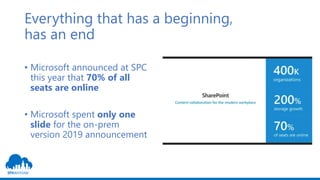
Everything that has a beginning,
has an end
• Microsoft announced at SPC
this year that 70% of all
seats are online
• Microsoft spent only one
slide for the on-prem
version 2019 announcement
Step #2
Alignment
What should you
consider when
using on-prem?
First of all: it‘s completely different
• Microsoft‘s vision of the modern workplace
• Requires a completely new mindset in the whole organisation
• Before you struggle with technology, you need to get everyone
onboard for that journey and change the mindset
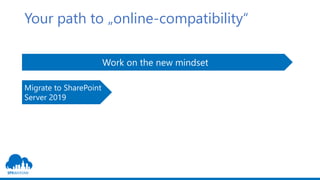
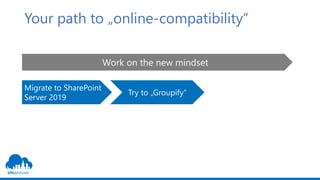
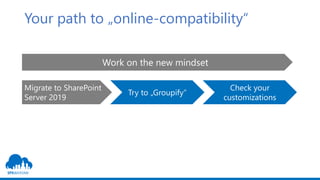
Your path to „online-compatibility“
Work on the new mindset
Migrate to SharePoint
Server 2019
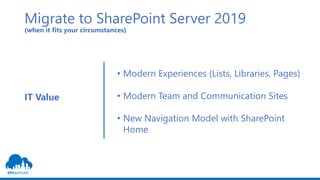
Migrate to SharePoint Server 2019
(when it fits your circumstances)
• Modern Experiences (Lists, Libraries, Pages)
• Modern Team and Communication Sites
• New Navigation Model with SharePoint
Home
IT Value
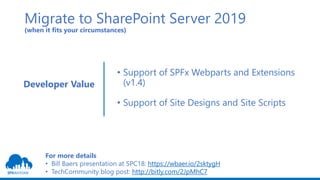
Migrate to SharePoint Server 2019
(when it fits your circumstances)
• Support of SPFx Webparts and Extensions
(v1.4)
• Support of Site Designs and Site Scripts
Developer Value
For more details
• Bill Baers presentation at SPC18: https://wbaer.io/2sktygH
• TechCommunity blog post: http://bitly.com/2JpMhC7
Your path to „online-compatibility“
Work on the new mindset
Migrate to SharePoint
Server 2019
Try to „Groupify“
Try to „Groupify“
First of all: What does „Groupify“ mean?
„Groupify“ means to connect an existing „Classic“ SharePoint
site with an Office365 Group.
But ...
What is an Office365 Group?
Try to „Groupify“
“Office 365 Groups are [...] like your Security Groups, but
with a provisioning robot and a sense of centralized
management.“ Benjamin Niaulin (MVP & RD, Sharegate)
But ...
Office365 Groups will stay an online-only feature
Source: https://en.share-gate.com/blog/office-365-groups-explained
Try to „Groupify“
So what does that mean?
We can not “Groupify“ our site collections.
But we can build (SP/AD) groups to empower our employees to
get their work done.
Because Office365 Group is a concept which can be applied to on-
premises as well.
Try to „Groupify“
• Create up to 3 groups (owners, members, visitors) for the site
collection
• Allow only adding and removing of users
• Create workflows (Powershell, Third-Party tools) to provision
other services (e.g. exchange accounts) or manage the groups
• Keep a flat site structure to be ready for Hubsites
Your path to „online-compatibility“
Work on the new mindset
Migrate to SharePoint
Server 2019
Try to „Groupify“
Check your
customizations
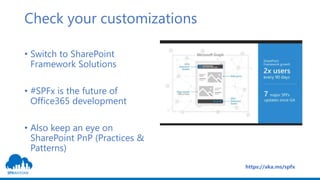
Check your customizations
• Switch to SharePoint
Framework Solutions
• #SPFx is the future of
Office365 development
• Also keep an eye on
SharePoint PnP (Practices &
Patterns)
https://aka.ms/spfx
Check your Third Party Applications
• existance of a cloud model (vendor cloud)
• no or low migration effort
• reevaluate the general need for the application
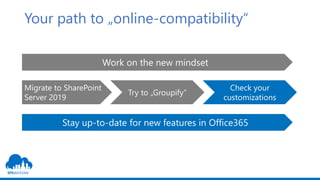
Your path to „online-compatibility“
Work on the new mindset
Migrate to SharePoint
Server 2019
Try to „Groupify“
Check your
customizations
Stay up-to-date for new features in Office365
Stay updated: Resources for Updates or
feature announcements in Office365
• Office365 Roadmap (https://products.office.com/en-us/business/office-365-
roadmap)
• TechCommunity (https://techcommunity.microsoft.com/)
• Follow Microsoft Product Managers on Twitter
• Attend the MSFT events
• Community Events like SharePoint Saturdays
To sum it all
up ...
Prepare for a time
without on-premise
• Adapt constantly your on-
premise environment to be
„online-compatible“
• Create an Office365 strategy
• Create a Migration strategy
Thank you!
#SPSWarsaw

Adapt your on-prem environment to be online-compatible

  • 1.
    Adapt your on-premenvironment to be „online-compatible“ @beerzed Philipp Brzezicki #SPSWarsaw
  • 2.
  • 3.
    Who is PhilippBrzezicki? @beerzed SharePoint Consultant and Developer at Vater Group, Germany
  • 4.
    What do Imean with „online-compatible“? „Online-compatible“ shall describe the state when your on-premise environment is prepared to be migrated to Office365 and SPOnline with least effort It has nothing to do with Hybrid features.
  • 5.
    Reasons to stayon on-prem • Already made investments into the own infrastructure • Existing integration to other internal systems • Lack of Trust
  • 6.
    Step #1 Awakening Why shouldyou care about Online Features?
  • 7.
    Cloud First • „Mobilefirst, cloud first“ (Satya Nadella, CEO Microsoft) • Innovation happens in the cloud (#SharePointSpaces) • Most cloud features will be released in on-prem versions with delay or even not at all • But gives you possibility to prepare for the new features
  • 8.
    Everything that hasa beginning, has an end • Microsoft announced at SPC this year that 70% of all seats are online • Microsoft spent only one slide for the on-prem version 2019 announcement
  • 9.
    Step #2 Alignment What shouldyou consider when using on-prem?
  • 10.
    First of all:it‘s completely different • Microsoft‘s vision of the modern workplace • Requires a completely new mindset in the whole organisation • Before you struggle with technology, you need to get everyone onboard for that journey and change the mindset
  • 11.
    Your path to„online-compatibility“ Work on the new mindset Migrate to SharePoint Server 2019
  • 12.
    Migrate to SharePointServer 2019 (when it fits your circumstances) • Modern Experiences (Lists, Libraries, Pages) • Modern Team and Communication Sites • New Navigation Model with SharePoint Home IT Value
  • 13.
    Migrate to SharePointServer 2019 (when it fits your circumstances) • Support of SPFx Webparts and Extensions (v1.4) • Support of Site Designs and Site Scripts Developer Value For more details • Bill Baers presentation at SPC18: https://wbaer.io/2sktygH • TechCommunity blog post: http://bitly.com/2JpMhC7
  • 14.
    Your path to„online-compatibility“ Work on the new mindset Migrate to SharePoint Server 2019 Try to „Groupify“
  • 15.
    Try to „Groupify“ Firstof all: What does „Groupify“ mean? „Groupify“ means to connect an existing „Classic“ SharePoint site with an Office365 Group. But ... What is an Office365 Group?
  • 16.
    Try to „Groupify“ “Office365 Groups are [...] like your Security Groups, but with a provisioning robot and a sense of centralized management.“ Benjamin Niaulin (MVP & RD, Sharegate) But ... Office365 Groups will stay an online-only feature Source: https://en.share-gate.com/blog/office-365-groups-explained
  • 17.
    Try to „Groupify“ Sowhat does that mean? We can not “Groupify“ our site collections. But we can build (SP/AD) groups to empower our employees to get their work done. Because Office365 Group is a concept which can be applied to on- premises as well.
  • 18.
    Try to „Groupify“ •Create up to 3 groups (owners, members, visitors) for the site collection • Allow only adding and removing of users • Create workflows (Powershell, Third-Party tools) to provision other services (e.g. exchange accounts) or manage the groups • Keep a flat site structure to be ready for Hubsites
  • 19.
    Your path to„online-compatibility“ Work on the new mindset Migrate to SharePoint Server 2019 Try to „Groupify“ Check your customizations
  • 20.
    Check your customizations •Switch to SharePoint Framework Solutions • #SPFx is the future of Office365 development • Also keep an eye on SharePoint PnP (Practices & Patterns) https://aka.ms/spfx
  • 21.
    Check your ThirdParty Applications • existance of a cloud model (vendor cloud) • no or low migration effort • reevaluate the general need for the application
  • 22.
    Your path to„online-compatibility“ Work on the new mindset Migrate to SharePoint Server 2019 Try to „Groupify“ Check your customizations Stay up-to-date for new features in Office365
  • 23.
    Stay updated: Resourcesfor Updates or feature announcements in Office365 • Office365 Roadmap (https://products.office.com/en-us/business/office-365- roadmap) • TechCommunity (https://techcommunity.microsoft.com/) • Follow Microsoft Product Managers on Twitter • Attend the MSFT events • Community Events like SharePoint Saturdays
  • 24.
    To sum itall up ... Prepare for a time without on-premise • Adapt constantly your on- premise environment to be „online-compatible“ • Create an Office365 strategy • Create a Migration strategy
  • 25.