Activity Diagrams and State Charts
for detailed modeling
Larman, chapters 28 and 29
CSE 432: Object-Oriented Software Engineering
Glenn D. Blank
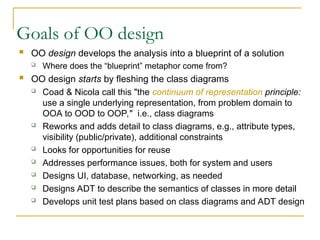
Goals of OO design
 OO design develops the analysis into a blueprint of a solution
 Where does the “blueprint” metaphor come from?
 OO design starts by fleshing the class diagrams
 Coad & Nicola call this "the continuum of representation principle:
use a single underlying representation, from problem domain to
OOA to OOD to OOP," i.e., class diagrams
 Reworks and adds detail to class diagrams, e.g., attribute types,
visibility (public/private), additional constraints
 Looks for opportunities for reuse
 Addresses performance issues, both for system and users
 Designs UI, database, networking, as needed
 Designs ADT to describe the semantics of classes in more detail
 Develops unit test plans based on class diagrams and ADT design
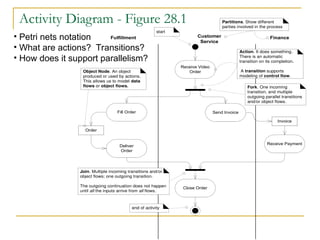
Activity Diagram - Figure 28.1
Receive Video
Order
Fill Order Send Invoice
Deliver
Order
Receive Payment
Close Order
Fulfillment Customer
Service
Finance
Order
Invoice
start
Action. It does something.
There is an automatic
transition on its completion.
A transition supports
modeling of control flow.
Fork. One incoming
transition, and multiple
outgoing parallel transitions
and/or object flows.
Partitions. Show different
parties involved in the process
Join. Multiple incoming transitions and/or
object flows; one outgoing transition.
The outgoing continuation does not happen
until all the inputs arrive from all flows.
Object Node. An object
produced or used by actions.
This allows us to model data
flows or object flows.
end of activity
• Petri nets notation
• What are actions? Transitions?
• How does it support parallelism?
When to create Activity diagrams?
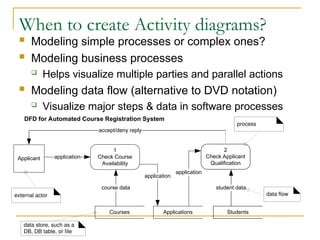
 Modeling simple processes or complex ones?
 Modeling business processes
 Helps visualize multiple parties and parallel actions
 Modeling data flow (alternative to DVD notation)
 Visualize major steps & data in software processes
1
Check Course
Availability
Courses
2
Check Applicant
Qualification
Applications Students
Applicant application
course data
application
application
student data
accept/deny reply
external actor
data store, such as a
DB, DB table, or file
data flow
process
DFD for Automated Course Registration System
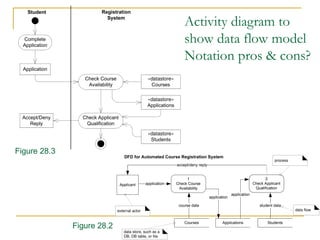
Activity diagram to
show data flow model
Notation pros & cons?
Student Registration
System
Application
Complete
Application
Check Course
Availability
«datastore»
Courses
«datastore»
Applications
Check Applicant
Qualification
«datastore»
Students
Accept/Deny
Reply
1
Check Course
Availability
Courses
2
Check Applicant
Qualification
Applications Students
Applicant application
course data
application
application
student data
accept/deny reply
external actor
data store, such as a
DB, DB table, or file
data flow
process
DFD for Automated Course Registration System
Figure 28.3
Figure 28.2
What does the Rake
symbol mean?
When to use it?
Receive Video
Order
Fill Order Send Invoice
Deliver
Order
Receive Payment
Close Order
Accept a signal
Resend Invoice
Cancel
request
Cancel Order
30 days since sent last invoice,
and no payment received
A time signal
Fig. 28.5
Deliver Regular Deliver Rush
[ rush ]
[ else ]
Deliver Order
Decision: Any
branch happens.
Mutual exclusion
Merge: Any input leads
to continuation. This is
in contrast to a join, in
which case all the
inputs have to arrive
before it continues.
Figure 28.6
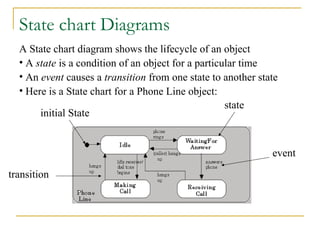
State chart Diagrams
initial State
state
transition
event
A State chart diagram shows the lifecycle of an object
• A state is a condition of an object for a particular time
• An event causes a transition from one state to another state
• Here is a State chart for a Phone Line object:
State charts in UML:
States in ovals, Transitions as arrows
 Transitions labels have three
optional parts:
Event [Guard] / Action
 Find one of each
 Item Received is an event,
/get first item is an action,
[Not all items checked] is a
guard
 State may also label activities,
e.g., do/check item
 Actions, associated with
transitions, occur quickly
and aren’t interruptible
 Activities, associated with
states, can take longer and
are interruptible
 Definition of “quickly” depends
on the kind of system,
e.g., real-time vs. info system
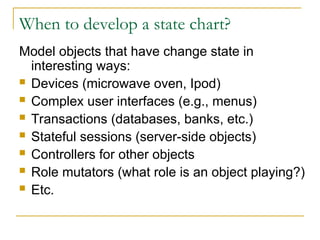
When to develop a state chart?
Model objects that have change state in
interesting ways:
 Devices (microwave oven, Ipod)
 Complex user interfaces (e.g., menus)
 Transactions (databases, banks, etc.)
 Stateful sessions (server-side objects)
 Controllers for other objects
 Role mutators (what role is an object playing?)
 Etc.
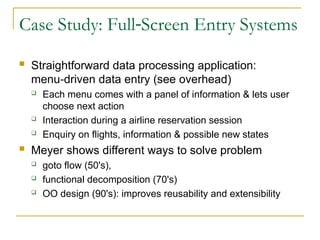
Case Study: Full Screen Entry Systems
‑
 Straightforward data processing application:
menu driven data entry (see overhead)
‑
 Each menu comes with a panel of information & lets user
choose next action
 Interaction during a airline reservation session
 Enquiry on flights, information & possible new states
 Meyer shows different ways to solve problem
 goto flow (50's),
 functional decomposition (70's)
 OO design (90's): improves reusability and extensibility
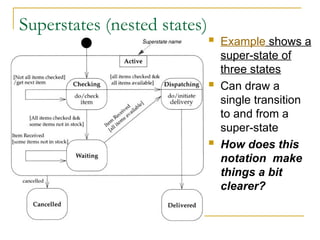
Superstates (nested states)
 Example shows a
super-state of
three states
 Can draw a
single transition
to and from a
super-state
 How does this
notation make
things a bit
clearer?
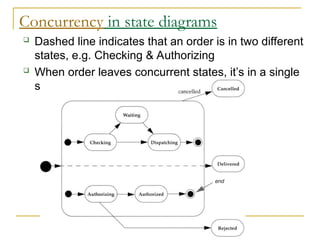
Concurrency in state diagrams
 Dashed line indicates that an order is in two different
states, e.g. Checking & Authorizing
 When order leaves concurrent states, it’s in a single
state: Canceled, Delivered or Rejected
Classes as active state machines
 Consider whether a class should keep track of its own internal state
 Example from Bertrand Meyer: first cut design of LINKED_LIST class
class LINKABLE[T] linkable cells
‑‑
feature
value:T;
right: LINKABLE[T]; next cell
‑‑
‑‑routines to change_value, change_right
end;
class LINKEDLIST[T]
feature
nb_elements: INTEGER;
first_element: LINKABLE[T];
value(i:INTEGER):T is value of i th element; loop until it reaches the ith element
‑‑ ‑
insert(i:INTEGER; val:T); loop until it reaches ith element, then insert val
‑‑
delete(i:INTEGER); loop until it reaches ith element, then delete it
‑‑
 Problems with first cut?
‑
 Getting the loops right is tricky (loops are error prone)
‑
 Redundancy: the same loop logic recurs in all these routines
 Reuse leads to inefficiency: suppose I want a routine search
 Find an element then replace it: I'll do the loop twice!
 Need some way to keep track of the position I found!
 Could return the LINKABLE cell found, but this would ruin encapsulation
Classes as active state machines (cont.)
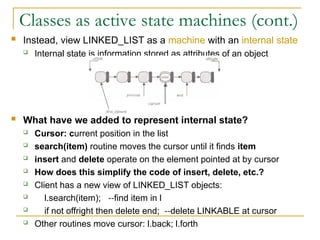
 Instead, view LINKED_LIST as a machine with an internal state
 Internal state is information stored as attributes of an object
 What have we added to represent internal state?
 Cursor: current position in the list
 search(item) routine moves the cursor until it finds item
 insert and delete operate on the element pointed at by cursor
 How does this simplify the code of insert, delete, etc.?
 Client has a new view of LINKED_LIST objects:
 l.search(item); find item in l
‑‑
 if not offright then delete end; delete LINKABLE at cursor
‑‑
 Other routines move cursor: l.back; l.forth
Key idea for OOD: data structures can be active
 Active structures have internal states, which change
 Routines manipulate the object's state
 What other classes could be designed this way?
 Files, random number generators, tokenizers, ...
 Class as state machine view may not be obvious
during analysis
 A good reason for redesign!

Activity Diagram Berbasis Object Oriented

  • 1.
    Activity Diagrams andState Charts for detailed modeling Larman, chapters 28 and 29 CSE 432: Object-Oriented Software Engineering Glenn D. Blank
  • 2.
    Goals of OOdesign  OO design develops the analysis into a blueprint of a solution  Where does the “blueprint” metaphor come from?  OO design starts by fleshing the class diagrams  Coad & Nicola call this "the continuum of representation principle: use a single underlying representation, from problem domain to OOA to OOD to OOP," i.e., class diagrams  Reworks and adds detail to class diagrams, e.g., attribute types, visibility (public/private), additional constraints  Looks for opportunities for reuse  Addresses performance issues, both for system and users  Designs UI, database, networking, as needed  Designs ADT to describe the semantics of classes in more detail  Develops unit test plans based on class diagrams and ADT design
  • 3.
    Activity Diagram -Figure 28.1 Receive Video Order Fill Order Send Invoice Deliver Order Receive Payment Close Order Fulfillment Customer Service Finance Order Invoice start Action. It does something. There is an automatic transition on its completion. A transition supports modeling of control flow. Fork. One incoming transition, and multiple outgoing parallel transitions and/or object flows. Partitions. Show different parties involved in the process Join. Multiple incoming transitions and/or object flows; one outgoing transition. The outgoing continuation does not happen until all the inputs arrive from all flows. Object Node. An object produced or used by actions. This allows us to model data flows or object flows. end of activity • Petri nets notation • What are actions? Transitions? • How does it support parallelism?
  • 4.
    When to createActivity diagrams?  Modeling simple processes or complex ones?  Modeling business processes  Helps visualize multiple parties and parallel actions  Modeling data flow (alternative to DVD notation)  Visualize major steps & data in software processes 1 Check Course Availability Courses 2 Check Applicant Qualification Applications Students Applicant application course data application application student data accept/deny reply external actor data store, such as a DB, DB table, or file data flow process DFD for Automated Course Registration System
  • 5.
    Activity diagram to showdata flow model Notation pros & cons? Student Registration System Application Complete Application Check Course Availability «datastore» Courses «datastore» Applications Check Applicant Qualification «datastore» Students Accept/Deny Reply 1 Check Course Availability Courses 2 Check Applicant Qualification Applications Students Applicant application course data application application student data accept/deny reply external actor data store, such as a DB, DB table, or file data flow process DFD for Automated Course Registration System Figure 28.3 Figure 28.2
  • 6.
    What does theRake symbol mean? When to use it? Receive Video Order Fill Order Send Invoice Deliver Order Receive Payment Close Order Accept a signal Resend Invoice Cancel request Cancel Order 30 days since sent last invoice, and no payment received A time signal Fig. 28.5 Deliver Regular Deliver Rush [ rush ] [ else ] Deliver Order Decision: Any branch happens. Mutual exclusion Merge: Any input leads to continuation. This is in contrast to a join, in which case all the inputs have to arrive before it continues. Figure 28.6
  • 7.
    State chart Diagrams initialState state transition event A State chart diagram shows the lifecycle of an object • A state is a condition of an object for a particular time • An event causes a transition from one state to another state • Here is a State chart for a Phone Line object:
  • 8.
    State charts inUML: States in ovals, Transitions as arrows  Transitions labels have three optional parts: Event [Guard] / Action  Find one of each  Item Received is an event, /get first item is an action, [Not all items checked] is a guard  State may also label activities, e.g., do/check item  Actions, associated with transitions, occur quickly and aren’t interruptible  Activities, associated with states, can take longer and are interruptible  Definition of “quickly” depends on the kind of system, e.g., real-time vs. info system
  • 9.
    When to developa state chart? Model objects that have change state in interesting ways:  Devices (microwave oven, Ipod)  Complex user interfaces (e.g., menus)  Transactions (databases, banks, etc.)  Stateful sessions (server-side objects)  Controllers for other objects  Role mutators (what role is an object playing?)  Etc.
  • 10.
    Case Study: FullScreen Entry Systems ‑  Straightforward data processing application: menu driven data entry (see overhead) ‑  Each menu comes with a panel of information & lets user choose next action  Interaction during a airline reservation session  Enquiry on flights, information & possible new states  Meyer shows different ways to solve problem  goto flow (50's),  functional decomposition (70's)  OO design (90's): improves reusability and extensibility
  • 11.
    Superstates (nested states) Example shows a super-state of three states  Can draw a single transition to and from a super-state  How does this notation make things a bit clearer?
  • 12.
    Concurrency in statediagrams  Dashed line indicates that an order is in two different states, e.g. Checking & Authorizing  When order leaves concurrent states, it’s in a single state: Canceled, Delivered or Rejected
  • 13.
    Classes as activestate machines  Consider whether a class should keep track of its own internal state  Example from Bertrand Meyer: first cut design of LINKED_LIST class class LINKABLE[T] linkable cells ‑‑ feature value:T; right: LINKABLE[T]; next cell ‑‑ ‑‑routines to change_value, change_right end; class LINKEDLIST[T] feature nb_elements: INTEGER; first_element: LINKABLE[T]; value(i:INTEGER):T is value of i th element; loop until it reaches the ith element ‑‑ ‑ insert(i:INTEGER; val:T); loop until it reaches ith element, then insert val ‑‑ delete(i:INTEGER); loop until it reaches ith element, then delete it ‑‑  Problems with first cut? ‑  Getting the loops right is tricky (loops are error prone) ‑  Redundancy: the same loop logic recurs in all these routines  Reuse leads to inefficiency: suppose I want a routine search  Find an element then replace it: I'll do the loop twice!  Need some way to keep track of the position I found!  Could return the LINKABLE cell found, but this would ruin encapsulation
  • 14.
    Classes as activestate machines (cont.)  Instead, view LINKED_LIST as a machine with an internal state  Internal state is information stored as attributes of an object  What have we added to represent internal state?  Cursor: current position in the list  search(item) routine moves the cursor until it finds item  insert and delete operate on the element pointed at by cursor  How does this simplify the code of insert, delete, etc.?  Client has a new view of LINKED_LIST objects:  l.search(item); find item in l ‑‑  if not offright then delete end; delete LINKABLE at cursor ‑‑  Other routines move cursor: l.back; l.forth
  • 15.
    Key idea forOOD: data structures can be active  Active structures have internal states, which change  Routines manipulate the object's state  What other classes could be designed this way?  Files, random number generators, tokenizers, ...  Class as state machine view may not be obvious during analysis  A good reason for redesign!