0
Project System
Development 2
acjim/AcmacsDesktop
Darmstadt, 17. February 2015
1
1
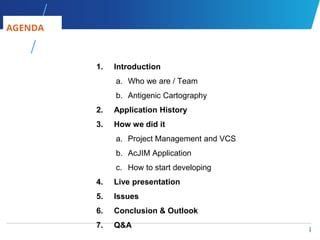
1. Introduction
a. Who we are / Team
b. Antigenic Cartography
2. Application History
3. How we did it
a. Project Management and VCS
b. AcJIM Application
c. How to start developing
4. Live presentation
5. Issues
6. Conclusion & Outlook
7. Q&A
AGENDA
2
2
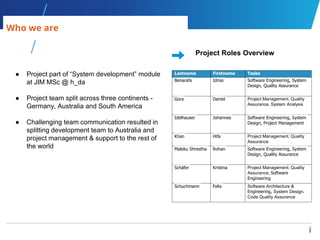
Who we are
● Project part of “System development” module
at JIM MSc @ h_da
● Project team split across three continents -
Germany, Australia and South America
● Challenging team communication resulted in
splitting development team to Australia and
project management & support to the rest of
the world
Lastname Firstname Tasks
Benarafa Idriss Software Engineering, System
Design, Quality Assurance
Gora Daniel Project Management, Quality
Assurance, System Analysis
Idelhauser Johannes Software Engineering, System
Design, Project Management
Khan Hifa Project Management, Quality
Assurance
Maleku Shrestha Rohan Software Engineering, System
Design, Quality Assurance
Schäfer Kristina Project Management, Quality
Assurance, Software
Engineering
Schuchmann Felix Software Architecture &
Engineering, System Design,
Code Quality Assurance
Project Roles Overview
3
3
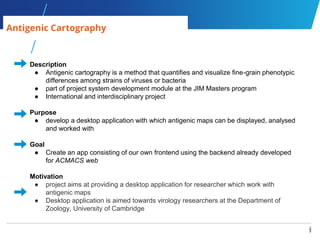
Antigenic Cartography
Description
● Antigenic cartography is a method that quantifies and visualize fine-grain phenotypic
differences among strains of viruses or bacteria
● part of project system development module at the JIM Masters program
● International and interdisciplinary project
Purpose
● develop a desktop application with which antigenic maps can be displayed, analysed
and worked with
Goal
● Create an app consisting of our own frontend using the backend already developed
for ACMACS web
Motivation
● project aims at providing a desktop application for researcher which work with
antigenic maps
● Desktop application is aimed towards virology researchers at the Department of
Zoology, University of Cambridge
4
4
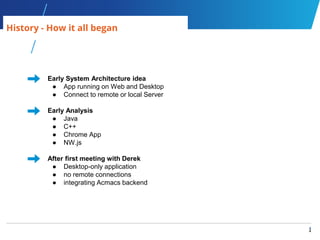
History - How it all began
Early System Architecture idea
● App running on Web and Desktop
● Connect to remote or local Server
Early Analysis
● Java
● C++
● Chrome App
● NW.js
After first meeting with Derek
● Desktop-only application
● no remote connections
● integrating Acmacs backend
5
5
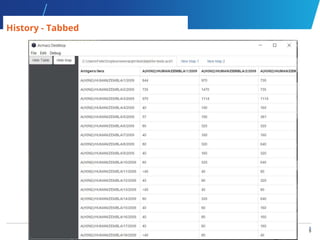
History - Tabbed
6
6
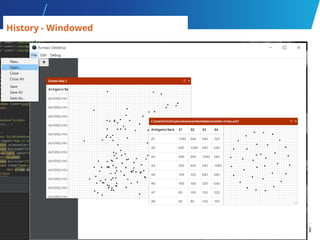
History - Windowed
7
7
History - Split windows
8
8
History - One Table only
9
9
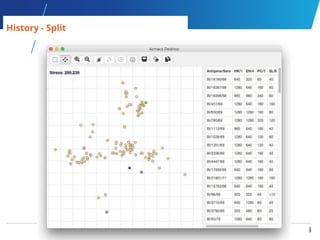
History - Split
10
10
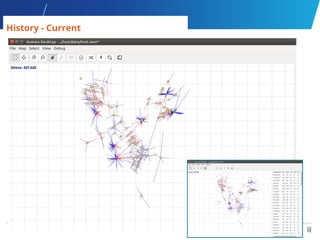
History - Current
11
11
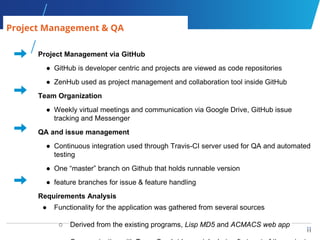
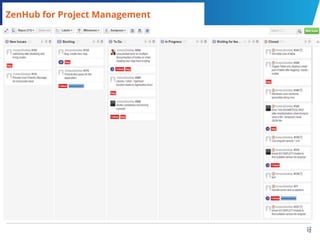
Project Management via GitHub
● GitHub is developer centric and projects are viewed as code repositories
● ZenHub used as project management and collaboration tool inside GitHub
Team Organization
● Weekly virtual meetings and communication via Google Drive, GitHub issue
tracking and Messenger
QA and issue management
● Continuous integration used through Travis-CI server used for QA and automated
testing
● One “master” branch on Github that holds runnable version
● feature branches for issue & feature handling
Requirements Analysis
● Functionality for the application was gathered from several sources
○ Derived from the existing programs, Lisp MD5 and ACMACS web app
Project Management & QA
12
12
ZenHub for Project Management
13
13
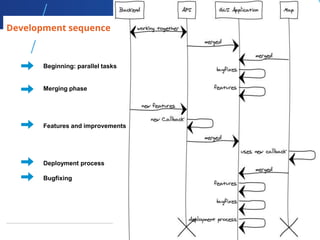
Development sequence
Beginning: parallel tasks
Merging phase
Features and improvements
Deployment process
Bugfixing
14
14
AcJIM Application - Technical components
Node.js
● node.js and its package manager npm installed on your system in order to get
AcmacsDesktop running in development mode
NW.js
● NW.js (node-webkit) is used to deploy the application as a multi platform
desktop executable
AngularJS
● modern dynamic html handling is provided by AngularJS as a future proof and
feature rich framework
● pre defined structures and public documentation ensures maintainability for
future teams/developers
● karma as test runner and PhantomJS to emulate browser to test angular
D3.js
● D3 is used to visualize the the data on the map
15
15
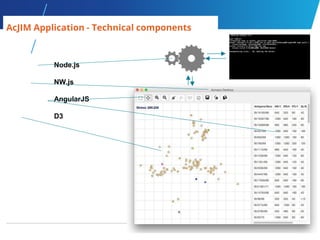
Node.js
NW.js
AngularJS
D3
AcJIM Application - Technical components
16
16
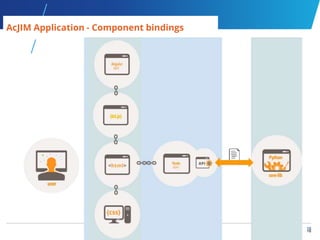
AcJIM Application - Component bindings
17
17
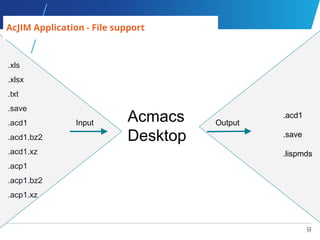
AcJIM Application - File support
Input OutputAcmacs
Desktop
.acd1
.save
.lispmds
.xls
.xlsx
.txt
.save
.acd1
.acd1.bz2
.acd1.xz
.acp1
.acp1.bz2
.acp1.xz
18
18
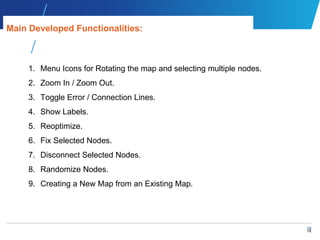
1. Menu Icons for Rotating the map and selecting multiple nodes.
2. Zoom In / Zoom Out.
3. Toggle Error / Connection Lines.
4. Show Labels.
5. Reoptimize.
6. Fix Selected Nodes.
7. Disconnect Selected Nodes.
8. Randomize Nodes.
9. Creating a New Map from an Existing Map.
Main Developed Functionalities:
19
19
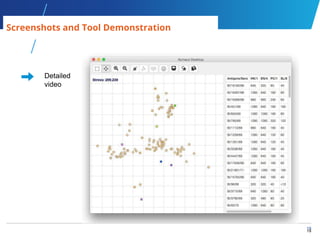
Screenshots and Tool Demonstration
Detailed
video
20
20
Multi Platform
● All frontend components were chosen to support multi
platform applications
● Early frontend application worked perfectly under Windows
But
● The strong dependency of the core backend on UNIX
features made it impossible to deploy as a Windows version.
● Packing the backend into a virtualbox environment failed due
to
○ Performance bottlenecks with ssh calls and
○ File handling for argument passing
Future possibility
● Changing the frontend<->backend protocol from system calls
to a HTTP/SOAP API and deploying the core with an own
server
Platform/Windows issue
21
21
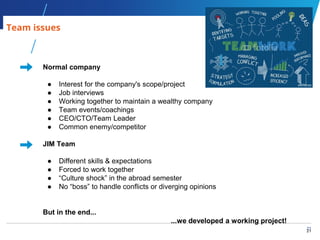
Normal company
● Interest for the company's scope/project
● Job interviews
● Working together to maintain a wealthy company
● Team events/coachings
● CEO/CTO/Team Leader
● Common enemy/competitor
JIM Team
● Different skills & expectations
● Forced to work together
● “Culture shock” in the abroad semester
● No “boss” to handle conflicts or diverging opinions
But in the end...
...we developed a working project!
Team issues
22
22
Additional Issues and Challenges
Limitations
● Not all functionality integrated available in backend
○ modification of titer tables
○ get best map
○ displaying blobs
● Keep track of a user's interactions (undo/redo)
● Operating system compatibilities
● nw.js problems
User requirements
● Challenging requirement engineering during the course of the project
Communication
● Challenges of managing a team that is geographically spread across the
globe
23
23
Future work and more...
What next
● Fix known bugs
● Add more features
○ Increase compatibility with import and export of
different file formats
○ Implementation of state management (undo/redo
feature)
○ and more…
● Develop core libraries in javascript
● Analysis of the user interface based on user feedback
● Develop cloud and mobile based applications
● Ensure that user data is securely encrypted
24
24
Where to get it?
Packaged App: https://github.com/acjim/AcmacsDesktop/releases
Code: https://github.com/acjim/AcmacsDesktop
Technical Documentation and User Guide: goo.gl/tuARin
Presentation: http://www.slideshare.net/hda_jim/acjim-acmacs-
presentation-58365576
slideshare keywords: acmacs, antigenic cartography, acmacs-desktop
25
25
Q&A
Open for Discussion

Acjim acmacs presentation

  • 1.
  • 2.
    1 1 1. Introduction a. Whowe are / Team b. Antigenic Cartography 2. Application History 3. How we did it a. Project Management and VCS b. AcJIM Application c. How to start developing 4. Live presentation 5. Issues 6. Conclusion & Outlook 7. Q&A AGENDA
  • 3.
    2 2 Who we are ●Project part of “System development” module at JIM MSc @ h_da ● Project team split across three continents - Germany, Australia and South America ● Challenging team communication resulted in splitting development team to Australia and project management & support to the rest of the world Lastname Firstname Tasks Benarafa Idriss Software Engineering, System Design, Quality Assurance Gora Daniel Project Management, Quality Assurance, System Analysis Idelhauser Johannes Software Engineering, System Design, Project Management Khan Hifa Project Management, Quality Assurance Maleku Shrestha Rohan Software Engineering, System Design, Quality Assurance Schäfer Kristina Project Management, Quality Assurance, Software Engineering Schuchmann Felix Software Architecture & Engineering, System Design, Code Quality Assurance Project Roles Overview
  • 4.
    3 3 Antigenic Cartography Description ● Antigeniccartography is a method that quantifies and visualize fine-grain phenotypic differences among strains of viruses or bacteria ● part of project system development module at the JIM Masters program ● International and interdisciplinary project Purpose ● develop a desktop application with which antigenic maps can be displayed, analysed and worked with Goal ● Create an app consisting of our own frontend using the backend already developed for ACMACS web Motivation ● project aims at providing a desktop application for researcher which work with antigenic maps ● Desktop application is aimed towards virology researchers at the Department of Zoology, University of Cambridge
  • 5.
    4 4 History - Howit all began Early System Architecture idea ● App running on Web and Desktop ● Connect to remote or local Server Early Analysis ● Java ● C++ ● Chrome App ● NW.js After first meeting with Derek ● Desktop-only application ● no remote connections ● integrating Acmacs backend
  • 6.
  • 7.
  • 8.
  • 9.
  • 10.
  • 11.
  • 12.
    11 11 Project Management viaGitHub ● GitHub is developer centric and projects are viewed as code repositories ● ZenHub used as project management and collaboration tool inside GitHub Team Organization ● Weekly virtual meetings and communication via Google Drive, GitHub issue tracking and Messenger QA and issue management ● Continuous integration used through Travis-CI server used for QA and automated testing ● One “master” branch on Github that holds runnable version ● feature branches for issue & feature handling Requirements Analysis ● Functionality for the application was gathered from several sources ○ Derived from the existing programs, Lisp MD5 and ACMACS web app Project Management & QA
  • 13.
  • 14.
    13 13 Development sequence Beginning: paralleltasks Merging phase Features and improvements Deployment process Bugfixing
  • 15.
    14 14 AcJIM Application -Technical components Node.js ● node.js and its package manager npm installed on your system in order to get AcmacsDesktop running in development mode NW.js ● NW.js (node-webkit) is used to deploy the application as a multi platform desktop executable AngularJS ● modern dynamic html handling is provided by AngularJS as a future proof and feature rich framework ● pre defined structures and public documentation ensures maintainability for future teams/developers ● karma as test runner and PhantomJS to emulate browser to test angular D3.js ● D3 is used to visualize the the data on the map
  • 16.
  • 17.
    16 16 AcJIM Application -Component bindings
  • 18.
    17 17 AcJIM Application -File support Input OutputAcmacs Desktop .acd1 .save .lispmds .xls .xlsx .txt .save .acd1 .acd1.bz2 .acd1.xz .acp1 .acp1.bz2 .acp1.xz
  • 19.
    18 18 1. Menu Iconsfor Rotating the map and selecting multiple nodes. 2. Zoom In / Zoom Out. 3. Toggle Error / Connection Lines. 4. Show Labels. 5. Reoptimize. 6. Fix Selected Nodes. 7. Disconnect Selected Nodes. 8. Randomize Nodes. 9. Creating a New Map from an Existing Map. Main Developed Functionalities:
  • 20.
    19 19 Screenshots and ToolDemonstration Detailed video
  • 21.
    20 20 Multi Platform ● Allfrontend components were chosen to support multi platform applications ● Early frontend application worked perfectly under Windows But ● The strong dependency of the core backend on UNIX features made it impossible to deploy as a Windows version. ● Packing the backend into a virtualbox environment failed due to ○ Performance bottlenecks with ssh calls and ○ File handling for argument passing Future possibility ● Changing the frontend<->backend protocol from system calls to a HTTP/SOAP API and deploying the core with an own server Platform/Windows issue
  • 22.
    21 21 Normal company ● Interestfor the company's scope/project ● Job interviews ● Working together to maintain a wealthy company ● Team events/coachings ● CEO/CTO/Team Leader ● Common enemy/competitor JIM Team ● Different skills & expectations ● Forced to work together ● “Culture shock” in the abroad semester ● No “boss” to handle conflicts or diverging opinions But in the end... ...we developed a working project! Team issues
  • 23.
    22 22 Additional Issues andChallenges Limitations ● Not all functionality integrated available in backend ○ modification of titer tables ○ get best map ○ displaying blobs ● Keep track of a user's interactions (undo/redo) ● Operating system compatibilities ● nw.js problems User requirements ● Challenging requirement engineering during the course of the project Communication ● Challenges of managing a team that is geographically spread across the globe
  • 24.
    23 23 Future work andmore... What next ● Fix known bugs ● Add more features ○ Increase compatibility with import and export of different file formats ○ Implementation of state management (undo/redo feature) ○ and more… ● Develop core libraries in javascript ● Analysis of the user interface based on user feedback ● Develop cloud and mobile based applications ● Ensure that user data is securely encrypted
  • 25.
    24 24 Where to getit? Packaged App: https://github.com/acjim/AcmacsDesktop/releases Code: https://github.com/acjim/AcmacsDesktop Technical Documentation and User Guide: goo.gl/tuARin Presentation: http://www.slideshare.net/hda_jim/acjim-acmacs- presentation-58365576 slideshare keywords: acmacs, antigenic cartography, acmacs-desktop
  • 26.

Editor's Notes

  • #2 Hifa
  • #3 Hifa Should be same like Masters thesis Presentation will be open anyone can visit it include in powerpoint how things were build in node js, java script etc. Screen shots Demonstration of tools max 1 hour time limit including Q&A  for presentation Drawbacks: no explanation about antigenic cryptography, no literature review Break down structure should be more clear too small lay out Use Agile development
  • #4 Hifa
  • #5 Hifa
  • #6 Kristina change in thinking (start analysing: Java, C++, etc.) web and desktop possibility (vagrant, connect server or locally)
  • #7 Kristina basis: maps disconnected from tables first application GUI tabs for different maps and different tables
  • #8 Kristina basis: each map connected to own table displaying maps in individual windows each with the table they’re based on split view
  • #9 Kristina basis: each map connected to own table switched to another library windows with split view left side as toolbar windows fixed to right side
  • #10 Kristina basis: several maps based on same table separated table from map. maps in windows table on right side of application window
  • #11 Kristina basis: one map = one table toolbar at top (menu bar out of screenshot) map fixed on left, table on right
  • #12 Kristina basis: one map = one table table not displayed by default table toggle, will be displayed on right side
  • #13 Daniel
  • #14 Daniel Zenhub allowed us to manage our project virtualized via the code repository tool github Taskboard the structures issues in agile manner : new issues, backlog, to do Zenhub shows how the project is progressing by displaying the current status, priorities, issues status and the task owners the workflow of the tasks can be customized, e.g. labeled and sorted differently labels such as “bug” define the kind of task labels like “critical” define the priority of the task when a task is created, it is in the new issues pipeline the backlog is used for tasks that have not started yet to do task every update is reflected in real time to the rest of the team taskboard is integrated with the slack tool, which allows team members to view updates on any kind of device
  • #15 Felix
  • #16 Johannes
  • #17 Johannes
  • #18 Johannes
  • #19 Idriss
  • #20 Idriss
  • #21 Idriss
  • #22 Felix
  • #23 Felix
  • #24 nw.js issues: The current nwjs version we use in the project seems to have problems with mouse capturing when running on Ubuntu in Virtualbox. However, there is a workaround to get AcmacsDesktop running as intended. As mentioned on Github, disabling mouse integration in Virtualbox fixes the issues. As this problem is related to the used Chromium version, it will most likely be fixed in the next major nw.js release (0.13.0). Operating system compatibilities Fedora: Incompatible software binaries from debian. 32-bit debian based system (ubuntu)
  • #25 Rohan
  • #26 Rohan
  • #27 Rohan