Chapter 10
Information Systems Development
Learning Objectives
Upon successful completion of this chapter, you will be
able to:
• Explain the overall process of developing a new
software application
• Explain the differences between software development
methodologies
• Understand the different types of programming
languages used to develop software
• Understand some of the issues
surrounding the development of
websites and mobile applications
• Identify the four primary
implementation policies
Programming
• Needed to take ideas or business solutions and
bringing them to reality.
• Small changes can be implemented in a short
timeframe with a streamlined process
• Larger changes will require a software
development methodology to guide and manage
the process:
– Systems development life cycle (SDLC)
– Rapid application development (RAD)
– Agile methodologies
– Lean methodology
Systems Development Life Cycle (SDLC)
• Developed in 1960s to manage large software
development projects
• Still in wide use today and called waterfall
methodology
• Very structured
– each phase has an end deliverable requiring approval to next phase
– each phase must be completed before the next phase can start
• Phases:
1. Preliminary Analysis
2. Systems Analysis
3. Systems Design
4. Programming
5. Testing
6. Implementation
7. Maintenance
SDLC Phases
1. Preliminary Analysis – requests are reviewed
– Deliverable - feasibility analysis document
2. Systems Analysis – if approved, determine the system
requirements for new system
– Deliverable – systems requirement document
3. Systems Design – converts system analysis requirements into
system design document deliverable
4. Programming – coding commences using design documents
5. Testing – ensures that the code functions according to
requirements
6. Implementation – converting from old system to
new system
– Training, documenting functions, and data
conversion
7. Maintenance – support for reporting
prioritizing, and fixing bugs
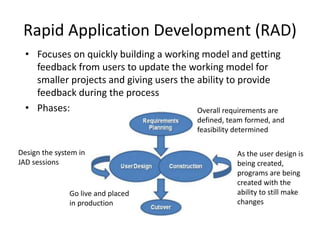
Rapid Application Development (RAD)
Overall requirements are
defined, team formed, and
feasibility determined
Design the system in
JAD sessions
Go live and placed
in production
As the user design is
being created,
programs are being
created with the
ability to still make
changes
• Focuses on quickly building a working model and getting
feedback from users to update the working model for
smaller projects and giving users the ability to provide
feedback during the process
• Phases: Overall requirements are
defined, team formed, and
feasibility determined
Agile Methodologies
• Group of methodologies for incremental changes
focused on quality and attention to detail
• Each increment is released with very specific
objectives
• Characteristics:
– Small cross-functional teams are used
– Daily status meetings are held
– Short timeframe increments for each
change
– A working project is completed at
end of each iteration and
demonstrated to stakeholders
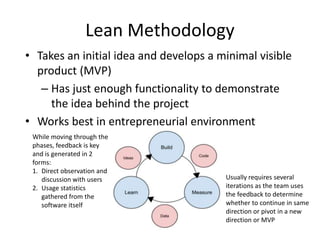
Lean Methodology
• Takes an initial idea and develops a minimal visible
product (MVP)
– Has just enough functionality to demonstrate
the idea behind the project
• Works best in entrepreneurial environment
While moving through the
phases, feedback is key
and is generated in 2
forms:
1. Direct observation and
discussion with users
2. Usage statistics
gathered from the
software itself
Usually requires several
iterations as the team uses
the feedback to determine
whether to continue in same
direction or pivot in a new
direction or MVP
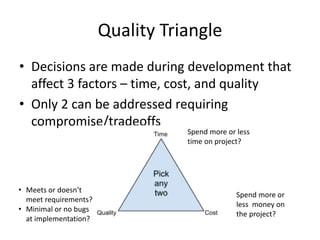
Quality Triangle
• Decisions are made during development that
affect 3 factors – time, cost, and quality
• Only 2 can be addressed requiring
compromise/tradeoffs
Spend more or
less money on
the project?
Spend more or less
time on project?
• Meets or doesn’t
meet requirements?
• Minimal or no bugs
at implementation?
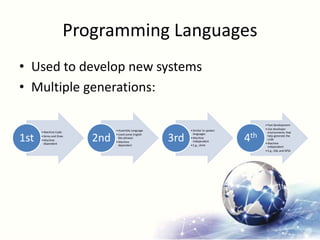
Programming Languages
• Used to develop new systems
• Multiple generations:
• Machine Code
• Zeros and Ones
• Machine
dependent
1st
• Assembly Language
• Used some English
like phrases
• Machine
dependent
2nd
• Similar to spoken
languages
• Machine
independent
• E.g., JAVA
3rd
• Fast development
• Use developer
environments that
help generate the
code
• Machine
independent
• E.g., SQL and SPSS
4th
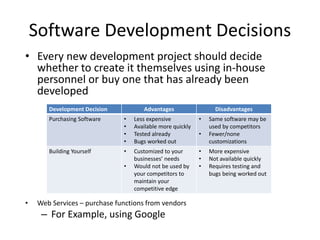
Software Development Decisions
Development Decision Advantages Disadvantages
Purchasing Software • Less expensive
• Available more quickly
• Tested already
• Bugs worked out
• Same software may be
used by competitors
• Fewer/none
customizations
Building Yourself • Customized to your
businesses’ needs
• Would not be used by
your competitors to
maintain your
competitive edge
• More expensive
• Not available quickly
• Requires testing and
bugs being worked out
• Every new development project should decide
whether to create it themselves using in-house
personnel or buy one that has already been
developed
• Web Services – purchase functions from vendors
– For Example, using Google
End User Computing
• Others (non-IT) develop their own solutions that are
not trained in programming or software
development
• Needs to be managed and guidelines established
• Advantages:
– Development is closer to those that will use them
– May receive it sooner than from IT
• Disadvantages:
– Several applications may perform the
same functions which may or may not
have same results
– May not be fully tested and bug-free
– Data is not always backed up
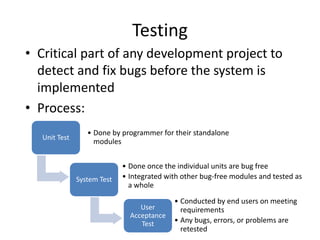
Testing
• Critical part of any development project to
detect and fix bugs before the system is
implemented
• Process:
Unit Test
• Done by programmer for their standalone
modules
System Test
• Done once the individual units are bug free
• Integrated with other bug-free modules and tested as
a whole
User
Acceptance
Test
• Conducted by end users on meeting
requirements
• Any bugs, errors, or problems are
retested
Implementation Methodologies
Several implementation methodologies exist:
– Direct cutover – new system is turned on and old system
turned off
• Riskiest but least expensive – no need to support 2 systems
– Pilot implementation – a small group uses the new system
• Small impact on organization is something goes wrong – still have
old system running
– Parallel operation – all transactions are entered in new and
old system
• Very expensive to maintain 2 systems
• Least risky that you can identify bugs and
go back to old system if needed
– Phased implementation – new
functions are implemented as parts of old
system are turned off
• Slowly move from old system to new one
Implementation Methodologies
Support
Every implementation requires support in 2 key areas:
1. Change management
– All proposed changes should be communicated to all
affected personnel, including IT
– IT should be managing which code has been tested and
signed off by the end users prior to implementation
2. Maintenance
– Often newly implemented systems still need
changes for fixing bugs
– Management needs to ensure that the
system continues to runs and is aligned
with business priorities
Summary
• Explained the overall process of developing a new
software application
• Explained the differences between software
development methodologies
• Understand the different types of programming
languages used to develop software
• Understand some of the issues surrounding the
development of websites and
mobile applications
• Identified the four primary
implementation policies

ISBB_Chapter10.pptx

  • 1.
  • 2.
    Learning Objectives Upon successfulcompletion of this chapter, you will be able to: • Explain the overall process of developing a new software application • Explain the differences between software development methodologies • Understand the different types of programming languages used to develop software • Understand some of the issues surrounding the development of websites and mobile applications • Identify the four primary implementation policies
  • 3.
    Programming • Needed totake ideas or business solutions and bringing them to reality. • Small changes can be implemented in a short timeframe with a streamlined process • Larger changes will require a software development methodology to guide and manage the process: – Systems development life cycle (SDLC) – Rapid application development (RAD) – Agile methodologies – Lean methodology
  • 4.
    Systems Development LifeCycle (SDLC) • Developed in 1960s to manage large software development projects • Still in wide use today and called waterfall methodology • Very structured – each phase has an end deliverable requiring approval to next phase – each phase must be completed before the next phase can start • Phases: 1. Preliminary Analysis 2. Systems Analysis 3. Systems Design 4. Programming 5. Testing 6. Implementation 7. Maintenance
  • 5.
    SDLC Phases 1. PreliminaryAnalysis – requests are reviewed – Deliverable - feasibility analysis document 2. Systems Analysis – if approved, determine the system requirements for new system – Deliverable – systems requirement document 3. Systems Design – converts system analysis requirements into system design document deliverable 4. Programming – coding commences using design documents 5. Testing – ensures that the code functions according to requirements 6. Implementation – converting from old system to new system – Training, documenting functions, and data conversion 7. Maintenance – support for reporting prioritizing, and fixing bugs
  • 6.
    Rapid Application Development(RAD) Overall requirements are defined, team formed, and feasibility determined Design the system in JAD sessions Go live and placed in production As the user design is being created, programs are being created with the ability to still make changes • Focuses on quickly building a working model and getting feedback from users to update the working model for smaller projects and giving users the ability to provide feedback during the process • Phases: Overall requirements are defined, team formed, and feasibility determined
  • 7.
    Agile Methodologies • Groupof methodologies for incremental changes focused on quality and attention to detail • Each increment is released with very specific objectives • Characteristics: – Small cross-functional teams are used – Daily status meetings are held – Short timeframe increments for each change – A working project is completed at end of each iteration and demonstrated to stakeholders
  • 8.
    Lean Methodology • Takesan initial idea and develops a minimal visible product (MVP) – Has just enough functionality to demonstrate the idea behind the project • Works best in entrepreneurial environment While moving through the phases, feedback is key and is generated in 2 forms: 1. Direct observation and discussion with users 2. Usage statistics gathered from the software itself Usually requires several iterations as the team uses the feedback to determine whether to continue in same direction or pivot in a new direction or MVP
  • 9.
    Quality Triangle • Decisionsare made during development that affect 3 factors – time, cost, and quality • Only 2 can be addressed requiring compromise/tradeoffs Spend more or less money on the project? Spend more or less time on project? • Meets or doesn’t meet requirements? • Minimal or no bugs at implementation?
  • 10.
    Programming Languages • Usedto develop new systems • Multiple generations: • Machine Code • Zeros and Ones • Machine dependent 1st • Assembly Language • Used some English like phrases • Machine dependent 2nd • Similar to spoken languages • Machine independent • E.g., JAVA 3rd • Fast development • Use developer environments that help generate the code • Machine independent • E.g., SQL and SPSS 4th
  • 11.
    Software Development Decisions DevelopmentDecision Advantages Disadvantages Purchasing Software • Less expensive • Available more quickly • Tested already • Bugs worked out • Same software may be used by competitors • Fewer/none customizations Building Yourself • Customized to your businesses’ needs • Would not be used by your competitors to maintain your competitive edge • More expensive • Not available quickly • Requires testing and bugs being worked out • Every new development project should decide whether to create it themselves using in-house personnel or buy one that has already been developed • Web Services – purchase functions from vendors – For Example, using Google
  • 12.
    End User Computing •Others (non-IT) develop their own solutions that are not trained in programming or software development • Needs to be managed and guidelines established • Advantages: – Development is closer to those that will use them – May receive it sooner than from IT • Disadvantages: – Several applications may perform the same functions which may or may not have same results – May not be fully tested and bug-free – Data is not always backed up
  • 13.
    Testing • Critical partof any development project to detect and fix bugs before the system is implemented • Process: Unit Test • Done by programmer for their standalone modules System Test • Done once the individual units are bug free • Integrated with other bug-free modules and tested as a whole User Acceptance Test • Conducted by end users on meeting requirements • Any bugs, errors, or problems are retested
  • 14.
    Implementation Methodologies Several implementationmethodologies exist: – Direct cutover – new system is turned on and old system turned off • Riskiest but least expensive – no need to support 2 systems – Pilot implementation – a small group uses the new system • Small impact on organization is something goes wrong – still have old system running – Parallel operation – all transactions are entered in new and old system • Very expensive to maintain 2 systems • Least risky that you can identify bugs and go back to old system if needed – Phased implementation – new functions are implemented as parts of old system are turned off • Slowly move from old system to new one
  • 15.
    Implementation Methodologies Support Every implementationrequires support in 2 key areas: 1. Change management – All proposed changes should be communicated to all affected personnel, including IT – IT should be managing which code has been tested and signed off by the end users prior to implementation 2. Maintenance – Often newly implemented systems still need changes for fixing bugs – Management needs to ensure that the system continues to runs and is aligned with business priorities
  • 16.
    Summary • Explained theoverall process of developing a new software application • Explained the differences between software development methodologies • Understand the different types of programming languages used to develop software • Understand some of the issues surrounding the development of websites and mobile applications • Identified the four primary implementation policies