Achieving Better 
Image Optimization 
Billy Hoffman 
billy@zoompf.com 
@zoompf
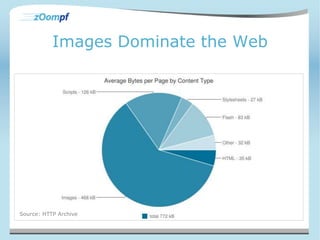
Images Dominate the Web 
Source: HTTP Archive
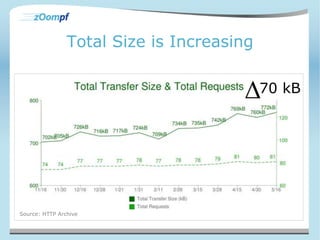
Total Size is Increasing 
70 kB 
Source: HTTP Archive
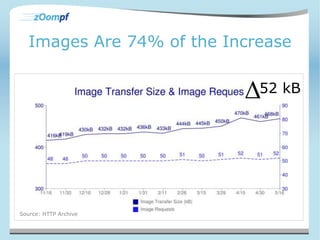
Images Are 74% of the Increase 
52 kB 
Source: HTTP Archive
Reducing Content Size 
• HTTP Compression isn’t the king 
– JS, CSS, HTML = 188 kB 
– Only 24% of total content size 
– Reducing 24% of web content by 66% is not 
great 
• Images 
– Reduce image size by 25% results in more 
total savings than text optimizations
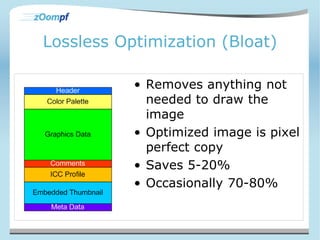
Lossless Optimization (Bloat) 
• Removes anything not 
needed to draw the 
image 
• Optimized image is pixel 
perfect copy 
• Saves 5-20% 
• Occasionally 70-80%
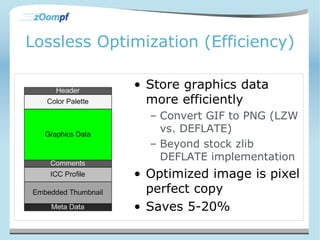
Lossless Optimization (Efficiency) 
• Store graphics data 
more efficiently 
– Convert GIF to PNG (LZW 
vs. DEFLATE) 
– Beyond stock zlib 
DEFLATE implementation 
• Optimized image is pixel 
perfect copy 
• Saves 5-20%
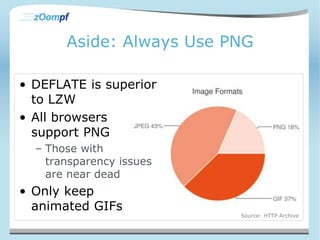
Aside: Always Use PNG 
• DEFLATE is superior 
to LZW 
• All browsers 
support PNG 
– Those with 
transparency issues 
are near dead 
• Only keep 
animated GIFs 
Source: HTTP Archive
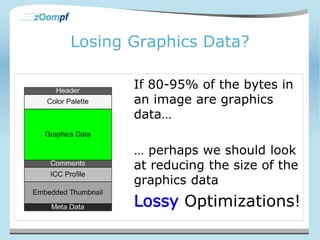
Losing Graphics Data? 
If 80-95% of the bytes in 
an image are graphics 
data… 
… perhaps we should look 
at reducing the size of the 
graphics data 
Lossy Optimizations!
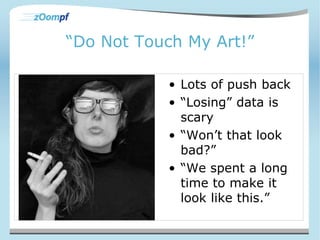
“Do Not Touch My Art!” 
• Lots of push back 
• “Losing” data is 
scary 
• “Won’t that look 
bad?” 
• “We spent a long 
time to make it 
look like this.”
Everything is Lossy! 
• Telephone calls (8kHz w/ 8bit Samples) 
• CDs (44kHz w/ 16 bit samples) 
• Conversion to Color Television 
– Eye more sensitive to brightness than color 
– Chroma Sub-sampling (Y’CbCr 4:2:2) 
– 33% less bandwidth, no perceivable difference 
• MP3 files 
– Frequency Masking
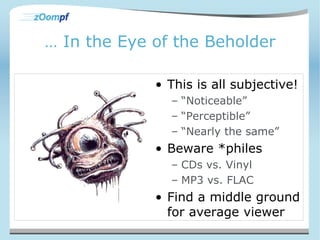
… In the Eye of the Beholder 
• This is all subjective! 
– “Noticeable” 
– “Perceptible” 
– “Nearly the same” 
• Beware *philes 
– CDs vs. Vinyl 
– MP3 vs. FLAC 
• Find a middle ground 
for average viewer
PNG24 to PNG8 
• From millions of colors to 256 
• The human eye is not well suited to 
detecting subtle color changes 
• Discard them!
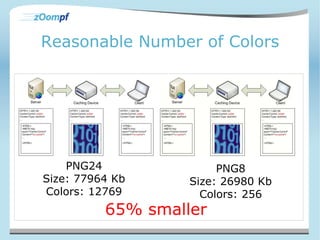
Reasonable Number of Colors 
PNG24 
Size: 77964 Kb 
Colors: 12769 
PNG8 
Size: 26980 Kb 
Colors: 256 
65% smaller
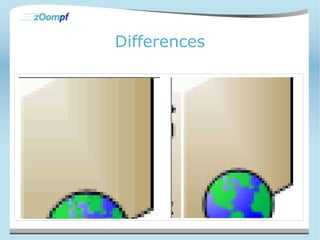
Differences
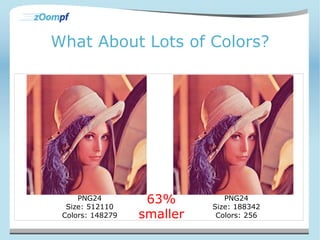
What About Lots of Colors? 
PNG24 
Size: 512110 
Colors: 148279 
PNG24 
Size: 188342 
Colors: 256 
63% 
smaller
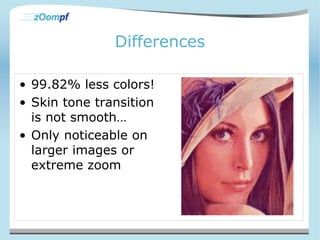
Differences 
• 99.82% less colors! 
• Skin tone transition 
is not smooth… 
• Only noticeable on 
larger images or 
extreme zoom
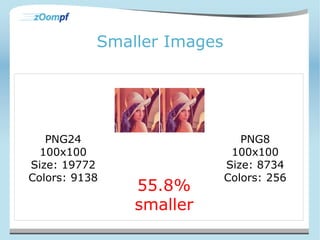
Smaller Images 
PNG24 
100x100 
Size: 19772 
Colors: 9138 
PNG8 
100x100 
Size: 8734 
Colors: 256 
55.8% 
smaller
PNG24 to PNG 8 Guidelines 
• Convert images with low unique color 
counts and verify 
– identify –format "%k“ image.png 
– Zoompf recommends < 5000 colors 
• Always convert small dimensional images 
– Zoompf recommends < 10,000 pixel area 
• You can push these limits 
• Tools 
– Zoompf free scan/WPO
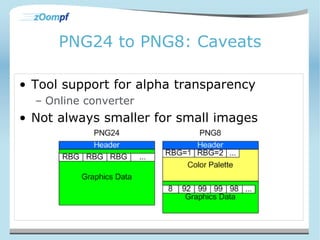
PNG24 to PNG8: Caveats 
• Tool support for alpha transparency 
– Online converter 
• Not always smaller for small images
Lossless to Lossy (PNG to JPEG) 
• Lots of images are saved as lossless when 
lossy will work 
– Photos 
– Screen shots 
– Logos 
– Icons 
– Diagrams 
• Changing formats reduces file size
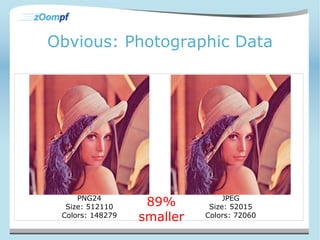
Obvious: Photographic Data 
PNG24 
Size: 512110 
Colors: 148279 
JPEG 
Size: 52015 
Colors: 72060 
89% 
smaller
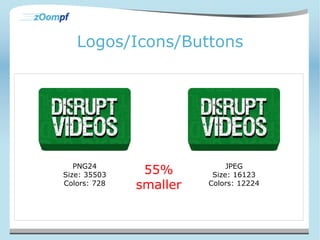
Logos/Icons/Buttons 
PNG24 
Size: 35503 
Colors: 728 
JPEG 
Size: 16123 
Colors: 12224 
55% 
smaller
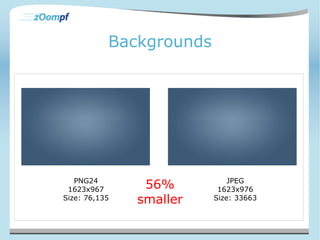
Backgrounds 
PNG24 
1623x967 
Size: 76,135 
JPEG 
1623x976 
Size: 33663 
56% 
smaller
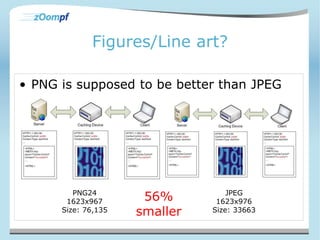
Figures/Line art? 
• PNG is supposed to be better than JPEG 
PNG24 
1623x967 
Size: 76,135 
JPEG 
1623x976 
Size: 33663 
56% 
smaller
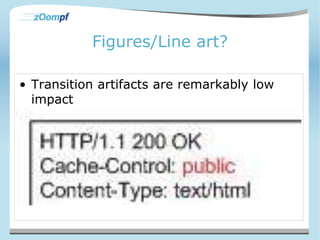
Figures/Line art? 
• Transition artifacts are remarkably low 
impact
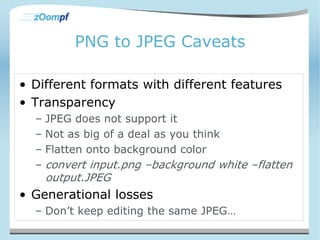
PNG to JPEG Caveats 
• Different formats with different features 
• Transparency 
– JPEG does not support it 
– Not as big of a deal as you think 
– Flatten onto background color 
– convert input.png –background white –flatten 
output.JPEG 
• Generational losses 
– Don’t keep editing the same JPEG…
PNG to JPEG Guidelines 
• Review images to discover what is PNG 
and what is JPEG 
– .jpg does not mean JPEG… 
– Imagemagick’s identify, Linux/Unix’s file 
• Bulk convert and verify 
– Tedious 
• Only consider when savings > 30% 
– Zoompf free scan/WPO flags these candidates
JPEG Quality 
• JPEG images have a “quality” setting 
– 1-100 
– 0-10 
• Quality 90 != discarding 10% of data 
• Quality scale is purely arbitrary 
– it's not a percentage of anything 
• Best Practices for web 
– 50-80, 75, depends on source
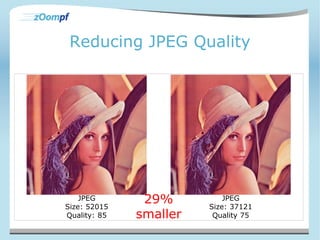
Reducing JPEG Quality 
JPEG 
Size: 52015 
Quality: 85 
JPEG 
Size: 37121 
Quality 75 
29% 
smaller
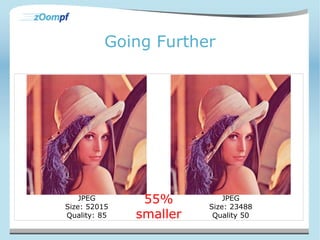
Going Further 
JPEG 
Size: 52015 
Quality: 85 
JPEG 
Size: 23488 
Quality 50 
55% 
smaller
Differences 
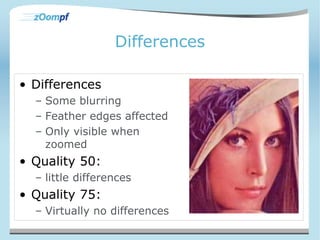
• Differences 
– Some blurring 
– Feather edges affected 
– Only visible when 
zoomed 
• Quality 50: 
– little differences 
• Quality 75: 
– Virtually no differences
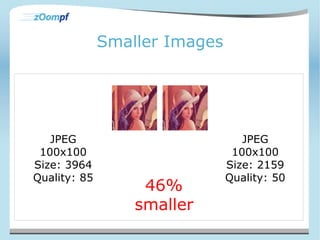
Smaller Images 
JPEG 
100x100 
Size: 3964 
Quality: 85 
JPEG 
100x100 
Size: 2159 
Quality: 50 
46% 
smaller
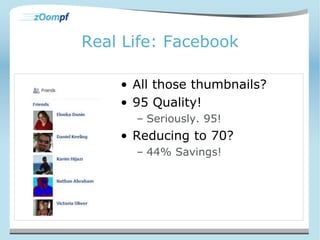
Real Life: Facebook 
• All those thumbnails? 
• 95 Quality! 
– Seriously. 95! 
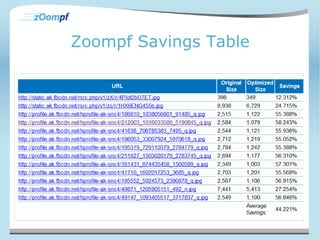
• Reducing to 70? 
– 44% Savings!
Zoompf Savings Table
JPEG Quality Guidelines 
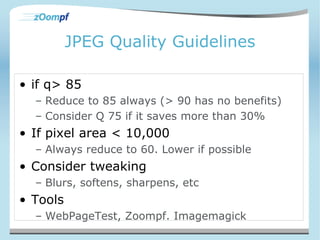
• if q> 85 
– Reduce to 85 always (> 90 has no benefits) 
– Consider Q 75 if it saves more than 30% 
• If pixel area < 10,000 
– Always reduce to 60. Lower if possible 
• Consider tweaking 
– Blurs, softens, sharpens, etc 
• Tools 
– WebPageTest, Zoompf. Imagemagick
Conclusions 
• Images dominate the 
web 
– In Size 
– In Count 
• Image domination is 
growing larger 
• Huge, untapped area, 
needs more attention
Conclusions 
• Don’t be scared about 
lossy 
– Be intelligent about how 
you apply lossy 
• Lossy achieves 
substantial savings 
– 40-60%, 80% spikes 
• Lossy can be automated
Lossy Guidelines Summary 
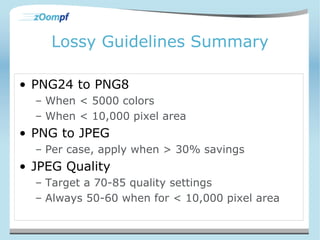
• PNG24 to PNG8 
– When < 5000 colors 
– When < 10,000 pixel area 
• PNG to JPEG 
– Per case, apply when > 30% savings 
• JPEG Quality 
– Target a 70-85 quality settings 
– Always 50-60 when for < 10,000 pixel area
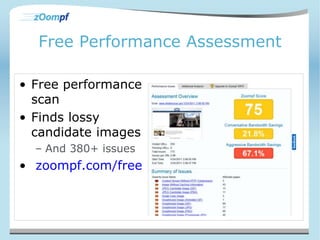
Free Performance Assessment 
• Free performance 
scan 
• Finds lossy 
candidate images 
– And 380+ issues 
• zoompf.com/free
Achieving Better 
Image Optimization 
Billy Hoffman 
billy@zoompf.com 
@zoompf

Achieving Better Image Optimizations

  • 1.
    Achieving Better ImageOptimization Billy Hoffman billy@zoompf.com @zoompf
  • 2.
    Images Dominate theWeb Source: HTTP Archive
  • 3.
    Total Size isIncreasing 70 kB Source: HTTP Archive
  • 4.
    Images Are 74%of the Increase 52 kB Source: HTTP Archive
  • 5.
    Reducing Content Size • HTTP Compression isn’t the king – JS, CSS, HTML = 188 kB – Only 24% of total content size – Reducing 24% of web content by 66% is not great • Images – Reduce image size by 25% results in more total savings than text optimizations
  • 6.
    Lossless Optimization (Bloat) • Removes anything not needed to draw the image • Optimized image is pixel perfect copy • Saves 5-20% • Occasionally 70-80%
  • 7.
    Lossless Optimization (Efficiency) • Store graphics data more efficiently – Convert GIF to PNG (LZW vs. DEFLATE) – Beyond stock zlib DEFLATE implementation • Optimized image is pixel perfect copy • Saves 5-20%
  • 8.
    Aside: Always UsePNG • DEFLATE is superior to LZW • All browsers support PNG – Those with transparency issues are near dead • Only keep animated GIFs Source: HTTP Archive
  • 9.
    Losing Graphics Data? If 80-95% of the bytes in an image are graphics data… … perhaps we should look at reducing the size of the graphics data Lossy Optimizations!
  • 10.
    “Do Not TouchMy Art!” • Lots of push back • “Losing” data is scary • “Won’t that look bad?” • “We spent a long time to make it look like this.”
  • 11.
    Everything is Lossy! • Telephone calls (8kHz w/ 8bit Samples) • CDs (44kHz w/ 16 bit samples) • Conversion to Color Television – Eye more sensitive to brightness than color – Chroma Sub-sampling (Y’CbCr 4:2:2) – 33% less bandwidth, no perceivable difference • MP3 files – Frequency Masking
  • 12.
    … In theEye of the Beholder • This is all subjective! – “Noticeable” – “Perceptible” – “Nearly the same” • Beware *philes – CDs vs. Vinyl – MP3 vs. FLAC • Find a middle ground for average viewer
  • 13.
    PNG24 to PNG8 • From millions of colors to 256 • The human eye is not well suited to detecting subtle color changes • Discard them!
  • 14.
    Reasonable Number ofColors PNG24 Size: 77964 Kb Colors: 12769 PNG8 Size: 26980 Kb Colors: 256 65% smaller
  • 15.
  • 16.
    What About Lotsof Colors? PNG24 Size: 512110 Colors: 148279 PNG24 Size: 188342 Colors: 256 63% smaller
  • 17.
    Differences • 99.82%less colors! • Skin tone transition is not smooth… • Only noticeable on larger images or extreme zoom
  • 18.
    Smaller Images PNG24 100x100 Size: 19772 Colors: 9138 PNG8 100x100 Size: 8734 Colors: 256 55.8% smaller
  • 19.
    PNG24 to PNG8 Guidelines • Convert images with low unique color counts and verify – identify –format "%k“ image.png – Zoompf recommends < 5000 colors • Always convert small dimensional images – Zoompf recommends < 10,000 pixel area • You can push these limits • Tools – Zoompf free scan/WPO
  • 20.
    PNG24 to PNG8:Caveats • Tool support for alpha transparency – Online converter • Not always smaller for small images
  • 21.
    Lossless to Lossy(PNG to JPEG) • Lots of images are saved as lossless when lossy will work – Photos – Screen shots – Logos – Icons – Diagrams • Changing formats reduces file size
  • 22.
    Obvious: Photographic Data PNG24 Size: 512110 Colors: 148279 JPEG Size: 52015 Colors: 72060 89% smaller
  • 23.
    Logos/Icons/Buttons PNG24 Size:35503 Colors: 728 JPEG Size: 16123 Colors: 12224 55% smaller
  • 24.
    Backgrounds PNG24 1623x967 Size: 76,135 JPEG 1623x976 Size: 33663 56% smaller
  • 25.
    Figures/Line art? •PNG is supposed to be better than JPEG PNG24 1623x967 Size: 76,135 JPEG 1623x976 Size: 33663 56% smaller
  • 26.
    Figures/Line art? •Transition artifacts are remarkably low impact
  • 27.
    PNG to JPEGCaveats • Different formats with different features • Transparency – JPEG does not support it – Not as big of a deal as you think – Flatten onto background color – convert input.png –background white –flatten output.JPEG • Generational losses – Don’t keep editing the same JPEG…
  • 28.
    PNG to JPEGGuidelines • Review images to discover what is PNG and what is JPEG – .jpg does not mean JPEG… – Imagemagick’s identify, Linux/Unix’s file • Bulk convert and verify – Tedious • Only consider when savings > 30% – Zoompf free scan/WPO flags these candidates
  • 29.
    JPEG Quality •JPEG images have a “quality” setting – 1-100 – 0-10 • Quality 90 != discarding 10% of data • Quality scale is purely arbitrary – it's not a percentage of anything • Best Practices for web – 50-80, 75, depends on source
  • 30.
    Reducing JPEG Quality JPEG Size: 52015 Quality: 85 JPEG Size: 37121 Quality 75 29% smaller
  • 31.
    Going Further JPEG Size: 52015 Quality: 85 JPEG Size: 23488 Quality 50 55% smaller
  • 32.
    Differences • Differences – Some blurring – Feather edges affected – Only visible when zoomed • Quality 50: – little differences • Quality 75: – Virtually no differences
  • 33.
    Smaller Images JPEG 100x100 Size: 3964 Quality: 85 JPEG 100x100 Size: 2159 Quality: 50 46% smaller
  • 34.
    Real Life: Facebook • All those thumbnails? • 95 Quality! – Seriously. 95! • Reducing to 70? – 44% Savings!
  • 35.
  • 36.
    JPEG Quality Guidelines • if q> 85 – Reduce to 85 always (> 90 has no benefits) – Consider Q 75 if it saves more than 30% • If pixel area < 10,000 – Always reduce to 60. Lower if possible • Consider tweaking – Blurs, softens, sharpens, etc • Tools – WebPageTest, Zoompf. Imagemagick
  • 37.
    Conclusions • Imagesdominate the web – In Size – In Count • Image domination is growing larger • Huge, untapped area, needs more attention
  • 38.
    Conclusions • Don’tbe scared about lossy – Be intelligent about how you apply lossy • Lossy achieves substantial savings – 40-60%, 80% spikes • Lossy can be automated
  • 39.
    Lossy Guidelines Summary • PNG24 to PNG8 – When < 5000 colors – When < 10,000 pixel area • PNG to JPEG – Per case, apply when > 30% savings • JPEG Quality – Target a 70-85 quality settings – Always 50-60 when for < 10,000 pixel area
  • 40.
    Free Performance Assessment • Free performance scan • Finds lossy candidate images – And 380+ issues • zoompf.com/free
  • 41.
    Achieving Better ImageOptimization Billy Hoffman billy@zoompf.com @zoompf