© 2009 Marty Hall


            j
            jQuery Part III:
                 y
    Rich Interfaces with jQuery UI
                                (j
                                (jQuery 1.3, jQuery UI 1.7)
                                      y    ,j     y       )
            Originals of Slides and Source Code for Examples:
       http://courses.coreservlets.com/Course-Materials/ajax.html
          p                                              j
                  Customized Java EE Training: http://courses.coreservlets.com/
  Servlets, JSP, JSF 1.x & JSF 2.0, Struts Classic & Struts 2, Ajax, GWT, Spring, Hibernate/JPA, Java 5 & 6.
   Developed and taught by well-known author and developer. At public venues or onsite at your location.


                                                                                                                © 2009 Marty Hall


 For live Ajax & GWT training, see training
courses at http://courses.coreservlets.com/.
          t htt //                l t       /
      Taught by the author of Core Servlets and JSP, More
     Servlets and JSP and this tutorial. Available at public
                  JSP,          tutorial
     venues, or customized versions can be held on-site at
                       your organization.
   •C
    Courses d
            developed and t
                l   d d taught b M t H ll
                            ht by Marty Hall
          – Java 6, intermediate/beginning servlets/JSP, advanced servlets/JSP, Struts, JSF 1.x & 2.0, Ajax, GWT, custom mix of topics
                   Customized Java EE Training: http://courses.coreservlets.com/
          – Ajax courses can concentrate on one library (jQuery, Prototype/Scriptaculous, Ext-JS, Dojo) or survey several
   • Courses developed and taught by coreservlets.com experts (edited by Marty)
  Servlets, JSP, JSF 1.x & JSFEJB3, Struts Classic & Struts 2, Ajax, GWT, Spring, Hibernate/JPA, Java 5 & 6.
          – Spring, Hibernate/JPA, 2.0, Ruby/Rails
   Developed and taught by well-known author and developer. At public venues or onsite at your location.
                                        Contact hall@coreservlets.com for details
Topics in This Section
    • Overview
    • Installation and setup
    • Widgets
      –   Static tabbed panels
      –   Ajax tabbed panels
      –   Accordion panels
      –   Date picker
      –   Slider
      –   Progress bar


5


                                                                                                   © 2009 Marty Hall


                                 Introduction

                        Customized Java EE Training: http://courses.coreservlets.com/
          Servlets, JSP, JSF 1.x & JSF 2.0, Struts Classic & Struts 2, Ajax, GWT, Spring, Hibernate/JPA, Java 5 & 6.
           Developed and taught by well-known author and developer. At public venues or onsite at your location.
Overview
    • Set of rich GUI elements and effects
      – Tabbed panels, slider, etc
      – Effects similar to Scripaculous
      – Drag and drop API
    • Pros
      –   Official part of j
                   p       jQuery
                                y
      –   Well tested
      –   Very clean design
      –   Many still show meaningful results if JavaScript disabled
      –   Theming framework
    • Cons
      – No autocompleter (!)
7
      – Not as extensive as Dojo, ext/JS, or YUI


    Downloading
    • Download custom bundle
      – h //j
        http://jqueryui.com/download
                      i    /d    l d
      – Select widgets and effects you want
      – Press “Download” to download ZIP file of result
    • Unzip
      – Unzip result into location of your choice
    • D
      Download additional themes
          l d dditi     l th
      – http://jqueryui.com/download
      – Deselect all widgets and options, choose different theme
           • You can also interactively build a customized theme
      – Unzip and copy entries in “css” folder to “css” folder of
        original download
    • Bookmark the documentation
8
      – http://docs.jquery.com/UI/
Installing Files
     • Load normal jQuery as before
       – jQuery UI download gives an additional copy in “js”
         folder, so if you are using jQuery UI, one download from
         jq y
         jqueryui.com is sufficient
          • As discussed in previous sections, it is common to rename
            jQuery-1.3.x.min.js to jQuery.js to simplify upgrades
     • Copy jQuery ui 1.7.x.custom.min.js
            jQuery-ui-1.7.x.custom.min.js
       – E.g., copy download_folder/js/jQuery-ui-
         1.7.x.custom.min.js to WebContent/scripts
       – It is common to leave detailed name for this file, since UI
            i           t l     d t il d      f thi fil i
         capabilities change from version to version
     • Copy CSS “theme” folder
         py
       – E.g., copy download_folder/css/ui-lightness to
         WebContent/css/
9


     Setting Up Page: Overview
     • Load required jQuery UI files
       – jquery.js (renamed from jquery-1.3.2.min.js)
       – jquery-ui-1.7.1.custom.min.js
       – Any custom CSS files your app uses
     • Load your files that use jQuery UI
       – Any custom JavaScript files your app uses
       – themename/jquery-ui-1.7.1.custom.min.css


10
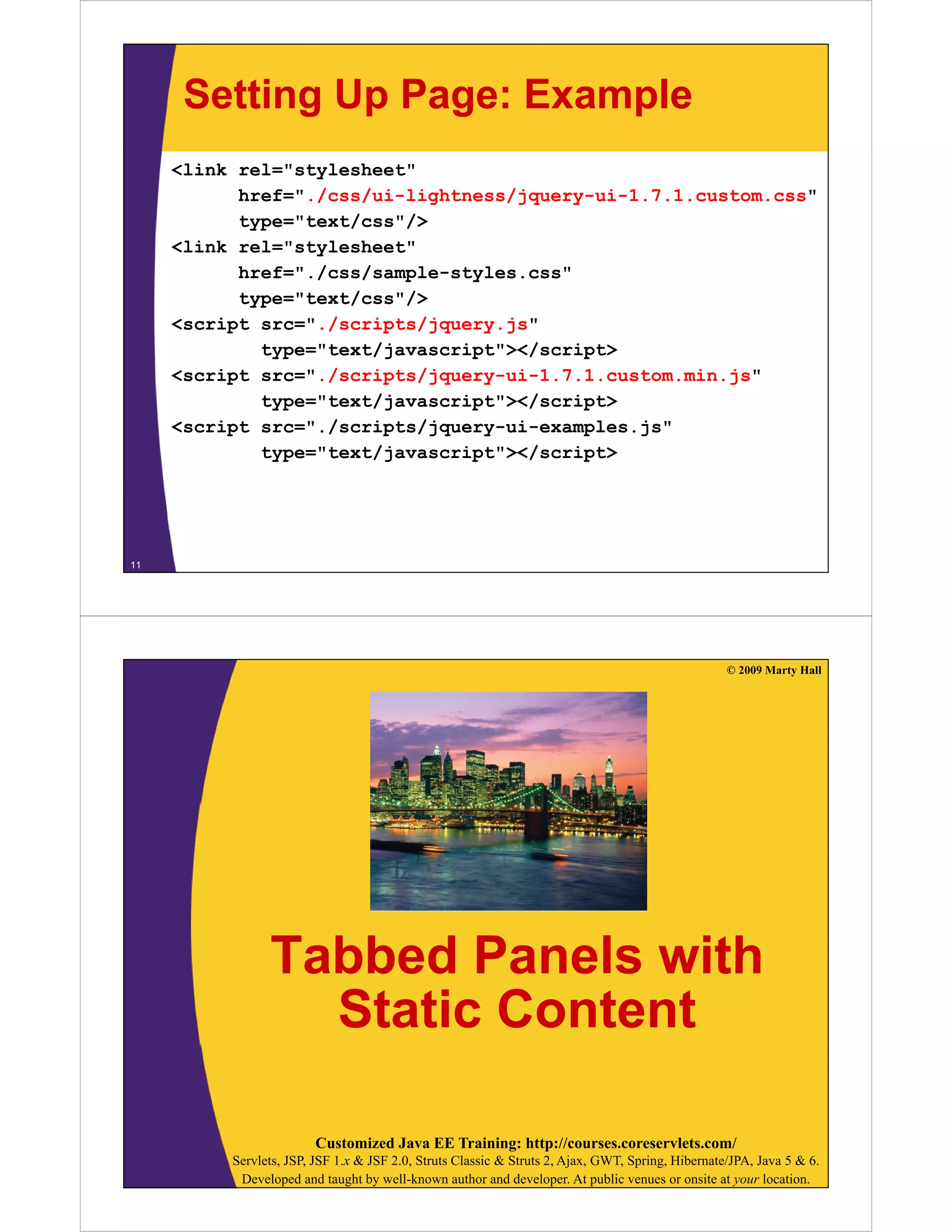
Setting Up Page: Example
     <link rel="stylesheet"
           href="./css/ui-lightness/jquery-ui-1.7.1.custom.css"
           href=" /css/ui lightness/jquery ui 1 7 1 custom css"
           type="text/css"/>
     <link rel="stylesheet"
           href="./css/sample-styles.css"
           href=" /css/sample styles css"
           type="text/css"/>
     <script src="./scripts/jquery.js"
             type="text/javascript"></script>
             t    "t t/j       i t"></    i t>
     <script src="./scripts/jquery-ui-1.7.1.custom.min.js"
             type="text/javascript"></script>
     <script src="./scripts/jquery-ui-examples.js"
         i t     " /   i t /j       i       l  j "
             type="text/javascript"></script>


11


                                                                                                   © 2009 Marty Hall


                Tabbed Panels with
                  Static Content

                        Customized Java EE Training: http://courses.coreservlets.com/
          Servlets, JSP, JSF 1.x & JSF 2.0, Struts Classic & Struts 2, Ajax, GWT, Spring, Hibernate/JPA, Java 5 & 6.
           Developed and taught by well-known author and developer. At public venues or onsite at your location.
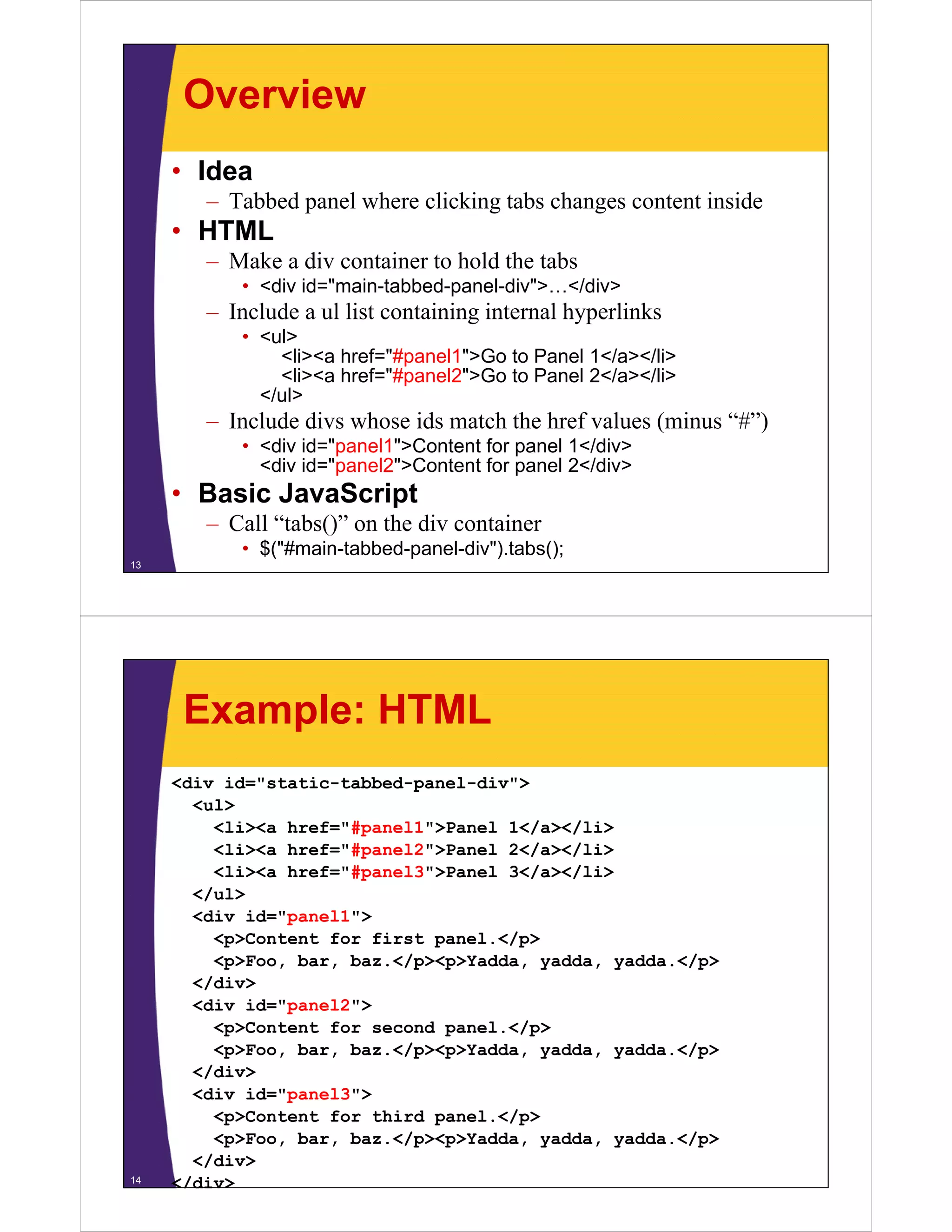
Overview
     • Idea
        – T bb d panel where clicking tabs changes content inside
          Tabbed     l h      li ki t b h             t t i id
     • HTML
        – Make a div container to hold the tabs
           • <div id="main-tabbed-panel-div">…</div>
        – Include a ul list containing internal hyperlinks
           • <ul>
               <li><a href="#panel1">Go to Panel 1</a></li>
               <li><a href="#panel2">Go to Panel 2</a></li>
             </ul>
        – Include divs whose ids match the href values (minus “#”)
                                                               # )
           • <div id="panel1">Content for panel 1</div>
             <div id="panel2">Content for panel 2</div>
     • Basic JavaScript
        – Call “tabs()” on the div container
           • $("#main-tabbed-panel-div").tabs();
13


      Example: HTML
     <div id="static-tabbed-panel-div">
       <ul>
         <li><a href="#panel1">Panel 1</a></li>
         <li><a href="#panel2">Panel 2</a></li>
         <li><a href="#panel3">Panel 3</a></li>
       </ul>
       <div id="panel1">
         <p>Content for first panel.</p>
         <p>Foo, bar, baz.</p><p>Yadda, yadda, yadda.</p>
         <p>Foo bar baz </p><p>Yadda yadda yadda </p>
       </div>
       <div id="panel2">
         <p>Content for second panel.</p>
         <p>Foo, bar, baz.</p><p>Yadda, yadda, yadda.</p>
       </div>
       <div id="panel3">
         <p>Content for thi d panel.</p>
         < >C t t f     third     l </ >
         <p>Foo, bar, baz.</p><p>Yadda, yadda, yadda.</p>
       </div>
14   </div>
Example: JavaScript
     $(function() {
         $("#static-tabbed-panel-div").tabs();
         $("# t ti t bb d      l di ") t b ()
         …
     })
     });


15


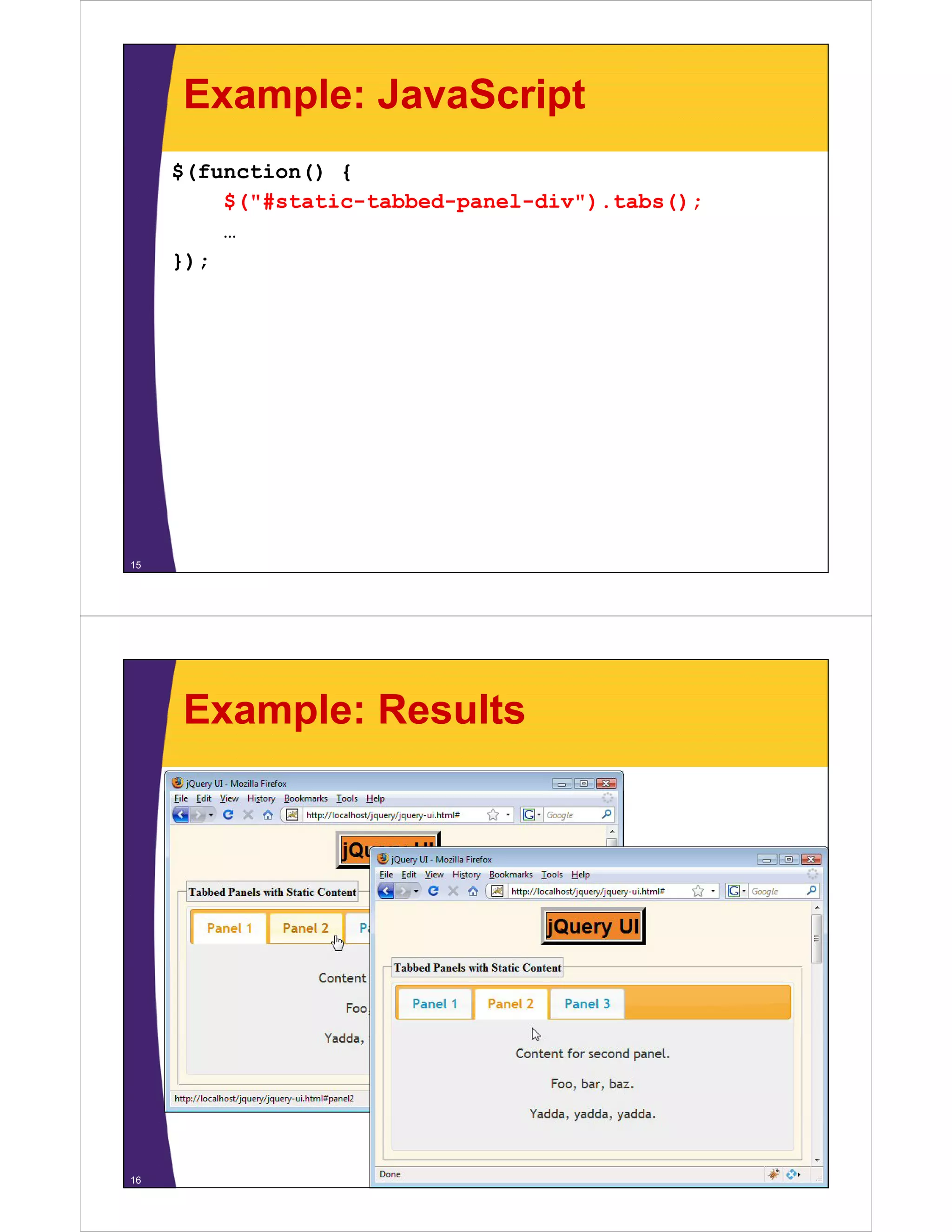
     Example: Results


16
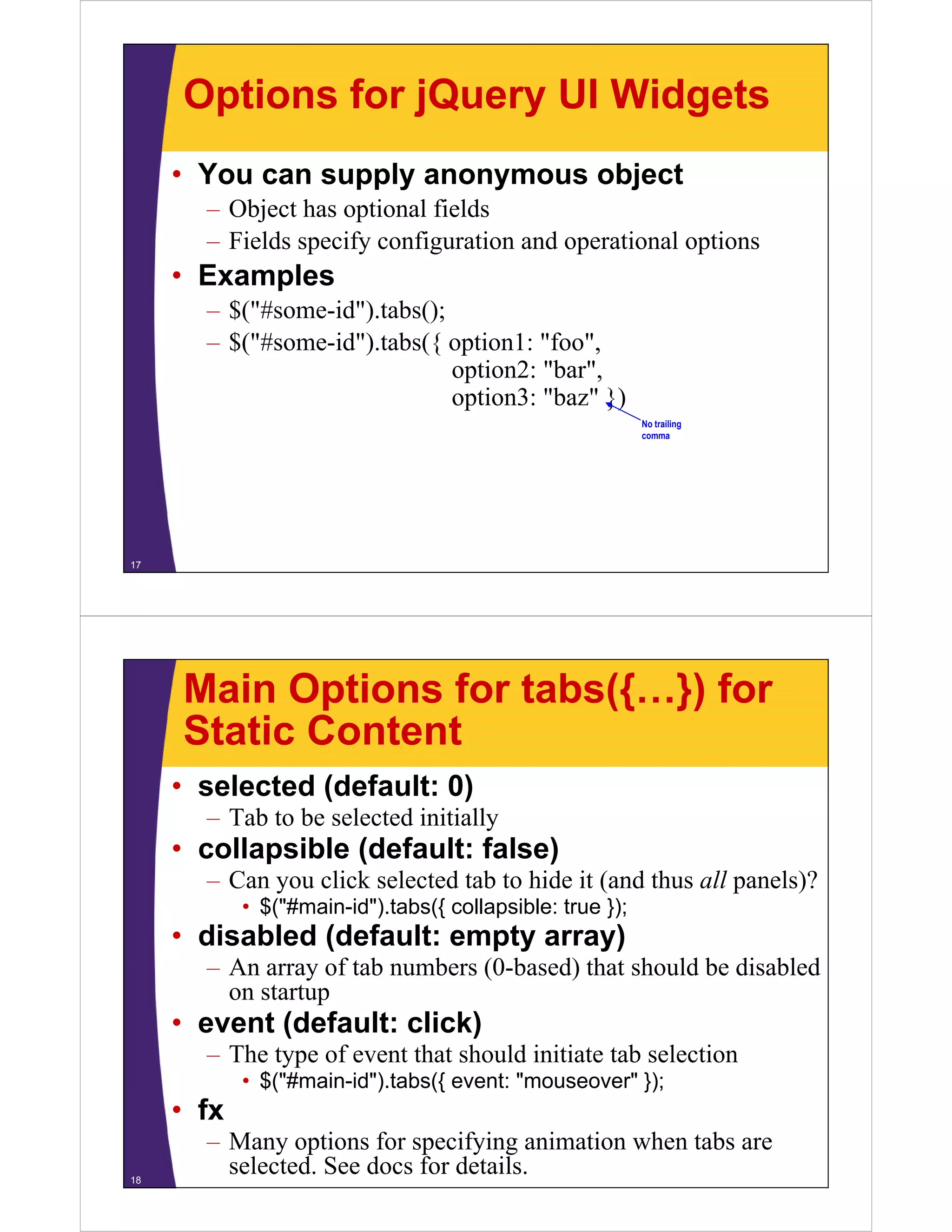
Options for jQuery UI Widgets
     • You can supply anonymous object
       – Object has optional fields
       – Fields specify configuration and operational options
     • Examples
       – $("#some-id").tabs();
       – $("#some-id") tabs({ option1: "foo",
         $( #some id ).tabs({            foo
                               option2: "bar",
                               option3: "baz" })
                                                           No t ili
                                                           N trailing
                                                           comma


17


     Main Options for tabs({…}) for
     Static Content
     • selected (default: 0)
       – T b to be selected initially
         Tab b       l    d i i i ll
     • collapsible (default: false)
       – Can you click selected tab to hide it (and thus all panels)?
            • $("#main-id").tabs({ collapsible: true });
     • disabled (default: empty array)
       – A array of t b numbers (0-based) that should be disabled
         An         f tab  b (0 b d) th t h ld b di bl d
         on startup
     • event (default: click)
             (              )
       – The type of event that should initiate tab selection
            • $("#main-id").tabs({ event: "mouseover" });
     • fx
       – Many options for specifying animation when tabs are
18
         selected. See docs for details.
© 2009 Marty Hall


         Tabbed Panels with
        Dynamic ( j ) Content
         y      (Ajax)

                       Customized Java EE Training: http://courses.coreservlets.com/
         Servlets, JSP, JSF 1.x & JSF 2.0, Struts Classic & Struts 2, Ajax, GWT, Spring, Hibernate/JPA, Java 5 & 6.
          Developed and taught by well-known author and developer. At public venues or onsite at your location.


     Overview
     • Idea
       – T bb d panel where clicking tabs gets server content
         Tabbed     l h      li ki     b
     • HTML
       – Make a div container to hold the tabs
          • <div id="main-tabbed-panel-div">…</div>
       – Include a ul list containing external relative hyperlinks
          • <ul>
              <li><a href="url1">Get Content for Panel 1</a></li>
              <li><a href="url2">Get Content for Panel 2</a></li>
            </ul>
       – That’s all!
     • Basic JavaScript
       – C ll “tabs()” on the div container
         Call “ b ()”      h di        i
          • $("#main-tabbed-panel-div").tabs();
20
Example: HTML
     <div id="ajax-tabbed-panel-div">
     <ul>
       <li><a href="time-panel.jsp">Show Time</a></li>
       <li><a href="list-panel.jsp?range=5">
            Show Small Numbers</a></li>
       <li><a href="list-panel.jsp?range=500">
            Show Big Numbers</a></li>
     </ul>
     </div>


21


      Example: JavaScript
     $(function() {
          $( #ajax tabbed panel div ).tabs({
          $("#ajax-tabbed-panel-div") tabs({ collapsible: true });
         …
     });


22
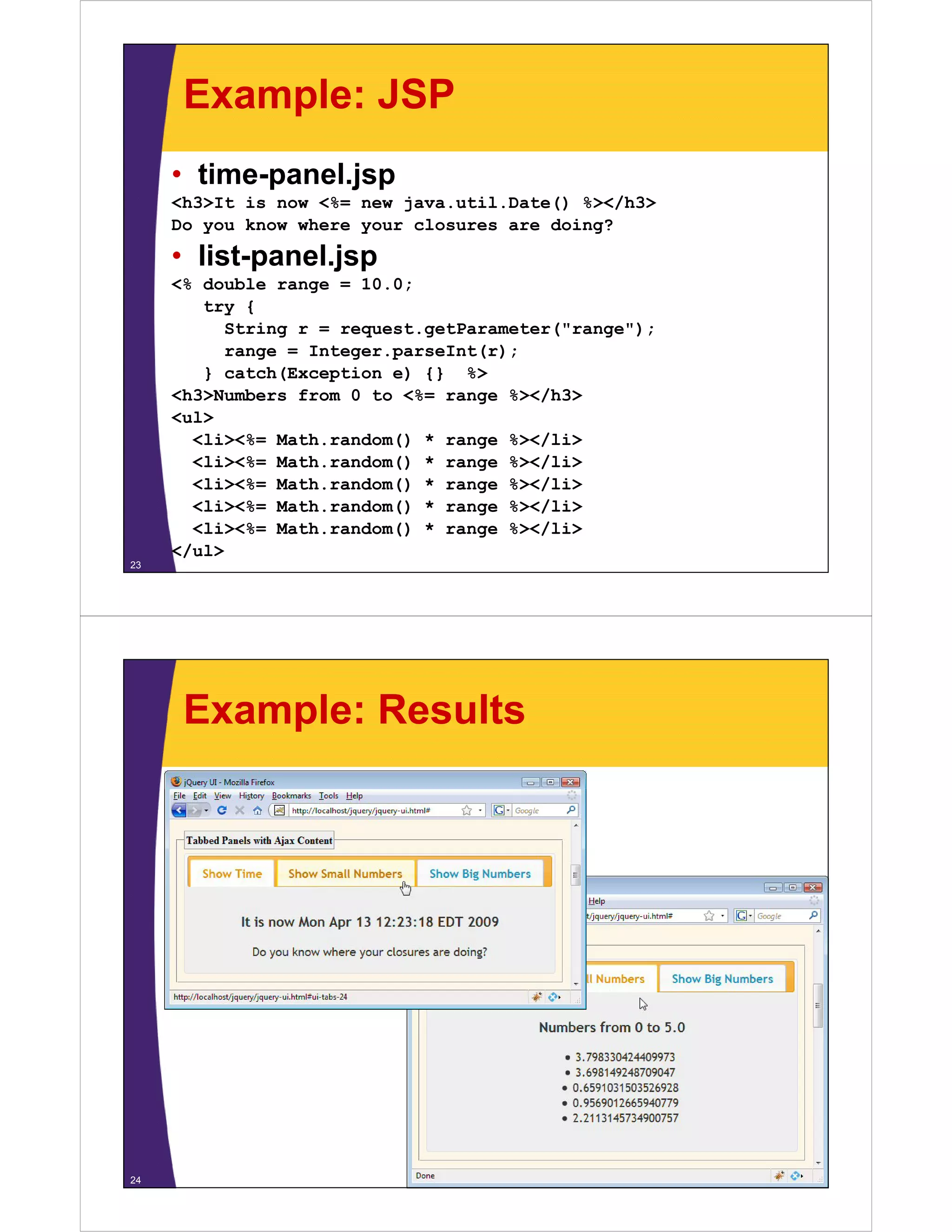
Example: JSP
     • time-panel.jsp
     <h3>It is now <%= new java.util.Date() %></h3>
     Do you know where your closures are doing?

     • list-panel.jsp
            p     j p
     <% double range = 10.0;
        try {
          String r = request.getParameter("range");
          range = I t
                  Integer.parseInt(r);
                               I t( )
        } catch(Exception e) {} %>
     <h3>Numbers from 0 to <%= range %></h3>
     <ul>
       <li><%= Math.random() * range %></li>
       <li><%= Math.random() * range %></li>
       <li><%= Math.random() * range %></li>
       <li><%= Math.random() * range %></li>
       <li><%= Math.random() * range %></li>
     </ul>
23


      Example: Results


24
Main Options for tabs({…}) for
     Ajax Content
     • ajaxOptions (default: {})
       – Any of the options used for $.ajax in first jQuery section
          • $("#main-id").tabs({ ajaxOptions: { error: errorHandler }});
     • cache (default: false)
       – Should jQuery remember content for previously-selected
         tabs? Very helpful if result is always the same for a given
                  y p                        y                 g
         URL.
     • spinner (default “<em>Loading…</em>”)
       – T to show in tab title after tab selected but before
         Text     h i b il f             b l     db b f
         content is received from server


25


                                                                                                  © 2009 Marty Hall


                    Accordion Panels

                       Customized Java EE Training: http://courses.coreservlets.com/
         Servlets, JSP, JSF 1.x & JSF 2.0, Struts Classic & Struts 2, Ajax, GWT, Spring, Hibernate/JPA, Java 5 & 6.
          Developed and taught by well-known author and developer. At public venues or onsite at your location.
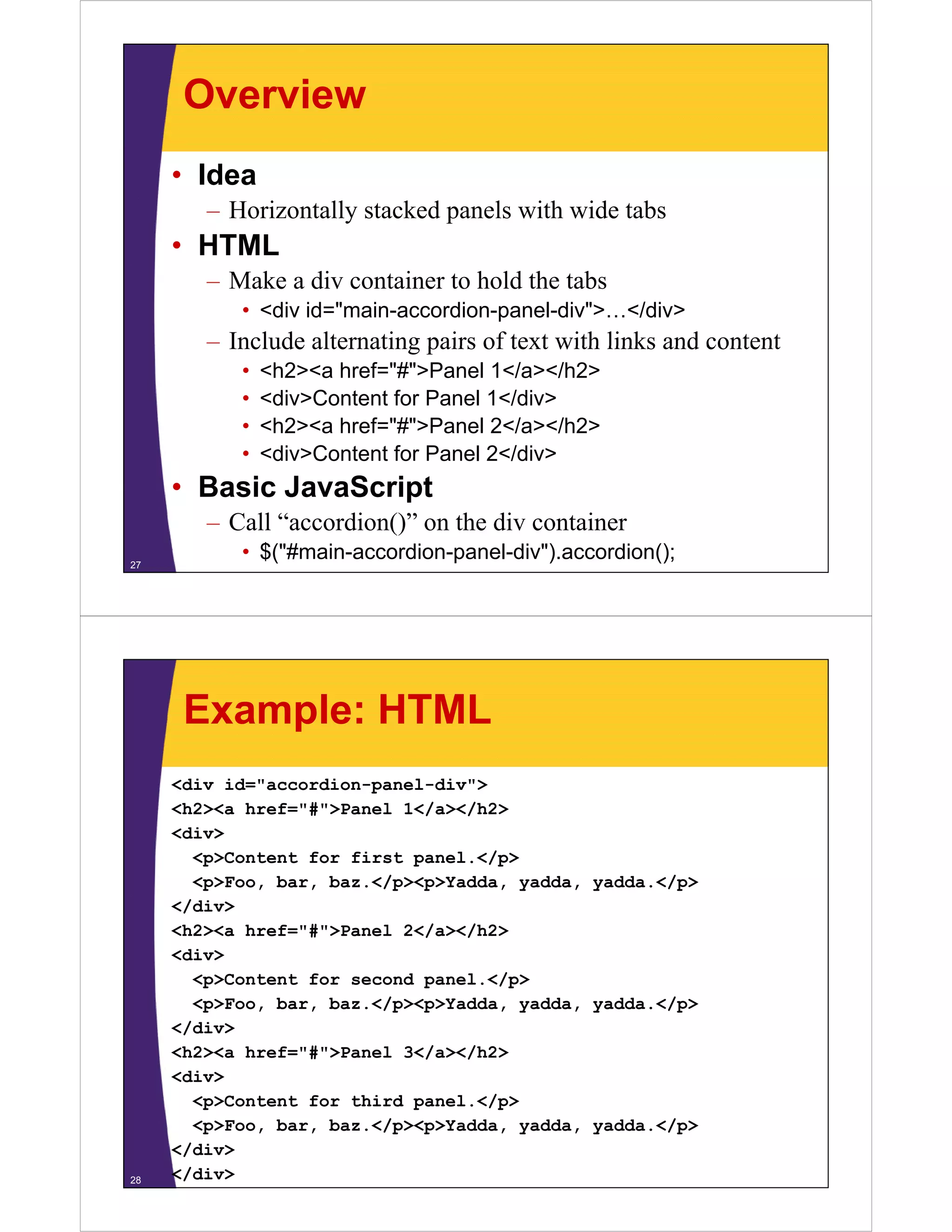
Overview
     • Idea
        – Horizontally stacked panels with wide tabs
     • HTML
        – Make a div container to hold the tabs
           • <div id="main-accordion-panel-div">…</div>
        – Include alternating pairs of text with links and content
           •   <h2><a href="#">Panel 1</a></h2>
           •   <div>Content for Panel 1</div>
           •   <h2><a href="#">Panel 2</ ></h2>
               <h2>< h f "#">P       l 2</a></h2>
           •   <div>Content for Panel 2</div>
     • Basic Ja aSc pt
        as c JavaScript
        – Call “accordion()” on the div container
27
           • $("#main-accordion-panel-div").accordion();


      Example: HTML
     <div id="accordion-panel-div">
     <h2><a href="#">Panel 1</a></h2>
            href= # >Panel
     <div>
       <p>Content for first panel.</p>
       <p>Foo, bar, baz.</p><p>Yadda, yadda, yadda.</p>
     </div>
     <h2><a href="#">Panel 2</a></h2>
     <div>
       <p>Content for second panel.</p>
       <p>Foo, bar, baz.</p><p>Yadda, yadda, yadda.</p>
     </div>
     <h2><a href="#">Panel 3</a></h2>
     <div>
       <p>Content for third panel.</p>
       <p>Foo, bar, baz.</p><p>Yadda, yadda, yadda.</p>
     </div>
28   </div>
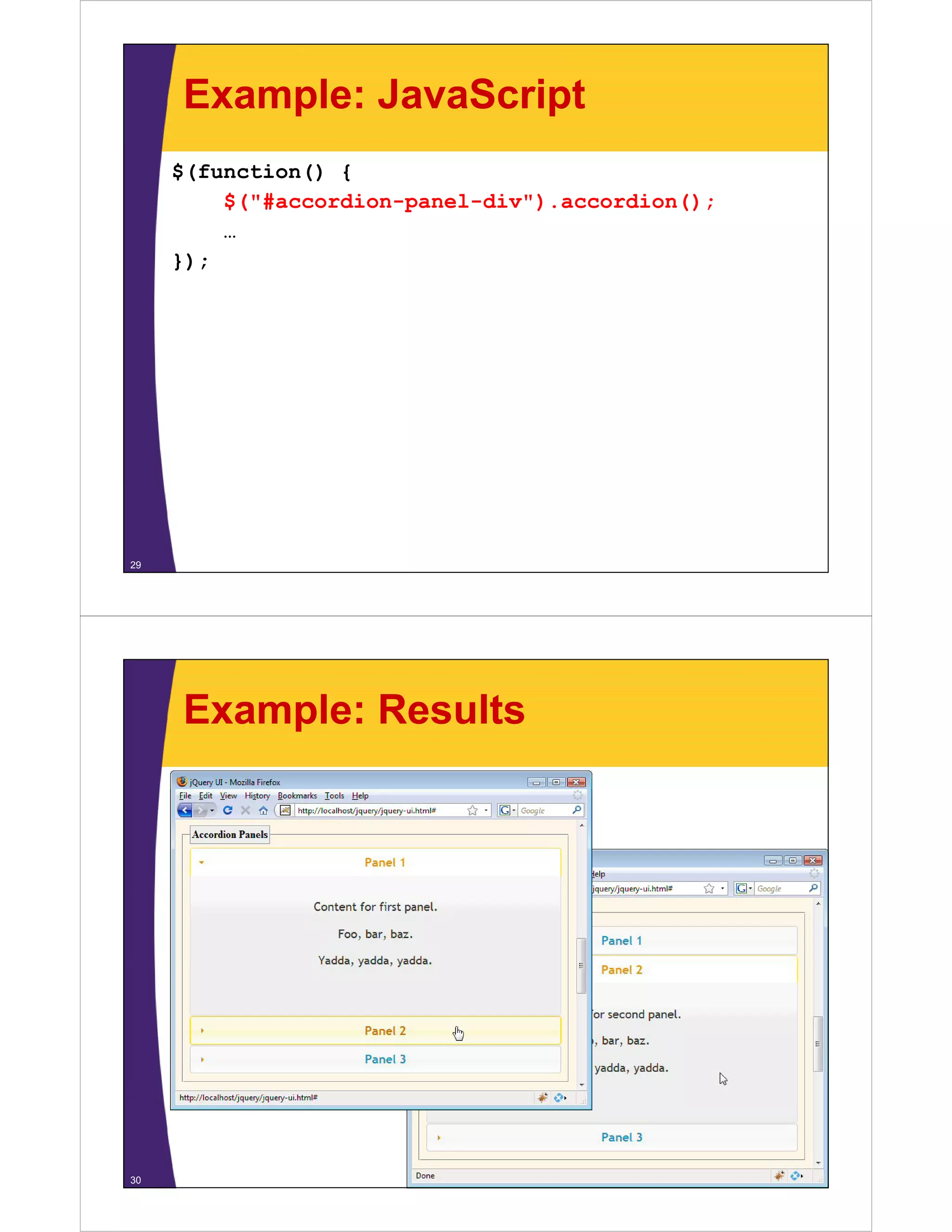
Example: JavaScript
     $(function() {
         $("#accordion-panel-div").accordion();
         $("#     di       l di ")      di ()
         …
     })
     });


29


     Example: Results


30
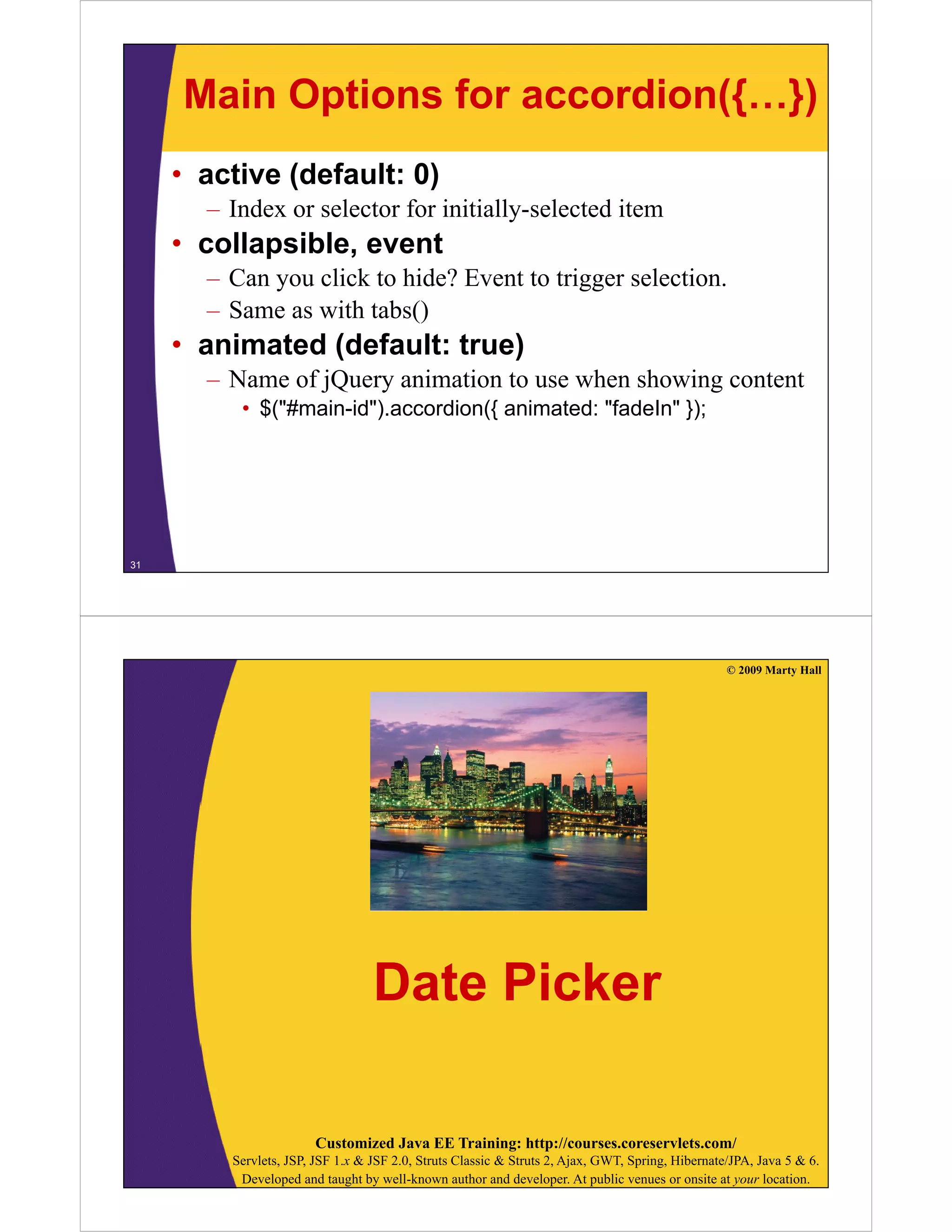
Main Options for accordion({…})
     • active (default: 0)
       – Index or selector for initially-selected item
     • collapsible, event
       – C you click to hide? Event to trigger selection.
         Can      li k hid ? E           i       l i
       – Same as with tabs()
     • animated (default: true)
       – Name of jQuery animation to use when showing content
          • $("#main-id").accordion({ animated: "fadeIn" });


31


                                                                                                  © 2009 Marty Hall


                                  Date Picker

                       Customized Java EE Training: http://courses.coreservlets.com/
         Servlets, JSP, JSF 1.x & JSF 2.0, Struts Classic & Struts 2, Ajax, GWT, Spring, Hibernate/JPA, Java 5 & 6.
          Developed and taught by well-known author and developer. At public venues or onsite at your location.
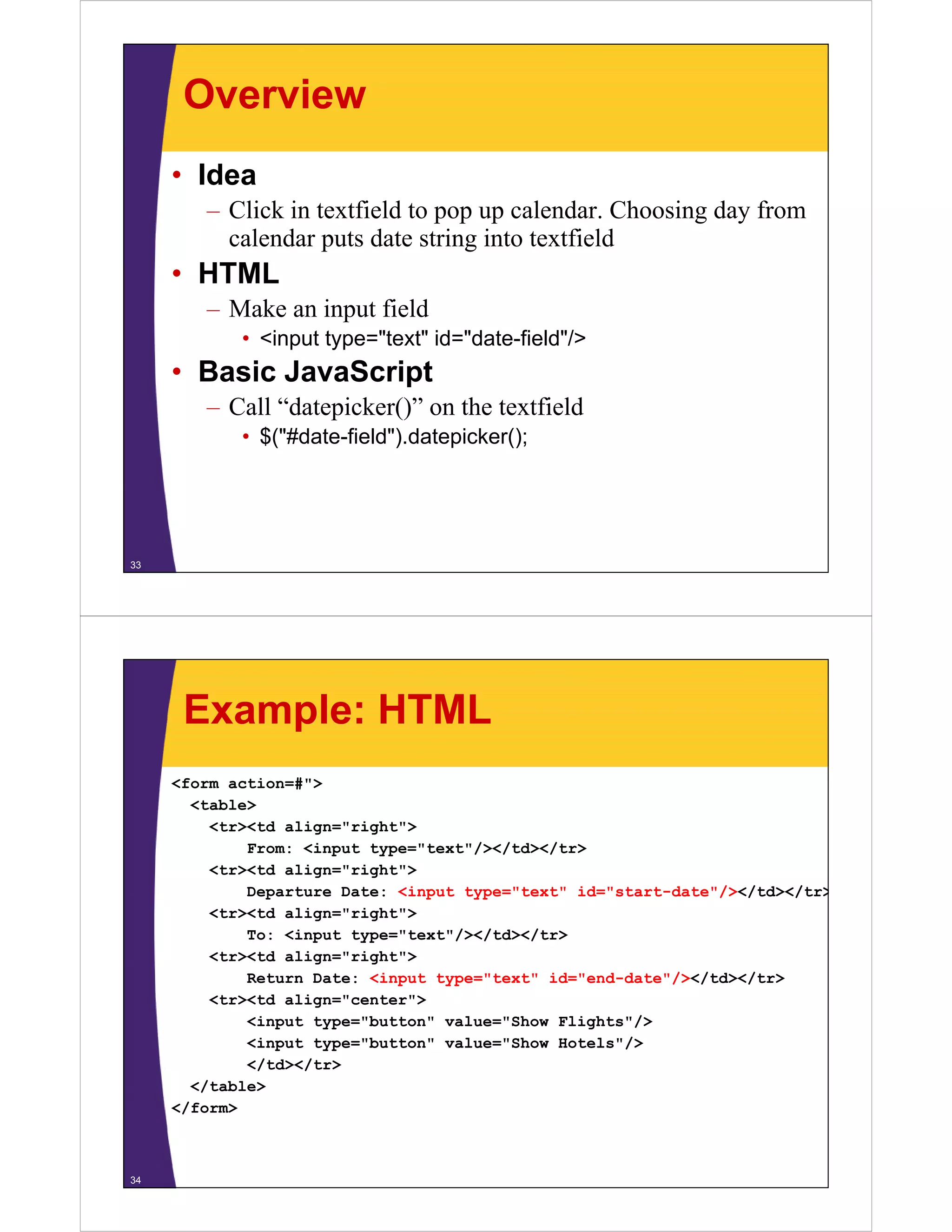
Overview
     • Idea
        – Click in textfield to pop up calendar. Choosing day from
          calendar puts date string into textfield
     • HTML
        – Make an input field
            • <input type="text" id="date-field"/>
                 p yp
     • Basic JavaScript
        – Call “datepicker()” on the textfield
            • $("#date-field").datepicker();


33


      Example: HTML
     <form action=#">
       <table>
         <tr><td align="right">
             From: <input type="text"/></td></tr>
         <tr><td align="right">
             Departure Date: <input type="text" id="start-date"/></td></tr>
                                                               / /     /
         <tr><td align="right">
             To: <input type="text"/></td></tr>
         <tr><td a g
          t    td align="right">
                           g t
             Return Date: <input type="text" id="end-date"/></td></tr>
         <tr><td align="center">
             <input type="button" value="Show Flights"/>
             <input type="button" value="Show Hotels"/>
                                                     /
             </td></tr>
       </table>
     </form>


34
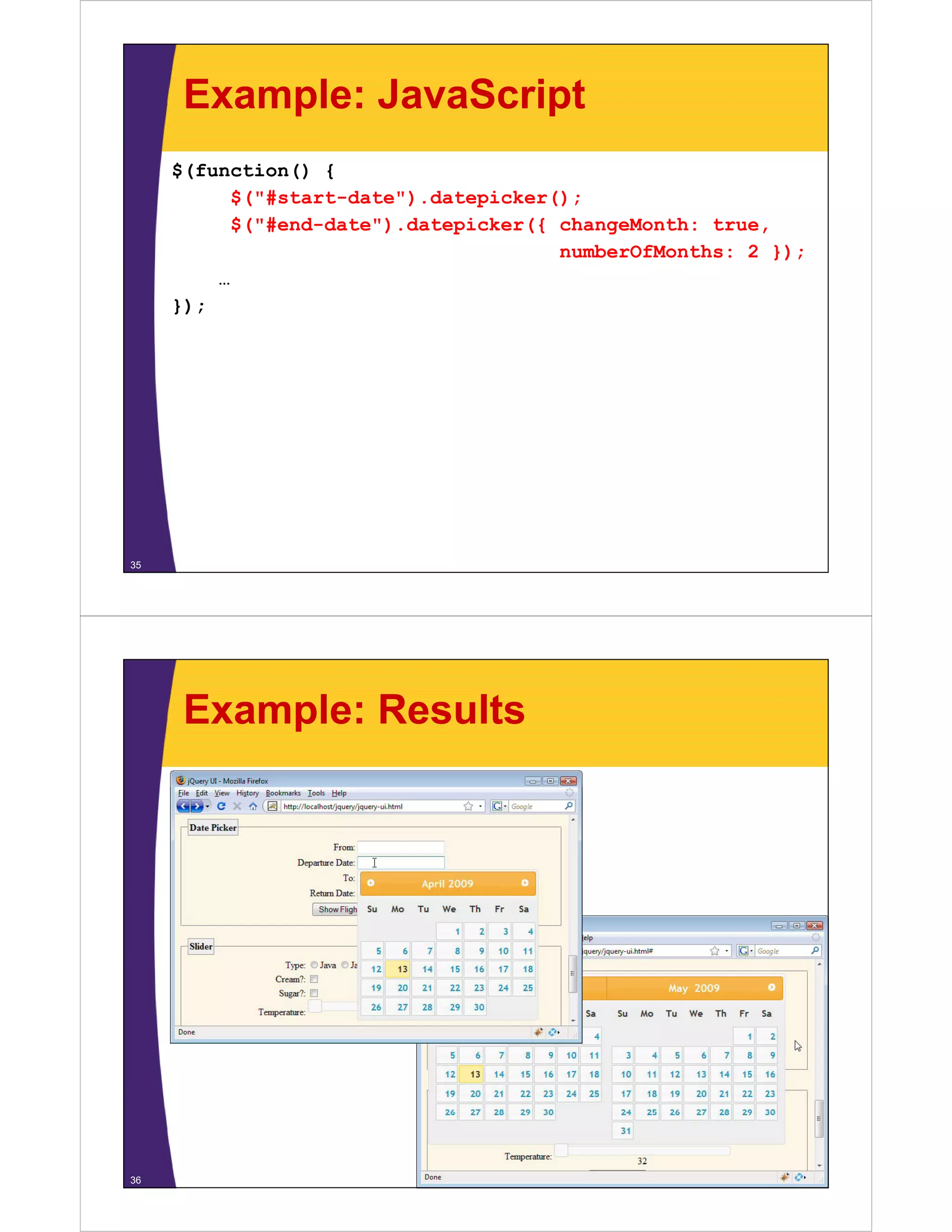
Example: JavaScript
     $(function() {
           $("#start-date").datepicker();
           $("#start date") datepicker();
           $("#end-date").datepicker({ changeMonth: true,
                                       numberOfMonths: 2 });
         …
     });


35


      Example: Results


36
Main Options for
     datepicker({…})
     datepicker({ })
     • defaultDate (default: today)
       – I i i ll selected date
         Initially l     dd
     • changeMonth (default: false)
       changeYear (default: false)
       – Should jQuery include a dropdown list to let you choose
         the month or year?
     • dayNames (default Sunday Saturday)
                         Sunday…Saturday)
       monthNames (default January…December)
       – Names to use for the days and months. For other
                                 y
         languages. There are also various options for short
         versions of days.
     • numberOfMonths (default: 1)
       – How many months to show at a time
37


                                                                                                  © 2009 Marty Hall


                                               Slider

                       Customized Java EE Training: http://courses.coreservlets.com/
         Servlets, JSP, JSF 1.x & JSF 2.0, Struts Classic & Struts 2, Ajax, GWT, Spring, Hibernate/JPA, Java 5 & 6.
          Developed and taught by well-known author and developer. At public venues or onsite at your location.
Overview
     • Idea
        – Interactive slider to let user choose numeric values
            • Also supports double-handled sliders for choosing ranges
     • HTML
        – Make a placeholder div
            • <div id="div-for-slider"></div>
     • Basic JavaScript
        – Call “slider()” on the div, supply function to be called
          when slider moves
            • $("#div-for-slider").slider({ slide: sliderEventHandler });
        – Look up value later
            • Event handler takes two arguments: event and ui. Use
              ui.value to get current slider value
39


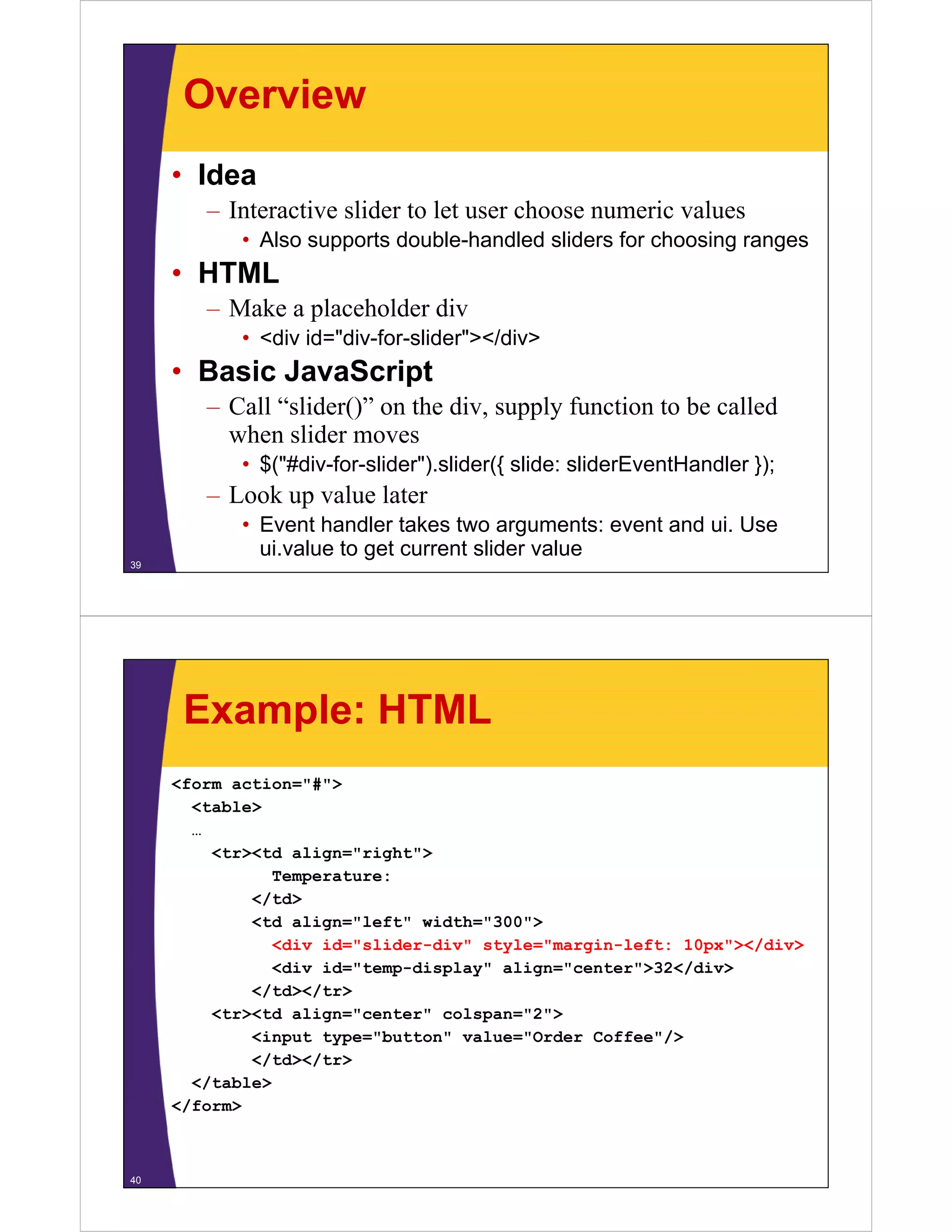
      Example: HTML
     <form action="#">
        <table>
        …
          <tr><td align="right">
                 Temperature:
              </td>
              <td align="left" width="300">
                 <div id="slider-div" style="margin-left: 10px"></div>
                 <div id="temp-display" align="center">32</div>
                                                          /
              </td></tr>
          <tr><td align="center" colspan="2">
              <input type="button" value="Order Coffee />
                      type= button value= Order Coffee"/>
              </td></tr>
        </table>
     </form>
      /


40
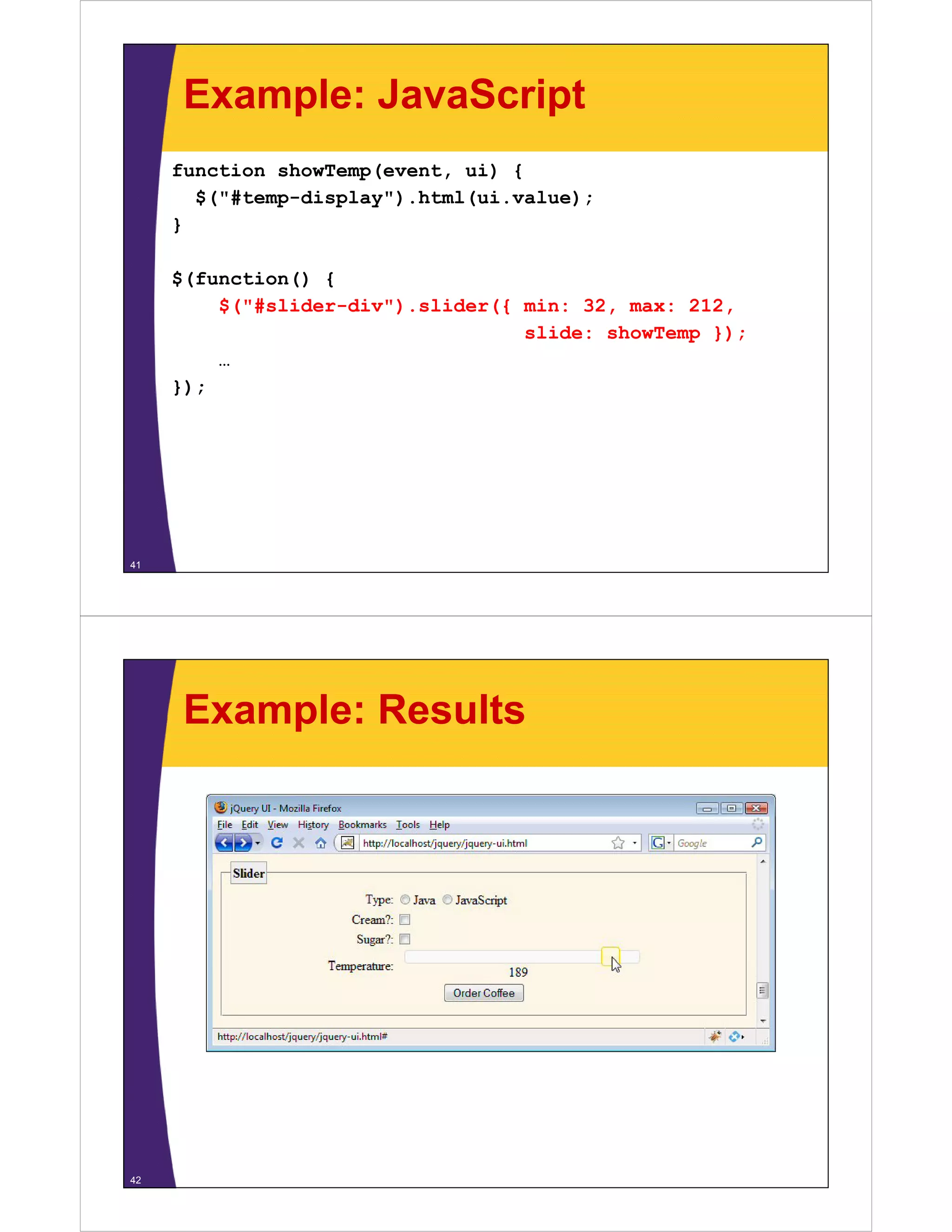
Example: JavaScript
     function showTemp(event, ui) {
       $("#temp-display").html(ui.value);
       $("#temp display") html(ui value);
     }

     $(function() {
         $("#slider-div").slider({ min: 32, max: 212,
                                   slide: showTemp });
         …
     });


41


      Example: Results


42
Main Options for slider({…})
     • min(default: 0)
       – V l corresponding t left or top
         Value        di to l ft t
     • max
       – Value corresponding to right or bottom
     • slide
       – Function to call every time value changes. Function takes two
         arguments: event and ui object. Use ui.value to get currently
           g                        j                    g           y
         selected value.
     • step (default: 1)
       – Granularity of changes
     • value (default: min)
       – The initial value
     • orientation (default: auto)
         i t ti (d f lt        t )
       – horizontal or vertical
43


                                                                                                   © 2009 Marty Hall


                               Progress Bar

                        Customized Java EE Training: http://courses.coreservlets.com/
          Servlets, JSP, JSF 1.x & JSF 2.0, Struts Classic & Struts 2, Ajax, GWT, Spring, Hibernate/JPA, Java 5 & 6.
           Developed and taught by well-known author and developer. At public venues or onsite at your location.
Overview
     • Idea
       – Sh
         Shows progress from 0% to 100%
                        f
          • Output only: does not accept user input
     • HTML
       – Make a placeholder div
          • <div id="div-for-progress-bar"></div>
     • Basic JavaScript
       – Call “progressbar()” on the div
          • $("#div-for-progress").progressbar();
       – Have another event that changes values of bar
          • Look up value with
            $("#div-for-progress").progressbar("option", "value");
          • Change value with
            $("#div-for-progress").progressbar("option", "value", num);
45


     Example: HTML
     <form action="#">
     <div id="progressbar-div"></div>
     <di id "          b   di "></di >
     <input type="button" value="Click 10 Times"
             id="progressbar-button"/>
     </form>


46
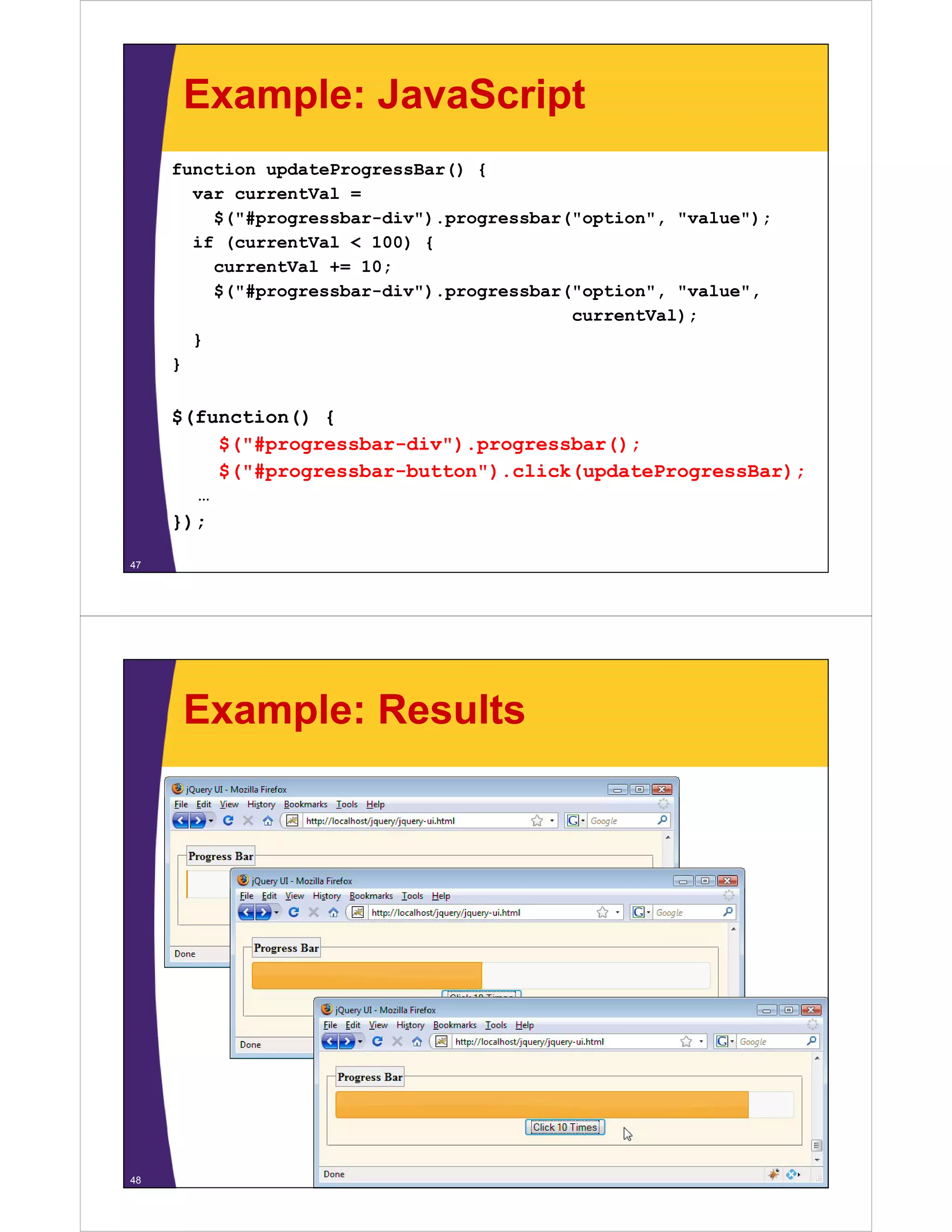
Example: JavaScript
     function updateProgressBar() {
       var currentVal =
         $("#progressbar-div").progressbar("option", "value");
       if (currentVal < 100) {
         currentVal += 10;
                    +
         $("#progressbar-div").progressbar("option", "value",
                                           currentVal);
       }
     }


     $(function() {
         $("#progressbar-div").progressbar();
         $("#progressbar-button").click(updateProgressBar);
       …
     });

47


      Example: Results


48
© 2009 Marty Hall


                                         Wrap-up

                       Customized Java EE Training: http://courses.coreservlets.com/
         Servlets, JSP, JSF 1.x & JSF 2.0, Struts Classic & Struts 2, Ajax, GWT, Spring, Hibernate/JPA, Java 5 & 6.
          Developed and taught by well-known author and developer. At public venues or onsite at your location.


     Summary
     • Setup
       – Load jquery.js, jquery-ui…js and themename/…css
     • Ajax tabbed panels
       – HTML
          • <div id="main">
            <ul><li><a href="relative-url-1">Panel 1</1></li>
             ul li a href relative url 1 Panel 1 /1 /li
                 <li><a href="relative-url-2">Panel 2</1></li>…
            </ul></div>
       – JavaScript
          • $("#main").tabs();
     • Others
       – Static tabbed panels, accordion panel, date picker, slider,
50
         progress bar
© 2009 Marty Hall


                         Questions?

              Customized Java EE Training: http://courses.coreservlets.com/
Servlets, JSP, JSF 1.x & JSF 2.0, Struts Classic & Struts 2, Ajax, GWT, Spring, Hibernate/JPA, Java 5 & 6.
 Developed and taught by well-known author and developer. At public venues or onsite at your location.

jQuery-3-UI

  • 1.
    © 2009 MartyHall j jQuery Part III: y Rich Interfaces with jQuery UI (j (jQuery 1.3, jQuery UI 1.7) y ,j y ) Originals of Slides and Source Code for Examples: http://courses.coreservlets.com/Course-Materials/ajax.html p j Customized Java EE Training: http://courses.coreservlets.com/ Servlets, JSP, JSF 1.x & JSF 2.0, Struts Classic & Struts 2, Ajax, GWT, Spring, Hibernate/JPA, Java 5 & 6. Developed and taught by well-known author and developer. At public venues or onsite at your location. © 2009 Marty Hall For live Ajax & GWT training, see training courses at http://courses.coreservlets.com/. t htt // l t / Taught by the author of Core Servlets and JSP, More Servlets and JSP and this tutorial. Available at public JSP, tutorial venues, or customized versions can be held on-site at your organization. •C Courses d developed and t l d d taught b M t H ll ht by Marty Hall – Java 6, intermediate/beginning servlets/JSP, advanced servlets/JSP, Struts, JSF 1.x & 2.0, Ajax, GWT, custom mix of topics Customized Java EE Training: http://courses.coreservlets.com/ – Ajax courses can concentrate on one library (jQuery, Prototype/Scriptaculous, Ext-JS, Dojo) or survey several • Courses developed and taught by coreservlets.com experts (edited by Marty) Servlets, JSP, JSF 1.x & JSFEJB3, Struts Classic & Struts 2, Ajax, GWT, Spring, Hibernate/JPA, Java 5 & 6. – Spring, Hibernate/JPA, 2.0, Ruby/Rails Developed and taught by well-known author and developer. At public venues or onsite at your location. Contact hall@coreservlets.com for details
  • 2.
    Topics in ThisSection • Overview • Installation and setup • Widgets – Static tabbed panels – Ajax tabbed panels – Accordion panels – Date picker – Slider – Progress bar 5 © 2009 Marty Hall Introduction Customized Java EE Training: http://courses.coreservlets.com/ Servlets, JSP, JSF 1.x & JSF 2.0, Struts Classic & Struts 2, Ajax, GWT, Spring, Hibernate/JPA, Java 5 & 6. Developed and taught by well-known author and developer. At public venues or onsite at your location.
  • 3.
    Overview • Set of rich GUI elements and effects – Tabbed panels, slider, etc – Effects similar to Scripaculous – Drag and drop API • Pros – Official part of j p jQuery y – Well tested – Very clean design – Many still show meaningful results if JavaScript disabled – Theming framework • Cons – No autocompleter (!) 7 – Not as extensive as Dojo, ext/JS, or YUI Downloading • Download custom bundle – h //j http://jqueryui.com/download i /d l d – Select widgets and effects you want – Press “Download” to download ZIP file of result • Unzip – Unzip result into location of your choice • D Download additional themes l d dditi l th – http://jqueryui.com/download – Deselect all widgets and options, choose different theme • You can also interactively build a customized theme – Unzip and copy entries in “css” folder to “css” folder of original download • Bookmark the documentation 8 – http://docs.jquery.com/UI/
  • 4.
    Installing Files • Load normal jQuery as before – jQuery UI download gives an additional copy in “js” folder, so if you are using jQuery UI, one download from jq y jqueryui.com is sufficient • As discussed in previous sections, it is common to rename jQuery-1.3.x.min.js to jQuery.js to simplify upgrades • Copy jQuery ui 1.7.x.custom.min.js jQuery-ui-1.7.x.custom.min.js – E.g., copy download_folder/js/jQuery-ui- 1.7.x.custom.min.js to WebContent/scripts – It is common to leave detailed name for this file, since UI i t l d t il d f thi fil i capabilities change from version to version • Copy CSS “theme” folder py – E.g., copy download_folder/css/ui-lightness to WebContent/css/ 9 Setting Up Page: Overview • Load required jQuery UI files – jquery.js (renamed from jquery-1.3.2.min.js) – jquery-ui-1.7.1.custom.min.js – Any custom CSS files your app uses • Load your files that use jQuery UI – Any custom JavaScript files your app uses – themename/jquery-ui-1.7.1.custom.min.css 10
  • 5.
    Setting Up Page:Example <link rel="stylesheet" href="./css/ui-lightness/jquery-ui-1.7.1.custom.css" href=" /css/ui lightness/jquery ui 1 7 1 custom css" type="text/css"/> <link rel="stylesheet" href="./css/sample-styles.css" href=" /css/sample styles css" type="text/css"/> <script src="./scripts/jquery.js" type="text/javascript"></script> t "t t/j i t"></ i t> <script src="./scripts/jquery-ui-1.7.1.custom.min.js" type="text/javascript"></script> <script src="./scripts/jquery-ui-examples.js" i t " / i t /j i l j " type="text/javascript"></script> 11 © 2009 Marty Hall Tabbed Panels with Static Content Customized Java EE Training: http://courses.coreservlets.com/ Servlets, JSP, JSF 1.x & JSF 2.0, Struts Classic & Struts 2, Ajax, GWT, Spring, Hibernate/JPA, Java 5 & 6. Developed and taught by well-known author and developer. At public venues or onsite at your location.
  • 6.
    Overview • Idea – T bb d panel where clicking tabs changes content inside Tabbed l h li ki t b h t t i id • HTML – Make a div container to hold the tabs • <div id="main-tabbed-panel-div">…</div> – Include a ul list containing internal hyperlinks • <ul> <li><a href="#panel1">Go to Panel 1</a></li> <li><a href="#panel2">Go to Panel 2</a></li> </ul> – Include divs whose ids match the href values (minus “#”) # ) • <div id="panel1">Content for panel 1</div> <div id="panel2">Content for panel 2</div> • Basic JavaScript – Call “tabs()” on the div container • $("#main-tabbed-panel-div").tabs(); 13 Example: HTML <div id="static-tabbed-panel-div"> <ul> <li><a href="#panel1">Panel 1</a></li> <li><a href="#panel2">Panel 2</a></li> <li><a href="#panel3">Panel 3</a></li> </ul> <div id="panel1"> <p>Content for first panel.</p> <p>Foo, bar, baz.</p><p>Yadda, yadda, yadda.</p> <p>Foo bar baz </p><p>Yadda yadda yadda </p> </div> <div id="panel2"> <p>Content for second panel.</p> <p>Foo, bar, baz.</p><p>Yadda, yadda, yadda.</p> </div> <div id="panel3"> <p>Content for thi d panel.</p> < >C t t f third l </ > <p>Foo, bar, baz.</p><p>Yadda, yadda, yadda.</p> </div> 14 </div>
  • 7.
    Example: JavaScript $(function() { $("#static-tabbed-panel-div").tabs(); $("# t ti t bb d l di ") t b () … }) }); 15 Example: Results 16
  • 8.
    Options for jQueryUI Widgets • You can supply anonymous object – Object has optional fields – Fields specify configuration and operational options • Examples – $("#some-id").tabs(); – $("#some-id") tabs({ option1: "foo", $( #some id ).tabs({ foo option2: "bar", option3: "baz" }) No t ili N trailing comma 17 Main Options for tabs({…}) for Static Content • selected (default: 0) – T b to be selected initially Tab b l d i i i ll • collapsible (default: false) – Can you click selected tab to hide it (and thus all panels)? • $("#main-id").tabs({ collapsible: true }); • disabled (default: empty array) – A array of t b numbers (0-based) that should be disabled An f tab b (0 b d) th t h ld b di bl d on startup • event (default: click) ( ) – The type of event that should initiate tab selection • $("#main-id").tabs({ event: "mouseover" }); • fx – Many options for specifying animation when tabs are 18 selected. See docs for details.
  • 9.
    © 2009 MartyHall Tabbed Panels with Dynamic ( j ) Content y (Ajax) Customized Java EE Training: http://courses.coreservlets.com/ Servlets, JSP, JSF 1.x & JSF 2.0, Struts Classic & Struts 2, Ajax, GWT, Spring, Hibernate/JPA, Java 5 & 6. Developed and taught by well-known author and developer. At public venues or onsite at your location. Overview • Idea – T bb d panel where clicking tabs gets server content Tabbed l h li ki b • HTML – Make a div container to hold the tabs • <div id="main-tabbed-panel-div">…</div> – Include a ul list containing external relative hyperlinks • <ul> <li><a href="url1">Get Content for Panel 1</a></li> <li><a href="url2">Get Content for Panel 2</a></li> </ul> – That’s all! • Basic JavaScript – C ll “tabs()” on the div container Call “ b ()” h di i • $("#main-tabbed-panel-div").tabs(); 20
  • 10.
    Example: HTML <div id="ajax-tabbed-panel-div"> <ul> <li><a href="time-panel.jsp">Show Time</a></li> <li><a href="list-panel.jsp?range=5"> Show Small Numbers</a></li> <li><a href="list-panel.jsp?range=500"> Show Big Numbers</a></li> </ul> </div> 21 Example: JavaScript $(function() { $( #ajax tabbed panel div ).tabs({ $("#ajax-tabbed-panel-div") tabs({ collapsible: true }); … }); 22
  • 11.
    Example: JSP • time-panel.jsp <h3>It is now <%= new java.util.Date() %></h3> Do you know where your closures are doing? • list-panel.jsp p j p <% double range = 10.0; try { String r = request.getParameter("range"); range = I t Integer.parseInt(r); I t( ) } catch(Exception e) {} %> <h3>Numbers from 0 to <%= range %></h3> <ul> <li><%= Math.random() * range %></li> <li><%= Math.random() * range %></li> <li><%= Math.random() * range %></li> <li><%= Math.random() * range %></li> <li><%= Math.random() * range %></li> </ul> 23 Example: Results 24
  • 12.
    Main Options fortabs({…}) for Ajax Content • ajaxOptions (default: {}) – Any of the options used for $.ajax in first jQuery section • $("#main-id").tabs({ ajaxOptions: { error: errorHandler }}); • cache (default: false) – Should jQuery remember content for previously-selected tabs? Very helpful if result is always the same for a given y p y g URL. • spinner (default “<em>Loading…</em>”) – T to show in tab title after tab selected but before Text h i b il f b l db b f content is received from server 25 © 2009 Marty Hall Accordion Panels Customized Java EE Training: http://courses.coreservlets.com/ Servlets, JSP, JSF 1.x & JSF 2.0, Struts Classic & Struts 2, Ajax, GWT, Spring, Hibernate/JPA, Java 5 & 6. Developed and taught by well-known author and developer. At public venues or onsite at your location.
  • 13.
    Overview • Idea – Horizontally stacked panels with wide tabs • HTML – Make a div container to hold the tabs • <div id="main-accordion-panel-div">…</div> – Include alternating pairs of text with links and content • <h2><a href="#">Panel 1</a></h2> • <div>Content for Panel 1</div> • <h2><a href="#">Panel 2</ ></h2> <h2>< h f "#">P l 2</a></h2> • <div>Content for Panel 2</div> • Basic Ja aSc pt as c JavaScript – Call “accordion()” on the div container 27 • $("#main-accordion-panel-div").accordion(); Example: HTML <div id="accordion-panel-div"> <h2><a href="#">Panel 1</a></h2> href= # >Panel <div> <p>Content for first panel.</p> <p>Foo, bar, baz.</p><p>Yadda, yadda, yadda.</p> </div> <h2><a href="#">Panel 2</a></h2> <div> <p>Content for second panel.</p> <p>Foo, bar, baz.</p><p>Yadda, yadda, yadda.</p> </div> <h2><a href="#">Panel 3</a></h2> <div> <p>Content for third panel.</p> <p>Foo, bar, baz.</p><p>Yadda, yadda, yadda.</p> </div> 28 </div>
  • 14.
    Example: JavaScript $(function() { $("#accordion-panel-div").accordion(); $("# di l di ") di () … }) }); 29 Example: Results 30
  • 15.
    Main Options foraccordion({…}) • active (default: 0) – Index or selector for initially-selected item • collapsible, event – C you click to hide? Event to trigger selection. Can li k hid ? E i l i – Same as with tabs() • animated (default: true) – Name of jQuery animation to use when showing content • $("#main-id").accordion({ animated: "fadeIn" }); 31 © 2009 Marty Hall Date Picker Customized Java EE Training: http://courses.coreservlets.com/ Servlets, JSP, JSF 1.x & JSF 2.0, Struts Classic & Struts 2, Ajax, GWT, Spring, Hibernate/JPA, Java 5 & 6. Developed and taught by well-known author and developer. At public venues or onsite at your location.
  • 16.
    Overview • Idea – Click in textfield to pop up calendar. Choosing day from calendar puts date string into textfield • HTML – Make an input field • <input type="text" id="date-field"/> p yp • Basic JavaScript – Call “datepicker()” on the textfield • $("#date-field").datepicker(); 33 Example: HTML <form action=#"> <table> <tr><td align="right"> From: <input type="text"/></td></tr> <tr><td align="right"> Departure Date: <input type="text" id="start-date"/></td></tr> / / / <tr><td align="right"> To: <input type="text"/></td></tr> <tr><td a g t td align="right"> g t Return Date: <input type="text" id="end-date"/></td></tr> <tr><td align="center"> <input type="button" value="Show Flights"/> <input type="button" value="Show Hotels"/> / </td></tr> </table> </form> 34
  • 17.
    Example: JavaScript $(function() { $("#start-date").datepicker(); $("#start date") datepicker(); $("#end-date").datepicker({ changeMonth: true, numberOfMonths: 2 }); … }); 35 Example: Results 36
  • 18.
    Main Options for datepicker({…}) datepicker({ }) • defaultDate (default: today) – I i i ll selected date Initially l dd • changeMonth (default: false) changeYear (default: false) – Should jQuery include a dropdown list to let you choose the month or year? • dayNames (default Sunday Saturday) Sunday…Saturday) monthNames (default January…December) – Names to use for the days and months. For other y languages. There are also various options for short versions of days. • numberOfMonths (default: 1) – How many months to show at a time 37 © 2009 Marty Hall Slider Customized Java EE Training: http://courses.coreservlets.com/ Servlets, JSP, JSF 1.x & JSF 2.0, Struts Classic & Struts 2, Ajax, GWT, Spring, Hibernate/JPA, Java 5 & 6. Developed and taught by well-known author and developer. At public venues or onsite at your location.
  • 19.
    Overview • Idea – Interactive slider to let user choose numeric values • Also supports double-handled sliders for choosing ranges • HTML – Make a placeholder div • <div id="div-for-slider"></div> • Basic JavaScript – Call “slider()” on the div, supply function to be called when slider moves • $("#div-for-slider").slider({ slide: sliderEventHandler }); – Look up value later • Event handler takes two arguments: event and ui. Use ui.value to get current slider value 39 Example: HTML <form action="#"> <table> … <tr><td align="right"> Temperature: </td> <td align="left" width="300"> <div id="slider-div" style="margin-left: 10px"></div> <div id="temp-display" align="center">32</div> / </td></tr> <tr><td align="center" colspan="2"> <input type="button" value="Order Coffee /> type= button value= Order Coffee"/> </td></tr> </table> </form> / 40
  • 20.
    Example: JavaScript function showTemp(event, ui) { $("#temp-display").html(ui.value); $("#temp display") html(ui value); } $(function() { $("#slider-div").slider({ min: 32, max: 212, slide: showTemp }); … }); 41 Example: Results 42
  • 21.
    Main Options forslider({…}) • min(default: 0) – V l corresponding t left or top Value di to l ft t • max – Value corresponding to right or bottom • slide – Function to call every time value changes. Function takes two arguments: event and ui object. Use ui.value to get currently g j g y selected value. • step (default: 1) – Granularity of changes • value (default: min) – The initial value • orientation (default: auto) i t ti (d f lt t ) – horizontal or vertical 43 © 2009 Marty Hall Progress Bar Customized Java EE Training: http://courses.coreservlets.com/ Servlets, JSP, JSF 1.x & JSF 2.0, Struts Classic & Struts 2, Ajax, GWT, Spring, Hibernate/JPA, Java 5 & 6. Developed and taught by well-known author and developer. At public venues or onsite at your location.
  • 22.
    Overview • Idea – Sh Shows progress from 0% to 100% f • Output only: does not accept user input • HTML – Make a placeholder div • <div id="div-for-progress-bar"></div> • Basic JavaScript – Call “progressbar()” on the div • $("#div-for-progress").progressbar(); – Have another event that changes values of bar • Look up value with $("#div-for-progress").progressbar("option", "value"); • Change value with $("#div-for-progress").progressbar("option", "value", num); 45 Example: HTML <form action="#"> <div id="progressbar-div"></div> <di id " b di "></di > <input type="button" value="Click 10 Times" id="progressbar-button"/> </form> 46
  • 23.
    Example: JavaScript function updateProgressBar() { var currentVal = $("#progressbar-div").progressbar("option", "value"); if (currentVal < 100) { currentVal += 10; + $("#progressbar-div").progressbar("option", "value", currentVal); } } $(function() { $("#progressbar-div").progressbar(); $("#progressbar-button").click(updateProgressBar); … }); 47 Example: Results 48
  • 24.
    © 2009 MartyHall Wrap-up Customized Java EE Training: http://courses.coreservlets.com/ Servlets, JSP, JSF 1.x & JSF 2.0, Struts Classic & Struts 2, Ajax, GWT, Spring, Hibernate/JPA, Java 5 & 6. Developed and taught by well-known author and developer. At public venues or onsite at your location. Summary • Setup – Load jquery.js, jquery-ui…js and themename/…css • Ajax tabbed panels – HTML • <div id="main"> <ul><li><a href="relative-url-1">Panel 1</1></li> ul li a href relative url 1 Panel 1 /1 /li <li><a href="relative-url-2">Panel 2</1></li>… </ul></div> – JavaScript • $("#main").tabs(); • Others – Static tabbed panels, accordion panel, date picker, slider, 50 progress bar
  • 25.
    © 2009 MartyHall Questions? Customized Java EE Training: http://courses.coreservlets.com/ Servlets, JSP, JSF 1.x & JSF 2.0, Struts Classic & Struts 2, Ajax, GWT, Spring, Hibernate/JPA, Java 5 & 6. Developed and taught by well-known author and developer. At public venues or onsite at your location.