Go to View > Header & Footer to edit July 17, 2013 | slide 1RSCs – Stimulating and supporting innovation in learning
Using iPads to Support Inclusive Learning
Chris Barber and Scott Hibberson
Jisc Regional Support Centre for Yorkshire and Humber
www.jiscrsc.ac.uk/YH
www.jisc.ac.uk/rsc
July 17, 2013 | slide 2
Structure of the Session
 Reasonable adjustments - the Jisc TechDis Tool
Box
 Web solutions
– Robobraille
– QR Codes
– Weblink sites: Pearltrees and Scoop.it
 Using iPads to support dyslexic learners
– Accessibility options
– Various Apps
July 17, 2013 | slide 3
Who we are.
ww
http://inclusivity.rsc-yh.ac.uk
July 17, 2013 | slide 4
Who we are.
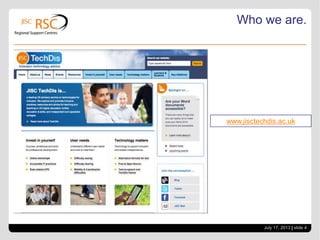
www.jisctechdis.ac.uk
July 17, 2013 | slide 5
Who we are.
www.jisctechdis.ac.uk/tbx
July 17, 2013 | slide 6
Reasonable Adjustments.
 Reasonable adjustments need to be made to ensure
disabled persons do not suffer substantial disadvantage.
 ………..institutions need to be anticipatory and proactive in
encouraging disabled persons to participate in the
education provision and the various activities of each
institution…..
 And……..Ofsted is now looking at the quality of LLDD
provision in a learning provider!
July 17, 2013 | slide 7
Reasonable Adjustments.
 Issues for Learners with a range of disabilities
– Taking notes, correct spelling (predictive texting)
– Background colours / contrast
– Recognising words and meanings
– Organising work (and self, generally)
– Thinking visually
– Remembering information
– Communicating face to face and in written form
– For VI learners – working in any visual format
July 17, 2013 | slide 8
Web solutions
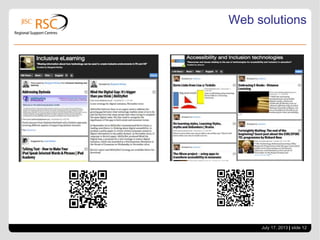
 Web solutions
–Robobraille – www.robobraille.org
–QR Codes – www.qrstuff.com
–Weblink sites, Pearltrees and Scoop.it
• www.pearltrees.com
• www.scoop.it
July 17, 2013 | slide 9
Web solutions
July 17, 2013 | slide 10
Web solutions
http://www.qrstuff.com
/
http://blog.dundee.ac.uk/acc
essibility/2011/10/qr-codes-
and-accessibility/
July 17, 2013 | slide 11
Web solutions
www.scoop.it
July 17, 2013 | slide 12
Web solutions
July 17, 2013 | slide 13
Web solutions
www.pearltrees.com
July 17, 2013 | slide 14
Using iPads to Support Learning
July 17, 2013 | slide 15
Using iPads to Support Learning
- Accessibility features
July 17, 2013 | slide 16
Using iPads to Support Learning
July 17, 2013 | slide 17
Using iPads to Support Learning
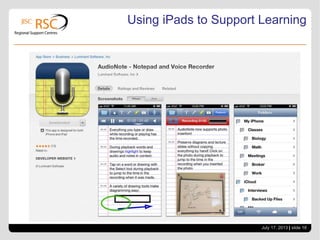
July 17, 2013 | slide 18
Using iPads to Support Learning
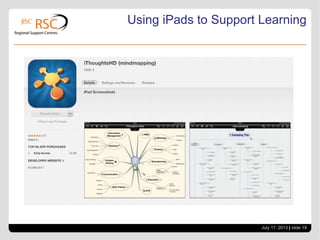
July 17, 2013 | slide 19
Using iPads to Support Learning
July 17, 2013 | slide 20
Using iPads to Support Learning
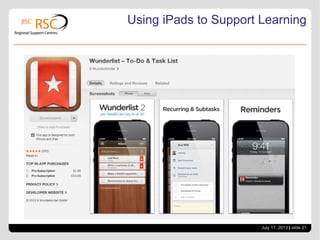
July 17, 2013 | slide 21
Using iPads to Support Learning
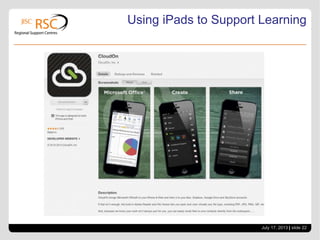
July 17, 2013 | slide 22
Using iPads to Support Learning
July 17, 2013 | slide 23
Using iPads to Support Learning
July 17, 2013 | slide 24
Discussion
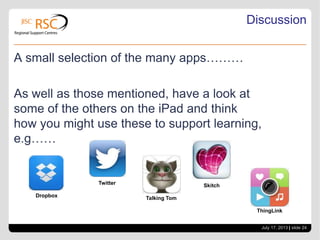
A small selection of the many apps………
As well as those mentioned, have a look at
some of the others on the iPad and think
how you might use these to support learning,
e.g……
Dropbox
Twitter
Talking Tom
Skitch
ThingLink
July 17, 2013 | slide 25
Some links
 Spreadsheet of Apps
 https://docs.google.com/spreadsheet/ccc?key=0AlUoOEy_1LXtdDEwUldfd2dtNWE0LXFVNXRaY2tGVkE
 Blog of mobile AT resources
– http://asstech.wordpress.com/category/mobile/
 Jisc TechDis
– http://www.jisctechdis.ac.uk

Accessible learning

  • 1.
    Go to View> Header & Footer to edit July 17, 2013 | slide 1RSCs – Stimulating and supporting innovation in learning Using iPads to Support Inclusive Learning Chris Barber and Scott Hibberson Jisc Regional Support Centre for Yorkshire and Humber www.jiscrsc.ac.uk/YH www.jisc.ac.uk/rsc
  • 2.
    July 17, 2013| slide 2 Structure of the Session  Reasonable adjustments - the Jisc TechDis Tool Box  Web solutions – Robobraille – QR Codes – Weblink sites: Pearltrees and Scoop.it  Using iPads to support dyslexic learners – Accessibility options – Various Apps
  • 3.
    July 17, 2013| slide 3 Who we are. ww http://inclusivity.rsc-yh.ac.uk
  • 4.
    July 17, 2013| slide 4 Who we are. www.jisctechdis.ac.uk
  • 5.
    July 17, 2013| slide 5 Who we are. www.jisctechdis.ac.uk/tbx
  • 6.
    July 17, 2013| slide 6 Reasonable Adjustments.  Reasonable adjustments need to be made to ensure disabled persons do not suffer substantial disadvantage.  ………..institutions need to be anticipatory and proactive in encouraging disabled persons to participate in the education provision and the various activities of each institution…..  And……..Ofsted is now looking at the quality of LLDD provision in a learning provider!
  • 7.
    July 17, 2013| slide 7 Reasonable Adjustments.  Issues for Learners with a range of disabilities – Taking notes, correct spelling (predictive texting) – Background colours / contrast – Recognising words and meanings – Organising work (and self, generally) – Thinking visually – Remembering information – Communicating face to face and in written form – For VI learners – working in any visual format
  • 8.
    July 17, 2013| slide 8 Web solutions  Web solutions –Robobraille – www.robobraille.org –QR Codes – www.qrstuff.com –Weblink sites, Pearltrees and Scoop.it • www.pearltrees.com • www.scoop.it
  • 9.
    July 17, 2013| slide 9 Web solutions
  • 10.
    July 17, 2013| slide 10 Web solutions http://www.qrstuff.com / http://blog.dundee.ac.uk/acc essibility/2011/10/qr-codes- and-accessibility/
  • 11.
    July 17, 2013| slide 11 Web solutions www.scoop.it
  • 12.
    July 17, 2013| slide 12 Web solutions
  • 13.
    July 17, 2013| slide 13 Web solutions www.pearltrees.com
  • 14.
    July 17, 2013| slide 14 Using iPads to Support Learning
  • 15.
    July 17, 2013| slide 15 Using iPads to Support Learning - Accessibility features
  • 16.
    July 17, 2013| slide 16 Using iPads to Support Learning
  • 17.
    July 17, 2013| slide 17 Using iPads to Support Learning
  • 18.
    July 17, 2013| slide 18 Using iPads to Support Learning
  • 19.
    July 17, 2013| slide 19 Using iPads to Support Learning
  • 20.
    July 17, 2013| slide 20 Using iPads to Support Learning
  • 21.
    July 17, 2013| slide 21 Using iPads to Support Learning
  • 22.
    July 17, 2013| slide 22 Using iPads to Support Learning
  • 23.
    July 17, 2013| slide 23 Using iPads to Support Learning
  • 24.
    July 17, 2013| slide 24 Discussion A small selection of the many apps……… As well as those mentioned, have a look at some of the others on the iPad and think how you might use these to support learning, e.g…… Dropbox Twitter Talking Tom Skitch ThingLink
  • 25.
    July 17, 2013| slide 25 Some links  Spreadsheet of Apps  https://docs.google.com/spreadsheet/ccc?key=0AlUoOEy_1LXtdDEwUldfd2dtNWE0LXFVNXRaY2tGVkE  Blog of mobile AT resources – http://asstech.wordpress.com/category/mobile/  Jisc TechDis – http://www.jisctechdis.ac.uk