© 2022 NTT DATA INTRAMART CORPORATION
2022 Spring Updates
intra-mart Accel Platform/Accel Series
NTT DATA INTRAMAT CO., LTD.
© 2022 NTT DATA INTRAMART CORPORATION
Added support for ◆◆◆.
・○○○○○○
-△△△
-□□□
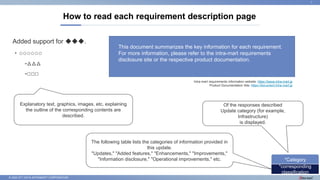
How to read each requirement description page
1
This document summarizes the key information for each requirement.
For more information, please refer to the intra-mart requirements
disclosure site or the respective product documentation.
*corresponding
classification
*Category
Of the responses described
Update category (for example,
Infrastructure)
is displayed.
The following table lists the categories of information provided in
this update.
"Updates," "Added features," "Enhancements," "Improvements,"
"Information disclosure," "Operational improvements," etc.
Explanatory text, graphics, images, etc. explaining
the outline of the corresponding contents are
described.
Intra-mart requirements information website: https://issue.intra-mart.jp
Product Documentation Site: https://document.intra-mart.jp
© 2022 NTT DATA INTRAMART CORPORATION
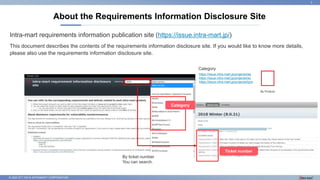
Intra-mart requirements information publication site (https://issue.intra-mart.jp/)
This document describes the contents of the requirements information disclosure site. If you would like to know more details,
please also use the requirements information disclosure site.
About the Requirements Information Disclosure Site
2
https://issue.intra-mart.jp/projects/iap
https://issue.intra-mart.jp/projects/iac
https://issue.intra-mart.jp/projects/bpm
Category
Category
Ticket number
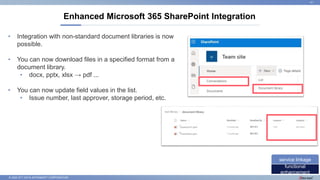
By ticket number
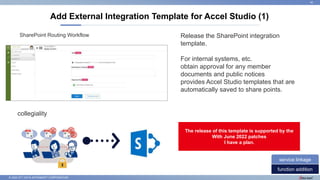
You can search.
By Product
© 2022 NTT DATA INTRAMART CORPORATION
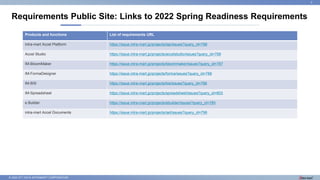
Requirements Public Site: Links to 2022 Spring Readiness Requirements
3
Products and functions List of requirements URL
intra-mart Accel Platform https://issue.intra-mart.jp/projects/iap/issues?query_id=798
Accel Studio https://issue.intra-mart.jp/projects/accelstudio/issues?query_id=799
IM-BloomMaker https://issue.intra-mart.jp/projects/bloommaker/issues?query_id=787
IM-FormaDesigner https://issue.intra-mart.jp/projects/forma/issues?query_id=788
IM-BIS https://issue.intra-mart.jp/projects/bis/issues?query_id=786
IM-Spreadsheet https://issue.intra-mart.jp/projects/spreadsheet/issues?query_id=803
e Builder https://issue.intra-mart.jp/projects/ebuilder/issues?query_id=785
intra-mart Accel Documents https://issue.intra-mart.jp/projects/iad/issues?query_id=796
© 2022 NTT DATA INTRAMART CORPORATION
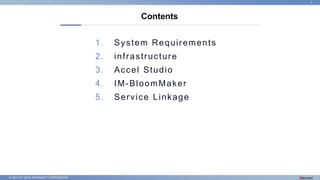
1. System Requirements
2. infrastructure
3. Accel Studio
4. IM-BloomMaker
5. Service Linkage
Contents
4
© 2022 NTT DATA INTRAMART CORPORATION
1. System Requirements
5
© 2022 NTT DATA INTRAMART CORPORATION
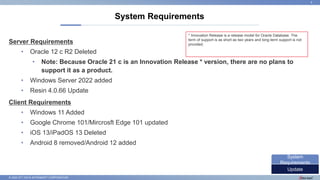
Server Requirements
• Oracle 12 c R2 Deleted
• Note: Because Oracle 21 c is an Innovation Release * version, there are no plans to
support it as a product.
• Windows Server 2022 added
• Resin 4.0.66 Update
Client Requirements
• Windows 11 Added
• Google Chrome 101/Mircrosft Edge 101 updated
• iOS 13/iPadOS 13 Deleted
• Android 8 removed/Android 12 added
System Requirements
6
Update
System
Requirements
* Innovation Release is a release model for Oracle Database. The
term of support is as short as two years and long-term support is not
provided.
© 2022 NTT DATA INTRAMART CORPORATION
2. infrastructure
7
© 2022 NTT DATA INTRAMART CORPORATION
Correspondence content
• Allows authentication from the intra-mart Accel Platform to an SMTP/IMAP/POP server using OAuth.
• Provides the ability for system administrators to configure SMTP connection settings from the screen.
• Provides the ability to configure OAuth providers for use by system administrators from the screen.
• Provides the ability to configure the OAuth client for use by system administrators from the screen.
• Enables you to pass access tokens to tasks related to IMAP/POP operations in IM-LogicDesigner.
• You can operate IMAP/POP by combining it with the access token acquisition task.
Support for connecting to mail servers using OAuth authentication
8
functional
enhancement
infrastructure
© 2022 NTT DATA INTRAMART CORPORATION
Background to the Response
• For Microsoft Exchange Online and Google Workspace, authentication using OAuth is recommended
for connecting to mail servers. It has been announced that connections with Basic Authentication will be
disabled soon.
• https://docs.microsoft.com/ja-jp/exchange/clients-and-mobile-in-exchange-online/deprecation-of-basic-authentication-exchange-
online
• https://support.google.com/accounts/answer/6010255
• We have received requests for authentication using OAuth in order to comply with our security policy.
Support for connecting to mail servers using OAuth authentication
9
functional
enhancement
infrastructure
© 2022 NTT DATA INTRAMART CORPORATION
3. Accel Studio/Accel Studio templates
10
© 2022 NTT DATA INTRAMART CORPORATION
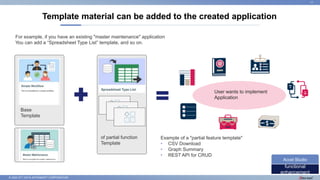
Template material can be added to the created application
11
functional
enhancement
Accel Studio
For example, if you have an existing "master maintenance" application
You can add a “Spreadsheet Type List” template, and so on.
User wants to implement
Application
Example of a "partial feature template"
• CSV Download
• Graph Summary
• REST API for CRUD
of partial function
Template
Base
Template
© 2022 NTT DATA INTRAMART CORPORATION
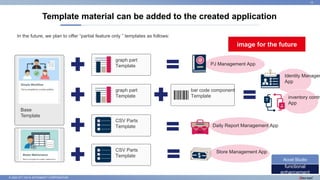
Template material can be added to the created application
12
functional
enhancement
Accel Studio
In the future, we plan to offer “partial feature only ” templates as follows:
graph part
Template
graph part
Template
CSV Parts
Template
bar code component
Template
CSV Parts
Template
Daily Report Management App
PJ Management App
inventory contro
App
Identity Managem
App
Store Management App
image for the future
Base
Template
© 2022 NTT DATA INTRAMART CORPORATION
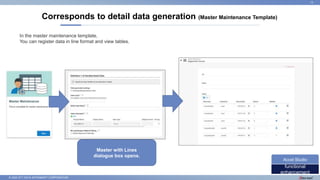
Corresponds to detail data generation (Master Maintenance Template)
13
functional
enhancement
Accel Studio
Master with Lines
dialogue box opens.
In the master maintenance template,
You can register data in line format and view tables.
© 2022 NTT DATA INTRAMART CORPORATION
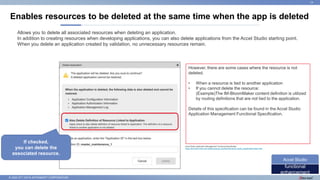
Enables resources to be deleted at the same time when the app is deleted
14
functional
enhancement
Accel Studio
Allows you to delete all associated resources when deleting an application.
In addition to creating resources when developing applications, you can also delete applications from the Accel Studio starting point.
When you delete an application created by validation, no unnecessary resources remain.
However, there are some cases where the resource is not
deleted.
• When a resource is tied to another application
• If you cannot delete the resource:
(Example)The IM-BloomMaker content definition is utilized
by routing definitions that are not tied to the application.
Details of this specification can be found in the Accel Studio
Application Management Functional Specification.
If checked,
you can delete the
associated resource.
Accel Studio Application Management Functional Specification
https://document.intra-mart.jp/library/accel_studio/public/accel_studio_specification/index.html
© 2022 NTT DATA INTRAMART CORPORATION
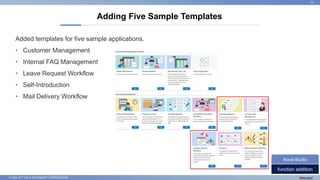
Adding Five Sample Templates
15
function addition
Accel Studio
Added templates for five sample applications.
• Customer Management
• Internal FAQ Management
• Leave Request Workflow
• Self-Introduction
• Mail Delivery Workflow
© 2022 NTT DATA INTRAMART CORPORATION
[Accel Studio Glossary]
Template
A template for applications you create in Accel Studio. Contains various materials and definitions for creating applications
on intra-mart.
Sample Application Template
This template can be used as a simple application as it is. Not only can you use it as is, but you can also use it as an
example of what you want to do, what you want to do, and how to create a rich UI.
[Column Description] "Templates"
16
column
commentary
Accel Studio
For more information on templates, also refer to the Accel Studio Template Catalog.
Accel Studio Template Catalog
https://document.intra-mart.jp/library/accel_studio/public/accel_studio_template_catalog/texts/templates/index.html
© 2022 NTT DATA INTRAMART CORPORATION
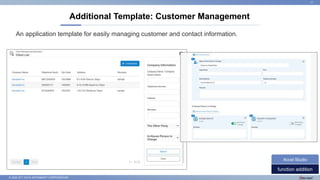
Additional Template: Customer Management
17
function addition
Accel Studio
An application template for easily managing customer and contact information.
© 2022 NTT DATA INTRAMART CORPORATION
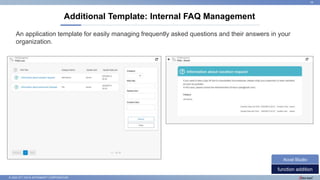
Additional Template: Internal FAQ Management
18
function addition
Accel Studio
An application template for easily managing frequently asked questions and their answers in your
organization.
© 2022 NTT DATA INTRAMART CORPORATION
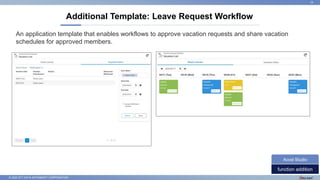
Additional Template: Leave Request Workflow
19
function addition
Accel Studio
An application template that enables workflows to approve vacation requests and share vacation
schedules for approved members.
© 2022 NTT DATA INTRAMART CORPORATION
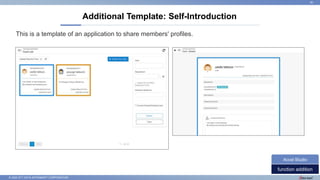
Additional Template: Self-Introduction
20
function addition
Accel Studio
This is a template of an application to share members' profiles.
© 2022 NTT DATA INTRAMART CORPORATION
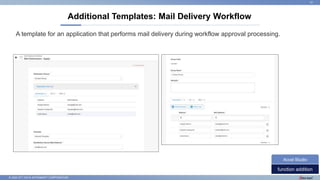
Additional Templates: Mail Delivery Workflow
21
function addition
Accel Studio
A template for an application that performs mail delivery during workflow approval processing.
© 2022 NTT DATA INTRAMART CORPORATION
4. IM-BloomMaker
22
© 2022 NTT DATA INTRAMART CORPORATION
Specification Change 1
When assigning a variable, null is used to complete any missing mapping keys.
Specification Change 2
Change the time zone of the account context to default for the date and time in the “Environment” variable.
Spec Change3
Change the color of the "Display message ○ in error dialog box" and "Display in alert dialog box" buttons.
The following pages provide more details.
Designer Screen Specification Changes
23
specification
change
IM-BloomMaker
© 2022 NTT DATA INTRAMART CORPORATION
Specification change 1: Variable Assignment
24
specification
change
IM-BloomMaker
When assigning a value to a variable, the key is compared to the mapped key defined in the
destination, and if there are not enough keys in the assignment, the key is complemented with a
null value.
$variable
{“list”: [{
“id”: “item1”,
"name": "item 1"
}]}
$variable.list[1] => {}
2021 Winter or earlier
$variable.list[1] => {
“id”: null,
“name”: null
}
2022 Spring or later
$variable.list.push ({}) After
© 2022 NTT DATA INTRAMART CORPORATION
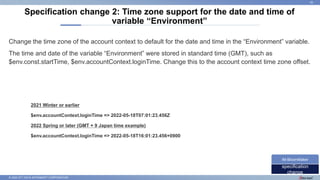
Change the time zone of the account context to default for the date and time in the “Environment” variable.
The time and date of the variable “Environment” were stored in standard time (GMT), such as
$env.const.startTime, $env.accountContext.loginTime. Change this to the account context time zone offset.
Specification change 2: Time zone support for the date and time of
variable “Environment”
25
specification
change
IM-BloomMaker
2021 Winter or earlier
$env.accountContext.loginTime => 2022-05-18T07:01:23.456Z
2022 Spring or later (GMT + 9 Japan time example)
$env.accountContext.loginTime => 2022-05-18T16:01:23.456+0900
© 2022 NTT DATA INTRAMART CORPORATION
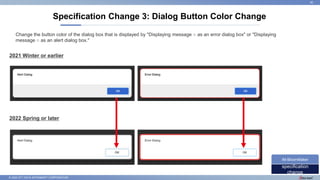
Specification Change 3: Dialog Button Color Change
26
specification
change
IM-BloomMaker
2021 Winter or earlier
2022 Spring or later
Change the button color of the dialog box that is displayed by "Displaying message ○ as an error dialog box" or "Displaying
message ○ as an alert dialog box."
© 2022 NTT DATA INTRAMART CORPORATION
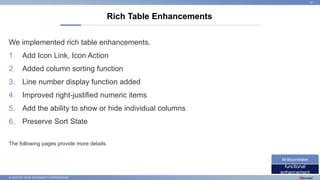
We implemented rich table enhancements.
1. Add Icon Link, Icon Action
2. Added column sorting function
3. Line number display function added
4. Improved right-justified numeric items
5. Add the ability to show or hide individual columns
6. Preserve Sort State
The following pages provide more details.
Rich Table Enhancements
27
functional
enhancement
IM-BloomMaker
© 2022 NTT DATA INTRAMART CORPORATION
[Rich Table Enhancement 1] Add Icon Link and Icon Action
28
functional
enhancement
IM-BloomMaker
Added icon link and icon action to
columnSettings of rich table.
Icons for CSS sprites are available
for imui and Font Awesome for
Bulma.
© 2022 NTT DATA INTRAMART CORPORATION
[Rich Table Enhancement 2] Added Column Sorting Function
29
functional
enhancement
IM-BloomMaker
Added column sorting functionality
to rich tables.
Equivalent to the column sorting
feature available for grid table items
in IM-FormaDesigner.
© 2022 NTT DATA INTRAMART CORPORATION
[Rich table enhancement 3] Line number display function added
30
functional
enhancement
IM-BloomMaker
Added the ability to display line
numbers.
© 2022 NTT DATA INTRAMART CORPORATION
[Rich Table Enhancement 4] Improved the display of numerical items to the right.
31
functional
enhancement
IM-BloomMaker
Numeric items are now right-aligned.
If you want the column to be left-
aligned, specify string for the
column type.
© 2022 NTT DATA INTRAMART CORPORATION
[Rich Table Enhancement 5] Add an argument to set whether to show or hide
columns
32
functional
enhancement
IM-BloomMaker
Added hiddenColumn parameter to
columnSettings.
If this parameter is true, the column
is hidden.
© 2022 NTT DATA INTRAMART CORPORATION
Added a variable sortConditions to store sort conditions in rich table properties.
When you sort data in a rich table, sort criteria are stored in variables. You can also specify
the sort status at initial display by storing the sort condition in a variable beforehand.
[Rich Table Enhancement 6] Improved to retain the sort state
33
functional
enhancement
IM-BloomMaker
© 2022 NTT DATA INTRAMART CORPORATION
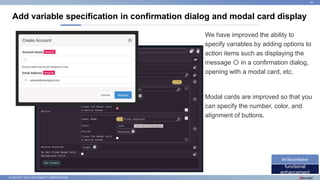
Add variable specification in confirmation dialog and modal card display
34
functional
enhancement
IM-BloomMaker
We have improved the ability to
specify variables by adding options to
action items such as displaying the
message 〇 in a confirmation dialog,
opening with a modal card, etc.
Modal cards are improved so that you
can specify the number, color, and
alignment of buttons.
© 2022 NTT DATA INTRAMART CORPORATION
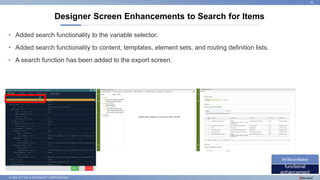
Designer Screen Enhancements to Search for Items
35
functional
enhancement
IM-BloomMaker
• Added search functionality to the variable selector.
• Added search functionality to content, templates, element sets, and routing definition lists.
• A search function has been added to the export screen.
© 2022 NTT DATA INTRAMART CORPORATION
• Improves rendering performance for screen transitions between IM-BloomMaker
content. If the contents of IM-BloomMaker are different, render by performing a
differential update display.
• If the visibility property is set to false, the element is removed from the HTML rather
than hidden.
Performance Improvement
36
functional
improvement
IM-BloomMaker
© 2022 NTT DATA INTRAMART CORPORATION
• Add% encoding functions to expression expressions (Tom Lane).
• Add action items like Object.keys, values, and functions for expression expressions.
• A pop-up window support function has been added.
• Maintains the connection between the content and the element set so that you can see a
list of where the element set is used.
• For each action item, we added an option to end the action after execution.
Function Addition
37
function addition
IM-BloomMaker
© 2022 NTT DATA INTRAMART CORPORATION
• The variable selector now scrolls to where you can see the selected variable.
• Improvements have been made to preserve the open and closed state of the variable
and element trees.
• The variable path is now displayed in the title attribute of the text box that specifies the
variable.
• Improved to display the "Common" and "Event" properties in the open state.
• Improved display of element category names.
Improved Designer Screen Usability
38
functional
improvement
IM-BloomMaker
© 2022 NTT DATA INTRAMART CORPORATION
• You can now specify the file extension for uploadable files.
• You can now specify the maximum file size that can be uploaded.
• The multi-file upload selected files list can now be viewed in an open state.
File Upload Enhancements
39
functional
enhancement
IM-BloomMaker
© 2022 NTT DATA INTRAMART CORPORATION
5. Service Linkage
40
© 2022 NTT DATA INTRAMART CORPORATION
Enhanced Microsoft 365 SharePoint Integration
41
functional
enhancement
service linkage
• Integration with non-standard document libraries is now
possible.
• You can now download files in a specified format from a
document library.
• docx, pptx, xlsx → pdf ...
• You can now update field values in the list.
• Issue number, last approver, storage period, etc.
© 2022 NTT DATA INTRAMART CORPORATION
Add External Integration Template for Accel Studio (1)
42
function addition
service linkage
Release the SharePoint integration
template.
For internal systems, etc.
obtain approval for any member
documents and public notices
provides Accel Studio templates that are
automatically saved to share points.
collegiality
The release of this template is supported by the
With June 2022 patches
I have a plan.
SharePoint Routing Workflow
© 2022 NTT DATA INTRAMART CORPORATION
Add External Integration Template for Accel Studio (2)
43
function addition
service linkage
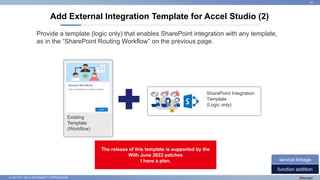
SharePoint Integration
Template
(Logic only)
Existing
Template
(Workflow)
Provide a template (logic only) that enables SharePoint integration with any template,
as in the “SharePoint Routing Workflow” on the previous page.
The release of this template is supported by the
With June 2022 patches
I have a plan.
© 2022 NTT DATA INTRAMART CORPORATION
Minor defect fixes and enhancements were made to the Box linkage module.
• Remove unnecessary text from the configuration file upload screen and place it in the appropriate
location.
• Fixes a bug that causes a NullPointerException due to timing when a Box linkage task executes.
• Fixes a bug that caused some LogicDesigner tasks to fail to step when debugging.
• Adds a template, scope parameter to a metadata operation.
• Add arguments for “the Lock Files” task, such as due date and time.
Box Linkage
44
functional
enhancement
service linkage
© 2022 NTT DATA INTRAMART CORPORATION
45
• This document is an explanatory document limited to the topics of the update.
For information on the update, please refer to the requirements information disclosure site.
https://issue.intra-mart.jp/
• Please refer to the release notes of each product for system requirements and limitations.
https://www.intra-mart.jp/document/library/
If you have any questions, please contact the following.
NTT Data Intramart Corporation
Sales & Marketing Division
Telephone: 03-5549-2821
E-mail: info@intra-mart.jp

Accel_Series_2022Spring_En.pptx

  • 1.
    © 2022 NTTDATA INTRAMART CORPORATION 2022 Spring Updates intra-mart Accel Platform/Accel Series NTT DATA INTRAMAT CO., LTD.
  • 2.
    © 2022 NTTDATA INTRAMART CORPORATION Added support for ◆◆◆. ・○○○○○○ -△△△ -□□□ How to read each requirement description page 1 This document summarizes the key information for each requirement. For more information, please refer to the intra-mart requirements disclosure site or the respective product documentation. *corresponding classification *Category Of the responses described Update category (for example, Infrastructure) is displayed. The following table lists the categories of information provided in this update. "Updates," "Added features," "Enhancements," "Improvements," "Information disclosure," "Operational improvements," etc. Explanatory text, graphics, images, etc. explaining the outline of the corresponding contents are described. Intra-mart requirements information website: https://issue.intra-mart.jp Product Documentation Site: https://document.intra-mart.jp
  • 3.
    © 2022 NTTDATA INTRAMART CORPORATION Intra-mart requirements information publication site (https://issue.intra-mart.jp/) This document describes the contents of the requirements information disclosure site. If you would like to know more details, please also use the requirements information disclosure site. About the Requirements Information Disclosure Site 2 https://issue.intra-mart.jp/projects/iap https://issue.intra-mart.jp/projects/iac https://issue.intra-mart.jp/projects/bpm Category Category Ticket number By ticket number You can search. By Product
  • 4.
    © 2022 NTTDATA INTRAMART CORPORATION Requirements Public Site: Links to 2022 Spring Readiness Requirements 3 Products and functions List of requirements URL intra-mart Accel Platform https://issue.intra-mart.jp/projects/iap/issues?query_id=798 Accel Studio https://issue.intra-mart.jp/projects/accelstudio/issues?query_id=799 IM-BloomMaker https://issue.intra-mart.jp/projects/bloommaker/issues?query_id=787 IM-FormaDesigner https://issue.intra-mart.jp/projects/forma/issues?query_id=788 IM-BIS https://issue.intra-mart.jp/projects/bis/issues?query_id=786 IM-Spreadsheet https://issue.intra-mart.jp/projects/spreadsheet/issues?query_id=803 e Builder https://issue.intra-mart.jp/projects/ebuilder/issues?query_id=785 intra-mart Accel Documents https://issue.intra-mart.jp/projects/iad/issues?query_id=796
  • 5.
    © 2022 NTTDATA INTRAMART CORPORATION 1. System Requirements 2. infrastructure 3. Accel Studio 4. IM-BloomMaker 5. Service Linkage Contents 4
  • 6.
    © 2022 NTTDATA INTRAMART CORPORATION 1. System Requirements 5
  • 7.
    © 2022 NTTDATA INTRAMART CORPORATION Server Requirements • Oracle 12 c R2 Deleted • Note: Because Oracle 21 c is an Innovation Release * version, there are no plans to support it as a product. • Windows Server 2022 added • Resin 4.0.66 Update Client Requirements • Windows 11 Added • Google Chrome 101/Mircrosft Edge 101 updated • iOS 13/iPadOS 13 Deleted • Android 8 removed/Android 12 added System Requirements 6 Update System Requirements * Innovation Release is a release model for Oracle Database. The term of support is as short as two years and long-term support is not provided.
  • 8.
    © 2022 NTTDATA INTRAMART CORPORATION 2. infrastructure 7
  • 9.
    © 2022 NTTDATA INTRAMART CORPORATION Correspondence content • Allows authentication from the intra-mart Accel Platform to an SMTP/IMAP/POP server using OAuth. • Provides the ability for system administrators to configure SMTP connection settings from the screen. • Provides the ability to configure OAuth providers for use by system administrators from the screen. • Provides the ability to configure the OAuth client for use by system administrators from the screen. • Enables you to pass access tokens to tasks related to IMAP/POP operations in IM-LogicDesigner. • You can operate IMAP/POP by combining it with the access token acquisition task. Support for connecting to mail servers using OAuth authentication 8 functional enhancement infrastructure
  • 10.
    © 2022 NTTDATA INTRAMART CORPORATION Background to the Response • For Microsoft Exchange Online and Google Workspace, authentication using OAuth is recommended for connecting to mail servers. It has been announced that connections with Basic Authentication will be disabled soon. • https://docs.microsoft.com/ja-jp/exchange/clients-and-mobile-in-exchange-online/deprecation-of-basic-authentication-exchange- online • https://support.google.com/accounts/answer/6010255 • We have received requests for authentication using OAuth in order to comply with our security policy. Support for connecting to mail servers using OAuth authentication 9 functional enhancement infrastructure
  • 11.
    © 2022 NTTDATA INTRAMART CORPORATION 3. Accel Studio/Accel Studio templates 10
  • 12.
    © 2022 NTTDATA INTRAMART CORPORATION Template material can be added to the created application 11 functional enhancement Accel Studio For example, if you have an existing "master maintenance" application You can add a “Spreadsheet Type List” template, and so on. User wants to implement Application Example of a "partial feature template" • CSV Download • Graph Summary • REST API for CRUD of partial function Template Base Template
  • 13.
    © 2022 NTTDATA INTRAMART CORPORATION Template material can be added to the created application 12 functional enhancement Accel Studio In the future, we plan to offer “partial feature only ” templates as follows: graph part Template graph part Template CSV Parts Template bar code component Template CSV Parts Template Daily Report Management App PJ Management App inventory contro App Identity Managem App Store Management App image for the future Base Template
  • 14.
    © 2022 NTTDATA INTRAMART CORPORATION Corresponds to detail data generation (Master Maintenance Template) 13 functional enhancement Accel Studio Master with Lines dialogue box opens. In the master maintenance template, You can register data in line format and view tables.
  • 15.
    © 2022 NTTDATA INTRAMART CORPORATION Enables resources to be deleted at the same time when the app is deleted 14 functional enhancement Accel Studio Allows you to delete all associated resources when deleting an application. In addition to creating resources when developing applications, you can also delete applications from the Accel Studio starting point. When you delete an application created by validation, no unnecessary resources remain. However, there are some cases where the resource is not deleted. • When a resource is tied to another application • If you cannot delete the resource: (Example)The IM-BloomMaker content definition is utilized by routing definitions that are not tied to the application. Details of this specification can be found in the Accel Studio Application Management Functional Specification. If checked, you can delete the associated resource. Accel Studio Application Management Functional Specification https://document.intra-mart.jp/library/accel_studio/public/accel_studio_specification/index.html
  • 16.
    © 2022 NTTDATA INTRAMART CORPORATION Adding Five Sample Templates 15 function addition Accel Studio Added templates for five sample applications. • Customer Management • Internal FAQ Management • Leave Request Workflow • Self-Introduction • Mail Delivery Workflow
  • 17.
    © 2022 NTTDATA INTRAMART CORPORATION [Accel Studio Glossary] Template A template for applications you create in Accel Studio. Contains various materials and definitions for creating applications on intra-mart. Sample Application Template This template can be used as a simple application as it is. Not only can you use it as is, but you can also use it as an example of what you want to do, what you want to do, and how to create a rich UI. [Column Description] "Templates" 16 column commentary Accel Studio For more information on templates, also refer to the Accel Studio Template Catalog. Accel Studio Template Catalog https://document.intra-mart.jp/library/accel_studio/public/accel_studio_template_catalog/texts/templates/index.html
  • 18.
    © 2022 NTTDATA INTRAMART CORPORATION Additional Template: Customer Management 17 function addition Accel Studio An application template for easily managing customer and contact information.
  • 19.
    © 2022 NTTDATA INTRAMART CORPORATION Additional Template: Internal FAQ Management 18 function addition Accel Studio An application template for easily managing frequently asked questions and their answers in your organization.
  • 20.
    © 2022 NTTDATA INTRAMART CORPORATION Additional Template: Leave Request Workflow 19 function addition Accel Studio An application template that enables workflows to approve vacation requests and share vacation schedules for approved members.
  • 21.
    © 2022 NTTDATA INTRAMART CORPORATION Additional Template: Self-Introduction 20 function addition Accel Studio This is a template of an application to share members' profiles.
  • 22.
    © 2022 NTTDATA INTRAMART CORPORATION Additional Templates: Mail Delivery Workflow 21 function addition Accel Studio A template for an application that performs mail delivery during workflow approval processing.
  • 23.
    © 2022 NTTDATA INTRAMART CORPORATION 4. IM-BloomMaker 22
  • 24.
    © 2022 NTTDATA INTRAMART CORPORATION Specification Change 1 When assigning a variable, null is used to complete any missing mapping keys. Specification Change 2 Change the time zone of the account context to default for the date and time in the “Environment” variable. Spec Change3 Change the color of the "Display message ○ in error dialog box" and "Display in alert dialog box" buttons. The following pages provide more details. Designer Screen Specification Changes 23 specification change IM-BloomMaker
  • 25.
    © 2022 NTTDATA INTRAMART CORPORATION Specification change 1: Variable Assignment 24 specification change IM-BloomMaker When assigning a value to a variable, the key is compared to the mapped key defined in the destination, and if there are not enough keys in the assignment, the key is complemented with a null value. $variable {“list”: [{ “id”: “item1”, "name": "item 1" }]} $variable.list[1] => {} 2021 Winter or earlier $variable.list[1] => { “id”: null, “name”: null } 2022 Spring or later $variable.list.push ({}) After
  • 26.
    © 2022 NTTDATA INTRAMART CORPORATION Change the time zone of the account context to default for the date and time in the “Environment” variable. The time and date of the variable “Environment” were stored in standard time (GMT), such as $env.const.startTime, $env.accountContext.loginTime. Change this to the account context time zone offset. Specification change 2: Time zone support for the date and time of variable “Environment” 25 specification change IM-BloomMaker 2021 Winter or earlier $env.accountContext.loginTime => 2022-05-18T07:01:23.456Z 2022 Spring or later (GMT + 9 Japan time example) $env.accountContext.loginTime => 2022-05-18T16:01:23.456+0900
  • 27.
    © 2022 NTTDATA INTRAMART CORPORATION Specification Change 3: Dialog Button Color Change 26 specification change IM-BloomMaker 2021 Winter or earlier 2022 Spring or later Change the button color of the dialog box that is displayed by "Displaying message ○ as an error dialog box" or "Displaying message ○ as an alert dialog box."
  • 28.
    © 2022 NTTDATA INTRAMART CORPORATION We implemented rich table enhancements. 1. Add Icon Link, Icon Action 2. Added column sorting function 3. Line number display function added 4. Improved right-justified numeric items 5. Add the ability to show or hide individual columns 6. Preserve Sort State The following pages provide more details. Rich Table Enhancements 27 functional enhancement IM-BloomMaker
  • 29.
    © 2022 NTTDATA INTRAMART CORPORATION [Rich Table Enhancement 1] Add Icon Link and Icon Action 28 functional enhancement IM-BloomMaker Added icon link and icon action to columnSettings of rich table. Icons for CSS sprites are available for imui and Font Awesome for Bulma.
  • 30.
    © 2022 NTTDATA INTRAMART CORPORATION [Rich Table Enhancement 2] Added Column Sorting Function 29 functional enhancement IM-BloomMaker Added column sorting functionality to rich tables. Equivalent to the column sorting feature available for grid table items in IM-FormaDesigner.
  • 31.
    © 2022 NTTDATA INTRAMART CORPORATION [Rich table enhancement 3] Line number display function added 30 functional enhancement IM-BloomMaker Added the ability to display line numbers.
  • 32.
    © 2022 NTTDATA INTRAMART CORPORATION [Rich Table Enhancement 4] Improved the display of numerical items to the right. 31 functional enhancement IM-BloomMaker Numeric items are now right-aligned. If you want the column to be left- aligned, specify string for the column type.
  • 33.
    © 2022 NTTDATA INTRAMART CORPORATION [Rich Table Enhancement 5] Add an argument to set whether to show or hide columns 32 functional enhancement IM-BloomMaker Added hiddenColumn parameter to columnSettings. If this parameter is true, the column is hidden.
  • 34.
    © 2022 NTTDATA INTRAMART CORPORATION Added a variable sortConditions to store sort conditions in rich table properties. When you sort data in a rich table, sort criteria are stored in variables. You can also specify the sort status at initial display by storing the sort condition in a variable beforehand. [Rich Table Enhancement 6] Improved to retain the sort state 33 functional enhancement IM-BloomMaker
  • 35.
    © 2022 NTTDATA INTRAMART CORPORATION Add variable specification in confirmation dialog and modal card display 34 functional enhancement IM-BloomMaker We have improved the ability to specify variables by adding options to action items such as displaying the message 〇 in a confirmation dialog, opening with a modal card, etc. Modal cards are improved so that you can specify the number, color, and alignment of buttons.
  • 36.
    © 2022 NTTDATA INTRAMART CORPORATION Designer Screen Enhancements to Search for Items 35 functional enhancement IM-BloomMaker • Added search functionality to the variable selector. • Added search functionality to content, templates, element sets, and routing definition lists. • A search function has been added to the export screen.
  • 37.
    © 2022 NTTDATA INTRAMART CORPORATION • Improves rendering performance for screen transitions between IM-BloomMaker content. If the contents of IM-BloomMaker are different, render by performing a differential update display. • If the visibility property is set to false, the element is removed from the HTML rather than hidden. Performance Improvement 36 functional improvement IM-BloomMaker
  • 38.
    © 2022 NTTDATA INTRAMART CORPORATION • Add% encoding functions to expression expressions (Tom Lane). • Add action items like Object.keys, values, and functions for expression expressions. • A pop-up window support function has been added. • Maintains the connection between the content and the element set so that you can see a list of where the element set is used. • For each action item, we added an option to end the action after execution. Function Addition 37 function addition IM-BloomMaker
  • 39.
    © 2022 NTTDATA INTRAMART CORPORATION • The variable selector now scrolls to where you can see the selected variable. • Improvements have been made to preserve the open and closed state of the variable and element trees. • The variable path is now displayed in the title attribute of the text box that specifies the variable. • Improved to display the "Common" and "Event" properties in the open state. • Improved display of element category names. Improved Designer Screen Usability 38 functional improvement IM-BloomMaker
  • 40.
    © 2022 NTTDATA INTRAMART CORPORATION • You can now specify the file extension for uploadable files. • You can now specify the maximum file size that can be uploaded. • The multi-file upload selected files list can now be viewed in an open state. File Upload Enhancements 39 functional enhancement IM-BloomMaker
  • 41.
    © 2022 NTTDATA INTRAMART CORPORATION 5. Service Linkage 40
  • 42.
    © 2022 NTTDATA INTRAMART CORPORATION Enhanced Microsoft 365 SharePoint Integration 41 functional enhancement service linkage • Integration with non-standard document libraries is now possible. • You can now download files in a specified format from a document library. • docx, pptx, xlsx → pdf ... • You can now update field values in the list. • Issue number, last approver, storage period, etc.
  • 43.
    © 2022 NTTDATA INTRAMART CORPORATION Add External Integration Template for Accel Studio (1) 42 function addition service linkage Release the SharePoint integration template. For internal systems, etc. obtain approval for any member documents and public notices provides Accel Studio templates that are automatically saved to share points. collegiality The release of this template is supported by the With June 2022 patches I have a plan. SharePoint Routing Workflow
  • 44.
    © 2022 NTTDATA INTRAMART CORPORATION Add External Integration Template for Accel Studio (2) 43 function addition service linkage SharePoint Integration Template (Logic only) Existing Template (Workflow) Provide a template (logic only) that enables SharePoint integration with any template, as in the “SharePoint Routing Workflow” on the previous page. The release of this template is supported by the With June 2022 patches I have a plan.
  • 45.
    © 2022 NTTDATA INTRAMART CORPORATION Minor defect fixes and enhancements were made to the Box linkage module. • Remove unnecessary text from the configuration file upload screen and place it in the appropriate location. • Fixes a bug that causes a NullPointerException due to timing when a Box linkage task executes. • Fixes a bug that caused some LogicDesigner tasks to fail to step when debugging. • Adds a template, scope parameter to a metadata operation. • Add arguments for “the Lock Files” task, such as due date and time. Box Linkage 44 functional enhancement service linkage
  • 46.
    © 2022 NTTDATA INTRAMART CORPORATION 45 • This document is an explanatory document limited to the topics of the update. For information on the update, please refer to the requirements information disclosure site. https://issue.intra-mart.jp/ • Please refer to the release notes of each product for system requirements and limitations. https://www.intra-mart.jp/document/library/ If you have any questions, please contact the following. NTT Data Intramart Corporation Sales & Marketing Division Telephone: 03-5549-2821 E-mail: info@intra-mart.jp