A Pathway to Continuous
Improvement
in Computer-Based
Testing
	
  
An ExamSoft Client Webinar
A	
  Pathway	
  to	
  Con,nuous	
  Improvement	
  
in	
  Computer-­‐Based	
  Tes,ng	


Veronica	
  Powell	
  Shuford,	
  M.Ed.	
  
Director	
  of	
  Educa8on	
  and	
  Assessment	
  
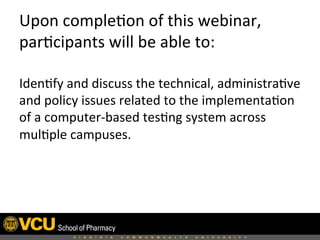
Upon	
  comple8on	
  of	
  this	
  webinar,	
  
par8cipants	
  will	
  be	
  able	
  to:	
  
Iden8fy	
  and	
  discuss	
  the	
  technical,	
  administra8ve	
  
and	
  policy	
  issues	
  related	
  to	
  the	
  implementa8on	
  
of	
  a	
  computer-­‐based	
  tes8ng	
  system	
  across	
  
mul8ple	
  campuses.	
  
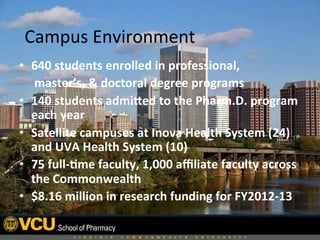
•  640	
  students	
  enrolled	
  in	
  professional,	


  master’s,	
  &	
  doctoral	
  degree	
  programs	
  
•  140	
  students	
  admiEed	
  to	
  the	
  Pharm.D.	
  program	
  
each	
  year	
  
•  Satellite	
  campuses	
  at	
  Inova	
  Health	
  System	
  (24)	
  
and	
  UVA	
  Health	
  System	
  (10)	
  
•  75	
  full-­‐,me	
  faculty,	
  1,000	
  affiliate	
  faculty	
  across	
  
the	
  Commonwealth	
  
•  $8.16	
  million	
  in	
  research	
  funding	
  for	
  FY2012-­‐13	
  
Campus	
  Environment	
  
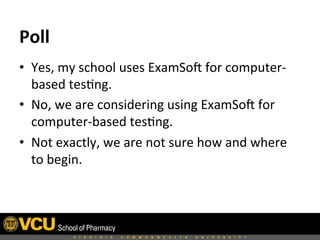
•  Yes,	
  my	
  school	
  uses	
  ExamSoH	
  for	
  computer-­‐
based	
  tes8ng.	
  
•  No,	
  we	
  are	
  considering	
  using	
  ExamSoH	
  for	
  
computer-­‐based	
  tes8ng.	
  
•  Not	
  exactly,	
  we	
  are	
  not	
  sure	
  how	
  and	
  where	
  
to	
  begin.	
  
Poll	
  
 	
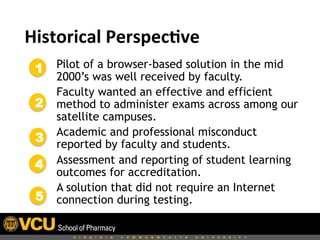
  Historical	
  Perspec,ve	
  
Pilot of a browser-based solution in the mid
2000’s was well received by faculty.
Faculty wanted an effective and efficient
method to administer exams across among our
satellite campuses.
Academic and professional misconduct
reported by faculty and students.
Assessment and reporting of student learning
outcomes for accreditation.
A solution that did not require an Internet
connection during testing.
1
2
3
4
5
 	
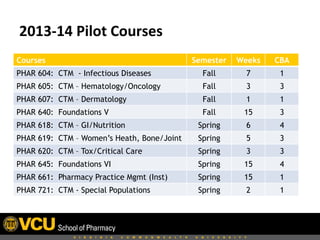
  2013-­‐14	
  Pilot	
  Courses	
  
Courses Semester Weeks CBA
PHAR 604: CTM - Infectious Diseases Fall 7 1
PHAR 605: CTM – Hematology/Oncology Fall 3 3
PHAR 607: CTM – Dermatology Fall 1 1
PHAR 640: Foundations V Fall 15 3
PHAR 618: CTM – GI/Nutrition Spring 6 4
PHAR 619: CTM – Women’s Heath, Bone/Joint Spring 5 3
PHAR 620: CTM – Tox/Critical Care Spring 3 3
PHAR 645: Foundations VI Spring 15 4
PHAR 661: Pharmacy Practice Mgmt (Inst) Spring 15 1
PHAR 721: CTM - Special Populations Spring 2 1
 	
  
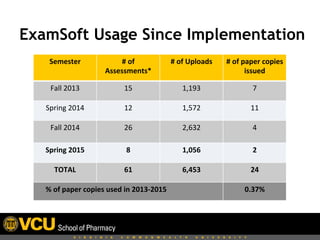
Semester	
   #	
  of	
  
Assessments*	
  
#	
  of	
  Uploads	
   #	
  of	
  paper	
  copies	
  
issued	
  
Fall	
  2013	
   15	
   1,193	
   7	
  
Spring	
  2014	
   12	
   1,572	
   11	
  
Fall	
  2014	
   26	
   2,632	


4	
  
Spring	
  2015	
   8	
   1,056	
   2	
  
TOTAL	
   61	
   6,453	
   24	


  %	
  of	
  paper	
  copies	
  used	
  in	
  2013-­‐2015	
   0.37%	
  
ExamSoft Usage Since Implementation
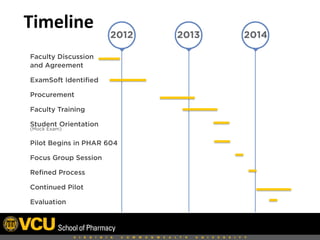
 Timeline	
  
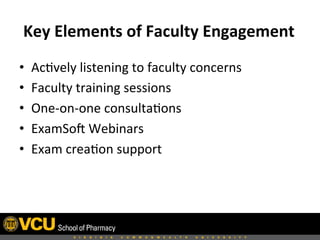
 Key	
  Elements	
  of	
  Faculty	
  Engagement	
  
•  Ac8vely	
  listening	
  to	
  faculty	
  concerns	
  
•  Faculty	
  training	
  sessions	
  
•  One-­‐on-­‐one	
  consulta8ons	
  
•  ExamSoH	
  Webinars	
  
•  Exam	
  crea8on	
  support	
  
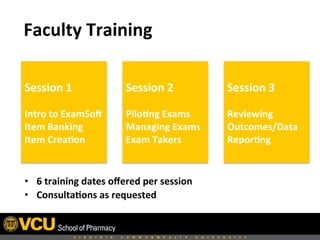
 Faculty	
  Training	
  
•  6	
  training	
  dates	
  offered	
  per	
  session	
  
•  Consulta,ons	
  as	
  requested	


Session	
  1	


Intro	
  to	
  ExamSoa	
  
Item	
  Banking	
  
Item	
  Crea,on	
  
Session	
  2	


Pilo,ng	
  Exams	
  
Managing	
  Exams	
  	
  
Exam	
  Takers	
  
Session	
  3	


Reviewing	
  
Outcomes/Data	
  
Repor,ng	
  
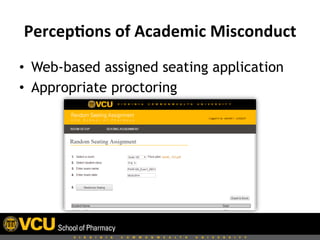
Percep,ons	
  of	
  Academic	
  Misconduct	
  
•  Web-based assigned seating application
•  Appropriate proctoring
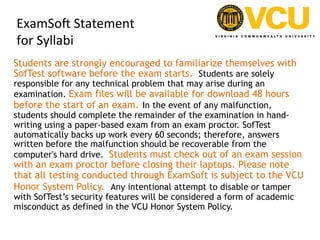
ExamSoH	
  Statement	
  	
  
for	
  Syllabi	
  
Students are strongly encouraged to familiarize themselves with
SofTest software before the exam starts.  Students are solely
responsible for any technical problem that may arise during an
examination. Exam files will be available for download 48 hours
before the start of an exam. In the event of any malfunction,
students should complete the remainder of the examination in hand-
writing using a paper-based exam from an exam proctor. SofTest
automatically backs up work every 60 seconds; therefore, answers
written before the malfunction should be recoverable from the
computer's hard drive.  Students must check out of an exam session
with an exam proctor before closing their laptops. Please note
that all testing conducted through ExamSoft is subject to the VCU
Honor System Policy.  Any intentional attempt to disable or tamper
with SofTest’s security features will be considered a form of academic
misconduct as defined in the VCU Honor System Policy.
Item	
  Banking	
  and	
  Exam	
  Crea,on	
  
7	
  days	
  
before	
  
• Faculty	
  sends	
  Director	
  of	
  Educa8on	
  and	
  
Assessment	
  exam	
  items	
  
6	
  days	
  before	
  
• Director	
  of	
  Educa8on	
  and	
  Assessment	
  returns	
  copy	
  
of	
  exam	
  to	
  Faculty	
  for	
  review	
  
• Faculty	
  reviews	
  exam	
  in	
  SofTest	
  
4	
  days	
  before	
   • Faculty	
  sends	
  any	
  revisions	
  to	
  DEA/approves	
  exam	
  	
  
2	
  days	
  before	
  
• Password	
  protected	
  exam	
  file	
  published	
  to	
  students	
  
• ExamSoH	
  PPT	
  file,	
  Universal	
  Resume	
  Code,	
  Notes	
  
Page,	
  Assigned	
  Sea8ng	
  Chart,	
  and	
  copy	
  of	
  exam	
  to	
  
CC	
  and	
  satellite	
  campuses	
  
•  No categorization of items last year [Retroactive tagging]
•  Items imported and formatted by the Director of Education and Assessment (DEA)
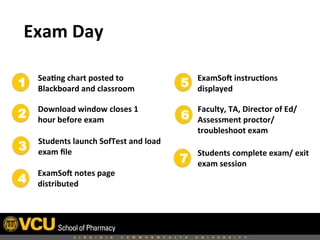
 Exam	
  Day	
  
Sea,ng	
  chart	
  posted	
  to	
  
Blackboard	
  and	
  classroom	
  
Download	
  window	
  closes	
  1	
  
hour	
  before	
  exam	
  
Students	
  launch	
  SofTest	
  and	
  load	
  
exam	
  file	
  
ExamSoa	
  notes	
  page	
  
distributed	
  
ExamSoa	
  instruc,ons	
  
displayed	
  
Students	
  complete	
  exam/	
  exit	
  
exam	
  session	
  
Faculty,	
  TA,	
  Director	
  of	
  Ed/
Assessment	
  proctor/
troubleshoot	
  exam	
  
1
2
3
4
5
6
7
 	
  
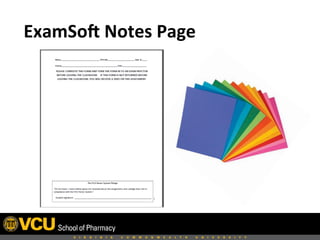
 ExamSoa	
  Notes	
  Page	
  
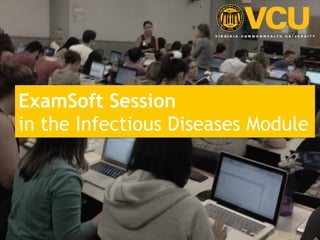
ExamSoft Session
in the Infectious Diseases Module
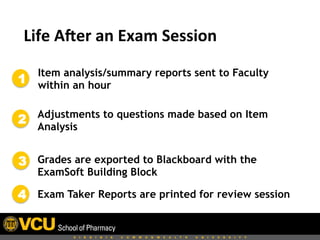
 Life	
  Aaer	
  an	
  Exam	
  Session	
  
Item analysis/summary reports sent to Faculty
within an hour
Adjustments to questions made based on Item
Analysis
Grades are exported to Blackboard with the
ExamSoft Building Block
Exam Taker Reports are printed for review session
1
2
3
4
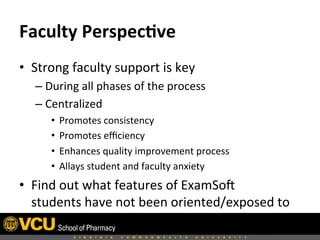
Faculty	
  Perspec,ve	
  	
  
•  Strong	
  faculty	
  support	
  is	
  key	
  
– During	
  all	
  phases	
  of	
  the	
  process	
  
– Centralized	
  	
  
•  Promotes	
  consistency	
  	
  
•  Promotes	
  efficiency	
  
•  Enhances	
  quality	
  improvement	
  process	
  	
  
•  Allays	
  student	
  and	
  faculty	
  anxiety	
  	
  
•  Find	
  out	
  what	
  features	
  of	
  ExamSoH	
  
students	
  have	
  not	
  been	
  oriented/exposed	
  to	
  
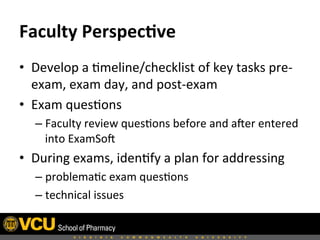
Faculty	
  Perspec,ve	
  
•  Develop	
  a	
  8meline/checklist	
  of	
  key	
  tasks	
  pre-­‐
exam,	
  exam	
  day,	
  and	
  post-­‐exam	
  
•  Exam	
  ques8ons	
  
– Faculty	
  review	
  ques8ons	
  before	
  and	
  aHer	
  entered	
  
into	
  ExamSoH	
  
•  During	
  exams,	
  iden8fy	
  a	
  plan	
  for	
  addressing	
  	
  
– problema8c	
  exam	
  ques8ons	
  
– technical	
  issues	
  
Faculty	
  Perspec,ve	
  	
  
•  When	
  wri8ng	
  “case-­‐based”	
  ques8ons,	
  students	
  
preferred	
  the	
  case	
  to	
  be	
  included	
  with	
  each	
  
ques8on	
  instead	
  of	
  a	
  pop-­‐up	
  box	
  [abachment].	
  
Make	
  sure	
  “case-­‐based”	
  ques8ons	
  on	
  the	
  same	
  
pa8ent	
  are	
  grouped	
  together.	
  
•  Go	
  over	
  the	
  features	
  of	
  ExamSoH	
  with	
  students:	
  
how	
  to	
  use	
  the	
  calculator,	
  cross-­‐out	
  answers,	
  
highlight	
  text,	
  8mer	
  before	
  the	
  first	
  exam.	


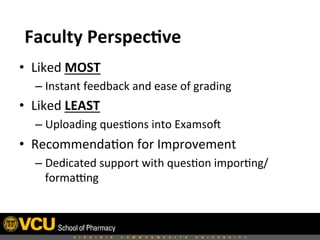
•  Liked	
  MOST	
  	
  
– Instant	
  feedback	
  and	
  ease	
  of	
  grading	
  
•  Liked	
  LEAST	
  	
  
– Uploading	
  ques8ons	
  into	
  ExamsoH	
  	
  
•  Recommenda8on	
  for	
  Improvement	
  
– Dedicated	
  support	
  with	
  ques8on	
  impor8ng/
formafng	
  
Faculty	
  Perspec,ve	
  
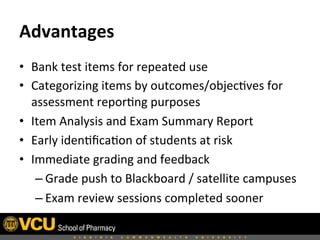
Advantages	
  	
  
•  Bank	
  test	
  items	
  for	
  repeated	
  use	
  
•  Categorizing	
  items	
  by	
  outcomes/objec8ves	
  for	
  
assessment	
  repor8ng	
  purposes	
  
•  Item	
  Analysis	
  and	
  Exam	
  Summary	
  Report	
  
•  Early	
  iden8fica8on	
  of	
  students	
  at	
  risk	
  
•  Immediate	
  grading	
  and	
  feedback	
  
– Grade	
  push	
  to	
  Blackboard	
  /	
  satellite	
  campuses	
  
– Exam	
  review	
  sessions	
  completed	
  sooner	
  
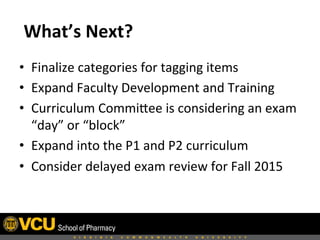
 What’s	
  Next?	
  
•  Finalize	
  categories	
  for	
  tagging	
  items	
  
•  Expand	
  Faculty	
  Development	
  and	
  Training	
  
•  Curriculum	
  Commibee	
  is	
  considering	
  an	
  exam	
  
“day”	
  or	
  “block”	
  
•  Expand	
  into	
  the	
  P1	
  and	
  P2	
  curriculum	
  
•  Consider	
  delayed	
  exam	
  review	
  for	
  Fall	
  2015	
  
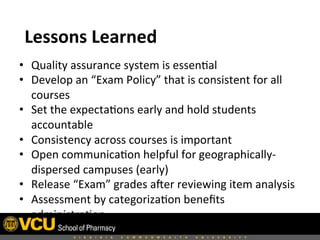
Lessons	
  Learned	
  
•  Quality	
  assurance	
  system	
  is	
  essen8al	
  
•  Develop	
  an	
  “Exam	
  Policy”	
  that	
  is	
  consistent	
  for	
  all	
  
courses	
  
•  Set	
  the	
  expecta8ons	
  early	
  and	
  hold	
  students	
  
accountable	
  
•  Consistency	
  across	
  courses	
  is	
  important	
  
•  Open	
  communica8on	
  helpful	
  for	
  geographically-­‐
dispersed	
  campuses	
  (early)	
  
•  Release	
  “Exam”	
  grades	
  aHer	
  reviewing	
  item	
  analysis	
  
•  Assessment	
  by	
  categoriza8on	
  benefits	
  
administra8on	


Ques,ons	
  
Click to edit Master title style
Click to edit Master subtitle style
For More Information:
Call: 1.866.429.8889
Email: info@examsoft.com
Visit: learn.examsoft.com

A Pathway to Continuous Improvement in Computer-Based Testing

  • 1.
    A Pathway toContinuous Improvement in Computer-Based Testing   An ExamSoft Client Webinar
  • 2.
    A  Pathway  to  Con,nuous  Improvement   in  Computer-­‐Based  Tes,ng     Veronica  Powell  Shuford,  M.Ed.   Director  of  Educa8on  and  Assessment  
  • 3.
    Upon  comple8on  of  this  webinar,   par8cipants  will  be  able  to:   Iden8fy  and  discuss  the  technical,  administra8ve   and  policy  issues  related  to  the  implementa8on   of  a  computer-­‐based  tes8ng  system  across   mul8ple  campuses.  
  • 4.
    •  640  students  enrolled  in  professional,              master’s,  &  doctoral  degree  programs   •  140  students  admiEed  to  the  Pharm.D.  program   each  year   •  Satellite  campuses  at  Inova  Health  System  (24)   and  UVA  Health  System  (10)   •  75  full-­‐,me  faculty,  1,000  affiliate  faculty  across   the  Commonwealth   •  $8.16  million  in  research  funding  for  FY2012-­‐13   Campus  Environment  
  • 5.
    •  Yes,  my  school  uses  ExamSoH  for  computer-­‐ based  tes8ng.   •  No,  we  are  considering  using  ExamSoH  for   computer-­‐based  tes8ng.   •  Not  exactly,  we  are  not  sure  how  and  where   to  begin.   Poll  
  • 6.
       Historical  Perspec,ve   Pilot of a browser-based solution in the mid 2000’s was well received by faculty. Faculty wanted an effective and efficient method to administer exams across among our satellite campuses. Academic and professional misconduct reported by faculty and students. Assessment and reporting of student learning outcomes for accreditation. A solution that did not require an Internet connection during testing. 1 2 3 4 5
  • 7.
       2013-­‐14  Pilot  Courses   Courses Semester Weeks CBA PHAR 604: CTM - Infectious Diseases Fall 7 1 PHAR 605: CTM – Hematology/Oncology Fall 3 3 PHAR 607: CTM – Dermatology Fall 1 1 PHAR 640: Foundations V Fall 15 3 PHAR 618: CTM – GI/Nutrition Spring 6 4 PHAR 619: CTM – Women’s Heath, Bone/Joint Spring 5 3 PHAR 620: CTM – Tox/Critical Care Spring 3 3 PHAR 645: Foundations VI Spring 15 4 PHAR 661: Pharmacy Practice Mgmt (Inst) Spring 15 1 PHAR 721: CTM - Special Populations Spring 2 1
  • 8.
        Semester  #  of   Assessments*   #  of  Uploads   #  of  paper  copies   issued   Fall  2013   15   1,193   7   Spring  2014   12   1,572   11   Fall  2014   26   2,632     4   Spring  2015   8   1,056   2   TOTAL   61   6,453   24            %  of  paper  copies  used  in  2013-­‐2015   0.37%   ExamSoft Usage Since Implementation
  • 9.
  • 10.
     Key  Elements  of  Faculty  Engagement   •  Ac8vely  listening  to  faculty  concerns   •  Faculty  training  sessions   •  One-­‐on-­‐one  consulta8ons   •  ExamSoH  Webinars   •  Exam  crea8on  support  
  • 11.
     Faculty  Training   • 6  training  dates  offered  per  session   •  Consulta,ons  as  requested     Session  1     Intro  to  ExamSoa   Item  Banking   Item  Crea,on   Session  2     Pilo,ng  Exams   Managing  Exams     Exam  Takers   Session  3     Reviewing   Outcomes/Data   Repor,ng  
  • 12.
    Percep,ons  of  Academic  Misconduct   •  Web-based assigned seating application •  Appropriate proctoring
  • 13.
    ExamSoH  Statement     for  Syllabi   Students are strongly encouraged to familiarize themselves with SofTest software before the exam starts.  Students are solely responsible for any technical problem that may arise during an examination. Exam files will be available for download 48 hours before the start of an exam. In the event of any malfunction, students should complete the remainder of the examination in hand- writing using a paper-based exam from an exam proctor. SofTest automatically backs up work every 60 seconds; therefore, answers written before the malfunction should be recoverable from the computer's hard drive.  Students must check out of an exam session with an exam proctor before closing their laptops. Please note that all testing conducted through ExamSoft is subject to the VCU Honor System Policy.  Any intentional attempt to disable or tamper with SofTest’s security features will be considered a form of academic misconduct as defined in the VCU Honor System Policy.
  • 14.
    Item  Banking  and  Exam  Crea,on   7  days   before   • Faculty  sends  Director  of  Educa8on  and   Assessment  exam  items   6  days  before   • Director  of  Educa8on  and  Assessment  returns  copy   of  exam  to  Faculty  for  review   • Faculty  reviews  exam  in  SofTest   4  days  before   • Faculty  sends  any  revisions  to  DEA/approves  exam     2  days  before   • Password  protected  exam  file  published  to  students   • ExamSoH  PPT  file,  Universal  Resume  Code,  Notes   Page,  Assigned  Sea8ng  Chart,  and  copy  of  exam  to   CC  and  satellite  campuses   •  No categorization of items last year [Retroactive tagging] •  Items imported and formatted by the Director of Education and Assessment (DEA)
  • 15.
     Exam  Day   Sea,ng  chart  posted  to   Blackboard  and  classroom   Download  window  closes  1   hour  before  exam   Students  launch  SofTest  and  load   exam  file   ExamSoa  notes  page   distributed   ExamSoa  instruc,ons   displayed   Students  complete  exam/  exit   exam  session   Faculty,  TA,  Director  of  Ed/ Assessment  proctor/ troubleshoot  exam   1 2 3 4 5 6 7
  • 16.
  • 17.
  • 18.
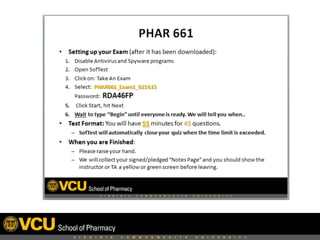
    ExamSoft Session in theInfectious Diseases Module
  • 19.
     Life  Aaer  an  Exam  Session   Item analysis/summary reports sent to Faculty within an hour Adjustments to questions made based on Item Analysis Grades are exported to Blackboard with the ExamSoft Building Block Exam Taker Reports are printed for review session 1 2 3 4
  • 20.
    Faculty  Perspec,ve     •  Strong  faculty  support  is  key   – During  all  phases  of  the  process   – Centralized     •  Promotes  consistency     •  Promotes  efficiency   •  Enhances  quality  improvement  process     •  Allays  student  and  faculty  anxiety     •  Find  out  what  features  of  ExamSoH   students  have  not  been  oriented/exposed  to  
  • 21.
    Faculty  Perspec,ve   • Develop  a  8meline/checklist  of  key  tasks  pre-­‐ exam,  exam  day,  and  post-­‐exam   •  Exam  ques8ons   – Faculty  review  ques8ons  before  and  aHer  entered   into  ExamSoH   •  During  exams,  iden8fy  a  plan  for  addressing     – problema8c  exam  ques8ons   – technical  issues  
  • 22.
    Faculty  Perspec,ve     •  When  wri8ng  “case-­‐based”  ques8ons,  students   preferred  the  case  to  be  included  with  each   ques8on  instead  of  a  pop-­‐up  box  [abachment].   Make  sure  “case-­‐based”  ques8ons  on  the  same   pa8ent  are  grouped  together.   •  Go  over  the  features  of  ExamSoH  with  students:   how  to  use  the  calculator,  cross-­‐out  answers,   highlight  text,  8mer  before  the  first  exam.  
  • 23.
        •  Liked  MOST     – Instant  feedback  and  ease  of  grading   •  Liked  LEAST     – Uploading  ques8ons  into  ExamsoH     •  Recommenda8on  for  Improvement   – Dedicated  support  with  ques8on  impor8ng/ formafng   Faculty  Perspec,ve  
  • 24.
    Advantages     • Bank  test  items  for  repeated  use   •  Categorizing  items  by  outcomes/objec8ves  for   assessment  repor8ng  purposes   •  Item  Analysis  and  Exam  Summary  Report   •  Early  iden8fica8on  of  students  at  risk   •  Immediate  grading  and  feedback   – Grade  push  to  Blackboard  /  satellite  campuses   – Exam  review  sessions  completed  sooner  
  • 25.
     What’s  Next?   • Finalize  categories  for  tagging  items   •  Expand  Faculty  Development  and  Training   •  Curriculum  Commibee  is  considering  an  exam   “day”  or  “block”   •  Expand  into  the  P1  and  P2  curriculum   •  Consider  delayed  exam  review  for  Fall  2015  
  • 26.
    Lessons  Learned   • Quality  assurance  system  is  essen8al   •  Develop  an  “Exam  Policy”  that  is  consistent  for  all   courses   •  Set  the  expecta8ons  early  and  hold  students   accountable   •  Consistency  across  courses  is  important   •  Open  communica8on  helpful  for  geographically-­‐ dispersed  campuses  (early)   •  Release  “Exam”  grades  aHer  reviewing  item  analysis   •  Assessment  by  categoriza8on  benefits   administra8on  
  • 27.
  • 28.
    Click to editMaster title style Click to edit Master subtitle style For More Information: Call: 1.866.429.8889 Email: info@examsoft.com Visit: learn.examsoft.com