White Paper
A Guide to Preparing Your
Data for Tableau
Written in collaboration with Chris Love, Alteryx Grand Prix Champion
2
Introduction
If you’re like most data analysts today, creating rich visualizations of your data
is a critical step in the analytic process. Visualizations let you pinpoint the
trends, discover the risks, and uncover the opportunities hidden in your data
so you can find the answers you need—and make the right data-driven decisions
for your business.
But creating beautiful and elegant data visualizations that wow business users
requires a significant amount of behind-the-scenes work to prepare the data—
work that can take longer than creating the visualizations themselves.
First, to get the most complete and accurate view of your business problem
in context, you need to gather, blend, and cleanse data from an ever-growing
number of disparate sources. Next, even when you’ve wrapped your arms
around your internal data sources, you don’t have the whole story. That
requires enriching your internal data with third-party data sources—such as
demographic or location information—and then running sophisticated spatial
or predictive analytics. And finally, once you have generated your analytic
application, the output may not be easily consumable for visualization and
extra work may be required to get it ready for “prime time.”
As a data analyst, you’re familiar with all of these challenges, and until now
you’ve probably overcome them with manual workarounds. But those
workarounds are no longer enough, thanks to the rapidly changing nature of
data as well as the speed at which business users ask questions and expect
answers. You’re still feeling overworked and scrambling to meet deadlines.
In order to create visualizations that lead to answers quickly, you need to
prepare your data in the right way. Together, Alteryx and Tableau can help.
This paper will show you how.
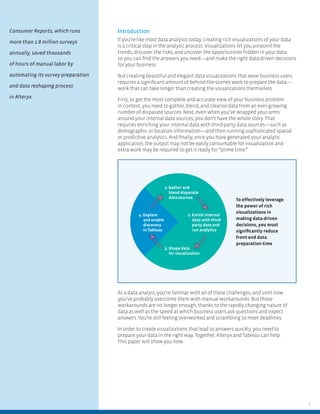
1. Gather and
blend disparate
data sources
3. Shape data
for visualization
4. Explore
and enable
discovery
in Tableau
2. Enrich internal
data with third-
party data and
run analytics
To effectively leverage
the power of rich
visualizations in
making data-driven
decisions, you must
significantly reduce
front-end data
preparation time
Consumer Reports, which runs
more than 1.8 million surveys
annually, saved thousands
of hours of manual labor by
automating its survey preparation
and data reshaping process
in Alteryx.
3
Gather and Prepare Your Data
Alteryx makes it simple to gather all your relevant data sources into a single
workflow so you can analyze your business problem in context. Whether your
data is in a data warehouse, Excel spreadsheets, social media apps, Big Data
platform, cloud apps, or any combination of these, you can quickly and easily
create the data set you need in the intuitive drag-and-drop workflow of
Alteryx, without needing any special tools or programming skills.
Once you have all the relevant data that’s required to answer the business
question at hand and you have your data set in front of you, you’re ready to
go, right? Wrong! You still need to make sure your data set is free of duplicates,
extraneous characters, trailing zeroes, and other data noise. How can you
determine how much of your main product you have really sold if you have
10 or 15 different product names that represent the same SKU? And how
will you know who your best customers are if your data has three different
entries for a single company’s name, for example, one with “Inc.,” one without,
and one that looks like another company but is really the subsidiary of your
largest customer?
With Alteryx, creating standardized product and company name taxonomies,
for example, is a snap. Thanks to built-in tools that automatically deduplicate,
parse, and eliminate extraneous data, you can easily create the cleanest
possible data set.
Plus, with Alteryx, you only have to define your cleansing process once.
Every time you introduce or update your data, Alteryx automatically cleanses
the data set according to the rules you defined the first time. The result?
A truly automated data preparation process.
You can also use Alteryx in this step to ensure the data fits your specific
purpose, whether you plan to run predictive models or generate rich data
visualizations. For example, predictive modeling requires a narrow data set
with just a few specific variables to establish causality and then use this
data to predict future outcomes. In contrast, when creating a visualization,
you want as much data at hand as possible so you can recombine, compare,
and view the data from different perspectives: by gender, by income level,
by geography, by purchase level, and more.
Using Alteryx to blend and analyze data and then visualize analytic results
in Tableau, Discovery Communications monitors its video editing processes,
tracking its edit bays and which film clips are edited on which machine and
by whom. Thanks to Alteryx and Tableau, operators can pinpoint the exact
machines or bays in which problems may have occurred, quickly recalibrating
machines and remediating errors. What’s more, by blending error information
with editing information, the company can also determine if a particular editor
generates an unacceptable number of errors, and then provide retraining on
editing processes.
For more information, please see http://bit.ly/DiscoveryComm.
“Analysts spend a significant
amount of time, over two-thirds
(69%), in data-related tasks in the
analytics process, compared
to the analytic ones where their
time should be spent.”
Mark Smith, CEO and Chief Research
Officer, Ventana Research
4
Enrich Your Data and Run Analytics
In some cases, you might not have all the information you need; your internal
data just needs more. More what? More context. With third-party data that’s
available with Alteryx, you can get the big picture in minutes.
Need to determine how your customers stand out from the rest of the
population? No problem. Just use Experian Mosaic categories in Alteryx to
segment your customers. Then match your customers to these categories
so you can target prospects with similar attributes.
Which potential store locations will be the most profitable? Using the
Experian data in Alteryx, you can answer that question by discovering how
many customers live within a certain distance or drive time from the store.
Run Powerful Predictive Analytics
Conventional wisdom says that only highly trained data scientists and
programmers with Ph.D.s can run predictive analytics, creating complex
algorithms to predict, for example, which product a customer will purchase
next and when. Conventional wisdom has changed, thanks to Alteryx.
Using Alteryx, business analysts can harness the power of predictive analytics
by merely dragging and dropping pre-built predictive analytics macros and
configuring those macros with a few items in a dialog box. Market-basket
analysis, linear regression, A/B testing, decision trees, and forest models are all
just a few keystrokes away for every business user, making them self-reliant
and able to iterate quickly to answer new business questions.
Based on previous data from other similar customers, you can use Alteryx
predictive analytics to determine the most likely next purchase, along with a
degree of certainty for that prediction. You can also use predictive capabilities
to determine which offers to give to which customers and whether to offer
them by mail or live on your website.
What’s more, any predictive analytic model can be easily represented and
visualized in Tableau. You can use bar charts to represent treatment vs. non-
treatment items in A/B tests. Or use bubble charts to represent market-basket
analysis and show how a customer’s purchase of one item can influence his
purchase of others.
Leverage Spatial Analytics
While retailers, supply chain managers, and transportation managers have
long known and leveraged spatial analytics, any organization that uses
mobile technology is waking up to the power of spatial. With spatial analytics,
you can track how traffic flows inside a store, the physical location of a buyer
when she makes an online purchase, and even where the customer is physically
located when she expresses a sentiment about your product.
What’s more, if you are planning to create any type of map in Tableau,
Alteryx spatial analytics can help you create the relevant data set for your
business decisions. Using Alteryx, you can create polygons that capture data
within a specific area and then output that data directly to Tableau for visual
representation in a drive-time map, cell tower coverage area, disease outbreak
area, flood zone, and more.
“All levels of my team, from data
scientists to business analysts,
found they could use Alteryx
within a couple of hours, to produce
results that would have taken
days or weeks to get from IT.
We can automate jobs in seconds,
and spend more time analyzing
data instead of getting it.”
Kim Carrico, Director of Marketing Planning
and Analysis, Optimum Lightpath
5
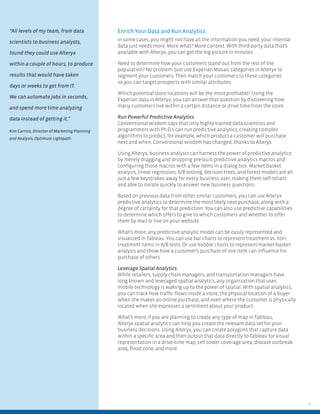
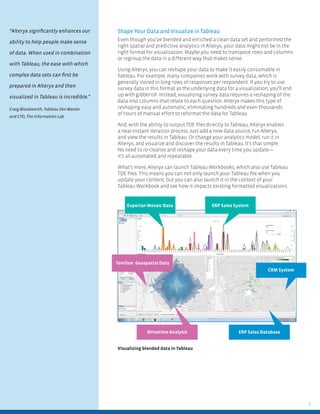
Visualizing blended data in Tableau
Experian Mosaic Data ERP Sales System
ERP Sales DatabaseDrivetime Analysis
CRM System
TomTom Geospatial Data
Shape Your Data and Visualize in Tableau
Even though you’ve blended and enriched a clean data set and performed the
right spatial and predictive analytics in Alteryx, your data might not be in the
right format for visualization. Maybe you need to transpose rows and columns
or regroup the data in a different way that makes sense.
Using Alteryx, you can reshape your data to make it easily consumable in
Tableau. For example, many companies work with survey data, which is
generally stored in long rows of responses per respondent. If you try to use
survey data in this format as the underlying data for a visualization, you’ll end
up with gibberish. Instead, visualizing survey data requires a reshaping of the
data into columns that relate to each question. Alteryx makes this type of
reshaping easy and automatic, eliminating hundreds and even thousands
of hours of manual effort to reformat the data for Tableau.
And, with the ability to output TDE files directly to Tableau, Alteryx enables
a near-instant iteration process. Just add a new data source, run Alteryx,
and view the results in Tableau. Or change your analytics model, run it in
Alteryx, and visualize and discover the results in Tableau. It’s that simple.
No need to re-cleanse and reshape your data every time you update—
it’s all automated and repeatable.
What’s more, Alteryx can launch Tableau Workbooks, which also use Tableau
TDE files. This means you can not only launch your Tableau file when you
update your content, but you can also launch it in the context of your
Tableau Workbook and see how it impacts existing formatted visualizations.
“Alteryx significantly enhances our
ability to help people make sense
of data. When used in combination
with Tableau, the ease with which
complex data sets can first be
prepared in Alteryx and then
visualized in Tableau is incredible.”
Craig Bloodworth, Tableau Zen Master
and CTO, The Information Lab
Alteryx is a registered trademark of Alteryx, Inc. 6/14
230 Commerce, Ste. 250, Irvine, CA 92602
+1 714 516 2400
www.alteryx.com
About Alteryx
Alteryx is the leader in data blending
and advanced analytics software.
Alteryx Analytics provides analysts
with an intuitive workflow for data
blending and advanced analytics
that leads to deeper insights in hours,
not the weeks typical of traditional
approaches. Analysts love the Alteryx
analytics platform because they can
deliver deeper insights by seamlessly
blending internal, third-party, and
cloud data, and then analyze it using
spatial and predictive drag-and-
drop tools. This is all done in a single
workflow, with no programming
required. More than 400 customers,
including Experian, Kaiser, Ford,
and McDonald’s, and 200,000+ users
worldwide rely on Alteryx daily. Visit
www.alteryx.com or call 1-888-836-4274.
Alteryx is a registered trademark of
Alteryx, Inc.
Conclusion
Creating visualizations are a big part of your job as a data analyst—and it is
only becoming more important. But if you are spending 50 to 75 percent of your
time preparing your data for visualization instead of creating the visualization
itself, you’re not giving business users what they need to pinpoint trends,
discover risks, and take advantage of time-critical opportunities when they
need it.
To create the rich visualizations that lead to answers quickly, you need Alteryx
and Tableau. Pull together all the relevant data for the most complete, accurate
view of your business problem in Alteryx. Use Alteryx to enrich your internal
data with third-party data source and run powerful predictive or spatial
analytics to get the big picture. Shape your analytic results in Alteryx for easy
output to and consumption in Tableau. And do all the heavy lifting once and
automate the process for future content updates. The result? Less time spent
preparing data for visualization and more time actually exploring the data and
enabling discovery in Tableau.
For more information, please go to alteryx.com/tableau

A guide to preparing your data for tableau

  • 1.
    White Paper A Guideto Preparing Your Data for Tableau Written in collaboration with Chris Love, Alteryx Grand Prix Champion
  • 2.
    2 Introduction If you’re likemost data analysts today, creating rich visualizations of your data is a critical step in the analytic process. Visualizations let you pinpoint the trends, discover the risks, and uncover the opportunities hidden in your data so you can find the answers you need—and make the right data-driven decisions for your business. But creating beautiful and elegant data visualizations that wow business users requires a significant amount of behind-the-scenes work to prepare the data— work that can take longer than creating the visualizations themselves. First, to get the most complete and accurate view of your business problem in context, you need to gather, blend, and cleanse data from an ever-growing number of disparate sources. Next, even when you’ve wrapped your arms around your internal data sources, you don’t have the whole story. That requires enriching your internal data with third-party data sources—such as demographic or location information—and then running sophisticated spatial or predictive analytics. And finally, once you have generated your analytic application, the output may not be easily consumable for visualization and extra work may be required to get it ready for “prime time.” As a data analyst, you’re familiar with all of these challenges, and until now you’ve probably overcome them with manual workarounds. But those workarounds are no longer enough, thanks to the rapidly changing nature of data as well as the speed at which business users ask questions and expect answers. You’re still feeling overworked and scrambling to meet deadlines. In order to create visualizations that lead to answers quickly, you need to prepare your data in the right way. Together, Alteryx and Tableau can help. This paper will show you how. 1. Gather and blend disparate data sources 3. Shape data for visualization 4. Explore and enable discovery in Tableau 2. Enrich internal data with third- party data and run analytics To effectively leverage the power of rich visualizations in making data-driven decisions, you must significantly reduce front-end data preparation time Consumer Reports, which runs more than 1.8 million surveys annually, saved thousands of hours of manual labor by automating its survey preparation and data reshaping process in Alteryx.
  • 3.
    3 Gather and PrepareYour Data Alteryx makes it simple to gather all your relevant data sources into a single workflow so you can analyze your business problem in context. Whether your data is in a data warehouse, Excel spreadsheets, social media apps, Big Data platform, cloud apps, or any combination of these, you can quickly and easily create the data set you need in the intuitive drag-and-drop workflow of Alteryx, without needing any special tools or programming skills. Once you have all the relevant data that’s required to answer the business question at hand and you have your data set in front of you, you’re ready to go, right? Wrong! You still need to make sure your data set is free of duplicates, extraneous characters, trailing zeroes, and other data noise. How can you determine how much of your main product you have really sold if you have 10 or 15 different product names that represent the same SKU? And how will you know who your best customers are if your data has three different entries for a single company’s name, for example, one with “Inc.,” one without, and one that looks like another company but is really the subsidiary of your largest customer? With Alteryx, creating standardized product and company name taxonomies, for example, is a snap. Thanks to built-in tools that automatically deduplicate, parse, and eliminate extraneous data, you can easily create the cleanest possible data set. Plus, with Alteryx, you only have to define your cleansing process once. Every time you introduce or update your data, Alteryx automatically cleanses the data set according to the rules you defined the first time. The result? A truly automated data preparation process. You can also use Alteryx in this step to ensure the data fits your specific purpose, whether you plan to run predictive models or generate rich data visualizations. For example, predictive modeling requires a narrow data set with just a few specific variables to establish causality and then use this data to predict future outcomes. In contrast, when creating a visualization, you want as much data at hand as possible so you can recombine, compare, and view the data from different perspectives: by gender, by income level, by geography, by purchase level, and more. Using Alteryx to blend and analyze data and then visualize analytic results in Tableau, Discovery Communications monitors its video editing processes, tracking its edit bays and which film clips are edited on which machine and by whom. Thanks to Alteryx and Tableau, operators can pinpoint the exact machines or bays in which problems may have occurred, quickly recalibrating machines and remediating errors. What’s more, by blending error information with editing information, the company can also determine if a particular editor generates an unacceptable number of errors, and then provide retraining on editing processes. For more information, please see http://bit.ly/DiscoveryComm. “Analysts spend a significant amount of time, over two-thirds (69%), in data-related tasks in the analytics process, compared to the analytic ones where their time should be spent.” Mark Smith, CEO and Chief Research Officer, Ventana Research
  • 4.
    4 Enrich Your Dataand Run Analytics In some cases, you might not have all the information you need; your internal data just needs more. More what? More context. With third-party data that’s available with Alteryx, you can get the big picture in minutes. Need to determine how your customers stand out from the rest of the population? No problem. Just use Experian Mosaic categories in Alteryx to segment your customers. Then match your customers to these categories so you can target prospects with similar attributes. Which potential store locations will be the most profitable? Using the Experian data in Alteryx, you can answer that question by discovering how many customers live within a certain distance or drive time from the store. Run Powerful Predictive Analytics Conventional wisdom says that only highly trained data scientists and programmers with Ph.D.s can run predictive analytics, creating complex algorithms to predict, for example, which product a customer will purchase next and when. Conventional wisdom has changed, thanks to Alteryx. Using Alteryx, business analysts can harness the power of predictive analytics by merely dragging and dropping pre-built predictive analytics macros and configuring those macros with a few items in a dialog box. Market-basket analysis, linear regression, A/B testing, decision trees, and forest models are all just a few keystrokes away for every business user, making them self-reliant and able to iterate quickly to answer new business questions. Based on previous data from other similar customers, you can use Alteryx predictive analytics to determine the most likely next purchase, along with a degree of certainty for that prediction. You can also use predictive capabilities to determine which offers to give to which customers and whether to offer them by mail or live on your website. What’s more, any predictive analytic model can be easily represented and visualized in Tableau. You can use bar charts to represent treatment vs. non- treatment items in A/B tests. Or use bubble charts to represent market-basket analysis and show how a customer’s purchase of one item can influence his purchase of others. Leverage Spatial Analytics While retailers, supply chain managers, and transportation managers have long known and leveraged spatial analytics, any organization that uses mobile technology is waking up to the power of spatial. With spatial analytics, you can track how traffic flows inside a store, the physical location of a buyer when she makes an online purchase, and even where the customer is physically located when she expresses a sentiment about your product. What’s more, if you are planning to create any type of map in Tableau, Alteryx spatial analytics can help you create the relevant data set for your business decisions. Using Alteryx, you can create polygons that capture data within a specific area and then output that data directly to Tableau for visual representation in a drive-time map, cell tower coverage area, disease outbreak area, flood zone, and more. “All levels of my team, from data scientists to business analysts, found they could use Alteryx within a couple of hours, to produce results that would have taken days or weeks to get from IT. We can automate jobs in seconds, and spend more time analyzing data instead of getting it.” Kim Carrico, Director of Marketing Planning and Analysis, Optimum Lightpath
  • 5.
    5 Visualizing blended datain Tableau Experian Mosaic Data ERP Sales System ERP Sales DatabaseDrivetime Analysis CRM System TomTom Geospatial Data Shape Your Data and Visualize in Tableau Even though you’ve blended and enriched a clean data set and performed the right spatial and predictive analytics in Alteryx, your data might not be in the right format for visualization. Maybe you need to transpose rows and columns or regroup the data in a different way that makes sense. Using Alteryx, you can reshape your data to make it easily consumable in Tableau. For example, many companies work with survey data, which is generally stored in long rows of responses per respondent. If you try to use survey data in this format as the underlying data for a visualization, you’ll end up with gibberish. Instead, visualizing survey data requires a reshaping of the data into columns that relate to each question. Alteryx makes this type of reshaping easy and automatic, eliminating hundreds and even thousands of hours of manual effort to reformat the data for Tableau. And, with the ability to output TDE files directly to Tableau, Alteryx enables a near-instant iteration process. Just add a new data source, run Alteryx, and view the results in Tableau. Or change your analytics model, run it in Alteryx, and visualize and discover the results in Tableau. It’s that simple. No need to re-cleanse and reshape your data every time you update— it’s all automated and repeatable. What’s more, Alteryx can launch Tableau Workbooks, which also use Tableau TDE files. This means you can not only launch your Tableau file when you update your content, but you can also launch it in the context of your Tableau Workbook and see how it impacts existing formatted visualizations. “Alteryx significantly enhances our ability to help people make sense of data. When used in combination with Tableau, the ease with which complex data sets can first be prepared in Alteryx and then visualized in Tableau is incredible.” Craig Bloodworth, Tableau Zen Master and CTO, The Information Lab
  • 6.
    Alteryx is aregistered trademark of Alteryx, Inc. 6/14 230 Commerce, Ste. 250, Irvine, CA 92602 +1 714 516 2400 www.alteryx.com About Alteryx Alteryx is the leader in data blending and advanced analytics software. Alteryx Analytics provides analysts with an intuitive workflow for data blending and advanced analytics that leads to deeper insights in hours, not the weeks typical of traditional approaches. Analysts love the Alteryx analytics platform because they can deliver deeper insights by seamlessly blending internal, third-party, and cloud data, and then analyze it using spatial and predictive drag-and- drop tools. This is all done in a single workflow, with no programming required. More than 400 customers, including Experian, Kaiser, Ford, and McDonald’s, and 200,000+ users worldwide rely on Alteryx daily. Visit www.alteryx.com or call 1-888-836-4274. Alteryx is a registered trademark of Alteryx, Inc. Conclusion Creating visualizations are a big part of your job as a data analyst—and it is only becoming more important. But if you are spending 50 to 75 percent of your time preparing your data for visualization instead of creating the visualization itself, you’re not giving business users what they need to pinpoint trends, discover risks, and take advantage of time-critical opportunities when they need it. To create the rich visualizations that lead to answers quickly, you need Alteryx and Tableau. Pull together all the relevant data for the most complete, accurate view of your business problem in Alteryx. Use Alteryx to enrich your internal data with third-party data source and run powerful predictive or spatial analytics to get the big picture. Shape your analytic results in Alteryx for easy output to and consumption in Tableau. And do all the heavy lifting once and automate the process for future content updates. The result? Less time spent preparing data for visualization and more time actually exploring the data and enabling discovery in Tableau. For more information, please go to alteryx.com/tableau