A Cultural Heritage Repository as Source for Learning Materials Manjula Patel, Krzysztof Walczak, Fabrizio Giorgini, Martin White 5 th  International Symposium on Virtual Reality, Archaeology and Cultural Heritage VAST 2004, 6-9 th  December 2004, Brussels This work is licensed under the Creative Commons Attribution-NonCommercial-ShareAlike 2.5 UK: Scotland License. To view a copy of this license, visit  http://creativecommons.org/licenses/by-nc-sa/2.5/scotland/   ; or, (b) send a letter to Creative Commons, 543 Howard Street, 5th Floor, San Francisco, California, 94105, USA.
Overview Cultural Heritage, Education and Online Learning The ARCO RTD Project Digital capture to visualisation Designing virtual exhibitions Learning Technology Standards Interoperability issues ARCO repository of cultural artefacts Learning through interaction and exploration ARCO Interoperability with external LCMS
Cultural Heritage, Education and Online Learning Digitised cultural artefacts can help to create rich and rewarding learning experiences Low cost of hardware and digitisation equipment has led to inception of numerous digitisation projects in the CH sector However, digitisation is still costly in terms of the amount of time and effort required; we can justify cost of digitisation by: Using digital objects in multiple applications Re-using, re-purposing and adapting digital artefacts in multiple contexts Early work in online learning focused on Online learning and teaching Computer Assisted Learning (CAL) Investigation of instructional models and user interfaces Further advances in technology (Virtual and Augmented Reality) Research into immersive experiences Development of a networked information environment Learning resources are distributed (VLEs, DLEs) Digital Libraries and Repositories Accessibility, sharing, interoperability, re-use Technical and metadata standards facilitate search, retrieval, evaluation and sharing of information resources
The ARCO RTD Project ARCO started in October 2001 as a three year RTD project Key Action II – Multimedia Content and Tools Action Line III.1.6 – Virtual representation of cultural and scientific objects Co-funded by the EC under the 5FP Total investment is 2.8M Euro inclusive of 2.05M Euro from the EC 7 partners, including two museum pilot sites, from 4 European countries United Kingdom:  University of Sussex (coordinator),    UKOLN@University of Bath, Victoria and Albert Museum,    Sussex Archaeological Society France:  Commissariat à l'Energie Atomique Poland:  Poznan University of Economics Italy:  GIUNTI Publishing Group
Motivation for the ARCO Project Develop technology and expertise to help museums  create ,  manipulate, manage  and  present  cultural objects in virtual exhibitions both within museums and over the Web Why? To provide wider access to cultural heritage artefacts To allow museums to have an online (3D) presence To enable interaction with digital representations of museum collections How?  Building a set of tools and processes for: digital capture of artefacts, 3D modelling and refinement, database and content management, visualisation in virtual and augmented reality environments Interoperability i.e. an Open Architecture   XML Data Exchange between components and other systems Internet, Web, graphics and metadata standards Applications Virtual digital museum environments Use of Cultural Heritage artefacts in online Learning
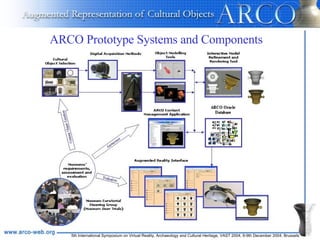
ARCO Prototype Systems and Components
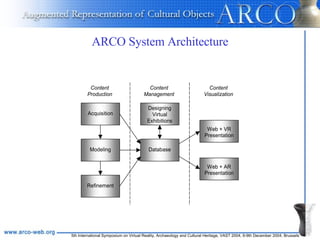
ARCO System Architecture
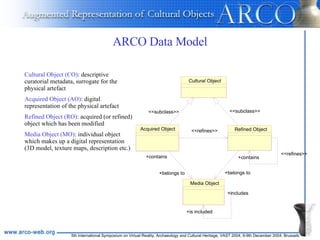
ARCO Data Model Media Object +is included +includes Cultural Object Acquired Object <<subclass>> +belongs to +contains Refined Object <<subclass>> +belongs to +contains <<refines>> <<refines>> Cultural Object (CO) : descriptive curatorial metadata, surrogate for the physical artefact Acquired Object (AO) : digital representation of the physical artefact Refined Object (RO) : acquired (or refined) object which has been modified Media Object (MO) : individual object which makes up a digital representation (3D model, texture maps, description etc.)
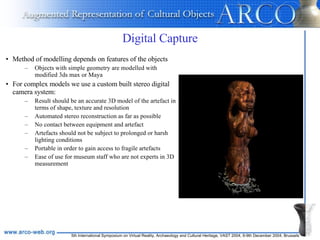
Digital Capture Method of modelling depends on features of the objects Objects with simple geometry   are modelled with modified 3ds max or Maya For complex models we use a custom built stereo digital camera system: Result should be an accurate 3D model of the artefact in terms of shape, texture and resolution Automated stereo reconstruction as far as possible  No contact between equipment and artefact Artefacts should not be subject to prolonged or harsh lighting conditions Portable in order to gain access to fragile artefacts Ease of use for museum staff who are not experts in 3D measurement
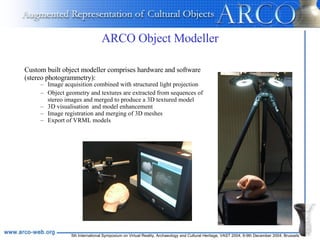
ARCO Object Modeller Custom built object modeller comprises hardware and software (stereo photogrammetry): Image acquisition combined with structured light projection Object geometry and textures are extracted from sequences of stereo images and merged to produce a 3D textured model 3D visualisation  and model enhancement Image registration and merging of 3D meshes Export of VRML models
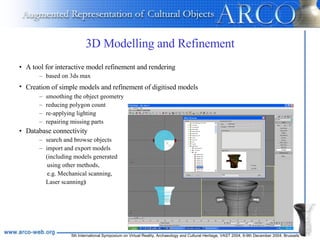
3D Modelling and Refinement A tool for interactive model refinement and rendering based on 3ds max Creation of simple models and refinement of digitised models   smoothing the object geometry reducing polygon count  re-applying lighting  repairing missing parts Database connectivity search and browse objects import and export models  (including models generated  using other methods, e.g. Mechanical scanning, Laser scanning )
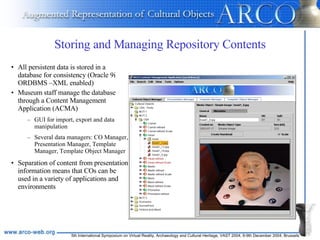
Storing and Managing Repository Contents All persistent data is stored in a database for consistency (Oracle 9i ORDBMS –XML enabled) Museum staff manage the database through a Content Management Application (ACMA) GUI for import, export and data manipulation Several data managers: CO Manager, Presentation Manager, Template Manager, Template Object Manager Separation of content from presentation information means that COs can be used in a variety of applications and environments
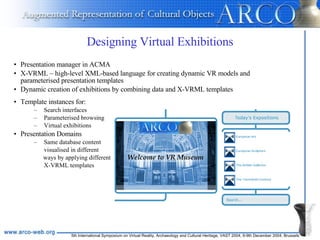
Designing Virtual Exhibitions Template instances for: Search interfaces Parameterised browsing Virtual exhibitions Presentation Domains  Same database content  visualised in different  ways by applying different  X-VRML templates Presentation manager in ACMA X-VRML – high-level XML-based language for creating dynamic VR models and parameterised presentation templates Dynamic creation of exhibitions by combining data and X-VRML templates
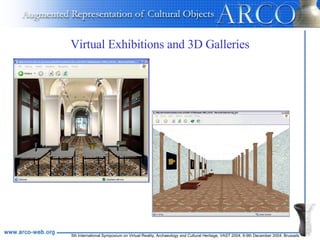
Virtual Exhibitions and 3D Galleries
Learning Technology Standards Prominent Learning Technology standards making bodies: Instructional Management Systems (IMS) Global Learning Consortium Advanced Distributed Learning (ADL) Initiative (SCORM –Shareable Content Object Reference Model) European Centre for Standards/Information Society Standardisation System Learning Technologies Workshop(CEN/ISSS WS-LT) Institute of Electrical and Electronic Engineers (IEEE) Learning Technology Standards Committee (LTSC) International Standards Organisation (ISO) Sub-Committee 36 (SC 36) Dublin Core Metadata Initiative (DC-Ed) BSI Committee IST/43 Information Technology for Learning, Education and Training Areas for standards and specifications: Share content between systems Enable users to search, locate and retrieve appropriate content Plan educational scenarios and formulate instructional design Deliver educational content tailored to a learner’s requirements Create and deliver computer aided assessments Record and share learner information Ensure educational content is accessible to all users
Learning Objects A Learning Object is a digital learning resource that facilitates a single learning objective and which may be reused is a different context “ any entity, digital or non-digital, that may be used for learning, education or training ” (IEEE Learning Object Metadata Standard)   Granularity is a major issue (authoring, deployment, re-purposing): Small LOs can be easily re-used Larger, complex and composite LOs less easily re-used but provide added-value Media object; Information object; Learning Object; Composite LO; Course IEEE LOM (to simplify discovery, management and exchange of LOs) Metadata Standard for Learning Objects 77 elements to describe re-usable learning material Used by IMS and ADL (SCORM) IMS Content Packaging Standard for packaging groups of LOs into re-usable content for exchange
Interoperability Issues Syntactic interoperability:  technical ability of data from multiple and previously unknown or unplanned sources, to work together when combined   Semantic interoperability:  in addition involves the consistent use of metadata vocabularies and classifications  Interoperability in ARCO Data exchange between ARCO components Data exchange with external systems Both are based on XML Compatibility with best practice in the Cultural Heritage Sector mda’s SPECTRUM comprises procedures for documenting objects and the processes that they undergo use of Dublin Core metadata for resource discovery To maximise versatility of digitised objects  store primary resources –LTSC notion of self-contained “assets” (small media objects used in creating LOs) no added-value in terms of educational information
ARCO Repository of Cultural Artefacts Types of multimedia objects: Simple Image, Image Collection, Panorama Image, Multi-resolution Image, Description, Sound, VRML/X3D 3D Model, QuickTime VR, and 3ds max Project New types of media object can be added AMS –ARCO Metadata Schema, is a vocabulary for describing the whole pipeline of processes from digitisation to visualisation: Descriptive curatorial metadata (mda SPECTRUM) Resource discovery metadata (DCMES) Technical metadata (preservation) Presentation metadata (templates) Themed metadata (intelligence, effort report) Administrative metadata ARCO specific elements
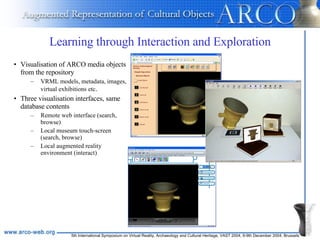
Learning through Interaction and Exploration Visualisation of ARCO media objects from the repository VRML models, metadata, images, virtual exhibitions etc .  Three visualisation interfaces, same database contents Remote web interface (search, browse) Local museum touch-screen (search, browse) Local augmented reality environment (interact)
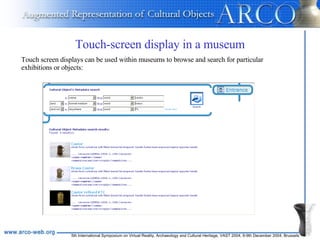
Touch-screen display in a museum Touch screen displays can be used within museums to browse and search for particular exhibitions or objects:
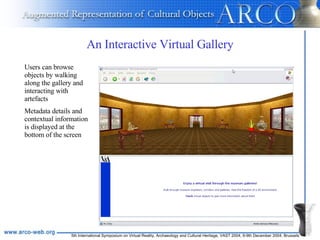
An Interactive Virtual Gallery Users can browse objects by walking along the gallery and interacting with artefacts Metadata details and contextual information is displayed at the bottom of the screen
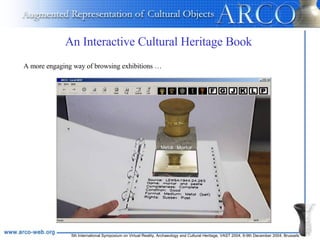
An Interactive Cultural Heritage Book   A more engaging way of browsing exhibitions …
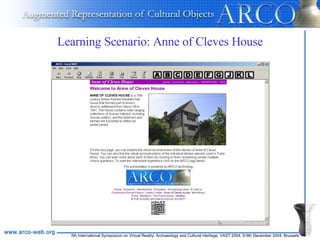
Learning Scenario: Anne of Cleves House
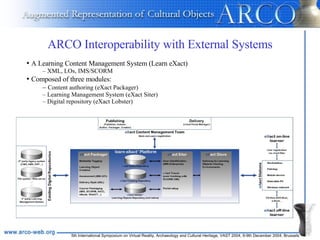
ARCO Interoperability with External Systems A Learning Content Management System (Learn eXact) XML, LOs, IMS/SCORM Composed of three modules: Content authoring (eXact Packager) Learning Management System (eXact Siter) Digital repository (eXact Lobster)
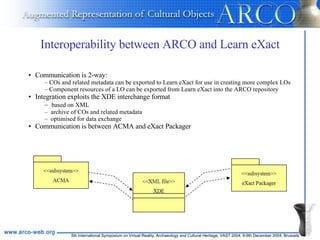
Interoperability between ARCO and Learn eXact Communication is 2-way: COs and related metadata can be exported to Learn eXact for use in creating more complex LOs  Component resources of a LO can be exported from Learn eXact into the ARCO repository Integration exploits the XDE interchange format based on XML archive of COs and related metadata optimised for data exchange Communication is between ACMA and eXact Packager
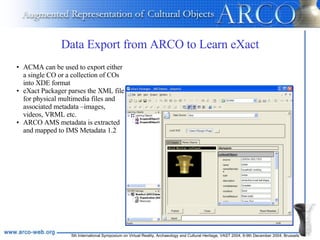
Data Export from ARCO to Learn eXact ACMA can be used to export either a single CO or a collection of COs into XDE format eXact Packager parses the XML file for physical multimedia files and associated metadata –images, videos, VRML etc. ARCO AMS metadata is extracted and mapped to IMS Metadata 1.2
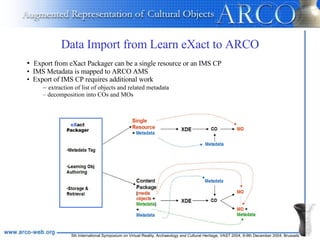
Data Import from Learn eXact to ARCO Export from eXact Packager can be a single resource or an IMS CP IMS Metadata is mapped to ARCO AMS Export of IMS CP requires additional work extraction of list of objects and related metadata decomposition into COs and MOs
Conclusions and Further Work By developing a repository of primary multimedia cultural objects and making them easily accessible it is possible to support differing instructional models Edutainment type scenarios for informal learning  Export to external LCMS for use in creating complex LOs and more formal teaching, learning and training Cultural heritage repositories important in making heritage resources readily available for 24/7, global access Access to objects that would not otherwise be available to the masses Will play an important role as data-providers in Open Access Initiative  Resource discovery and technical metadata crucial in re-use of primary resources Digital rights management and copyright issues are also pertinent ARCO system currently under-going field trials  ARCO system used in EPOCH showcase ‘Multimodal Interface for Safe Presentation of Valuable Objects’
Thank you –Questions? Manjula Patel UKOLN, University of Bath [email_address] http://www.ukoln.ac.uk

A Cultural Heritage Repository as Source for Learning Materials

  • 1.
    A Cultural HeritageRepository as Source for Learning Materials Manjula Patel, Krzysztof Walczak, Fabrizio Giorgini, Martin White 5 th International Symposium on Virtual Reality, Archaeology and Cultural Heritage VAST 2004, 6-9 th December 2004, Brussels This work is licensed under the Creative Commons Attribution-NonCommercial-ShareAlike 2.5 UK: Scotland License. To view a copy of this license, visit http://creativecommons.org/licenses/by-nc-sa/2.5/scotland/ ; or, (b) send a letter to Creative Commons, 543 Howard Street, 5th Floor, San Francisco, California, 94105, USA.
  • 2.
    Overview Cultural Heritage,Education and Online Learning The ARCO RTD Project Digital capture to visualisation Designing virtual exhibitions Learning Technology Standards Interoperability issues ARCO repository of cultural artefacts Learning through interaction and exploration ARCO Interoperability with external LCMS
  • 3.
    Cultural Heritage, Educationand Online Learning Digitised cultural artefacts can help to create rich and rewarding learning experiences Low cost of hardware and digitisation equipment has led to inception of numerous digitisation projects in the CH sector However, digitisation is still costly in terms of the amount of time and effort required; we can justify cost of digitisation by: Using digital objects in multiple applications Re-using, re-purposing and adapting digital artefacts in multiple contexts Early work in online learning focused on Online learning and teaching Computer Assisted Learning (CAL) Investigation of instructional models and user interfaces Further advances in technology (Virtual and Augmented Reality) Research into immersive experiences Development of a networked information environment Learning resources are distributed (VLEs, DLEs) Digital Libraries and Repositories Accessibility, sharing, interoperability, re-use Technical and metadata standards facilitate search, retrieval, evaluation and sharing of information resources
  • 4.
    The ARCO RTDProject ARCO started in October 2001 as a three year RTD project Key Action II – Multimedia Content and Tools Action Line III.1.6 – Virtual representation of cultural and scientific objects Co-funded by the EC under the 5FP Total investment is 2.8M Euro inclusive of 2.05M Euro from the EC 7 partners, including two museum pilot sites, from 4 European countries United Kingdom: University of Sussex (coordinator), UKOLN@University of Bath, Victoria and Albert Museum, Sussex Archaeological Society France: Commissariat à l'Energie Atomique Poland: Poznan University of Economics Italy: GIUNTI Publishing Group
  • 5.
    Motivation for theARCO Project Develop technology and expertise to help museums create , manipulate, manage and present cultural objects in virtual exhibitions both within museums and over the Web Why? To provide wider access to cultural heritage artefacts To allow museums to have an online (3D) presence To enable interaction with digital representations of museum collections How? Building a set of tools and processes for: digital capture of artefacts, 3D modelling and refinement, database and content management, visualisation in virtual and augmented reality environments Interoperability i.e. an Open Architecture XML Data Exchange between components and other systems Internet, Web, graphics and metadata standards Applications Virtual digital museum environments Use of Cultural Heritage artefacts in online Learning
  • 6.
    ARCO Prototype Systemsand Components
  • 7.
  • 8.
    ARCO Data ModelMedia Object +is included +includes Cultural Object Acquired Object <<subclass>> +belongs to +contains Refined Object <<subclass>> +belongs to +contains <<refines>> <<refines>> Cultural Object (CO) : descriptive curatorial metadata, surrogate for the physical artefact Acquired Object (AO) : digital representation of the physical artefact Refined Object (RO) : acquired (or refined) object which has been modified Media Object (MO) : individual object which makes up a digital representation (3D model, texture maps, description etc.)
  • 9.
    Digital Capture Methodof modelling depends on features of the objects Objects with simple geometry are modelled with modified 3ds max or Maya For complex models we use a custom built stereo digital camera system: Result should be an accurate 3D model of the artefact in terms of shape, texture and resolution Automated stereo reconstruction as far as possible No contact between equipment and artefact Artefacts should not be subject to prolonged or harsh lighting conditions Portable in order to gain access to fragile artefacts Ease of use for museum staff who are not experts in 3D measurement
  • 10.
    ARCO Object ModellerCustom built object modeller comprises hardware and software (stereo photogrammetry): Image acquisition combined with structured light projection Object geometry and textures are extracted from sequences of stereo images and merged to produce a 3D textured model 3D visualisation and model enhancement Image registration and merging of 3D meshes Export of VRML models
  • 11.
    3D Modelling andRefinement A tool for interactive model refinement and rendering based on 3ds max Creation of simple models and refinement of digitised models smoothing the object geometry reducing polygon count re-applying lighting repairing missing parts Database connectivity search and browse objects import and export models (including models generated using other methods, e.g. Mechanical scanning, Laser scanning )
  • 12.
    Storing and ManagingRepository Contents All persistent data is stored in a database for consistency (Oracle 9i ORDBMS –XML enabled) Museum staff manage the database through a Content Management Application (ACMA) GUI for import, export and data manipulation Several data managers: CO Manager, Presentation Manager, Template Manager, Template Object Manager Separation of content from presentation information means that COs can be used in a variety of applications and environments
  • 13.
    Designing Virtual ExhibitionsTemplate instances for: Search interfaces Parameterised browsing Virtual exhibitions Presentation Domains Same database content visualised in different ways by applying different X-VRML templates Presentation manager in ACMA X-VRML – high-level XML-based language for creating dynamic VR models and parameterised presentation templates Dynamic creation of exhibitions by combining data and X-VRML templates
  • 14.
  • 15.
    Learning Technology StandardsProminent Learning Technology standards making bodies: Instructional Management Systems (IMS) Global Learning Consortium Advanced Distributed Learning (ADL) Initiative (SCORM –Shareable Content Object Reference Model) European Centre for Standards/Information Society Standardisation System Learning Technologies Workshop(CEN/ISSS WS-LT) Institute of Electrical and Electronic Engineers (IEEE) Learning Technology Standards Committee (LTSC) International Standards Organisation (ISO) Sub-Committee 36 (SC 36) Dublin Core Metadata Initiative (DC-Ed) BSI Committee IST/43 Information Technology for Learning, Education and Training Areas for standards and specifications: Share content between systems Enable users to search, locate and retrieve appropriate content Plan educational scenarios and formulate instructional design Deliver educational content tailored to a learner’s requirements Create and deliver computer aided assessments Record and share learner information Ensure educational content is accessible to all users
  • 16.
    Learning Objects ALearning Object is a digital learning resource that facilitates a single learning objective and which may be reused is a different context “ any entity, digital or non-digital, that may be used for learning, education or training ” (IEEE Learning Object Metadata Standard) Granularity is a major issue (authoring, deployment, re-purposing): Small LOs can be easily re-used Larger, complex and composite LOs less easily re-used but provide added-value Media object; Information object; Learning Object; Composite LO; Course IEEE LOM (to simplify discovery, management and exchange of LOs) Metadata Standard for Learning Objects 77 elements to describe re-usable learning material Used by IMS and ADL (SCORM) IMS Content Packaging Standard for packaging groups of LOs into re-usable content for exchange
  • 17.
    Interoperability Issues Syntacticinteroperability: technical ability of data from multiple and previously unknown or unplanned sources, to work together when combined Semantic interoperability: in addition involves the consistent use of metadata vocabularies and classifications Interoperability in ARCO Data exchange between ARCO components Data exchange with external systems Both are based on XML Compatibility with best practice in the Cultural Heritage Sector mda’s SPECTRUM comprises procedures for documenting objects and the processes that they undergo use of Dublin Core metadata for resource discovery To maximise versatility of digitised objects store primary resources –LTSC notion of self-contained “assets” (small media objects used in creating LOs) no added-value in terms of educational information
  • 18.
    ARCO Repository ofCultural Artefacts Types of multimedia objects: Simple Image, Image Collection, Panorama Image, Multi-resolution Image, Description, Sound, VRML/X3D 3D Model, QuickTime VR, and 3ds max Project New types of media object can be added AMS –ARCO Metadata Schema, is a vocabulary for describing the whole pipeline of processes from digitisation to visualisation: Descriptive curatorial metadata (mda SPECTRUM) Resource discovery metadata (DCMES) Technical metadata (preservation) Presentation metadata (templates) Themed metadata (intelligence, effort report) Administrative metadata ARCO specific elements
  • 19.
    Learning through Interactionand Exploration Visualisation of ARCO media objects from the repository VRML models, metadata, images, virtual exhibitions etc . Three visualisation interfaces, same database contents Remote web interface (search, browse) Local museum touch-screen (search, browse) Local augmented reality environment (interact)
  • 20.
    Touch-screen display ina museum Touch screen displays can be used within museums to browse and search for particular exhibitions or objects:
  • 21.
    An Interactive VirtualGallery Users can browse objects by walking along the gallery and interacting with artefacts Metadata details and contextual information is displayed at the bottom of the screen
  • 22.
    An Interactive CulturalHeritage Book A more engaging way of browsing exhibitions …
  • 23.
    Learning Scenario: Anneof Cleves House
  • 24.
    ARCO Interoperability withExternal Systems A Learning Content Management System (Learn eXact) XML, LOs, IMS/SCORM Composed of three modules: Content authoring (eXact Packager) Learning Management System (eXact Siter) Digital repository (eXact Lobster)
  • 25.
    Interoperability between ARCOand Learn eXact Communication is 2-way: COs and related metadata can be exported to Learn eXact for use in creating more complex LOs Component resources of a LO can be exported from Learn eXact into the ARCO repository Integration exploits the XDE interchange format based on XML archive of COs and related metadata optimised for data exchange Communication is between ACMA and eXact Packager
  • 26.
    Data Export fromARCO to Learn eXact ACMA can be used to export either a single CO or a collection of COs into XDE format eXact Packager parses the XML file for physical multimedia files and associated metadata –images, videos, VRML etc. ARCO AMS metadata is extracted and mapped to IMS Metadata 1.2
  • 27.
    Data Import fromLearn eXact to ARCO Export from eXact Packager can be a single resource or an IMS CP IMS Metadata is mapped to ARCO AMS Export of IMS CP requires additional work extraction of list of objects and related metadata decomposition into COs and MOs
  • 28.
    Conclusions and FurtherWork By developing a repository of primary multimedia cultural objects and making them easily accessible it is possible to support differing instructional models Edutainment type scenarios for informal learning Export to external LCMS for use in creating complex LOs and more formal teaching, learning and training Cultural heritage repositories important in making heritage resources readily available for 24/7, global access Access to objects that would not otherwise be available to the masses Will play an important role as data-providers in Open Access Initiative Resource discovery and technical metadata crucial in re-use of primary resources Digital rights management and copyright issues are also pertinent ARCO system currently under-going field trials ARCO system used in EPOCH showcase ‘Multimodal Interface for Safe Presentation of Valuable Objects’
  • 29.
    Thank you –Questions?Manjula Patel UKOLN, University of Bath [email_address] http://www.ukoln.ac.uk