Load and Performance Testing –  From a general perspective Presenter: John Brennan
Agenda Challenge Application Infrastructure Application Development Accessibility Economics Best  Practises  for Performance Testing/Tuning Preparation Development Execution Analysis Results Summary Benefits of Performance Testing Q & A
Challenge Application Infrastructure Highly Complex Infrastructures; Enterprise Networks, Client Machines, Application/Web Servers, etc, etc Application Development Legacy Applications Today’s Developments; .NET, Java, Macromedia Flash, m-Commerce etc Accessibility Internal (inc. long distance locations) / External Mobile Channels Wireless Laptops/PDAs 3G+ Telecommunication iMode / WAP GPRS Today’s Economy:  Organisations  faced with delivering more for less Customer Facing and Reputation: No room for error Timescales: Often Restricted
Best  Practises : Preparation Timeline: Approx. 1 Month, depending on project size/scope Normally conducted by Project Leader, or lead Performance Tester Planning Project Timeline, and milestone dates Expectations (SLA’s), Goals and Success Criteria Design Transactions Per Second (TPS) User Volumes User Journeys / Business Processes (Aim = 80% of Transactional Throughput) Data Requirements (Unique / Reusable) Database Refresh Consideration & Implication {  For each User Journey / Business Process  }
Best  Practises : Preparation (Cont.) Environment Configuration Review Architecture, inc. configuration options, etc Perform Environment Comparison (Test v Prod) Ascertain Scalability Levels (between environments) Review Application Code Levels Agree Change/Release Windows Load Farm Requirements (estimate at this point) Resourcing Internal Support (Technical Specialists and Component Owners) Contractors / Consultancy 3 rd  Party Support (i.e. BT for Networks)
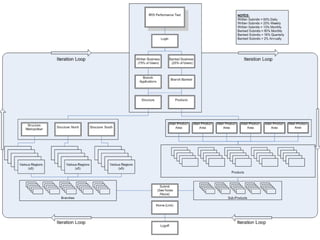
Best  Practises : Development Timeline: Approx. 1 Month, depending on project size/scope Develop System Load Model Create appropriate scripts, using most relevant protocol Dev => Test => (Sign-Off) => Debug (Iterative Cycle) Build / Configure Load Farm Create Test Scenarios (Manual / Goal Oriented) Develop Graphical Representation of Scenario Mirror and Schedule  (1) Off-Peak, (2) Peak and (3) Seasonal Include Transaction Monitors to ensure minimum expectations achieved Application Monitoring Options: Use Vendor Tools / Configure Tool Monitors Diagnostics (.NET, J2EE or Siebel) – Depending on Detail Required Note: Infrastructure requirements/constraints and associated cost/benefit analysis
Best  Practises : Execution Analysis Timeline: Approx. 1 Month, depending on project size/scope Scenario Execution (On Site / Off Site) Capture and Record Test Defects Collate Test Results Perform Analysis Add Comment; highlighting operational / performance bottlenecks Develop Suggestions for System Improvement Adhere to Change / Release Management Processes Tuning over Iterative Cycle Collaborate with Supporting Resources Internal Resource and/or 3 rd  Party (i.e. BT, etc) Combine Full Results & Publish (Intranet / Word)
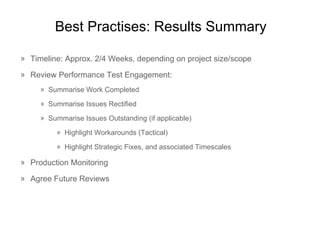
Best  Practises : Results Summary Timeline: Approx. 2/4 Weeks, depending on project size/scope Review Performance Test Engagement: Summarise Work Completed Summarise Issues Rectified Summarise Issues Outstanding (if applicable) Highlight Workarounds (Tactical) Highlight Strategic Fixes, and associated Timescales Production Monitoring Agree Future Reviews
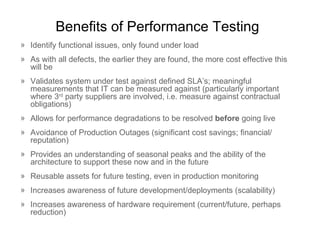
Benefits of Performance Testing Identify functional issues, only found under load As with all defects, the earlier they are found, the more cost effective this will be Validates system under test against defined SLA’s; meaningful measurements that IT can be measured against (particularly important where 3 rd  party suppliers are involved, i.e. measure against contractual obligations) Allows for performance degradations to be resolved  before  going live Avoidance of Production Outages (significant cost savings; financial/ reputation) Provides an understanding of seasonal peaks and the ability of the architecture to support these now and in the future Reusable assets for future testing, even in production monitoring Increases awareness of future development/deployments (scalability) Increases awareness of hardware requirement (current/future, perhaps reduction)

General Performance Testing Overview

  • 1.
    Load and PerformanceTesting – From a general perspective Presenter: John Brennan
  • 2.
    Agenda Challenge ApplicationInfrastructure Application Development Accessibility Economics Best Practises for Performance Testing/Tuning Preparation Development Execution Analysis Results Summary Benefits of Performance Testing Q & A
  • 3.
    Challenge Application InfrastructureHighly Complex Infrastructures; Enterprise Networks, Client Machines, Application/Web Servers, etc, etc Application Development Legacy Applications Today’s Developments; .NET, Java, Macromedia Flash, m-Commerce etc Accessibility Internal (inc. long distance locations) / External Mobile Channels Wireless Laptops/PDAs 3G+ Telecommunication iMode / WAP GPRS Today’s Economy: Organisations faced with delivering more for less Customer Facing and Reputation: No room for error Timescales: Often Restricted
  • 4.
    Best Practises: Preparation Timeline: Approx. 1 Month, depending on project size/scope Normally conducted by Project Leader, or lead Performance Tester Planning Project Timeline, and milestone dates Expectations (SLA’s), Goals and Success Criteria Design Transactions Per Second (TPS) User Volumes User Journeys / Business Processes (Aim = 80% of Transactional Throughput) Data Requirements (Unique / Reusable) Database Refresh Consideration & Implication { For each User Journey / Business Process }
  • 5.
    Best Practises: Preparation (Cont.) Environment Configuration Review Architecture, inc. configuration options, etc Perform Environment Comparison (Test v Prod) Ascertain Scalability Levels (between environments) Review Application Code Levels Agree Change/Release Windows Load Farm Requirements (estimate at this point) Resourcing Internal Support (Technical Specialists and Component Owners) Contractors / Consultancy 3 rd Party Support (i.e. BT for Networks)
  • 6.
    Best Practises: Development Timeline: Approx. 1 Month, depending on project size/scope Develop System Load Model Create appropriate scripts, using most relevant protocol Dev => Test => (Sign-Off) => Debug (Iterative Cycle) Build / Configure Load Farm Create Test Scenarios (Manual / Goal Oriented) Develop Graphical Representation of Scenario Mirror and Schedule (1) Off-Peak, (2) Peak and (3) Seasonal Include Transaction Monitors to ensure minimum expectations achieved Application Monitoring Options: Use Vendor Tools / Configure Tool Monitors Diagnostics (.NET, J2EE or Siebel) – Depending on Detail Required Note: Infrastructure requirements/constraints and associated cost/benefit analysis
  • 7.
    Best Practises: Execution Analysis Timeline: Approx. 1 Month, depending on project size/scope Scenario Execution (On Site / Off Site) Capture and Record Test Defects Collate Test Results Perform Analysis Add Comment; highlighting operational / performance bottlenecks Develop Suggestions for System Improvement Adhere to Change / Release Management Processes Tuning over Iterative Cycle Collaborate with Supporting Resources Internal Resource and/or 3 rd Party (i.e. BT, etc) Combine Full Results & Publish (Intranet / Word)
  • 8.
    Best Practises: Results Summary Timeline: Approx. 2/4 Weeks, depending on project size/scope Review Performance Test Engagement: Summarise Work Completed Summarise Issues Rectified Summarise Issues Outstanding (if applicable) Highlight Workarounds (Tactical) Highlight Strategic Fixes, and associated Timescales Production Monitoring Agree Future Reviews
  • 9.
    Benefits of PerformanceTesting Identify functional issues, only found under load As with all defects, the earlier they are found, the more cost effective this will be Validates system under test against defined SLA’s; meaningful measurements that IT can be measured against (particularly important where 3 rd party suppliers are involved, i.e. measure against contractual obligations) Allows for performance degradations to be resolved before going live Avoidance of Production Outages (significant cost savings; financial/ reputation) Provides an understanding of seasonal peaks and the ability of the architecture to support these now and in the future Reusable assets for future testing, even in production monitoring Increases awareness of future development/deployments (scalability) Increases awareness of hardware requirement (current/future, perhaps reduction)