Production Reflection
Jesse Lapworth
Process
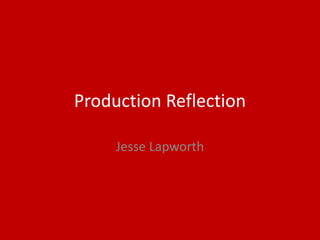
I really wanted a tracking shot for
the opening shot of my film to
keep in tone with the genre and
keep with the countryside theme.
To do this I decided to head out
on my bike and film it whilst
riding.
This I feel worked well and
achieved what I wanted. I then
added the start credits with the
credits tool in Adobe Premiere
Pro. Again I tried to keep a
professional feel and I feel it
works well.
Process
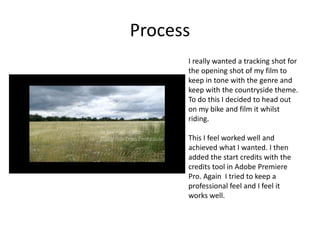
I used a number of still photos for the
piece. This was again a genre convention
and helped me a lot in my piece. The
picture of the dog is just fairly simple, I
took a number of photos over a few days
and felt this one worked best for my
piece. I used the cameras custom settings
to make sure that it took good close-ups
as well as using manual focus for the best
photo possible.
Then photo of the cake is slightly
different. I went for making the image
look like a snapchat photo as this would
realistically be how a teenager may
document the event and was the best
way for me to have a photo of the scene
without breaking emersion and the story.
The way I did this was actually to take a
photo with an IPhone on the Snapchat
app. I tried photos with the camera but
felt like this photo works best for my piece
and people will instantly know what is
trying to be communicating.
Process
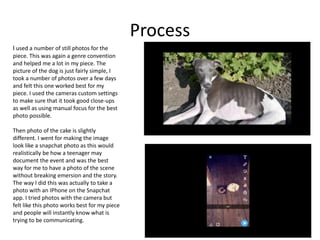
So this is a shot of a Phone call, with
this I wanted to keep the viewer
interested visually as well as the
audio. To do this I went in to Adobe
After Effects and made the Audio
graph. I think this again works well
for the piece and is a nice effect that
is synced with the audio nicely. It
again keeps a professional feel. I
then also altered the audio clip
adding interference to one side of
the phone call to make it sound like
it was actually a recorded phone call
when in fact I recorded it using my
computer. I then added subtitles
over the parts of the clips with the
distortion so that everything in the
clip is understood.
Process
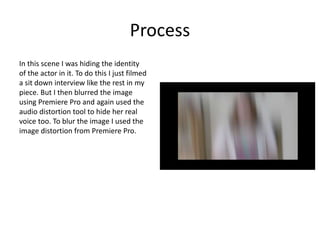
In this scene I was hiding the identity
of the actor in it. To do this I just filmed
a sit down interview like the rest in my
piece. But I then blurred the image
using Premiere Pro and again used the
audio distortion tool to hide her real
voice too. To blur the image I used the
image distortion from Premiere Pro.

6. production reflection

  • 1.
  • 2.
    Process I really wanteda tracking shot for the opening shot of my film to keep in tone with the genre and keep with the countryside theme. To do this I decided to head out on my bike and film it whilst riding. This I feel worked well and achieved what I wanted. I then added the start credits with the credits tool in Adobe Premiere Pro. Again I tried to keep a professional feel and I feel it works well.
  • 3.
    Process I used anumber of still photos for the piece. This was again a genre convention and helped me a lot in my piece. The picture of the dog is just fairly simple, I took a number of photos over a few days and felt this one worked best for my piece. I used the cameras custom settings to make sure that it took good close-ups as well as using manual focus for the best photo possible. Then photo of the cake is slightly different. I went for making the image look like a snapchat photo as this would realistically be how a teenager may document the event and was the best way for me to have a photo of the scene without breaking emersion and the story. The way I did this was actually to take a photo with an IPhone on the Snapchat app. I tried photos with the camera but felt like this photo works best for my piece and people will instantly know what is trying to be communicating.
  • 4.
    Process So this isa shot of a Phone call, with this I wanted to keep the viewer interested visually as well as the audio. To do this I went in to Adobe After Effects and made the Audio graph. I think this again works well for the piece and is a nice effect that is synced with the audio nicely. It again keeps a professional feel. I then also altered the audio clip adding interference to one side of the phone call to make it sound like it was actually a recorded phone call when in fact I recorded it using my computer. I then added subtitles over the parts of the clips with the distortion so that everything in the clip is understood.
  • 5.
    Process In this sceneI was hiding the identity of the actor in it. To do this I just filmed a sit down interview like the rest in my piece. But I then blurred the image using Premiere Pro and again used the audio distortion tool to hide her real voice too. To blur the image I used the image distortion from Premiere Pro.

Editor's Notes

  • #3 Discuss the tools and processes used in your production. Log your thoughts and feelings about your work.
  • #4 Discuss the tools and processes used in your production. Log your thoughts and feelings about your work.
  • #5 Discuss the tools and processes used in your production. Log your thoughts and feelings about your work.
  • #6 Discuss the tools and processes used in your production. Log your thoughts and feelings about your work.