6 key thingsUXers need
to know while working
withAPIs
Mags Hanley
UX Design Group of Melbourne
3rd March 2020
© Mags Hanley
APIs – a data journey
© Mags Hanley
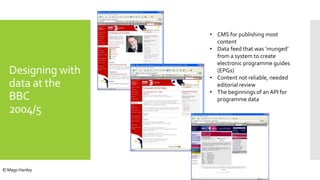
• CMS for publishing most
content
• Data feed that was ‘munged’
from a system to create
electronic programme guides
(EPGs)
• Content not reliable, needed
editorial review
• The beginnings of an API for
programme data
Designing with
data at the
BBC
2004/5
© Mags Hanley
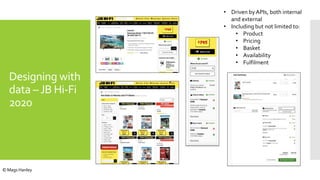
Designing with
data –JB Hi-Fi
2020
• Driven by APIs, both internal
and external
• Including but not limited to:
• Product
• Pricing
• Basket
• Availability
• Fulfilment
© Mags Hanley
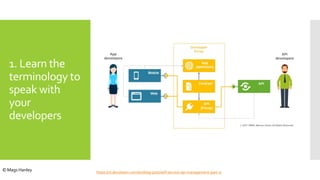
1. Learn the
terminology to
speak with
your
developers
https://nl.devoteam.com/en/blog-post/self-service-api-management-part-1/
© Mags Hanley
Definitions
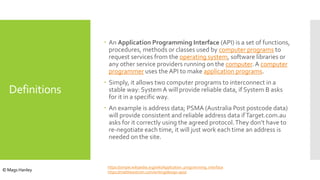
 An Application Programming Interface (API) is a set of functions,
procedures, methods or classes used by computer programs to
request services from the operating system, software libraries or
any other service providers running on the computer. A computer
programmer uses the API to make application programs.
 Simply, it allows two computer programs to interconnect in a
stable way: System A will provide reliable data, if System B asks
for it in a specific way.
 An example is address data; PSMA (Australia Post postcode data)
will provide consistent and reliable address data ifTarget.com.au
asks for it correctly using the agreed protocol.They don’t have to
re-negotiate each time, it will just work each time an address is
needed on the site.
https://simple.wikipedia.org/wiki/Application_programming_interface
https://matthewstrom.com/writing/design-apis/© Mags Hanley
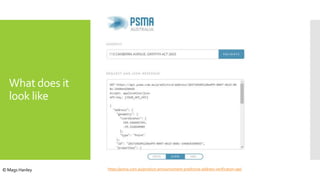
What does it
look like
https://psma.com.au/product-announcement-predictive-address-verification-api/© Mags Hanley
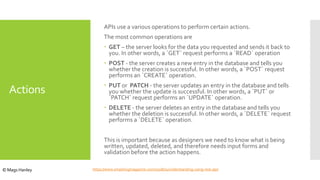
Actions
APIs use a various operations to perform certain actions.
The most common operations are
 GET – the server looks for the data you requested and sends it back to
you. In other words, a `GET` request performs a `READ` operation
 POST - the server creates a new entry in the database and tells you
whether the creation is successful. In other words, a `POST` request
performs an `CREATE` operation.
 PUT or PATCH - the server updates an entry in the database and tells
you whether the update is successful. In other words, a `PUT` or
`PATCH` request performs an `UPDATE` operation.
 DELETE - the server deletes an entry in the database and tells you
whether the deletion is successful. In other words, a `DELETE` request
performs a `DELETE` operation.
This is important because as designers we need to know what is being
written, updated, deleted, and therefore needs input forms and
validation before the action happens.
https://www.smashingmagazine.com/2018/01/understanding-using-rest-api/© Mags Hanley
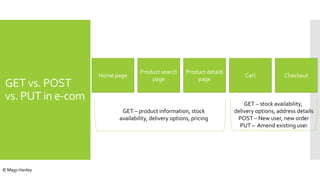
GET vs. POST
vs. PUT in e-com
Home page
Product search
page
Product details
page
Cart Checkout
GET – product information, stock
availability, delivery options, pricing
GET – stock availability,
delivery options, address details
POST – New user, new order
PUT – Amend existing user
© Mags Hanley
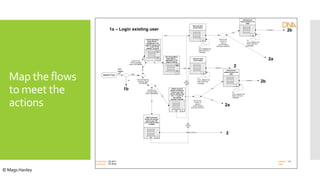
Map the flows
to meet the
actions
Project title
Document
Version
Date
O2 2211
O2 shop
1.0
Basket Flow
User
logged
on?
no
yes
Check all O2 Shop
mandatory fields
are entered?
Yes
No
Are there any
monthly payable
items in the basket?
No
Are there any
monthly payable
items in the basket?
Yes
Yes
No
Reflect personal
details and address
back to user with
current address field
available
>>Edit
Reflect personal
details and address
back to user with
current address field
and >< 3 years at
this address
question available
>>Edit
Clicked continue
Not all mandatory
fields filled in –
highlighted on the
page for editing
>>
*
*
Not all mandatory
fields filled in –
highlighted on the
page for editing; add
“>< 3 years at this
address” question
>>
*
*
Edit each field
(active fields)
>>
FV:
Form validation fail
Return with error
messages
Edit
Edit
Edit
Edit
User
Presses
edit
User
Presses
edit
Edit
Edit
Did the user
choose <3
years at
current address
and press continue?
No
Yes
Add previous
address fields to the
page
>>
FV:
Form validation fail
Return with error
messages
Continue
Did the user
choose <3
years at
current address
and press continue? No
Yes
Add previous
address fields to the
page
>>
FV:
Form validation fail
Return with error
messages
Continue1a – Login existing user
1b
Edit each field
(active fields)
>>
FV:
Form validation fail
Return with error
messages
Continue
2
2
2a
2a
2b
2b
© Mags Hanley
2. Design the
API structure
and data with
the tech team
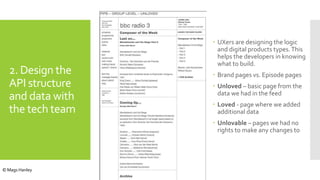
 UXers are designing the logic
and digital products types.This
helps the developers in knowing
what to build.
 Brand pages vs. Episode pages
 Unloved – basic page from the
data we had in the feed
 Loved - page where we added
additional data
 Unlovable – pages we had no
rights to make any changes to
© Mags Hanley
2. Design the
API structure
and data with
the tech team
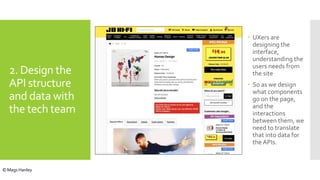
 UXers are
designing the
interface,
understanding the
users needs from
the site
 So as we design
what components
go on the page,
and the
interactions
between them, we
need to translate
that into data for
the APIs.
© Mags Hanley
3.Ask the right
questions
about the data
Questions to ask
 Available – is the data there in the company?Or do we need to
invest in capturing and expanding the data set?
 Correct – the schema might be great, but are we capturing correct
data or any data for each field? Rubbish in – rubbish out. Do we
need to change the way we collect and enter the data, outside of
the API?
 Useful - is it the right data for the users to make decisions about
it?
 For example Geologists vs. Head office analysts
 More detailed data for the geologists; different views for the
analysts
© Mags Hanley
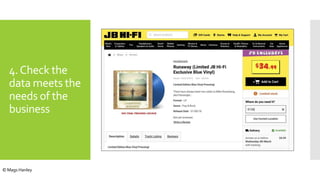
4.Check the
data meets the
needs of the
business
© Mags Hanley
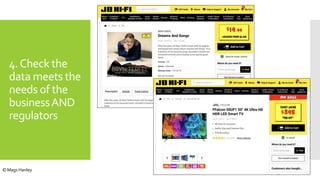
4.Check the
data meets the
needs of the
businessAND
regulators
© Mags Hanley
5. Read and
test the data
Swagger is fine to read the schema
But you need to see the data as a whole to see if it meets the needs
of the users
You can either:
1. Learn to query the database
2. See it in the interface
3. Find a proxy for the database (search index)
Understand the source database for the content and make sure it is
has been mapped correctly.
That means a live system with real data – Pre-Production, not a test
site with test data.
From experience test data is usually old data and can’t represent the
live changes that happen within a site.
© Mags Hanley
5.Test the data
– live data is
best
Case study
 Testing search to see if the same data was coming up in the existing
search vs. the new search engine, so I could sign-off search
 Tested the top 20 search terms and other representative searches,
and compared the number of results and the order the results came
back
 Reviewed the interface and the search index
 They weren’t the same…
 The difference was the data was not being indexed by the search
engine based on the data and business rules being provided by the
product API.
Detailed, unsexy work!
Is this UX, Product Management orTester role?The conundrum.
Or does it just need to be done.
© Mags Hanley
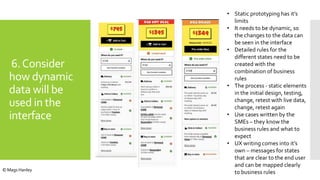
6.Consider
how dynamic
data will be
used in the
interface
• Static prototyping has it’s
limits
• It needs to be dynamic, so
the changes to the data can
be seen in the interface
• Detailed rules for the
different states need to be
created with the
combination of business
rules
• The process - static elements
in the initial design, testing,
change, retest with live data,
change, retest again
• Use cases written by the
SMEs – they know the
business rules and what to
expect
• UX writing comes into it’s
own – messages for states
that are clear to the end user
and can be mapped clearly
to business rules© Mags Hanley
Summary
1. Learn the terminology to speak with your developers
2. Design the API structure and data with the tech team
3. Ask the right questions about the data for your users
4. Check the data meets the needs of the business AND
regulators
5. Test the data – live data is best
6. Consider how dynamic data will be used in the
interface
© Mags Hanley
My details
 I am Career Growth Coach and Mentor.
 My technical skill is InformationArchitecture.
 I have an onlineCommunity for mid-senior
UXers to grow their technical and leadership
skills (UX-CLC)
 I also teach designing with data, information
architecture and UX leadership skills.
 My latest course is Designing with data for
Product designers
 If you would like to learn more, I offer a free
30 min consultation
 http://bit.ly/ux-design-group
© Mags Hanley
Contacting
Mags
Mags Hanley
 Web site: www.magshanley.com
 Email: mags@magshanley.com
 Twitter: @magshanley
 LinkedIn: https://www.linkedin.com/in/magshanley/
 Kintell: https://kintell.com/advisors/mags-Hanley
© Mags Hanley
Questions
© Mags Hanley

6 key things UXers need to know while working with APIs

  • 1.
    6 key thingsUXersneed to know while working withAPIs Mags Hanley UX Design Group of Melbourne 3rd March 2020 © Mags Hanley
  • 2.
    APIs – adata journey © Mags Hanley
  • 3.
    • CMS forpublishing most content • Data feed that was ‘munged’ from a system to create electronic programme guides (EPGs) • Content not reliable, needed editorial review • The beginnings of an API for programme data Designing with data at the BBC 2004/5 © Mags Hanley
  • 4.
    Designing with data –JBHi-Fi 2020 • Driven by APIs, both internal and external • Including but not limited to: • Product • Pricing • Basket • Availability • Fulfilment © Mags Hanley
  • 5.
    1. Learn the terminologyto speak with your developers https://nl.devoteam.com/en/blog-post/self-service-api-management-part-1/ © Mags Hanley
  • 6.
    Definitions  An ApplicationProgramming Interface (API) is a set of functions, procedures, methods or classes used by computer programs to request services from the operating system, software libraries or any other service providers running on the computer. A computer programmer uses the API to make application programs.  Simply, it allows two computer programs to interconnect in a stable way: System A will provide reliable data, if System B asks for it in a specific way.  An example is address data; PSMA (Australia Post postcode data) will provide consistent and reliable address data ifTarget.com.au asks for it correctly using the agreed protocol.They don’t have to re-negotiate each time, it will just work each time an address is needed on the site. https://simple.wikipedia.org/wiki/Application_programming_interface https://matthewstrom.com/writing/design-apis/© Mags Hanley
  • 7.
    What does it looklike https://psma.com.au/product-announcement-predictive-address-verification-api/© Mags Hanley
  • 8.
    Actions APIs use avarious operations to perform certain actions. The most common operations are  GET – the server looks for the data you requested and sends it back to you. In other words, a `GET` request performs a `READ` operation  POST - the server creates a new entry in the database and tells you whether the creation is successful. In other words, a `POST` request performs an `CREATE` operation.  PUT or PATCH - the server updates an entry in the database and tells you whether the update is successful. In other words, a `PUT` or `PATCH` request performs an `UPDATE` operation.  DELETE - the server deletes an entry in the database and tells you whether the deletion is successful. In other words, a `DELETE` request performs a `DELETE` operation. This is important because as designers we need to know what is being written, updated, deleted, and therefore needs input forms and validation before the action happens. https://www.smashingmagazine.com/2018/01/understanding-using-rest-api/© Mags Hanley
  • 9.
    GET vs. POST vs.PUT in e-com Home page Product search page Product details page Cart Checkout GET – product information, stock availability, delivery options, pricing GET – stock availability, delivery options, address details POST – New user, new order PUT – Amend existing user © Mags Hanley
  • 10.
    Map the flows tomeet the actions Project title Document Version Date O2 2211 O2 shop 1.0 Basket Flow User logged on? no yes Check all O2 Shop mandatory fields are entered? Yes No Are there any monthly payable items in the basket? No Are there any monthly payable items in the basket? Yes Yes No Reflect personal details and address back to user with current address field available >>Edit Reflect personal details and address back to user with current address field and >< 3 years at this address question available >>Edit Clicked continue Not all mandatory fields filled in – highlighted on the page for editing >> * * Not all mandatory fields filled in – highlighted on the page for editing; add “>< 3 years at this address” question >> * * Edit each field (active fields) >> FV: Form validation fail Return with error messages Edit Edit Edit Edit User Presses edit User Presses edit Edit Edit Did the user choose <3 years at current address and press continue? No Yes Add previous address fields to the page >> FV: Form validation fail Return with error messages Continue Did the user choose <3 years at current address and press continue? No Yes Add previous address fields to the page >> FV: Form validation fail Return with error messages Continue1a – Login existing user 1b Edit each field (active fields) >> FV: Form validation fail Return with error messages Continue 2 2 2a 2a 2b 2b © Mags Hanley
  • 11.
    2. Design the APIstructure and data with the tech team  UXers are designing the logic and digital products types.This helps the developers in knowing what to build.  Brand pages vs. Episode pages  Unloved – basic page from the data we had in the feed  Loved - page where we added additional data  Unlovable – pages we had no rights to make any changes to © Mags Hanley
  • 12.
    2. Design the APIstructure and data with the tech team  UXers are designing the interface, understanding the users needs from the site  So as we design what components go on the page, and the interactions between them, we need to translate that into data for the APIs. © Mags Hanley
  • 13.
    3.Ask the right questions aboutthe data Questions to ask  Available – is the data there in the company?Or do we need to invest in capturing and expanding the data set?  Correct – the schema might be great, but are we capturing correct data or any data for each field? Rubbish in – rubbish out. Do we need to change the way we collect and enter the data, outside of the API?  Useful - is it the right data for the users to make decisions about it?  For example Geologists vs. Head office analysts  More detailed data for the geologists; different views for the analysts © Mags Hanley
  • 14.
    4.Check the data meetsthe needs of the business © Mags Hanley
  • 15.
    4.Check the data meetsthe needs of the businessAND regulators © Mags Hanley
  • 16.
    5. Read and testthe data Swagger is fine to read the schema But you need to see the data as a whole to see if it meets the needs of the users You can either: 1. Learn to query the database 2. See it in the interface 3. Find a proxy for the database (search index) Understand the source database for the content and make sure it is has been mapped correctly. That means a live system with real data – Pre-Production, not a test site with test data. From experience test data is usually old data and can’t represent the live changes that happen within a site. © Mags Hanley
  • 17.
    5.Test the data –live data is best Case study  Testing search to see if the same data was coming up in the existing search vs. the new search engine, so I could sign-off search  Tested the top 20 search terms and other representative searches, and compared the number of results and the order the results came back  Reviewed the interface and the search index  They weren’t the same…  The difference was the data was not being indexed by the search engine based on the data and business rules being provided by the product API. Detailed, unsexy work! Is this UX, Product Management orTester role?The conundrum. Or does it just need to be done. © Mags Hanley
  • 18.
    6.Consider how dynamic data willbe used in the interface • Static prototyping has it’s limits • It needs to be dynamic, so the changes to the data can be seen in the interface • Detailed rules for the different states need to be created with the combination of business rules • The process - static elements in the initial design, testing, change, retest with live data, change, retest again • Use cases written by the SMEs – they know the business rules and what to expect • UX writing comes into it’s own – messages for states that are clear to the end user and can be mapped clearly to business rules© Mags Hanley
  • 19.
    Summary 1. Learn theterminology to speak with your developers 2. Design the API structure and data with the tech team 3. Ask the right questions about the data for your users 4. Check the data meets the needs of the business AND regulators 5. Test the data – live data is best 6. Consider how dynamic data will be used in the interface © Mags Hanley
  • 20.
    My details  Iam Career Growth Coach and Mentor.  My technical skill is InformationArchitecture.  I have an onlineCommunity for mid-senior UXers to grow their technical and leadership skills (UX-CLC)  I also teach designing with data, information architecture and UX leadership skills.  My latest course is Designing with data for Product designers  If you would like to learn more, I offer a free 30 min consultation  http://bit.ly/ux-design-group © Mags Hanley
  • 21.
    Contacting Mags Mags Hanley  Website: www.magshanley.com  Email: mags@magshanley.com  Twitter: @magshanley  LinkedIn: https://www.linkedin.com/in/magshanley/  Kintell: https://kintell.com/advisors/mags-Hanley © Mags Hanley
  • 22.