Internet for Educators
EDTECH 502
SPRING 2009 Course Syllabus
JANUARY 20 - MAY 8
3 Credits
Instructor

Name: Amanda H. Chase
Location: Pittsburgh, PA
Home Phone: 412-548-3332
Cell Phone: 412-716-0220
Email: chase.amanda@gmail.com
AIM: the arctic panda
MSN: chase@medsagetechnologies.com

Email is the best way to get in contact with me. I am located in Pittsburgh, PA. Most of
our communication is done via instant messenger, email, and discussion board.

The login page is located at: http://blackboard.boisestate.edu/ To access the course, you
will log in using your BroncoWeb username and password.

EdTech 502 Course Description
Locate, retrieve, and evaluate information found on the Internet. Design and produce
instructional Web pages using a combination of software and HTML/XHTML/CSS code.
Apply appropriate instructional strategies and models to the design of digital curriculum.
Course Goals

After completing this course the student will be able to:

   * create Web pages using and HTML authoring system;
   * develop Web pages using CSS templates;
   * create a default page for a website;
   * apply file management skills to maintain local and remote Web site files and folders;
   * write HTML, XHTML, and CSS code correctly so that it validates under W3C
standards;
   * copy and paste code into a Web page;
   * write CSS to position Web page content;
   * write and apply an external CSS style sheet to multiple Web pages;
   * write and apply alternative style sheets;
   * create a navigation menu for multiple Web pages;
   * create graphics in the appropriate format for Web pages;
   * modify images using image editing software;
   * insert images correctly into Web pages;
   * create client-side image maps;
   * apply appropriate design principles to create professional looking websites;
* create accessible Web pages for individuals with disabilities;
   * adhere to rules of netiquette when corresponding with others on the Internet;
   * identify and apply copyright and fair use guidelines for website development;
   * use Internet search tools to locate high-quality instructional content;
   * develop appropriate rules of netiquette for a specified group of learners;
   * develop a page of hot links to essential information about Web accessibility;
   * develop an Internet scavenger hunt learning activity that integrates Internet
resources;
   * develop a Jigsaw cooperative learning activity that integrates Internet resources;
   * develop an online learning activity for mobile devices;
   * develop a WebQuest learning activity that integrates Internet resources;
   * develop a virtual field trip learning activity that integrates multimedia an Internet
resources.

Required Course Texts

The first two books listed below have companion Web sites with practice files and notes
about mistakes that may have been found (errata).

Dreamweaver CS3 Book         Dreamweaver CS4:The Missing Manual
Author: David Sawyer McFarland
Date: 2008
Publisher: Pogue Press, O'Reilly
ISBN-10: 0-596-52292-4
Companion Web Site: http://www.sawmac.com/missing/dwcs4/tutorials/index.php

HTML/XHTML/CSS Book        HTML, XHTML & CSS (Sixth Edition)
Visual QuickStart Guide
Author: Elizabeth Castro
Date: 2007
Publisher: Peachpit Press
ISBN-10: 0321430840
Companion Web Site:http://www.cookwood.com/html6ed/

Non Designers Web Book       The Non-Designer's Web Book: An Easy Guide to
Creating, Designing, and Posting Your Own Web Site (Third Edition)
Authors: Robin Williams & John Tollett
Date: 2006
Publisher: Peachpit Press
ISBN-10: 0321303377
Required Software


       Adobe CS4 Web Standard We will use Dreamweaver CS4, Fireworks CS4 and
       Device Central. Please install all of these when you install the CS4 suite.
       Popup Blocker
       Adobe Reader
       Flash Player
       QuickTime Player
       Firefox Web Browser:
       FireFTP (Firefox add on): http://fireftp.mozdev.org/
       Fangs Screen Reader Emulator (Firefox add on):http://www.standards-
       schmandards.com/projects/fangs/

Internet Connection and FTP Capability:

We will be creating a Web site over the semester and it will be necessary to FTP files to a
Web server here at Boise State University. Dreamweaver uploads and downloads files
through FTP.

Alternative Web Site Space:
Typically, we provide Web site space for students on the EDTECH2 server. However,
sometimes things go wrong with the server or students are unable to FTP to it. This has
sometimes been an issue for students who are outside of the United States. Please be
prepared to obtain alternative Web site space if necessary. You may already have Web
site space as part of the Internet Service Provider subscription you are using. Free, or
inexpensive Web site hosting is also quite easy to find.

Hardware:
As with an internet connection, a computer is required for this course. It is everybody's
responsibility to ensure that they have a working computer to complete their lessons. To
help ease any worries, having a back up plan (in case there are computer troubles that
will take more than a week to repair), is always recommended.

Assignments
The assignments for EdTech 502 include discussions, curriculum development for the
Internet, and a final project.

Posting of Assignments: Assignments weeks begin on every Wednesday and assignments
are due the following.
Note that the default email address in Blackboard is your BSU email address. Please
check your personal information in Blackboard to see if the email address listed there is
the one you with to be contacted with. If not, please change it right away.

Assignment Submission: All assignments must be submitted by Tuesday
evening/Wednesday morning at midnight on the assigned due dates in your Blackboard
assignment.

Grades: Your assignments will be reviewed and within one week after the assignment
due date. Depending upon the assignment, you will receive a rubric with comments or
receive points earned for assignment completion.

Here is a list of the assignments and projects for this semester:


       Participation in Class Discussions     50
       Blackboard Homepage                    25
       XHTML 502.html page                    50
       External CSS for 502.html              50
       Netiquette Page                        75
       Web accessibility hot links page       75
       Copyright scavenger hunt               75
       Interactive concept map                75
       Jigsaw activity                        75
       M-Learning activity                    75
       Edtech home page: default.html         75
       Virtual field trip                     150
       WebQuest                               150
                        Grand Total Points    1,000


Your final grade will be based on the following scale:

       A+      970 - 1000
       A       940 - 969
       A-      900 - 939
       B+      870 - 899
       B       840 - 869
       B-      800 - 839
       C+      770 - 799
       C       740 - 769
       C-      700 - 739
       D+      670 - 699
       D       640 - 669
       D-      600 - 639
       F       599 & Below
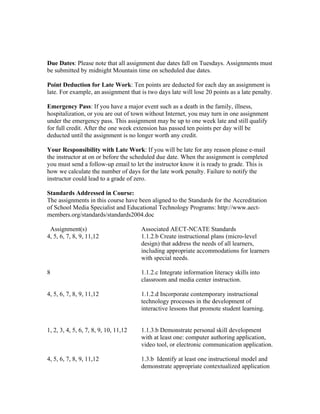
Due Dates: Please note that all assignment due dates fall on Tuesdays. Assignments must
be submitted by midnight Mountain time on scheduled due dates.

Point Deduction for Late Work: Ten points are deducted for each day an assignment is
late. For example, an assignment that is two days late will lose 20 points as a late penalty.

Emergency Pass: If you have a major event such as a death in the family, illness,
hospitalization, or you are out of town without Internet, you may turn in one assignment
under the emergency pass. This assignment may be up to one week late and still qualify
for full credit. After the one week extension has passed ten points per day will be
deducted until the assignment is no longer worth any credit.

Your Responsibility with Late Work: If you will be late for any reason please e-mail
the instructor at on or before the scheduled due date. When the assignment is completed
you must send a follow-up email to let the instructor know it is ready to grade. This is
how we calculate the number of days for the late work penalty. Failure to notify the
instructor could lead to a grade of zero.

Standards Addressed in Course:
The assignments in this course have been aligned to the Standards for the Accreditation
of School Media Specialist and Educational Technology Programs: http://www.aect-
members.org/standards/standards2004.doc

 Assignment(s)                         Associated AECT-NCATE Standards
4, 5, 6, 7, 8, 9, 11,12                1.1.2.b Create instructional plans (micro-level
                                       design) that address the needs of all learners,
                                       including appropriate accommodations for learners
                                       with special needs.

8                                      1.1.2.c Integrate information literacy skills into
                                       classroom and media center instruction.

4, 5, 6, 7, 8, 9, 11,12                1.1.2.d Incorporate contemporary instructional
                                       technology processes in the development of
                                       interactive lessons that promote student learning.


1, 2, 3, 4, 5, 6, 7, 8, 9, 10, 11,12   1.1.3.b Demonstrate personal skill development
                                       with at least one: computer authoring application,
                                       video tool, or electronic communication application.

4, 5, 6, 7, 8, 9, 11,12                1.3.b Identify at least one instructional model and
                                       demonstrate appropriate contextualized application
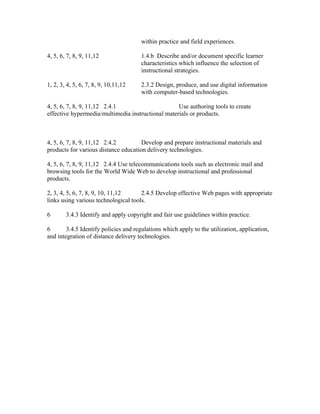
within practice and field experiences.

4, 5, 6, 7, 8, 9, 11,12                1.4.b Describe and/or document specific learner
                                       characteristics which influence the selection of
                                       instructional strategies.

1, 2, 3, 4, 5, 6, 7, 8, 9, 10,11,12    2.3.2 Design, produce, and use digital information
                                       with computer-based technologies.

4, 5, 6, 7, 8, 9, 11,12 2.4.1                      Use authoring tools to create
effective hypermedia/multimedia instructional materials or products.


4, 5, 6, 7, 8, 9, 11,12 2.4.2         Develop and prepare instructional materials and
products for various distance education delivery technologies.

4, 5, 6, 7, 8, 9, 11,12 2.4.4 Use telecommunications tools such as electronic mail and
browsing tools for the World Wide Web to develop instructional and professional
products.

2, 3, 4, 5, 6, 7, 8, 9, 10, 11,12     2.4.5 Develop effective Web pages with appropriate
links using various technological tools.

6       3.4.3 Identify and apply copyright and fair use guidelines within practice.

6       3.4.5 Identify policies and regulations which apply to the utilization, application,
and integration of distance delivery technologies.

502: Syllabus

  • 1.
    Internet for Educators EDTECH502 SPRING 2009 Course Syllabus JANUARY 20 - MAY 8 3 Credits Instructor Name: Amanda H. Chase Location: Pittsburgh, PA Home Phone: 412-548-3332 Cell Phone: 412-716-0220 Email: chase.amanda@gmail.com AIM: the arctic panda MSN: chase@medsagetechnologies.com Email is the best way to get in contact with me. I am located in Pittsburgh, PA. Most of our communication is done via instant messenger, email, and discussion board. The login page is located at: http://blackboard.boisestate.edu/ To access the course, you will log in using your BroncoWeb username and password. EdTech 502 Course Description Locate, retrieve, and evaluate information found on the Internet. Design and produce instructional Web pages using a combination of software and HTML/XHTML/CSS code. Apply appropriate instructional strategies and models to the design of digital curriculum. Course Goals After completing this course the student will be able to: * create Web pages using and HTML authoring system; * develop Web pages using CSS templates; * create a default page for a website; * apply file management skills to maintain local and remote Web site files and folders; * write HTML, XHTML, and CSS code correctly so that it validates under W3C standards; * copy and paste code into a Web page; * write CSS to position Web page content; * write and apply an external CSS style sheet to multiple Web pages; * write and apply alternative style sheets; * create a navigation menu for multiple Web pages; * create graphics in the appropriate format for Web pages; * modify images using image editing software; * insert images correctly into Web pages; * create client-side image maps; * apply appropriate design principles to create professional looking websites;
  • 2.
    * create accessibleWeb pages for individuals with disabilities; * adhere to rules of netiquette when corresponding with others on the Internet; * identify and apply copyright and fair use guidelines for website development; * use Internet search tools to locate high-quality instructional content; * develop appropriate rules of netiquette for a specified group of learners; * develop a page of hot links to essential information about Web accessibility; * develop an Internet scavenger hunt learning activity that integrates Internet resources; * develop a Jigsaw cooperative learning activity that integrates Internet resources; * develop an online learning activity for mobile devices; * develop a WebQuest learning activity that integrates Internet resources; * develop a virtual field trip learning activity that integrates multimedia an Internet resources. Required Course Texts The first two books listed below have companion Web sites with practice files and notes about mistakes that may have been found (errata). Dreamweaver CS3 Book Dreamweaver CS4:The Missing Manual Author: David Sawyer McFarland Date: 2008 Publisher: Pogue Press, O'Reilly ISBN-10: 0-596-52292-4 Companion Web Site: http://www.sawmac.com/missing/dwcs4/tutorials/index.php HTML/XHTML/CSS Book HTML, XHTML & CSS (Sixth Edition) Visual QuickStart Guide Author: Elizabeth Castro Date: 2007 Publisher: Peachpit Press ISBN-10: 0321430840 Companion Web Site:http://www.cookwood.com/html6ed/ Non Designers Web Book The Non-Designer's Web Book: An Easy Guide to Creating, Designing, and Posting Your Own Web Site (Third Edition) Authors: Robin Williams & John Tollett Date: 2006 Publisher: Peachpit Press ISBN-10: 0321303377
  • 3.
    Required Software Adobe CS4 Web Standard We will use Dreamweaver CS4, Fireworks CS4 and Device Central. Please install all of these when you install the CS4 suite. Popup Blocker Adobe Reader Flash Player QuickTime Player Firefox Web Browser: FireFTP (Firefox add on): http://fireftp.mozdev.org/ Fangs Screen Reader Emulator (Firefox add on):http://www.standards- schmandards.com/projects/fangs/ Internet Connection and FTP Capability: We will be creating a Web site over the semester and it will be necessary to FTP files to a Web server here at Boise State University. Dreamweaver uploads and downloads files through FTP. Alternative Web Site Space: Typically, we provide Web site space for students on the EDTECH2 server. However, sometimes things go wrong with the server or students are unable to FTP to it. This has sometimes been an issue for students who are outside of the United States. Please be prepared to obtain alternative Web site space if necessary. You may already have Web site space as part of the Internet Service Provider subscription you are using. Free, or inexpensive Web site hosting is also quite easy to find. Hardware: As with an internet connection, a computer is required for this course. It is everybody's responsibility to ensure that they have a working computer to complete their lessons. To help ease any worries, having a back up plan (in case there are computer troubles that will take more than a week to repair), is always recommended. Assignments The assignments for EdTech 502 include discussions, curriculum development for the Internet, and a final project. Posting of Assignments: Assignments weeks begin on every Wednesday and assignments are due the following.
  • 4.
    Note that thedefault email address in Blackboard is your BSU email address. Please check your personal information in Blackboard to see if the email address listed there is the one you with to be contacted with. If not, please change it right away. Assignment Submission: All assignments must be submitted by Tuesday evening/Wednesday morning at midnight on the assigned due dates in your Blackboard assignment. Grades: Your assignments will be reviewed and within one week after the assignment due date. Depending upon the assignment, you will receive a rubric with comments or receive points earned for assignment completion. Here is a list of the assignments and projects for this semester: Participation in Class Discussions 50 Blackboard Homepage 25 XHTML 502.html page 50 External CSS for 502.html 50 Netiquette Page 75 Web accessibility hot links page 75 Copyright scavenger hunt 75 Interactive concept map 75 Jigsaw activity 75 M-Learning activity 75 Edtech home page: default.html 75 Virtual field trip 150 WebQuest 150 Grand Total Points 1,000 Your final grade will be based on the following scale: A+ 970 - 1000 A 940 - 969 A- 900 - 939 B+ 870 - 899 B 840 - 869 B- 800 - 839 C+ 770 - 799 C 740 - 769 C- 700 - 739 D+ 670 - 699 D 640 - 669 D- 600 - 639 F 599 & Below
  • 5.
    Due Dates: Pleasenote that all assignment due dates fall on Tuesdays. Assignments must be submitted by midnight Mountain time on scheduled due dates. Point Deduction for Late Work: Ten points are deducted for each day an assignment is late. For example, an assignment that is two days late will lose 20 points as a late penalty. Emergency Pass: If you have a major event such as a death in the family, illness, hospitalization, or you are out of town without Internet, you may turn in one assignment under the emergency pass. This assignment may be up to one week late and still qualify for full credit. After the one week extension has passed ten points per day will be deducted until the assignment is no longer worth any credit. Your Responsibility with Late Work: If you will be late for any reason please e-mail the instructor at on or before the scheduled due date. When the assignment is completed you must send a follow-up email to let the instructor know it is ready to grade. This is how we calculate the number of days for the late work penalty. Failure to notify the instructor could lead to a grade of zero. Standards Addressed in Course: The assignments in this course have been aligned to the Standards for the Accreditation of School Media Specialist and Educational Technology Programs: http://www.aect- members.org/standards/standards2004.doc Assignment(s) Associated AECT-NCATE Standards 4, 5, 6, 7, 8, 9, 11,12 1.1.2.b Create instructional plans (micro-level design) that address the needs of all learners, including appropriate accommodations for learners with special needs. 8 1.1.2.c Integrate information literacy skills into classroom and media center instruction. 4, 5, 6, 7, 8, 9, 11,12 1.1.2.d Incorporate contemporary instructional technology processes in the development of interactive lessons that promote student learning. 1, 2, 3, 4, 5, 6, 7, 8, 9, 10, 11,12 1.1.3.b Demonstrate personal skill development with at least one: computer authoring application, video tool, or electronic communication application. 4, 5, 6, 7, 8, 9, 11,12 1.3.b Identify at least one instructional model and demonstrate appropriate contextualized application
  • 6.
    within practice andfield experiences. 4, 5, 6, 7, 8, 9, 11,12 1.4.b Describe and/or document specific learner characteristics which influence the selection of instructional strategies. 1, 2, 3, 4, 5, 6, 7, 8, 9, 10,11,12 2.3.2 Design, produce, and use digital information with computer-based technologies. 4, 5, 6, 7, 8, 9, 11,12 2.4.1 Use authoring tools to create effective hypermedia/multimedia instructional materials or products. 4, 5, 6, 7, 8, 9, 11,12 2.4.2 Develop and prepare instructional materials and products for various distance education delivery technologies. 4, 5, 6, 7, 8, 9, 11,12 2.4.4 Use telecommunications tools such as electronic mail and browsing tools for the World Wide Web to develop instructional and professional products. 2, 3, 4, 5, 6, 7, 8, 9, 10, 11,12 2.4.5 Develop effective Web pages with appropriate links using various technological tools. 6 3.4.3 Identify and apply copyright and fair use guidelines within practice. 6 3.4.5 Identify policies and regulations which apply to the utilization, application, and integration of distance delivery technologies.