Strings in C++
The string Class
 Definition of Strings
 How to declare strings in C++: the string class
 Operations on strings
 Concatenation, comparison operators, and [ ]
 Functions of the string class
 length, size, empty,
 insert, substr, replace, erase, clear, find
 Useful char functions in the C library <ctype.h>
1
Definition of Strings
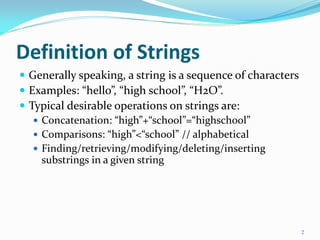
 Generally speaking, a string is a sequence of characters
 Examples: “hello”, “high school”, “H2O”.
 Typical desirable operations on strings are:
 Concatenation: “high”+“school”=“highschool”
 Comparisons: “high”<“school” // alphabetical
 Finding/retrieving/modifying/deleting/inserting
substrings in a given string
2
Strings in C
 In C, a string can be a specially terminated char array or char
pointer
 a char array, such as char str[ ]=“high”;
 a char pointer, such as char *p = “high”;
 If a char array, the last element of the array must be equal to
‘0’, signaling the end
 For example, the above str[] is really of length 5:
str[0]=‘h’ str[1]=‘i’ str[2]=‘g’ str[3]=‘h’ str[4]=‘0’
 The same array could’ve been declared as:
 char str[5] = {‘h’,’i’, ‘g’,’h’,’0’};
 If you write char str[4] = {‘h’,’i’, ‘g’,’h’};, then str is an array of
chars but not a string.
 In char *p=“high”; the system allocates memory of 5
characters long, stores “high” in the first 4, and ‘0’ in the 5th.
3
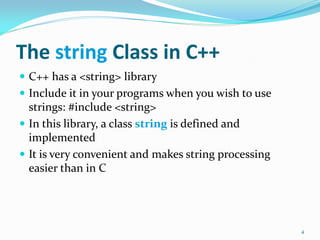
The string Class in C++
 C++ has a <string> library
 Include it in your programs when you wish to use
strings: #include <string>
 In this library, a class string is defined and
implemented
 It is very convenient and makes string processing
easier than in C
4
Declaration of strings
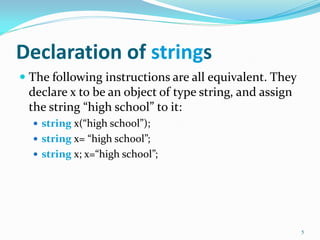
 The following instructions are all equivalent. They
declare x to be an object of type string, and assign
the string “high school” to it:
 string x(“high school”);
 string x= “high school”;
 string x; x=“high school”;
5
Operations on strings
(Concatenation)
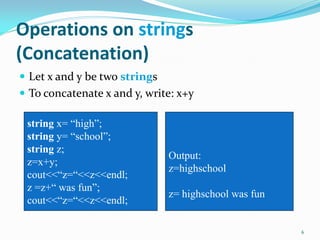
 Let x and y be two strings
 To concatenate x and y, write: x+y
6
string x= “high”;
string y= “school”;
string z;
z=x+y;
cout<<“z=“<<z<<endl;
z =z+“ was fun”;
cout<<“z=“<<z<<endl;
Output:
z=highschool
z= highschool was fun
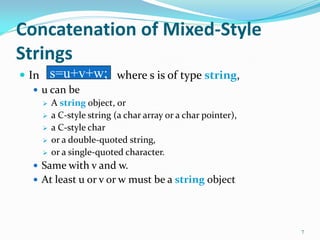
Concatenation of Mixed-Style
Strings
 In where s is of type string,
 u can be
 A string object, or
 a C-style string (a char array or a char pointer),
 a C-style char
 or a double-quoted string,
 or a single-quoted character.
 Same with v and w.
 At least u or v or w must be a string object
7
s=u+v+w;
Example of Mixed-Style Concat
8
string x= “high”;
char y[]= “school”;
char z[]= {„w‟,‟a‟,‟s‟,‟0‟};
char *p = “good”;
string s= x+y+‟ „+z+” very”+” “+p+‟!‟;
cout<<“s=“<<s<<endl;
cout<<“s=“+s<<endl;
Output:
s=highschool was very good!
The concat-assign Operator +=
 Assume x is a string object.
 The statement
x += y;
is equivalent to
x=x+y;
where y can be a string object, a C-style string
variable, a char variable, a double-quoted string, or a
single-quoted char.
9
Comparison Operators for string
Objects
 We can compare two strings x and y using the
following operators: ==, !=, <, <=, >, >=
 The comparison is alphabetical
 The outcome of each comparison is: true or false
 The comparison works as long as at least x or y is a
string object. The other string can be a string
object, a C-style string variable, or a double-
quoted string.
10
Example of String Comparisons
11
string x= “high”;
char y[]= “school”;
char *p = “good”;
If (x<y)
cout<<“x<y”<<endl;
If (x<“tree”)
cout<<“x<tree”<,endl;
If (“low” != x)
cout<<“low != x”<<endl;
if( (p>x)
cout<<“p>x”<<endl;
Else
cout<<“p<=x”<<endl;
Output:
x<y
x<tree
low != x
p>x
The Index Operator []
 If x is a string object, and you wish to obtain the value
of the k-th character in the string, you write: x[k];
 This feature makes string objects appear like arrays of
chars.
12
string x= “high”;
char c=x[0]; // c is „h‟
c=x[1]; // c is „i‟
c=x[2]; // c is g
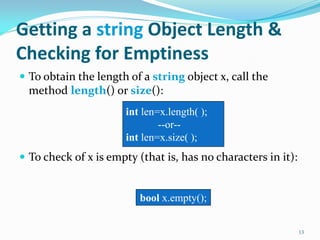
Getting a string Object Length &
Checking for Emptiness
 To obtain the length of a string object x, call the
method length() or size():
 To check of x is empty (that is, has no characters in it):
13
int len=x.length( );
--or--
int len=x.size( );
bool x.empty();
Obtaining Substrings of Strings
 Logically, a substring of a string x is a
subsequence of consecutive characters in x
 For example, “rod” is a substring of “product”
 If x is a string object, and we want the substring
that begins at position pos and has len
characters (where pos and len are of type int),
write:
 The default value of len is x.length( )
 The default value for pos is 0
14
string y = x.substr(pos,len);
string y = x.substr(pos);//x[pos..end-1]
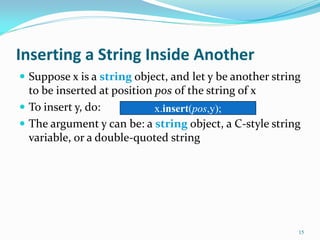
Inserting a String Inside Another
 Suppose x is a string object, and let y be another string
to be inserted at position pos of the string of x
 To insert y, do:
 The argument y can be: a string object, a C-style string
variable, or a double-quoted string
15
x.insert(pos,y);
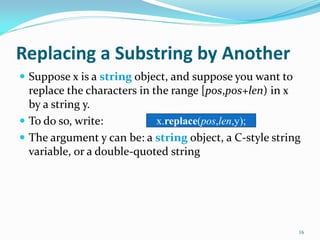
Replacing a Substring by Another
 Suppose x is a string object, and suppose you want to
replace the characters in the range [pos,pos+len) in x
by a string y.
 To do so, write:
 The argument y can be: a string object, a C-style string
variable, or a double-quoted string
16
x.replace(pos,len,y);
Deleting (Erasing) a Substring of a
string Object
 Suppose x is a string object, and suppose you want to
delete/erase the characters in the range [pos,pos+len)
in x.
 To do so, write:
 The default value of len is the x.length( )
 The default value for pos is 0
 To erase the whole string of x, do:
17
x.erase(pos,len);
x.clear( );
x.erase(pos); // erases x[pos..end-1]
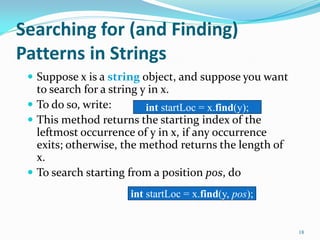
Searching for (and Finding)
Patterns in Strings
 Suppose x is a string object, and suppose you want
to search for a string y in x.
 To do so, write:
 This method returns the starting index of the
leftmost occurrence of y in x, if any occurrence
exits; otherwise, the method returns the length of
x.
 To search starting from a position pos, do
18
int startLoc = x.find(y);
int startLoc = x.find(y, pos);
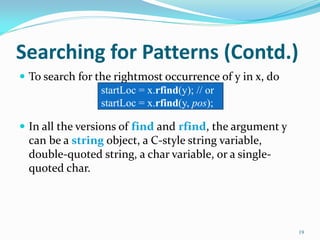
Searching for Patterns (Contd.)
 To search for the rightmost occurrence of y in x, do
 In all the versions of find and rfind, the argument y
can be a string object, a C-style string variable,
double-quoted string, a char variable, or a single-
quoted char.
19
startLoc = x.rfind(y); // or
startLoc = x.rfind(y, pos);
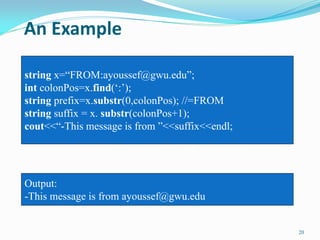
An Example
20
string x=“FROM:ayoussef@gwu.edu”;
int colonPos=x.find(„:‟);
string prefix=x.substr(0,colonPos); //=FROM
string suffix = x. substr(colonPos+1);
cout<<“-This message is from ”<<suffix<<endl;
Output:
-This message is from ayoussef@gwu.edu
Another Example
21
#include <fstream>
// this code segment reads lines from an input file and
// appends them to a string object called body. It does
// so until it sees a line equal to ##########
ifstream in(“inputFileName.txt”);
string body; char line[1000];
while(in.getline(line,1000)){ //puts in line the next line w/o n
string lineString (line);
if (lineString != "##########")
body += lineString +'n';// appends line to body
else
break; // exits the while loop
}
Trimming Leading & Trailing Spaces
22
// this function removes leading and trailing spaces from x
void trim (string& x){
int k = 0; // k will procced to the first non-blank char
while(k<x.size() &&(x[k]==' ' || x[k]=='t' || x[k]=='n'))
k++;
x. erase(0,k);
int s=x.size();
// s will move backward to the rightmost non-blank char
while(s>0 &&(x[s-1]==' ' || x[s-1]=='t' || x[s-1]=='n'))
s--;
x.erase(s);
}
What if You Want to Use C-Style Strings
 You can!
 C has a library <strings.h> which provides several
string processing functions
 Some of the more commonly used functions in
that library are presented in the next two slides
 In those functions, most of the arguments are of
type char *str. That can be replaced by char str[];
23
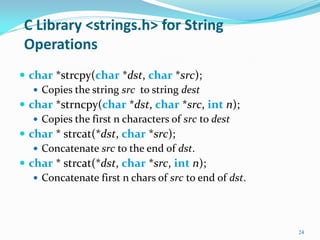
C Library <strings.h> for String
Operations
 char *strcpy(char *dst, char *src);
 Copies the string src to string dest
 char *strncpy(char *dst, char *src, int n);
 Copies the first n characters of src to dest
 char * strcat(*dst, char *src);
 Concatenate src to the end of dst.
 char * strcat(*dst, char *src, int n);
 Concatenate first n chars of src to end of dst.
24
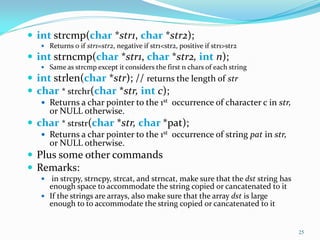
 int strcmp(char *str1, char *str2);
 Returns 0 if str1=str2, negative if str1<str2, positive if str1>str2
 int strncmp(char *str1, char *str2, int n);
 Same as strcmp except it considers the first n chars of each string
 int strlen(char *str); // returns the length of str
 char * strchr(char *str, int c);
 Returns a char pointer to the 1st occurrence of character c in str,
or NULL otherwise.
 char * strstr(char *str, char *pat);
 Returns a char pointer to the 1st occurrence of string pat in str,
or NULL otherwise.
 Plus some other commands
 Remarks:
 in strcpy, strncpy, strcat, and strncat, make sure that the dst string has
enough space to accommodate the string copied or cancatenated to it
 If the strings are arrays, also make sure that the array dst is large
enough to to accommodate the string copied or cancatenated to it
25
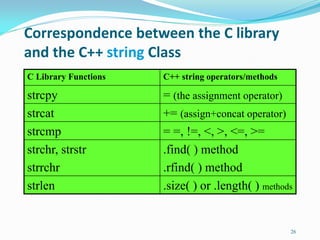
Correspondence between the C library
and the C++ string Class
C Library Functions C++ string operators/methods
strcpy = (the assignment operator)
strcat += (assign+concat operator)
strcmp = =, !=, <, >, <=, >=
strchr, strstr
strrchr
.find( ) method
.rfind( ) method
strlen .size( ) or .length( ) methods
26
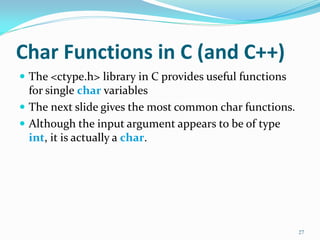
Char Functions in C (and C++)
 The <ctype.h> library in C provides useful functions
for single char variables
 The next slide gives the most common char functions.
 Although the input argument appears to be of type
int, it is actually a char.
27
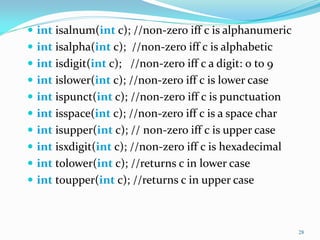
 int isalnum(int c); //non-zero iff c is alphanumeric
 int isalpha(int c); //non-zero iff c is alphabetic
 int isdigit(int c); //non-zero iff c a digit: 0 to 9
 int islower(int c); //non-zero iff c is lower case
 int ispunct(int c); //non-zero iff c is punctuation
 int isspace(int c); //non-zero iff c is a space char
 int isupper(int c); // non-zero iff c is upper case
 int isxdigit(int c); //non-zero iff c is hexadecimal
 int tolower(int c); //returns c in lower case
 int toupper(int c); //returns c in upper case
28
An example of Using char Functions
29
//PRECONDITION: str a string object
//POSTCONDITION: every lower-case alphabetical letter
//in str is replaced by its upper-case counterpart
void toupper(string& str){
for(int i=0;i<str.size();i++){
char c=str[i];
if (islower(c)){
char C = toupper(c);
string strC; strC=C;
str.replace(i,1,strC);
}
}
}

Strinng Classes in c++

  • 1.
    Strings in C++ Thestring Class  Definition of Strings  How to declare strings in C++: the string class  Operations on strings  Concatenation, comparison operators, and [ ]  Functions of the string class  length, size, empty,  insert, substr, replace, erase, clear, find  Useful char functions in the C library <ctype.h> 1
  • 2.
    Definition of Strings Generally speaking, a string is a sequence of characters  Examples: “hello”, “high school”, “H2O”.  Typical desirable operations on strings are:  Concatenation: “high”+“school”=“highschool”  Comparisons: “high”<“school” // alphabetical  Finding/retrieving/modifying/deleting/inserting substrings in a given string 2
  • 3.
    Strings in C In C, a string can be a specially terminated char array or char pointer  a char array, such as char str[ ]=“high”;  a char pointer, such as char *p = “high”;  If a char array, the last element of the array must be equal to ‘0’, signaling the end  For example, the above str[] is really of length 5: str[0]=‘h’ str[1]=‘i’ str[2]=‘g’ str[3]=‘h’ str[4]=‘0’  The same array could’ve been declared as:  char str[5] = {‘h’,’i’, ‘g’,’h’,’0’};  If you write char str[4] = {‘h’,’i’, ‘g’,’h’};, then str is an array of chars but not a string.  In char *p=“high”; the system allocates memory of 5 characters long, stores “high” in the first 4, and ‘0’ in the 5th. 3
  • 4.
    The string Classin C++  C++ has a <string> library  Include it in your programs when you wish to use strings: #include <string>  In this library, a class string is defined and implemented  It is very convenient and makes string processing easier than in C 4
  • 5.
    Declaration of strings The following instructions are all equivalent. They declare x to be an object of type string, and assign the string “high school” to it:  string x(“high school”);  string x= “high school”;  string x; x=“high school”; 5
  • 6.
    Operations on strings (Concatenation) Let x and y be two strings  To concatenate x and y, write: x+y 6 string x= “high”; string y= “school”; string z; z=x+y; cout<<“z=“<<z<<endl; z =z+“ was fun”; cout<<“z=“<<z<<endl; Output: z=highschool z= highschool was fun
  • 7.
    Concatenation of Mixed-Style Strings In where s is of type string,  u can be  A string object, or  a C-style string (a char array or a char pointer),  a C-style char  or a double-quoted string,  or a single-quoted character.  Same with v and w.  At least u or v or w must be a string object 7 s=u+v+w;
  • 8.
    Example of Mixed-StyleConcat 8 string x= “high”; char y[]= “school”; char z[]= {„w‟,‟a‟,‟s‟,‟0‟}; char *p = “good”; string s= x+y+‟ „+z+” very”+” “+p+‟!‟; cout<<“s=“<<s<<endl; cout<<“s=“+s<<endl; Output: s=highschool was very good! s=highschool was very good!
  • 9.
    The concat-assign Operator+=  Assume x is a string object.  The statement x += y; is equivalent to x=x+y; where y can be a string object, a C-style string variable, a char variable, a double-quoted string, or a single-quoted char. 9
  • 10.
    Comparison Operators forstring Objects  We can compare two strings x and y using the following operators: ==, !=, <, <=, >, >=  The comparison is alphabetical  The outcome of each comparison is: true or false  The comparison works as long as at least x or y is a string object. The other string can be a string object, a C-style string variable, or a double- quoted string. 10
  • 11.
    Example of StringComparisons 11 string x= “high”; char y[]= “school”; char *p = “good”; If (x<y) cout<<“x<y”<<endl; If (x<“tree”) cout<<“x<tree”<,endl; If (“low” != x) cout<<“low != x”<<endl; if( (p>x) cout<<“p>x”<<endl; Else cout<<“p<=x”<<endl; Output: x<y x<tree low != x p>x
  • 12.
    The Index Operator[]  If x is a string object, and you wish to obtain the value of the k-th character in the string, you write: x[k];  This feature makes string objects appear like arrays of chars. 12 string x= “high”; char c=x[0]; // c is „h‟ c=x[1]; // c is „i‟ c=x[2]; // c is g
  • 13.
    Getting a stringObject Length & Checking for Emptiness  To obtain the length of a string object x, call the method length() or size():  To check of x is empty (that is, has no characters in it): 13 int len=x.length( ); --or-- int len=x.size( ); bool x.empty();
  • 14.
    Obtaining Substrings ofStrings  Logically, a substring of a string x is a subsequence of consecutive characters in x  For example, “rod” is a substring of “product”  If x is a string object, and we want the substring that begins at position pos and has len characters (where pos and len are of type int), write:  The default value of len is x.length( )  The default value for pos is 0 14 string y = x.substr(pos,len); string y = x.substr(pos);//x[pos..end-1]
  • 15.
    Inserting a StringInside Another  Suppose x is a string object, and let y be another string to be inserted at position pos of the string of x  To insert y, do:  The argument y can be: a string object, a C-style string variable, or a double-quoted string 15 x.insert(pos,y);
  • 16.
    Replacing a Substringby Another  Suppose x is a string object, and suppose you want to replace the characters in the range [pos,pos+len) in x by a string y.  To do so, write:  The argument y can be: a string object, a C-style string variable, or a double-quoted string 16 x.replace(pos,len,y);
  • 17.
    Deleting (Erasing) aSubstring of a string Object  Suppose x is a string object, and suppose you want to delete/erase the characters in the range [pos,pos+len) in x.  To do so, write:  The default value of len is the x.length( )  The default value for pos is 0  To erase the whole string of x, do: 17 x.erase(pos,len); x.clear( ); x.erase(pos); // erases x[pos..end-1]
  • 18.
    Searching for (andFinding) Patterns in Strings  Suppose x is a string object, and suppose you want to search for a string y in x.  To do so, write:  This method returns the starting index of the leftmost occurrence of y in x, if any occurrence exits; otherwise, the method returns the length of x.  To search starting from a position pos, do 18 int startLoc = x.find(y); int startLoc = x.find(y, pos);
  • 19.
    Searching for Patterns(Contd.)  To search for the rightmost occurrence of y in x, do  In all the versions of find and rfind, the argument y can be a string object, a C-style string variable, double-quoted string, a char variable, or a single- quoted char. 19 startLoc = x.rfind(y); // or startLoc = x.rfind(y, pos);
  • 20.
    An Example 20 string x=“FROM:ayoussef@gwu.edu”; intcolonPos=x.find(„:‟); string prefix=x.substr(0,colonPos); //=FROM string suffix = x. substr(colonPos+1); cout<<“-This message is from ”<<suffix<<endl; Output: -This message is from ayoussef@gwu.edu
  • 21.
    Another Example 21 #include <fstream> //this code segment reads lines from an input file and // appends them to a string object called body. It does // so until it sees a line equal to ########## ifstream in(“inputFileName.txt”); string body; char line[1000]; while(in.getline(line,1000)){ //puts in line the next line w/o n string lineString (line); if (lineString != "##########") body += lineString +'n';// appends line to body else break; // exits the while loop }
  • 22.
    Trimming Leading &Trailing Spaces 22 // this function removes leading and trailing spaces from x void trim (string& x){ int k = 0; // k will procced to the first non-blank char while(k<x.size() &&(x[k]==' ' || x[k]=='t' || x[k]=='n')) k++; x. erase(0,k); int s=x.size(); // s will move backward to the rightmost non-blank char while(s>0 &&(x[s-1]==' ' || x[s-1]=='t' || x[s-1]=='n')) s--; x.erase(s); }
  • 23.
    What if YouWant to Use C-Style Strings  You can!  C has a library <strings.h> which provides several string processing functions  Some of the more commonly used functions in that library are presented in the next two slides  In those functions, most of the arguments are of type char *str. That can be replaced by char str[]; 23
  • 24.
    C Library <strings.h>for String Operations  char *strcpy(char *dst, char *src);  Copies the string src to string dest  char *strncpy(char *dst, char *src, int n);  Copies the first n characters of src to dest  char * strcat(*dst, char *src);  Concatenate src to the end of dst.  char * strcat(*dst, char *src, int n);  Concatenate first n chars of src to end of dst. 24
  • 25.
     int strcmp(char*str1, char *str2);  Returns 0 if str1=str2, negative if str1<str2, positive if str1>str2  int strncmp(char *str1, char *str2, int n);  Same as strcmp except it considers the first n chars of each string  int strlen(char *str); // returns the length of str  char * strchr(char *str, int c);  Returns a char pointer to the 1st occurrence of character c in str, or NULL otherwise.  char * strstr(char *str, char *pat);  Returns a char pointer to the 1st occurrence of string pat in str, or NULL otherwise.  Plus some other commands  Remarks:  in strcpy, strncpy, strcat, and strncat, make sure that the dst string has enough space to accommodate the string copied or cancatenated to it  If the strings are arrays, also make sure that the array dst is large enough to to accommodate the string copied or cancatenated to it 25
  • 26.
    Correspondence between theC library and the C++ string Class C Library Functions C++ string operators/methods strcpy = (the assignment operator) strcat += (assign+concat operator) strcmp = =, !=, <, >, <=, >= strchr, strstr strrchr .find( ) method .rfind( ) method strlen .size( ) or .length( ) methods 26
  • 27.
    Char Functions inC (and C++)  The <ctype.h> library in C provides useful functions for single char variables  The next slide gives the most common char functions.  Although the input argument appears to be of type int, it is actually a char. 27
  • 28.
     int isalnum(intc); //non-zero iff c is alphanumeric  int isalpha(int c); //non-zero iff c is alphabetic  int isdigit(int c); //non-zero iff c a digit: 0 to 9  int islower(int c); //non-zero iff c is lower case  int ispunct(int c); //non-zero iff c is punctuation  int isspace(int c); //non-zero iff c is a space char  int isupper(int c); // non-zero iff c is upper case  int isxdigit(int c); //non-zero iff c is hexadecimal  int tolower(int c); //returns c in lower case  int toupper(int c); //returns c in upper case 28
  • 29.
    An example ofUsing char Functions 29 //PRECONDITION: str a string object //POSTCONDITION: every lower-case alphabetical letter //in str is replaced by its upper-case counterpart void toupper(string& str){ for(int i=0;i<str.size();i++){ char c=str[i]; if (islower(c)){ char C = toupper(c); string strC; strC=C; str.replace(i,1,strC); } } }