Pre-Production
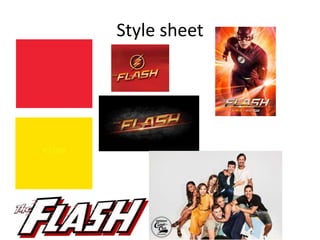
Style sheet
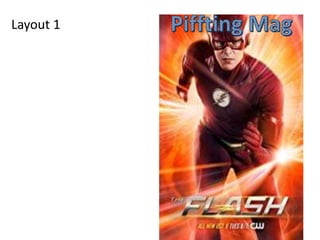
Layout 1
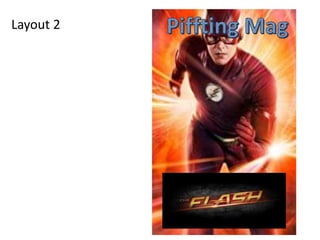
Layout 2
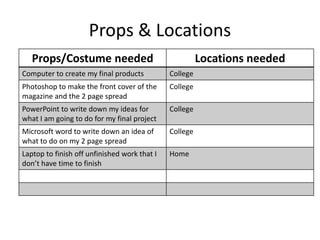
Props & Locations
Props/Costume needed Locations needed
Computer to create my final products College
Photoshop to make the front cover of the
magazine and the 2 page spread
College
PowerPoint to write down my ideas for
what I am going to do for my final project
College
Microsoft word to write down an idea of
what to do on my 2 page spread
College
Laptop to finish off unfinished work that I
don’t have time to finish
Home
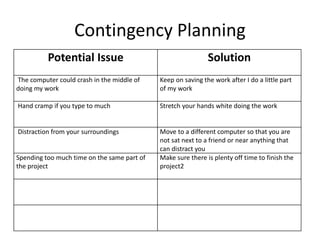
Contingency Planning
Potential Issue Solution
The computer could crash in the middle of
doing my work
Keep on saving the work after I do a little part
of my work
Hand cramp if you type to much Stretch your hands white doing the work
Distraction from your surroundings Move to a different computer so that you are
not sat next to a friend or near anything that
can distract you
Spending too much time on the same part of
the project
Make sure there is plenty off time to finish the
project2
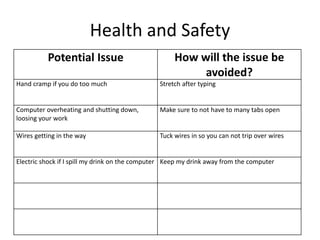
Health and Safety
Potential Issue How will the issue be
avoided?
Hand cramp if you do too much Stretch after typing
Computer overheating and shutting down,
loosing your work
Make sure to not have to many tabs open
Wires getting in the way Tuck wires in so you can not trip over wires
Electric shock if I spill my drink on the computer Keep my drink away from the computer
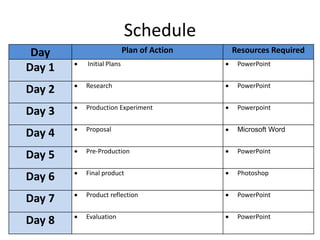
Schedule
Day Plan of Action Resources Required
Day 1  Initial Plans  PowerPoint
Day 2  Research  PowerPoint
Day 3  Production Experiment  Powerpoint
Day 4  Proposal  Microsoft Word
Day 5  Pre-Production  PowerPoint
Day 6  Final product  Photoshop
Day 7  Product reflection  PowerPoint
Day 8  Evaluation  PowerPoint

5. pre production(3)

  • 1.
  • 2.
  • 3.
  • 4.
  • 5.
    Props & Locations Props/Costumeneeded Locations needed Computer to create my final products College Photoshop to make the front cover of the magazine and the 2 page spread College PowerPoint to write down my ideas for what I am going to do for my final project College Microsoft word to write down an idea of what to do on my 2 page spread College Laptop to finish off unfinished work that I don’t have time to finish Home
  • 6.
    Contingency Planning Potential IssueSolution The computer could crash in the middle of doing my work Keep on saving the work after I do a little part of my work Hand cramp if you type to much Stretch your hands white doing the work Distraction from your surroundings Move to a different computer so that you are not sat next to a friend or near anything that can distract you Spending too much time on the same part of the project Make sure there is plenty off time to finish the project2
  • 7.
    Health and Safety PotentialIssue How will the issue be avoided? Hand cramp if you do too much Stretch after typing Computer overheating and shutting down, loosing your work Make sure to not have to many tabs open Wires getting in the way Tuck wires in so you can not trip over wires Electric shock if I spill my drink on the computer Keep my drink away from the computer
  • 8.
    Schedule Day Plan ofAction Resources Required Day 1  Initial Plans  PowerPoint Day 2  Research  PowerPoint Day 3  Production Experiment  Powerpoint Day 4  Proposal  Microsoft Word Day 5  Pre-Production  PowerPoint Day 6  Final product  Photoshop Day 7  Product reflection  PowerPoint Day 8  Evaluation  PowerPoint

Editor's Notes

  • #3 Explore colours, fonts and image styles similar to what you want to produce. Discuss all three elements in relation to why you chose them and where you may use them in your project. Go over as many pages as you need to
  • #4 Mock up of a potential design using the colours and fonts established in your style sheet and sourced images
  • #5 Mock up of a potential design using the colours and fonts established in your style sheet and sourced images