Review
Blocks and Compound Statements
Control Flow
Conditional Statements
Loops
Functions
Modular Programming
Variable Scope
Static Variables
Register Variables
1
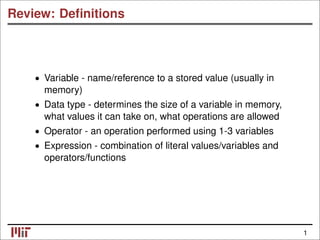
Review: Definitions
• Variable - name/reference to a stored value (usually in
memory)
• Data type - determines the size of a variable in memory,
what values it can take on, what operations are allowed
• Operator - an operation performed using 1-3 variables
• Expression - combination of literal values/variables and
operators/functions
1
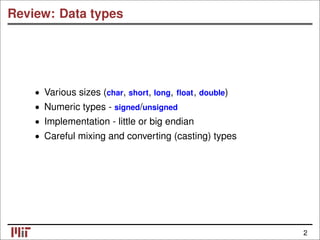
Review: Data types
• Various sizes (char, short, long, float, double)
• Numeric types - signed/unsigned
• Implementation - little or big endian
• Careful mixing and converting (casting) types
2
Review: Operators
• Unary, binary, ternary (1-3 arguments)
• Arithmetic operators, relational operators, binary (bitwise
and logical) operators, assignment operators, etc.
• Conditional expressions
• Order of evaluation (precedence, direction)
3
Review
Blocks and Compound Statements
Control Flow
Conditional Statements
Loops
Functions
Modular Programming
Variable Scope
Static Variables
Register Variables
4
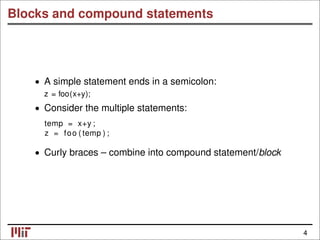
Blocks and compound statements
• A simple statement ends in a semicolon:
z = foo(x+y);
• Consider the multiple statements:
temp = x+y ;
z = foo ( temp ) ;
• Curly braces – combine into compound statement/block
4
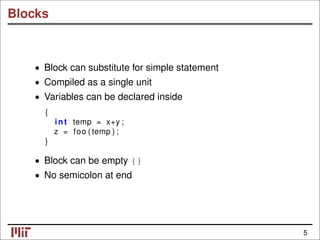
Blocks
• Block can substitute for simple statement
• Compiled as a single unit
Variables can be declared inside
•
{
int temp = x+y ;
z = foo ( temp ) ;
}
• Block can be empty {}
No semicolon at end
•
5
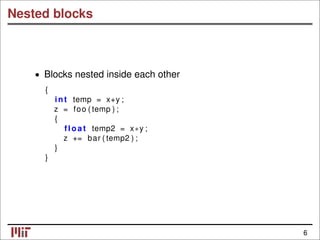
Nested blocks
Blocks nested inside each other
•
{
int temp = x+y ;
z = foo ( temp ) ;
{
float temp2 = x∗y ;
z += bar ( temp2 ) ;
}
}
6
Review
Blocks and Compound Statements
Control Flow
Conditional Statements
Loops
Functions
Modular Programming
Variable Scope
Static Variables
Register Variables
7
Control conditions
• Unlike C++ or Java, no boolean type (in C89/C90)
• in C99, bool type available (use stdbool.h)
• Condition is an expression (or series of expressions)
e.g. n < 3 or x < y || z < y
Expression is non-zero condition true
• ⇒
• Expression must be numeric (or a pointer)
const char s t r [ ] = "some text" ;
i f ( s t r ) /∗ s t r i n g i s not n u l l ∗/
return 0;
7
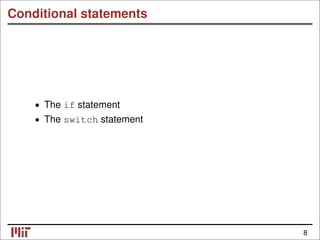
Conditional statements
The if statement
•
The switch statement
•
8
The if statement
i f ( x % 2)
y += x / 2 ;
Evaluate condition
•
if (x % 2 == 0)
• If true, evaluate inner statement
y += x/2;
• Otherwise, do nothing
9
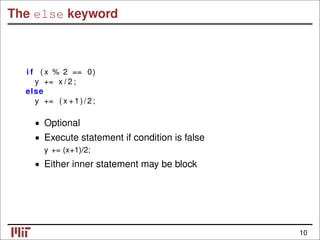
The else keyword
i f ( x % 2 == 0)
y += x / 2 ;
else
y += ( x +1)/2;
• Optional
Execute statement if condition is false
•
y += (x+1)/2;
• Either inner statement may be block
10
The else if keyword
i f ( x % 2 == 0)
y += x / 2 ;
else i f ( x % 4 == 1)
y += 2∗(( x + 3 ) / 4 ) ;
else
y += ( x +1)/2;
• Additional alternative control paths
• Conditions evaluated in order until one is met; inner
statement then executed
• If multiple conditions true, only first executed
• Equivalent to nested if statements
11
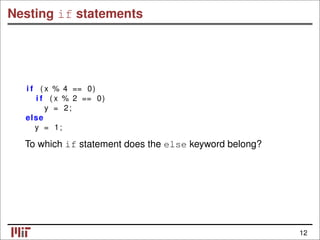
Nesting if statements
i f ( x % 4 == 0)
i f ( x % 2 == 0)
y = 2;
else
y = 1;
To which if statement does the else keyword belong?
12
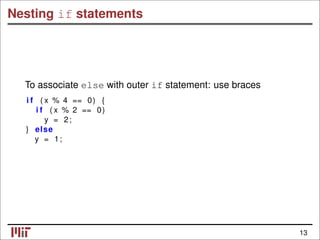
Nesting if statements
To associate else with outer if statement: use braces
i f ( x % 4 == 0) {
i f ( x % 2 == 0)
y = 2;
} else
y = 1;
13
The switch statement
Alternative conditional statement
•
• Integer (or character) variable as input
Considers cases for value of variable
•
switch ( ch ) {
case ’Y’ : /∗ ch == ’Y ’ ∗/
/∗ do something ∗/
break ;
case ’N’ : /∗ ch == ’N ’ ∗/
/∗ do something else ∗/
break ;
default : /∗ otherwise ∗/
/∗ do a t h i r d thing ∗/
break ;
}
14
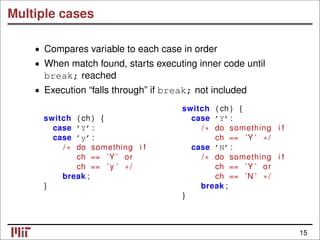
Multiple cases
• Compares variable to each case in order
• When match found, starts executing inner code until
break; reached
• Execution “falls through” if break; not included
switch ( ch ) {
switch ( ch ) { case ’Y’ :
case ’Y’ : /∗ do something i f
case ’y’ : ch == ’Y ’ ∗/
/∗ do something i f case ’N’ :
ch == ’Y ’ or /∗ do something i f
ch == ’ y ’ ∗/ ch == ’Y ’ or
break ; ch == ’N ’ ∗/
} break ;
}
15
The switch statement
Contents of switch statement a block
•
• Case labels: different entry points into block
• Similar to labels used with goto keyword (next lecture. . . )
16
Loop statements
• The while loop
• The for loop
• The do-while loop
• The break and continue keywords
17
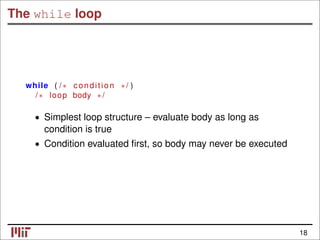
The while loop
while ( /∗ condition ∗/ )
/∗ loop body ∗/
• Simplest loop structure – evaluate body as long as
condition is true
• Condition evaluated first, so body may never be executed
18
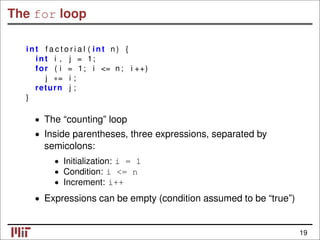
The for loop
int f a c t o r i a l ( int n ) {
int i , j = 1;
for ( i = 1; i <= n ; i ++)
j ∗= i ;
return j ;
}
• The “counting” loop
• Inside parentheses, three expressions, separated by
semicolons:
Initialization: i = 1
•
Condition: i <= n
•
Increment: i++
•
• Expressions can be empty (condition assumed to be “true”)
19
The for loop
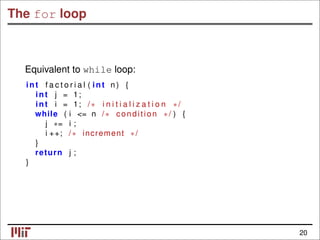
Equivalent to while loop:
int f a c t o r i a l ( int n ) {
int j = 1;
int i = 1; /∗ i n i t i a l i z a t i o n ∗/
while ( i <= n /∗ condition ∗/ ) {
j ∗= i ;
i ++; /∗ increment ∗/
}
return j ;
}
20
The for loop
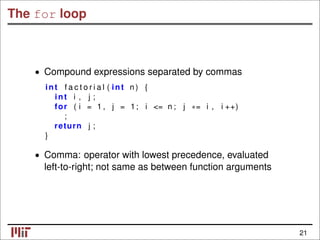
• Compound expressions separated by commas
int f a c t o r i a l ( int n ) {
int i , j ;
for ( i = 1 , j = 1; i <= n ; j ∗= i , i ++)
;
return j ;
}
• Comma: operator with lowest precedence, evaluated
left-to-right; not same as between function arguments
21
The do-while loop
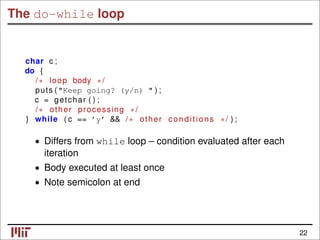
char c ;
do {
/∗ loop body ∗/
puts ("Keep going? (y/n) " ) ;
c = getchar ( ) ;
/∗ other processing ∗/
} while ( c == ’y’ && /∗ other conditions ∗/ ) ;
• Differs from while loop – condition evaluated after each
iteration
• Body executed at least once
Note semicolon at end
•
22
The break keyword
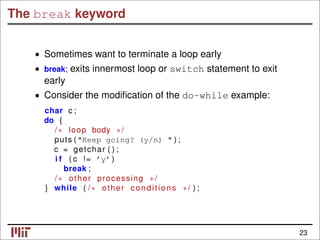
• Sometimes want to terminate a loop early
• break; exits innermost loop or switch statement to exit
early
• Consider the modification of the do-while example:
char c ;
do {
/∗ loop body ∗/
puts ("Keep going? (y/n) " ) ;
c = getchar ( ) ;
i f ( c != ’y’)
break ;
/∗ other processing ∗/
} while ( /∗ other conditions ∗/ ) ;
23
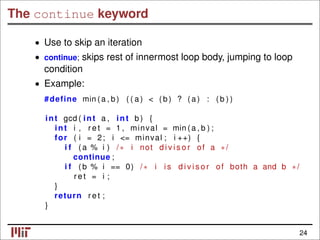
The continue keyword
• Use to skip an iteration
• continue; skips rest of innermost loop body, jumping to loop
condition
• Example:
#define min (a , b ) ( ( a ) < ( b ) ? ( a ) : ( b ) )
int gcd ( int a , int b ) {
int i , r e t = 1 , minval = min (a , b ) ;
for ( i = 2; i <= minval ; i ++) {
i f ( a % i ) /∗ i not d i v i s o r of a ∗/
continue ;
i f ( b % i == 0) /∗ i i s d i v i s o r of both a and b ∗/
r e t = i ;
}
return r e t ;
}
24
Review
Blocks and Compound Statements
Control Flow
Conditional Statements
Loops
Functions
Modular Programming
Variable Scope
Static Variables
Register Variables
25
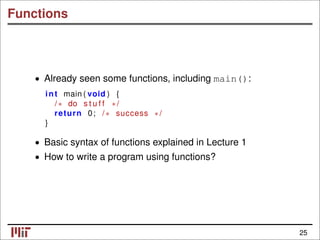
Functions
• Already seen some functions, including main():
int main ( void ) {
/∗ do s t u f f ∗/
return 0; /∗ success ∗/
}
• Basic syntax of functions explained in Lecture 1
• How to write a program using functions?
25
Divide and conquer
• Conceptualize how a program can be broken into smaller
parts
• Let’s design a program to solve linear Diophantine
equation (ax + by = c,x, y: integers):
get a, b, c from command line
compute g = gcd(a,b)
if (c is not a multiple of the gcd)
no solutions exist; exit
run Extended Euclidean algorithm on a, b
rescale x and y output by (c/g)
print solution
• Extended Euclidean algorithm: finds integers x, y s.t.
ax + by = gcd(a, b).
26
Computing the gcd
• Compute the gcd using the Euclidean algorithm:
int gcd ( int a , int b ) {
while ( b ) { /∗ i f a < b , performs swap ∗/
int temp = b ;
b = a % b ;
a = temp ;
}
return a ;
}
• Algorithm relies on gcd(a, b) = gcd(b, a mod b), for natural
numbers a > b.
[Knuth, D. E. The Art of Computer Programming, Volume 1: Fundamental
Algorithms. 3rd ed. Addison-Wesley, 1997.]
27
© Addison Wesley. All rights reserved. This content is excluded from our Creative Commons license.
For more information, see http://ocw.mit.edu/fairuse.
Extended Euclidean algorithm
Pseudocode for Extended Euclidean algorithm:
Initialize state variables (x,y)
if (a < b)
swap(a,b)
while (b > 0) {
compute quotient, remainder
update state variables (x,y)
}
return gcd and state variables (x,y)
[Menezes, A. J., et al. Handbook of Applied Cryptography. CRC Press, 1996.]
28
© CRC Press. All rights reserved. This content is excluded from our Creative Commons license.
For more information, see http://ocw.mit.edu/fairuse.
Returning multiple values
• Extended Euclidean algorithm returns gcd, and two other
state variables, x and y
• Functions only return (up to) one value
• Solution: use global variables
• Declare variables for other outputs outside the function
• variables declared outside of a function block are globals
• persist throughout life of program
• can be accessed/modified in any function
29
Divide and conquer
• Break down problem into simpler sub-problems
Consider iteration and recursion
•
• How can we implement gcd(a,b) recursively?
Minimize transfer of state between functions
•
• Writing pseudocode first can help
30

3.Loops_conditionals.pdf

  • 1.
    Review Blocks and CompoundStatements Control Flow Conditional Statements Loops Functions Modular Programming Variable Scope Static Variables Register Variables 1
  • 2.
    Review: Definitions • Variable- name/reference to a stored value (usually in memory) • Data type - determines the size of a variable in memory, what values it can take on, what operations are allowed • Operator - an operation performed using 1-3 variables • Expression - combination of literal values/variables and operators/functions 1
  • 3.
    Review: Data types •Various sizes (char, short, long, float, double) • Numeric types - signed/unsigned • Implementation - little or big endian • Careful mixing and converting (casting) types 2
  • 4.
    Review: Operators • Unary,binary, ternary (1-3 arguments) • Arithmetic operators, relational operators, binary (bitwise and logical) operators, assignment operators, etc. • Conditional expressions • Order of evaluation (precedence, direction) 3
  • 5.
    Review Blocks and CompoundStatements Control Flow Conditional Statements Loops Functions Modular Programming Variable Scope Static Variables Register Variables 4
  • 6.
    Blocks and compoundstatements • A simple statement ends in a semicolon: z = foo(x+y); • Consider the multiple statements: temp = x+y ; z = foo ( temp ) ; • Curly braces – combine into compound statement/block 4
  • 7.
    Blocks • Block cansubstitute for simple statement • Compiled as a single unit Variables can be declared inside • { int temp = x+y ; z = foo ( temp ) ; } • Block can be empty {} No semicolon at end • 5
  • 8.
    Nested blocks Blocks nestedinside each other • { int temp = x+y ; z = foo ( temp ) ; { float temp2 = x∗y ; z += bar ( temp2 ) ; } } 6
  • 9.
    Review Blocks and CompoundStatements Control Flow Conditional Statements Loops Functions Modular Programming Variable Scope Static Variables Register Variables 7
  • 10.
    Control conditions • UnlikeC++ or Java, no boolean type (in C89/C90) • in C99, bool type available (use stdbool.h) • Condition is an expression (or series of expressions) e.g. n < 3 or x < y || z < y Expression is non-zero condition true • ⇒ • Expression must be numeric (or a pointer) const char s t r [ ] = "some text" ; i f ( s t r ) /∗ s t r i n g i s not n u l l ∗/ return 0; 7
  • 11.
    Conditional statements The ifstatement • The switch statement • 8
  • 12.
    The if statement if ( x % 2) y += x / 2 ; Evaluate condition • if (x % 2 == 0) • If true, evaluate inner statement y += x/2; • Otherwise, do nothing 9
  • 13.
    The else keyword if ( x % 2 == 0) y += x / 2 ; else y += ( x +1)/2; • Optional Execute statement if condition is false • y += (x+1)/2; • Either inner statement may be block 10
  • 14.
    The else ifkeyword i f ( x % 2 == 0) y += x / 2 ; else i f ( x % 4 == 1) y += 2∗(( x + 3 ) / 4 ) ; else y += ( x +1)/2; • Additional alternative control paths • Conditions evaluated in order until one is met; inner statement then executed • If multiple conditions true, only first executed • Equivalent to nested if statements 11
  • 15.
    Nesting if statements if ( x % 4 == 0) i f ( x % 2 == 0) y = 2; else y = 1; To which if statement does the else keyword belong? 12
  • 16.
    Nesting if statements Toassociate else with outer if statement: use braces i f ( x % 4 == 0) { i f ( x % 2 == 0) y = 2; } else y = 1; 13
  • 17.
    The switch statement Alternativeconditional statement • • Integer (or character) variable as input Considers cases for value of variable • switch ( ch ) { case ’Y’ : /∗ ch == ’Y ’ ∗/ /∗ do something ∗/ break ; case ’N’ : /∗ ch == ’N ’ ∗/ /∗ do something else ∗/ break ; default : /∗ otherwise ∗/ /∗ do a t h i r d thing ∗/ break ; } 14
  • 18.
    Multiple cases • Comparesvariable to each case in order • When match found, starts executing inner code until break; reached • Execution “falls through” if break; not included switch ( ch ) { switch ( ch ) { case ’Y’ : case ’Y’ : /∗ do something i f case ’y’ : ch == ’Y ’ ∗/ /∗ do something i f case ’N’ : ch == ’Y ’ or /∗ do something i f ch == ’ y ’ ∗/ ch == ’Y ’ or break ; ch == ’N ’ ∗/ } break ; } 15
  • 19.
    The switch statement Contentsof switch statement a block • • Case labels: different entry points into block • Similar to labels used with goto keyword (next lecture. . . ) 16
  • 20.
    Loop statements • Thewhile loop • The for loop • The do-while loop • The break and continue keywords 17
  • 21.
    The while loop while( /∗ condition ∗/ ) /∗ loop body ∗/ • Simplest loop structure – evaluate body as long as condition is true • Condition evaluated first, so body may never be executed 18
  • 22.
    The for loop intf a c t o r i a l ( int n ) { int i , j = 1; for ( i = 1; i <= n ; i ++) j ∗= i ; return j ; } • The “counting” loop • Inside parentheses, three expressions, separated by semicolons: Initialization: i = 1 • Condition: i <= n • Increment: i++ • • Expressions can be empty (condition assumed to be “true”) 19
  • 23.
    The for loop Equivalentto while loop: int f a c t o r i a l ( int n ) { int j = 1; int i = 1; /∗ i n i t i a l i z a t i o n ∗/ while ( i <= n /∗ condition ∗/ ) { j ∗= i ; i ++; /∗ increment ∗/ } return j ; } 20
  • 24.
    The for loop •Compound expressions separated by commas int f a c t o r i a l ( int n ) { int i , j ; for ( i = 1 , j = 1; i <= n ; j ∗= i , i ++) ; return j ; } • Comma: operator with lowest precedence, evaluated left-to-right; not same as between function arguments 21
  • 25.
    The do-while loop charc ; do { /∗ loop body ∗/ puts ("Keep going? (y/n) " ) ; c = getchar ( ) ; /∗ other processing ∗/ } while ( c == ’y’ && /∗ other conditions ∗/ ) ; • Differs from while loop – condition evaluated after each iteration • Body executed at least once Note semicolon at end • 22
  • 26.
    The break keyword •Sometimes want to terminate a loop early • break; exits innermost loop or switch statement to exit early • Consider the modification of the do-while example: char c ; do { /∗ loop body ∗/ puts ("Keep going? (y/n) " ) ; c = getchar ( ) ; i f ( c != ’y’) break ; /∗ other processing ∗/ } while ( /∗ other conditions ∗/ ) ; 23
  • 27.
    The continue keyword •Use to skip an iteration • continue; skips rest of innermost loop body, jumping to loop condition • Example: #define min (a , b ) ( ( a ) < ( b ) ? ( a ) : ( b ) ) int gcd ( int a , int b ) { int i , r e t = 1 , minval = min (a , b ) ; for ( i = 2; i <= minval ; i ++) { i f ( a % i ) /∗ i not d i v i s o r of a ∗/ continue ; i f ( b % i == 0) /∗ i i s d i v i s o r of both a and b ∗/ r e t = i ; } return r e t ; } 24
  • 28.
    Review Blocks and CompoundStatements Control Flow Conditional Statements Loops Functions Modular Programming Variable Scope Static Variables Register Variables 25
  • 29.
    Functions • Already seensome functions, including main(): int main ( void ) { /∗ do s t u f f ∗/ return 0; /∗ success ∗/ } • Basic syntax of functions explained in Lecture 1 • How to write a program using functions? 25
  • 30.
    Divide and conquer •Conceptualize how a program can be broken into smaller parts • Let’s design a program to solve linear Diophantine equation (ax + by = c,x, y: integers): get a, b, c from command line compute g = gcd(a,b) if (c is not a multiple of the gcd) no solutions exist; exit run Extended Euclidean algorithm on a, b rescale x and y output by (c/g) print solution • Extended Euclidean algorithm: finds integers x, y s.t. ax + by = gcd(a, b). 26
  • 31.
    Computing the gcd •Compute the gcd using the Euclidean algorithm: int gcd ( int a , int b ) { while ( b ) { /∗ i f a < b , performs swap ∗/ int temp = b ; b = a % b ; a = temp ; } return a ; } • Algorithm relies on gcd(a, b) = gcd(b, a mod b), for natural numbers a > b. [Knuth, D. E. The Art of Computer Programming, Volume 1: Fundamental Algorithms. 3rd ed. Addison-Wesley, 1997.] 27 © Addison Wesley. All rights reserved. This content is excluded from our Creative Commons license. For more information, see http://ocw.mit.edu/fairuse.
  • 32.
    Extended Euclidean algorithm Pseudocodefor Extended Euclidean algorithm: Initialize state variables (x,y) if (a < b) swap(a,b) while (b > 0) { compute quotient, remainder update state variables (x,y) } return gcd and state variables (x,y) [Menezes, A. J., et al. Handbook of Applied Cryptography. CRC Press, 1996.] 28 © CRC Press. All rights reserved. This content is excluded from our Creative Commons license. For more information, see http://ocw.mit.edu/fairuse.
  • 33.
    Returning multiple values •Extended Euclidean algorithm returns gcd, and two other state variables, x and y • Functions only return (up to) one value • Solution: use global variables • Declare variables for other outputs outside the function • variables declared outside of a function block are globals • persist throughout life of program • can be accessed/modified in any function 29
  • 34.
    Divide and conquer •Break down problem into simpler sub-problems Consider iteration and recursion • • How can we implement gcd(a,b) recursively? Minimize transfer of state between functions • • Writing pseudocode first can help 30