Networking
• Introduction
• Networking Basics
• Networking Classes and Interfaces
• TCP Client/Server Sockets
• UDP Client/Server Sockets
• Java is practically a synonym for Internet
programming. There are a number of reasons
for this like its ability to generate secure,
cross-platform, portable code.
• One of the most important reasons that Java
is the premier language for network
programming are the classes defined in the
java.net package. They provide an easy-to-use
means by which programmers of all skill levels
can access network resources.
Networking Basics
• At the core of Java’s networking support is the concept
of a socket. A socket identifies an endpoint in a
network. The socket paradigm was part of the 4.2BSD
Berkeley UNIX release in the early 1980s. Because of
this, the term Berkeley socket is also used.
• Sockets are at the foundation of modern networking
because a socket allows a single computer to serve
many different clients at once, as well as to serve many
different types of information. This is accomplished
through the use of a port, which is a numbered socket
on a particular machine. A server process is said to
“listen” to a port until a client connects to it.
• Socket communication takes place via a protocol.
Internet Protocol (IP) is a low-level routing protocol
that breaks data into small packets and sends them to
an address across a network, which does not guarantee
to deliver said packets to the destination.
• Transmission Control Protocol (TCP) is a higher-level
protocol that manages to robustly string together
these packets, sorting and retransmitting them as
necessary to reliably transmit data.
• A third protocol, User Datagram Protocol (UDP), sits
next to TCP and can be used directly to support fast,
connectionless, unreliable transport of packets.
• TCP/IP reserves the lower 1,024 ports for specific
protocols. Many of these will seem familiar to
you if you have spent any time surfing the
Internet. Port number 21 is for FTP; 23 is for
Telnet; 25 is for e-mail; 43 is for whois; 79 is for
finger; 80 is for HTTP; 119 is for netnews so on.
• It is up to each protocol to determine how a
client should interact with the port. For example,
HTTP is the protocol that web browsers and
servers use to transfer hypertext pages and
images.
• A key component of the Internet is the address.
Every computer on the Internet has one. An
internet address is a number that uniquely
identifies each computer on the Net.
• Originally, all Internet addresses consisted of 32-
bit values, organized as four 8-bit values. This
address type was specified by IPv4 (Internet
Protocol, version 4). However, a new addressing
scheme, called IPv6 (Internet Protocol, version 6)
has come into play. IPv6 uses a 128-bit value to
represent an address, organized into eight 16-bit
chunks.
• Just as the numbers of an IP address describe a
network hierarchy, the name of an Internet
address, called its domain name, describes a
machine’s location in a name space. For example,
www.osborne.com is in the COM domain
(reserved for U.S. commercial sites); it is called
osborne (after the company name), and www
identifies the server for web requests. An Internet
domain name is mapped to an IP address by the
Domain Naming Service (DNS). This enables users
to work with domain names, but the Internet
operates on IP addresses.
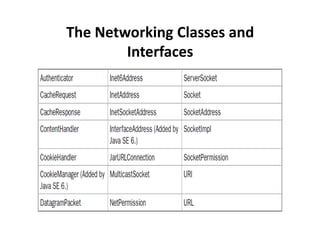
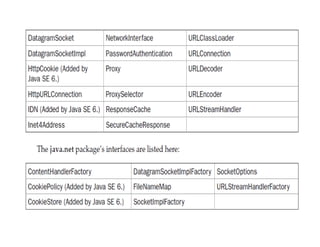
The Networking Classes and
Interfaces
• InetAddress: The InetAddress class is used to
encapsulate both the numerical IP address and the
domain name for that address.
// Demonstrate InetAddress.
import java.net.*;
class B
{
public static void main(String args[]) throws
UnknownHostException {
InetAddress Address = InetAddress.getLocalHost();
System.out.println(Address);
Address = InetAddress.getByName("google.com");
System.out.println(Address);
} }
TCP Client/Server Sockets
• TCP/IP sockets are used to implement reliable,
bidirectional, persistent, point-to-point, stream-based
connections between hosts on the Internet.
• A socket can be used to connect Java’s I/O system to
other programs that may reside either on the local
machine or on any other machine on the Internet.
• There are two kinds of TCP sockets in Java. One is for
servers, and the other is for clients.
• The ServerSocket class is designed to be a “listener,”
which waits for clients to connect before doing
anything. Thus, ServerSocket is for servers.
• The Socket class is for clients. It is designed to connect
to server sockets and initiate protocol exchanges.
• Socket(String hostName, int port) throws
UnknownHostException, IOException
• Socket(InetAddress ipAddress, int port) throws
IOException
• You can gain access to the input and output
streams associated with a Socket by use of the
getInputStream( ) and getOuptutStream()
methods, as shown here. Each can throw an
IOException if the socket has been invalidated by
a loss of connection.
• Several other method are available, like connect()
which allows you to specify a new connection.
• Simple TCP Server.
import java.io.*;
import java.net.*;
class TCPServer {
public static void main(String argv[]) throws Exception {
String clientSentence;
String capitalizedSentence;
ServerSocket welcomeSocket = new ServerSocket(6789);
while(true)
{ Socket connectionSocket = welcomeSocket.accept();
BufferedReader inFromClient = new BufferedReader(new
InputStreamReader(connectionSocket.getInputStream()));
DataOutputStream outToClient = new
DataOutputStream(connectionSocket.getOutputStream());
clientSentence = inFromClient.readLine();
System.out.println("Received: " + clientSentence);
capitalizedSentence = clientSentence.toUpperCase() + 'n';
outToClient.writeBytes(capitalizedSentence);
} } }
• Simple TCP Client
import java.io.*;
import java.net.*;
class TCPClient {
public static void main(String argv[]) throws Exception {
String sentence, modifiedSentence;
BufferedReader inFromUser = new BufferedReader( new
InputStreamReader(System.in));
Socket clientSocket = new Socket("localhost", 6789);
DataOutputStream outToServer = new
DataOutputStream(clientSocket.getOutputStream());
BufferedReader inFromServer = new BufferedReader(
new InputStreamReader(clientSocket.getInputStream()));
sentence = inFromUser.readLine();
outToServer.writeBytes(sentence + 'n');
modifiedSentence = inFromServer.readLine();
System.out.println("FROM SERVER: " + modifiedSentence);
clientSocket.close(); } }
UDP Client/Server Sockets
• TCP/IP-style networking is appropriate for most
networking needs. It provides a serialized,
predictable, reliable stream of packet data.
However. TCP includes many complicated
algorithms for dealing with congestion control on
crowded networks, as well as pessimistic
expectations about packet loss. This leads to a
somewhat inefficient way to transport data.
Datagrams provide an alternative.
• Datagrams are bundles of information passed
between machines.
• Once the datagram has been released to its
intended target, there is no assurance that it will
arrive or even that someone will be there to
catch it. Likewise, when the datagram is received,
there is no assurance that it hasn’t been
damaged in transit or that whoever sent it is still
there to receive a response.
• Java implements datagrams on top of the UDP
protocol by using two classes: DatagramPacket
and DatagramSocket
• DatagramPacket object is the data container,
while the DatagramSocket is the mechanism
used to send or receive the DatagramPackets.
DatagramSocket( ) throws SocketException
DatagramSocket(int port) throws SocketException
• DatagramSocket defines many methods. Two of
the most important are send( ) and receive()
void send(DatagramPacket packet) throws
IOException
void receive(DatagramPacket packet) throws
IOException
• DatagramPacket defines several constructors.
DatagramPacket(byte data[ ], int size)
DatagramPacket(byte data[ ], int offset, int size)
• simple UDP server.
import java.io.*;
import java.net.*;
class UDPServer {
public static void main(String args[]) throws Exception {
DatagramSocket serverSocket = new DatagramSocket(9876);
byte[] receiveData = new byte[1024];
byte[] sendData = new byte[1024];
while(true) {
DatagramPacket receivePacket = new DatagramPacket(receiveData, receiveData.length);
serverSocket.receive(receivePacket);
String sentence = new String(receivePacket.getData(), 0, receivePacket.getLength());
System.out.println("RECEIVED: " + sentence);
InetAddress IPAddress = receivePacket.getAddress();
int port = receivePacket.getPort();
String capitalizedSentence = sentence.toUpperCase();
sendData = capitalizedSentence.getBytes();
DatagramPacket sendPacket = new DatagramPacket(sendData, sendData.length,
IPAddress, port);
serverSocket.send(sendPacket); } } }
import java.io.*;
import java.net.*;
class UDPClient {
public static void main(String args[]) throws Exception {
BufferedReader inFromUser = new BufferedReader(new
InputStreamReader(System.in));
DatagramSocket clientSocket = new DatagramSocket();
InetAddress IPAddress = InetAddress.getByName("localhost");
byte[] sendData = new byte[1024];
byte[] receiveData = new byte[1024];
String sentence = inFromUser.readLine();
sendData = sentence.getBytes();
DatagramPacket sendPacket = new DatagramPacket(sendData,
sendData.length, IPAddress, 9876);
clientSocket.send(sendPacket);
DatagramPacket receivePacket = new DatagramPacket(receiveData,
receiveData.length);
clientSocket.receive(receivePacket);
String modifiedSentence = new String(receivePacket.getData());
System.out.println("FROM SERVER:" + modifiedSentence.trim());
clientSocket.close(); } }
28  networking

28 networking

  • 1.
    Networking • Introduction • NetworkingBasics • Networking Classes and Interfaces • TCP Client/Server Sockets • UDP Client/Server Sockets
  • 2.
    • Java ispractically a synonym for Internet programming. There are a number of reasons for this like its ability to generate secure, cross-platform, portable code. • One of the most important reasons that Java is the premier language for network programming are the classes defined in the java.net package. They provide an easy-to-use means by which programmers of all skill levels can access network resources.
  • 3.
    Networking Basics • Atthe core of Java’s networking support is the concept of a socket. A socket identifies an endpoint in a network. The socket paradigm was part of the 4.2BSD Berkeley UNIX release in the early 1980s. Because of this, the term Berkeley socket is also used. • Sockets are at the foundation of modern networking because a socket allows a single computer to serve many different clients at once, as well as to serve many different types of information. This is accomplished through the use of a port, which is a numbered socket on a particular machine. A server process is said to “listen” to a port until a client connects to it.
  • 4.
    • Socket communicationtakes place via a protocol. Internet Protocol (IP) is a low-level routing protocol that breaks data into small packets and sends them to an address across a network, which does not guarantee to deliver said packets to the destination. • Transmission Control Protocol (TCP) is a higher-level protocol that manages to robustly string together these packets, sorting and retransmitting them as necessary to reliably transmit data. • A third protocol, User Datagram Protocol (UDP), sits next to TCP and can be used directly to support fast, connectionless, unreliable transport of packets.
  • 5.
    • TCP/IP reservesthe lower 1,024 ports for specific protocols. Many of these will seem familiar to you if you have spent any time surfing the Internet. Port number 21 is for FTP; 23 is for Telnet; 25 is for e-mail; 43 is for whois; 79 is for finger; 80 is for HTTP; 119 is for netnews so on. • It is up to each protocol to determine how a client should interact with the port. For example, HTTP is the protocol that web browsers and servers use to transfer hypertext pages and images.
  • 6.
    • A keycomponent of the Internet is the address. Every computer on the Internet has one. An internet address is a number that uniquely identifies each computer on the Net. • Originally, all Internet addresses consisted of 32- bit values, organized as four 8-bit values. This address type was specified by IPv4 (Internet Protocol, version 4). However, a new addressing scheme, called IPv6 (Internet Protocol, version 6) has come into play. IPv6 uses a 128-bit value to represent an address, organized into eight 16-bit chunks.
  • 7.
    • Just asthe numbers of an IP address describe a network hierarchy, the name of an Internet address, called its domain name, describes a machine’s location in a name space. For example, www.osborne.com is in the COM domain (reserved for U.S. commercial sites); it is called osborne (after the company name), and www identifies the server for web requests. An Internet domain name is mapped to an IP address by the Domain Naming Service (DNS). This enables users to work with domain names, but the Internet operates on IP addresses.
  • 8.
    The Networking Classesand Interfaces
  • 10.
    • InetAddress: TheInetAddress class is used to encapsulate both the numerical IP address and the domain name for that address. // Demonstrate InetAddress. import java.net.*; class B { public static void main(String args[]) throws UnknownHostException { InetAddress Address = InetAddress.getLocalHost(); System.out.println(Address); Address = InetAddress.getByName("google.com"); System.out.println(Address); } }
  • 11.
    TCP Client/Server Sockets •TCP/IP sockets are used to implement reliable, bidirectional, persistent, point-to-point, stream-based connections between hosts on the Internet. • A socket can be used to connect Java’s I/O system to other programs that may reside either on the local machine or on any other machine on the Internet. • There are two kinds of TCP sockets in Java. One is for servers, and the other is for clients. • The ServerSocket class is designed to be a “listener,” which waits for clients to connect before doing anything. Thus, ServerSocket is for servers. • The Socket class is for clients. It is designed to connect to server sockets and initiate protocol exchanges.
  • 12.
    • Socket(String hostName,int port) throws UnknownHostException, IOException • Socket(InetAddress ipAddress, int port) throws IOException • You can gain access to the input and output streams associated with a Socket by use of the getInputStream( ) and getOuptutStream() methods, as shown here. Each can throw an IOException if the socket has been invalidated by a loss of connection. • Several other method are available, like connect() which allows you to specify a new connection.
  • 13.
    • Simple TCPServer. import java.io.*; import java.net.*; class TCPServer { public static void main(String argv[]) throws Exception { String clientSentence; String capitalizedSentence; ServerSocket welcomeSocket = new ServerSocket(6789); while(true) { Socket connectionSocket = welcomeSocket.accept(); BufferedReader inFromClient = new BufferedReader(new InputStreamReader(connectionSocket.getInputStream())); DataOutputStream outToClient = new DataOutputStream(connectionSocket.getOutputStream()); clientSentence = inFromClient.readLine(); System.out.println("Received: " + clientSentence); capitalizedSentence = clientSentence.toUpperCase() + 'n'; outToClient.writeBytes(capitalizedSentence); } } }
  • 14.
    • Simple TCPClient import java.io.*; import java.net.*; class TCPClient { public static void main(String argv[]) throws Exception { String sentence, modifiedSentence; BufferedReader inFromUser = new BufferedReader( new InputStreamReader(System.in)); Socket clientSocket = new Socket("localhost", 6789); DataOutputStream outToServer = new DataOutputStream(clientSocket.getOutputStream()); BufferedReader inFromServer = new BufferedReader( new InputStreamReader(clientSocket.getInputStream())); sentence = inFromUser.readLine(); outToServer.writeBytes(sentence + 'n'); modifiedSentence = inFromServer.readLine(); System.out.println("FROM SERVER: " + modifiedSentence); clientSocket.close(); } }
  • 15.
    UDP Client/Server Sockets •TCP/IP-style networking is appropriate for most networking needs. It provides a serialized, predictable, reliable stream of packet data. However. TCP includes many complicated algorithms for dealing with congestion control on crowded networks, as well as pessimistic expectations about packet loss. This leads to a somewhat inefficient way to transport data. Datagrams provide an alternative. • Datagrams are bundles of information passed between machines.
  • 16.
    • Once thedatagram has been released to its intended target, there is no assurance that it will arrive or even that someone will be there to catch it. Likewise, when the datagram is received, there is no assurance that it hasn’t been damaged in transit or that whoever sent it is still there to receive a response. • Java implements datagrams on top of the UDP protocol by using two classes: DatagramPacket and DatagramSocket • DatagramPacket object is the data container, while the DatagramSocket is the mechanism used to send or receive the DatagramPackets.
  • 17.
    DatagramSocket( ) throwsSocketException DatagramSocket(int port) throws SocketException • DatagramSocket defines many methods. Two of the most important are send( ) and receive() void send(DatagramPacket packet) throws IOException void receive(DatagramPacket packet) throws IOException • DatagramPacket defines several constructors. DatagramPacket(byte data[ ], int size) DatagramPacket(byte data[ ], int offset, int size)
  • 18.
    • simple UDPserver. import java.io.*; import java.net.*; class UDPServer { public static void main(String args[]) throws Exception { DatagramSocket serverSocket = new DatagramSocket(9876); byte[] receiveData = new byte[1024]; byte[] sendData = new byte[1024]; while(true) { DatagramPacket receivePacket = new DatagramPacket(receiveData, receiveData.length); serverSocket.receive(receivePacket); String sentence = new String(receivePacket.getData(), 0, receivePacket.getLength()); System.out.println("RECEIVED: " + sentence); InetAddress IPAddress = receivePacket.getAddress(); int port = receivePacket.getPort(); String capitalizedSentence = sentence.toUpperCase(); sendData = capitalizedSentence.getBytes(); DatagramPacket sendPacket = new DatagramPacket(sendData, sendData.length, IPAddress, port); serverSocket.send(sendPacket); } } }
  • 19.
    import java.io.*; import java.net.*; classUDPClient { public static void main(String args[]) throws Exception { BufferedReader inFromUser = new BufferedReader(new InputStreamReader(System.in)); DatagramSocket clientSocket = new DatagramSocket(); InetAddress IPAddress = InetAddress.getByName("localhost"); byte[] sendData = new byte[1024]; byte[] receiveData = new byte[1024]; String sentence = inFromUser.readLine(); sendData = sentence.getBytes(); DatagramPacket sendPacket = new DatagramPacket(sendData, sendData.length, IPAddress, 9876); clientSocket.send(sendPacket); DatagramPacket receivePacket = new DatagramPacket(receiveData, receiveData.length); clientSocket.receive(receivePacket); String modifiedSentence = new String(receivePacket.getData()); System.out.println("FROM SERVER:" + modifiedSentence.trim()); clientSocket.close(); } }