Haniffa Beevi Bt. Abdul Jaleel
CGS00739920
INTRODUCTION
•   One of the important factors that affect the students’ learning is the students’
    engagement with the academically purposeful activities (Kuh, 2001).
•   In 21st century learning, students and educators must be prepared with
    technological knowledge, understanding, and skills.
•   This paper is a proposal on designing 21st century learning for face-to-face
    learning for primary school students for subject History.
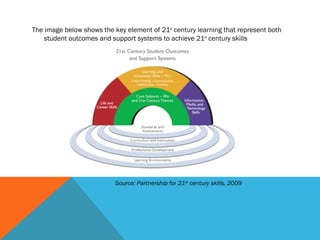
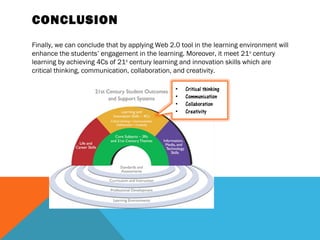
The image below shows the key element of 21st century learning that represent both
    student outcomes and support systems to achieve 21st century skills


                           Source: Partnership for 21st century skills, 2009
In order to find the current teaching and learning method, the observation has been
done according to these four aspects:


•The instructional design of the teaching material
•The teaching and learning methods that has been applied in the learning
environment (e.g., taking notes, referring to book, etc).
•Interaction between students and teacher in the classroom
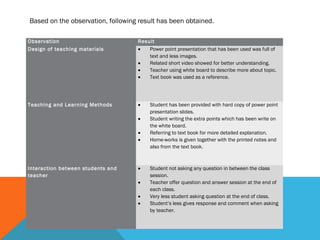
Based on the observation, following result has been obtained.

Observation                        Result
Design of teaching materials       •   Power point presentation that has been used was full of
                                       text and less images.
                                   •   Related short video showed for better understanding.
                                   •   Teacher using white board to describe more about topic.
                                   •   Text book was used as a reference.


Teaching and Learning Methods      •    Student has been provided with hard copy of power point
                                        presentation slides.
                                   •    Student writing the extra points which has been write on
                                        the white board.
                                   •    Referring to text book for more detailed explanation.
                                   •    Home-works is given together with the printed notes and
                                        also from the text book.


Interaction between students and   •    Student not asking any question in between the class
teacher                                 session.
                                   •    Teacher offer question and answer session at the end of
                                        each class.
                                   •    Very less student asking question at the end of class.
                                   •    Student’s less gives response and comment when asking
                                        by teacher.
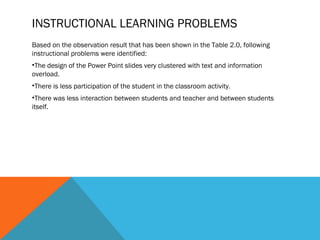
INSTRUCTIONAL LEARNING PROBLEMS
Based on the observation result that has been shown in the Table 2.0, following
instructional problems were identified:
•The design of the Power Point slides very clustered with text and information
overload.
•There is less participation of the student in the classroom activity.
•There was less interaction between students and teacher and between students
itself.
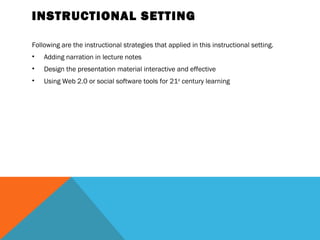
INSTRUCTIONAL SETTING

Following are the instructional strategies that applied in this instructional setting.
•   Adding narration in lecture notes
•   Design the presentation material interactive and effective
•   Using Web 2.0 or social software tools for 21st century learning 
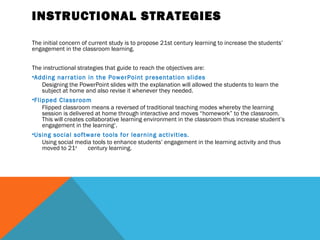
INSTRUCTIONAL STRATEGIES

The initial concern of current study is to propose 21st century learning to increase the students’
engagement in the classroom learning.


The instructional strategies that guide to reach the objectives are:
•Adding narration in the PowerPoint presentation slides
    Designing the PowerPoint slides with the explanation will allowed the students to learn the
    subject at home and also revise it whenever they needed.
•Flipped Classroom
    Flipped classroom means a reversed of traditional teaching modes whereby the learning
    session is delivered at home through interactive and moves “homework” to the classroom.
    This will creates collaborative learning environment in the classroom thus increase student’s
    engagement in the learning‘.
•Using social software tools for learning activities.
    Using social media tools to enhance students’ engagement in the learning activity and thus
    moved to 21st      century learning.
INSTRUCTIONAL OBJECTIVES
The purpose of this proposal is to enhance students’ engagement and moved toward
the 21st century learning by utilizing Web 2.0 tools.


INSTRUCTIONAL DESIGN
For designing the course, the following point is taking into consideration:
•   Presentation Material
•   Interaction between students and teacher
•   Active learning
PRESENTATION MATERIAL

•   The content of the material was collected from subject matter expert and re-
    design it applying Robert Gagne Learning Theory instructional design.
•   Since the subject matter expert was the best person who can give the explanation
    for their learning material, we require him/her to record their lecture using e-
    learning software.
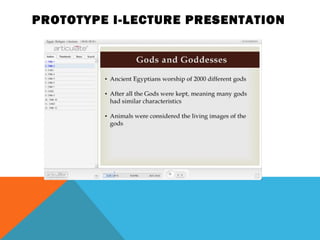
•   The Articulate Presenter software is used to add narration and interactivity in the
    PowerPoint Presentation Slides
INTERACTION BETWEEN STUDENTS
AND TEACHER

Here the proposed Web 2.0 tools to enhance students’ engagement in the learning.
•   Facebook
•   Blog
•   Social Bookmarking
•   Poll Everywhere
FACEBOOK
•   Social network tool such as a Facebook is a most powerful application tool
    nowadays to connect the people all over the world.
•   The feature as a ‘Group Application’ in the Facebook is widely used for educational
    purposes.
•   Teacher and students can connected with the Facebook and form an informal
    learning system outside the classroom. This informal setting allowed them easily
    voice out their question and interacts between peers and teacher. Thus, it’s
    improved the communication and relationship between peers and teacher and
    form an active learning.
BLOG
•   Blog can be used to create a group portfolio.
•   Students will participate collaboratively in the group activities which is encouraged
    active learning and reflective practice among the students.
SOCIAL BOOKMARKING
•   Social bookmarking tool is a very useful in a collaborative learning.
•   As describe by Alexander (2006) (as cited in Minocha, S., 2009), this tool
    providing a location to store links that might be lost, finding people with related
    interest, thus learning from others and forming new collaborations.
•   User-created tagging offers new perspectives and this ability to create multi-
    authored bookmark pages can be useful for team projects.
POLL EVERYWHERE
•   Poll Everywhere is the world’s is the world’s largest real time web, SMS, and
    Twitter polling service that allowed user to votes and/comments to a PowerPoint
    or Keynote slide.
•   Teacher can utilized this tool with large number of students for them interactively
    respond to the lecture and give feedback to teacher’s teaching methods.
ACTIVE LEARNING
•   Using a Flipped Classroom strategy can change the traditional classroom learning
    method.
•   The PowerPoint presentation which is design with the narration will be email to all
    the students and notification can be send through the Facebook. This PowerPoint
    presentation which is called i-lecture is design to replace the classroom session.
    Therefore student need to study at home and group activities regarding the topic
    will be given in the class. Students will work together and share ideas for group
    activity using blog.
•   Teacher has more times to help each student and answer their questions and
    assists them to complete their task. Student will learn actively and more engage in
    this collaborative learning strategy.
•   In order to make the learning environment more interactively, poll everywhere can
    be used to share comments and ideas within the classroom.
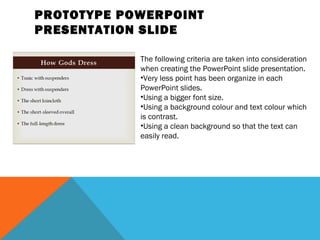
PROTOTYPE POWERPOINT
PRESENTATION SLIDE

            The following criteria are taken into consideration
            when creating the PowerPoint slide presentation.
            •Very less point has been organize in each
            PowerPoint slides.
            •Using a bigger font size.
            •Using a background colour and text colour which
            is contrast.
            •Using a clean background so that the text can
            easily read.
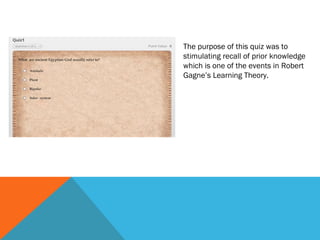
The purpose of this quiz was to
stimulating recall of prior knowledge
which is one of the events in Robert
Gagne’s Learning Theory.
 
PROTOTYPE I-LECTURE PRESENTATION
CONCLUSION
Finally, we can conclude that by applying Web 2.0 tool in the learning environment will
enhance the students’ engagement in the learning. Moreover, it meet 21st century
learning by achieving 4Cs of 21st century learning and innovation skills which are
critical thinking, communication, collaboration, and creativity.
21st century learning haniffa beevi

21st century learning haniffa beevi

  • 1.
    Haniffa Beevi Bt.Abdul Jaleel CGS00739920
  • 2.
    INTRODUCTION • One of the important factors that affect the students’ learning is the students’ engagement with the academically purposeful activities (Kuh, 2001). • In 21st century learning, students and educators must be prepared with technological knowledge, understanding, and skills. • This paper is a proposal on designing 21st century learning for face-to-face learning for primary school students for subject History.
  • 3.
    The image belowshows the key element of 21st century learning that represent both student outcomes and support systems to achieve 21st century skills Source: Partnership for 21st century skills, 2009
  • 4.
    In order tofind the current teaching and learning method, the observation has been done according to these four aspects: •The instructional design of the teaching material •The teaching and learning methods that has been applied in the learning environment (e.g., taking notes, referring to book, etc). •Interaction between students and teacher in the classroom
  • 5.
    Based on theobservation, following result has been obtained. Observation Result Design of teaching materials • Power point presentation that has been used was full of text and less images. • Related short video showed for better understanding. • Teacher using white board to describe more about topic. • Text book was used as a reference. Teaching and Learning Methods • Student has been provided with hard copy of power point presentation slides. • Student writing the extra points which has been write on the white board. • Referring to text book for more detailed explanation. • Home-works is given together with the printed notes and also from the text book. Interaction between students and • Student not asking any question in between the class teacher session. • Teacher offer question and answer session at the end of each class. • Very less student asking question at the end of class. • Student’s less gives response and comment when asking by teacher.
  • 6.
    INSTRUCTIONAL LEARNING PROBLEMS Basedon the observation result that has been shown in the Table 2.0, following instructional problems were identified: •The design of the Power Point slides very clustered with text and information overload. •There is less participation of the student in the classroom activity. •There was less interaction between students and teacher and between students itself.
  • 7.
    INSTRUCTIONAL SETTING Following arethe instructional strategies that applied in this instructional setting. • Adding narration in lecture notes • Design the presentation material interactive and effective • Using Web 2.0 or social software tools for 21st century learning 
  • 8.
    INSTRUCTIONAL STRATEGIES The initialconcern of current study is to propose 21st century learning to increase the students’ engagement in the classroom learning. The instructional strategies that guide to reach the objectives are: •Adding narration in the PowerPoint presentation slides Designing the PowerPoint slides with the explanation will allowed the students to learn the subject at home and also revise it whenever they needed. •Flipped Classroom Flipped classroom means a reversed of traditional teaching modes whereby the learning session is delivered at home through interactive and moves “homework” to the classroom. This will creates collaborative learning environment in the classroom thus increase student’s engagement in the learning‘. •Using social software tools for learning activities. Using social media tools to enhance students’ engagement in the learning activity and thus moved to 21st century learning.
  • 9.
    INSTRUCTIONAL OBJECTIVES The purposeof this proposal is to enhance students’ engagement and moved toward the 21st century learning by utilizing Web 2.0 tools. INSTRUCTIONAL DESIGN For designing the course, the following point is taking into consideration: • Presentation Material • Interaction between students and teacher • Active learning
  • 10.
    PRESENTATION MATERIAL • The content of the material was collected from subject matter expert and re- design it applying Robert Gagne Learning Theory instructional design. • Since the subject matter expert was the best person who can give the explanation for their learning material, we require him/her to record their lecture using e- learning software. • The Articulate Presenter software is used to add narration and interactivity in the PowerPoint Presentation Slides
  • 11.
    INTERACTION BETWEEN STUDENTS ANDTEACHER Here the proposed Web 2.0 tools to enhance students’ engagement in the learning. • Facebook • Blog • Social Bookmarking • Poll Everywhere
  • 12.
    FACEBOOK • Social network tool such as a Facebook is a most powerful application tool nowadays to connect the people all over the world. • The feature as a ‘Group Application’ in the Facebook is widely used for educational purposes. • Teacher and students can connected with the Facebook and form an informal learning system outside the classroom. This informal setting allowed them easily voice out their question and interacts between peers and teacher. Thus, it’s improved the communication and relationship between peers and teacher and form an active learning.
  • 13.
    BLOG • Blog can be used to create a group portfolio. • Students will participate collaboratively in the group activities which is encouraged active learning and reflective practice among the students.
  • 14.
    SOCIAL BOOKMARKING • Social bookmarking tool is a very useful in a collaborative learning. • As describe by Alexander (2006) (as cited in Minocha, S., 2009), this tool providing a location to store links that might be lost, finding people with related interest, thus learning from others and forming new collaborations. • User-created tagging offers new perspectives and this ability to create multi- authored bookmark pages can be useful for team projects.
  • 15.
    POLL EVERYWHERE • Poll Everywhere is the world’s is the world’s largest real time web, SMS, and Twitter polling service that allowed user to votes and/comments to a PowerPoint or Keynote slide. • Teacher can utilized this tool with large number of students for them interactively respond to the lecture and give feedback to teacher’s teaching methods.
  • 16.
    ACTIVE LEARNING • Using a Flipped Classroom strategy can change the traditional classroom learning method. • The PowerPoint presentation which is design with the narration will be email to all the students and notification can be send through the Facebook. This PowerPoint presentation which is called i-lecture is design to replace the classroom session. Therefore student need to study at home and group activities regarding the topic will be given in the class. Students will work together and share ideas for group activity using blog. • Teacher has more times to help each student and answer their questions and assists them to complete their task. Student will learn actively and more engage in this collaborative learning strategy. • In order to make the learning environment more interactively, poll everywhere can be used to share comments and ideas within the classroom.
  • 17.
    PROTOTYPE POWERPOINT PRESENTATION SLIDE The following criteria are taken into consideration when creating the PowerPoint slide presentation. •Very less point has been organize in each PowerPoint slides. •Using a bigger font size. •Using a background colour and text colour which is contrast. •Using a clean background so that the text can easily read.
  • 18.
    The purpose ofthis quiz was to stimulating recall of prior knowledge which is one of the events in Robert Gagne’s Learning Theory.  
  • 19.
  • 20.
    CONCLUSION Finally, we canconclude that by applying Web 2.0 tool in the learning environment will enhance the students’ engagement in the learning. Moreover, it meet 21st century learning by achieving 4Cs of 21st century learning and innovation skills which are critical thinking, communication, collaboration, and creativity.

Editor's Notes