Michael Ewins
@ewinsmi
GlasgowTech MeetUp - 24 June 2015
 40% of people abandon a website that takes
more than 3 seconds to load
Kissmetrics, 2011
 “We surveyed 3000 users… they rated speed
2nd most important”
The Guardian, 2014
Ref: https://blog.kissmetrics.com/loading-time/
Ref: https://speakerdeck.com/patrickhamann/breaking-news-at-1000ms-front-trends-2014
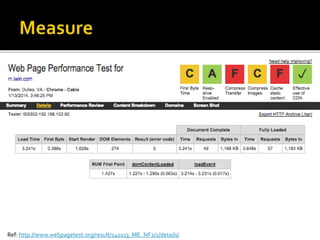
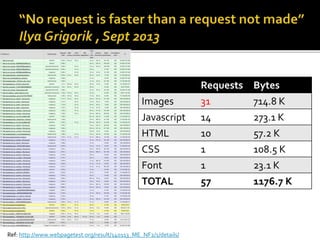
Ref: http://www.webpagetest.org/result/140113_ME_NF2/1/details/
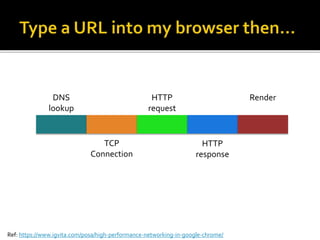
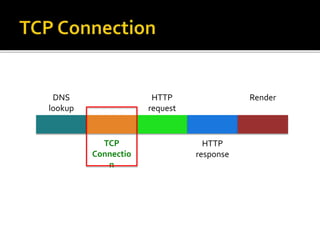
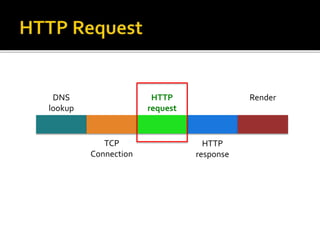
DNS
lookup
TCP
Connection
HTTP
request
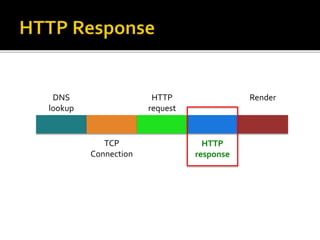
HTTP
response
Ref: https://www.igvita.com/posa/high-performance-networking-in-google-chrome/
Render
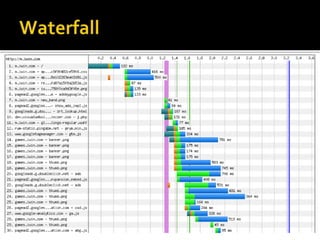
Ref: http://www.webpagetest.org/result/140113_ME_NF2/1/details/
Requests Bytes
Images 31 714.8 K
Javascript 14 273.1 K
HTML 10 57.2 K
CSS 1 108.5 K
Font 1 23.1 K
TOTAL 57 1176.7 K
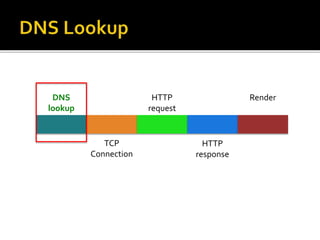
DNS
lookup
TCP
Connection
HTTP
request
HTTP
response
Render
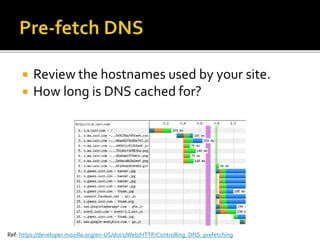
 Review the hostnames used by your site.
 How long is DNS cached for?
Ref: https://developer.mozilla.org/en-US/docs/Web/HTTP/Controlling_DNS_prefetching
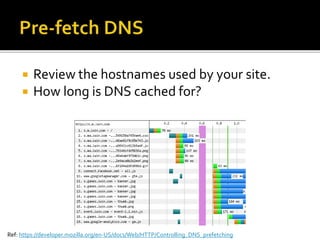
 Review the hostnames used by your site.
 How long is DNS cached for?
Ref: https://developer.mozilla.org/en-US/docs/Web/HTTP/Controlling_DNS_prefetching
DNS
lookup
TCP
Connectio
n
HTTP
request
HTTP
response
Render
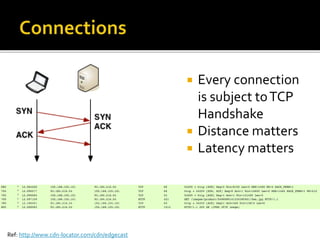
 Every connection
is subject toTCP
Handshake
 Distance matters
 Latency matters
Ref: http://www.cdn-locator.com/cdn/edgecast
Ref: http://www.webpagetest.org/result/140830_4J_3SR5/3/details/
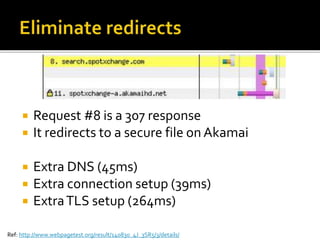
 Request #8 is a 307 response
 It redirects to a secure file on Akamai
 Extra DNS (45ms)
 Extra connection setup (39ms)
 ExtraTLS setup (264ms)
DNS
lookup
TCP
Connection
HTTP
request
HTTP
response
Render
Ref: http://www.webpagetest.org/result/140909_KN_AS0/2/details/
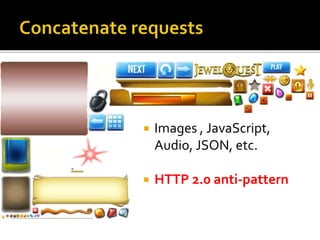
 Images , JavaScript,
Audio, JSON, etc.
 HTTP 2.0 anti-pattern
Before: http://www.webpagetest.org/result/140821_FS_WDZ/1/details/
After: http://www.webpagetest.org/result/140821_8H_W8A/9/details/
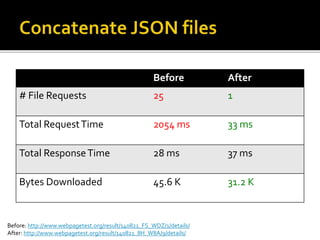
Before After
# File Requests 25 1
Total RequestTime 2054 ms 33 ms
Total ResponseTime 28 ms 37 ms
Bytes Downloaded 45.6 K 31.2 K
DNS
lookup
TCP
Connection
HTTP
request
HTTP
response
Render
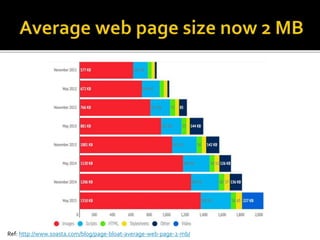
Ref: http://www.soasta.com/blog/page-bloat-average-web-page-2-mb/
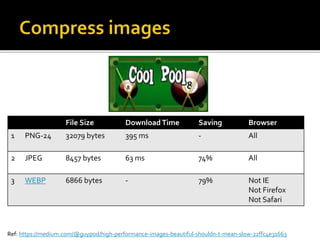
File Size DownloadTime Saving Browser
1 PNG-24 32079 bytes 395 ms - All
2 JPEG 8457 bytes 63 ms 74% All
3 WEBP 6866 bytes - 79% Not IE
Not Firefox
Not Safari
Ref: https://medium.com/@guypod/high-performance-images-beautiful-shouldn-t-mean-slow-22ffc4e31663
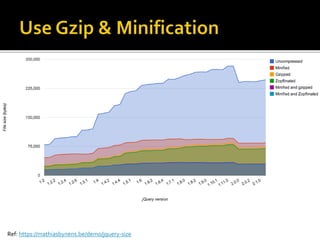
Ref: https://mathiasbynens.be/demo/jquery-size
Ref: https://www.youtube.com/watch?v=C8orjQLacTo
 Review your cookies
 Eliminate cookies for static resources
 HTTP 2.0 – headers are compressed.
Ref: http://www.yuiblog.com/blog/2007/03/01/performance-research-part-3/
DNS
lookup
TCP
Connection
HTTP
request
HTTP
response
Render
Ref: https://www.youtube.com/watch?v=VKTWdaupft0
HTML DOM
CSS CSSOM
Render
Tree
Layout Paint
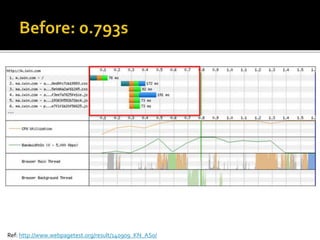
Ref: http://www.webpagetest.org/result/140909_KN_AS0/
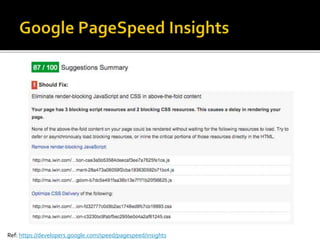
Ref: https://developers.google.com/speed/pagespeed/insights
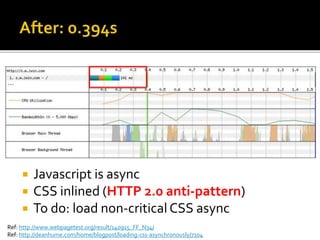
Ref: http://www.webpagetest.org/result/140915_FF_N34/
Ref: http://deanhume.com/home/blogpost/loading-css-asynchronously/7104
 Javascript is async
 CSS inlined (HTTP 2.0 anti-pattern)
 To do: load non-critical CSS async
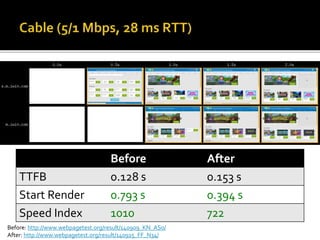
Before: http://www.webpagetest.org/result/140909_KN_AS0/
After: http://www.webpagetest.org/result/140915_FF_N34/
Before After
TTFB 0.128 s 0.153 s
Start Render 0.793 s 0.394 s
Speed Index 1010 722
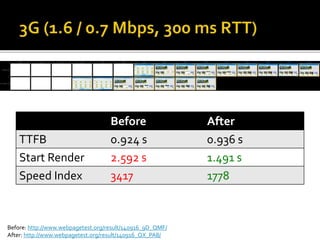
Before: http://www.webpagetest.org/result/140916_9D_QMF/
After: http://www.webpagetest.org/result/140916_QX_PA8/
Before After
TTFB 0.924 s 0.936 s
Start Render 2.592 s 1.491 s
Speed Index 3417 1778
DNS
lookup
TCP
Connection
HTTP
request
HTTP
response
Render
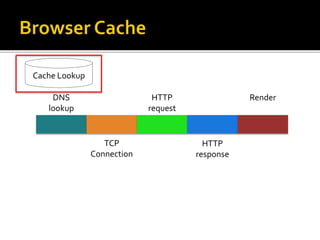
Cache Lookup
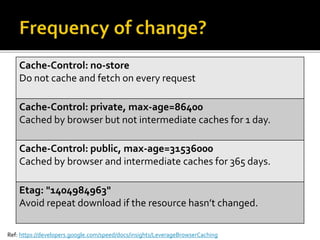
Ref: https://developers.google.com/speed/docs/insights/LeverageBrowserCaching
Cache-Control: no-store
Do not cache and fetch on every request
Cache-Control: private, max-age=86400
Cached by browser but not intermediate caches for 1 day.
Cache-Control: public, max-age=31536000
Cached by browser and intermediate caches for 365 days.
Etag: "1404984963"
Avoid repeat download if the resource hasn’t changed.
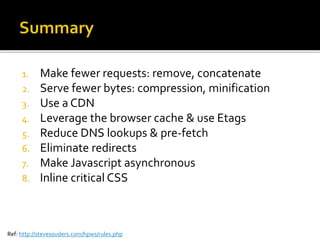
1. Make fewer requests: remove, concatenate
2. Serve fewer bytes: compression, minification
3. Use a CDN
4. Leverage the browser cache & use Etags
5. Reduce DNS lookups & pre-fetch
6. Eliminate redirects
7. Make Javascript asynchronous
8. Inline critical CSS
Ref: http://stevesouders.com/hpws/rules.php
Michael Ewins
@ewinsmi

A faster journey with HTTP

Editor's Notes

  • #2 Welcome
  • #3 1. Abandonment. Kissmetrics (web analytics platform) survey from 2011. Many similar studies. 2. Loss in revenues. Aberdeen Group – technology focused research group have found that: 1% delay >> 7% loss of conversions >> $100K per day >> 7% translates to $2.5M per year 3. Users. See Guardian survey. Rated speed 2nd most important only after easy to find content. 4. Growth. Fred Wilson from USV (twitter, soundcloud) “speed is most important” 5. How fast should we be? 1 second (flow) + 10 seconds (abandon) Ref: http://www.nngroup.com/articles/response-times-3-important-limits/ http://www.getelastic.com/mobile-commerce-performance/
  • #4 1. HTML5 Games Portal for mobile / tablet / PC developed by iWin 2. Jewel Quest (match 3) and Bubble Town (bubble popper). 3. Speed is important: tablet (55%); mobile (28%); desktop (17%) + engage with the games / view adverts that pay for the games
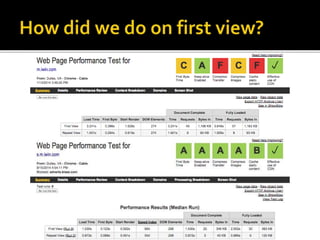
  • #5 Measure before we launch – script WPT with fake HOST file entry. Create an account so you get a record of results Run 9 tests so median is reported Take a video so Speed Index is recorded – measure of visual completeness not how quick you render the full page (2 pages 100% complete at same time but one renders more of the page sooner will have a lower speed index) Interaction Time Ref: https://community.nccgroup-webperf.com/2015/06/speed-index-how-it-works-and-what-it-means/
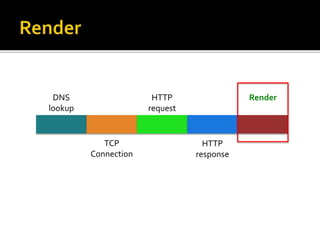
  • #6 1. obtain the IP address: cached? chrome://net-internals/#dns 2. New TCP connection incurs the Three-Way Handshake which adds a full roundtrip of latency. 3. Ignoring SSL / HTTPS – it will incur 1-2 additional round trips - HTTP2 must have 4. Dispatch the HTTP request to the server. 5. HTTP Response delivered in multiple packets 6. Then the response needs to be rendered – request all resources in the html 7. Browser cache – kicks in for repeat visits. chrome://view-http-cache/ For timings from http://www.webpagetest.org/result/140831_E3_E1J/2/details/ See http://www.cdnplanet.com/blog/tune-tcp-initcwnd-for-optimum-performance/
  • #7 1. Multiple DNS lookups 2. Multiple connections 3. Multiple requests 4. Multiple responses
  • #8 Our original design has numerous game images displayed off screen. So we dropped / defered loading of those images. In a later design we also dropped hidden carousel images.
  • #10 1. Options limited to things we can control 2. Number of domains referenced – can we reduce? (e.g. events.iwin.com >> m.iwin.com/events) 3. TTL – maybe good reason for 1 minute or 5 minutes or 7 days. Reason? Costs linked to TTL. 4. DNS prefetch (see example). Separate browser thread for DNS lookups - in parallel to downloads and rendering. 4.1 Resource Hint spec: preconnect, prefetch, prerender http://daker.me/2013/05/5-html5-features-you-need-to-know.html $ dig +nocmd +noall +answer +ttlid a m.iwin.com m.iwin.com. 604800 IN CNAME m.iplay.mobi. m.iplay.mobi. 60 IN A 54.209.107.239 $ dig +nocmd +noall +answer +ttlid a games.iwin.com games.iwin.com. 604800 IN CNAME wpc.81CD.edgecastcdn.net. wpc.81CD.edgecastcdn.net. 3600 IN CNAME gs1.wpc.v1cdn.net. gs1.wpc.v1cdn.net. 600 IN A 72.21.81.131 $ dig +nocmd +noall +answer +ttlid a ma.iwin.com ma.iwin.com. 604800 IN CNAME cds.n5v6x5m3.hwcdn.net. cds.n5v6x5m3.hwcdn.net. 300 IN A 205.185.216.10
  • #11 1. Options limited to things we can control 2. Number of domains referenced – can we reduce? (e.g. events.iwin.com >> m.iwin.com/events) 3. TTL – maybe good reason for 1 minute or 5 minutes or 7 days. Reason? Costs linked to TTL. 4. DNS prefetch (see example). Separate browser thread for DNS lookups - in parallel to downloads and rendering. 4.1 Resource Hint spec: preconnect, prefetch, prerender http://daker.me/2013/05/5-html5-features-you-need-to-know.html $ dig +nocmd +noall +answer +ttlid a m.iwin.com m.iwin.com. 604800 IN CNAME m.iplay.mobi. m.iplay.mobi. 60 IN A 54.209.107.239 $ dig +nocmd +noall +answer +ttlid a games.iwin.com games.iwin.com. 604800 IN CNAME wpc.81CD.edgecastcdn.net. wpc.81CD.edgecastcdn.net. 3600 IN CNAME gs1.wpc.v1cdn.net. gs1.wpc.v1cdn.net. 600 IN A 72.21.81.131 $ dig +nocmd +noall +answer +ttlid a ma.iwin.com ma.iwin.com. 604800 IN CNAME cds.n5v6x5m3.hwcdn.net. cds.n5v6x5m3.hwcdn.net. 300 IN A 205.185.216.10
  • #13 1. Connections require a round trip to the server 2. Traceroute (RTT) from my home to AWS East and AWS West. Distance matters. 3. Scotland - AWS East RTT 110ms 4. Scotland – AWS West RTT approx 190ms
  • #14 More servers if content is dynamic or not cacheable at CDN. Use GeoDNS. 2. Use a CDN for static content. Edgecast have 19 PoPs. 3. Some CDNs may not support what you are trying to do. E.g. caching by device type. At least OOTB. Google CDN for jQuery: https://stackoverflow.com/questions/5206666/jquery-ui-how-to-use-google-cdn This approach is interesting because your user may already have this file from another web site. May 2013 - Approx 20% of sites use Jquery from google cdn http://www.stevesouders.com/blog/2013/03/18/http-archive-jquery/ GeoDNS: http://serverfault.com/questions/325076/what-is-the-difference-between-anycast-and-geodns-geoip-wrt-ha http://www.cdnplanet.com/tools/cdnfinder/#site:http://m.iwin.com http://visualwebsiteoptimizer.com/split-testing-blog/geo-distributed-architecture/ http://www.cedexis.com/blog/fun-with-headers/ http://www.semicomplete.com/blog/geekery/ssl-latency.html http://blog.radware.com/applicationdelivery/applicationaccelerationoptimization/2014/04/7-mobile-performance-myths/ https://www.igvita.com/2014/03/26/why-is-my-cdn-slow-for-mobile-clients/
  • #15 So we make a request and the first thing that the server does is issue a redirect response. In this example (for an advert) We are redirected to a new domain: DNS lookup We then need a new connection And this is a secure domain so we also have TLS setup. And then we can download the content.
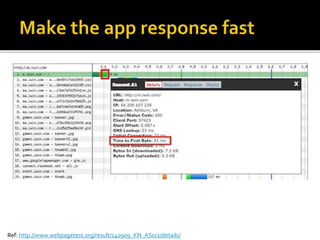
  • #17 1. Time spent by the backend server to respond to deliver the HTML 2. In our case this is 41ms. We’re serving from an in-memory cache called Varnish. 3. Unique user behaviours we have pushed to the client (e.g. user id generation). 4. We cache different versions based on device behaviour. 5. Entire talk on this alone.
  • #19 1. Refactored to a single level JSON file 2. Bytes downloaded and download time are similar to before. 3. But the request time (TTFB) is down from 2 second to 33 ms. 4. Making lots of requests is bad for performance because it increases the effect of latency. 5. TTFB = time for a request to leave browser, travel to server and return
  • #21 This data is from HTTP Archive And images continue to be the biggest culprit
  • #22 Photos – JPEG, PNG-24 Low complexity (few colors) – GIF, PNG-8 Low complexity with transparency – GIF, PNG-8 High complexity with transparency – PNG-24 Line art – SVG Kraken.io 3. WebP is new image compression format developed by Google. Limited Browser support. 4. If we apply similar compression to all images on home page then we reduce to 840 ms elapsed time (from 1438 ms) http://calendar.perfplanet.com/2014/images-are-king-an-image-optimization-checklist-for-everyone-in-your-organization/
  • #23 1. GZIP compresses the file on the server as it is requested (cache this response) 3. Compression is quick and the uncompress is also quick on the client. 4. Don’t do this for binary formats that are already compressed. 5. Some CDNs require you to expose both gzip and non gzip. 6. Applies to Javascript and other text formats.
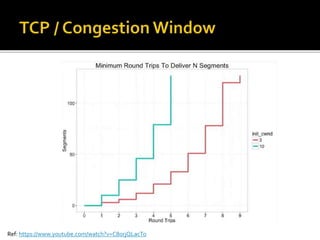
  • #24 Each segment is 1460 bytes With init_cwnd of 3 then a 61K html would take 6 round trips. With init_cwnd of 10 then a 61K html would take 3 round trips. Deliver smaller images first. John Rauser talk at Velocity in May 2015.
  • #25 1. Review all cookies. Use local storage 80ms per 4K: http://www.yuiblog.com/blog/2007/03/01/performance-research-part-3/ http://www.jonathanklein.net/2014/02/revisiting-cookieless-domain.html https://twitter.com/csswizardry/status/280639163789893632 http://www.geedew.com/2014/02/26/the-case-for-critical-assets/
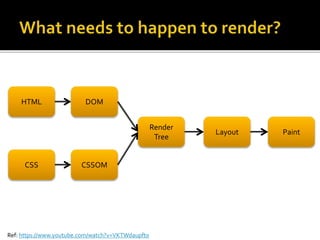
  • #27 1. Critical rendering path is the sequence of resources that are needed to render a page. 2. Firstly we load and parse the HTML. This may identify other resources it needs to complete the render. 3. Download / parse / execute JS files needed to further construct the DOM. Could be multiple JS files. Request round-trips are expensive. JS blocks the DOM construction. 4. Download / parse / process CSS that blocks construction of the Render tree. 5. The render cannot complete until DOM and CSS ready, render tree ready, layout is ready.
  • #29 1. Google Pagespeed Insights can tell you what resources are on the critical rendering path: 3 x JavaScript files and 2 x CSS files 2. If we put them in the HTML then the browser will block because it thinks it needs them to construct the DOM and the render tree. 3. Each of these resources require us to request / download / parse time.
  • #30 1. All JS is async and inlined all CSS 2. Initial download is longer 3. Still doing the same JS processing. http 2.0 anti-pattern cos you cannot cache
  • #32 These optimizations have bigger effects where network latency is slower. Web Page Test – traffic shaping Speed Index is the average time at which visible parts of the page are displayed. It is expressed in milliseconds and dependent on size of the view port.
  • #34 1. Use browser cache to avoid making repeat requests 2. Four examples on the slide: no cache; browser/1day; browser+CDN/365d; Etags 3. Checklist: what can be cached (query params, case sensitive URLs); how long / what changes frequently?; how to invalidate?. 4. Advanced concepts like gzip; what happens when caches invalidate Flowchart: https://developers.google.com/speed/docs/insights/LeverageBrowserCaching New headers: http://www.fastly.com/blog/stale-while-revalidate/#.VBoRCS5dUZw Vary: Accept-Encoding -Caches should only be used if the incoming request matches the Vary information in the cache. With gzip. http://blog.maxcdn.com/accept-encoding-its-vary-important/ Checklist: https://developers.google.com/web/fundamentals/performance/optimizing-content-efficiency/http-caching#caching-checklist