創客任務- 2015 高中程式夏令營
IoT & Rasberry Pi 2
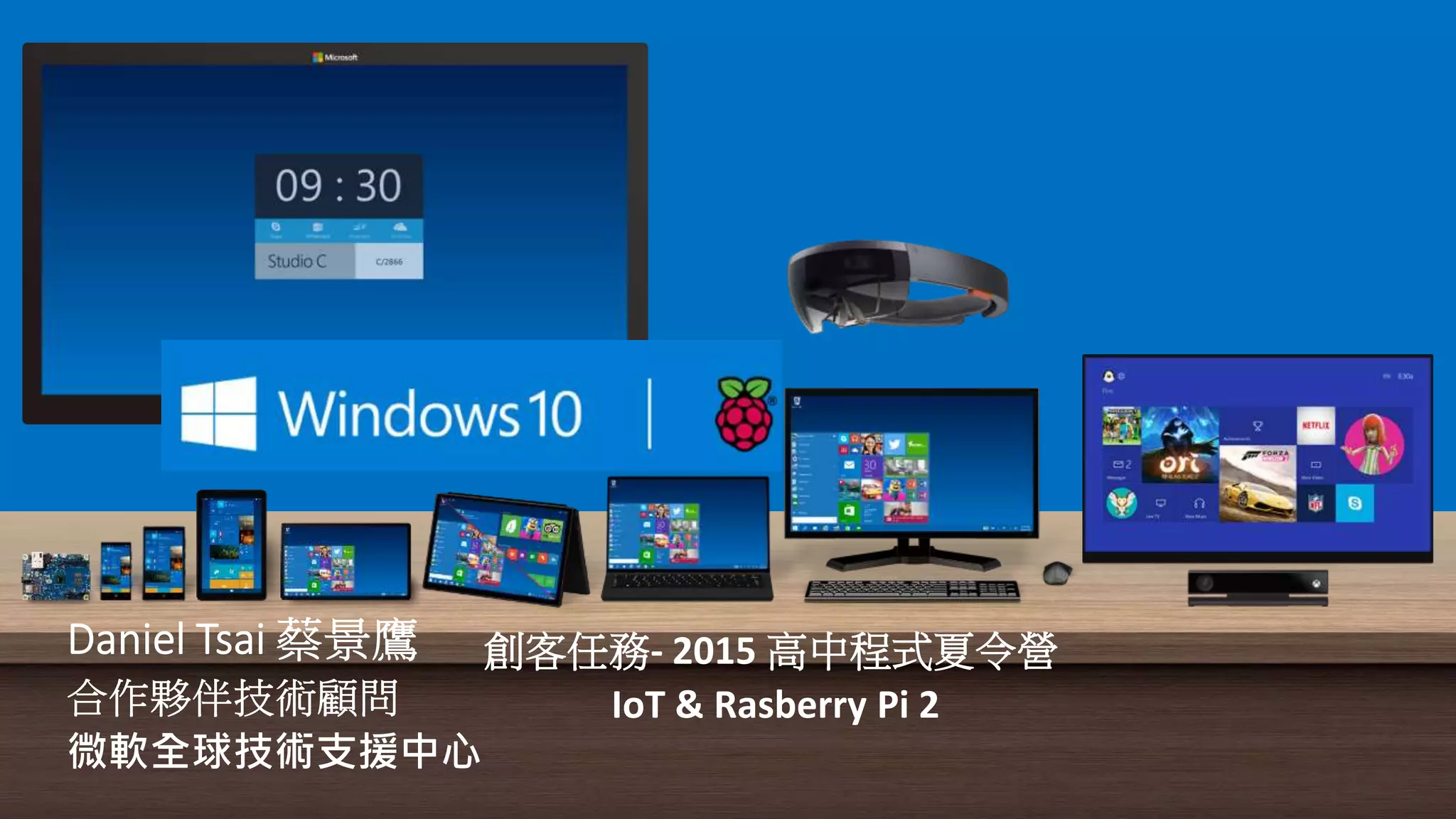
認識Windows 10 IoT
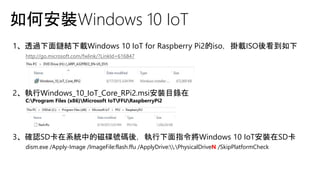
如何安裝Windows 10 IoT
1、透過下面鏈結下載Windows 10 IoT for Raspberry Pi2的iso,掛載ISO後看到如下
http://go.microsoft.com/fwlink/?LinkId=616847
2、執行Windows_10_IoT_Core_RPi2.msi安裝目錄在
C:Program Files (x86)Microsoft IoTFFURaspberryPi2
3、確認SD卡在系統中的磁碟號碼後,執行下面指令將Windows 10 IoT安裝在SD卡
dism.exe /Apply-Image /ImageFile:flash.ffu /ApplyDrive:.PhysicalDriveN /SkipPlatformCheck
瀏覽器PowerShell 自行開發工具
如何管理WINDOWS 10 IoT
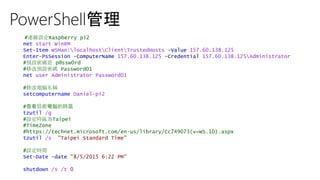
PowerShell管理
#連線設定Raspberry pi2
net start WinRM
Set-Item WSMan:localhostClientTrustedHosts -Value 157.60.138.125
Enter-PsSession -ComputerName 157.60.138.125 -Credential 157.60.138.125Administrator
#預設密碼是 p@ssw0rd
#修改預設密碼 Password01
net user Administrator Password01
#修改電腦名稱
setcomputername Daniel-pi2
#查看目前電腦的時區
tzutil /g
#設定時區為Taipei
#TimeZone
#https://technet.microsoft.com/en-us/library/Cc749073(v=WS.10).aspx
tzutil /s "Taipei Standard Time"
#設定時間
Set-Date -date "8/5/2015 6:22 PM"
shutdown /s /t 0
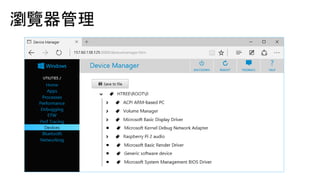
瀏覽器管理
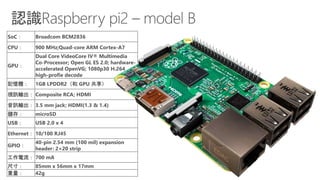
認識
Raspberry pi2
– model B
SoC: Broadcom BCM2836
CPU: 900 MHz;Quad-core ARM Cortex-A7
GPU:
Dual Core VideoCore IV® Multimedia
Co-Processor; Open GL ES 2.0; hardware-
accelerated OpenVG; 1080p30 H.264
high-profie decode
記憶體: 1GB LPDDR2(和 GPU 共享)
視訊輸出: Composite RCA; HDMI
音訊輸出: 3.5 mm jack; HDMI(1.3 & 1.4)
儲存: microSD
USB: USB 2.0 x 4
Ethernet: 10/100 RJ45
GPIO:
40-pin 2.54 mm (100 mil) expansion
header: 2×20 strip
工作電流: 700 mA
尺寸: 85mm x 56mm x 17mm
重量: 42g
•
•
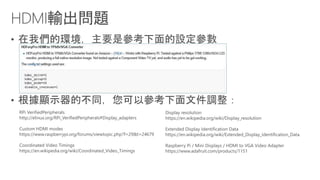
RPi VerifiedPeripherals
http://elinux.org/RPi_VerifiedPeripherals#Display_adapters
Custom HDMI modes
https://www.raspberrypi.org/forums/viewtopic.php?f=29&t=24679
Coordinated Video Timings
https://en.wikipedia.org/wiki/Coordinated_Video_Timings
Display resolution
https://en.wikipedia.org/wiki/Display_resolution
Extended Display Identification Data
https://en.wikipedia.org/wiki/Extended_Display_Identification_Data
Raspberry Pi / Mini Displays / HDMI to VGA Video Adapter
https://www.adafruit.com/products/1151
•
•
•
認識軟硬體工具
•
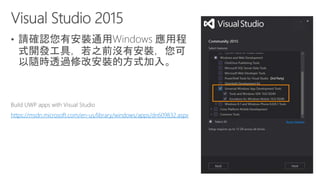
https://msdn.microsoft.com/en-us/library/windows/apps/dn609832.aspx
•
•
Lab 1
•
•
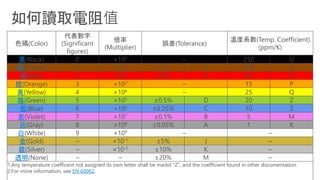
色碼(Color)
代表數字
(Significant
figures)
倍率
(Multiplier)
誤差(Tolerance)
溫度系數(Temp. Coefficient)
(ppm/K)
黑(Black) 0 ×100 – 250 U
棕(Brown) 1 ×101 ±1% F 100 S
紅(Red) 2 ×10² ±2% G 50 R
橙(Orange) 3 ×10³ – 15 P
黃(Yellow) 4 ×10⁴ – 25 Q
綠(Green) 5 ×10⁵ ±0.5% D 20 Z
藍(Blue) 6 ×10⁶ ±0.25% C 10 Z
紫(Violet) 7 ×10⁷ ±0.1% B 5 M
灰(Gray) 8 ×10⁸ ±0.05% A 1 K
白(White) 9 ×10⁹ – –
金(Gold) – ×10-1 ±5% J –
銀(Silver) – ×10-2 ±10% K –
透明(None) – – ±20% M –
1.Any temperature coefficent not assigned its own letter shall be markd "Z", and the coefficient found in other documentation.
2.For more information, see EN 60062.
•
•
Lab 2
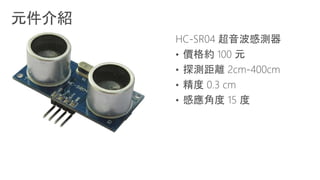
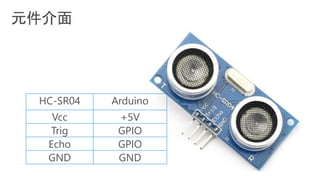
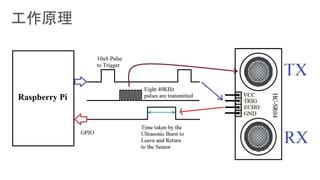
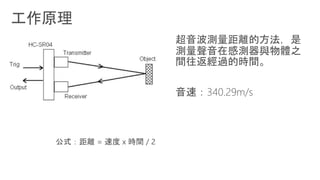
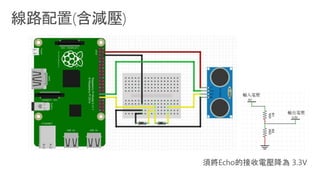
超音波距離感測器
•
•
•
•
HC-SR04 Arduino
Vcc +5V
Trig GPIO
Echo GPIO
GND GND
Lab 3
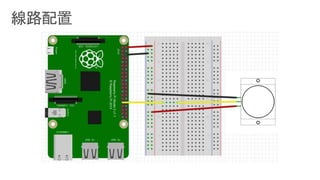
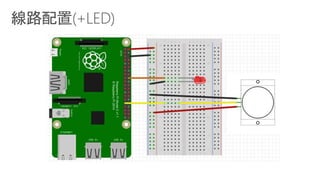
我的家庭/校園
安全哨兵
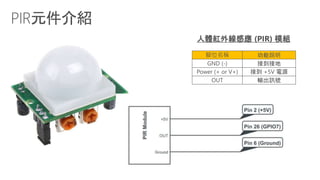
腳位名稱 功能說明
GND (-) 接到接地
Power (+ or V+) 接到 +5V 電源
OUT 輸出訊號
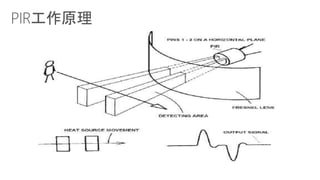
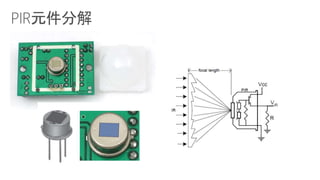
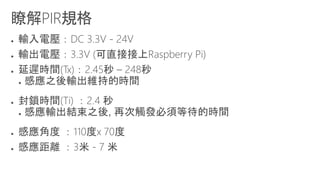
人體紅外線感應 (PIR) 模組
●
●
●
●
●
●
●
●
●
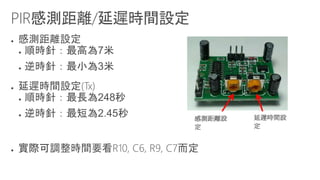
感測距離設
定
延遲時間設
定
●
●
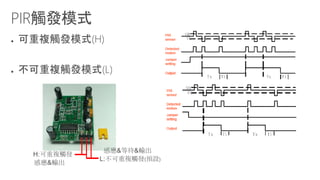
H:可重複觸發
L:不可重複觸發(預設)
感應&輸出
感應&等待&輸出
Microsoft Windows 10 brings one converged Windows operating system
that powers your Internet of Things (IoT) devices by providing a single
platform for management, security and application development for
enterprises that look to gain sustainable competitive advantage through
the power of the latest connected device technologies.
創客任務  2015 高中程式夏令營 io t & rasberry pi2(student)

創客任務 2015 高中程式夏令營 io t & rasberry pi2(student)