仕事 
個人活動 http://tanaka733.net
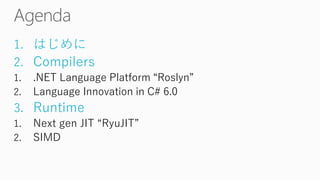
1.はじめに 
2.Compilers 
1..NET Language Platform “Roslyn” 
2.Language Innovationin C# 6.0 
3.Runtime 
1.Next gen JIT “RyuJIT” 
2.SIMD
http://channel9.msdn.com/Events/Visual-Studio/Connect-event-2014
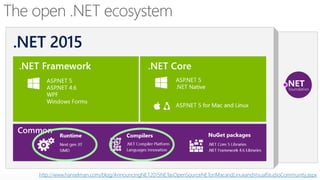
http://www.hanselman.com/blog/AnnouncingNET2015NETasOpenSourceNETonMacandLinuxandVisualStudioCommunity.aspx
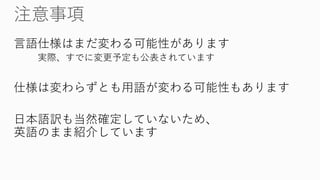
言語仕様はまだ変わる可能性があります 
実際、すでに変更予定も公表されています 
仕様は変わらずとも用語が変わる可能性もあります 
日本語訳も当然確定していないため、 英語のまま紹介しています
VisualStudio2015 Preview を使いましょう 
http://www.microsoft.com/ja-jp/dev/products/visual-studio- 2015.aspx 
本日の内容は基本的にこのPreview時点の情報です 
Go Live でないので、製品開発には使えません 
(自己責任ですが)以前のVSとSide-by-sideで使えます 
Azureの仮想マシンギャラリーからも利用できます
https://roslyn.codeplex.com/
Code Refactoring 
Diagnostic with Code Fix
http://www.visualstudio.com/downloads/visual-studio-2015-downloads-vshttps://visualstudiogallery.msdn.microsoft.com/849f3ab1-05cf-4682-b4af- ef995e2aa1a5 
https://visualstudiogallery.msdn.microsoft.com/70e184da-9b3a-402f-b210- d62a898e2887
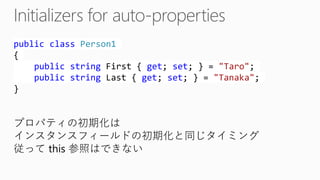
publicclassPerson1{ publicstringFirst { get; set; } = "Taro"; publicstringLast { get; set; } = "Tanaka"; } 
プロパティの初期化は インスタンスフィールドの初期化と同じタイミング 
従ってthis 参照はできない
publicclassPerson2B{ privatereadonlystringfirst = "Taro"; publicstringFirst{ get{ returnfirst; } } privatereadonlystringlast = "Tanaka"; publicstringLast{ get{ returnlast; } } publicPerson2B(stringfirst, stringlast) { this.first= first; this.last= last; } } 
C#5.0風の書き方 
readonlyなプロパティのために、 フィールドを用意する必要があった
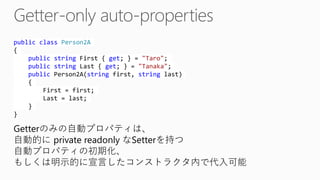
publicclassPerson2A{ publicstringFirst { get; } = "Taro"; publicstringLast { get; } = "Tanaka"; publicPerson2A(stringfirst, stringlast) { First = first; Last = last; } } 
Getterのみの自動プロパティは、 
自動的にprivate readonlyなSetterを持つ 自動プロパティの初期化、 
もしくは明示的に宣言したコンストラクタ内で代入可能
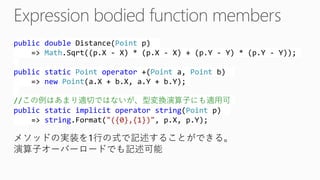
publicdoubleDistance(Pointp) => Math.Sqrt((p.X -X) * (p.X -X) + (p.Y -Y) * (p.Y -Y)); publicstaticPointoperator+(Pointa, Pointb) => newPoint(a.X+ b.X, a.Y+ b.Y); //この例はあまり適切ではないが、型変換演算子にも適用可 publicstaticimplicitoperatorstring(Pointp) => string.Format("({0},{1})", p.X, p.Y); 
メソッドの実装を1行の式で記述することができる。 演算子オーバーロードでも記述可能
publicdoubleLength => Math.Sqrt(X * X + Y * Y); publicPersonthis[longid] => store[id]; 
Getter Only なプロパティやプロパティインデクサも 式形式で実装できる。 Get 修飾子は記述不要(自動的にGetter-only扱い)
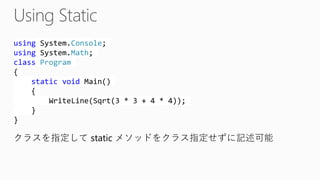
usingSystem.Console; usingSystem.Math; classProgram{ staticvoidMain() { WriteLine(Sqrt(3 * 3 + 4 * 4)); } } 
クラスを指定してstaticメソッドをクラス指定せずに記述可能
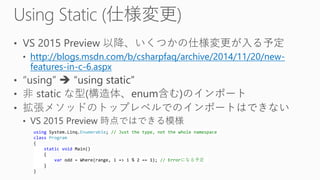
http://blogs.msdn.com/b/csharpfaq/archive/2014/11/20/new- features-in-c-6.aspxusingSystem.Linq.Enumerable; // Just the type, not the whole namespaceclassProgram{ staticvoidMain() { varodd = Where(range, i=> i% 2 == 1); // Errorになる予定 } }
IList<Person> persons = null; int? count = persons?.Count(); Personfirst = persons?[0]; intcountWithDefault= persons?.Count() ?? 0; 
null の場合、nullを返す。 
null合算演算子と組み合わせても便利。 
※名称はNull-propagating operators という記述も多い
int? first1 = persons?[0].Freinds.Count(); //同じ int? first2 = (persons != null) ? (int?)persons[0].Freinds.Count() : null; 
短絡評価(ショートサーキット)するため、 
nullと評価された時点で、後続の式は評価されない。
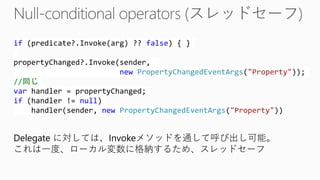
if(predicate?.Invoke(arg) ?? false) { } propertyChanged?.Invoke(sender, newPropertyChangedEventArgs("Property")); //同じ varhandler = propertyChanged; if(handler != null) handler(sender, newPropertyChangedEventArgs("Property")) 
Delegate に対しては、Invokeメソッドを通して呼び出し可能。 
これは一度、ローカル変数に格納するため、スレッドセーフ
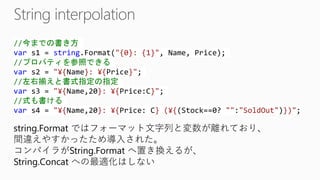
//今までの書き方 vars1 = string.Format("{0}: {1}", Name, Price); //プロパティを参照できる vars2 = "¥{Name}: ¥{Price}"; //左右揃えと書式指定の指定 vars3 = "¥{Name,20}: ¥{Price:C}"; //式も書ける vars4 = "¥{Name,20}: ¥{Price: C} (¥{(Stock==0? "":"SoldOut")})"; 
string.Formatではフォーマット文字列と変数が離れており、 間違えやすかったため導入された。 
コンパイラがString.Formatへ置き換えるが、 String.Concatへの最適化はしない
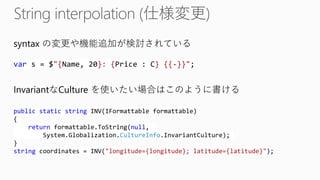
syntax の変更や機能追加が検討されている vars = $"{Name, 20}: {Price : C} {{-}}"; publicstaticstringINV(IFormattableformattable) { returnformattable.ToString(null, System.Globalization.CultureInfo.InvariantCulture); } stringcoordinates = INV("longitude={longitude}; latitude={latitude}"); 
InvariantなCulture を使いたい場合はこのように書ける
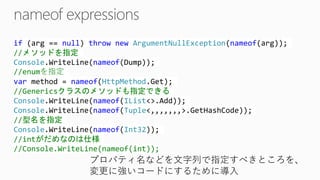
if(arg== null) thrownewArgumentNullException(nameof(arg)); //メソッドを指定 Console.WriteLine(nameof(Dump)); //enumを指定 varmethod = nameof(HttpMethod.Get); //Genericsクラスのメソッドも指定できる Console.WriteLine(nameof(IList<>.Add)); Console.WriteLine(nameof(Tuple<,,,,,,,>.GetHashCode)); //型名を指定 Console.WriteLine(nameof(Int32)); //intがだめなのは仕様 //Console.WriteLine(nameof(int)); 
プロパティ名などを文字列で指定すべきところを、 
変更に強いコードにするために導入
//以前の記法 vardict2 = newDictionary<string, string> { {"key1", "value1"}, {"key2", "value2"}, {"key3", "value3"}, }; //新しい記法(同じ初期化子内で以前の記法と混ぜるのは不可) vardict= newDictionary<string, string> { ["key1"] = "value1", ["key2"] = "value2", ["key3"] = "value3" };
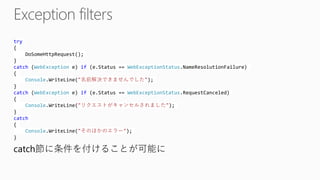
try{ DoSomeHttpRequest(); } catch(WebExceptione) if(e.Status== WebExceptionStatus.NameResolutionFailure) { Console.WriteLine("名前解決できませんでした"); } catch(WebExceptione) if(e.Status== WebExceptionStatus.RequestCanceled) { Console.WriteLine("リクエストがキャンセルされました"); } catch{ Console.WriteLine("そのほかのエラー"); } 
catch節に条件を付けることが可能に
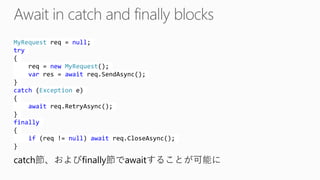
MyRequestreq= null; try{ req= newMyRequest(); varres = awaitreq.SendAsync(); } catch(Exceptione) { awaitreq.RetryAsync(); } finally{ if(req!= null) awaitreq.CloseAsync(); } 
catch節、およびfinally節でawaitすることが可能に
structPerson{ publicstringName { get; } publicintAge { get; } publicPerson(stringname, intage) { Name = name; Age = age; } publicPerson() : this("Taro Tanaka", 10) { } } 
default(Person) とかnew Person[3] と宣言したときは このコンストラクタは実行されない。 あくまで明示的にnew Person() と呼び出したときのみ。
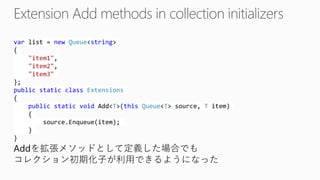
varlist = newQueue<string> { "item1", "item2", "item3" }; publicstaticclassExtensions{ publicstaticvoidAdd<T>(thisQueue<T> source, Titem) { source.Enqueue(item); } } 
Addを拡張メソッドとして定義した場合でも 
コレクション初期化子が利用できるようになった
http://aka.ms/ryujit
http://blogs.msdn.com/b/dotnet/archive/2013/09/30/ryujit-the-next-generation-jit-compiler.aspx
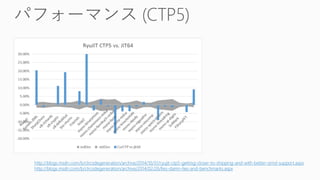
http://blogs.msdn.com/b/clrcodegeneration/archive/2014/10/31/ryujit-ctp5-getting-closer-to-shipping-and-with-better-simd-support.aspx 
http://blogs.msdn.com/b/clrcodegeneration/archive/2014/02/26/lies-damn-lies-and-benchmarks.aspx
https://code.msdn.microsoft.com/SIMD-Sample-f2c8c35a
staticvoidDemo() { // Array of 2 * Vector<int>.Length valuesint[] values = CreateValues(); // Multiply the first N values with the second// N values (N, being Vector<int>.Length). varx = newVector<int>(values, 0); vary = newVector<int>(values, Vector<int>.Length); varz = x * y; // Store the result in the array where x came fromz.CopyTo(values, 0); }
20141129-dotNet2015

20141129-dotNet2015