Number System -Definition
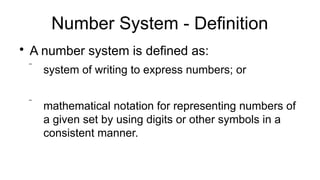
A number system is defined as:
system of writing to express numbers; or
mathematical notation for representing numbers of
a given set by using digits or other symbols in a
consistent manner.
3.
Number System -Base
The base of a number system refers to the total number of digits that are actually used in
the given number system.
The number system that has the base 'b' consists of digits in the [0, b-1] range e.g.
Base 10 has digits ranging from 0 to 9.
Base 7?
Base 5?
Given that the digits of a base range from 0 to 8, whats the base?
This base of the number system is also known as the radix of a number system
4.
How Bases AreUsed
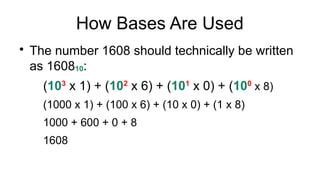
The number 1608 should technically be written
as 160810:
(103
x 1) + (102
x 6) + (101
x 0) + (100
x 8)
(1000 x 1) + (100 x 6) + (10 x 0) + (1 x 8)
1000 + 600 + 0 + 8
1608
Decimal Number System
Basefor decimal number system?
Symbols used with decimal number system?
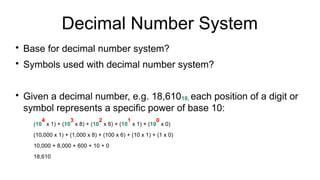
Given a decimal number, e.g. 18,61010, each position of a digit or
symbol represents a specific power of base 10:
(10
4
x 1) + (10
3
x 8) + (10
2
x 6) + (10
1
x 1) + (10
0
x 0)
(10,000 x 1) + (1,000 x 8) + (100 x 6) + (10 x 1) + (1 x 0)
10,000 + 8,000 + 600 + 10 + 0
18,610
7.
Binary Number System
Basefor binary number system?
Symbols used with binary number system?
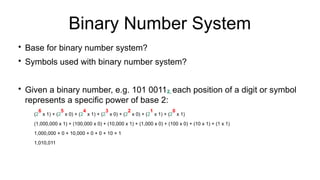
Given a binary number, e.g. 101 00112, each position of a digit or symbol
represents a specific power of base 2:
(2
6
x 1) + (2
5
x 0) + (2
4
x 1) + (2
3
x 0) + (2
2
x 0) + (2
1
x 1) + (2
0
x 1)
(1,000,000 x 1) + (100,000 x 0) + (10,000 x 1) + (1,000 x 0) + (100 x 0) + (10 x 1) + (1 x 1)
1,000,000 + 0 + 10,000 + 0 + 0 + 10 + 1
1,010,011
8.
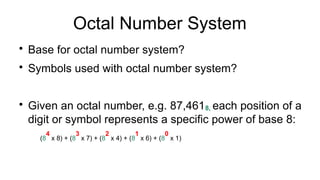
Octal Number System
Basefor octal number system?
Symbols used with octal number system?
Given an octal number, e.g. 87,4618, each position of a
digit or symbol represents a specific power of base 8:
(8
4
x 8) + (8
3
x 7) + (8
2
x 4) + (8
1
x 6) + (8
0
x 1)
9.
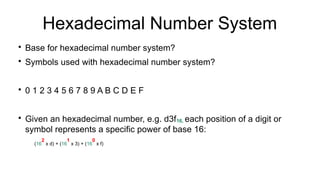
Hexadecimal Number System
Basefor hexadecimal number system?
Symbols used with hexadecimal number system?
0 1 2 3 4 5 6 7 8 9 A B C D E F
Given an hexadecimal number, e.g. d3f16, each position of a digit or
symbol represents a specific power of base 16:
(16
2
x d) + (16
1
x 3) + (16
0
x f)
10.
??
How are numbersstored inside a computer? Is
the number 256 stored as is, or does the
computer use a different format?
11.
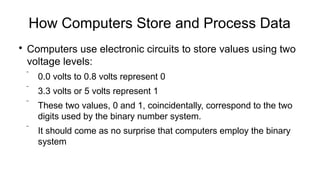
How Computers Storeand Process Data
Computers use electronic circuits to store values using two
voltage levels:
0.0 volts to 0.8 volts represent 0
3.3 volts or 5 volts represent 1
These two values, 0 and 1, coincidentally, correspond to the two
digits used by the binary number system.
It should come as no surprise that computers employ the binary
system
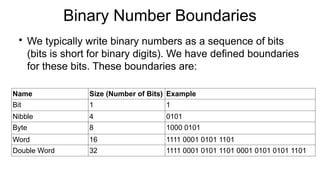
Binary Number Boundaries
Wetypically write binary numbers as a sequence of bits
(bits is short for binary digits). We have defined boundaries
for these bits. These boundaries are:
Name Size (Number of Bits) Example
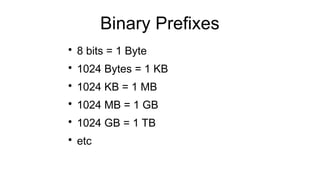
Bit 1 1
Nibble 4 0101
Byte 8 1000 0101
Word 16 1111 0001 0101 1101
Double Word 32 1111 0001 0101 1101 0001 0101 0101 1101
15.
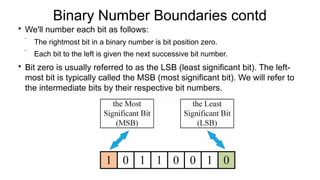
Binary Number Boundariescontd
We'll number each bit as follows:
The rightmost bit in a binary number is bit position zero.
Each bit to the left is given the next successive bit number.
Bit zero is usually referred to as the LSB (least significant bit). The left-
most bit is typically called the MSB (most significant bit). We will refer to
the intermediate bits by their respective bit numbers.
16.
The Bit
Bit isthe smallest "unit" of data on a binary
computer.
With a single bit, you can represent any two
distinct items. Examples include zero or one,
true or false, on or off, male or female, and right
or wrong.
17.
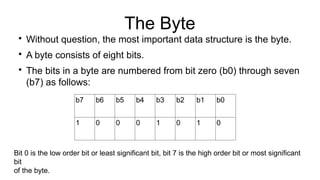
The Byte
Without question,the most important data structure is the byte.
A byte consists of eight bits.
The bits in a byte are numbered from bit zero (b0) through seven
(b7) as follows:
b7 b6 b5 b4 b3 b2 b1 b0
1 0 0 0 1 0 1 0
Bit 0 is the low order bit or least significant bit, bit 7 is the high order bit or most significant
bit
of the byte.
Computer Character Sets
Acharacter set is a collection of characters used to represent text in a computer system. It
includes letters, numbers, symbols, and other characters that a computer can display or
process.
Characters that are displayed by a computer are stored as a combination of 1s and 0s
Characters typed at the keyboard, displayed on the screen, and printed on the printer all have
numeric values. Hence, each character must have its own combination of 1s and 0s
representation.
Probably the most important use for a byte is holding a character code.
21.
Character Sets Contd
Thereare several character sets that determine which
particular pattern of bits will represent which character,
such as Unicode, ECBDIC and the ASCII character set.
The character sets differ by the number of characters
contained in their set and the number of binary digits
used to represent the characters.
22.
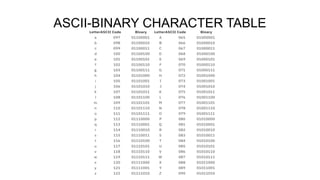
ASCII System
ASCII wasthe first major character encoding
standard for data processing;
It uses eight bits to represent numbers from 0-
9, the upper and lower case English letters from
A to Z, and some special characters.
Boolean Logic -Description
Boolean Logic is a system of logic, named after
mathematician George Boole, in which results
are calculated as either True or False (known as
truth values or truth variables)
Common operators used by Boolean logic?
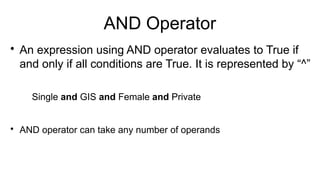
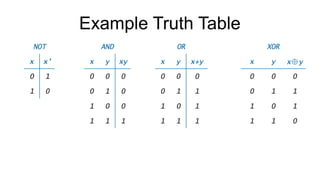
AND Operator
An expressionusing AND operator evaluates to True if
and only if all conditions are True. It is represented by “^”
Single and GIS and Female and Private
AND operator can take any number of operands
29.
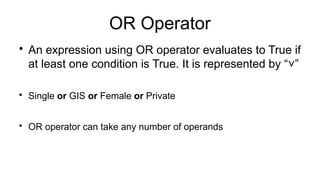
OR Operator
An expressionusing OR operator evaluates to True if
at least one condition is True. It is represented by “ ”
˅
Single or GIS or Female or Private
OR operator can take any number of operands
30.
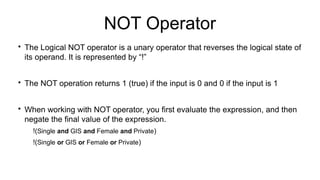
NOT Operator
The LogicalNOT operator is a unary operator that reverses the logical state of
its operand. It is represented by “!”
The NOT operation returns 1 (true) if the input is 0 and 0 if the input is 1
When working with NOT operator, you first evaluate the expression, and then
negate the final value of the expression.
!(Single and GIS and Female and Private)
!(Single or GIS or Female or Private)
31.
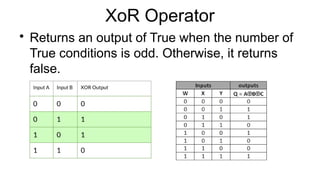
XoR Operator
Returns anoutput of True when the number of
True conditions is odd. Otherwise, it returns
false.
32.
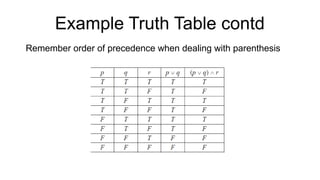
Boolean Operators Orderof Precedence
The order of precedence for Boolean operators,
from highest to lowest priority is NOT, then AND,
then XoR, lastly OR.
Note: Conditions in parenthesis have higher
precedence
33.
Truth Tables
A truthtable is a structured representation that
presents all possible combinations of truth
values for the input variables of a Boolean
function and their corresponding output values.

![Number System - Base
The base of a number system refers to the total number of digits that are actually used in
the given number system.
The number system that has the base 'b' consists of digits in the [0, b-1] range e.g.
Base 10 has digits ranging from 0 to 9.
Base 7?
Base 5?
Given that the digits of a base range from 0 to 8, whats the base?
This base of the number system is also known as the radix of a number system](https://image.slidesharecdn.com/2-250801140157-0776c40f/85/2-Computer-Applications-Lecture-2-pptx-3-320.jpg)