Automatic Number
Plate
Recognition(ANPR)
Cognizant Project Presentation
Project
Description
Project Design and Modelling
1. System Design
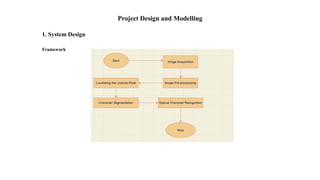
Framework
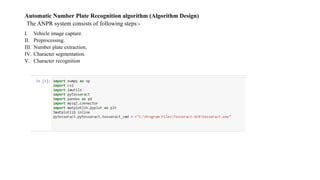
Python Libraries
 We are building a python software for optical character Recognition
of the license number plate using various Python libraries and
importing various packages such as OpenCV, Matplotlib, numpy,
imutils and Pytesseract for OCR(optical Character Recognition) of
Number plate from image clicked. Let us discuss complete process
step by step in this framework diagram shown above:
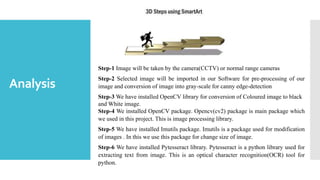
Analysis
Step-1 Image will be taken by the camera(CCTV) or normal range cameras
Step-2 Selected image will be imported in our Software for pre-processing of our
image and conversion of image into gray-scale for canny edge-detection
Step-3 We have installed OpenCV library for conversion of Coloured image to black
and White image.
Step-4 We installed OpenCV package. Opencv(cv2) package is main package which
we used in this project. This is image processing library.
Step-5 We have installed Imutils package. Imutils is a package used for modification
of images . In this we use this package for change size of image.
Step-6 We have installed Pytesseract library. Pytesseract is a python library used for
extracting text from image. This is an optical character recognition(OCR) tool for
python.
Step-7 We have installed Matplotlib Library. In matplotlib library we use a package name pyplot. This library is used for
plotting the images. % matplotlib inline is used for plot the image at same place.
Step-8 Image is read by the Imread() function and after reading the image we resize the image for further processing of
image.
Step-9 Then our selected image is converted to gray-scale using below function.
# RGB to Gray scale conversion
gray = cv2.cvtColor(image, cv2.COLOR_BGR2GRAY)
plot_image(gray,"Grayscale Conversion")
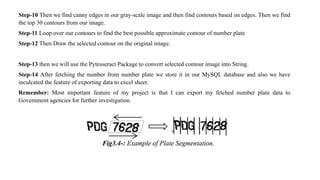
Step-10 Then we find canny edges in our gray-scale image and then find contours based on edges. Then we find
the top 30 contours from our image.
Step-11 Loop over our contours to find the best possible approximate contour of number plate
Step-12 Then Draw the selected contour on the original image.
Step-13 then we will use the Pytesseract Package to convert selected contour image into String.
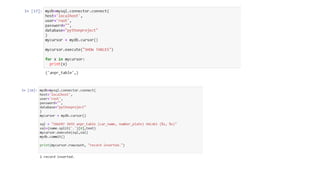
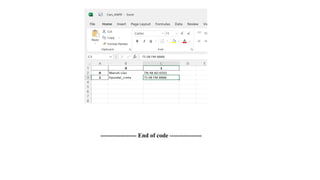
Step-14 After fetching the number from number plate we store it in our MySQL database and also we have
inculcated the feature of exporting data to excel sheet.
Remember: Most important feature of my project is that I can export my fetched number plate data to
Government agencies for further investigation.
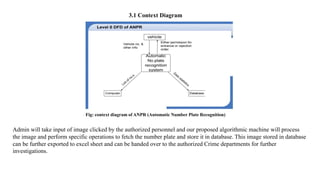
3.1 Context Diagram
Admin will take input of image clicked by the authorized personnel and our proposed algorithmic machine will process
the image and perform specific operations to fetch the number plate and store it in database. This image stored in database
can be further exported to excel sheet and can be handed over to the authorized Crime departments for further
investigations.
Fig: context diagram of ANPR (Automatic Number Plate Recognition)
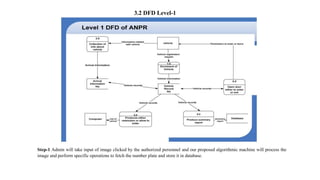
3.2 DFD Level-1
Step-1 Admin will take input of image clicked by the authorized personnel and our proposed algorithmic machine will process the
image and perform specific operations to fetch the number plate and store it in database.
Step-2 Then image will be processed and number will be fetched and if the fetched number matches with the society database
then the gates will open
Else
User needs to register his vehicle to gain access to entry in society.
Step-3 Vehicle Authorization is complete and data is stored in database
3.3 Sequence diagram:
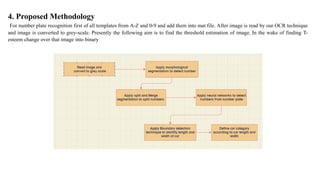
4. Proposed Methodology
For number plate recognition first of all templates from A-Z and 0-9 and add them into mat file. After image is read by our OCR technique
and image is converted to grey-scale. Presently the following aim is to find the threshold estimation of image. In the wake of finding T-
esteem change over that image into binary
Project
Implementation
Automatic Number Plate Recognition algorithm (Algorithm Design)
The ANPR system consists of following steps:-
I. Vehicle image capture.
II. Preprocessing.
III. Number plate extraction.
IV. Character segmentation.
V. Character recognition
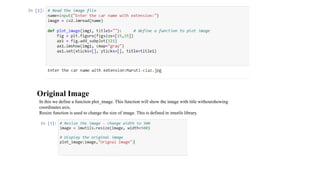
Original Image
In this we define a function plot_image. This function will show the image with title withoutshowing
coordinates axis.
Resize function is used to change the size of image. This is defined in imutils library.
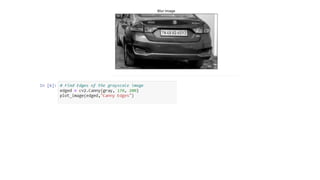
Grayscale and blur image
cvtColor function is used to convert the color of image. In this we convert original image to grayscale image. This function is also defined in
opencv library.
 BilateralFilter method is used to blur the image. This remove the noise from image/
 A bilateral filter is used for smoothening images and reducing noise, while preservingedges
 BilateralFilter is highly effective in noise removal while keeping edges sharp. But theoperation is slower compared
to other filters
Canny Edge Detection
OpenCV puts all the above in single function, cv.canny() . This method is used for detection of edges of car. After appling this
function image will be seen like a drawing on black paperwith white color.
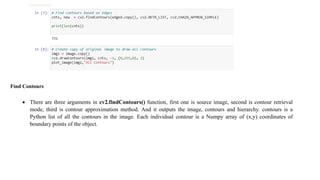
• Contours can be explained simply as a curve joining all the continuous points (along the boundary), having same color or
intensity. The contours are a useful tool for shape analysis and object detection and recognition.
• In OpenCV, finding contours is like finding white object from black background. So remember, object to be found should be
white and background should be black
Find Contours
 There are three arguments in cv2.findContours() function, first one is source image, second is contour retrieval
mode, third is contour approximation method. And it outputs the image, contours and hierarchy. contours is a
Python list of all the contours in the image. Each individual contour is a Numpy array of (x,y) coordinates of
boundary points of the object.
Draw Contours
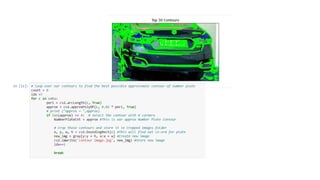
Sort Contours
 Now we are sorting the contours in reverse order areawise .
 Cv2.contourArea method is used to find area of contours.
 We took first 30 countous out of 981 countous according to their area.
 This will decrease the time of ouput.
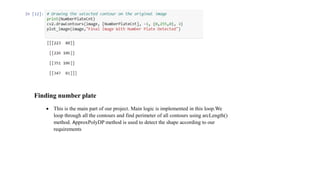
Finding number plate
 This is the main part of our project. Main logic is implemented in this loop.We
loop through all the contours and find perimeter of all contours using arcLength()
method. ApproxPolyDP method is used to detect the shape according to our
requirements
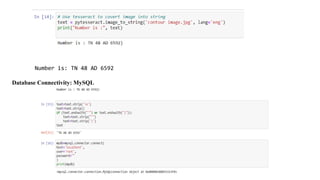
o Pytesseract library is used to convert image text to string .
There is a function name image_to_string defined in this
library. This will convert our image text to string.
o And then using print method we print this on screen
o Python-tesseract is an optical character recognition (OCR)
tool for python. That is, it will recognize and “read” the text
embedded in images.
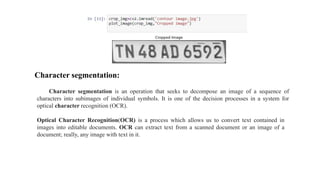
Character segmentation:
Character segmentation is an operation that seeks to decompose an image of a sequence of
characters into subimages of individual symbols. It is one of the decision processes in a system for
optical character recognition (OCR).
Optical Character Recognition(OCR) is a process which allows us to convert text contained in
images into editable documents. OCR can extract text from a scanned document or an image of a
document; really, any image with text in it.
Number is: TN 48 AD 6592
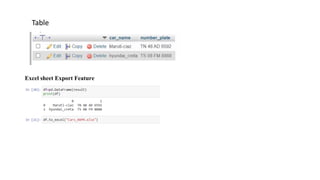
Database Connectivity: MySQL
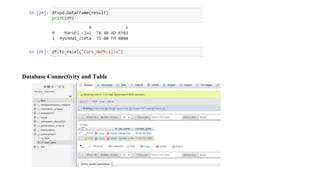
Database Connectivity and Table
Table
Excel sheet Export Feature
------------------ End of code ----------------
Conclusion and Future Scope:
This was great experience to make this project. We learned a lot from this project . This project can be
extended to further level. Logic applied in this project can be make accurateusing machine learning.
As a future work the developed system would be concentrated upon increasing the accuracy of text
localization and graphics removal in caption text-Images. It can be evaluated using various other available
image databases and using various other classifiers.
------------------ Thank You----------------

19BCS1815_PresentationAutomatic Number Plate Recognition(ANPR)P.pptx

  • 1.
  • 2.
  • 3.
    Project Design andModelling 1. System Design Framework
  • 4.
    Python Libraries  Weare building a python software for optical character Recognition of the license number plate using various Python libraries and importing various packages such as OpenCV, Matplotlib, numpy, imutils and Pytesseract for OCR(optical Character Recognition) of Number plate from image clicked. Let us discuss complete process step by step in this framework diagram shown above:
  • 5.
    Analysis Step-1 Image willbe taken by the camera(CCTV) or normal range cameras Step-2 Selected image will be imported in our Software for pre-processing of our image and conversion of image into gray-scale for canny edge-detection Step-3 We have installed OpenCV library for conversion of Coloured image to black and White image. Step-4 We installed OpenCV package. Opencv(cv2) package is main package which we used in this project. This is image processing library. Step-5 We have installed Imutils package. Imutils is a package used for modification of images . In this we use this package for change size of image. Step-6 We have installed Pytesseract library. Pytesseract is a python library used for extracting text from image. This is an optical character recognition(OCR) tool for python.
  • 6.
    Step-7 We haveinstalled Matplotlib Library. In matplotlib library we use a package name pyplot. This library is used for plotting the images. % matplotlib inline is used for plot the image at same place. Step-8 Image is read by the Imread() function and after reading the image we resize the image for further processing of image. Step-9 Then our selected image is converted to gray-scale using below function. # RGB to Gray scale conversion gray = cv2.cvtColor(image, cv2.COLOR_BGR2GRAY) plot_image(gray,"Grayscale Conversion")
  • 7.
    Step-10 Then wefind canny edges in our gray-scale image and then find contours based on edges. Then we find the top 30 contours from our image. Step-11 Loop over our contours to find the best possible approximate contour of number plate Step-12 Then Draw the selected contour on the original image. Step-13 then we will use the Pytesseract Package to convert selected contour image into String. Step-14 After fetching the number from number plate we store it in our MySQL database and also we have inculcated the feature of exporting data to excel sheet. Remember: Most important feature of my project is that I can export my fetched number plate data to Government agencies for further investigation.
  • 8.
    3.1 Context Diagram Adminwill take input of image clicked by the authorized personnel and our proposed algorithmic machine will process the image and perform specific operations to fetch the number plate and store it in database. This image stored in database can be further exported to excel sheet and can be handed over to the authorized Crime departments for further investigations. Fig: context diagram of ANPR (Automatic Number Plate Recognition)
  • 9.
    3.2 DFD Level-1 Step-1Admin will take input of image clicked by the authorized personnel and our proposed algorithmic machine will process the image and perform specific operations to fetch the number plate and store it in database.
  • 10.
    Step-2 Then imagewill be processed and number will be fetched and if the fetched number matches with the society database then the gates will open Else User needs to register his vehicle to gain access to entry in society. Step-3 Vehicle Authorization is complete and data is stored in database 3.3 Sequence diagram:
  • 11.
    4. Proposed Methodology Fornumber plate recognition first of all templates from A-Z and 0-9 and add them into mat file. After image is read by our OCR technique and image is converted to grey-scale. Presently the following aim is to find the threshold estimation of image. In the wake of finding T- esteem change over that image into binary
  • 12.
  • 13.
    Automatic Number PlateRecognition algorithm (Algorithm Design) The ANPR system consists of following steps:- I. Vehicle image capture. II. Preprocessing. III. Number plate extraction. IV. Character segmentation. V. Character recognition
  • 14.
    Original Image In thiswe define a function plot_image. This function will show the image with title withoutshowing coordinates axis. Resize function is used to change the size of image. This is defined in imutils library.
  • 15.
    Grayscale and blurimage cvtColor function is used to convert the color of image. In this we convert original image to grayscale image. This function is also defined in opencv library.
  • 16.
     BilateralFilter methodis used to blur the image. This remove the noise from image/  A bilateral filter is used for smoothening images and reducing noise, while preservingedges  BilateralFilter is highly effective in noise removal while keeping edges sharp. But theoperation is slower compared to other filters
  • 18.
    Canny Edge Detection OpenCVputs all the above in single function, cv.canny() . This method is used for detection of edges of car. After appling this function image will be seen like a drawing on black paperwith white color. • Contours can be explained simply as a curve joining all the continuous points (along the boundary), having same color or intensity. The contours are a useful tool for shape analysis and object detection and recognition. • In OpenCV, finding contours is like finding white object from black background. So remember, object to be found should be white and background should be black
  • 19.
    Find Contours  Thereare three arguments in cv2.findContours() function, first one is source image, second is contour retrieval mode, third is contour approximation method. And it outputs the image, contours and hierarchy. contours is a Python list of all the contours in the image. Each individual contour is a Numpy array of (x,y) coordinates of boundary points of the object.
  • 20.
  • 21.
    Sort Contours  Nowwe are sorting the contours in reverse order areawise .  Cv2.contourArea method is used to find area of contours.  We took first 30 countous out of 981 countous according to their area.  This will decrease the time of ouput.
  • 23.
    Finding number plate This is the main part of our project. Main logic is implemented in this loop.We loop through all the contours and find perimeter of all contours using arcLength() method. ApproxPolyDP method is used to detect the shape according to our requirements
  • 24.
    o Pytesseract libraryis used to convert image text to string . There is a function name image_to_string defined in this library. This will convert our image text to string. o And then using print method we print this on screen o Python-tesseract is an optical character recognition (OCR) tool for python. That is, it will recognize and “read” the text embedded in images.
  • 25.
    Character segmentation: Character segmentationis an operation that seeks to decompose an image of a sequence of characters into subimages of individual symbols. It is one of the decision processes in a system for optical character recognition (OCR). Optical Character Recognition(OCR) is a process which allows us to convert text contained in images into editable documents. OCR can extract text from a scanned document or an image of a document; really, any image with text in it.
  • 26.
    Number is: TN48 AD 6592 Database Connectivity: MySQL
  • 28.
  • 29.
  • 30.
    ------------------ End ofcode ----------------
  • 31.
    Conclusion and FutureScope: This was great experience to make this project. We learned a lot from this project . This project can be extended to further level. Logic applied in this project can be make accurateusing machine learning. As a future work the developed system would be concentrated upon increasing the accuracy of text localization and graphics removal in caption text-Images. It can be evaluated using various other available image databases and using various other classifiers. ------------------ Thank You----------------