































Performance
Testing
for web-scale
● happy father
● SA in EPAM Systems
● Java is my primary language
● hands-on-coding with Groovy, Ruby
● exploring FP with Erlang/Elixir
● passionate about agile, clean code and devops
Agenda
● Why?
● What?
● How to..?
● Tools
● Demo
● Summary
● References
● Q&A
Why...
should I Care?..
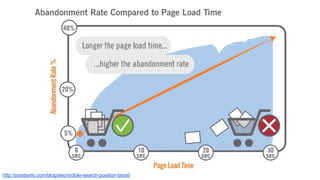
http://positionly.com/blog/seo/mobile-search-position-boost
Loss of $1.6b
~25 * $62m
What...
is Performance
Testing?
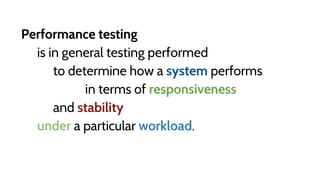
Performance testing
is in general testing performed
to determine how a system performs
in terms of responsiveness
and stability
under a particular workload.
What...
are
Key
Characteristics?
Availability
Concurrency
Response Time
Throughput
Capacity
How…
to Decide when to
Test?
Readiness
Enough Time
Continuously
How…
to Choose what to
Test?
System Load (#users|requests)
Test Duration (mins)
Normal Operation
Max Designed Operation Capacity
Stress Test
Soak Test
Peak Load Test
Spike Test
Types
Consensus
Scenarios
How…
to Execute Test?
Data Volume
Network
Monitoring
Above Limits
Tool Impact
How…
to Collect Results?
Measurements
Distributed Nature
Performance
Testing
Tools
Many..
- Iago http://twitter.github.io/iago/index.html
- Tsung https://www.process-one.net/en/tsung/
- Locust http://locust.io/
- Zopkio https://github.com/linkedin/Zopkio
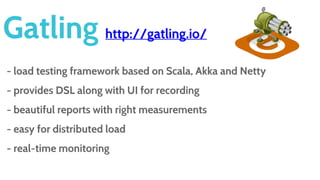
Gatling http://gatling.io/
- load testing framework based on Scala, Akka and Netty
- provides DSL along with UI for recording
- beautiful reports with right measurements
- easy for distributed load
- real-time monitoring
Demo
Takeaways
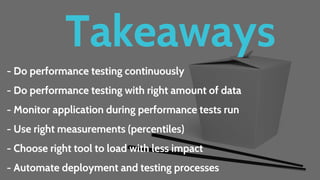
- Do performance testing continuously
- Do performance testing with right amount of data
- Monitor your infra during performance tests run
- Use right measurements (percentiles)
- Choose right tool to load with less impact
- Automate deployment and testing processes
References
- The Art of App Performance Testing http://goo.gl/CEgfSQ
- Performance Testing Crash Course https://goo.gl/jDDcP4
- InfluxDB https://influxdb.com/
- Grafana http://grafana.org/
- Docker Compose https://docs.docker.com/compose/
- Sources https://github.com/webdizz/web-scale-perf-testing
Q&A
Izzet_Mustafayev@EPAM.com
@webdizz webdizz
izzetmustafaiev
http://webdizz.name
Thanks
http://epam.com/careers

Performance testing for web-scale

Editor's Notes

  • #2  We hate slow apps, we have slow sites. I’m sure you agree with me. Imagine if Google responds to your request for more than 2 seconds, imagine Facebook loads your News feed slow or Amazon does not deliver your just purchased e-book within a minute - it's really frustrating. But why we do not like to make our software fast? One reason for this is we do not know how to achieve this. Well if you want to fix this, come to my talk where I’m going to share aspects and caveats of performance testing of Java based web applications.
  • #3 Ok. Let me say several words about myself. My name is Izzet, I’m working in EPAM relatively long time, the most part of my projects were related to Java language and closed technologies. Other than Java I have interests in Groovy, Ruby, trying to get in touch with Erlang/Elixir. As for non-tech I’m advocating agile approaches in software development and cultivating clean code and devops practices. That’s probably it about myself, let’s proceed with our agenda for today.
  • #4 Let’s go to our agenda for current session. First of all I’m going to share with you some insights why we need to care about performance testing. Than we’ll proceed to get understanding what is performance testing. Next will be the main chapter of this talk where I’m going to explain how to do a performance testing, how to achieve it for web scale. After that there will be several tools mentioned that could be used to arrange performance testing for web scale capable applications. Of course there will be a particular part where I’m going to demonstrate short demo of high load. Then we’ll go to short summary, references and of course you will have a chance to ask me questions.
  • #5 Let’s start. Before to do something we need to know why we need to do this. And usually performance testing is not a part of development or in better cases it’s part of release phase of application development, when everybody is in a rash, we’re trying to fulfil forgotten business requirements, fix hardware and network related issues, or may be even business readiness issues. I believe most of you faced with this right? Please raise your hand. And as for performance testing it happens somewhere in the middle… Let me share some insights with you why performance testing should be treated with the same importance as functional or acceptance testing as it worth much more attention than we pay for it.
  • #6 You know number cannot lie, so let’s take a look at some statistics. If your web application takes longer than 3 seconds to load, 43% of your visitors won’t return. According to Aberdeen Group, “A 1-second delay in load time can mean 11% fewer page views, a 16% decrease in customer satisfaction, and 7% loss in conversions”.
  • #7 Let’s take a look at more visible number - money. Amazon's calculated that a page load slowdown of just one second could cost it $1.6 billion in sales each year. Actually for this money we can buy about 10 tickets to ride to the moon according to Space Adventures. I hope it’s enough to think about necessity to spend more on performance testing and tuning of software we’re building, right?
  • #8 So, what is performance testing?
  • #9 For end users it’s simply how application responds on their actions, for end users does not matter how many other people right now are using application, each of them would like to complete his activity without frustration due to pure responsiveness and errors. And actually there is conflict of interest as from one point you as an owner of application would like to have as many users as possible from another side there is a dependency between application performance and amount of users, actually we’re going to come back to this a bit later. From wikipedia it’s also quite clear, performance testing helps to determine how system performs under load.
  • #10 OK, looks clear. Let’s go to key characteristics of performance testing.
  • #11 First of all it’s availability. The amount of time an application is available to the end user. Lack of availability is significant because many applications will have a substantial business cost for even a small outage. In performance terms, this would mean the complete inability of an end user to make effective use of the application either because the application is simply not responding or response time has degraded to an unacceptable degree. And by doing a performance testing we’re trying to determine the constraints of our application when it becomes unavailable.
  • #12 Another key characteristic of performance testing is Concurrency. It’s probably the least understood performance characteristic. Usually we get some number of concurrent users that the application must support without giving sufficient thought to what this actually entails. The more realistic is to calculate concurrency based on an hourly figure. From the performance testing tool it’s the number of active users generated by it, which is not necessarily the same as the number of users concurrently accessing the application as this value is too tied to performance scenarios design. In performance testing terms concurrency refers to next areas: concurrent virtual users - the number of active virtual users from the point of view of your performance testing tool. this number is often very different from number of virtual users actually accessing the system under test concurrent application users - the number of active virtual application users. by active we mean actually accessing our application. Achieving a certain number of concurrent virtual users is a balancing act between the time it takes for a use-case iteration to complete and the amount of pacing (or delay) you apply between use case iterations. To get more insights on this, imagine a real scenario in ecommerce. Customer searches for product, adds it to cart and continue to checkout. It’s not a quick process, usually customer need to think about product, take a look at some reviews, product characteristics etc, and then add item to cart. Performance testing tool in this case can make a 1000 concurrent users load on our application however at any given time it won’t be a 1000 concurrent users for our application as there is a pace and thinking times. If you want to achieve exactly 1000 concurrent users for application, you need to design your testing scenario in the way to increase an execution time of scenario in this case customer will do a bit more activities in order to stay active. Another solution is to split activity between use cases and to figure out measurements per scenario. E.g. to have dedicated scenario to browse pages usually we browse a lot before to make a decision to add product to cart, and dedicated scenario for checkout, usually this number of customers is lower. Also it differs for stateful and stateless applications, for stateless we’re counting number of hits, for stateful amount of sessions maters.
  • #13 Another key aspect is a response time - the amount of time it takes for the application to respond to a user request. In performance testing terms you normally measure system response time, which is the time between the end user requesting a response from application and a complete reply arriving at the user's device. It’s a valuable measurement as we as a customers are too impatient.
  • #14 Another key characteristic of performance is throughput. The rate at which events occur for application, in our case it's a number of hits on a web page or REST endpoint within given period of time. Mentioned characteristics are dependant on each other, for example usually on increase of throughput response time decreases and availability could suffer. This could be explained as more requests are coming to application server and it cannot handle them all within appropriate time and new requests are coming and load increases and after some time errors will appear. Also this characteristic is applicable for stateless applications when there is no log ins or state between browsing a site. In this case we are measuring a number of hits for the application page.
  • #15 Right, now we know what to look for during performance testing, let’s continue to get understanding of how to decide when to test.
  • #16 First of all you need to make sure application is ready e.g. it’s functionally stable. If it's not you get a lot of frustration by setting up scenarios and environment but after you realize it's just not ready and you need to update to the latest version. It's better to make a load of your app after functional tests were succeed for functionality you need to check from performance point of view.
  • #17 Another important point of this is to consider to left enough time to do performance testing. It is extremely important to factor it into your project plan. This cannot be a "finger in the air" decision and must take into account the following considerations: - Lead time to prepare test environment - Lead time to provision load injectors - Implement scenarios - Time to refine issues Otherwise you won’t be able to spend enough time for performance testing analysis and fixing related issues, you will be in rash with deadline and ongoing functional issues.
  • #18 In our industry there is a term “premature optimization is the root of all evil” by Donald Knuth. And somebody could think that doing performance testing at the early stages of the project is too early. Well it might be the case if you’re doing waterfall and is just somewhere in the early iterations. But actually we’re striving for minimum valuable product and emergent architectures and to evolve application through continuously working on it, adding new features, adding new tests, performing deployments, performing different type of tests etc. We’re doing many things except performance testing. Why? Actually performance testing at early stages could help us to drive our architecture as we will see that something is not working as it should be and we need something to change. Well of course it’s not for free and have additional maintenance costs, however those costs could be less than costs of losing customers. And actually critical functionality that is target for performance testing is not changing to often, for example log ins, add to cart, etc, usually there is a limit number of changes in API, however if there is a performance degradation we will have feedback much more earlier and will be able to react.
  • #19 OK, now we know when we need to start performance testing, let’s get some insights on what should be analysed from performance point of view.
  • #20 Before to decide what and how to test we need to understand different types of tests and their purposes. First of all each system is designed for normal operation and has max designed operation capacity, that said usually application is OK to handle normal operation load and less frequently is capable to handle higher demand. According to performance testing purpose we need to check what are those values in order to have understanding what load application is capable to handle. There are other types of performance testing with own purposes. Stress test is used to determine application performance limits, in this case we do not care a lot about response times as they are too high, however we care about application state and it’s capabilities to continue to handle requests. Peak Load test is used to ensure application is capable to handle requests under the peak loads, for example application rash hours, weekends, etc, usually it depends on type of application and business domain. The aim of Soak test is to determine how application behaves under the load for long time frame, for example over weekends or during 24 hour periods, usually this gives some insights regarding memory leaks. One more type of performance test is Spike and it’s aim is to understand how application behaves under high load but for short period of time and is capable to not to fail and to continue to handle requests after spike.
  • #21 In order to have a decision of what to cover by performance test we also need to get consensus on performance targets from all stakeholders. Usually there are different opinions on what are the targets for performance testing and as a result it will be difficult to get acceptance on performance results. In order to get consensus on targets we need to think about value that it gives for business and to involve interested parties and stakeholders. One more thing on this is to not to confuse performance tests with functional ones, you should have already done that. The main aim on performance tests is to create a realistic load to stress the application and then assess it’s behavior from a performance perspective to reveal any problems that are a result of concurrency, lack of adequate capacity, or less-than-optimal configuration.
  • #22 After achieving a common understanding of goals of performance tests it’s a right time to decide on use cases It’s better to have a check list for that this way you won’t face a situation of rewriting scripts over and over again due to lack of analysis from the beginning. document each step with inputs and outputs document all input data requirements and expected responses determine user types and roles (customer, returning customer, call center operator, administrator etc) It’s better to start from checking everything for 1 user and then if everything is ok increasing amount for desired number. This will help you avoid issues related to concurrent execution of tests. As for scenarios it does not make sense to choose many, it’s better to concentrate on the most critical ones that give the maximum value for business.
  • #23 That was some preparation for performance testing, let’s move farther to execution.
  • #24 Make sure you perform load testing with right amount of data in the system. You cannot guarantee results on small data sets, you should consider realistic data volume for your performance tests scenarios. If there is a search for products use it with real number of products in catalog, with real amount of customers and orders in database. Otherwise you simply cannot trust your results.
  • #25 Nowadays when mobile number of users is becoming a critical part of application users we need to consider speed of different networks. You know we do not have LTE everywhere or wi-fi. And slow clients make a visible impact on performance of our applications. It’s possible to utilise different simulators of network speed in order to have an idea how end-users will interact with our application.
  • #26 Another important point for execution of performance testing is to have live monitoring of your application and load injectors e.g. machines that do a load. Because if load injector is overloaded your results could be corrupted. As for monitoring of application it’s important to have understanding of hardware resources utilisation in order to get capacity and limits of environments.
  • #27 Another point is related to importance to look above the expected number of growth and limits. E.g. we need to think about our application under peak loads and what will be the usage of it in 6 or 12 months later in order to get understanding of capacity. Within ecommerce usually we should think and be ready for Black Fridays during this days usually customers make a lot of purchases. For example in 2014, $50.9 billion was spent during the 4-day Black Friday weekend.
  • #28 One more thing you need to consider for performance test execution - is to choose right tool that is actually capable to make a load without overloading itself. I think most of you faced with situation when JMeter fails due to OOM. It’s frustrating. Also we cannot trust our results in this case. Also we need to think about capabilities of even a single machine to handle such amount of traffic and hardware resource utilisation. Usually under web scale we understand distributed systems where our application is a cluster of tens or even hundreds instances operating as a single unit. So we need to think about tools that are capable to make a load also in distributed fashion.
  • #29 The logical part after execution of performance test is a collecting of results for later analysis.
  • #30 As for results of performance testing load we will need some values to evaluate our application. For distributed systems and systems that are willing to survive under the web scale absolute values do not matter a lot, as under the load we’re more interested in the rates and frequencies rather than in numbers. So we cannot trust average, min and max values they are not too relevant to actual situation. For example, if we have several requests with response times of 200 ms and a bit of 1000 ms then average will be above 200ms which is not true. So we need to concentrate on percentiles.. For example 95 percentile gives us a value that is corresponding to 95 percents of requests.
  • #31 As our application and load test tool for web scale capable application should be distributed. We need to understand what’s going on with our app during performance testing for this purpose we need to deal with distributed logs. Usually to solve this problem there is a centralized storage where all logs from all servers are aggregated and easily could be analysed. For this purpose we can utilise ELK stack or something similar commercial if you have big budget.
  • #32 Well.. that’s it about theoretical part and different important points regarding performance testing, let’s move to another chapter that is related to brief overview of existing tools to make a web scale load.
  • #33 There are many different tools starting from well known JMeter and continuing to commercial ones. We do not consider using commercial tools as usually they are cost a lot. As for open source there are several that deserve your attention. One more thing regarding mentioned tools, I believe you agree with me that nobody could write better code then developers. And developers think in terms of API and frameworks. So here we have tools to build comprehensive performance testing pipeline. Iago is primarily a load generation library written by Twitter for engineers familiar with JVM languages, it has no UI however it shines to test of APIs. It’s pretty good for stress testing in order to achieve limits of your application as it will send exactly N requests per second with no "mercy" if your application slows down. Tsung - is a high-performance benchmark framework for various protocols including HTTP, XMPP, LDAP, etc. The tool can simulate very large numbers of users per server, making it ideal for analysing and testing the performance of large-scale applications, such as instant messaging solutions. Written in Erlang, it lacks however proper measures and reports. Locust - is written in Python, distributed & scalable, supports running load tests distributed over multiple machines, and can therefore be used to simulate millions of simultaneous users. Zopkio - is a Functional and Performance Test Framework for Distributed Systems, written by Linkedin in Python as well. Zopkio provides the ability to write tests that combine performance and functional testing across a distributed services. Writing tests using Zopkio should be nearly as simple as writing tests in xUnit.
  • #34 There is another great one called Gatling. We choose it due to it’s written for JVM in Scala, it’s lightweight and on 1 machine is capable to create a high load due to reactive non-blocking architecture that utilizes Netty and Akka.
  • #35 Show architecture Show code Run demo
  • #36 I
  • #38 Of course questions