© 2013 IBM Corporation
Reviewing Experiences from the
PureExperience Program
Hendrik van Run, Certified Consulting IT Specialist, IBM
hvanrun@uk.ibm.com
Markus Keppeler, Certified Senior IT Specialist, IBM
markus.keppeler@de.ibm.com
Session 1457
22 © 2013 IBM Corporation
Please Note
IBM’s statements regarding its plans, directions, and intent are subject to change or
withdrawal without notice at IBM’s sole discretion.
Information regarding potential future products is intended to outline our general
product direction and it should not be relied on in making a purchasing decision.
The information mentioned regarding potential future products is not a commitment,
promise, or legal obligation to deliver any material, code or functionality. Information
about potential future products may not be incorporated into any contract. The
development, release, and timing of any future features or functionality described
for our products remains at our sole discretion.
Performance is based on measurements and projections using standard IBM
benchmarks in a controlled environment. The actual throughput or performance
that any user will experience will vary depending upon many factors, including
considerations such as the amount of multiprogramming in the user’s job stream,
the I/O configuration, the storage configuration, and the workload processed.
Therefore, no assurance can be given that an individual user will achieve results
similar to those stated here.
33 © 2013 IBM Corporation
Agenda
• Introduction to IBM PureApplication System
• What is the PureExperience?
• PureExperience Customer Scenarios
• Lessons Learned
44 © 2013 IBM Corporation
Introduction to
IBM PureApplication System
4
55 © 2013 IBM Corporation
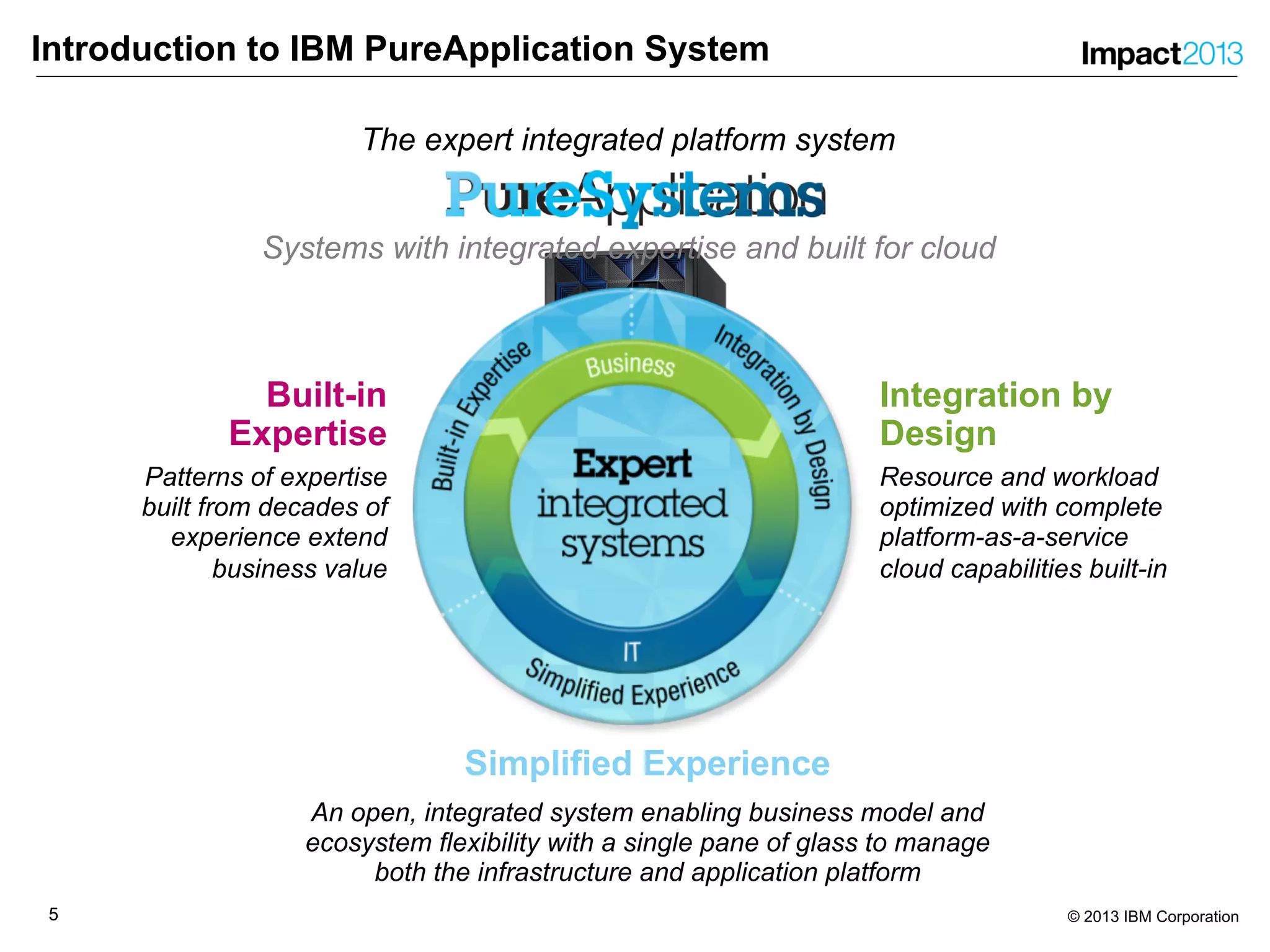
Introduction to IBM PureApplication System
Integration by
Design
Resource and workload
optimized with complete
platform-as-a-service
cloud capabilities built-in
Built-in
Expertise
Patterns of expertise
built from decades of
experience extend
business value
Simplified Experience
An open, integrated system enabling business model and
ecosystem flexibility with a single pane of glass to manage
both the infrastructure and application platform
Systems with integrated expertise and built for cloud
The expert integrated platform system
66 © 2013 IBM Corporation
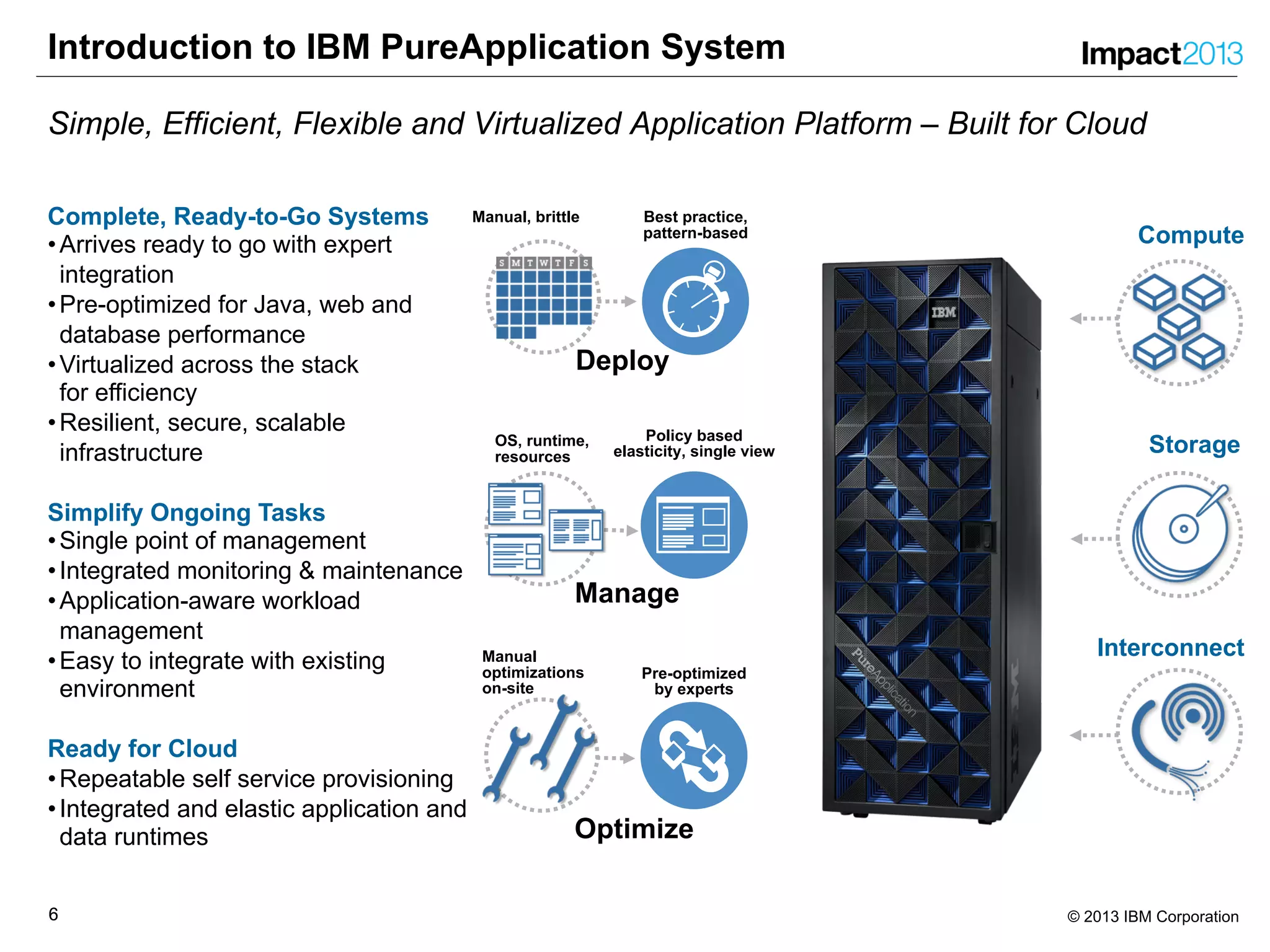
Introduction to IBM PureApplication System
Simple, Efficient, Flexible and Virtualized Application Platform – Built for Cloud
Best practice,
pattern-based
Manual, brittle
Policy based
elasticity, single view
OS, runtime,
resources
Manual
optimizations
on-site
Pre-optimized
by experts
Deploy
Manage
Optimize
Interconnect
Storage
Compute
Complete, Ready-to-Go Systems
•Arrives ready to go with expert
integration
•Pre-optimized for Java, web and
database performance
•Virtualized across the stack
for efficiency
•Resilient, secure, scalable
infrastructure
Simplify Ongoing Tasks
•Single point of management
•Integrated monitoring & maintenance
•Application-aware workload
management
•Easy to integrate with existing
environment
Ready for Cloud
•Repeatable self service provisioning
•Integrated and elastic application and
data runtimes
77 © 2013 IBM Corporation
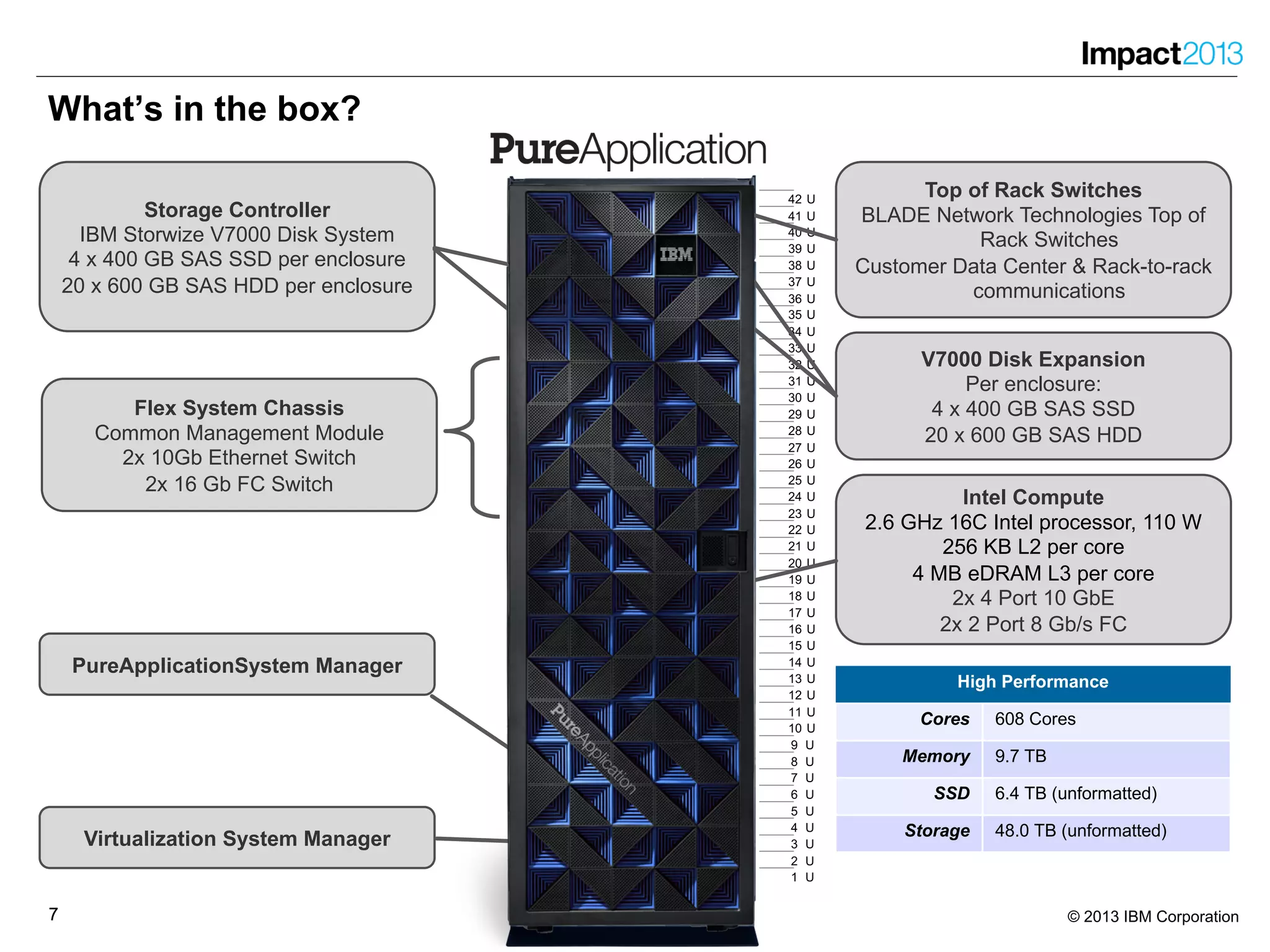
What’s in the box?
1 U
2 U
3 U
4 U
5 U
6 U
7 U
8 U
9 U
10 U
11 U
12 U
13 U
14 U
15 U
16 U
17 U
18 U
19 U
20 U
21 U
22 U
23 U
24 U
25 U
26 U
27 U
28 U
29 U
30 U
31 U
32 U
33 U
34 U
35 U
36 U
37 U
38 U
39 U
40 U
41 U
42 U
Storage
Cores -
Memory -
SSD 6.4 TB (unformatted)
Storage 48.0 TB (unformatted)
Small
Cores 96 Cores
Memory 1.5 TB
SSD 6.4 TB (unformatted)
Storage 48.0 TB (unformatted)
Medium
Cores 192 Cores
Memory 3.0 TB
SSD 6.4 TB (unformatted)
Storage 48.0 TB (unformatted)
Large
Cores 384 Cores
Memory 6.0 TB
SSD 6.4 TB (unformatted)
Storage 48.0 TB (unformatted)
High Performance
Cores 608 Cores
Memory 9.7 TB
SSD 6.4 TB (unformatted)
Storage 48.0 TB (unformatted)
Intel Compute
2.6 GHz 16C Intel processor, 110 W
256 KB L2 per core
4 MB eDRAM L3 per core
2x 4 Port 10 GbE
2x 2 Port 8 Gb/s FC
Flex System Chassis
Common Management Module
2x 10Gb Ethernet Switch
2x 16 Gb FC Switch
Virtualization System Manager
Top of Rack Switches
BLADE Network Technologies Top of
Rack Switches
Customer Data Center & Rack-to-rack
communications
PureApplicationSystem Manager
V7000 Disk Expansion
Per enclosure:
4 x 400 GB SAS SSD
20 x 600 GB SAS HDD
Storage Controller
IBM Storwize V7000 Disk System
4 x 400 GB SAS SSD per enclosure
20 x 600 GB SAS HDD per enclosure
88 © 2013 IBM Corporation
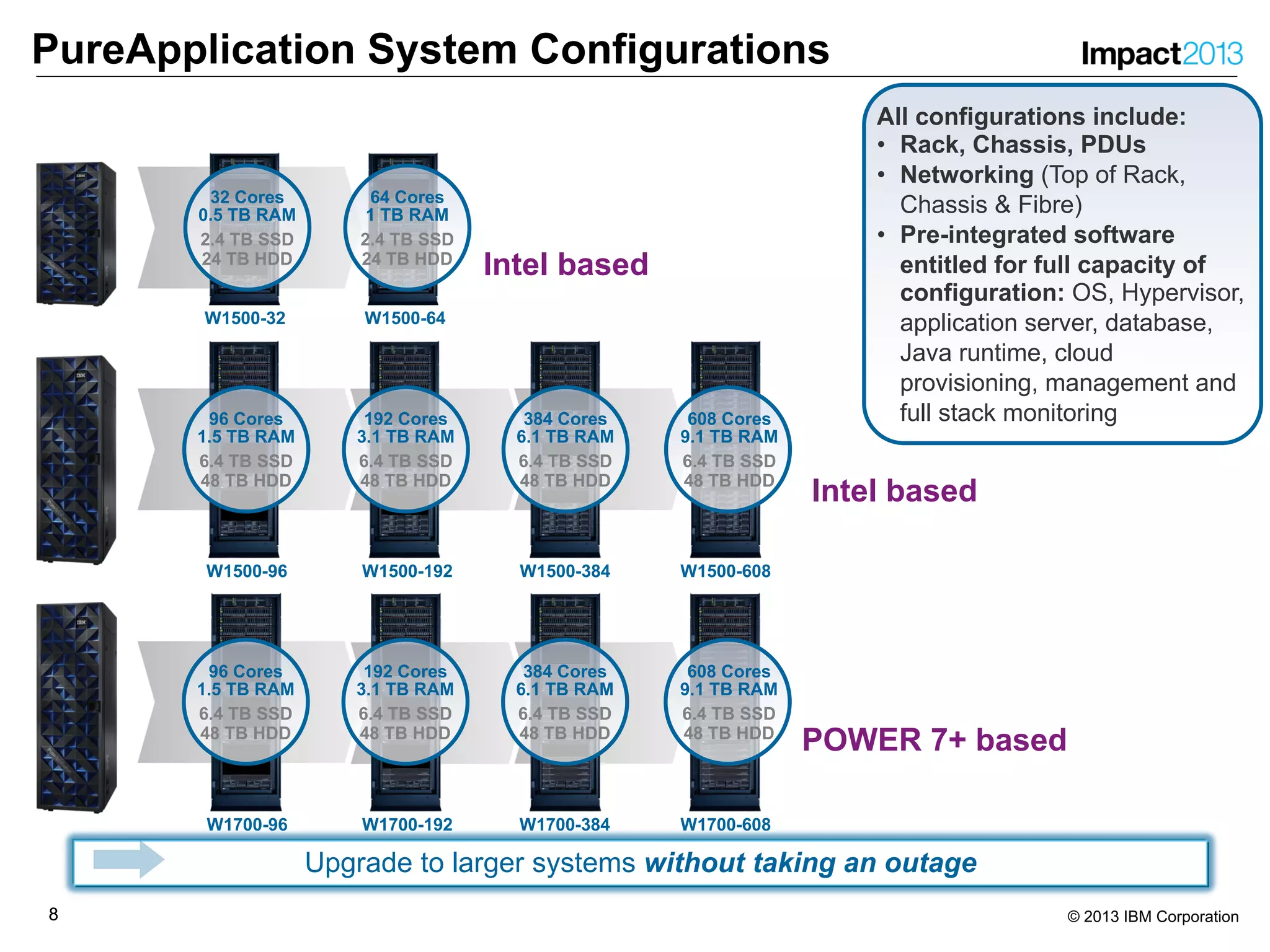
PureApplication System Configurations
Upgrade to larger systems without taking an outage
All configurations include:
• Rack, Chassis, PDUs
• Networking (Top of Rack,
Chassis & Fibre)
• Pre-integrated software
entitled for full capacity of
configuration: OS, Hypervisor,
application server, database,
Java runtime, cloud
provisioning, management and
full stack monitoring
W1500-32 W1500-64
W1500-96
W1700-96 W1700-192 W1700-384 W1700-608
W1500-192 W1500-384 W1500-608
32 Cores
0.5 TB RAM
2.4 TB SSD
24 TB HDD
64 Cores
1 TB RAM
2.4 TB SSD
24 TB HDD
96 Cores
1.5 TB RAM
6.4 TB SSD
48 TB HDD
192 Cores
3.1 TB RAM
6.4 TB SSD
48 TB HDD
384 Cores
6.1 TB RAM
6.4 TB SSD
48 TB HDD
608 Cores
9.1 TB RAM
6.4 TB SSD
48 TB HDD
96 Cores
1.5 TB RAM
6.4 TB SSD
48 TB HDD
192 Cores
3.1 TB RAM
6.4 TB SSD
48 TB HDD
384 Cores
6.1 TB RAM
6.4 TB SSD
48 TB HDD
608 Cores
9.1 TB RAM
6.4 TB SSD
48 TB HDD
POWER 7+ based
Intel based
Intel based
99 © 2013 IBM Corporation
What is the PureExperience?
9
1010 © 2013 IBM Corporation
What is the PureExperience?
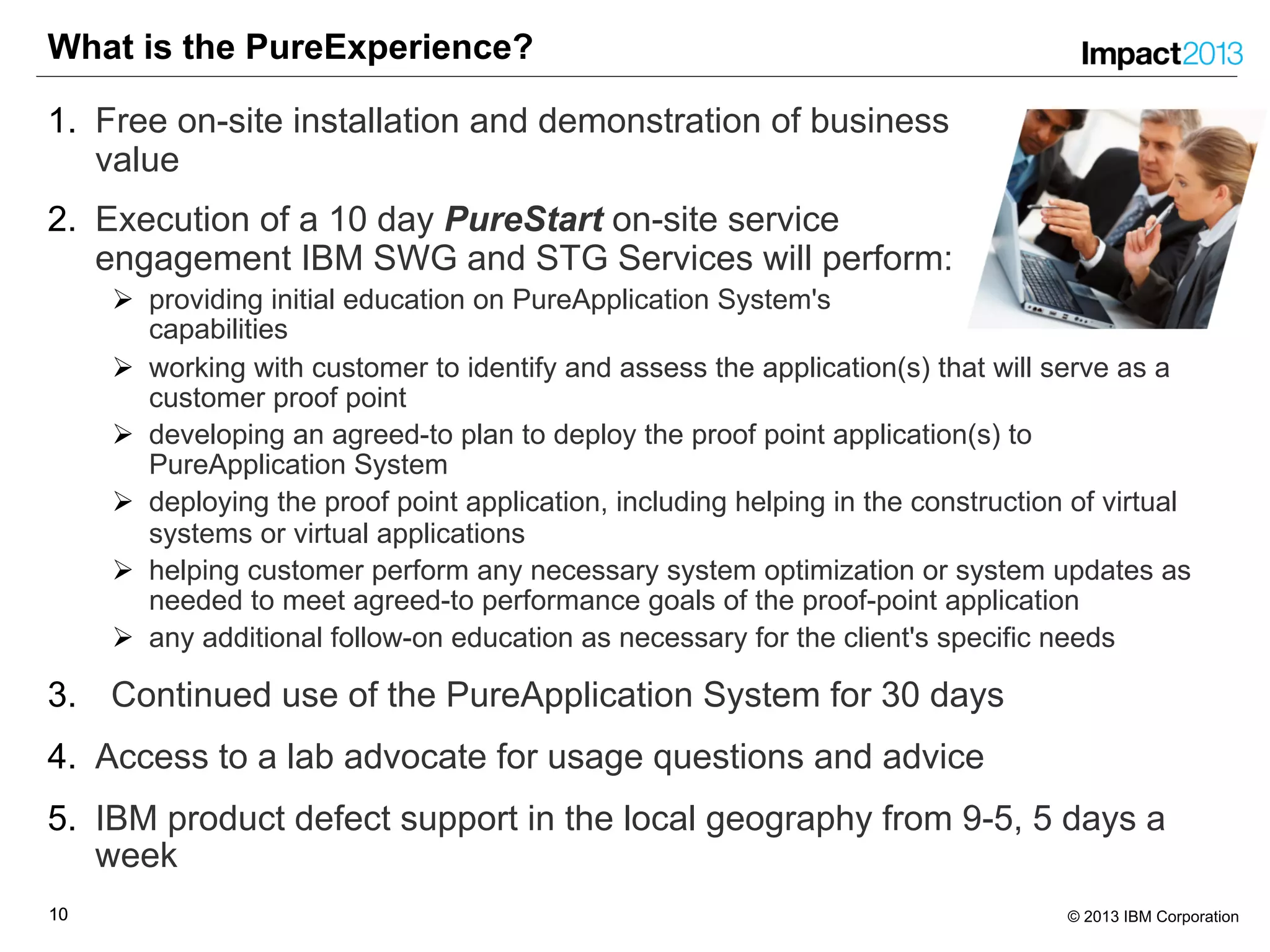
1. Free on-site installation and demonstration of business
value
2. Execution of a 10 day PureStart on-site service
engagement IBM SWG and STG Services will perform:
Ø providing initial education on PureApplication System's
capabilities
Ø working with customer to identify and assess the application(s) that will serve as a
customer proof point
Ø developing an agreed-to plan to deploy the proof point application(s) to
PureApplication System
Ø deploying the proof point application, including helping in the construction of virtual
systems or virtual applications
Ø helping customer perform any necessary system optimization or system updates as
needed to meet agreed-to performance goals of the proof-point application
Ø any additional follow-on education as necessary for the client's specific needs
3. Continued use of the PureApplication System for 30 days
4. Access to a lab advocate for usage questions and advice
5. IBM product defect support in the local geography from 9-5, 5 days a
week
1111 © 2013 IBM Corporation
What is the PureExperience?
The PureExperience Process has three phases
1. Evaluate customer facilities and application portfolio to see if
PureApplication System can apply to their needs
2. Assess customer physical environment, selected applications and
business needs to determine how much they can gain from
PureApplication System
3. Implement IBM PureApplication System in customer datacenter,
educate their staff and migrate/deploy selected applications onto
PureApplication System to demonstrate its business value
1212 © 2013 IBM Corporation
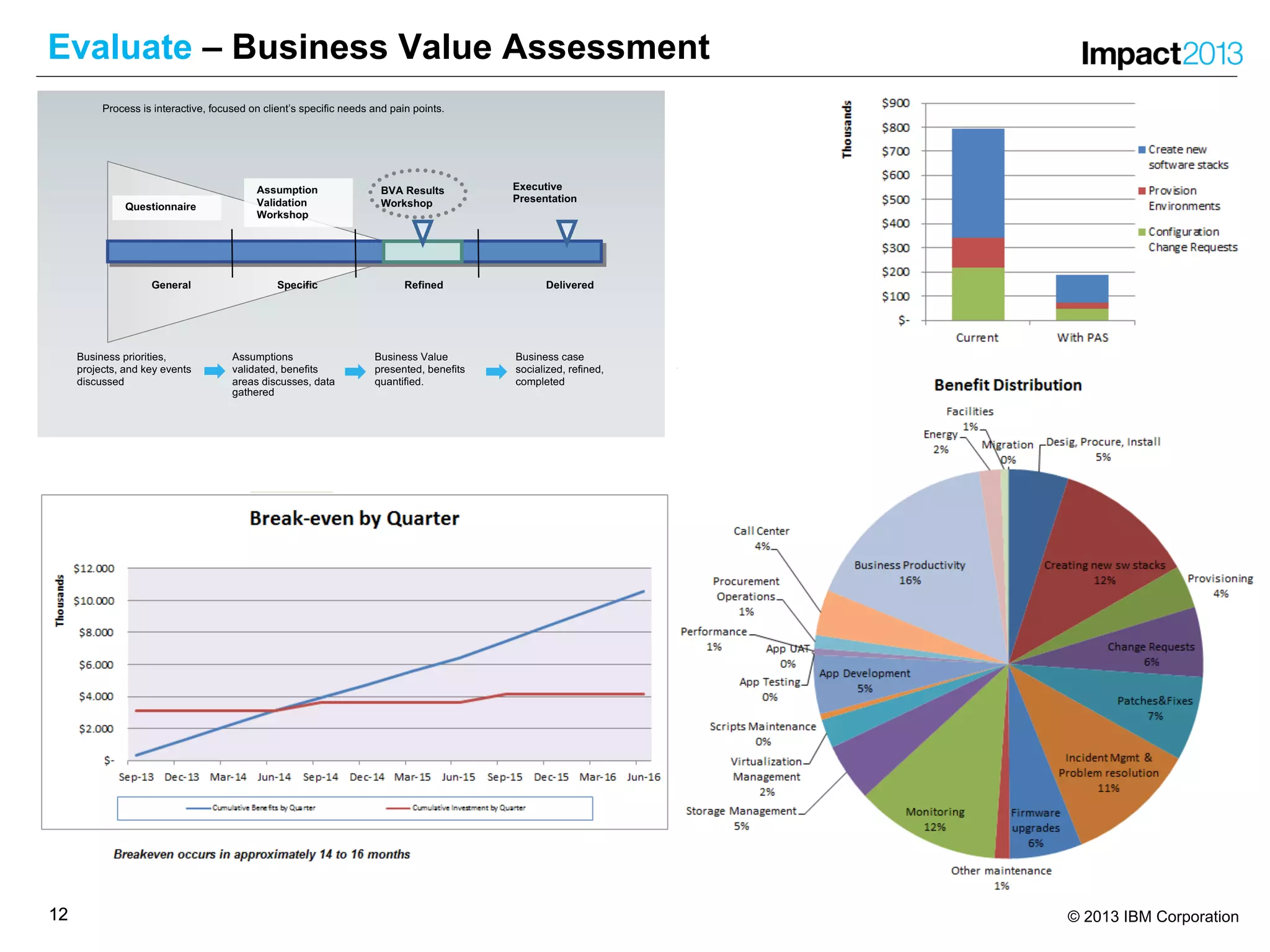
Evaluate – Business Value Assessment
General Specific Refined
Executive
Presentation
BVA Results
Workshop
Delivered
Process is interactive, focused on client’s specific needs and pain points.
Questionnaire
Business case
socialized, refined,
completed
Assumptions
validated, benefits
areas discusses, data
gathered
Business Value
presented, benefits
quantified.
Business priorities,
projects, and key events
discussed
Assumption
Validation
Workshop
1313 © 2013 IBM Corporation
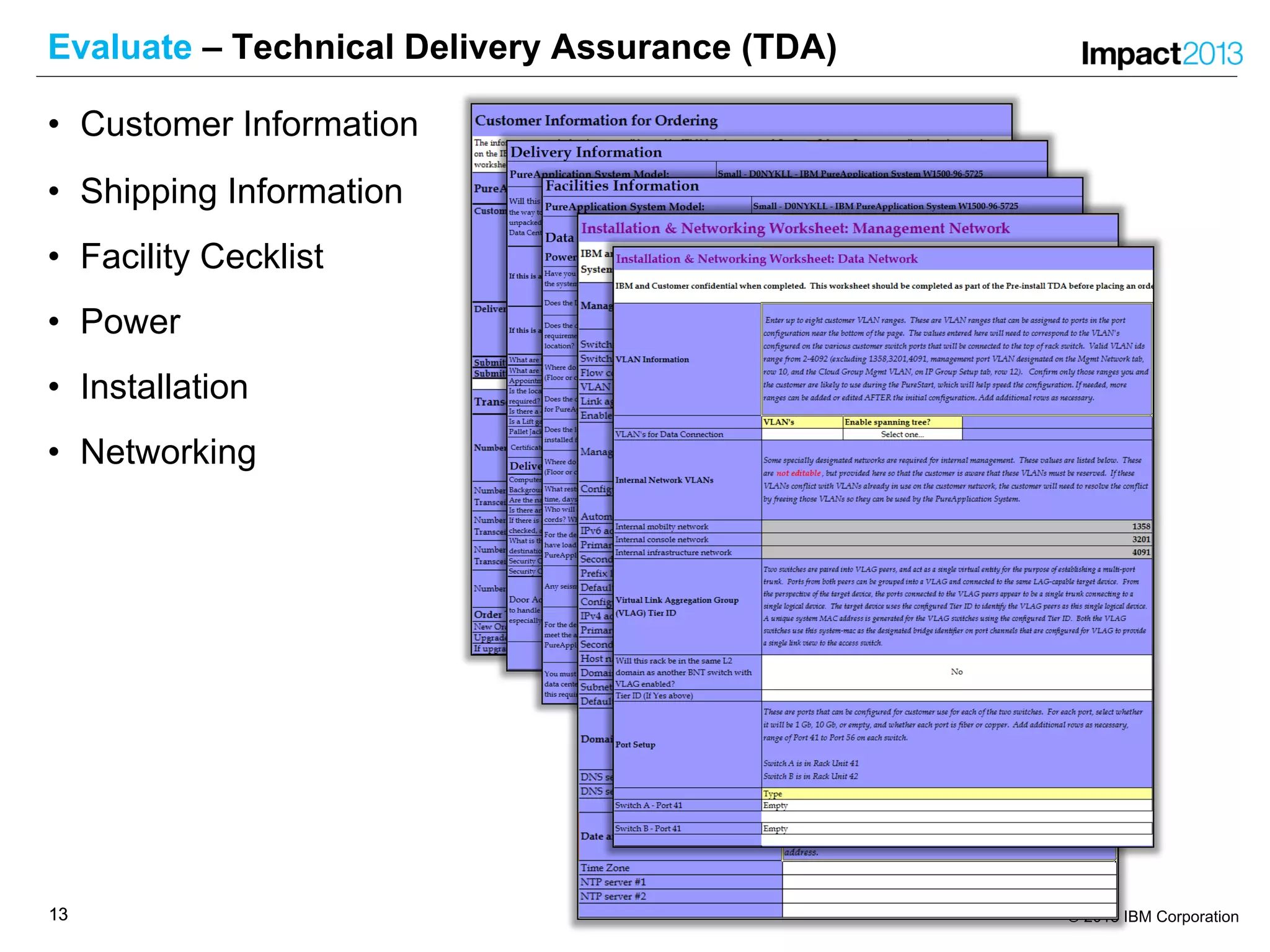
Evaluate – Technical Delivery Assurance (TDA)
• Customer Information
• Shipping Information
• Facility Cecklist
• Power
• Installation
• Networking
1414 © 2013 IBM Corporation
Assess – Customer Applications and Workloads
• Check availability of virtual images / pattern types
• Check if application fits into Virtual Application or Virtual System
• Proof readiness of an application for onboarding to PureApplication
System
• Estimate effort for changing / onboarding application
• Select 1 - 2 proof point applications for PureStart
1515 © 2013 IBM Corporation
Implement – Customer Responsibilities
• Complete Technical and Delivery Assessment (TDA)
‒ Customer Information
‒ Facilities & Shipping Information Worksheet
‒ Installation & Networking Worksheet
• Identify applications that will serve as proof point.
• Aggree on success criteria for the PureExperience.
• Assign resources to prepare and work with IBM
‒ project manager
‒ networking engineer
‒ application developer
‒ operations engineer
1616 © 2013 IBM Corporation
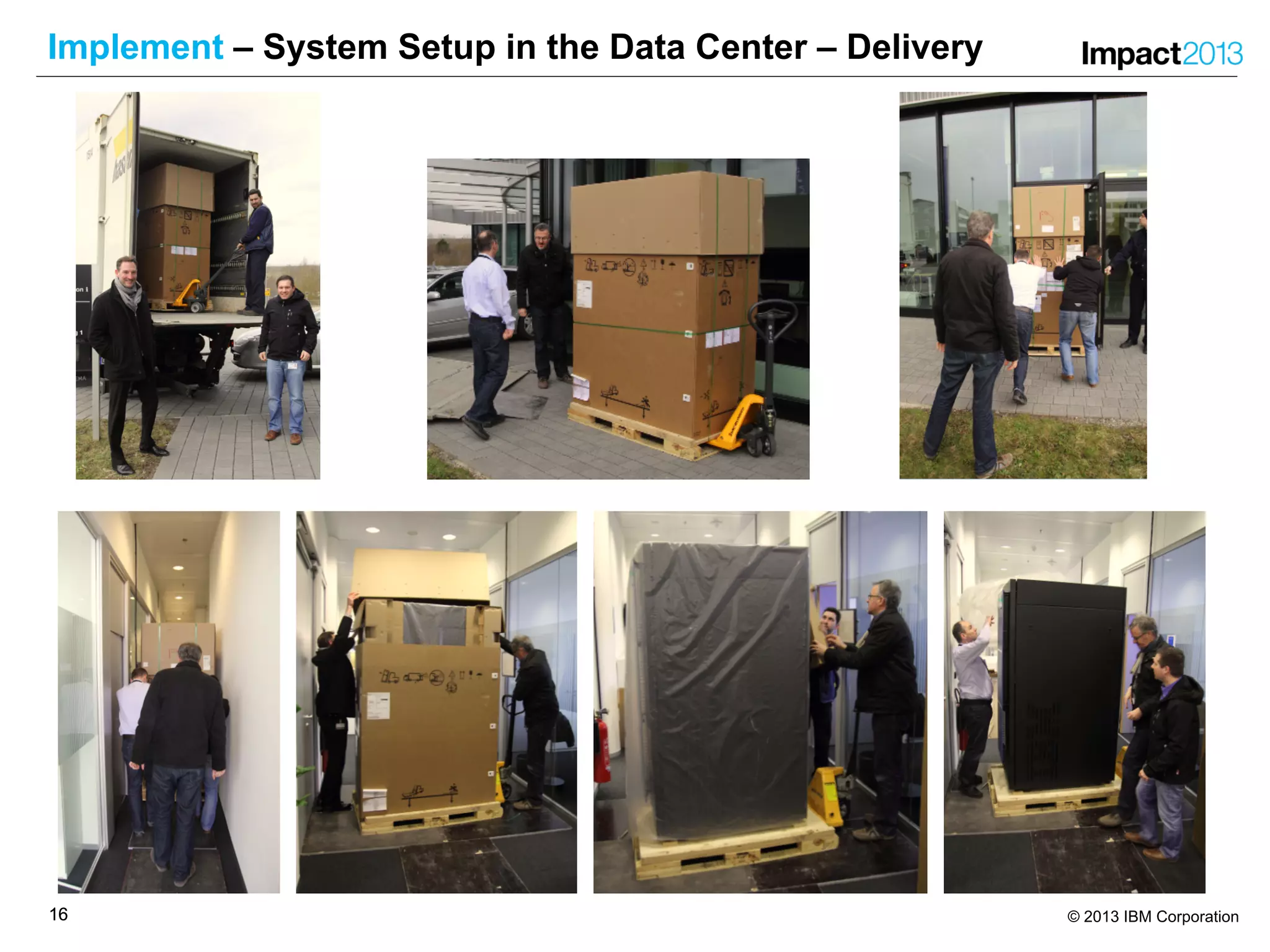
Implement – System Setup in the Data Center – Delivery
1717 © 2013 IBM Corporation
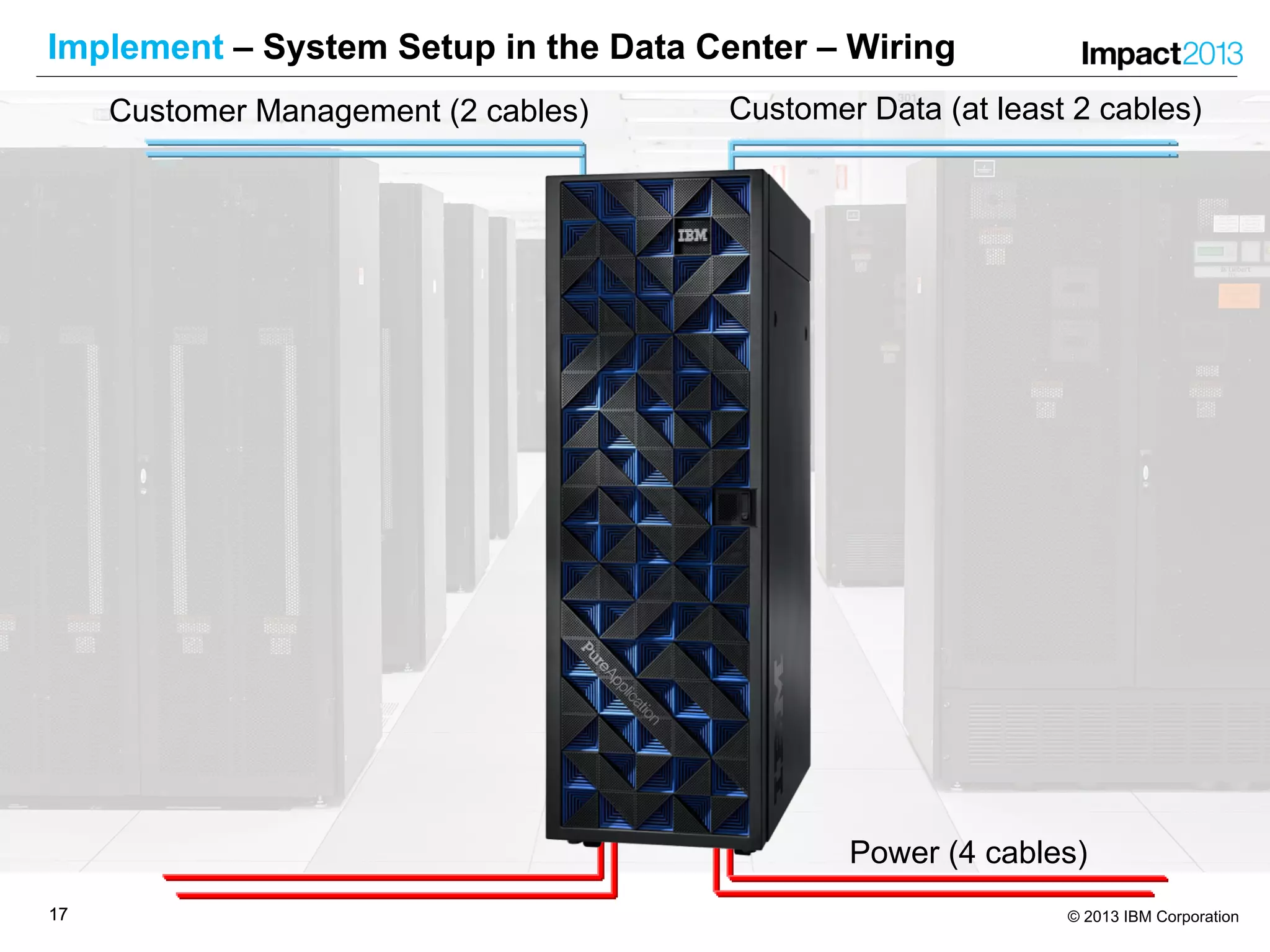
Implement – System Setup in the Data Center – Wiring
Power (4 cables)
Customer Data (at least 2 cables)Customer Management (2 cables)
1818 © 2013 IBM Corporation
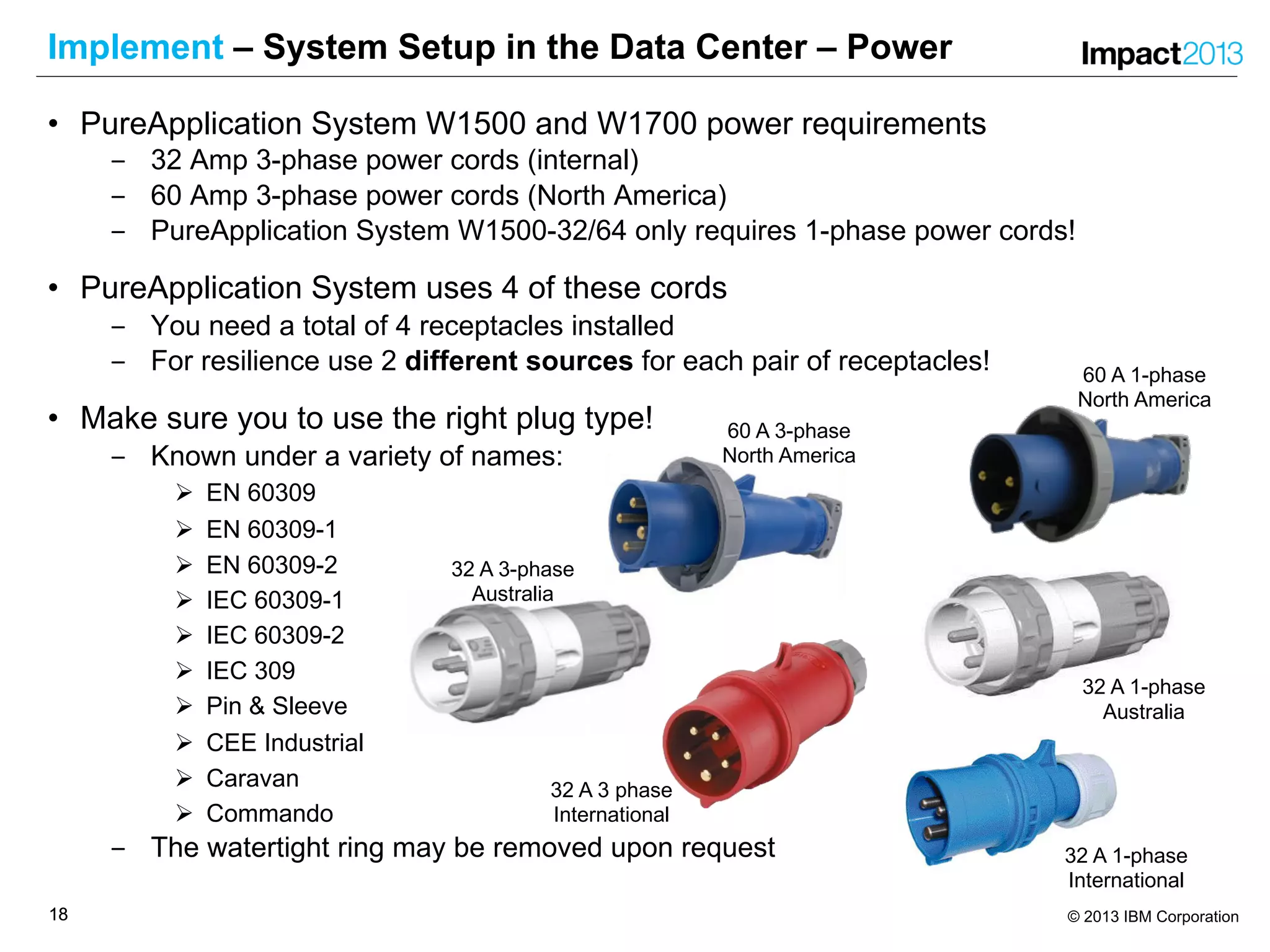
Implement – System Setup in the Data Center – Power
• PureApplication System W1500 and W1700 power requirements
‒ 32 Amp 3-phase power cords (internal)
‒ 60 Amp 3-phase power cords (North America)
‒ PureApplication System W1500-32/64 only requires 1-phase power cords!
• PureApplication System uses 4 of these cords
‒ You need a total of 4 receptacles installed
‒ For resilience use 2 different sources for each pair of receptacles!
• Make sure you to use the right plug type!
‒ Known under a variety of names:
Ø EN 60309
Ø EN 60309-1
Ø EN 60309-2
Ø IEC 60309-1
Ø IEC 60309-2
Ø IEC 309
Ø Pin & Sleeve
Ø CEE Industrial
Ø Caravan
Ø Commando
‒ The watertight ring may be removed upon request
32 A 3-phase
Australia
60 A 3-phase
North America
32 A 3 phase
International
60 A 1-phase
North America
32 A 1-phase
International
32 A 1-phase
Australia
1919 © 2013 IBM Corporation
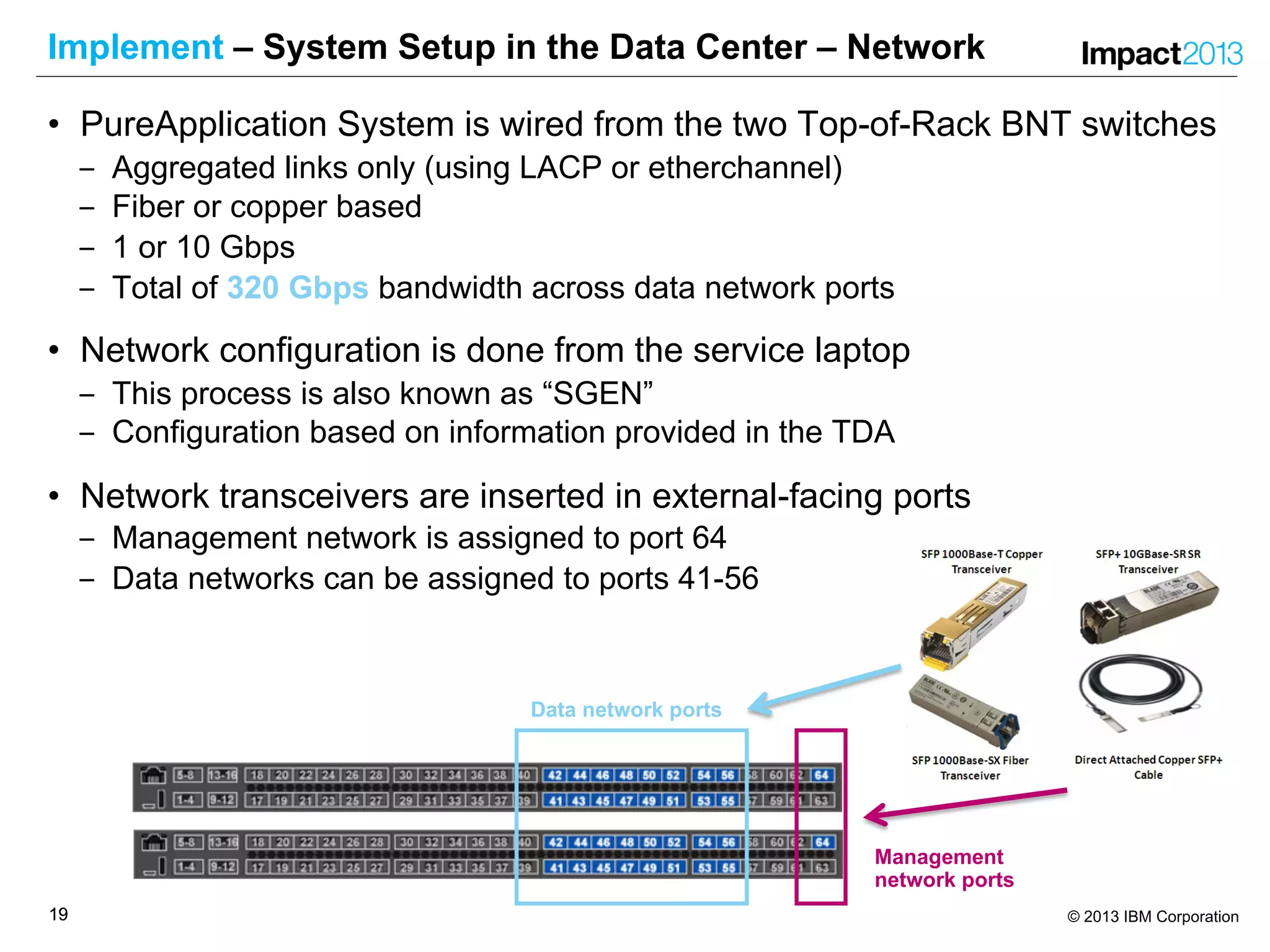
Implement – System Setup in the Data Center – Network
• PureApplication System is wired from the two Top-of-Rack BNT switches
‒ Aggregated links only (using LACP or etherchannel)
‒ Fiber or copper based
‒ 1 or 10 Gbps
‒ Total of 320 Gbps bandwidth across data network ports
• Network configuration is done from the service laptop
‒ This process is also known as “SGEN”
‒ Configuration based on information provided in the TDA
• Network transceivers are inserted in external-facing ports
‒ Management network is assigned to port 64
‒ Data networks can be assigned to ports 41-56
Data network ports
Management
network ports
2020 © 2013 IBM Corporation
Implement – Typical Customer Success Criteria
• Integration into existing (production) environment
‒ Operations, Monitoring, Security, Backup, Directory service
• Deployment of Pattern
‒ Self Service, Application Migration, Customization, Third-Party software
• Maintenance/Lifecycle Management
‒ Firmware, operating system update, middleware update, rollback
• Multitenant isolation
‒ Processor, RAM, Storage, Network
• Role based access
‒ Administrators, pattern/image/script developers, deployers
• Creating custom content images
‒ Image Construction and Composition Tool (ICCT), Extend&Capture
• Failover
2121 © 2013 IBM Corporation
PureExperience
Customer Scenarios
21
2222 © 2013 IBM Corporation
Cognos BI Virtual Application Pattern
• With increasing competition, banks need to make the best use of customer
information. Newly created insights into the customer base can be translated into
new marketing initiatives.
• Client embarked on a revitalization project with IT and Marketing to get all Unica
software modules updated. For the modules to be fully operational, client
needed an enterprise-ready IBM Cognos environment available to support its
Unica campaign software.
• Client has extremely rigid and time-consuming processes to design, build, deploy
and maintain any new software solution. It was challenging for IT to quickly
deliver an IBM Cognos environment to use with the Unica solution.
• PureApplication System deploys applications in minutes as a complete solution
on a single rack. This “AppStore” concept fits with client’s cloud strategy and
delivers superior “Time to Value”
2323 © 2013 IBM Corporation
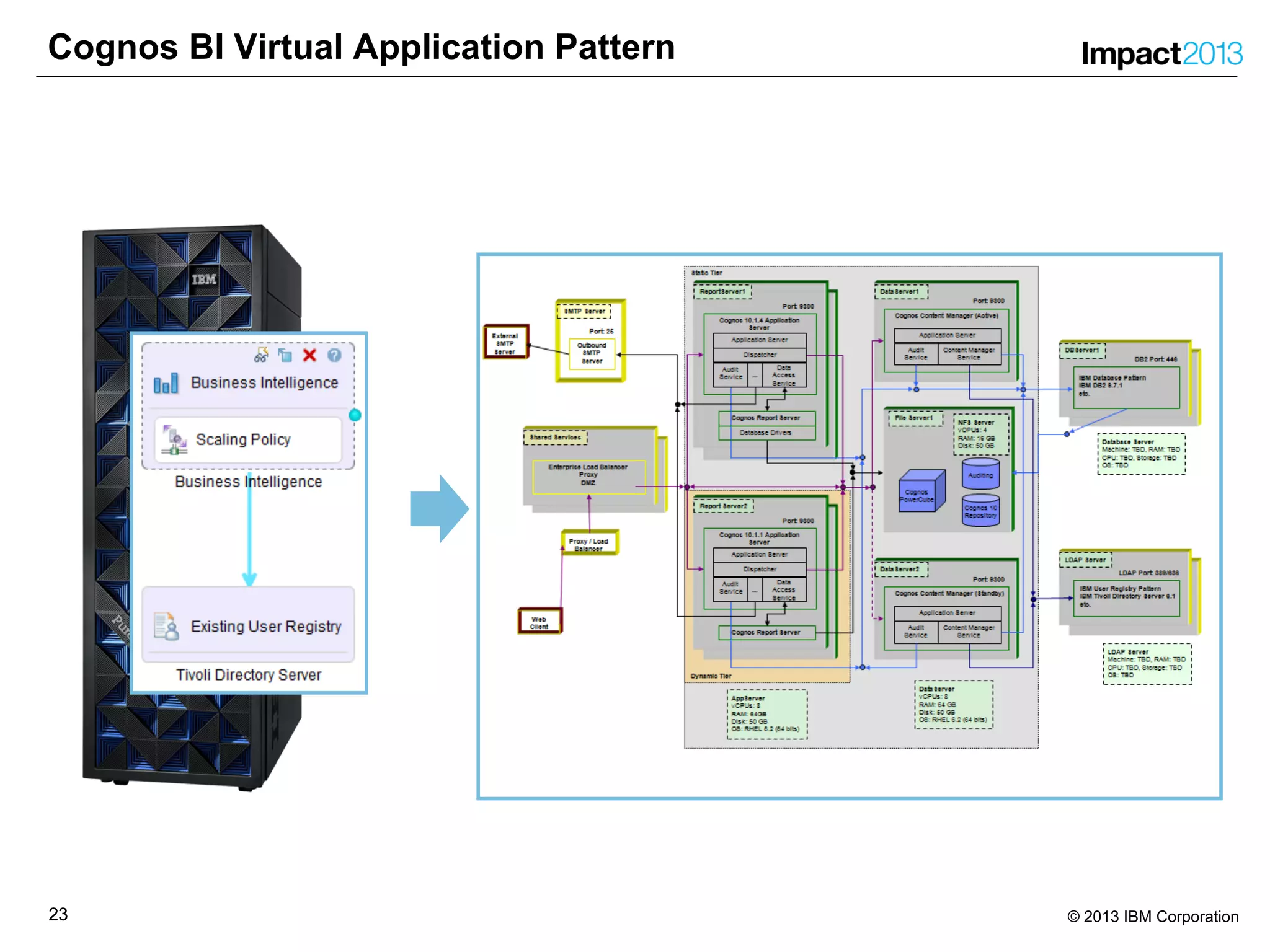
Cognos BI Virtual Application Pattern
2424 © 2013 IBM Corporation
Virtual System Pattern using Java REST Client
• Heterogenous IT landscape at client
‒ VMWare ESXi as hypervisor for Redhat 6.3 on intel
‒ Hyper-V as hypervisor for Windows workload
‒ Oracle Exadata for database instances
• Client uses a Cloud Broker
‒ Product used is “Agility Platform” by ServiceMesh
‒ Provisions environments across different platforms
‒ Supports VMWare ESXi, Hyper-V, Amazon EC2, etc
‒ No support for IBM PureApplication System (yet)
• We demonstrated how “Agility Platform” could integrate PureApplication
System
‒ Simple Java REST client
Ø Logon with a user on PureApplication System
Ø Retrieve Virtual System Patterns that this user has read permissions for
Ø Choose one of those patterns for deployment as a Virtual System Instance
Ø Provide deployment parameters as they have been defined in the pattern
Ø Execute the deployment and provide a REST URI reference for the Virtual System
Instance being deployed
2525 © 2013 IBM Corporation
Virtual System Pattern using Java REST Client
java com.ibm.ipas.rest.client.IPASClient ipas-admin.location.client.com devd1 password
Pattern 1 : Advanced Middleware Configuration 1.0.0.1
Pattern 2 : CoreOSPattern
Pattern 3 : web server
Pattern 4 : WAS 7.0 WhoIsWho
Pattern 5 : WAS 7.0 Service
Pattern 6 : WAS 7.0 Security
Pattern 7 : SiteMinder Web Server
Please enter the name of the pattern you want to deploy:
SiteMinder Web Server
Configuring part IBM HTTP servers
Virtual CPUs [1, 2, 4, 8, 12, 16, 24, 32](1):
Memory size (MB)(2048):
KDBPWD(password):
Configuring parameters for script SiteMinder Configuration on part IBM HTTP servers
SM_COUNTRY(eu):
SM_ENV(te1):
Enter the name of the Environment Profile for the deployment:
DEV
Enter the name of the new virtual system:
REST SiteMinder Web Server
About to deploy new Virtual System. Do you want to proceed (Y/N)?
Y
New virtual system resource located at https://ipas-admin.location.client.com:443/resources/virtualSystems/34
2626 © 2013 IBM Corporation
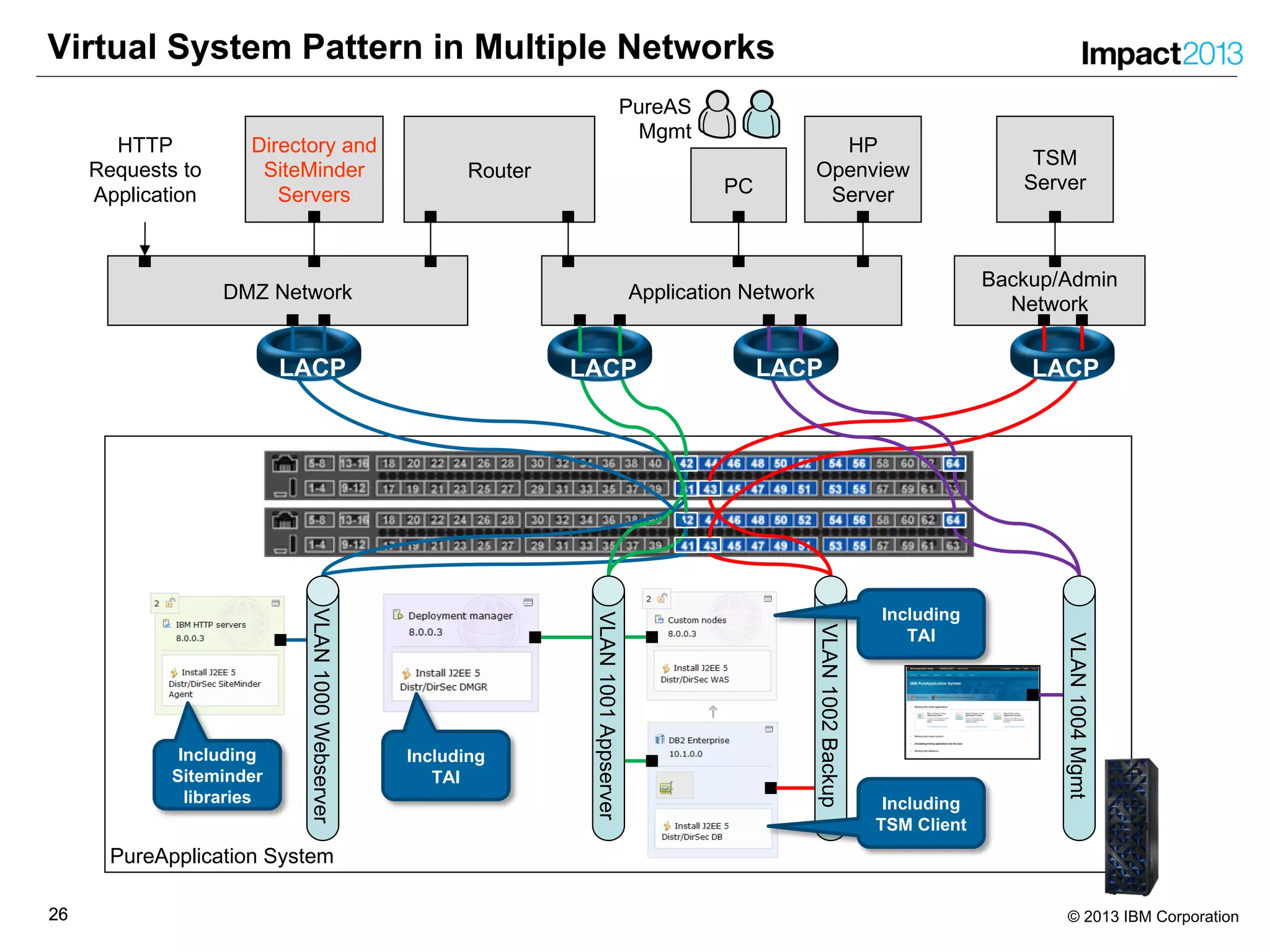
PureApplication System
Virtual System Pattern in Multiple Networks
DMZ Network
HTTP
Requests to
Application
Application Network
Router
Directory and
SiteMinder
Servers PC
Backup/Admin
Network
PureAS
Mgmt
TSM
Server
HP
Openview
Server
VLAN1000Webserver
VLAN1004Mgmt
Including
Siteminder
libraries
Including
TAI
LACP LACPLACPLACP
VLAN1001Appserver
VLAN1002Backup
Including
TAI
Including
TSM Client
2727 © 2013 IBM Corporation
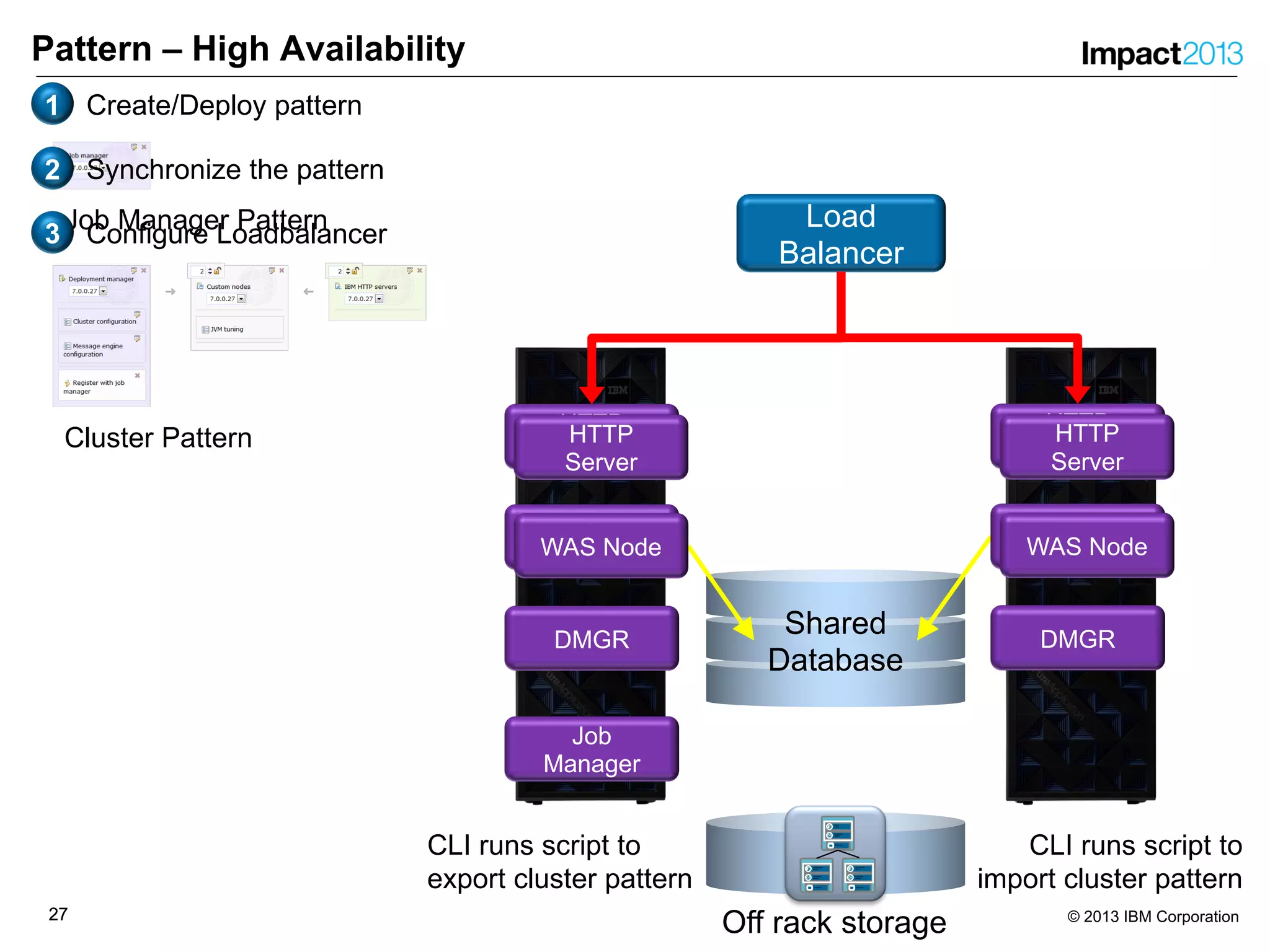
Pattern – High Availability
Load
Balancer
Job
Manager
Shared
Database
Off rack storage
Virtual
Applian
ce
Metadata
Application
Server
Operating
system
Virtual
Applian
ce
Metadata
Application
Server
Operating
system
Virtual
Applian
ce
Metadata
HTTP
Server
Operating
system
WAS Node
HTTP
Server
DMGR
HTTP
Server
WAS Node WAS Node
HTTP
Server
DMGR
HTTP
Server
WAS Node
Job Manager Pattern
Cluster Pattern
CLI runs script to
export cluster pattern
CLI runs script to
import cluster pattern
1 Create/Deploy pattern
2 Synchronize the pattern
3 Configure Loadbalancer
2828 © 2013 IBM Corporation
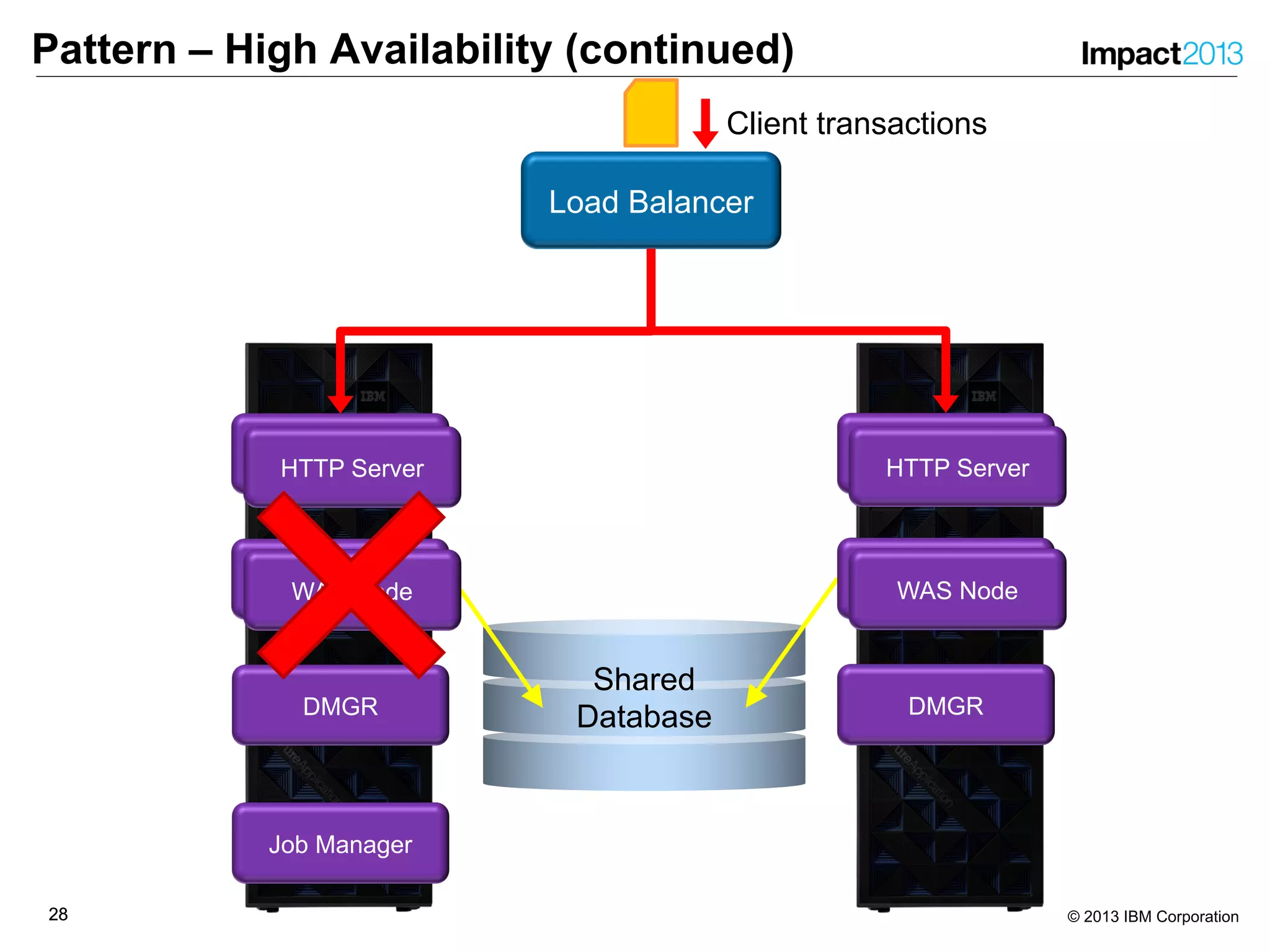
Pattern – High Availability (continued)
Load Balancer
Job Manager
Shared
Database
WAS Node
HTTP Server
DMGR
HTTP Server
WAS Node WAS Node
HTTP Server
DMGR
HTTP Server
WAS Node
Client transactions
2929 © 2013 IBM Corporation
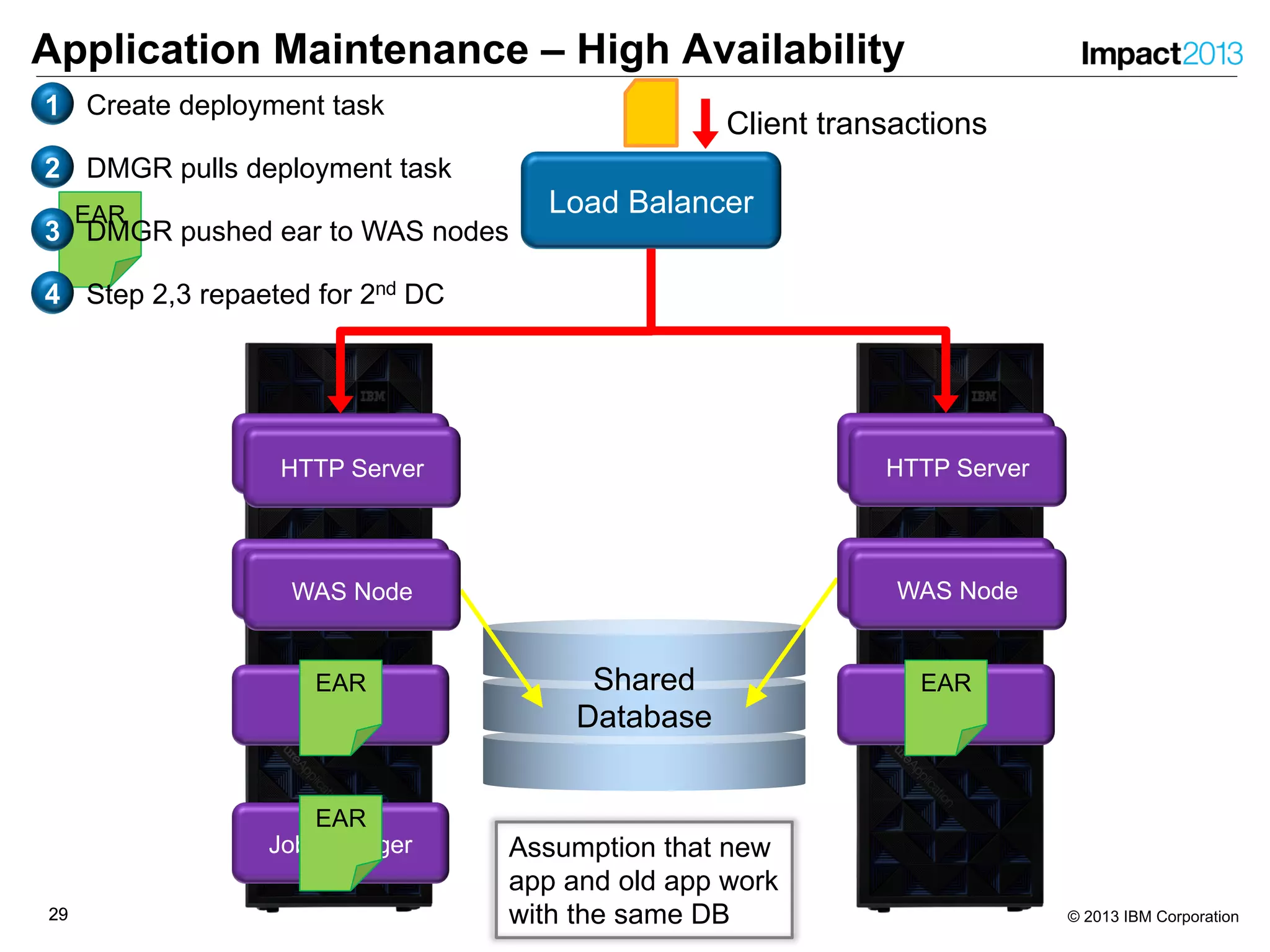
Application Maintenance – High Availability
Load Balancer
Job Manager
Shared
Database
WAS Node
HTTP Server
DMGR
HTTP Server
WAS Node
HTTP Server
DMGR
HTTP Server
Client transactions
EAR
EAR
WAS Node
EAR
EAR
WAS Node
EAR
1 Create deployment task
2 DMGR pulls deployment task
3 DMGR pushed ear to WAS nodes
4 Step 2,3 repaeted for 2nd DC
Assumption that new
app and old app work
with the same DB
3030 © 2013 IBM Corporation
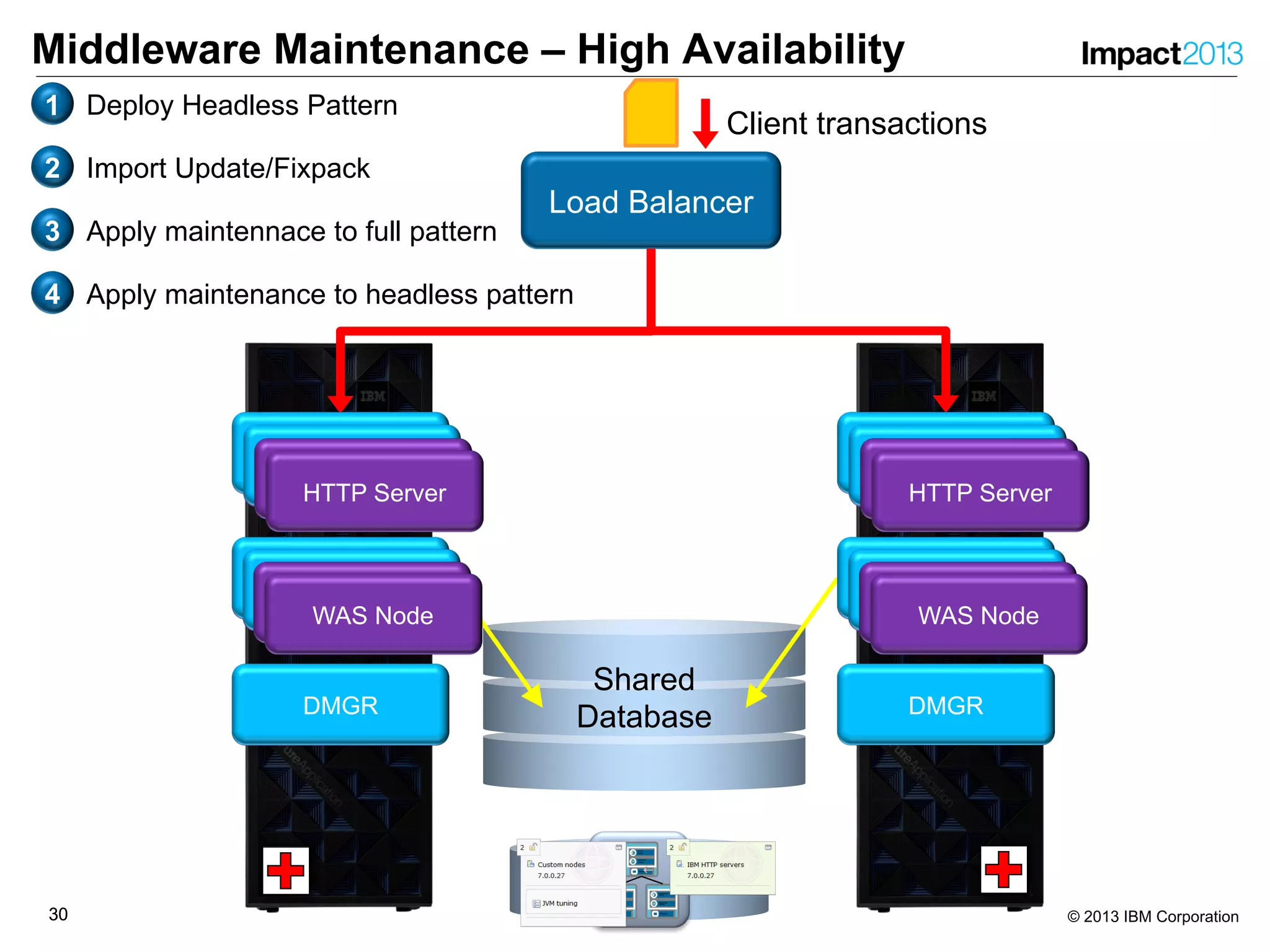
Middleware Maintenance – High Availability
Load Balancer
Shared
DatabaseDMGR DMGR
Client transactions
WAS NodeWAS Node
1 Deploy Headless Pattern
2 Import Update/Fixpack
3 Apply maintennace to full pattern
4 Apply maintenance to headless pattern
Virtual
Applian
ce
Metadata
Application
Server
Operating
system
Virtual
Applian
ce
Metadata
Application
Server
Operating
system
Virtual
Applian
ce
Metadata
HTTP
Server
Operating
system
HTTP Server
HTTP Server
DMGR
WAS NodeWAS Node
HTTP ServerHTTP Server
WAS NodeWAS Node
HTTP Server
HTTP Server
WAS NodeWAS Node
HTTP Server
HTTP Server
DMGR
WAS NodeWAS Node
HTTP ServerHTTP Server
WAS NodeWAS Node
HTTP Server
HTTP Server
WAS NodeWAS Node
HTTP Server
HTTP Server
WAS NodeWAS Node
HTTP Server
HTTP Server
3131 © 2013 IBM Corporation
Lessons Learned
31
3232 © 2013 IBM Corporation
Lessons Learned – Common Problems & Challenges
• Must be feasible in a 2-weeks IBM on-site engagement
• Success Criteria not precisely defined
• Customer (security) processes
‒ Connection to external resources (network, security) must be planned,
requested and prepared in advance
• Client employees to work on PureExperience alongside their regular job
• Built-in images are based on RedHat Enterprise Linux (RHEL)
• Original PureExperience process (application assessment & migration)
does not always fit to what customer wants to see
3333 © 2013 IBM Corporation
Lessons Learned
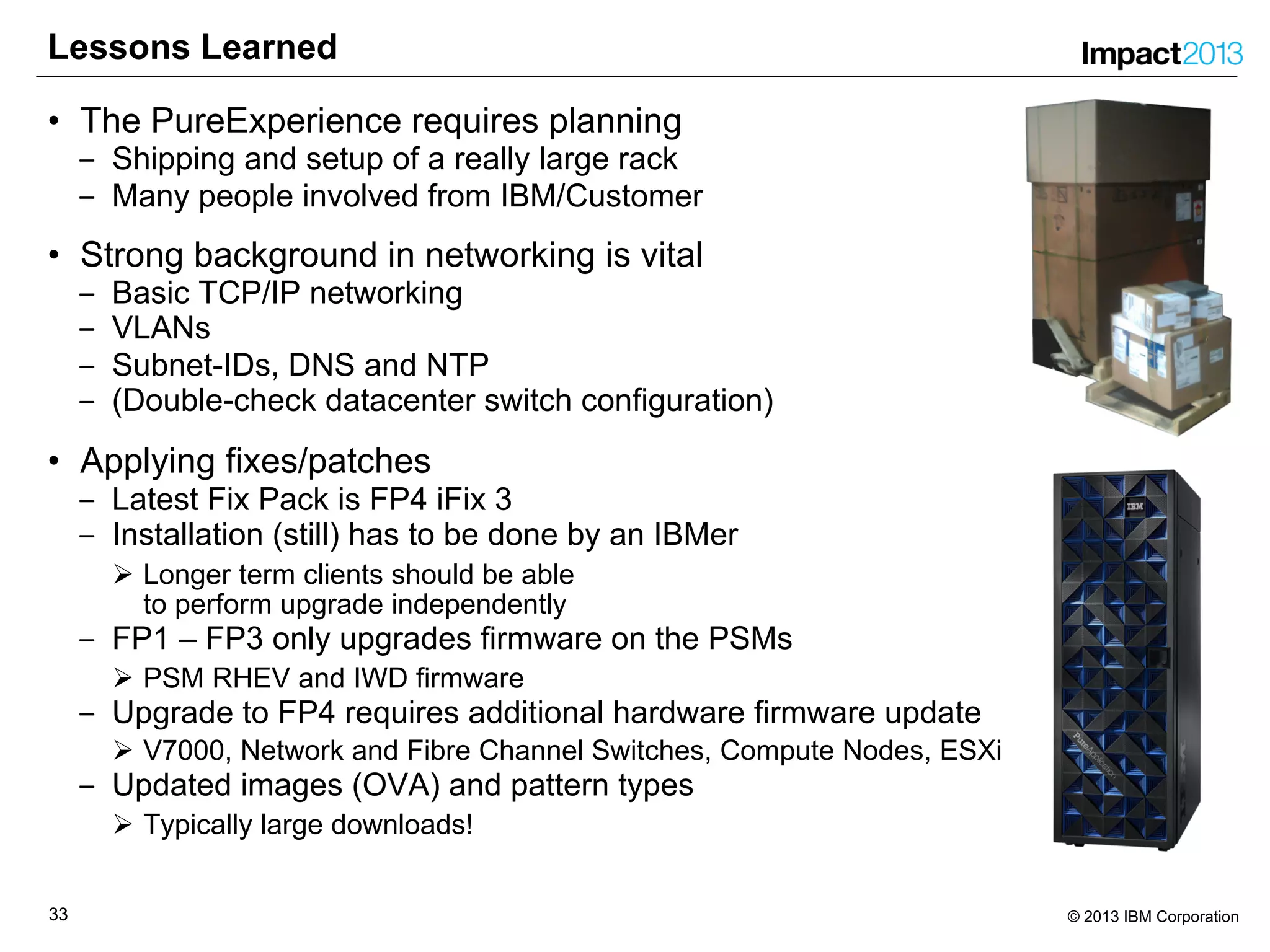
• The PureExperience requires planning
‒ Shipping and setup of a really large rack
‒ Many people involved from IBM/Customer
• Strong background in networking is vital
‒ Basic TCP/IP networking
‒ VLANs
‒ Subnet-IDs, DNS and NTP
‒ (Double-check datacenter switch configuration)
• Applying fixes/patches
‒ Latest Fix Pack is FP4 iFix 3
‒ Installation (still) has to be done by an IBMer
Ø Longer term clients should be able
to perform upgrade independently
‒ FP1 – FP3 only upgrades firmware on the PSMs
Ø PSM RHEV and IWD firmware
‒ Upgrade to FP4 requires additional hardware firmware update
Ø V7000, Network and Fibre Channel Switches, Compute Nodes, ESXi
‒ Updated images (OVA) and pattern types
Ø Typically large downloads!
3434 © 2013 IBM Corporation
Lessons Learned
• PureApplication System can dramatically reduce networking ports
‒ Workloads leverage VLANs within PureApplication System
‒ Reduced bandwidth and ports on external switches in the data center
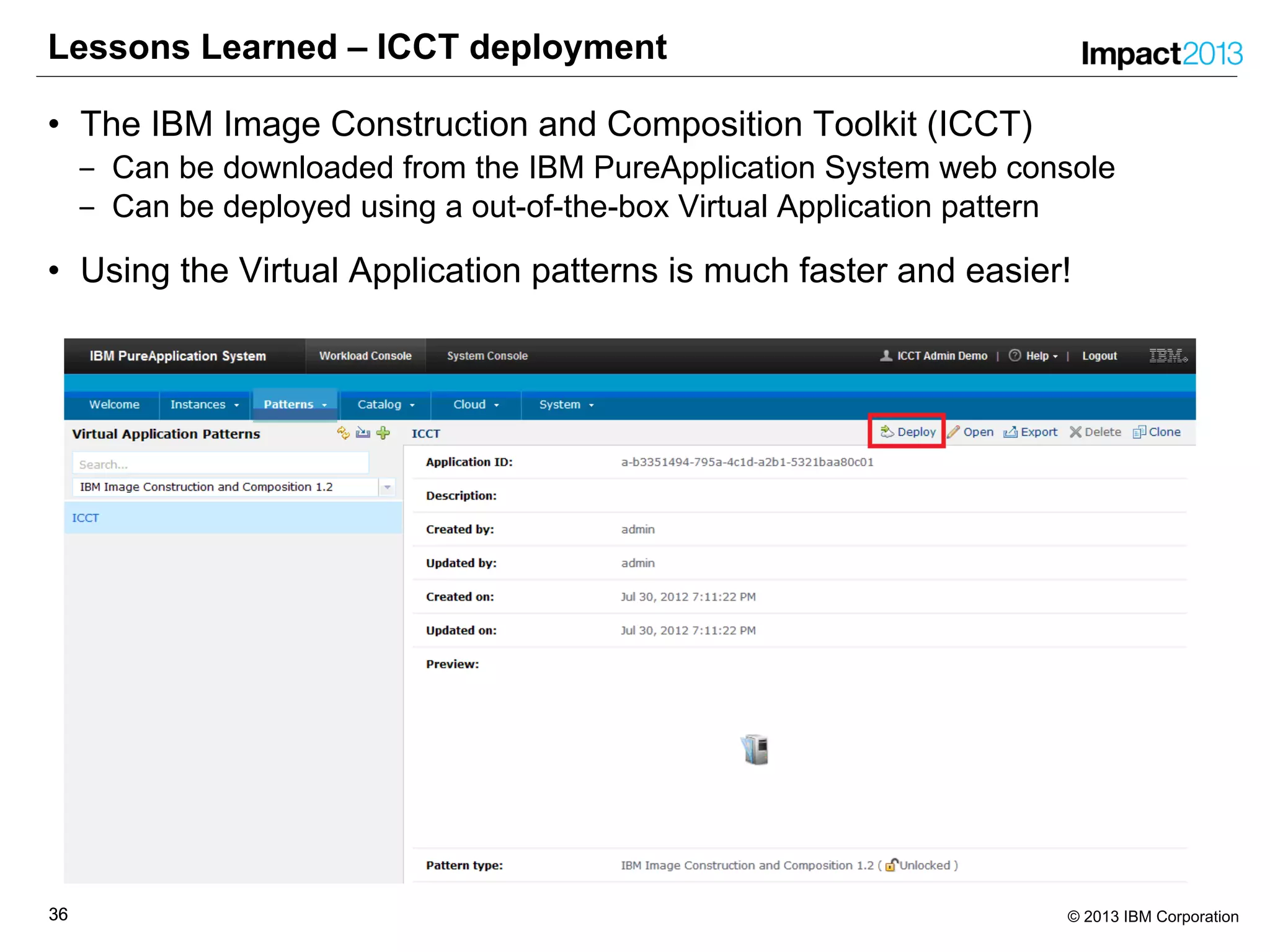
• IBM Construction and Composition Toolkit (ICCT)
‒ Can be quickly and easily deployed as a Virtual Application Pattern!
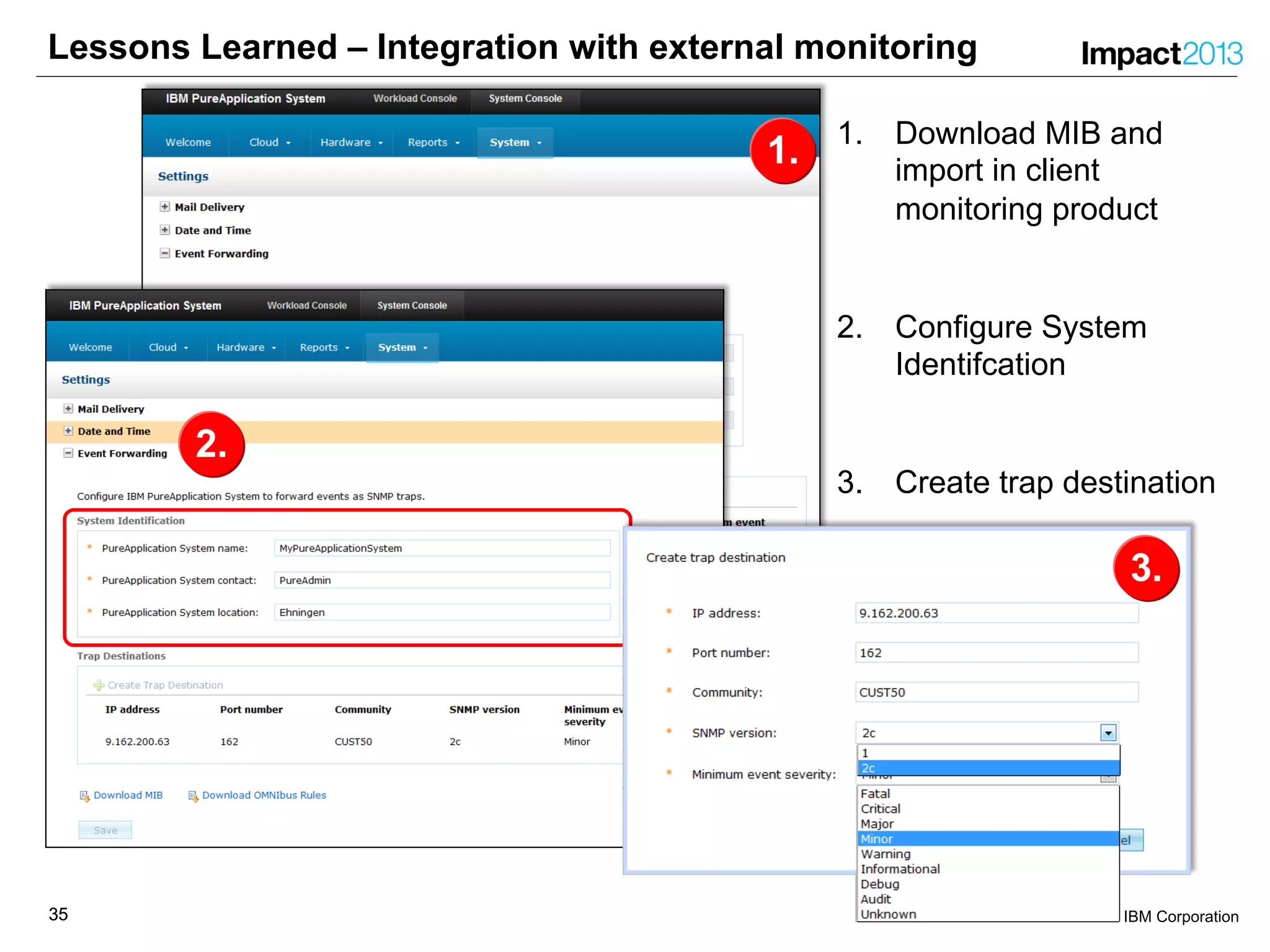
• Integration with external monitoring using SNMP is easy
‒ Download MIB and import into clients monitoring tool
‒ Configure system identification
‒ Create trap destination
• Health Check of the system is done by IBM before SGEN
• Additional monitoring tools may no longer be needed
• Simplicity is cool – PureApplication System can help simplify things!
3535 © 2013 IBM Corporation
1.
Lessons Learned – Integration with external monitoring
1. Download MIB and
import in client
monitoring product
2. Configure System
Identifcation
3. Create trap destination
2.
3.
3636 © 2013 IBM Corporation
Lessons Learned – ICCT deployment
• The IBM Image Construction and Composition Toolkit (ICCT)
‒ Can be downloaded from the IBM PureApplication System web console
‒ Can be deployed using a out-of-the-box Virtual Application pattern
• Using the Virtual Application patterns is much faster and easier!
3737 © 2013 IBM Corporation
Lessons Learned – Other
• Bring-Up Process has improved since GA
‒ Power on PSM1 and it will power on all other blades (FP4 onwards)
• FP4 Firmware Update Installation Process
‒ Currently performed by development or SWAT
‒ Updates Switches, Storwize V7000, Compute Node firmware and ESXi
‒ Requires to reboot blades so potential impact to running workloads!
Ø Cloud Groups with HA enabled should not be affected
• Existing IBM Workload Deployer (IWD) environment can be easily
migrated to PureApplication System
‒ Prepare scenarios using IWD before the machines arrives
• Certain tasks require physical access to the machine
‒ VGEN (System Verification after power-on)
‒ SGEN (Network Configuration)
‒ Anything that requires access to the Service Laptop
3838 © 2013 IBM Corporation
Networking Concepts
• Management Network
‒ Provides user access to the Management Console UI
Ø REST and CLI use the same network interface
‒ Integration with external systems
Ø LDAP, DNS, NTP, etc
‒ Access mode port because only one VLAN is supported
‒ Separated to ensure access
• Customer Data Networks
‒ Used by customers to access deployed workloads (vsys and vapp)
‒ Deployed workloads use this to connect with external applications
‒ External TEMs, databases, etc
• Shared DNS
‒ Same DNS or forwarding being used to common
‒ Doesn’t need to be the same DNS, but the resolved names need to match
• Recommend customer management be untagged and customer data
networks be tagged
‒ You will always have one VLAN for management but you could have one or
more VLANs for customer data
3939 © 2013 IBM Corporation
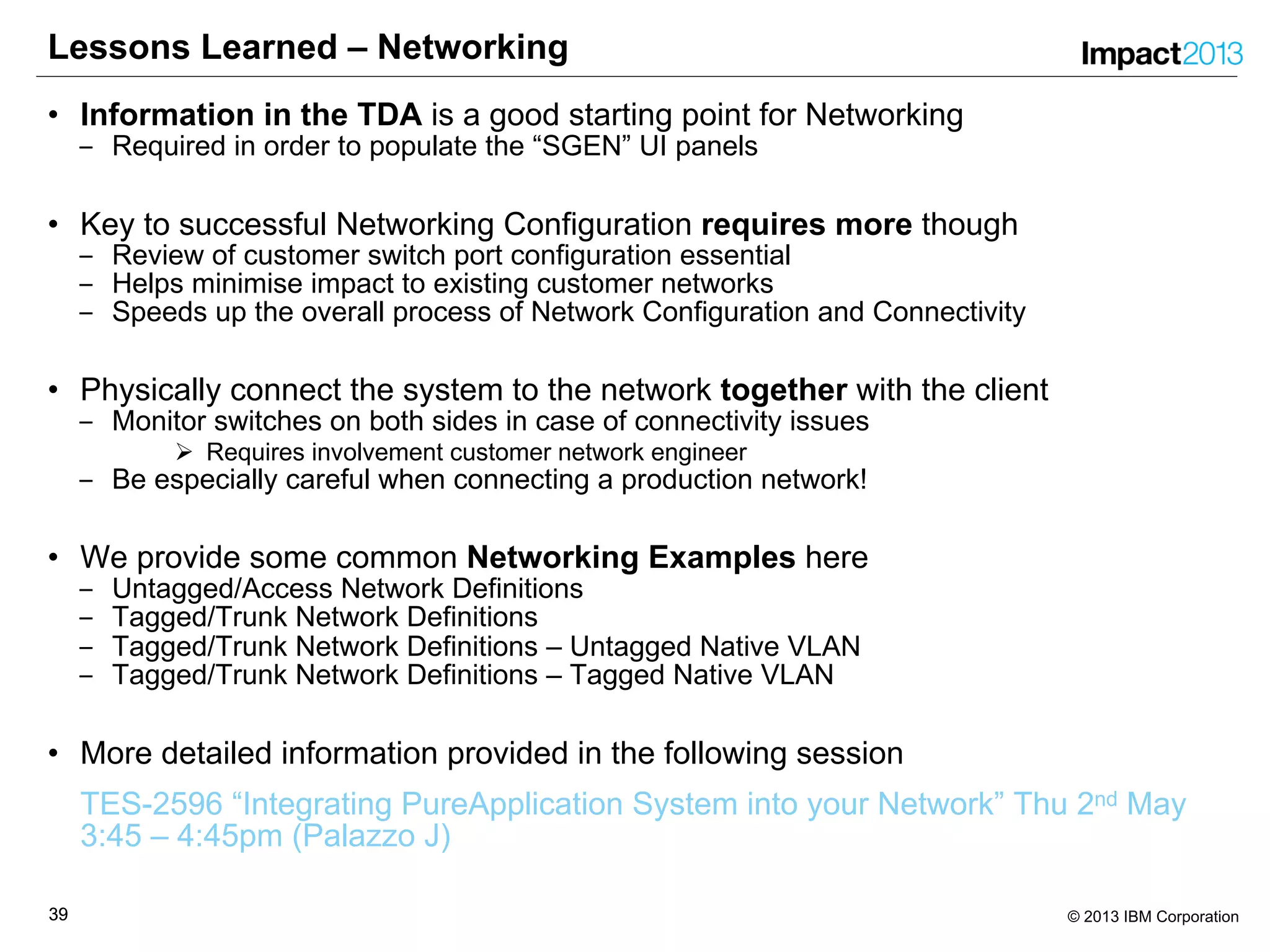
Lessons Learned – Networking
• Information in the TDA is a good starting point for Networking
‒ Required in order to populate the “SGEN” UI panels
• Key to successful Networking Configuration requires more though
‒ Review of customer switch port configuration essential
‒ Helps minimise impact to existing customer networks
‒ Speeds up the overall process of Network Configuration and Connectivity
• Physically connect the system to the network together with the client
‒ Monitor switches on both sides in case of connectivity issues
Ø Requires involvement customer network engineer
‒ Be especially careful when connecting a production network!
• We provide some common Networking Examples here
‒ Untagged/Access Network Definitions
‒ Tagged/Trunk Network Definitions
‒ Tagged/Trunk Network Definitions – Untagged Native VLAN
‒ Tagged/Trunk Network Definitions – Tagged Native VLAN
• More detailed information provided in the following session
TES-2596 “Integrating PureApplication System into your Network” Thu 2nd May
3:45 – 4:45pm (Palazzo J)
4040 © 2013 IBM Corporation
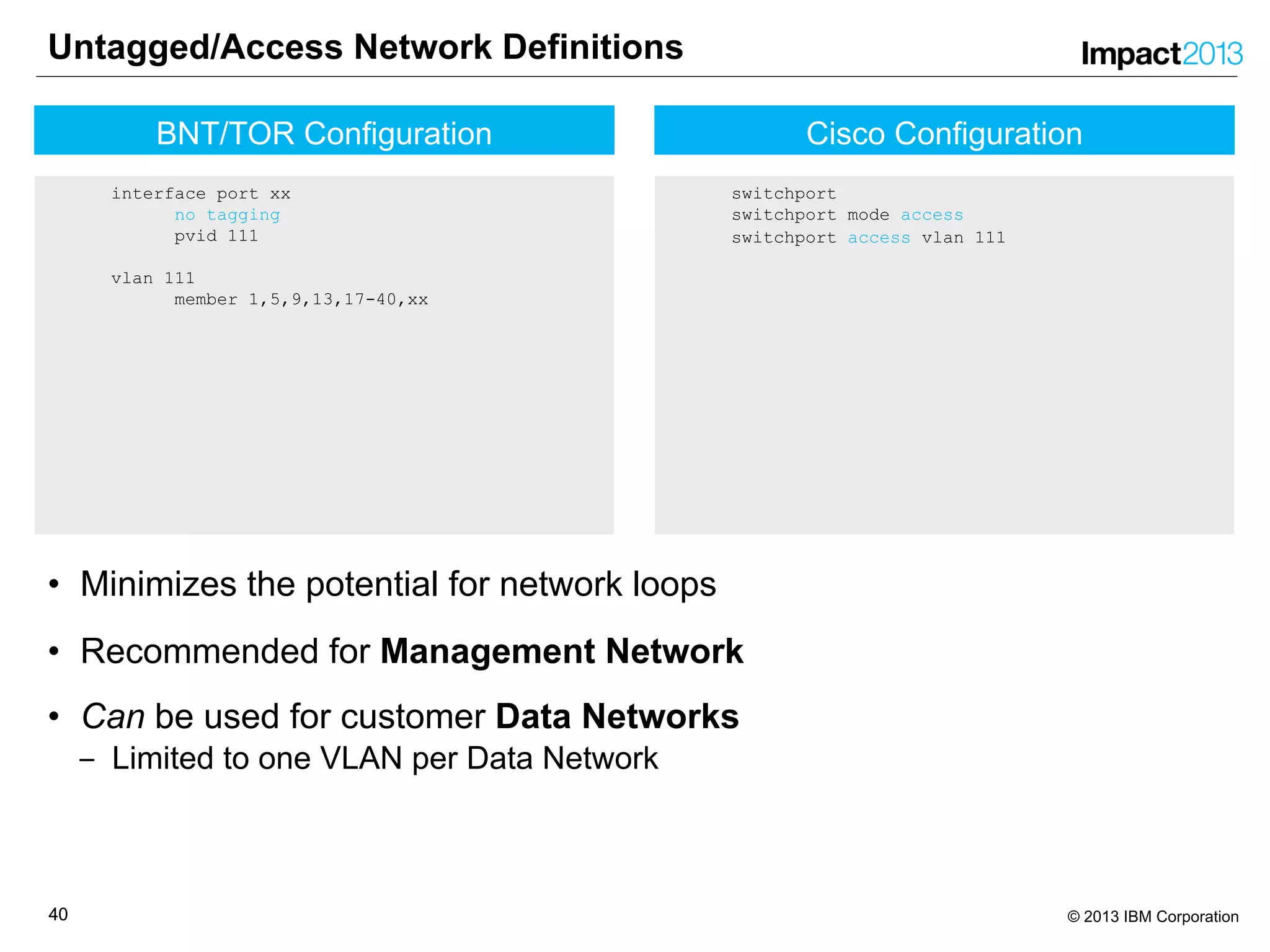
Cisco Configuration
switchport
switchport mode access
switchport access vlan 111
Untagged/Access Network Definitions
• Minimizes the potential for network loops
• Recommended for Management Network
• Can be used for customer Data Networks
‒ Limited to one VLAN per Data Network
BNT/TOR Configuration
interface port xx
no tagging
pvid 111
vlan 111
member 1,5,9,13,17-40,xx
4141 © 2013 IBM Corporation
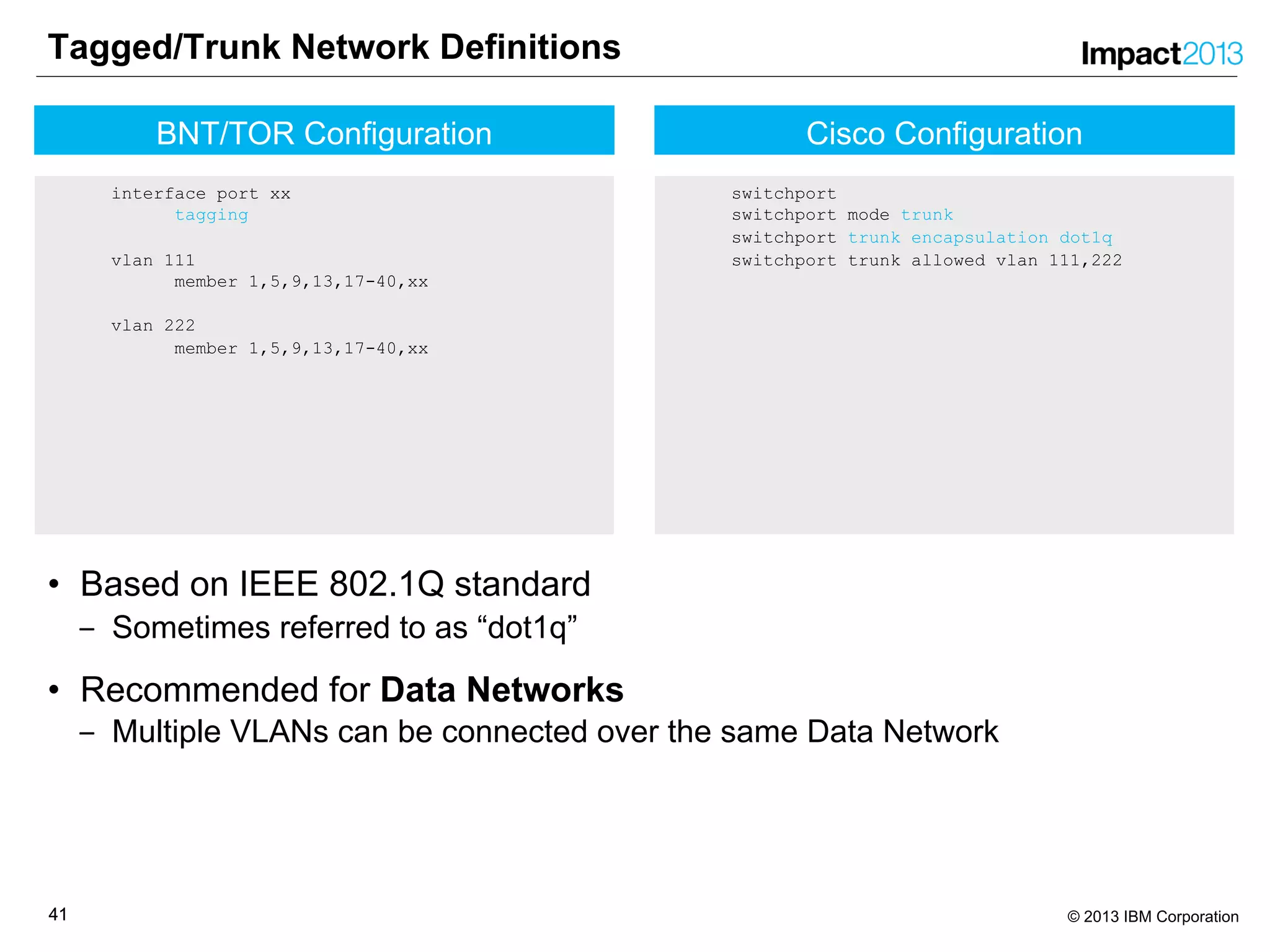
Cisco Configuration
switchport
switchport mode trunk
switchport trunk encapsulation dot1q
switchport trunk allowed vlan 111,222
Tagged/Trunk Network Definitions
• Based on IEEE 802.1Q standard
‒ Sometimes referred to as “dot1q”
• Recommended for Data Networks
‒ Multiple VLANs can be connected over the same Data Network
BNT/TOR Configuration
interface port xx
tagging
vlan 111
member 1,5,9,13,17-40,xx
vlan 222
member 1,5,9,13,17-40,xx
4242 © 2013 IBM Corporation
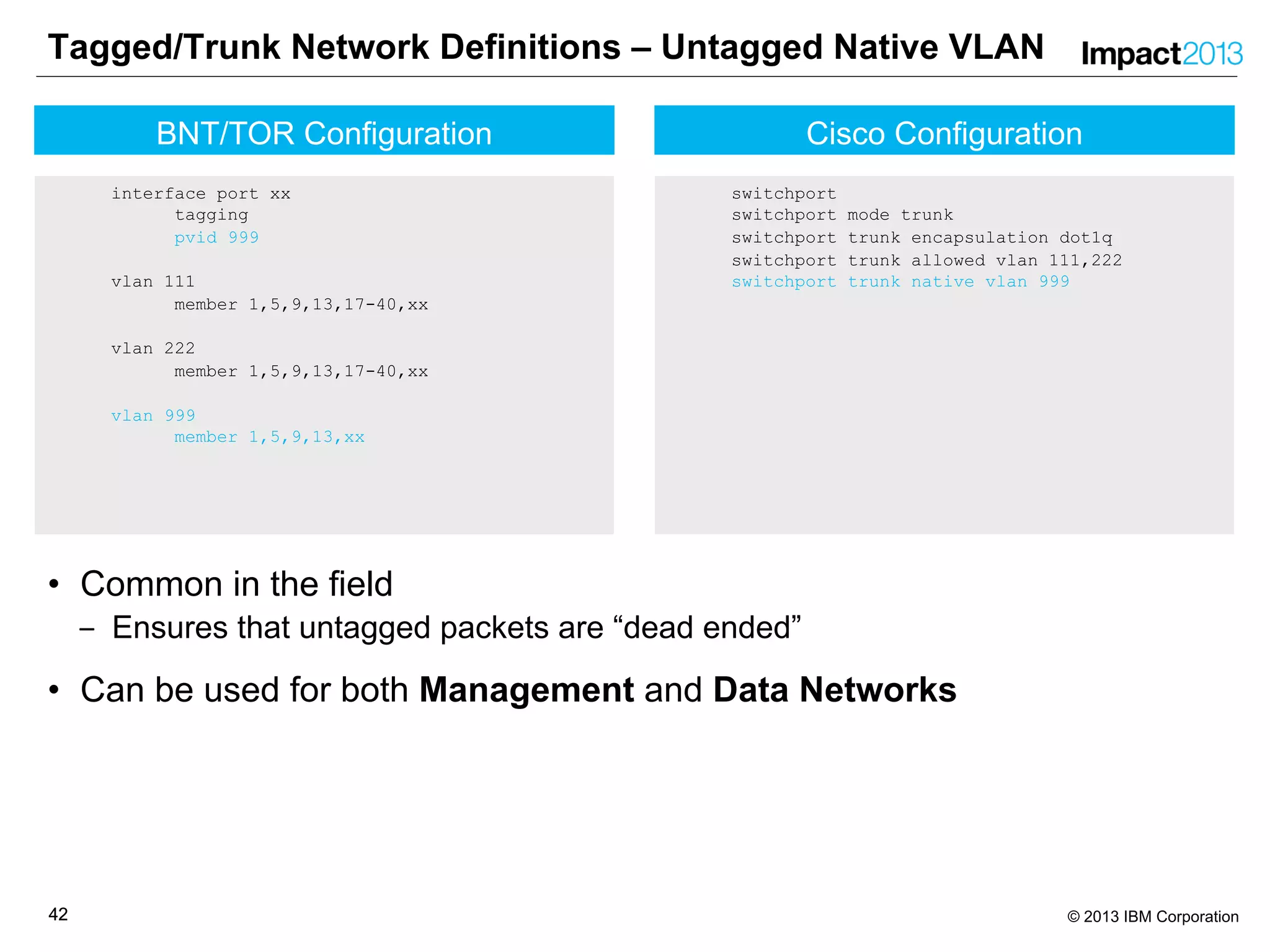
Cisco Configuration
switchport
switchport mode trunk
switchport trunk encapsulation dot1q
switchport trunk allowed vlan 111,222
switchport trunk native vlan 999
Tagged/Trunk Network Definitions – Untagged Native VLAN
• Common in the field
‒ Ensures that untagged packets are “dead ended”
• Can be used for both Management and Data Networks
BNT/TOR Configuration
interface port xx
tagging
pvid 999
vlan 111
member 1,5,9,13,17-40,xx
vlan 222
member 1,5,9,13,17-40,xx
vlan 999
member 1,5,9,13,xx
4343 © 2013 IBM Corporation
Cisco Configuration
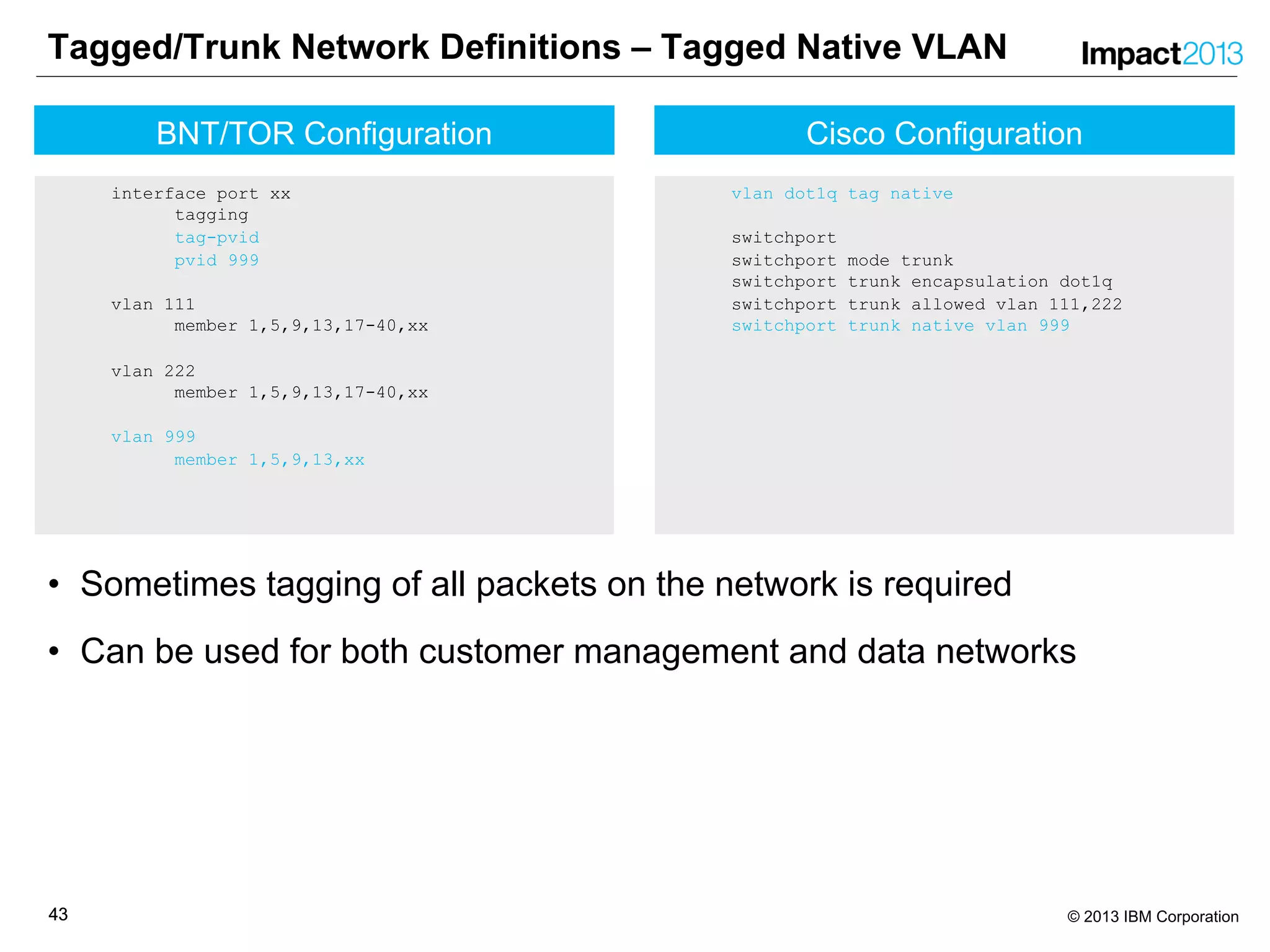
vlan dot1q tag native
switchport
switchport mode trunk
switchport trunk encapsulation dot1q
switchport trunk allowed vlan 111,222
switchport trunk native vlan 999
Tagged/Trunk Network Definitions – Tagged Native VLAN
• Sometimes tagging of all packets on the network is required
• Can be used for both customer management and data networks
BNT/TOR Configuration
interface port xx
tagging
tag-pvid
pvid 999
vlan 111
member 1,5,9,13,17-40,xx
vlan 222
member 1,5,9,13,17-40,xx
vlan 999
member 1,5,9,13,xx
4444 © 2013 IBM Corporation
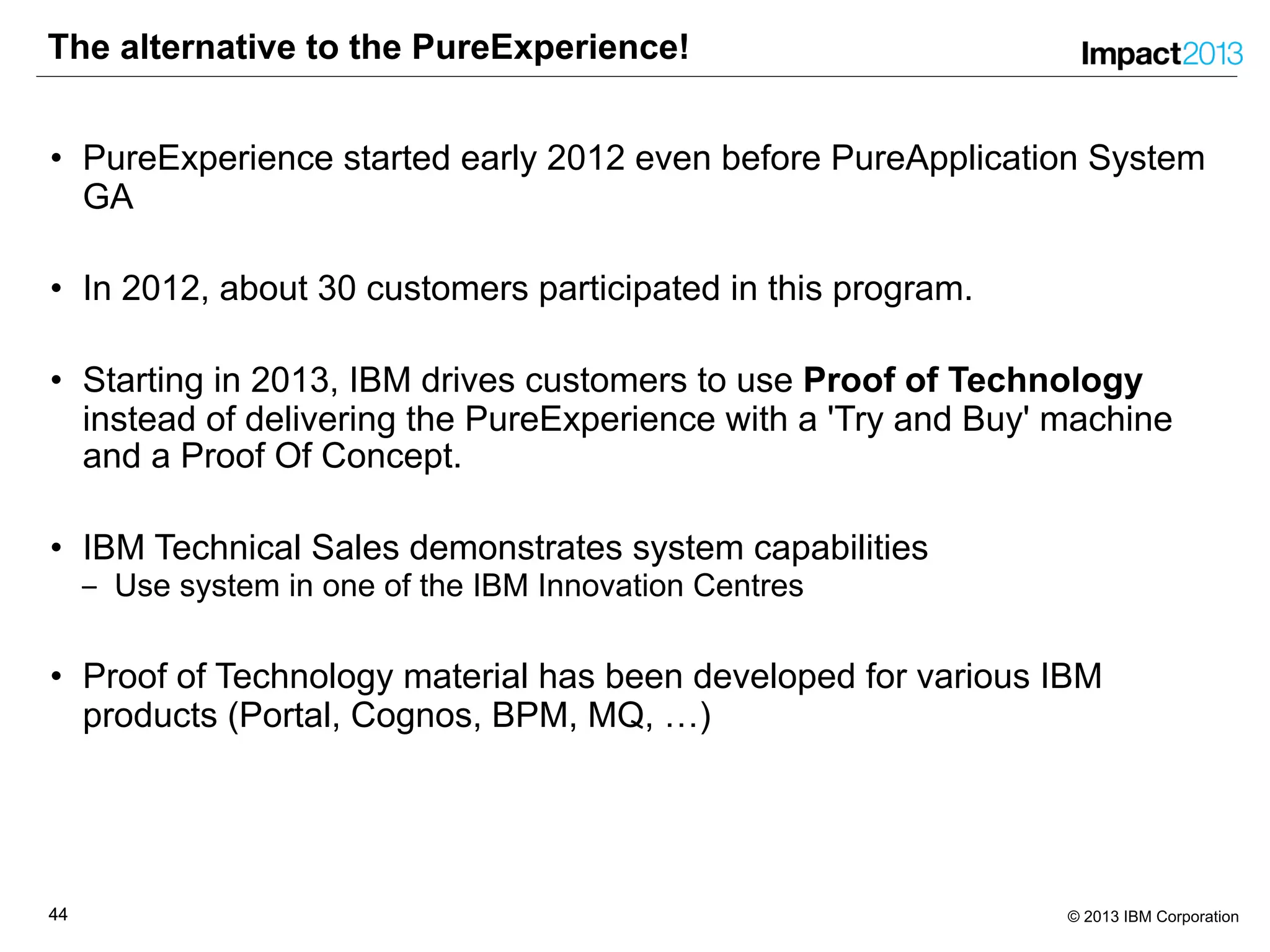
The alternative to the PureExperience!
• PureExperience started early 2012 even before PureApplication System
GA
• In 2012, about 30 customers participated in this program.
• Starting in 2013, IBM drives customers to use Proof of Technology
instead of delivering the PureExperience with a 'Try and Buy' machine
and a Proof Of Concept.
• IBM Technical Sales demonstrates system capabilities
‒ Use system in one of the IBM Innovation Centres
• Proof of Technology material has been developed for various IBM
products (Portal, Cognos, BPM, MQ, …)
4545 © 2013 IBM Corporation
We love your Feedback!
Don’t forget to submit your Impact session and speaker feedback!
‒ Session number is 1457
•Your feedback is very important to us – we use it to improve next year’s
conference
•Go to the Impact 2013 SmartSite (http://impactsmartsite/com):
‒ Use the session ID number to locate the session
‒ Click the “Take Survey” link
‒ Submit your feedback
4646 © 2013 IBM Corporation
4747 © 2013 IBM Corporation
Legal Disclaimer
• © IBM Corporation 2013. All Rights Reserved.
• The information contained in this publication is provided for informational purposes only. While efforts were made to verify the completeness and accuracy of the information
contained in this publication, it is provided AS IS without warranty of any kind, express or implied. In addition, this information is based on IBM’s current product plans and
strategy, which are subject to change by IBM without notice. IBM shall not be responsible for any damages arising out of the use of, or otherwise related to, this publication or
any other materials. Nothing contained in this publication is intended to, nor shall have the effect of, creating any warranties or representations from IBM or its suppliers or
licensors, or altering the terms and conditions of the applicable license agreement governing the use of IBM software.
• References in this presentation to IBM products, programs, or services do not imply that they will be available in all countries in which IBM operates. Product release dates
and/or capabilities referenced in this presentation may change at any time at IBM’s sole discretion based on market opportunities or other factors, and are not intended to be a
commitment to future product or feature availability in any way. Nothing contained in these materials is intended to, nor shall have the effect of, stating or implying that any
activities undertaken by you will result in any specific sales, revenue growth or other results.
• If the text contains performance statistics or references to benchmarks, insert the following language; otherwise delete:
Performance is based on measurements and projections using standard IBM benchmarks in a controlled environment. The actual throughput or performance that any user will
experience will vary depending upon many factors, including considerations such as the amount of multiprogramming in the user's job stream, the I/O configuration, the storage
configuration, and the workload processed. Therefore, no assurance can be given that an individual user will achieve results similar to those stated here.
• If the text includes any customer examples, please confirm we have prior written approval from such customer and insert the following language; otherwise delete:
All customer examples described are presented as illustrations of how those customers have used IBM products and the results they may have achieved. Actual environmental
costs and performance characteristics may vary by customer.
• Please review text for proper trademark attribution of IBM products. At first use, each product name must be the full name and include appropriate trademark symbols (e.g., IBM
Lotus® Sametime® Unyte™). Subsequent references can drop “IBM” but should include the proper branding (e.g., Lotus Sametime Gateway, or WebSphere Application
Server). Please refer to http://www.ibm.com/legal/copytrade.shtml for guidance on which trademarks require the ® or ™ symbol. Do not use abbreviations for IBM product
names in your presentation. All product names must be used as adjectives rather than nouns. Please list all of the trademarks that you use in your presentation as follows;
delete any not included in your presentation. IBM, the IBM logo, Lotus, Lotus Notes, Notes, Domino, Quickr, Sametime, WebSphere, UC2, PartnerWorld and Lotusphere are
trademarks of International Business Machines Corporation in the United States, other countries, or both. Unyte is a trademark of WebDialogs, Inc., in the United States, other
countries, or both.
• If you reference Adobe® in the text, please mark the first use and include the following; otherwise delete:
Adobe, the Adobe logo, PostScript, and the PostScript logo are either registered trademarks or trademarks of Adobe Systems Incorporated in the United States, and/or other
countries.
• If you reference Java™ in the text, please mark the first use and include the following; otherwise delete:
Java and all Java-based trademarks are trademarks of Sun Microsystems, Inc. in the United States, other countries, or both.
• If you reference Microsoft® and/or Windows® in the text, please mark the first use and include the following, as applicable; otherwise delete:
Microsoft and Windows are trademarks of Microsoft Corporation in the United States, other countries, or both.
• If you reference Intel® and/or any of the following Intel products in the text, please mark the first use and include those that you use as follows; otherwise delete:
Intel, Intel Centrino, Celeron, Intel Xeon, Intel SpeedStep, Itanium, and Pentium are trademarks or registered trademarks of Intel Corporation or its subsidiaries in the United
States and other countries.
• If you reference UNIX® in the text, please mark the first use and include the following; otherwise delete:
UNIX is a registered trademark of The Open Group in the United States and other countries.
• If you reference Linux® in your presentation, please mark the first use and include the following; otherwise delete:
Linux is a registered trademark of Linus Torvalds in the United States, other countries, or both. Other company, product, or service names may be trademarks or service marks
of others.
• If the text/graphics include screenshots, no actual IBM employee names may be used (even your own), if your screenshots include fictitious company names (e.g., Renovations,
Zeta Bank, Acme) please update and insert the following; otherwise delete: All references to [insert fictitious company name] refer to a fictitious company and are used for
illustration purposes only.

1457 - Reviewing Experiences from the PureExperience Program

  • 1.
    © 2013 IBMCorporation Reviewing Experiences from the PureExperience Program Hendrik van Run, Certified Consulting IT Specialist, IBM hvanrun@uk.ibm.com Markus Keppeler, Certified Senior IT Specialist, IBM markus.keppeler@de.ibm.com Session 1457
  • 2.
    22 © 2013IBM Corporation Please Note IBM’s statements regarding its plans, directions, and intent are subject to change or withdrawal without notice at IBM’s sole discretion. Information regarding potential future products is intended to outline our general product direction and it should not be relied on in making a purchasing decision. The information mentioned regarding potential future products is not a commitment, promise, or legal obligation to deliver any material, code or functionality. Information about potential future products may not be incorporated into any contract. The development, release, and timing of any future features or functionality described for our products remains at our sole discretion. Performance is based on measurements and projections using standard IBM benchmarks in a controlled environment. The actual throughput or performance that any user will experience will vary depending upon many factors, including considerations such as the amount of multiprogramming in the user’s job stream, the I/O configuration, the storage configuration, and the workload processed. Therefore, no assurance can be given that an individual user will achieve results similar to those stated here.
  • 3.
    33 © 2013IBM Corporation Agenda • Introduction to IBM PureApplication System • What is the PureExperience? • PureExperience Customer Scenarios • Lessons Learned
  • 4.
    44 © 2013IBM Corporation Introduction to IBM PureApplication System 4
  • 5.
    55 © 2013IBM Corporation Introduction to IBM PureApplication System Integration by Design Resource and workload optimized with complete platform-as-a-service cloud capabilities built-in Built-in Expertise Patterns of expertise built from decades of experience extend business value Simplified Experience An open, integrated system enabling business model and ecosystem flexibility with a single pane of glass to manage both the infrastructure and application platform Systems with integrated expertise and built for cloud The expert integrated platform system
  • 6.
    66 © 2013IBM Corporation Introduction to IBM PureApplication System Simple, Efficient, Flexible and Virtualized Application Platform – Built for Cloud Best practice, pattern-based Manual, brittle Policy based elasticity, single view OS, runtime, resources Manual optimizations on-site Pre-optimized by experts Deploy Manage Optimize Interconnect Storage Compute Complete, Ready-to-Go Systems •Arrives ready to go with expert integration •Pre-optimized for Java, web and database performance •Virtualized across the stack for efficiency •Resilient, secure, scalable infrastructure Simplify Ongoing Tasks •Single point of management •Integrated monitoring & maintenance •Application-aware workload management •Easy to integrate with existing environment Ready for Cloud •Repeatable self service provisioning •Integrated and elastic application and data runtimes
  • 7.
    77 © 2013IBM Corporation What’s in the box? 1 U 2 U 3 U 4 U 5 U 6 U 7 U 8 U 9 U 10 U 11 U 12 U 13 U 14 U 15 U 16 U 17 U 18 U 19 U 20 U 21 U 22 U 23 U 24 U 25 U 26 U 27 U 28 U 29 U 30 U 31 U 32 U 33 U 34 U 35 U 36 U 37 U 38 U 39 U 40 U 41 U 42 U Storage Cores - Memory - SSD 6.4 TB (unformatted) Storage 48.0 TB (unformatted) Small Cores 96 Cores Memory 1.5 TB SSD 6.4 TB (unformatted) Storage 48.0 TB (unformatted) Medium Cores 192 Cores Memory 3.0 TB SSD 6.4 TB (unformatted) Storage 48.0 TB (unformatted) Large Cores 384 Cores Memory 6.0 TB SSD 6.4 TB (unformatted) Storage 48.0 TB (unformatted) High Performance Cores 608 Cores Memory 9.7 TB SSD 6.4 TB (unformatted) Storage 48.0 TB (unformatted) Intel Compute 2.6 GHz 16C Intel processor, 110 W 256 KB L2 per core 4 MB eDRAM L3 per core 2x 4 Port 10 GbE 2x 2 Port 8 Gb/s FC Flex System Chassis Common Management Module 2x 10Gb Ethernet Switch 2x 16 Gb FC Switch Virtualization System Manager Top of Rack Switches BLADE Network Technologies Top of Rack Switches Customer Data Center & Rack-to-rack communications PureApplicationSystem Manager V7000 Disk Expansion Per enclosure: 4 x 400 GB SAS SSD 20 x 600 GB SAS HDD Storage Controller IBM Storwize V7000 Disk System 4 x 400 GB SAS SSD per enclosure 20 x 600 GB SAS HDD per enclosure
  • 8.
    88 © 2013IBM Corporation PureApplication System Configurations Upgrade to larger systems without taking an outage All configurations include: • Rack, Chassis, PDUs • Networking (Top of Rack, Chassis & Fibre) • Pre-integrated software entitled for full capacity of configuration: OS, Hypervisor, application server, database, Java runtime, cloud provisioning, management and full stack monitoring W1500-32 W1500-64 W1500-96 W1700-96 W1700-192 W1700-384 W1700-608 W1500-192 W1500-384 W1500-608 32 Cores 0.5 TB RAM 2.4 TB SSD 24 TB HDD 64 Cores 1 TB RAM 2.4 TB SSD 24 TB HDD 96 Cores 1.5 TB RAM 6.4 TB SSD 48 TB HDD 192 Cores 3.1 TB RAM 6.4 TB SSD 48 TB HDD 384 Cores 6.1 TB RAM 6.4 TB SSD 48 TB HDD 608 Cores 9.1 TB RAM 6.4 TB SSD 48 TB HDD 96 Cores 1.5 TB RAM 6.4 TB SSD 48 TB HDD 192 Cores 3.1 TB RAM 6.4 TB SSD 48 TB HDD 384 Cores 6.1 TB RAM 6.4 TB SSD 48 TB HDD 608 Cores 9.1 TB RAM 6.4 TB SSD 48 TB HDD POWER 7+ based Intel based Intel based
  • 9.
    99 © 2013IBM Corporation What is the PureExperience? 9
  • 10.
    1010 © 2013IBM Corporation What is the PureExperience? 1. Free on-site installation and demonstration of business value 2. Execution of a 10 day PureStart on-site service engagement IBM SWG and STG Services will perform: Ø providing initial education on PureApplication System's capabilities Ø working with customer to identify and assess the application(s) that will serve as a customer proof point Ø developing an agreed-to plan to deploy the proof point application(s) to PureApplication System Ø deploying the proof point application, including helping in the construction of virtual systems or virtual applications Ø helping customer perform any necessary system optimization or system updates as needed to meet agreed-to performance goals of the proof-point application Ø any additional follow-on education as necessary for the client's specific needs 3. Continued use of the PureApplication System for 30 days 4. Access to a lab advocate for usage questions and advice 5. IBM product defect support in the local geography from 9-5, 5 days a week
  • 11.
    1111 © 2013IBM Corporation What is the PureExperience? The PureExperience Process has three phases 1. Evaluate customer facilities and application portfolio to see if PureApplication System can apply to their needs 2. Assess customer physical environment, selected applications and business needs to determine how much they can gain from PureApplication System 3. Implement IBM PureApplication System in customer datacenter, educate their staff and migrate/deploy selected applications onto PureApplication System to demonstrate its business value
  • 12.
    1212 © 2013IBM Corporation Evaluate – Business Value Assessment General Specific Refined Executive Presentation BVA Results Workshop Delivered Process is interactive, focused on client’s specific needs and pain points. Questionnaire Business case socialized, refined, completed Assumptions validated, benefits areas discusses, data gathered Business Value presented, benefits quantified. Business priorities, projects, and key events discussed Assumption Validation Workshop
  • 13.
    1313 © 2013IBM Corporation Evaluate – Technical Delivery Assurance (TDA) • Customer Information • Shipping Information • Facility Cecklist • Power • Installation • Networking
  • 14.
    1414 © 2013IBM Corporation Assess – Customer Applications and Workloads • Check availability of virtual images / pattern types • Check if application fits into Virtual Application or Virtual System • Proof readiness of an application for onboarding to PureApplication System • Estimate effort for changing / onboarding application • Select 1 - 2 proof point applications for PureStart
  • 15.
    1515 © 2013IBM Corporation Implement – Customer Responsibilities • Complete Technical and Delivery Assessment (TDA) ‒ Customer Information ‒ Facilities & Shipping Information Worksheet ‒ Installation & Networking Worksheet • Identify applications that will serve as proof point. • Aggree on success criteria for the PureExperience. • Assign resources to prepare and work with IBM ‒ project manager ‒ networking engineer ‒ application developer ‒ operations engineer
  • 16.
    1616 © 2013IBM Corporation Implement – System Setup in the Data Center – Delivery
  • 17.
    1717 © 2013IBM Corporation Implement – System Setup in the Data Center – Wiring Power (4 cables) Customer Data (at least 2 cables)Customer Management (2 cables)
  • 18.
    1818 © 2013IBM Corporation Implement – System Setup in the Data Center – Power • PureApplication System W1500 and W1700 power requirements ‒ 32 Amp 3-phase power cords (internal) ‒ 60 Amp 3-phase power cords (North America) ‒ PureApplication System W1500-32/64 only requires 1-phase power cords! • PureApplication System uses 4 of these cords ‒ You need a total of 4 receptacles installed ‒ For resilience use 2 different sources for each pair of receptacles! • Make sure you to use the right plug type! ‒ Known under a variety of names: Ø EN 60309 Ø EN 60309-1 Ø EN 60309-2 Ø IEC 60309-1 Ø IEC 60309-2 Ø IEC 309 Ø Pin & Sleeve Ø CEE Industrial Ø Caravan Ø Commando ‒ The watertight ring may be removed upon request 32 A 3-phase Australia 60 A 3-phase North America 32 A 3 phase International 60 A 1-phase North America 32 A 1-phase International 32 A 1-phase Australia
  • 19.
    1919 © 2013IBM Corporation Implement – System Setup in the Data Center – Network • PureApplication System is wired from the two Top-of-Rack BNT switches ‒ Aggregated links only (using LACP or etherchannel) ‒ Fiber or copper based ‒ 1 or 10 Gbps ‒ Total of 320 Gbps bandwidth across data network ports • Network configuration is done from the service laptop ‒ This process is also known as “SGEN” ‒ Configuration based on information provided in the TDA • Network transceivers are inserted in external-facing ports ‒ Management network is assigned to port 64 ‒ Data networks can be assigned to ports 41-56 Data network ports Management network ports
  • 20.
    2020 © 2013IBM Corporation Implement – Typical Customer Success Criteria • Integration into existing (production) environment ‒ Operations, Monitoring, Security, Backup, Directory service • Deployment of Pattern ‒ Self Service, Application Migration, Customization, Third-Party software • Maintenance/Lifecycle Management ‒ Firmware, operating system update, middleware update, rollback • Multitenant isolation ‒ Processor, RAM, Storage, Network • Role based access ‒ Administrators, pattern/image/script developers, deployers • Creating custom content images ‒ Image Construction and Composition Tool (ICCT), Extend&Capture • Failover
  • 21.
    2121 © 2013IBM Corporation PureExperience Customer Scenarios 21
  • 22.
    2222 © 2013IBM Corporation Cognos BI Virtual Application Pattern • With increasing competition, banks need to make the best use of customer information. Newly created insights into the customer base can be translated into new marketing initiatives. • Client embarked on a revitalization project with IT and Marketing to get all Unica software modules updated. For the modules to be fully operational, client needed an enterprise-ready IBM Cognos environment available to support its Unica campaign software. • Client has extremely rigid and time-consuming processes to design, build, deploy and maintain any new software solution. It was challenging for IT to quickly deliver an IBM Cognos environment to use with the Unica solution. • PureApplication System deploys applications in minutes as a complete solution on a single rack. This “AppStore” concept fits with client’s cloud strategy and delivers superior “Time to Value”
  • 23.
    2323 © 2013IBM Corporation Cognos BI Virtual Application Pattern
  • 24.
    2424 © 2013IBM Corporation Virtual System Pattern using Java REST Client • Heterogenous IT landscape at client ‒ VMWare ESXi as hypervisor for Redhat 6.3 on intel ‒ Hyper-V as hypervisor for Windows workload ‒ Oracle Exadata for database instances • Client uses a Cloud Broker ‒ Product used is “Agility Platform” by ServiceMesh ‒ Provisions environments across different platforms ‒ Supports VMWare ESXi, Hyper-V, Amazon EC2, etc ‒ No support for IBM PureApplication System (yet) • We demonstrated how “Agility Platform” could integrate PureApplication System ‒ Simple Java REST client Ø Logon with a user on PureApplication System Ø Retrieve Virtual System Patterns that this user has read permissions for Ø Choose one of those patterns for deployment as a Virtual System Instance Ø Provide deployment parameters as they have been defined in the pattern Ø Execute the deployment and provide a REST URI reference for the Virtual System Instance being deployed
  • 25.
    2525 © 2013IBM Corporation Virtual System Pattern using Java REST Client java com.ibm.ipas.rest.client.IPASClient ipas-admin.location.client.com devd1 password Pattern 1 : Advanced Middleware Configuration 1.0.0.1 Pattern 2 : CoreOSPattern Pattern 3 : web server Pattern 4 : WAS 7.0 WhoIsWho Pattern 5 : WAS 7.0 Service Pattern 6 : WAS 7.0 Security Pattern 7 : SiteMinder Web Server Please enter the name of the pattern you want to deploy: SiteMinder Web Server Configuring part IBM HTTP servers Virtual CPUs [1, 2, 4, 8, 12, 16, 24, 32](1): Memory size (MB)(2048): KDBPWD(password): Configuring parameters for script SiteMinder Configuration on part IBM HTTP servers SM_COUNTRY(eu): SM_ENV(te1): Enter the name of the Environment Profile for the deployment: DEV Enter the name of the new virtual system: REST SiteMinder Web Server About to deploy new Virtual System. Do you want to proceed (Y/N)? Y New virtual system resource located at https://ipas-admin.location.client.com:443/resources/virtualSystems/34
  • 26.
    2626 © 2013IBM Corporation PureApplication System Virtual System Pattern in Multiple Networks DMZ Network HTTP Requests to Application Application Network Router Directory and SiteMinder Servers PC Backup/Admin Network PureAS Mgmt TSM Server HP Openview Server VLAN1000Webserver VLAN1004Mgmt Including Siteminder libraries Including TAI LACP LACPLACPLACP VLAN1001Appserver VLAN1002Backup Including TAI Including TSM Client
  • 27.
    2727 © 2013IBM Corporation Pattern – High Availability Load Balancer Job Manager Shared Database Off rack storage Virtual Applian ce Metadata Application Server Operating system Virtual Applian ce Metadata Application Server Operating system Virtual Applian ce Metadata HTTP Server Operating system WAS Node HTTP Server DMGR HTTP Server WAS Node WAS Node HTTP Server DMGR HTTP Server WAS Node Job Manager Pattern Cluster Pattern CLI runs script to export cluster pattern CLI runs script to import cluster pattern 1 Create/Deploy pattern 2 Synchronize the pattern 3 Configure Loadbalancer
  • 28.
    2828 © 2013IBM Corporation Pattern – High Availability (continued) Load Balancer Job Manager Shared Database WAS Node HTTP Server DMGR HTTP Server WAS Node WAS Node HTTP Server DMGR HTTP Server WAS Node Client transactions
  • 29.
    2929 © 2013IBM Corporation Application Maintenance – High Availability Load Balancer Job Manager Shared Database WAS Node HTTP Server DMGR HTTP Server WAS Node HTTP Server DMGR HTTP Server Client transactions EAR EAR WAS Node EAR EAR WAS Node EAR 1 Create deployment task 2 DMGR pulls deployment task 3 DMGR pushed ear to WAS nodes 4 Step 2,3 repaeted for 2nd DC Assumption that new app and old app work with the same DB
  • 30.
    3030 © 2013IBM Corporation Middleware Maintenance – High Availability Load Balancer Shared DatabaseDMGR DMGR Client transactions WAS NodeWAS Node 1 Deploy Headless Pattern 2 Import Update/Fixpack 3 Apply maintennace to full pattern 4 Apply maintenance to headless pattern Virtual Applian ce Metadata Application Server Operating system Virtual Applian ce Metadata Application Server Operating system Virtual Applian ce Metadata HTTP Server Operating system HTTP Server HTTP Server DMGR WAS NodeWAS Node HTTP ServerHTTP Server WAS NodeWAS Node HTTP Server HTTP Server WAS NodeWAS Node HTTP Server HTTP Server DMGR WAS NodeWAS Node HTTP ServerHTTP Server WAS NodeWAS Node HTTP Server HTTP Server WAS NodeWAS Node HTTP Server HTTP Server WAS NodeWAS Node HTTP Server HTTP Server
  • 31.
    3131 © 2013IBM Corporation Lessons Learned 31
  • 32.
    3232 © 2013IBM Corporation Lessons Learned – Common Problems & Challenges • Must be feasible in a 2-weeks IBM on-site engagement • Success Criteria not precisely defined • Customer (security) processes ‒ Connection to external resources (network, security) must be planned, requested and prepared in advance • Client employees to work on PureExperience alongside their regular job • Built-in images are based on RedHat Enterprise Linux (RHEL) • Original PureExperience process (application assessment & migration) does not always fit to what customer wants to see
  • 33.
    3333 © 2013IBM Corporation Lessons Learned • The PureExperience requires planning ‒ Shipping and setup of a really large rack ‒ Many people involved from IBM/Customer • Strong background in networking is vital ‒ Basic TCP/IP networking ‒ VLANs ‒ Subnet-IDs, DNS and NTP ‒ (Double-check datacenter switch configuration) • Applying fixes/patches ‒ Latest Fix Pack is FP4 iFix 3 ‒ Installation (still) has to be done by an IBMer Ø Longer term clients should be able to perform upgrade independently ‒ FP1 – FP3 only upgrades firmware on the PSMs Ø PSM RHEV and IWD firmware ‒ Upgrade to FP4 requires additional hardware firmware update Ø V7000, Network and Fibre Channel Switches, Compute Nodes, ESXi ‒ Updated images (OVA) and pattern types Ø Typically large downloads!
  • 34.
    3434 © 2013IBM Corporation Lessons Learned • PureApplication System can dramatically reduce networking ports ‒ Workloads leverage VLANs within PureApplication System ‒ Reduced bandwidth and ports on external switches in the data center • IBM Construction and Composition Toolkit (ICCT) ‒ Can be quickly and easily deployed as a Virtual Application Pattern! • Integration with external monitoring using SNMP is easy ‒ Download MIB and import into clients monitoring tool ‒ Configure system identification ‒ Create trap destination • Health Check of the system is done by IBM before SGEN • Additional monitoring tools may no longer be needed • Simplicity is cool – PureApplication System can help simplify things!
  • 35.
    3535 © 2013IBM Corporation 1. Lessons Learned – Integration with external monitoring 1. Download MIB and import in client monitoring product 2. Configure System Identifcation 3. Create trap destination 2. 3.
  • 36.
    3636 © 2013IBM Corporation Lessons Learned – ICCT deployment • The IBM Image Construction and Composition Toolkit (ICCT) ‒ Can be downloaded from the IBM PureApplication System web console ‒ Can be deployed using a out-of-the-box Virtual Application pattern • Using the Virtual Application patterns is much faster and easier!
  • 37.
    3737 © 2013IBM Corporation Lessons Learned – Other • Bring-Up Process has improved since GA ‒ Power on PSM1 and it will power on all other blades (FP4 onwards) • FP4 Firmware Update Installation Process ‒ Currently performed by development or SWAT ‒ Updates Switches, Storwize V7000, Compute Node firmware and ESXi ‒ Requires to reboot blades so potential impact to running workloads! Ø Cloud Groups with HA enabled should not be affected • Existing IBM Workload Deployer (IWD) environment can be easily migrated to PureApplication System ‒ Prepare scenarios using IWD before the machines arrives • Certain tasks require physical access to the machine ‒ VGEN (System Verification after power-on) ‒ SGEN (Network Configuration) ‒ Anything that requires access to the Service Laptop
  • 38.
    3838 © 2013IBM Corporation Networking Concepts • Management Network ‒ Provides user access to the Management Console UI Ø REST and CLI use the same network interface ‒ Integration with external systems Ø LDAP, DNS, NTP, etc ‒ Access mode port because only one VLAN is supported ‒ Separated to ensure access • Customer Data Networks ‒ Used by customers to access deployed workloads (vsys and vapp) ‒ Deployed workloads use this to connect with external applications ‒ External TEMs, databases, etc • Shared DNS ‒ Same DNS or forwarding being used to common ‒ Doesn’t need to be the same DNS, but the resolved names need to match • Recommend customer management be untagged and customer data networks be tagged ‒ You will always have one VLAN for management but you could have one or more VLANs for customer data
  • 39.
    3939 © 2013IBM Corporation Lessons Learned – Networking • Information in the TDA is a good starting point for Networking ‒ Required in order to populate the “SGEN” UI panels • Key to successful Networking Configuration requires more though ‒ Review of customer switch port configuration essential ‒ Helps minimise impact to existing customer networks ‒ Speeds up the overall process of Network Configuration and Connectivity • Physically connect the system to the network together with the client ‒ Monitor switches on both sides in case of connectivity issues Ø Requires involvement customer network engineer ‒ Be especially careful when connecting a production network! • We provide some common Networking Examples here ‒ Untagged/Access Network Definitions ‒ Tagged/Trunk Network Definitions ‒ Tagged/Trunk Network Definitions – Untagged Native VLAN ‒ Tagged/Trunk Network Definitions – Tagged Native VLAN • More detailed information provided in the following session TES-2596 “Integrating PureApplication System into your Network” Thu 2nd May 3:45 – 4:45pm (Palazzo J)
  • 40.
    4040 © 2013IBM Corporation Cisco Configuration switchport switchport mode access switchport access vlan 111 Untagged/Access Network Definitions • Minimizes the potential for network loops • Recommended for Management Network • Can be used for customer Data Networks ‒ Limited to one VLAN per Data Network BNT/TOR Configuration interface port xx no tagging pvid 111 vlan 111 member 1,5,9,13,17-40,xx
  • 41.
    4141 © 2013IBM Corporation Cisco Configuration switchport switchport mode trunk switchport trunk encapsulation dot1q switchport trunk allowed vlan 111,222 Tagged/Trunk Network Definitions • Based on IEEE 802.1Q standard ‒ Sometimes referred to as “dot1q” • Recommended for Data Networks ‒ Multiple VLANs can be connected over the same Data Network BNT/TOR Configuration interface port xx tagging vlan 111 member 1,5,9,13,17-40,xx vlan 222 member 1,5,9,13,17-40,xx
  • 42.
    4242 © 2013IBM Corporation Cisco Configuration switchport switchport mode trunk switchport trunk encapsulation dot1q switchport trunk allowed vlan 111,222 switchport trunk native vlan 999 Tagged/Trunk Network Definitions – Untagged Native VLAN • Common in the field ‒ Ensures that untagged packets are “dead ended” • Can be used for both Management and Data Networks BNT/TOR Configuration interface port xx tagging pvid 999 vlan 111 member 1,5,9,13,17-40,xx vlan 222 member 1,5,9,13,17-40,xx vlan 999 member 1,5,9,13,xx
  • 43.
    4343 © 2013IBM Corporation Cisco Configuration vlan dot1q tag native switchport switchport mode trunk switchport trunk encapsulation dot1q switchport trunk allowed vlan 111,222 switchport trunk native vlan 999 Tagged/Trunk Network Definitions – Tagged Native VLAN • Sometimes tagging of all packets on the network is required • Can be used for both customer management and data networks BNT/TOR Configuration interface port xx tagging tag-pvid pvid 999 vlan 111 member 1,5,9,13,17-40,xx vlan 222 member 1,5,9,13,17-40,xx vlan 999 member 1,5,9,13,xx
  • 44.
    4444 © 2013IBM Corporation The alternative to the PureExperience! • PureExperience started early 2012 even before PureApplication System GA • In 2012, about 30 customers participated in this program. • Starting in 2013, IBM drives customers to use Proof of Technology instead of delivering the PureExperience with a 'Try and Buy' machine and a Proof Of Concept. • IBM Technical Sales demonstrates system capabilities ‒ Use system in one of the IBM Innovation Centres • Proof of Technology material has been developed for various IBM products (Portal, Cognos, BPM, MQ, …)
  • 45.
    4545 © 2013IBM Corporation We love your Feedback! Don’t forget to submit your Impact session and speaker feedback! ‒ Session number is 1457 •Your feedback is very important to us – we use it to improve next year’s conference •Go to the Impact 2013 SmartSite (http://impactsmartsite/com): ‒ Use the session ID number to locate the session ‒ Click the “Take Survey” link ‒ Submit your feedback
  • 46.
    4646 © 2013IBM Corporation
  • 47.
    4747 © 2013IBM Corporation Legal Disclaimer • © IBM Corporation 2013. All Rights Reserved. • The information contained in this publication is provided for informational purposes only. While efforts were made to verify the completeness and accuracy of the information contained in this publication, it is provided AS IS without warranty of any kind, express or implied. In addition, this information is based on IBM’s current product plans and strategy, which are subject to change by IBM without notice. IBM shall not be responsible for any damages arising out of the use of, or otherwise related to, this publication or any other materials. Nothing contained in this publication is intended to, nor shall have the effect of, creating any warranties or representations from IBM or its suppliers or licensors, or altering the terms and conditions of the applicable license agreement governing the use of IBM software. • References in this presentation to IBM products, programs, or services do not imply that they will be available in all countries in which IBM operates. Product release dates and/or capabilities referenced in this presentation may change at any time at IBM’s sole discretion based on market opportunities or other factors, and are not intended to be a commitment to future product or feature availability in any way. Nothing contained in these materials is intended to, nor shall have the effect of, stating or implying that any activities undertaken by you will result in any specific sales, revenue growth or other results. • If the text contains performance statistics or references to benchmarks, insert the following language; otherwise delete: Performance is based on measurements and projections using standard IBM benchmarks in a controlled environment. The actual throughput or performance that any user will experience will vary depending upon many factors, including considerations such as the amount of multiprogramming in the user's job stream, the I/O configuration, the storage configuration, and the workload processed. Therefore, no assurance can be given that an individual user will achieve results similar to those stated here. • If the text includes any customer examples, please confirm we have prior written approval from such customer and insert the following language; otherwise delete: All customer examples described are presented as illustrations of how those customers have used IBM products and the results they may have achieved. Actual environmental costs and performance characteristics may vary by customer. • Please review text for proper trademark attribution of IBM products. At first use, each product name must be the full name and include appropriate trademark symbols (e.g., IBM Lotus® Sametime® Unyte™). Subsequent references can drop “IBM” but should include the proper branding (e.g., Lotus Sametime Gateway, or WebSphere Application Server). Please refer to http://www.ibm.com/legal/copytrade.shtml for guidance on which trademarks require the ® or ™ symbol. Do not use abbreviations for IBM product names in your presentation. All product names must be used as adjectives rather than nouns. Please list all of the trademarks that you use in your presentation as follows; delete any not included in your presentation. IBM, the IBM logo, Lotus, Lotus Notes, Notes, Domino, Quickr, Sametime, WebSphere, UC2, PartnerWorld and Lotusphere are trademarks of International Business Machines Corporation in the United States, other countries, or both. Unyte is a trademark of WebDialogs, Inc., in the United States, other countries, or both. • If you reference Adobe® in the text, please mark the first use and include the following; otherwise delete: Adobe, the Adobe logo, PostScript, and the PostScript logo are either registered trademarks or trademarks of Adobe Systems Incorporated in the United States, and/or other countries. • If you reference Java™ in the text, please mark the first use and include the following; otherwise delete: Java and all Java-based trademarks are trademarks of Sun Microsystems, Inc. in the United States, other countries, or both. • If you reference Microsoft® and/or Windows® in the text, please mark the first use and include the following, as applicable; otherwise delete: Microsoft and Windows are trademarks of Microsoft Corporation in the United States, other countries, or both. • If you reference Intel® and/or any of the following Intel products in the text, please mark the first use and include those that you use as follows; otherwise delete: Intel, Intel Centrino, Celeron, Intel Xeon, Intel SpeedStep, Itanium, and Pentium are trademarks or registered trademarks of Intel Corporation or its subsidiaries in the United States and other countries. • If you reference UNIX® in the text, please mark the first use and include the following; otherwise delete: UNIX is a registered trademark of The Open Group in the United States and other countries. • If you reference Linux® in your presentation, please mark the first use and include the following; otherwise delete: Linux is a registered trademark of Linus Torvalds in the United States, other countries, or both. Other company, product, or service names may be trademarks or service marks of others. • If the text/graphics include screenshots, no actual IBM employee names may be used (even your own), if your screenshots include fictitious company names (e.g., Renovations, Zeta Bank, Acme) please update and insert the following; otherwise delete: All references to [insert fictitious company name] refer to a fictitious company and are used for illustration purposes only.