Chapter 13 Graphics classes Bjarne Stroustrup www.stroustrup.com/Programming
Abstract Chapter 12 demonstrates how to create simple windows and display basic shapes: square, circle, triangle, and ellipse; It showed how to manipulate such shapes: change colors and line style, add text, etc. Chapter 13 shows how these shapes and operations are implemented, and shows a few more examples.  In Chapter 12, we were basically tool users; here we become tool builders. Stroustrup/Programming
Overview Graphing Model  Code organization Interface classes Point Line Lines Grid Open Polylines Closed Polylines Color Text Unnamed objects Stroustrup/Programming
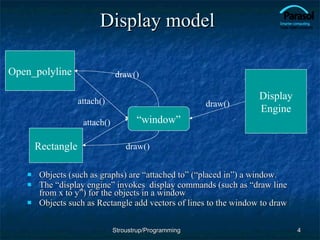
Display model Objects (such as graphs) are “attached to” (“placed in”) a window. The “display engine” invokes  display commands (such as “draw line from x to y”) for the objects in a window Objects such as Rectangle add vectors of lines to the window to draw Open_polyline Rectangle “ window” Display Engine attach() attach() draw() draw() draw() Stroustrup/Programming
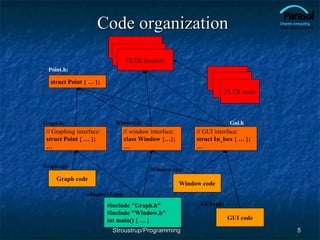
Code organization Gui.h Point.h: Stroustrup/Programming //  Graphing interface: struct Point { … }; … //  window interface: class Window {…}; … FLTK headers Graph code Window code FLTK code chapter12.cpp: Window.h: Window.cpp: #include "Graph.h" #include "Window.h" int main() { … } Graph.cpp: Graph.h: struct Point { … }; //  GUI interface: struct In_box { … }; … GUI code GUI.cpp:
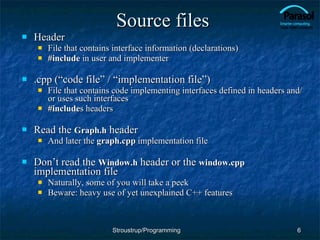
Source files Header File that contains interface information (declarations) #include  in user and implementer .cpp (“code file” / “implementation file”) File that contains code implementing interfaces defined in headers and/or uses such interfaces #include s headers Read the  Graph.h  header And later the  graph.cpp  implementation file Don’t read the  Window.h  header or the  window.cpp  implementation file Naturally, some of you will take a peek Beware: heavy use of yet unexplained C++ features Stroustrup/Programming
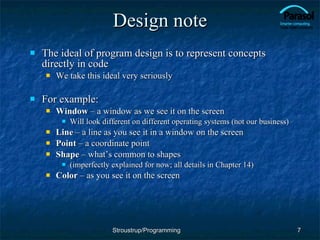
Design note The ideal of program design is to represent concepts directly in code We take this ideal very seriously For example: Window  – a window as we see it on the screen Will look different on different operating systems (not our business) Line  – a line as you see it in a window on the screen Point  – a coordinate point Shape  – what’s common to shapes (imperfectly explained for now; all details in Chapter 14) Color  – as you see it on the screen Stroustrup/Programming
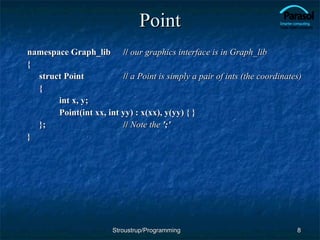
Point namespace Graph_lib  //  our graphics interface is in Graph_lib { struct Point    //  a Point is simply a pair of ints (the coordinates) {  int x, y; Point(int xx, int yy) : x(xx), y(yy) { } }; //  Note the  ';' } Stroustrup/Programming
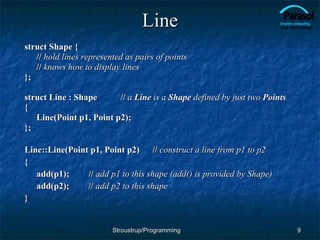
Line struct Shape { //   hold lines represented as pairs of points //  knows how to display lines }; struct Line : Shape  //  a  Line  is a  Shape  defined by just two  Points { Line(Point p1, Point p2); }; Line::Line(Point p1, Point p2) //  construct a line from p1 to p2 { add(p1); //  add p1 to this shape (add() is provided by Shape) add(p2); //  add p2 to this shape } Stroustrup/Programming
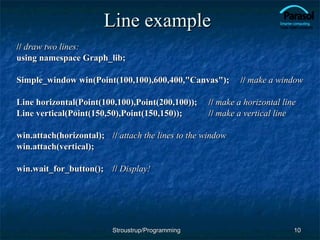
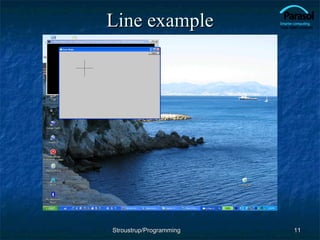
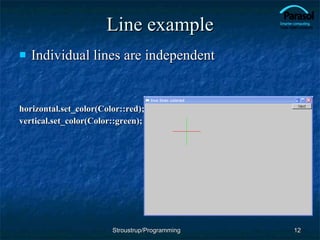
Line example //  draw two lines: using namespace Graph_lib; Simple_window win(Point(100,100),600,400,"Canvas");  //  make a   window Line horizontal(Point(100,100),Point(200,100));  //  make a horizontal line Line vertical(Point(150,50),Point(150,150)); //  make a vertical line win.attach(horizontal); //  attach the lines to the window win.attach(vertical); win.wait_for_button(); //  Display! Stroustrup/Programming
Line example Stroustrup/Programming
Line example Individual lines are independent horizontal.set_color(Color::red); vertical.set_color(Color::green); Stroustrup/Programming
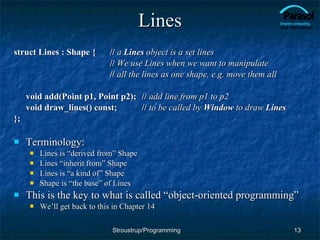
Lines struct Lines : Shape { //  a  Lines  object is a set lines //   We use Lines when we want to manipulate //  all the lines as one shape, e.g. move them all void add(Point p1, Point p2); //  add line from p1 to p2 void draw_lines() const; //  to be called by  Window  to draw  Lines }; Terminology: Lines is “derived from” Shape Lines “inherit from” Shape Lines is “a kind of” Shape Shape is “the base” of Lines This is the key to what is called “object-oriented programming” We’ll get back to this in Chapter 14 Stroustrup/Programming
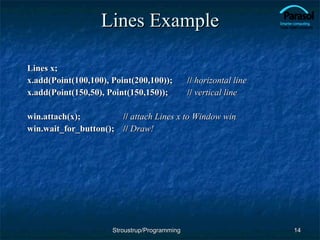
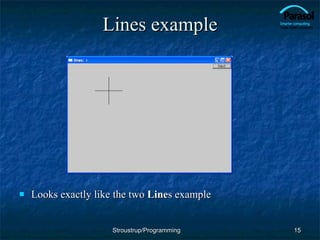
Lines Example Lines x; x.add(Point(100,100), Point(200,100)); //  horizontal line x.add(Point(150,50), Point(150,150)); //  vertical line win.attach(x); //  attach Lines x to Window win win.wait_for_button(); //  Draw! Stroustrup/Programming
Lines example Looks exactly like the two  Line s example Stroustrup/Programming
Implementation: Lines void Lines::add(Point p1, Point p2) //  use Shape’s add() { Shape::add(p1); Shape::add(p2); } void Lines::draw_lines() const //  to somehow be called from Shape { for (int i=1; i<number_of_points(); i+=2) fl_line(point(i-1).x,point(i-1).y,point(i).x,point(i).y); } Note fl_line is a basic line drawing function from FLTK FLTK is used in the  implementation , not in the  interface  to our classes We could replace FLTK with another graphics library Stroustrup/Programming
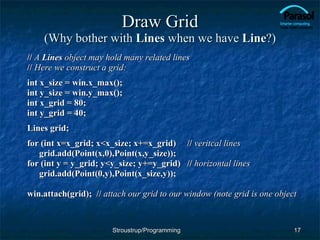
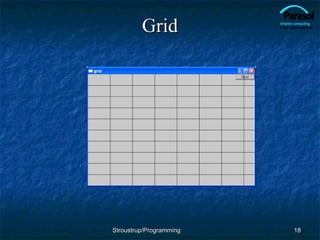
Draw Grid (Why bother with  Lines  when we have  Line ?) //  A  Lines  object may hold many related lines //  Here we construct a grid: int x_size = win.x_max(); int y_size = win.y_max();  int x_grid = 80; int y_grid = 40; Lines grid; for (int x=x_grid; x<x_size; x+=x_grid) //  veritcal lines grid.add(Point(x,0),Point(x,y_size)); for (int y = y_grid; y<y_size; y+=y_grid) //  horizontal lines grid.add(Point(0,y),Point(x_size,y)); win.attach(grid);  //  attach our grid to our window (note grid is one object Stroustrup/Programming
Grid Stroustrup/Programming
Color struct Color { //   Map FLTK colors and scope them; //  deal with visibility/transparency enum Color_type { red=FL_RED, blue=FL_BLUE, /*  …  */ }; enum Transparency { visible=0, invisible=255 }; Color(Color_type cc) :c(Fl_Color(cc)), v(visible) { } Color(int cc) :c(Fl_Color(cc)), v(visible) { } Color(Color_type cc, Transparency t) :c(Fl_Color(cc)), v(t) { } int as_int() const { return c; } Transparency visibility() { return v; } void set_visibility(Transparency t) { v = t; } private: Fl_Color c; Transparancy v; //  visibility (transparency not yet implemented) }; Stroustrup/Programming
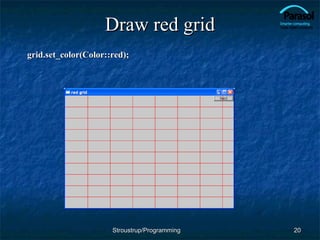
Draw red grid grid.set_color(Color::red); Stroustrup/Programming
Line_style struct Line_style { enum Line_style_type { solid=FL_SOLID, //  ------- dash=FL_DASH, //  - - - - dot=FL_DOT, //  .......  dashdot=FL_DASHDOT, //  - . - .  dashdotdot=FL_DASHDOTDOT, //  -..-.. }; Line_style(Line_style_type ss) :s(ss), w(0) { } Line_style(Line_style_type lst, int ww) :s(lst), w(ww) { } Line_style(int ss) :s(ss), w(0) { } int width() const { return w; } int style() const { return s; } private: int s; int w; }; Stroustrup/Programming
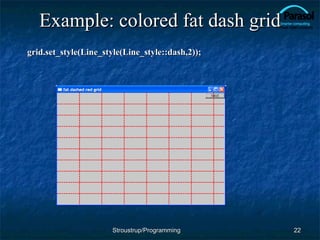
Example: colored fat dash grid grid.set_style(Line_style(Line_style::dash,2)); Stroustrup/Programming
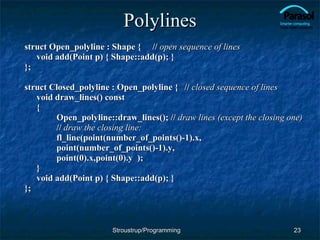
Polylines struct Open_polyline : Shape { //  open sequence of lines void add(Point p) { Shape::add(p); } }; struct Closed_polyline : Open_polyline { //  closed sequence of lines void draw_lines() const { Open_polyline::draw_lines(); //  draw lines (except the closing one) //  draw the closing line: fl_line(point(number_of_points()-1).x, point(number_of_points()-1).y, point(0).x,point(0).y  ); } void add(Point p) { Shape::add(p); } }; Stroustrup/Programming
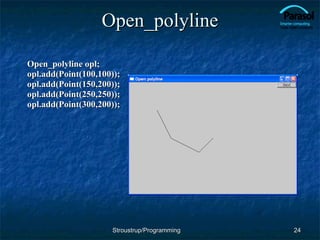
Open_polyline Open_polyline opl; opl.add(Point(100,100)); opl.add(Point(150,200)); opl.add(Point(250,250)); opl.add(Point(300,200));  Stroustrup/Programming
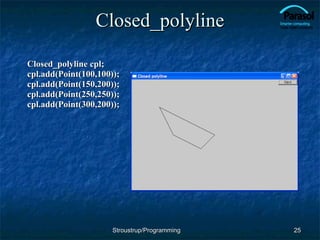
Closed_polyline Closed_polyline cpl; cpl.add(Point(100,100)); cpl.add(Point(150,200)); cpl.add(Point(250,250)); cpl.add(Point(300,200));  Stroustrup/Programming
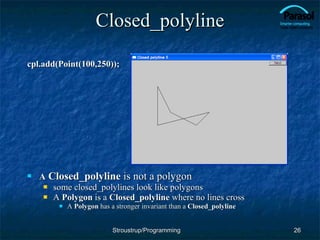
Closed_polyline cpl.add(Point(100,250)); A   Closed_polyline  is not a polygon some closed_polylines look like polygons A  Polygon  is a  Closed_polyline  where no lines cross A  Polygon  has a stronger invariant than a  Closed_polyline Stroustrup/Programming
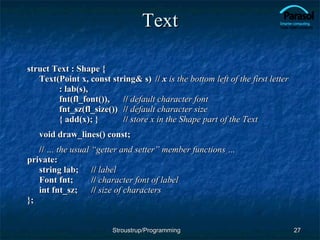
Text struct Text : Shape { Text(Point x, const string& s)  //  x  is the bottom left of the first letter : lab(s), fnt(fl_font()), //  default character font fnt_sz(fl_size()) //  default character size { add(x); } //  store x in the Shape part of the Text void draw_lines() const; //  … the usual “getter and setter” member functions … private: string lab; //  label Font fnt; //  character font of label int fnt_sz; //  size of characters }; Stroustrup/Programming
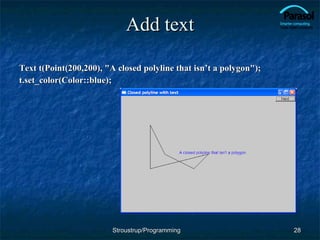
Add text Text t(Point(200,200), &quot;A closed polyline that isn’t a polygon&quot;); t.set_color(Color::blue); Stroustrup/Programming
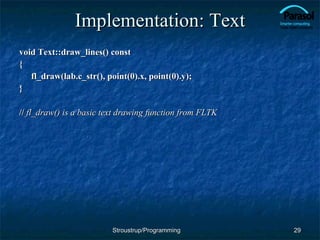
Implementation: Text void Text::draw_lines() const { fl_draw(lab.c_str(), point(0).x, point(0).y); } //  fl_draw() is a basic text drawing function from FLTK Stroustrup/Programming
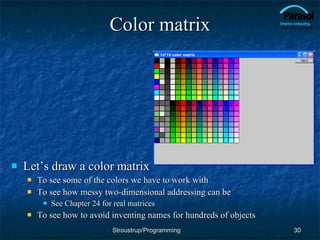
Color matrix Let’s draw a color matrix To see some of the colors we have to work with To see how messy two-dimensional addressing can be See Chapter 24 for real matrices To see how to avoid inventing names for hundreds of objects Stroustrup/Programming
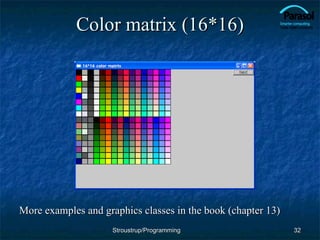
Color Matrix (16*16) Simple_window win20(pt,600,400,&quot;16*16 color matrix&quot;); Vector_ref<Rectangle> vr;  //  use like vector   //  but imagine that it holds references to objects for (int i = 0; i<16; ++i) { //  i is the horizontal coordinate for (int j = 0; j<16; ++j) { //  j is the vertical coordinate vr.push_back(new Rectangle(Point(i*20,j*20),20,20)); vr[vr.size()-1].set_fill_color(i*16+j); win20.attach(vr[vr.size()-1]); } //  new  makes an object that you can give to a  Vector_ref  to hold //   Vector_ref  is built using  std::vector , but is not in the standard library Stroustrup/Programming
Color matrix (16*16) More examples and graphics classes in the book (chapter 13) Stroustrup/Programming
Next lecture What is class Shape? Introduction to object-oriented programming Stroustrup/Programming

13 Graph Classes

  • 1.
    Chapter 13 Graphicsclasses Bjarne Stroustrup www.stroustrup.com/Programming
  • 2.
    Abstract Chapter 12demonstrates how to create simple windows and display basic shapes: square, circle, triangle, and ellipse; It showed how to manipulate such shapes: change colors and line style, add text, etc. Chapter 13 shows how these shapes and operations are implemented, and shows a few more examples. In Chapter 12, we were basically tool users; here we become tool builders. Stroustrup/Programming
  • 3.
    Overview Graphing Model Code organization Interface classes Point Line Lines Grid Open Polylines Closed Polylines Color Text Unnamed objects Stroustrup/Programming
  • 4.
    Display model Objects(such as graphs) are “attached to” (“placed in”) a window. The “display engine” invokes display commands (such as “draw line from x to y”) for the objects in a window Objects such as Rectangle add vectors of lines to the window to draw Open_polyline Rectangle “ window” Display Engine attach() attach() draw() draw() draw() Stroustrup/Programming
  • 5.
    Code organization Gui.hPoint.h: Stroustrup/Programming // Graphing interface: struct Point { … }; … // window interface: class Window {…}; … FLTK headers Graph code Window code FLTK code chapter12.cpp: Window.h: Window.cpp: #include &quot;Graph.h&quot; #include &quot;Window.h&quot; int main() { … } Graph.cpp: Graph.h: struct Point { … }; // GUI interface: struct In_box { … }; … GUI code GUI.cpp:
  • 6.
    Source files HeaderFile that contains interface information (declarations) #include in user and implementer .cpp (“code file” / “implementation file”) File that contains code implementing interfaces defined in headers and/or uses such interfaces #include s headers Read the Graph.h header And later the graph.cpp implementation file Don’t read the Window.h header or the window.cpp implementation file Naturally, some of you will take a peek Beware: heavy use of yet unexplained C++ features Stroustrup/Programming
  • 7.
    Design note Theideal of program design is to represent concepts directly in code We take this ideal very seriously For example: Window – a window as we see it on the screen Will look different on different operating systems (not our business) Line – a line as you see it in a window on the screen Point – a coordinate point Shape – what’s common to shapes (imperfectly explained for now; all details in Chapter 14) Color – as you see it on the screen Stroustrup/Programming
  • 8.
    Point namespace Graph_lib // our graphics interface is in Graph_lib { struct Point // a Point is simply a pair of ints (the coordinates) { int x, y; Point(int xx, int yy) : x(xx), y(yy) { } }; // Note the ';' } Stroustrup/Programming
  • 9.
    Line struct Shape{ // hold lines represented as pairs of points // knows how to display lines }; struct Line : Shape // a Line is a Shape defined by just two Points { Line(Point p1, Point p2); }; Line::Line(Point p1, Point p2) // construct a line from p1 to p2 { add(p1); // add p1 to this shape (add() is provided by Shape) add(p2); // add p2 to this shape } Stroustrup/Programming
  • 10.
    Line example // draw two lines: using namespace Graph_lib; Simple_window win(Point(100,100),600,400,&quot;Canvas&quot;); // make a window Line horizontal(Point(100,100),Point(200,100)); // make a horizontal line Line vertical(Point(150,50),Point(150,150)); // make a vertical line win.attach(horizontal); // attach the lines to the window win.attach(vertical); win.wait_for_button(); // Display! Stroustrup/Programming
  • 11.
  • 12.
    Line example Individuallines are independent horizontal.set_color(Color::red); vertical.set_color(Color::green); Stroustrup/Programming
  • 13.
    Lines struct Lines: Shape { // a Lines object is a set lines // We use Lines when we want to manipulate // all the lines as one shape, e.g. move them all void add(Point p1, Point p2); // add line from p1 to p2 void draw_lines() const; // to be called by Window to draw Lines }; Terminology: Lines is “derived from” Shape Lines “inherit from” Shape Lines is “a kind of” Shape Shape is “the base” of Lines This is the key to what is called “object-oriented programming” We’ll get back to this in Chapter 14 Stroustrup/Programming
  • 14.
    Lines Example Linesx; x.add(Point(100,100), Point(200,100)); // horizontal line x.add(Point(150,50), Point(150,150)); // vertical line win.attach(x); // attach Lines x to Window win win.wait_for_button(); // Draw! Stroustrup/Programming
  • 15.
    Lines example Looksexactly like the two Line s example Stroustrup/Programming
  • 16.
    Implementation: Lines voidLines::add(Point p1, Point p2) // use Shape’s add() { Shape::add(p1); Shape::add(p2); } void Lines::draw_lines() const // to somehow be called from Shape { for (int i=1; i<number_of_points(); i+=2) fl_line(point(i-1).x,point(i-1).y,point(i).x,point(i).y); } Note fl_line is a basic line drawing function from FLTK FLTK is used in the implementation , not in the interface to our classes We could replace FLTK with another graphics library Stroustrup/Programming
  • 17.
    Draw Grid (Whybother with Lines when we have Line ?) // A Lines object may hold many related lines // Here we construct a grid: int x_size = win.x_max(); int y_size = win.y_max(); int x_grid = 80; int y_grid = 40; Lines grid; for (int x=x_grid; x<x_size; x+=x_grid) // veritcal lines grid.add(Point(x,0),Point(x,y_size)); for (int y = y_grid; y<y_size; y+=y_grid) // horizontal lines grid.add(Point(0,y),Point(x_size,y)); win.attach(grid); // attach our grid to our window (note grid is one object Stroustrup/Programming
  • 18.
  • 19.
    Color struct Color{ // Map FLTK colors and scope them; // deal with visibility/transparency enum Color_type { red=FL_RED, blue=FL_BLUE, /* … */ }; enum Transparency { visible=0, invisible=255 }; Color(Color_type cc) :c(Fl_Color(cc)), v(visible) { } Color(int cc) :c(Fl_Color(cc)), v(visible) { } Color(Color_type cc, Transparency t) :c(Fl_Color(cc)), v(t) { } int as_int() const { return c; } Transparency visibility() { return v; } void set_visibility(Transparency t) { v = t; } private: Fl_Color c; Transparancy v; // visibility (transparency not yet implemented) }; Stroustrup/Programming
  • 20.
    Draw red gridgrid.set_color(Color::red); Stroustrup/Programming
  • 21.
    Line_style struct Line_style{ enum Line_style_type { solid=FL_SOLID, // ------- dash=FL_DASH, // - - - - dot=FL_DOT, // ....... dashdot=FL_DASHDOT, // - . - . dashdotdot=FL_DASHDOTDOT, // -..-.. }; Line_style(Line_style_type ss) :s(ss), w(0) { } Line_style(Line_style_type lst, int ww) :s(lst), w(ww) { } Line_style(int ss) :s(ss), w(0) { } int width() const { return w; } int style() const { return s; } private: int s; int w; }; Stroustrup/Programming
  • 22.
    Example: colored fatdash grid grid.set_style(Line_style(Line_style::dash,2)); Stroustrup/Programming
  • 23.
    Polylines struct Open_polyline: Shape { // open sequence of lines void add(Point p) { Shape::add(p); } }; struct Closed_polyline : Open_polyline { // closed sequence of lines void draw_lines() const { Open_polyline::draw_lines(); // draw lines (except the closing one) // draw the closing line: fl_line(point(number_of_points()-1).x, point(number_of_points()-1).y, point(0).x,point(0).y ); } void add(Point p) { Shape::add(p); } }; Stroustrup/Programming
  • 24.
    Open_polyline Open_polyline opl;opl.add(Point(100,100)); opl.add(Point(150,200)); opl.add(Point(250,250)); opl.add(Point(300,200)); Stroustrup/Programming
  • 25.
    Closed_polyline Closed_polyline cpl;cpl.add(Point(100,100)); cpl.add(Point(150,200)); cpl.add(Point(250,250)); cpl.add(Point(300,200)); Stroustrup/Programming
  • 26.
    Closed_polyline cpl.add(Point(100,250)); A Closed_polyline is not a polygon some closed_polylines look like polygons A Polygon is a Closed_polyline where no lines cross A Polygon has a stronger invariant than a Closed_polyline Stroustrup/Programming
  • 27.
    Text struct Text: Shape { Text(Point x, const string& s) // x is the bottom left of the first letter : lab(s), fnt(fl_font()), // default character font fnt_sz(fl_size()) // default character size { add(x); } // store x in the Shape part of the Text void draw_lines() const; // … the usual “getter and setter” member functions … private: string lab; // label Font fnt; // character font of label int fnt_sz; // size of characters }; Stroustrup/Programming
  • 28.
    Add text Textt(Point(200,200), &quot;A closed polyline that isn’t a polygon&quot;); t.set_color(Color::blue); Stroustrup/Programming
  • 29.
    Implementation: Text voidText::draw_lines() const { fl_draw(lab.c_str(), point(0).x, point(0).y); } // fl_draw() is a basic text drawing function from FLTK Stroustrup/Programming
  • 30.
    Color matrix Let’sdraw a color matrix To see some of the colors we have to work with To see how messy two-dimensional addressing can be See Chapter 24 for real matrices To see how to avoid inventing names for hundreds of objects Stroustrup/Programming
  • 31.
    Color Matrix (16*16)Simple_window win20(pt,600,400,&quot;16*16 color matrix&quot;); Vector_ref<Rectangle> vr; // use like vector // but imagine that it holds references to objects for (int i = 0; i<16; ++i) { // i is the horizontal coordinate for (int j = 0; j<16; ++j) { // j is the vertical coordinate vr.push_back(new Rectangle(Point(i*20,j*20),20,20)); vr[vr.size()-1].set_fill_color(i*16+j); win20.attach(vr[vr.size()-1]); } // new makes an object that you can give to a Vector_ref to hold // Vector_ref is built using std::vector , but is not in the standard library Stroustrup/Programming
  • 32.
    Color matrix (16*16)More examples and graphics classes in the book (chapter 13) Stroustrup/Programming
  • 33.
    Next lecture Whatis class Shape? Introduction to object-oriented programming Stroustrup/Programming