3
struct point {intx, y;};
void user_input(point&);
void graph_point(char grid[NUMBER_ROWS][NUMBER_COLS], point);
void print_grid(char grid[NUMBER_ROWS][NUMBER_COLS]);
void set_background(char grid[][NUMBER_COLS]);
void user_input(point& P){ // pass by reference
// get user input and check that it is on the grid
do{
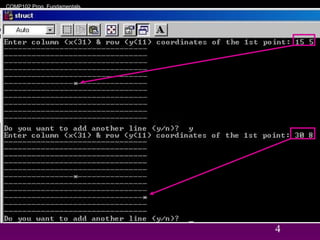
cout << "Enter column (x<" << NUMBER_COLS << ") & row (y<"
<< NUMBER_ROWS <<") of the 1st point: ";
cin >> P.x >> P.y;
} while ((P.y<0) || (P.y >= NUMBER_ROWS) ||
(P.x<0) || (P.x >= NUMBER_COLS));
}
// Put a point on the grid
void graph_point(char grid[][NUMBER_COLS], point P){
grid[P.y][P.x] = '*';
}
COMP102 Prog. Fundamentals,
Structures/ Slide 5
5
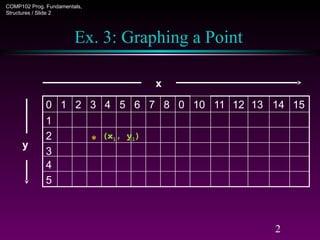
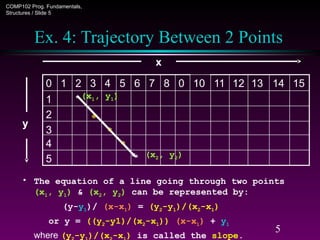
Ex. 4: Trajectory Between 2 Points
x
*
5
4
3
2
*
1
15
14
13
12
11
10
0
8
7
6
5
4
3
2
1
0
y
• The equation of a line going through two points
(x1, y1) & (x2, y2) can be represented by:
(y-y1)/ (x-x1) = (y2-y1)/(x2-x1)
or y = ((y2-y1)/(x2-x1)) (x-x1) + y1
where (y -y )/(x -x ) is called the slope.
(x1, y1)
(x2, y2)
*
*
*
6.
6
// use structto graph line between two points
#include <ctype> // for tolower
#include <iostream>
using namespace std;
int const NUMBER_ROWS = 11;
int const NUMBER_COLS = 31;
struct point {int x, y;};
struct line {point p1, p2;};
void user_input (line&);
void graph_line (char grid[NUMBER_ROWS][NUMBER_COLS], line);
void print_grid(char grid[NUMBER_ROWS][NUMBER_COLS]);
void set_background (char grid[][NUMBER_COLS]);
7.
7
// Graph linebetween two points
int main(){
// set an array for the grid
char grid[NUMBER_ROWS][NUMBER_COLS];
line line1;
int row1=0, col1=0, row2=0, col2=0;
char do_another;
// function call to fill background of grid with ‘-’
set_background(grid);
do{ // do-while loop allows multiple lines
// get user input
user_input(line1);
// put ‘*’ into array to graph the line(s) on the grid
graph_line(grid, line1);
// print the grid from the array to the screen
print_grid(grid);
cout << "Do you want to add another line (y/n)? ";
cin >> do_another;
do_another = tolower(do_another);
} while (do_another == 'y');
return 0;
}
8.
COMP102 Prog. Fundamentals,
Structures/ Slide 8
8
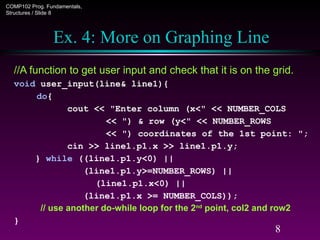
Ex. 4: More on Graphing Line
//A function to get user input and check that it is on the grid.
void user_input(line& line1){
do{
cout << "Enter column (x<" << NUMBER_COLS
<< ") & row (y<" << NUMBER_ROWS
<< ") coordinates of the 1st point: ";
cin >> line1.p1.x >> line1.p1.y;
} while ((line1.p1.y<0) ||
(line1.p1.y>=NUMBER_ROWS) ||
(line1.p1.x<0) ||
(line1.p1.x >= NUMBER_COLS));
// use another do-while loop for the 2nd
point, col2 and row2
}
9.
COMP102 Prog. Fundamentals,
Structures/ Slide 9
9
Ex. 4: More on Graphing Line
void graph_line(char grid[][NUMBER_COLS], line line1){
int row, col;
double rise, run, slope;
// one point
if((line1.p1.y==line1.p2.y)&&(line1.p1.x==line2.p2.x))
grid[line1.p1.y][line1.p1.x] = '*';
else if(line1.p2.x==line1.p1.x){ // infinite slope
if (line1.p1.y < line1.p2.y){
for(row=line1.p1.y; row <= line1.p2.y; row++)
grid[row][line1.p1.x] = '*';
}
else{
for(row=line1.p1.y; row >= line1.p2.y; row--)
grid[row][line1.p1.x] = '*';
}
}
10.
COMP102 Prog. Fundamentals,
Structures/ Slide 10
10
Ex. 4: More on Graphing Line
else{
rise=line1.p2.y-line1.p1.y; run=line1.p2.x-line1.p1.x;
slope = (double)rise / run; // run cannot = 0
if (run >0){
for(col = line1.p1.x; col <= line1.p2.x; col++){
// line1.p1.y is offset for starting point
row=(int)(slope*(col–line1.p1.x)+line1.p1.y);
grid[row][col] = '*';
}
}
else{
for(col=line1.p1.x; col >= line1.p2.x; col--){
row=(int)(slope*(col–line1.p1.x)+line1.p1.y);
grid[row][col] = '*';
}
}
}
}
COMP102 Prog. Fundamentals,
Structures/ Slide 12
12
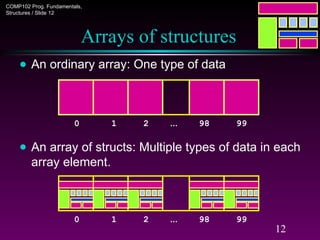
Arrays of structures
● An ordinary array: One type of data
● An array of structs: Multiple types of data in each
array element.
0 1 2 … 98 99
0 1 2 … 98 99
13.
COMP102 Prog. Fundamentals,
Structures/ Slide 13
13
Arrays of structures
● We often use arrays of structures.
● Example:
StudentRecord Class[100];
strcpy(Class[98].Name, "Chan Tai Man");
Class[98].Id = 12345;
strcpy(Class[98].Dept, "COMP");
Class[98].gender = 'M';
Class[0] = Class[98];
. . .
0 1 2 … 98 99
Chan Tai Man
12345 M
COMP
14.
COMP102 Prog. Fundamentals,
Structures/ Slide 14
14
Arrays inside structures
● We can use arrays inside structures.
● Example:
struct square{
point vertex[4];
};
square Sq;
● Assign values to Sq using the given square
(4,
3)
(10,
3)
(4,
1)
(10,
1)
x y x y x y x y
![3
struct point {int x, y;};
void user_input(point&);
void graph_point(char grid[NUMBER_ROWS][NUMBER_COLS], point);
void print_grid(char grid[NUMBER_ROWS][NUMBER_COLS]);
void set_background(char grid[][NUMBER_COLS]);
void user_input(point& P){ // pass by reference
// get user input and check that it is on the grid
do{
cout << "Enter column (x<" << NUMBER_COLS << ") & row (y<"
<< NUMBER_ROWS <<") of the 1st point: ";
cin >> P.x >> P.y;
} while ((P.y<0) || (P.y >= NUMBER_ROWS) ||
(P.x<0) || (P.x >= NUMBER_COLS));
}
// Put a point on the grid
void graph_point(char grid[][NUMBER_COLS], point P){
grid[P.y][P.x] = '*';
}](https://image.slidesharecdn.com/struct-250825190414-04ce4360/85/struct-programming-C-programming-advanced-data-structures-3-320.jpg)
![6
// use struct to graph line between two points
#include <ctype> // for tolower
#include <iostream>
using namespace std;
int const NUMBER_ROWS = 11;
int const NUMBER_COLS = 31;
struct point {int x, y;};
struct line {point p1, p2;};
void user_input (line&);
void graph_line (char grid[NUMBER_ROWS][NUMBER_COLS], line);
void print_grid(char grid[NUMBER_ROWS][NUMBER_COLS]);
void set_background (char grid[][NUMBER_COLS]);](https://image.slidesharecdn.com/struct-250825190414-04ce4360/85/struct-programming-C-programming-advanced-data-structures-6-320.jpg)
![7
// Graph line between two points
int main(){
// set an array for the grid
char grid[NUMBER_ROWS][NUMBER_COLS];
line line1;
int row1=0, col1=0, row2=0, col2=0;
char do_another;
// function call to fill background of grid with ‘-’
set_background(grid);
do{ // do-while loop allows multiple lines
// get user input
user_input(line1);
// put ‘*’ into array to graph the line(s) on the grid
graph_line(grid, line1);
// print the grid from the array to the screen
print_grid(grid);
cout << "Do you want to add another line (y/n)? ";
cin >> do_another;
do_another = tolower(do_another);
} while (do_another == 'y');
return 0;
}](https://image.slidesharecdn.com/struct-250825190414-04ce4360/85/struct-programming-C-programming-advanced-data-structures-7-320.jpg)
![COMP102 Prog. Fundamentals,
Structures / Slide 9
9
Ex. 4: More on Graphing Line
void graph_line(char grid[][NUMBER_COLS], line line1){
int row, col;
double rise, run, slope;
// one point
if((line1.p1.y==line1.p2.y)&&(line1.p1.x==line2.p2.x))
grid[line1.p1.y][line1.p1.x] = '*';
else if(line1.p2.x==line1.p1.x){ // infinite slope
if (line1.p1.y < line1.p2.y){
for(row=line1.p1.y; row <= line1.p2.y; row++)
grid[row][line1.p1.x] = '*';
}
else{
for(row=line1.p1.y; row >= line1.p2.y; row--)
grid[row][line1.p1.x] = '*';
}
}](https://image.slidesharecdn.com/struct-250825190414-04ce4360/85/struct-programming-C-programming-advanced-data-structures-9-320.jpg)
![COMP102 Prog. Fundamentals,
Structures / Slide 10
10
Ex. 4: More on Graphing Line
else{
rise=line1.p2.y-line1.p1.y; run=line1.p2.x-line1.p1.x;
slope = (double)rise / run; // run cannot = 0
if (run >0){
for(col = line1.p1.x; col <= line1.p2.x; col++){
// line1.p1.y is offset for starting point
row=(int)(slope*(col–line1.p1.x)+line1.p1.y);
grid[row][col] = '*';
}
}
else{
for(col=line1.p1.x; col >= line1.p2.x; col--){
row=(int)(slope*(col–line1.p1.x)+line1.p1.y);
grid[row][col] = '*';
}
}
}
}](https://image.slidesharecdn.com/struct-250825190414-04ce4360/85/struct-programming-C-programming-advanced-data-structures-10-320.jpg)
![COMP102 Prog. Fundamentals,
Structures / Slide 13
13
Arrays of structures
● We often use arrays of structures.
● Example:
StudentRecord Class[100];
strcpy(Class[98].Name, "Chan Tai Man");
Class[98].Id = 12345;
strcpy(Class[98].Dept, "COMP");
Class[98].gender = 'M';
Class[0] = Class[98];
. . .
0 1 2 … 98 99
Chan Tai Man
12345 M
COMP](https://image.slidesharecdn.com/struct-250825190414-04ce4360/85/struct-programming-C-programming-advanced-data-structures-13-320.jpg)
![COMP102 Prog. Fundamentals,
Structures / Slide 14
14
Arrays inside structures
● We can use arrays inside structures.
● Example:
struct square{
point vertex[4];
};
square Sq;
● Assign values to Sq using the given square
(4,
3)
(10,
3)
(4,
1)
(10,
1)
x y x y x y x y](https://image.slidesharecdn.com/struct-250825190414-04ce4360/85/struct-programming-C-programming-advanced-data-structures-14-320.jpg)


