HIT Toolkit
Workflow and Process
Redesign
Health Information
Technology Toolkit
for Critical Access
and Small Hospitals
http://www.stratishealth.org/HIT_Toolkit_hospitals
Presenter
• Margret Amatayakul
RHIA, CHPS, CPHIT, CPEHR, FHIMSS
President, MargretA Consulting, LLC
Schaumburg, IL
• Independent consultant, who focuses on achieving value from
electronic health records, HIPAA/HITECH, and health information
exchange. Developer of tools in Toolkit
• Adjunct faculty College of St. Scholastica, Duluth, MN, masters
program in health informatics
• Founder and former executive director Computer-based Patient
Record Institute, associate executive director AHIMA, associate
professor University of Illinois
• Active participant in standards development, former HIMSS BOD,
and co-founder of and faculty for Health IT Certification
2
Stratis Health
3
● Stratis Health is a nonprofit organization that leads
collaboration and innovation in health care quality
and safety, and serves as a trusted expert in
facilitating improvement for people and communities
● Stratis Health works toward its mission through
initiatives funded by federal and state government
contracts, and community and foundation grants,
including serving as Minnesota’s Medicare Quality
Improvement Organization (QIO)
● Stratis Health operates the Health Information
Technology Services Center for health care
organizations seeking to use health information
technology in support of their clinical transformation
Agenda
• Purpose of Workflow and Process Redesign
• Steps in Workflow and Process Redesign
• Workflows and processes to map
• Performing workflow and process mapping
• Critical success factors in workflow and
process mapping
4
Purpose: Create Ah Ha! Moments
• Workflow and process redesign
– Starts the process of identifying improvement
opportunities with HIT
– Helps users identify solutions for current problems
and today’s workarounds that will form the functional
requirements for your HIT
– Aids in setting expectations for achieving HIT goals
because users will now expect to see improvements
– Ensures that critical controls built into current
processes are retained or enhanced
5
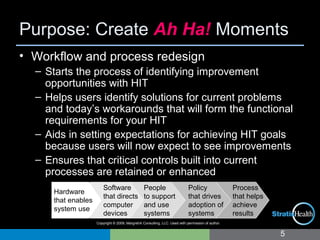
Software
that directs
computer
devices
People
to support
and use
systems
Policy
that drives
adoption of
systems
Hardware
that enables
system use
Process
that helps
achieve
results
Copyright © 2009, MargretA Consulting, LLC. Used with permission of author.
Copyright © 2007-8, MargretA Consulting, LLC. Used with permission of the author.
Workflow and Process
• Process is the manner in which
work to be completed to achieve a
particular result is performed
– Example: Do you always verify
the timeliness of medication
administration?
• Work flow is the sequence of
steps and hand-offs taken within a
process
– Example: Is information
available to schedule patients for
labs in advance of a clinic visit?
• Workflow and process
mapping depicts the detailed
nature of the processes and
workflow to enable improvements
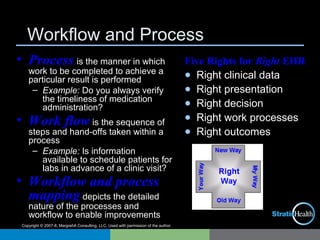
Five Rights for Right EHR
● Right clinical data
● Right presentation
● Right decision
● Right work processes
● Right outcomes
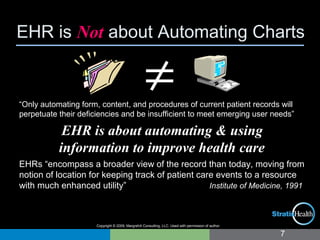
EHR is Not about Automating Charts
7
“Only automating form, content, and procedures of current patient records will
perpetuate their deficiencies and be insufficient to meet emerging user needs”
EHR is about automating & using
information to improve health care
EHRs “encompass a broader view of the record than today, moving from
notion of location for keeping track of patient care events to a resource
with much enhanced utility” Institute of Medicine, 1991
≠
Copyright © 2009, MargretA Consulting, LLC. Used with permission of author.
Steps in Mapping Current Processes
8
1. Identify processes to be mapped; e.g., those that will be impacted
by the HIT being acquired
2. Use individuals who actually perform the process; they know it
best and need to own the impending change
3. Instruct persons on process mapping – why it is being done and
how it is done
4. Map current processes. Avoid identifying opportunities for
improvement now, or critical controls built into current processes
may be overlooked
5. Validate maps to ensure they reflect current processes, all
variations, and the information payload
6. Collect all forms and reports that are part of processes to be
automated through HIT
7. Obtain benchmark data to define expectations for change
and for use in benefits realization studies
Steps in Redesign
8. Identify potential problems in current workflows and processes
and determine their root cause
9. Identify changes that may resolve problems today
10. Educate about HIT and EHR and identify further changes that
will be possible
11. Document changes by creating improved map
12. Use new processes to create use case scenarios to identify
HIT functional specifications, and later to build out the HIT
application to achieve improvements
13. Test new workflows and processes
14. Train all on new workflows and processes
15. Incorporate changes into policy and procedure
16. Conduct benefits realization and celebrate successful
change/correct course as necessary
9
Copyright © 2007-8, MargretA Consulting, LLC. Used with permission of the author.
What to Map
in Hospitals in Clinics
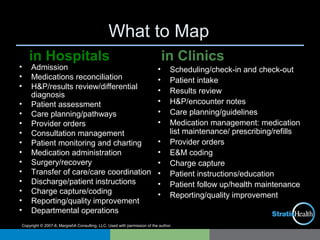
• Admission
• Medications reconciliation
• H&P/results review/differential
diagnosis
• Patient assessment
• Care planning/pathways
• Provider orders
• Consultation management
• Patient monitoring and charting
• Medication administration
• Surgery/recovery
• Transfer of care/care coordination
• Discharge/patient instructions
• Charge capture/coding
• Reporting/quality improvement
• Departmental operations
• Scheduling/check-in and check-out
• Patient intake
• Results review
• H&P/encounter notes
• Care planning/guidelines
• Medication management: medication
list maintenance/ prescribing/refills
• Provider orders
• E&M coding
• Charge capture
• Patient instructions/education
• Patient follow up/health maintenance
• Reporting/quality improvement
Copyright © 2007-8, MargretA Consulting, LLC. Used with permission of the author.
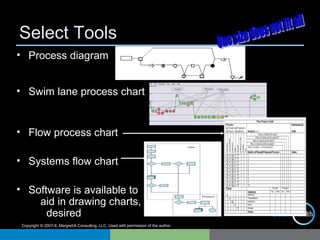
• Process diagram
• Swim lane process chart
• Flow process chart
• Systems flow chart
• Software is available to
aid in drawing charts, if
desired
Select Tools
Copyright © 2007-8, MargretA Consulting, LLC. Used with permission of the author.
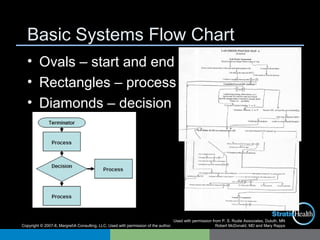
Basic Systems Flow Chart
• Ovals – start and end
• Rectangles – process
• Diamonds – decision
Used with permission from P. S. Rudie Associates, Duluth, MN
Robert McDonald, MD and Mary Rapps
Copyright © 2007-8, MargretA Consulting, LLC. Used with permission of the author.
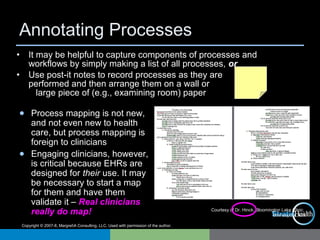
Annotating Processes
Courtesy of Dr. Hinck, Bloomington Lake Clinic,
Minneapolis, MN
• It may be helpful to capture components of processes and
workflows by simply making a list of all processes, or
• Use post-it notes to record processes as they are
performed and then arrange them on a wall or
large piece of (e.g., examining room) paper
● Process mapping is not new,
and not even new to health
care, but process mapping is
foreign to clinicians
● Engaging clinicians, however,
is critical because EHRs are
designed for their use. It may
be necessary to start a map
for them and have them
validate it – Real clinicians
really do map!
Copyright © 2007-8, MargretA Consulting, LLC. Used with permission of the author.
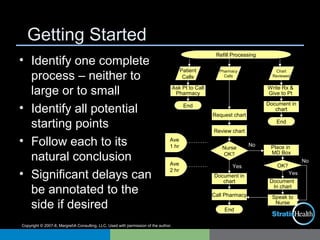
Getting Started
• Identify one complete
process – neither to
large or to small
• Identify all potential
starting points
• Follow each to its
natural conclusion
• Significant delays can
be annotated to the
side if desired
Refill Processing
No
Yes
Place in
MD Box
Patient
Calls
Ask Pt to Call
Pharmacy
End
Chart
Reviewed
Write Rx &
Give to Pt
Document in
chart
End
Ave
1 hr
Ave
2 hr
Pharmacy
Calls
Request chart
Review chart
Nurse
OK?
Call Pharmacy
Document in
chart
End
No
Yes
Document
In chart
Speak to
Nurse
OK?
Copyright © 2007-8, MargretA Consulting, LLC. Used with permission of the author.
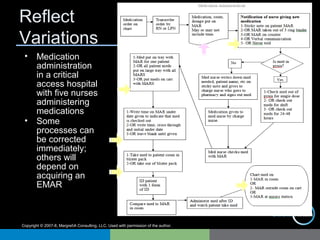
Reflect
Variations
• Medication
administration
in a critical
access hospital
with five nurses
administering
medications
• Some
processes can
be corrected
immediately;
others will
depend on
acquiring an
EMAR
Copyright © 2007-8, MargretA Consulting, LLC. Used with permission of the author.
Validate Process Maps
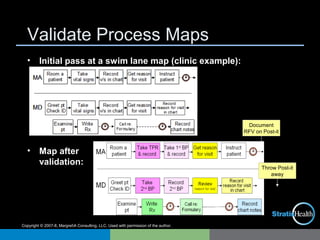
• Initial pass at a swim lane map (clinic example):
• Map after
validation:
Document
RFV on Post-it
Throw Post-it
away
Copyright © 2007-8, MargretA Consulting, LLC. Used with permission of the author.
Identify (Potential) Problems
• Review
current maps
to identify:
– Bottlenecks
– Sources of delay
– Rework due to
errors
– Role ambiguity
– Duplications
– Unnecessary
steps
– Cycle time
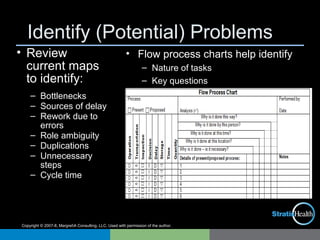
• Flow process charts help identify
– Nature of tasks
– Key questions
Copyright © 2007-8, MargretA Consulting, LLC. Used with permission of the author.
Determine Root Cause
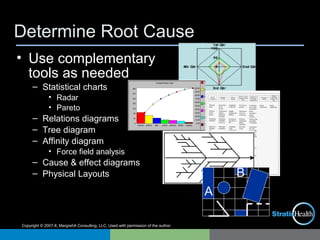
• Use complementary
tools as needed
– Statistical charts
• Radar
• Pareto
– Relations diagrams
– Tree diagram
– Affinity diagram
• Force field analysis
– Cause & effect diagrams
– Physical Layouts
A
B
Copyright © 2007-8, MargretA Consulting, LLC. Used with permission of the author.
Critical Success Factors
• Map processes that will be impacted by HIT, unless other reason for
process improvement
• Engage persons actually performing the process. Leave bias and
blame at the door – reward those who find the most warts!
• Avoid getting ahead of mapping current processes, but make sure
they are complete and address the information flow – remember,
information is being automated, not the staff member or the patient
• Get to the root cause of problems when looking for improvements.
Address immediate opportunities; use others as key functional
requirements for your HIT
• Use workflow and process mapping to create Ah ha! moments that
initiate the change process. Follow up that changes are adopted
and celebrate success once change is implemented
For More Support
• Contact:
Stratis Health
2901 Metro Dr., Suite 400
Bloomington, MN 55425
952-854-3306
1-877-787-2847 (toll free)
www.stratishealth.org
20

1.2 workflow and_process_redesign

  • 1.
    HIT Toolkit Workflow andProcess Redesign Health Information Technology Toolkit for Critical Access and Small Hospitals http://www.stratishealth.org/HIT_Toolkit_hospitals
  • 2.
    Presenter • Margret Amatayakul RHIA,CHPS, CPHIT, CPEHR, FHIMSS President, MargretA Consulting, LLC Schaumburg, IL • Independent consultant, who focuses on achieving value from electronic health records, HIPAA/HITECH, and health information exchange. Developer of tools in Toolkit • Adjunct faculty College of St. Scholastica, Duluth, MN, masters program in health informatics • Founder and former executive director Computer-based Patient Record Institute, associate executive director AHIMA, associate professor University of Illinois • Active participant in standards development, former HIMSS BOD, and co-founder of and faculty for Health IT Certification 2
  • 3.
    Stratis Health 3 ● StratisHealth is a nonprofit organization that leads collaboration and innovation in health care quality and safety, and serves as a trusted expert in facilitating improvement for people and communities ● Stratis Health works toward its mission through initiatives funded by federal and state government contracts, and community and foundation grants, including serving as Minnesota’s Medicare Quality Improvement Organization (QIO) ● Stratis Health operates the Health Information Technology Services Center for health care organizations seeking to use health information technology in support of their clinical transformation
  • 4.
    Agenda • Purpose ofWorkflow and Process Redesign • Steps in Workflow and Process Redesign • Workflows and processes to map • Performing workflow and process mapping • Critical success factors in workflow and process mapping 4
  • 5.
    Purpose: Create AhHa! Moments • Workflow and process redesign – Starts the process of identifying improvement opportunities with HIT – Helps users identify solutions for current problems and today’s workarounds that will form the functional requirements for your HIT – Aids in setting expectations for achieving HIT goals because users will now expect to see improvements – Ensures that critical controls built into current processes are retained or enhanced 5 Software that directs computer devices People to support and use systems Policy that drives adoption of systems Hardware that enables system use Process that helps achieve results Copyright © 2009, MargretA Consulting, LLC. Used with permission of author.
  • 6.
    Copyright © 2007-8,MargretA Consulting, LLC. Used with permission of the author. Workflow and Process • Process is the manner in which work to be completed to achieve a particular result is performed – Example: Do you always verify the timeliness of medication administration? • Work flow is the sequence of steps and hand-offs taken within a process – Example: Is information available to schedule patients for labs in advance of a clinic visit? • Workflow and process mapping depicts the detailed nature of the processes and workflow to enable improvements Five Rights for Right EHR ● Right clinical data ● Right presentation ● Right decision ● Right work processes ● Right outcomes
  • 7.
    EHR is Notabout Automating Charts 7 “Only automating form, content, and procedures of current patient records will perpetuate their deficiencies and be insufficient to meet emerging user needs” EHR is about automating & using information to improve health care EHRs “encompass a broader view of the record than today, moving from notion of location for keeping track of patient care events to a resource with much enhanced utility” Institute of Medicine, 1991 ≠ Copyright © 2009, MargretA Consulting, LLC. Used with permission of author.
  • 8.
    Steps in MappingCurrent Processes 8 1. Identify processes to be mapped; e.g., those that will be impacted by the HIT being acquired 2. Use individuals who actually perform the process; they know it best and need to own the impending change 3. Instruct persons on process mapping – why it is being done and how it is done 4. Map current processes. Avoid identifying opportunities for improvement now, or critical controls built into current processes may be overlooked 5. Validate maps to ensure they reflect current processes, all variations, and the information payload 6. Collect all forms and reports that are part of processes to be automated through HIT 7. Obtain benchmark data to define expectations for change and for use in benefits realization studies
  • 9.
    Steps in Redesign 8.Identify potential problems in current workflows and processes and determine their root cause 9. Identify changes that may resolve problems today 10. Educate about HIT and EHR and identify further changes that will be possible 11. Document changes by creating improved map 12. Use new processes to create use case scenarios to identify HIT functional specifications, and later to build out the HIT application to achieve improvements 13. Test new workflows and processes 14. Train all on new workflows and processes 15. Incorporate changes into policy and procedure 16. Conduct benefits realization and celebrate successful change/correct course as necessary 9
  • 10.
    Copyright © 2007-8,MargretA Consulting, LLC. Used with permission of the author. What to Map in Hospitals in Clinics • Admission • Medications reconciliation • H&P/results review/differential diagnosis • Patient assessment • Care planning/pathways • Provider orders • Consultation management • Patient monitoring and charting • Medication administration • Surgery/recovery • Transfer of care/care coordination • Discharge/patient instructions • Charge capture/coding • Reporting/quality improvement • Departmental operations • Scheduling/check-in and check-out • Patient intake • Results review • H&P/encounter notes • Care planning/guidelines • Medication management: medication list maintenance/ prescribing/refills • Provider orders • E&M coding • Charge capture • Patient instructions/education • Patient follow up/health maintenance • Reporting/quality improvement
  • 11.
    Copyright © 2007-8,MargretA Consulting, LLC. Used with permission of the author. • Process diagram • Swim lane process chart • Flow process chart • Systems flow chart • Software is available to aid in drawing charts, if desired Select Tools
  • 12.
    Copyright © 2007-8,MargretA Consulting, LLC. Used with permission of the author. Basic Systems Flow Chart • Ovals – start and end • Rectangles – process • Diamonds – decision Used with permission from P. S. Rudie Associates, Duluth, MN Robert McDonald, MD and Mary Rapps
  • 13.
    Copyright © 2007-8,MargretA Consulting, LLC. Used with permission of the author. Annotating Processes Courtesy of Dr. Hinck, Bloomington Lake Clinic, Minneapolis, MN • It may be helpful to capture components of processes and workflows by simply making a list of all processes, or • Use post-it notes to record processes as they are performed and then arrange them on a wall or large piece of (e.g., examining room) paper ● Process mapping is not new, and not even new to health care, but process mapping is foreign to clinicians ● Engaging clinicians, however, is critical because EHRs are designed for their use. It may be necessary to start a map for them and have them validate it – Real clinicians really do map!
  • 14.
    Copyright © 2007-8,MargretA Consulting, LLC. Used with permission of the author. Getting Started • Identify one complete process – neither to large or to small • Identify all potential starting points • Follow each to its natural conclusion • Significant delays can be annotated to the side if desired Refill Processing No Yes Place in MD Box Patient Calls Ask Pt to Call Pharmacy End Chart Reviewed Write Rx & Give to Pt Document in chart End Ave 1 hr Ave 2 hr Pharmacy Calls Request chart Review chart Nurse OK? Call Pharmacy Document in chart End No Yes Document In chart Speak to Nurse OK?
  • 15.
    Copyright © 2007-8,MargretA Consulting, LLC. Used with permission of the author. Reflect Variations • Medication administration in a critical access hospital with five nurses administering medications • Some processes can be corrected immediately; others will depend on acquiring an EMAR
  • 16.
    Copyright © 2007-8,MargretA Consulting, LLC. Used with permission of the author. Validate Process Maps • Initial pass at a swim lane map (clinic example): • Map after validation: Document RFV on Post-it Throw Post-it away
  • 17.
    Copyright © 2007-8,MargretA Consulting, LLC. Used with permission of the author. Identify (Potential) Problems • Review current maps to identify: – Bottlenecks – Sources of delay – Rework due to errors – Role ambiguity – Duplications – Unnecessary steps – Cycle time • Flow process charts help identify – Nature of tasks – Key questions
  • 18.
    Copyright © 2007-8,MargretA Consulting, LLC. Used with permission of the author. Determine Root Cause • Use complementary tools as needed – Statistical charts • Radar • Pareto – Relations diagrams – Tree diagram – Affinity diagram • Force field analysis – Cause & effect diagrams – Physical Layouts A B
  • 19.
    Copyright © 2007-8,MargretA Consulting, LLC. Used with permission of the author. Critical Success Factors • Map processes that will be impacted by HIT, unless other reason for process improvement • Engage persons actually performing the process. Leave bias and blame at the door – reward those who find the most warts! • Avoid getting ahead of mapping current processes, but make sure they are complete and address the information flow – remember, information is being automated, not the staff member or the patient • Get to the root cause of problems when looking for improvements. Address immediate opportunities; use others as key functional requirements for your HIT • Use workflow and process mapping to create Ah ha! moments that initiate the change process. Follow up that changes are adopted and celebrate success once change is implemented
  • 20.
    For More Support •Contact: Stratis Health 2901 Metro Dr., Suite 400 Bloomington, MN 55425 952-854-3306 1-877-787-2847 (toll free) www.stratishealth.org 20