Robot Vision
Methods for Digital Image Processing
Gray-level Histogram
Spatial
DFT DCT
Spectral
Digital Image Characteristics
Point Processing Masking Filtering
Enhancement
Degradation Models Inverse Filtering Wiener Filtering
Restoration
Pre-Processing
Information Theory
LZW (gif)
Lossless
Transform-based (jpeg)
Lossy
Compression
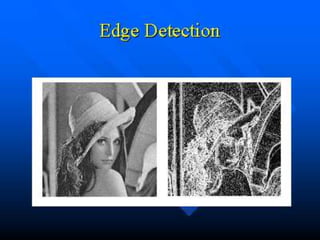
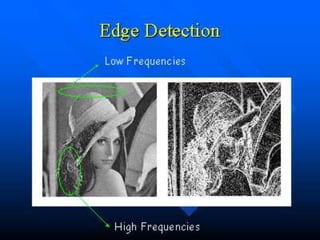
Edge Detection
Segmentation
Shape Descriptors Texture Morphology
Description
Digital Image Processing
Every picture tells a story
• Goal of computer vision is to write computer programs that can
interpret images
Image
• Image : a two-dimensional array of pixels
• The indices [i, j] of pixels : integer values that specify
the rows and columns in pixel values
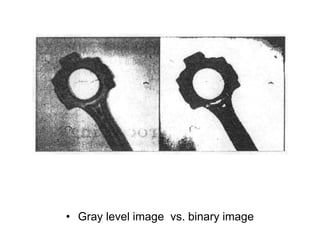
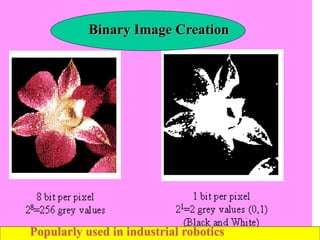
• Gray level image vs. binary image
Human Vision
• Can do amazing things like:
• Recognize people and objects
• Navigate through obstacles
• Understand mood in the scene
• Imagine stories
• But still is not perfect:
• Suffers from Illusions
• Ignores many details
• Ambiguous description of the world
• Doesn’t care about accuracy of world
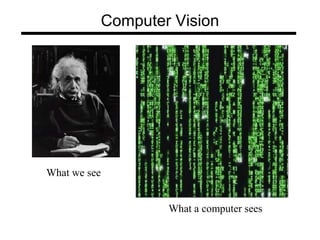
Computer Vision
What we see
What a computer sees
Computer Vision
What we see
What a computer sees
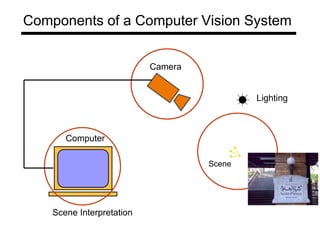
Lighting
Scene
Camera
Computer
Scene Interpretation
Components of a Computer Vision System
Microsoft Kinect
IR Camera
RGB Camera
IR LED Emitter
Face detection
Face detection
• Many digital cameras detect faces
– Canon, Sony, Fuji, …
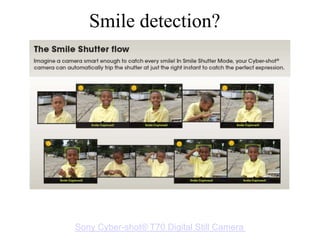
Smile detection?
Sony Cyber-shot® T70 Digital Still Camera
Face Recognition
• Principle Components Analysis (PCA)
Vision-based biometrics
“How the Afghan Girl was Identified by Her Iris Patterns” Read the story
wikipedia
Robots
• Today’s robots perform complex
tasks with amazing precision and
speed
• Why then have they not moved
from the structure of the factory
floor into the “real” world? What
is the limiting factor?
Definition of Robot vision
• Robot vision may be defined as
the process of extracting,
characterizing, and interpreting
information from images of a
three dimensional world
Common reasons for failure of
vision systems
• Small changes in the environment
can result in significant variations in
image data
–Changes in contrast
–Unexpected occlusion of features
What Skills Do Robots Need?
• Identification: What/who is that?
–Object detection, recognition
• Movement: How do I move safely?
–Obstacle avoidance, homing
• Manipulation: How do I change that?
–Interacting with objects/environment
• Navigation: Where am I?
–Mapping, localization
Visual Skills: Identification
• Recognizing face/body/structure: Who/what
do I see?
– Use shape, color, pattern, other static attributes
to distinguish from background, other
hypotheses
• Gesture/activity: What is it doing?
– From low-level motion detection & tracking to
categorizing high-level temporal patterns
• Feedback between static and dynamic
Visual Skills: Movement
• Steering, foot placement or landing spot
for entire vehicle
MAKRO sewer
shape pattern
Demeter region
boundary detection
Visual Skills: Manipulation
• Moving other things
–Grasping: Door opener (KTH)
–Pushing, digging, cranes
Clodbusters push a box
cooperatively
KTH robot &
typical handle
Visual Skills: Navigation
• Building a map
• Localization/place recognition
–Where are you in the map?
Minerva’s ceiling map
Laser-based wall map (CMU)
Binary Image Creation
Popularly used in industrial robotics
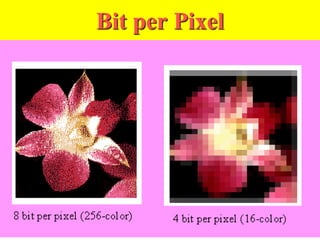
Bit per Pixel
Color models
• Color models for images,
– RGB, CMY
• Color models for video,
– YIQ, YUV (YCbCr)
• Relationship between color models :
Simplified diagram of camera
to CPU interface
Interfacing Digital Cameras to CPU
• Digital camera sensors are very complex
units.
– In many respects they are themselves
similar to an embedded controller chip.
• Some sensors buffer camera data and
allow slow reading via handshake (ideal
for slow microprocessors)
• Most sensors send full image as a stream
after start signal
– (CPU must be fast enough to read or use
hardware buffer)
• Idea
• Use FIFO as image data buffer
• FIFO is similar to dual-ported RAM, it is required
since there is no synchronization between camera
and CPU
• Interrupt service routine then reads FIFO until empty
Vision Sensors
• Single Perspective Camera
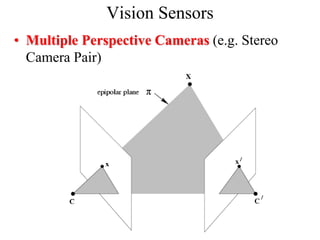
Vision Sensors
• Multiple Perspective Cameras (e.g. Stereo
Camera Pair)
Vision Sensors
• Multiple Perspective Cameras (e.g. Stereo
Camera Pair)
• 1) We can have stored models of line-
drawings of objects (from many possible
angles, and at many different possible scales!),
and then compare those with all possible
combinations of edges in the image.
– Notice that this is a very computationally
intensive and expensive process.
There are several good approaches to detect objects:
Model-based vision.
• 2) We can take advantage of motion.
– If we look at an image at two consecutive time-steps, and
we move the camera in between, each continuous solid
objects (which obeys physical laws) will move as one.
– This gives us a hint for finding objects, by subtracting
two images from each other.
– But notice that this also depends on knowing well:
• how we moved the camera relative to the scene (direction,
distance),
• and that nothing was moving in the scene at the time.
Motion vision.
• 3) We can use stereo (i.e., binocular stereopsis, two
eyes/cameras/points of view).
– Just like with motion vision above, but without having to
actually move,
– we get two images,
– we subtract them from each other,
– if we know what the disparity between them should be,
(i.e., if we know how the two cameras are
organized/positioned relative to each other), we can find
the information like in motion vision.
Binocular stereopsis
Clever Special Tricks that work:
• to do object recognition, it is possible to
simplify the vision problem in various ways:
– 1) Use color; look for specifically and uniquely
colored objects, and recognize them that way
(such as stop signs, for example)
– 2) Use a small image plane; instead of a full 512
x 512 pixel array, we can reduce our view to
much less.
• Of course there is much less information in the image,
but if we are clever, and know what to expect, we can
process what we see quickly and usefully.
Smart Tricks continued:
– 3) Use other, simpler and faster, sensors, and
combine those with vision.
• IR cameras isolate people by body-temperature.
• Grippers allow us to touch and move objects, after
which we can be sure they exist.
– 4) Use information about the environment;
• if you know you will be driving on the road which has
white lines, look specifically for those lines at the right
places in the image.
• This is how first and still fastest road and highway
robotic driving is done.

10833762.ppt

  • 1.
  • 2.
    Methods for DigitalImage Processing Gray-level Histogram Spatial DFT DCT Spectral Digital Image Characteristics Point Processing Masking Filtering Enhancement Degradation Models Inverse Filtering Wiener Filtering Restoration Pre-Processing Information Theory LZW (gif) Lossless Transform-based (jpeg) Lossy Compression Edge Detection Segmentation Shape Descriptors Texture Morphology Description Digital Image Processing
  • 3.
    Every picture tellsa story • Goal of computer vision is to write computer programs that can interpret images
  • 4.
    Image • Image :a two-dimensional array of pixels • The indices [i, j] of pixels : integer values that specify the rows and columns in pixel values
  • 5.
    • Gray levelimage vs. binary image
  • 6.
    Human Vision • Cando amazing things like: • Recognize people and objects • Navigate through obstacles • Understand mood in the scene • Imagine stories • But still is not perfect: • Suffers from Illusions • Ignores many details • Ambiguous description of the world • Doesn’t care about accuracy of world
  • 7.
    Computer Vision What wesee What a computer sees
  • 8.
    Computer Vision What wesee What a computer sees
  • 9.
  • 10.
    Microsoft Kinect IR Camera RGBCamera IR LED Emitter
  • 11.
  • 12.
    Face detection • Manydigital cameras detect faces – Canon, Sony, Fuji, …
  • 13.
    Smile detection? Sony Cyber-shot®T70 Digital Still Camera
  • 14.
    Face Recognition • PrincipleComponents Analysis (PCA)
  • 15.
    Vision-based biometrics “How theAfghan Girl was Identified by Her Iris Patterns” Read the story wikipedia
  • 16.
    Robots • Today’s robotsperform complex tasks with amazing precision and speed • Why then have they not moved from the structure of the factory floor into the “real” world? What is the limiting factor?
  • 17.
    Definition of Robotvision • Robot vision may be defined as the process of extracting, characterizing, and interpreting information from images of a three dimensional world
  • 18.
    Common reasons forfailure of vision systems • Small changes in the environment can result in significant variations in image data –Changes in contrast –Unexpected occlusion of features
  • 19.
    What Skills DoRobots Need? • Identification: What/who is that? –Object detection, recognition • Movement: How do I move safely? –Obstacle avoidance, homing • Manipulation: How do I change that? –Interacting with objects/environment • Navigation: Where am I? –Mapping, localization
  • 20.
    Visual Skills: Identification •Recognizing face/body/structure: Who/what do I see? – Use shape, color, pattern, other static attributes to distinguish from background, other hypotheses • Gesture/activity: What is it doing? – From low-level motion detection & tracking to categorizing high-level temporal patterns • Feedback between static and dynamic
  • 21.
    Visual Skills: Movement •Steering, foot placement or landing spot for entire vehicle MAKRO sewer shape pattern Demeter region boundary detection
  • 22.
    Visual Skills: Manipulation •Moving other things –Grasping: Door opener (KTH) –Pushing, digging, cranes Clodbusters push a box cooperatively KTH robot & typical handle
  • 23.
    Visual Skills: Navigation •Building a map • Localization/place recognition –Where are you in the map? Minerva’s ceiling map Laser-based wall map (CMU)
  • 28.
    Binary Image Creation Popularlyused in industrial robotics
  • 29.
  • 30.
    Color models • Colormodels for images, – RGB, CMY • Color models for video, – YIQ, YUV (YCbCr) • Relationship between color models :
  • 31.
    Simplified diagram ofcamera to CPU interface
  • 32.
    Interfacing Digital Camerasto CPU • Digital camera sensors are very complex units. – In many respects they are themselves similar to an embedded controller chip. • Some sensors buffer camera data and allow slow reading via handshake (ideal for slow microprocessors) • Most sensors send full image as a stream after start signal – (CPU must be fast enough to read or use hardware buffer)
  • 33.
    • Idea • UseFIFO as image data buffer • FIFO is similar to dual-ported RAM, it is required since there is no synchronization between camera and CPU • Interrupt service routine then reads FIFO until empty
  • 34.
    Vision Sensors • SinglePerspective Camera
  • 35.
    Vision Sensors • MultiplePerspective Cameras (e.g. Stereo Camera Pair)
  • 36.
    Vision Sensors • MultiplePerspective Cameras (e.g. Stereo Camera Pair)
  • 37.
    • 1) Wecan have stored models of line- drawings of objects (from many possible angles, and at many different possible scales!), and then compare those with all possible combinations of edges in the image. – Notice that this is a very computationally intensive and expensive process. There are several good approaches to detect objects: Model-based vision.
  • 38.
    • 2) Wecan take advantage of motion. – If we look at an image at two consecutive time-steps, and we move the camera in between, each continuous solid objects (which obeys physical laws) will move as one. – This gives us a hint for finding objects, by subtracting two images from each other. – But notice that this also depends on knowing well: • how we moved the camera relative to the scene (direction, distance), • and that nothing was moving in the scene at the time. Motion vision.
  • 39.
    • 3) Wecan use stereo (i.e., binocular stereopsis, two eyes/cameras/points of view). – Just like with motion vision above, but without having to actually move, – we get two images, – we subtract them from each other, – if we know what the disparity between them should be, (i.e., if we know how the two cameras are organized/positioned relative to each other), we can find the information like in motion vision. Binocular stereopsis
  • 40.
    Clever Special Tricksthat work: • to do object recognition, it is possible to simplify the vision problem in various ways: – 1) Use color; look for specifically and uniquely colored objects, and recognize them that way (such as stop signs, for example) – 2) Use a small image plane; instead of a full 512 x 512 pixel array, we can reduce our view to much less. • Of course there is much less information in the image, but if we are clever, and know what to expect, we can process what we see quickly and usefully.
  • 41.
    Smart Tricks continued: –3) Use other, simpler and faster, sensors, and combine those with vision. • IR cameras isolate people by body-temperature. • Grippers allow us to touch and move objects, after which we can be sure they exist. – 4) Use information about the environment; • if you know you will be driving on the road which has white lines, look specifically for those lines at the right places in the image. • This is how first and still fastest road and highway robotic driving is done.