WordPress	
  
www.wordpress.com	
  
WordPress	


•  WordPress	
  is	
  one	
  of	
  the	
  most	
  widely	
  used	
  content	
  
management	
  systems	
  around	
  today.	
  
•  It	
  can	
  therefore	
  be	
  used	
  to	
  build	
  a	
  variety	
  of	
  web	
  and	
  
blogging	
  sites.	
  
WordPress	


•  The	
  hosted	
  service	
  is	
  where	
  most	
  individuals	
  host	
  
their	
  personal	
  WordPress	
  blogs.(wordpress.com)	
  
•  The	
  free	
  open-­‐source	
  downloadable	
  version	
  can	
  be	
  
used	
  to	
  set	
  up	
  your	
  personal	
  blogging	
  pla?orm.
(wordpress.org)	
  	
  
WordPress	


•  WordPress	
  is	
  much	
  more	
  than	
  a	
  blogging	
  site.	
  
•  Since	
  it	
  has	
  the	
  facility	
  to	
  create	
  staAc	
  pages	
  in	
  
addiAon	
  to	
  blog	
  posts,	
  this	
  means	
  it	
  can	
  be	
  used	
  to	
  
build	
  a	
  complete	
  website.	
  
•  hCp://itl.ewha.ac.kr	
  
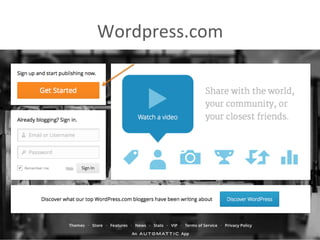
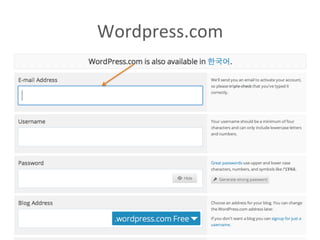
Wordpress.com	


Wordpress.com	


WordPress	
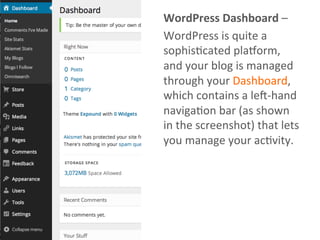
  Dashboard	
  –	
  
WordPress	
  is	
  quite	
  a	
  
sophisAcated	
  pla?orm,	
  
and	
  your	
  blog	
  is	
  managed	
  
through	
  your	
  Dashboard,	
  
which	
  contains	
  a	
  leJ-­‐hand	
  
navigaAon	
  bar	
  (as	
  shown	
  
in	
  the	
  screenshot)	
  that	
  lets	
  
you	
  manage	
  your	
  acAvity.	
  
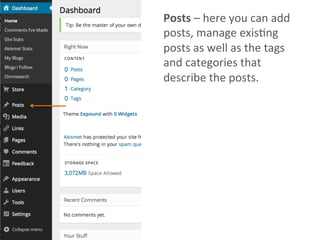
Posts	
  –	
  here	
  you	
  can	
  add	
  
posts,	
  manage	
  exisAng	
  
posts	
  as	
  well	
  as	
  the	
  tags	
  
and	
  categories	
  that	
  
describe	
  the	
  posts.	
  	
  
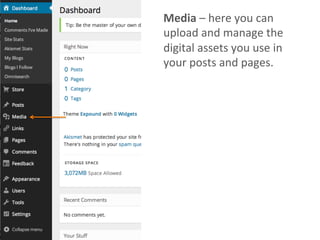
Media	
  –	
  here	
  you	
  can	
  
upload	
  and	
  manage	
  the	
  
digital	
  assets	
  you	
  use	
  in	
  
your	
  posts	
  and	
  pages.	
  	
  
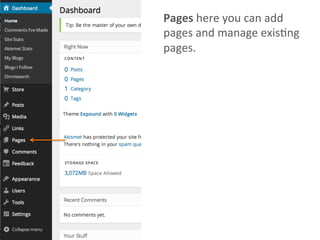
Pages	
  here	
  you	
  can	
  add	
  
pages	
  and	
  manage	
  exisAng	
  
pages.	
  	
  
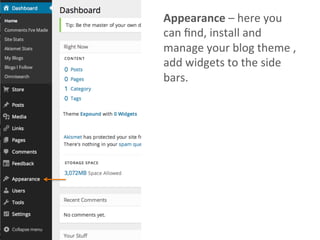
Appearance	
  –	
  here	
  you	
  
can	
  find,	
  install	
  and	
  
manage	
  your	
  blog	
  theme	
  ,	
  
add	
  widgets	
  to	
  the	
  side	
  
bars.	
  
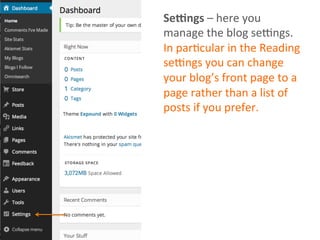
Se8ngs	
  –	
  here	
  you	
  
manage	
  the	
  blog	
  seMngs.	
  
In	
  parAcular	
  in	
  the	
  Reading	
  
seMngs	
  you	
  can	
  change	
  
your	
  blog’s	
  front	
  page	
  to	
  a	
  
page	
  rather	
  than	
  a	
  list	
  of	
  
posts	
  if	
  you	
  prefer.	
  	
  
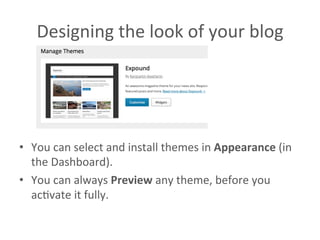
Designing	
  the	
  look	
  of	
  your	
  blog	
  	
  
•  You	
  can	
  select	
  and	
  install	
  themes	
  in	
  Appearance	
  (in	
  
the	
  Dashboard).	
  
•  You	
  can	
  always	
  Preview	
  any	
  theme,	
  before	
  you	
  
acAvate	
  it	
  fully.	
  	
  
WriAng	
  and	
  managing	
  posts	
  	
  
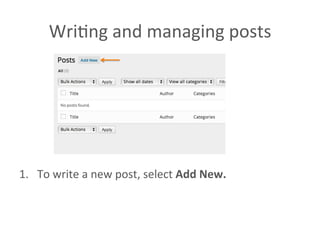
1.  To	
  write	
  a	
  new	
  post,	
  select	
  Add	
  New.	
  
WriAng	
  and	
  managing	
  posts	
  	
  
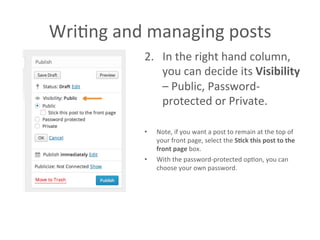
2.  In	
  the	
  right	
  hand	
  column,	
  
you	
  can	
  decide	
  its	
  Visibility	
  
–	
  Public,	
  Password-­‐
protected	
  or	
  Private.	
  	
  
•  Note,	
  if	
  you	
  want	
  a	
  post	
  to	
  remain	
  at	
  the	
  top	
  of	
  
your	
  front	
  page,	
  select	
  the	
  S>ck	
  this	
  post	
  to	
  the	
  
front	
  page	
  box.	
  	
  
•  With	
  the	
  password-­‐protected	
  opAon,	
  you	
  can	
  
choose	
  your	
  own	
  password.	
  	
  
WriAng	
  and	
  managing	
  posts	
  	
  
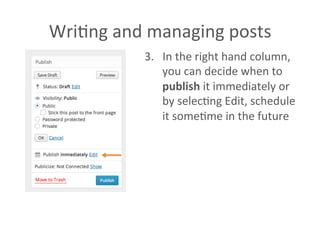
3.  In	
  the	
  right	
  hand	
  column,	
  
you	
  can	
  decide	
  when	
  to	
  
publish	
  it	
  immediately	
  or	
  
by	
  selecAng	
  Edit,	
  schedule	
  
it	
  someAme	
  in	
  the	
  future	
  	
  
WriAng	
  and	
  managing	
  posts	
  	
  
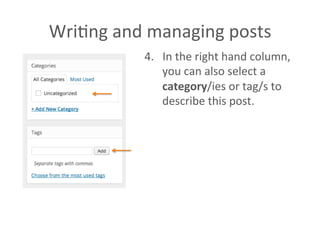
4.  In	
  the	
  right	
  hand	
  column,	
  
you	
  can	
  also	
  select	
  a	
  
category/ies	
  or	
  tag/s	
  to	
  
describe	
  this	
  post.	
  	
  
WriAng	
  and	
  managing	
  posts	
  	
  
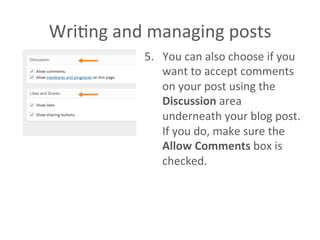
5.  You	
  can	
  also	
  choose	
  if	
  you	
  
want	
  to	
  accept	
  comments	
  
on	
  your	
  post	
  using	
  the	
  
Discussion	
  area	
  
underneath	
  your	
  blog	
  post.	
  
If	
  you	
  do,	
  make	
  sure	
  the	
  
Allow	
  Comments	
  box	
  is	
  
checked.	
  	
  
WriAng	
  and	
  managing	
  posts	
  	
  
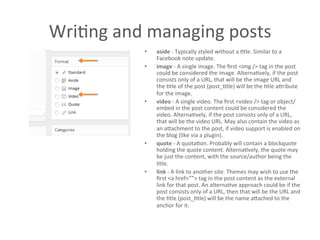
•  aside	
  -­‐	
  Typically	
  styled	
  without	
  a	
  Atle.	
  Similar	
  to	
  a	
  
Facebook	
  note	
  update.	
  
•  image	
  -­‐	
  A	
  single	
  image.	
  The	
  first	
  <img	
  />	
  tag	
  in	
  the	
  post	
  
could	
  be	
  considered	
  the	
  image.	
  AlternaAvely,	
  if	
  the	
  post	
  
consists	
  only	
  of	
  a	
  URL,	
  that	
  will	
  be	
  the	
  image	
  URL	
  and	
  
the	
  Atle	
  of	
  the	
  post	
  (post_Atle)	
  will	
  be	
  the	
  Atle	
  aCribute	
  
for	
  the	
  image.	
  
•  video	
  -­‐	
  A	
  single	
  video.	
  The	
  first	
  <video	
  />	
  tag	
  or	
  object/
embed	
  in	
  the	
  post	
  content	
  could	
  be	
  considered	
  the	
  
video.	
  AlternaAvely,	
  if	
  the	
  post	
  consists	
  only	
  of	
  a	
  URL,	
  
that	
  will	
  be	
  the	
  video	
  URL.	
  May	
  also	
  contain	
  the	
  video	
  as	
  
an	
  aCachment	
  to	
  the	
  post,	
  if	
  video	
  support	
  is	
  enabled	
  on	
  
the	
  blog	
  (like	
  via	
  a	
  plugin).	
  
•  quote	
  -­‐	
  A	
  quotaAon.	
  Probably	
  will	
  contain	
  a	
  blockquote	
  
holding	
  the	
  quote	
  content.	
  AlternaAvely,	
  the	
  quote	
  may	
  
be	
  just	
  the	
  content,	
  with	
  the	
  source/author	
  being	
  the	
  
Atle.	
  
•  link	
  -­‐	
  A	
  link	
  to	
  another	
  site.	
  Themes	
  may	
  wish	
  to	
  use	
  the	
  
first	
  <a	
  href=””>	
  tag	
  in	
  the	
  post	
  content	
  as	
  the	
  external	
  
link	
  for	
  that	
  post.	
  An	
  alternaAve	
  approach	
  could	
  be	
  if	
  the	
  
post	
  consists	
  only	
  of	
  a	
  URL,	
  then	
  that	
  will	
  be	
  the	
  URL	
  and	
  
the	
  Atle	
  (post_Atle)	
  will	
  be	
  the	
  name	
  aCached	
  to	
  the	
  
anchor	
  for	
  it.	


미사교 1001 wordpress

  • 1.
  • 2.
    WordPress       •  WordPress  is  one  of  the  most  widely  used  content   management  systems  around  today.   •  It  can  therefore  be  used  to  build  a  variety  of  web  and   blogging  sites.  
  • 3.
    WordPress       •  The  hosted  service  is  where  most  individuals  host   their  personal  WordPress  blogs.(wordpress.com)   •  The  free  open-­‐source  downloadable  version  can  be   used  to  set  up  your  personal  blogging  pla?orm. (wordpress.org)    
  • 4.
    WordPress       •  WordPress  is  much  more  than  a  blogging  site.   •  Since  it  has  the  facility  to  create  staAc  pages  in   addiAon  to  blog  posts,  this  means  it  can  be  used  to   build  a  complete  website.   •  hCp://itl.ewha.ac.kr  
  • 5.
  • 6.
  • 7.
    WordPress  Dashboard  –   WordPress  is  quite  a   sophisAcated  pla?orm,   and  your  blog  is  managed   through  your  Dashboard,   which  contains  a  leJ-­‐hand   navigaAon  bar  (as  shown   in  the  screenshot)  that  lets   you  manage  your  acAvity.  
  • 8.
    Posts  –  here  you  can  add   posts,  manage  exisAng   posts  as  well  as  the  tags   and  categories  that   describe  the  posts.    
  • 9.
    Media  –  here  you  can   upload  and  manage  the   digital  assets  you  use  in   your  posts  and  pages.    
  • 10.
    Pages  here  you  can  add   pages  and  manage  exisAng   pages.    
  • 11.
    Appearance  –  here  you   can  find,  install  and   manage  your  blog  theme  ,   add  widgets  to  the  side   bars.  
  • 12.
    Se8ngs  –  here  you   manage  the  blog  seMngs.   In  parAcular  in  the  Reading   seMngs  you  can  change   your  blog’s  front  page  to  a   page  rather  than  a  list  of   posts  if  you  prefer.    
  • 13.
    Designing  the  look  of  your  blog     •  You  can  select  and  install  themes  in  Appearance  (in   the  Dashboard).   •  You  can  always  Preview  any  theme,  before  you   acAvate  it  fully.    
  • 14.
    WriAng  and  managing  posts     1.  To  write  a  new  post,  select  Add  New.  
  • 15.
    WriAng  and  managing  posts     2.  In  the  right  hand  column,   you  can  decide  its  Visibility   –  Public,  Password-­‐ protected  or  Private.     •  Note,  if  you  want  a  post  to  remain  at  the  top  of   your  front  page,  select  the  S>ck  this  post  to  the   front  page  box.     •  With  the  password-­‐protected  opAon,  you  can   choose  your  own  password.    
  • 16.
    WriAng  and  managing  posts     3.  In  the  right  hand  column,   you  can  decide  when  to   publish  it  immediately  or   by  selecAng  Edit,  schedule   it  someAme  in  the  future    
  • 17.
    WriAng  and  managing  posts     4.  In  the  right  hand  column,   you  can  also  select  a   category/ies  or  tag/s  to   describe  this  post.    
  • 18.
    WriAng  and  managing  posts     5.  You  can  also  choose  if  you   want  to  accept  comments   on  your  post  using  the   Discussion  area   underneath  your  blog  post.   If  you  do,  make  sure  the   Allow  Comments  box  is   checked.    
  • 19.
    WriAng  and  managing  posts     •  aside  -­‐  Typically  styled  without  a  Atle.  Similar  to  a   Facebook  note  update.   •  image  -­‐  A  single  image.  The  first  <img  />  tag  in  the  post   could  be  considered  the  image.  AlternaAvely,  if  the  post   consists  only  of  a  URL,  that  will  be  the  image  URL  and   the  Atle  of  the  post  (post_Atle)  will  be  the  Atle  aCribute   for  the  image.   •  video  -­‐  A  single  video.  The  first  <video  />  tag  or  object/ embed  in  the  post  content  could  be  considered  the   video.  AlternaAvely,  if  the  post  consists  only  of  a  URL,   that  will  be  the  video  URL.  May  also  contain  the  video  as   an  aCachment  to  the  post,  if  video  support  is  enabled  on   the  blog  (like  via  a  plugin).   •  quote  -­‐  A  quotaAon.  Probably  will  contain  a  blockquote   holding  the  quote  content.  AlternaAvely,  the  quote  may   be  just  the  content,  with  the  source/author  being  the   Atle.   •  link  -­‐  A  link  to  another  site.  Themes  may  wish  to  use  the   first  <a  href=””>  tag  in  the  post  content  as  the  external   link  for  that  post.  An  alternaAve  approach  could  be  if  the   post  consists  only  of  a  URL,  then  that  will  be  the  URL  and   the  Atle  (post_Atle)  will  be  the  name  aCached  to  the   anchor  for  it.