VOYAGERACCESS
Using Access to
Create Reports
from Voyager
Alan Manifold
Consultant / Trainer
Alan Manifold Library Automation Consulting
alan@mashiyyat.net
Presented more than 60 times
VOYAGERACCESS
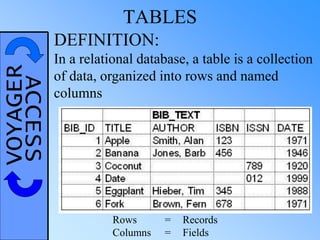
Rows = Records
Columns = Fields
TABLES
DEFINITION:
In a relational database, a table is a collection
of data, organized into rows and named
columns
VOYAGERACCESSGOOD & BAD DATABASE DESIGN
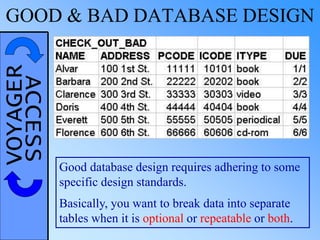
Good database design requires adhering to some
specific design standards.
Basically, you want to break data into separate
tables when it is optional or repeatable or both.
VOYAGERACCESSBAD DATABASE DESIGN
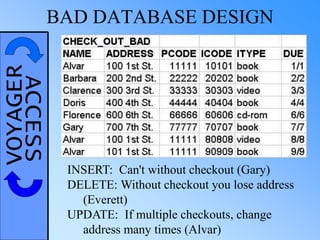
INSERT: Can't without checkout (Gary)
DELETE: Without checkout you lose address
(Everett)
UPDATE: If multiple checkouts, change
address many times (Alvar)
VOYAGERACCESSBETTER DATABASE DESIGN
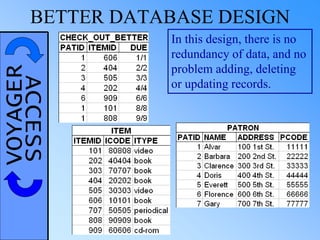
In this design, there is no
redundancy of data, and no
problem adding, deleting
or updating records.
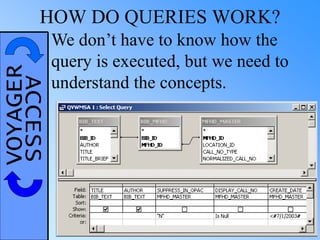
VOYAGERACCESSHOW DO QUERIES WORK?
We don’t have to know how the
query is executed, but we need to
understand the concepts.
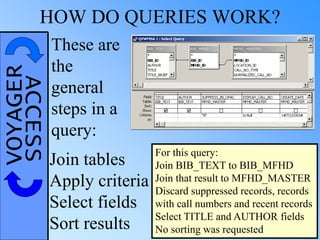
VOYAGERACCESSHOW DO QUERIES WORK?
These are
the
general
steps in a
query:
Join tables
Apply criteria
Select fields
Sort results
For this query:
Join BIB_TEXT to BIB_MFHD
Join that result to MFHD_MASTER
Discard suppressed records, records
with call numbers and recent records
Select TITLE and AUTHOR fields
No sorting was requested
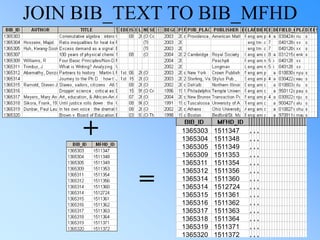
JOIN BIB_TEXT TO BIB_MFHD
1365303 1511347 . . .
1365304 1511348 . . .
1365305 1511349 . . .
1365309 1511353 . . .
1365311 1511354 . . .
1365312 1511356 . . .
1365314 1511360 . . .
1365314 1512724 . . .
1365315 1511361 . . .
1365316 1511362 . . .
1365317 1511363 . . .
1365318 1511364 . . .
1365319 1511371 . . .
1365320 1511372 . . .
+
=
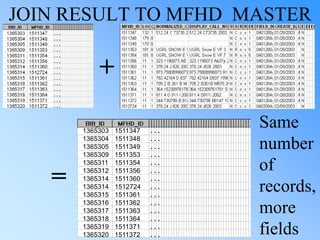
JOIN RESULT TO MFHD_MASTER
+
=
1365303 1511347 . . .
1365304 1511348 . . .
1365305 1511349 . . .
1365309 1511353 . . .
1365311 1511354 . . .
1365312 1511356 . . .
1365314 1511360 . . .
1365314 1512724 . . .
1365315 1511361 . . .
1365316 1511362 . . .
1365317 1511363 . . .
1365318 1511364 . . .
1365319 1511371 . . .
1365320 1511372 . . .
Same
number
of
records,
more
fields
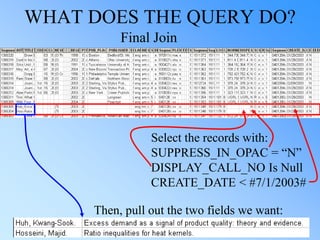
WHAT DOES THE QUERY DO?
Final Join
Select the records with:
SUPPRESS_IN_OPAC = “N”
DISPLAY_CALL_NO Is Null
CREATE_DATE < #7/1/2003#
Then, pull out the two fields we want:
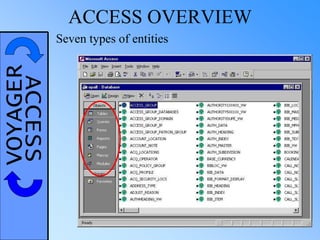
VOYAGERACCESS ACCESS OVERVIEW
Seven types of entities
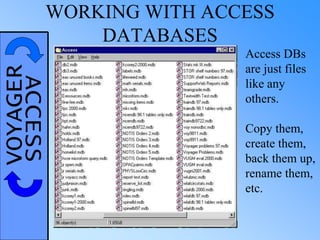
VOYAGERACCESSWORKING WITH ACCESS
DATABASES
Access DBs
are just files
like any
others.
Copy them,
create them,
back them up,
rename them,
etc.
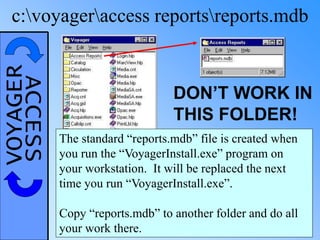
VOYAGERACCESSc:voyageraccess reportsreports.mdb
DON’T WORK IN
THIS FOLDER!
The standard “reports.mdb” file is created when
you run the “VoyagerInstall.exe” program on
your workstation. It will be replaced the next
time you run “VoyagerInstall.exe”.
Copy “reports.mdb” to another folder and do all
your work there.
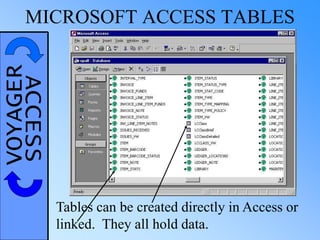
VOYAGERACCESSMICROSOFT ACCESS TABLES
Tables can be created directly in Access or
linked. They all hold data.
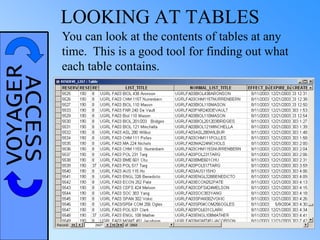
VOYAGERACCESS LOOKING AT TABLES
You can look at the contents of tables at any
time. This is a good tool for finding out what
each table contains.
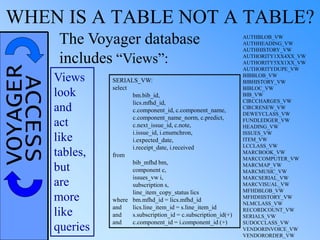
VOYAGERACCESSWHEN IS A TABLE NOT A TABLE?
The Voyager database
includes “Views”:
SERIALS_VW:
select
bm.bib_id,
lics.mfhd_id,
c.component_id, c.component_name,
c.component_name_norm, c.predict,
c.next_issue_id, c.note,
i.issue_id, i.enumchron,
i.expected_date,
i.receipt_date, i.received
from
bib_mfhd bm,
component c,
issues_vw i,
subscription s,
line_item_copy_status lics
where bm.mfhd_id = lics.mfhd_id
and lics.line_item_id = s.line_item_id
and s.subscription_id = c.subscription_id(+)
and c.component_id = i.component_id (+)
Views
look
and
act
like
tables,
but
are
more
like
queries
AUTHBLOB_VW
AUTHHEADING_VW
AUTHHISTORY_VW
AUTHORITY1XX4XX_VW
AUTHORITY5XX1XX_VW
AUTHORITYDUPE_VW
BIBBLOB_VW
BIBHISTORY_VW
BIBLOC_VW
BIB_VW
CIRCCHARGES_VW
CIRCRENEW_VW
DEWEYCLASS_VW
FUNDLEDGER_VW
HEADING_VW
ISSUES_VW
ITEM_VW
LCCLASS_VW
MARCBOOK_VW
MARCCOMPUTER_VW
MARCMAP_VW
MARCMUSIC_VW
MARCSERIAL_VW
MARCVISUAL_VW
MFHDBLOB_VW
MFHDHISTORY_VW
NLMCLASS_VW
RECORDCOUNT_VW
SERIALS_VW
SUDOCCLASS_VW
VENDORINVOICE_VW
VENDORORDER_VW
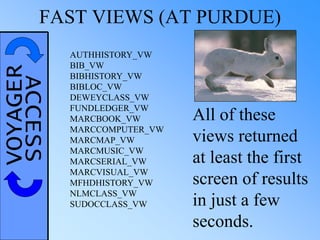
VOYAGERACCESSFAST VIEWS (AT PURDUE)
AUTHHISTORY_VW
BIB_VW
BIBHISTORY_VW
BIBLOC_VW
DEWEYCLASS_VW
FUNDLEDGER_VW
MARCBOOK_VW
MARCCOMPUTER_VW
MARCMAP_VW
MARCMUSIC_VW
MARCSERIAL_VW
MARCVISUAL_VW
MFHDHISTORY_VW
NLMCLASS_VW
SUDOCCLASS_VW
All of these
views returned
at least the first
screen of results
in just a few
seconds.
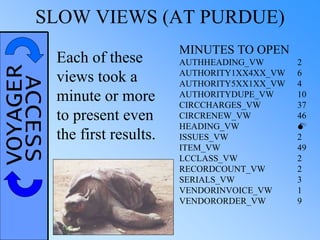
VOYAGERACCESSSLOW VIEWS (AT PURDUE)
MINUTES TO OPEN
AUTHHEADING_VW 2
AUTHORITY1XX4XX_VW 6
AUTHORITY5XX1XX_VW 4
AUTHORITYDUPE_VW 10
CIRCCHARGES_VW 37
CIRCRENEW_VW 46
HEADING_VW 
ISSUES_VW 2
ITEM_VW 49
LCCLASS_VW 2
RECORDCOUNT_VW 2
SERIALS_VW 3
VENDORINVOICE_VW 1
VENDORORDER_VW 9
Each of these
views took a
minute or more
to present even
the first results.
VOYAGERACCESS TIME TO TRY IT OUT!
ACCESS
TABLE
EXERCISES
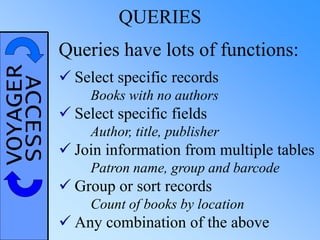
VOYAGERACCESS QUERIES
Queries have lots of functions:
 Select specific records
Books with no authors
 Select specific fields
Author, title, publisher
 Join information from multiple tables
Patron name, group and barcode
 Group or sort records
Count of books by location
 Any combination of the above
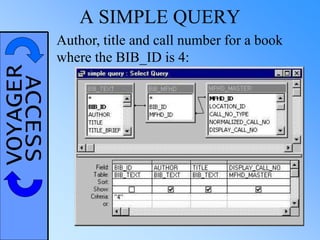
VOYAGERACCESS A SIMPLE QUERY
Author, title and call number for a book
where the BIB_ID is 4:
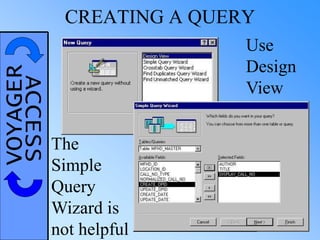
VOYAGERACCESS CREATING A QUERY
Use
Design
View
The
Simple
Query
Wizard is
not helpful
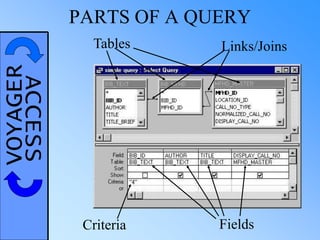
VOYAGERACCESS PARTS OF A QUERY
Tables Links/Joins
FieldsCriteria
VOYAGERACCESSWHICH TABLES TO CHOOSE?
Five reasons to add a table
to a query:
To select a field from it
To apply criteria to a field
To link other tables together
To eliminate or add records to
the result
To affect sorting or grouping
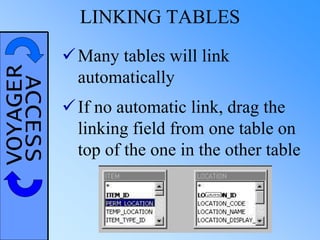
VOYAGERACCESS LINKING TABLES
Many tables will link
automatically
If no automatic link, drag the
linking field from one table on
top of the one in the other table
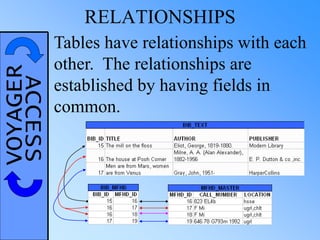
VOYAGERACCESS RELATIONSHIPS
Tables have relationships with each
other. The relationships are
established by having fields in
common.
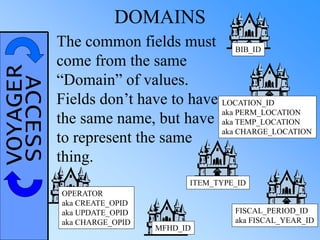
VOYAGERACCESS DOMAINS
The common fields must
come from the same
“Domain” of values.
Fields don’t have to have
the same name, but have
to represent the same
thing.
BIB_ID
LOCATION_ID
aka PERM_LOCATION
aka TEMP_LOCATION
aka CHARGE_LOCATION
FISCAL_PERIOD_ID
aka FISCAL_YEAR_ID
MFHD_ID
ITEM_TYPE_ID
OPERATOR
aka CREATE_OPID
aka UPDATE_OPID
aka CHARGE_OPID
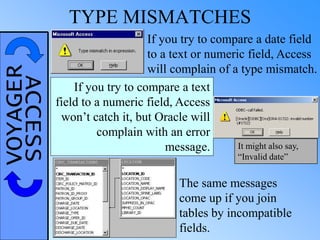
VOYAGERACCESS TYPE MISMATCHES
If you try to compare a date field
to a text or numeric field, Access
will complain of a type mismatch.
If you try to compare a text
field to a numeric field, Access
won’t catch it, but Oracle will
complain with an error
message.
The same messages
come up if you join
tables by incompatible
fields.
It might also say,
“Invalid date”
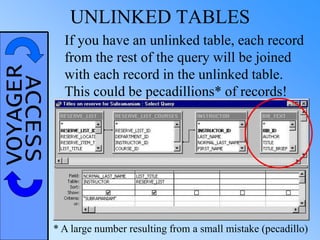
VOYAGERACCESS UNLINKED TABLES
If you have an unlinked table, each record
from the rest of the query will be joined
with each record in the unlinked table.
This could be pecadillions* of records!
* A large number resulting from a small mistake (pecadillo)
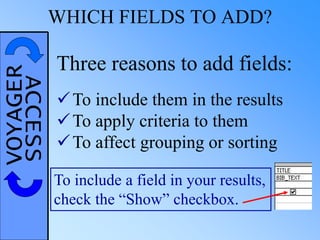
VOYAGERACCESSWHICH FIELDS TO ADD?
Three reasons to add fields:
To include them in the results
To apply criteria to them
To affect grouping or sorting
To include a field in your results,
check the “Show” checkbox.
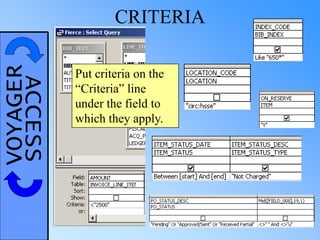
VOYAGERACCESS CRITERIA
Put criteria on the
“Criteria” line
under the field to
which they apply.
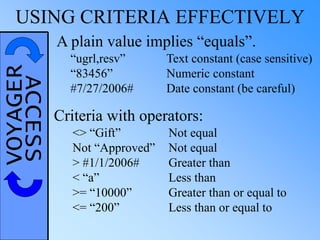
VOYAGERACCESSUSING CRITERIA EFFECTIVELY
A plain value implies “equals”.
<> “Gift” Not equal
Not “Approved” Not equal
> #1/1/2006# Greater than
< “a” Less than
>= “10000” Greater than or equal to
<= “200” Less than or equal to
Criteria with operators:
“ugrl,resv” Text constant (case sensitive)
“83456” Numeric constant
#7/27/2006# Date constant (be careful)
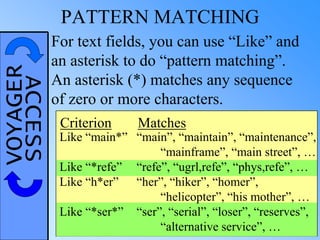
VOYAGERACCESS PATTERN MATCHING
“main”, “maintain”, “maintenance”,
“mainframe”, “main street”, …
“refe”, “ugrl,refe”, “phys,refe”, …
“her”, “hiker”, “homer”,
“helicopter”, “his mother”, …
“ser”, “serial”, “loser”, “reserves”,
“alternative service”, …
For text fields, you can use “Like” and
an asterisk to do “pattern matching”.
An asterisk (*) matches any sequence
of zero or more characters.
Like “main*”
Like “*refe”
Like “h*er”
Like “*ser*”
Criterion Matches
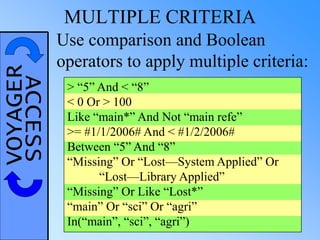
VOYAGERACCESS MULTIPLE CRITERIA
> “5” And < “8”
< 0 Or > 100
Like “main*” And Not “main refe”
>= #1/1/2006# And < #1/2/2006#
Between “5” And “8”
“Missing” Or “Lost—System Applied” Or
“Lost—Library Applied”
“Missing” Or Like “Lost*”
“main” Or “sci” Or “agri”
In(“main”, “sci”, “agri”)
Use comparison and Boolean
operators to apply multiple criteria:
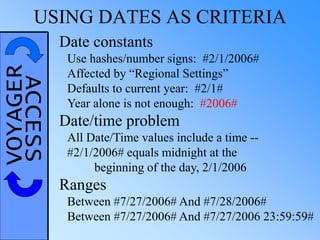
VOYAGERACCESSUSING DATES AS CRITERIA
Date constants
Use hashes/number signs: #2/1/2006#
Affected by “Regional Settings”
Defaults to current year: #2/1#
Year alone is not enough: #2006#
Date/time problem
All Date/Time values include a time --
#2/1/2006# equals midnight at the
beginning of the day, 2/1/2006
Ranges
Between #7/27/2006# And #7/28/2006#
Between #7/27/2006# And #7/27/2006 23:59:59#
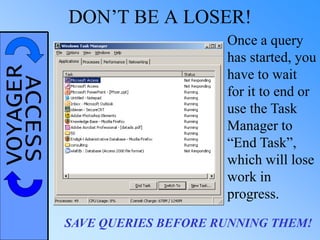
VOYAGERACCESS DON’T BE A LOSER!
Once a query
has started, you
have to wait
for it to end or
use the Task
Manager to
“End Task”,
which will lose
work in
progress.
SAVE QUERIES BEFORE RUNNING THEM!
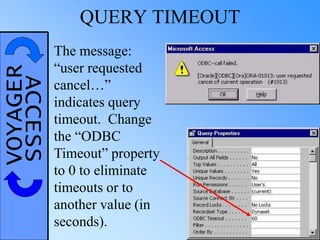
VOYAGERACCESS QUERY TIMEOUT
The message:
“user requested
cancel…”
indicates query
timeout. Change
the “ODBC
Timeout” property
to 0 to eliminate
timeouts or to
another value (in
seconds).
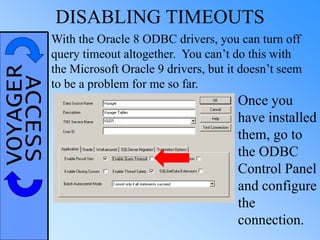
VOYAGERACCESS DISABLING TIMEOUTS
With the Oracle 8 ODBC drivers, you can turn off
query timeout altogether. You can’t do this with
the Microsoft Oracle 9 drivers, but it doesn’t seem
to be a problem for me so far.
Once you
have installed
them, go to
the ODBC
Control Panel
and configure
the
connection.
VOYAGERACCESS LET’S GIVE IT A TRY!
ACCESS
QUERY
EXERCISES
1
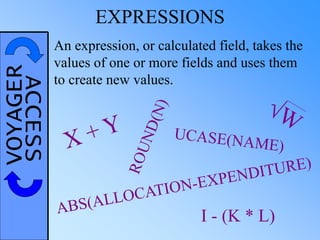
VOYAGERACCESS EXPRESSIONS
An expression, or calculated field, takes the
values of one or more fields and uses them
to create new values.
I - (K * L)
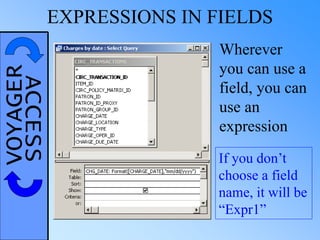
VOYAGERACCESSEXPRESSIONS IN FIELDS
Wherever
you can use a
field, you can
use an
expression
If you don’t
choose a field
name, it will be
“Expr1”
VOYAGERACCESSSOME USEFUL FUNCTIONS
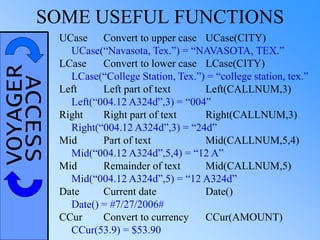
UCase Convert to upper case UCase(CITY)
UCase(“Navasota, Tex.”) = “NAVASOTA, TEX.”
LCase Convert to lower case LCase(CITY)
LCase(“College Station, Tex.”) = “college station, tex.”
Left Left part of text Left(CALLNUM,3)
Left(“004.12 A324d”,3) = “004”
Right Right part of text Right(CALLNUM,3)
Right(“004.12 A324d”,3) = “24d”
Mid Part of text Mid(CALLNUM,5,4)
Mid(“004.12 A324d”,5,4) = “12 A”
Mid Remainder of text Mid(CALLNUM,5)
Mid(“004.12 A324d”,5) = “12 A324d”
Date Current date Date()
Date() = #7/27/2006#
CCur Convert to currency CCur(AMOUNT)
CCur(53.9) = $53.90
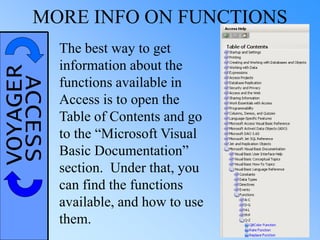
VOYAGERACCESSMORE INFO ON FUNCTIONS
The best way to get
information about the
functions available in
Access is to open the
Table of Contents and go
to the “Microsoft Visual
Basic Documentation”
section. Under that, you
can find the functions
available, and how to use
them.
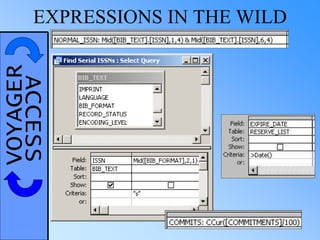
VOYAGERACCESSEXPRESSIONS IN THE WILD
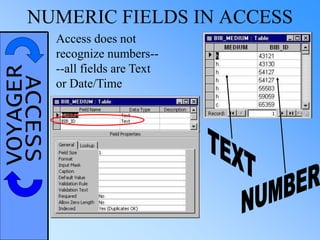
VOYAGERACCESSNUMERIC FIELDS IN ACCESS
Access does not
recognize numbers--
--all fields are Text
or Date/Time
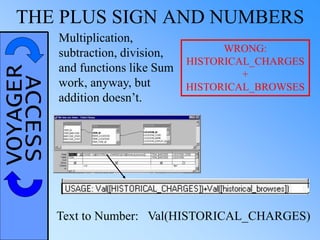
VOYAGERACCESSTHE PLUS SIGN AND NUMBERS
Text to Number: Val(HISTORICAL_CHARGES)
WRONG:
HISTORICAL_CHARGES
+
HISTORICAL_BROWSES
Multiplication,
subtraction, division,
and functions like Sum
work, anyway, but
addition doesn’t.
VOYAGERACCESS MONETARY VALUES
Monetary values problems:
Converted to text
Integers, stored in the smallest unit
To include a monetary figure in a query:
CCur([AMOUNT]/100)
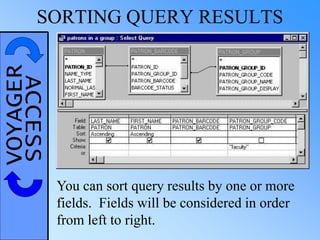
VOYAGERACCESSSORTING QUERY RESULTS
You can sort query results by one or more
fields. Fields will be considered in order
from left to right.
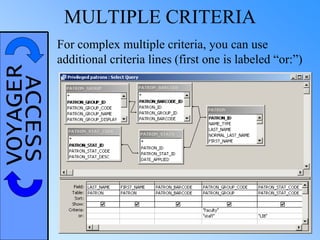
VOYAGERACCESS MULTIPLE CRITERIA
For complex multiple criteria, you can use
additional criteria lines (first one is labeled “or:”)
VOYAGERACCESSPROMPTING FOR CRITERIA
SYNTAX:
Left square bracket – Prompt – Right square bracket
Example: [Bib ID Number?]
VOYAGERACCESS USING PROMPTS
Make your prompts the best they can be.
Imagine that the users do not know what
kind of information is expected. Provide
enough information in the prompt that they
can figure it out.
[p1]
[sdate]
[start] *Endeavor’s standard
[start date]
[Start Date:]
[First date of data:]
[Starting date for report (mm/dd/yyyy):]
BETTER?
VOYAGERACCESSMORE COMPLEX PROMPTS
<> [Item Type to Exclude?]
> [Minimum Price?]
Like [Generic Location Code:] & “*”
Not Like [Vendor to Skip] & “*”
Between [Start Date:] And [End Date:]
If you use the same exact prompt more than once,
it only prompts you once and substitutes the same
value in each spot.
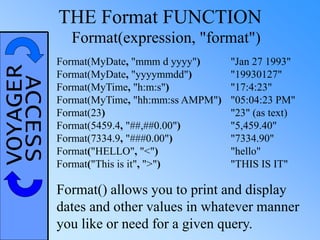
VOYAGERACCESS THE Format FUNCTION
Format() allows you to print and display
dates and other values in whatever manner
you like or need for a given query.
Format(MyDate, "mmm d yyyy") "Jan 27 1993"
Format(MyDate, "yyyymmdd") "19930127"
Format(MyTime, "h:m:s") "17:4:23"
Format(MyTime, "hh:mm:ss AMPM") "05:04:23 PM"
Format(23) "23" (as text)
Format(5459.4, "##,##0.00") "5,459.40"
Format(7334.9, "###0.00") "7334.90"
Format("HELLO", "<") "hello"
Format("This is it", ">") "THIS IS IT"
Format(expression, "format")
VOYAGERACCESS THE DateAdd FUNCTION
DateAdd(interval, number, date)
ADDS “number” TIMES THE
“interval” TO THE “date”
“yyyy” — YEAR
“q” — QUARTER
“m” — MONTH
“d” — DAY
“ww” — WEEK
“s” — SECOND
EXAMPLES:
ONE YEAR AGO TODAY:
DateAdd(“yyyy”, -1, Date())
ONE MONTH’S WORTH:
Between [Start of Month] And
DateAdd(“m”, 1, [Start of Month])
OVER THE WEEKEND:
Between [Friday’s Date?] And
DateAdd(“d”, 3, [Friday’s Date?])
ARBITRARY PERIOD’S DATA (SAFELY):
Between [Start Date:] And DateAdd(“s”, -1, [End Date:])
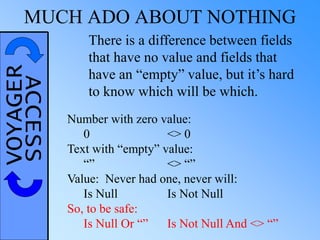
VOYAGERACCESSMUCH ADO ABOUT NOTHING
There is a difference between fields
that have no value and fields that
have an “empty” value, but it’s hard
to know which will be which.
Number with zero value:
0 <> 0
Text with “empty” value:
“” <> “”
Value: Never had one, never will:
Is Null Is Not Null
So, to be safe:
Is Null Or “” Is Not Null And <> “”
VOYAGERACCESS ENOUGH TALK!
ACCESS
QUERY
EXERCISES
2
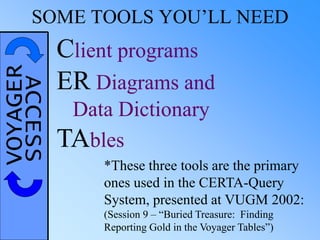
VOYAGERACCESSSOME TOOLS YOU’LL NEED
Client programs
ER Diagrams and
Data Dictionary
TAbles
*These three tools are the primary
ones used in the CERTA-Query
System, presented at VUGM 2002:
(Session 9 – “Buried Treasure: Finding
Reporting Gold in the Voyager Tables”)
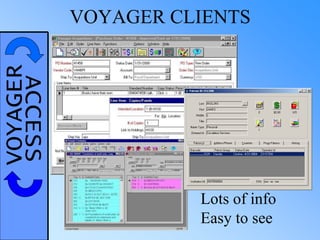
VOYAGERACCESS VOYAGER CLIENTS
Lots of info
Easy to see
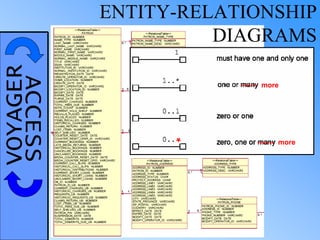
VOYAGERACCESS ENTITY-RELATIONSHIP
DIAGRAMS
*
------- more
------- more
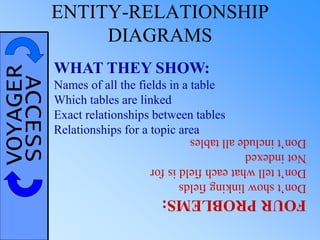
VOYAGERACCESS ENTITY-RELATIONSHIP
DIAGRAMS
WHAT THEY SHOW:
Names of all the fields in a table
Which tables are linked
Exact relationships between tables
Relationships for a topic area
FOURPROBLEMS:
Don’tshowlinkingfields
Don’ttellwhateachfieldisfor
Notindexed
Don’tincludealltables
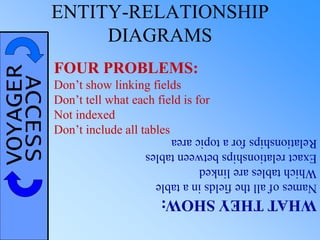
VOYAGERACCESS ENTITY-RELATIONSHIP
DIAGRAMS
WHATTHEYSHOW:
Namesofallthefieldsinatable
Whichtablesarelinked
Exactrelationshipsbetweentables
Relationshipsforatopicarea
FOUR PROBLEMS:
Don’t show linking fields
Don’t tell what each field is for
Not indexed
Don’t include all tables
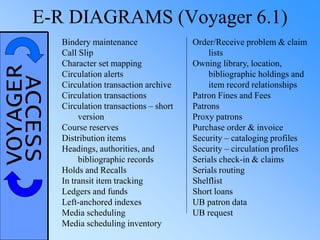
VOYAGERACCESSE-R DIAGRAMS (Voyager 6.1)
Bindery maintenance
Call Slip
Character set mapping
Circulation alerts
Circulation transaction archive
Circulation transactions
Circulation transactions – short
version
Course reserves
Distribution items
Headings, authorities, and
bibliographic records
Holds and Recalls
In transit item tracking
Ledgers and funds
Left-anchored indexes
Media scheduling
Media scheduling inventory
Order/Receive problem & claim
lists
Owning library, location,
bibliographic holdings and
item record relationships
Patron Fines and Fees
Patrons
Proxy patrons
Purchase order & invoice
Security – cataloging profiles
Security – circulation profiles
Serials check-in & claims
Serials routing
Shelflist
Short loans
UB patron data
UB request
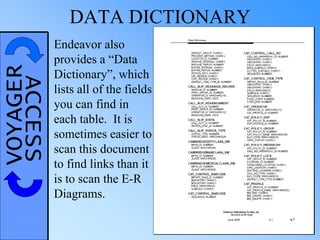
VOYAGERACCESS DATA DICTIONARY
Endeavor also
provides a “Data
Dictionary”, which
lists all of the fields
you can find in
each table. It is
sometimes easier to
scan this document
to find links than it
is to scan the E-R
Diagrams.
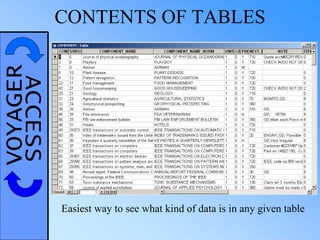
VOYAGERACCESS CONTENTS OF TABLES
Easiest way to see what kind of data is in any given table
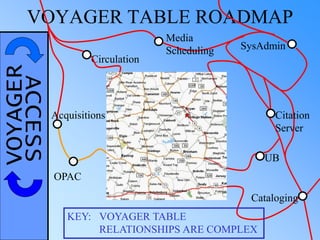
VOYAGERACCESSVOYAGER TABLE ROADMAP
Circulation
SysAdmin
KEY: VOYAGER TABLE
RELATIONSHIPS ARE COMPLEX
Citation
Server
Media
Scheduling
Cataloging
UB
Acquisitions
OPAC
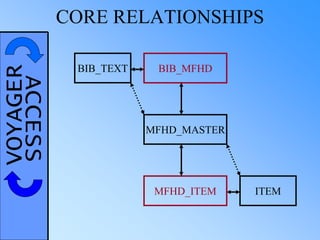
VOYAGERACCESS CORE RELATIONSHIPS
BIB_TEXT
MFHD_MASTER
ITEM
BIB_MFHD
MFHD_ITEM
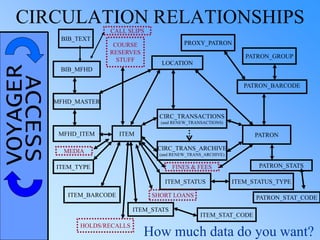
VOYAGERACCESSCIRCULATION RELATIONSHIPS
BIB_TEXT
MFHD_MASTER
ITEM
BIB_MFHD
MFHD_ITEM
CIRC_TRANSACTIONS
(and RENEW_TRANSACTIONS)
CIRC_TRANS_ARCHIVE
(and RENEW_TRANS_ARCHIVE)
PATRON
PATRON_BARCODE
ITEM_TYPE
ITEM_BARCODE
ITEM_STATUS
ITEM_STATS
PATRON_GROUP
LOCATION
ITEM_STAT_CODE
ITEM_STATUS_TYPE
COURSE
RESERVES
STUFF
HOLDS/RECALLS
FINES & FEES PATRON_STATS
How much data do you want?
SHORT LOANS
CALL SLIPS
MEDIA
PATRON_STAT_CODE
PROXY_PATRON
VOYAGERACCESS GETTING ALL THE
CIRCULATION HISTORY
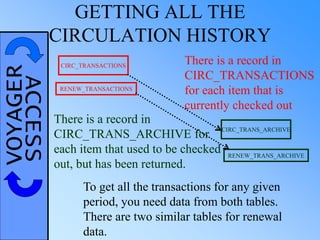
CIRC_TRANSACTIONS
CIRC_TRANS_ARCHIVE
There is a record in
CIRC_TRANSACTIONS
for each item that is
currently checked out
There is a record in
CIRC_TRANS_ARCHIVE for
each item that used to be checked
out, but has been returned.
To get all the transactions for any given
period, you need data from both tables.
There are two similar tables for renewal
data.
RENEW_TRANSACTIONS
RENEW_TRANS_ARCHIVE
VOYAGERACCESS UNION QUERIES
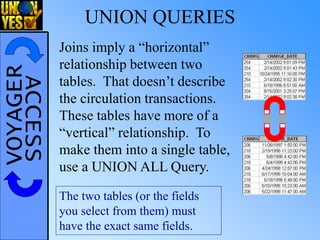
The two tables (or the fields
you select from them) must
have the exact same fields.
Joins imply a “horizontal”
relationship between two
tables. That doesn’t describe
the circulation transactions.
These tables have more of a
“vertical” relationship. To
make them into a single table,
use a UNION ALL Query.
VOYAGERACCESS UNION QUERIES
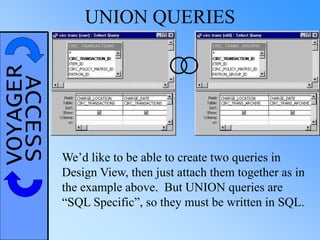
We’d like to be able to create two queries in
Design View, then just attach them together as in
the example above. But UNION queries are
“SQL Specific”, so they must be written in SQL.
VOYAGERACCESS UNION QUERIES
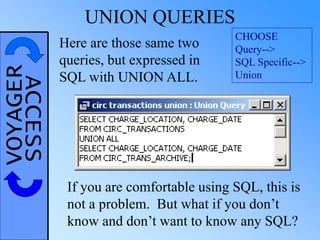
CHOOSE
Query-->
SQL Specific-->
Union
Here are those same two
queries, but expressed in
SQL with UNION ALL.
If you are comfortable using SQL, this is
not a problem. But what if you don’t
know and don’t want to know any SQL?
VOYAGERACCESS UNION QUERY CHEAT
The asterisk operator, which stands for “All
fields from the table”, makes it easy to create a
Union All from two Design View queries.
In general, the syntax is:
SELECT * FROM [<query 1>]
UNION ALL
SELECT * FROM [<query 2>]
UNION ALL
SELECT * FROM [<query 3>];
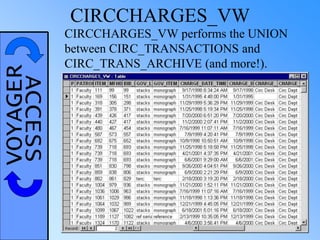
VOYAGERACCESS CIRCCHARGES_VW
CIRCCHARGES_VW performs the UNION
between CIRC_TRANSACTIONS and
CIRC_TRANS_ARCHIVE (and more!).
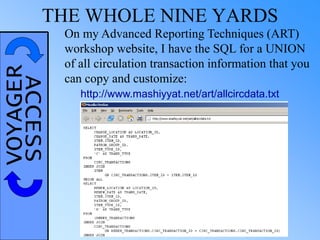
VOYAGERACCESSTHE WHOLE NINE YARDS
On my Advanced Reporting Techniques (ART)
workshop website, I have the SQL for a UNION
of all circulation transaction information that you
can copy and customize:
http://www.mashiyyat.net/art/allcircdata.txt
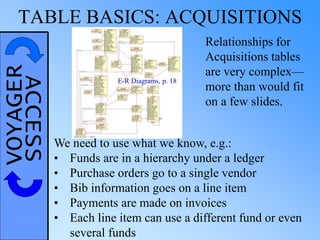
VOYAGERACCESSTABLE BASICS: ACQUISITIONS
Relationships for
Acquisitions tables
are very complex—
more than would fit
on a few slides.
We need to use what we know, e.g.:
• Funds are in a hierarchy under a ledger
• Purchase orders go to a single vendor
• Bib information goes on a line item
• Payments are made on invoices
• Each line item can use a different fund or even
several funds
E-R Diagrams, p. 18
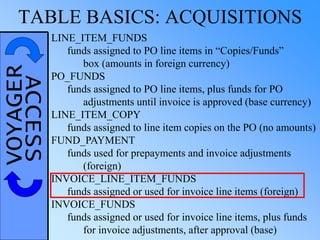
VOYAGERACCESSTABLE BASICS: ACQUISITIONS
LINE_ITEM_FUNDS
funds assigned to PO line items in “Copies/Funds”
box (amounts in foreign currency)
PO_FUNDS
funds assigned to PO line items, plus funds for PO
adjustments until invoice is approved (base currency)
LINE_ITEM_COPY
funds assigned to line item copies on the PO (no amounts)
FUND_PAYMENT
funds used for prepayments and invoice adjustments
(foreign)
INVOICE_LINE_ITEM_FUNDS
funds assigned or used for invoice line items (foreign)
INVOICE_FUNDS
funds assigned or used for invoice line items, plus funds
for invoice adjustments, after approval (base)
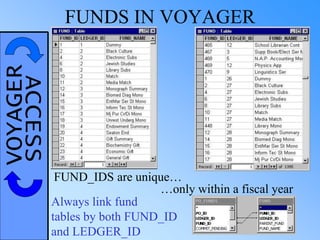
VOYAGERACCESS FUNDS IN VOYAGER
FUND_IDS are unique…
…only within a fiscal year
Always link fund
tables by both FUND_ID
and LEDGER_ID
VOYAGERACCESS
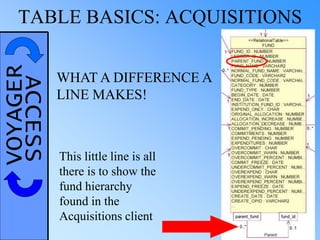
WHAT A DIFFERENCE A
LINE MAKES!
This little line is all
there is to show the
fund hierarchy
found in the
Acquisitions client
TABLE BASICS: ACQUISITIONS
VOYAGERACCESS
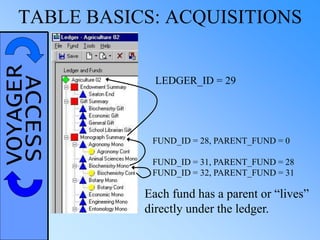
FUND_ID = 32, PARENT_FUND = 31
FUND_ID = 31, PARENT_FUND = 28
FUND_ID = 28, PARENT_FUND = 0
LEDGER_ID = 29
Each fund has a parent or “lives”
directly under the ledger.
TABLE BASICS: ACQUISITIONS
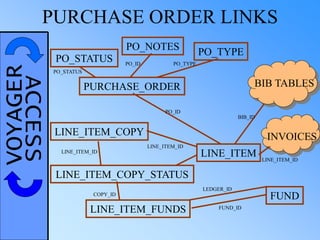
VOYAGERACCESSPURCHASE ORDER LINKS
PURCHASE_ORDER
LINE_ITEM
PO_ID
PO_NOTES
PO_STATUS
PO_TYPE
PO_STATUS
PO_TYPEPO_ID
BIB TABLES
BIB_ID
FUND
LEDGER_ID
FUND_ID
INVOICES
LINE_ITEM_ID
LINE_ITEM_FUNDS
LINE_ITEM_COPY_STATUS
LINE_ITEM_COPY
LINE_ITEM_ID
LINE_ITEM_ID
COPY_ID
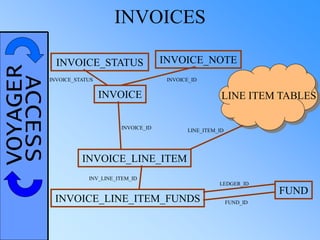
VOYAGERACCESS INVOICES
INVOICE
INVOICE_NOTEINVOICE_STATUS
INVOICE_STATUS INVOICE_ID
INVOICE_ID
INVOICE_LINE_ITEM
LINE ITEM TABLES
LINE_ITEM_ID
INVOICE_LINE_ITEM_FUNDS
INV_LINE_ITEM_ID
FUND
LEDGER_ID
FUND_ID
VOYAGERACCESSCURRENCY CONVERSION
Foreign currencies: CCur(([LINE_PRICE] /
([CONVERSION_RATE] / 100000)) / 100)
This is the
conversion rate
actually used.
Base currency: CCur([AMT]/100)
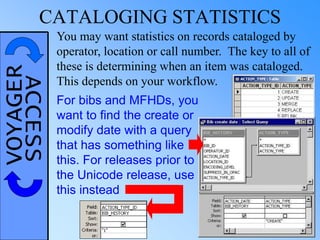
VOYAGERACCESSCATALOGING STATISTICS
You may want statistics on records cataloged by
operator, location or call number. The key to all of
these is determining when an item was cataloged.
This depends on your workflow.
For bibs and MFHDs, you
want to find the create or
modify date with a query
that has something like
this. For releases prior to
the Unicode release, use
this instead
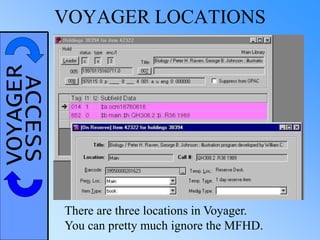
VOYAGERACCESS VOYAGER LOCATIONS
There are three locations in Voyager.
You can pretty much ignore the MFHD.
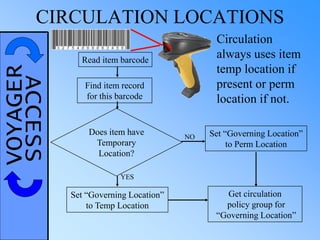
VOYAGERACCESSCIRCULATION LOCATIONS
Does item have
Temporary
Location?
Read item barcode
Find item record
for this barcode
Set “Governing Location”
to Temp Location
Set “Governing Location”
to Perm Location
Get circulation
policy group for
“Governing Location”
Circulation
always uses item
temp location if
present or perm
location if not.
YES
NO
VOYAGERACCESS OPAC LOCATIONS
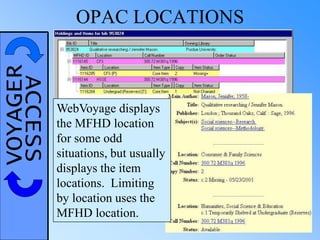
WebVoyage displays
the MFHD location
for some odd
situations, but usually
displays the item
locations. Limiting
by location uses the
MFHD location.
VOYAGERACCESSEXPLORE ON YOUR OWN
VOYAGER
EXPLORATION
EXERCISES
TOO MANY RESULTS
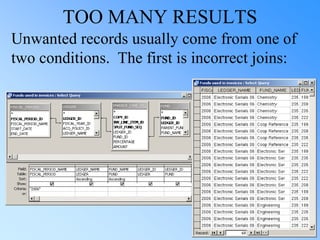
Unwanted records usually come from one of
two conditions. The first is incorrect joins:
VOYAGERACCESS TOO MANY RESULTS
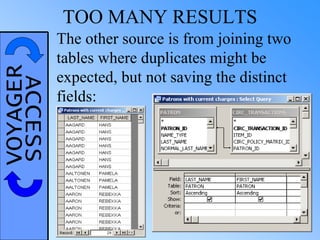
The other source is from joining two
tables where duplicates might be
expected, but not saving the distinct
fields:
VOYAGERACCESS TOO MANY RESULTS
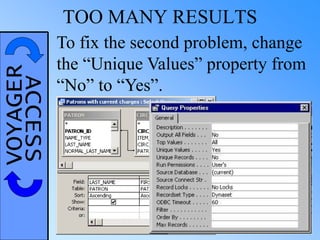
To fix the second problem, change
the “Unique Values” property from
“No” to “Yes”.
VOYAGERACCESS TOO FEW RESULTS
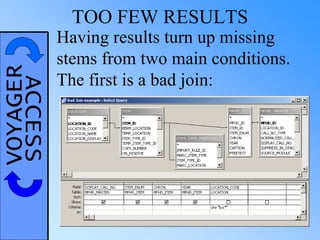
Having results turn up missing
stems from two main conditions.
The first is a bad join:
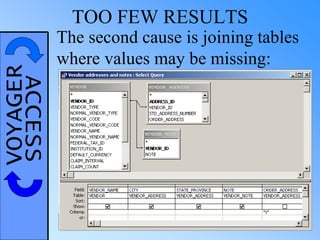
VOYAGERACCESS TOO FEW RESULTS
The second cause is joining tables
where values may be missing:
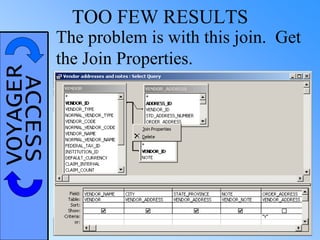
VOYAGERACCESS TOO FEW RESULTS
The problem is with this join. Get
the Join Properties.
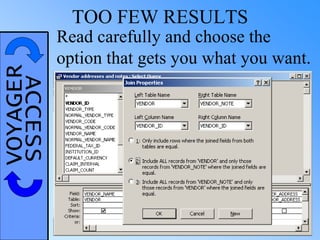
VOYAGERACCESS TOO FEW RESULTS
Read carefully and choose the
option that gets you what you want.
VOYAGERACCESS TOO FEW RESULTS
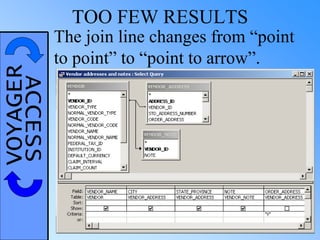
The join line changes from “point
to point” to “point to arrow”.
VOYAGERACCESSFINDING CHILDLESS RECORDS
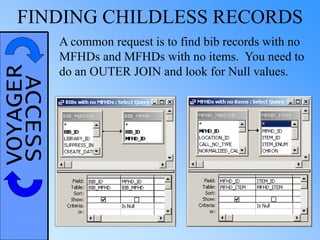
A common request is to find bib records with no
MFHDs and MFHDs with no items. You need to
do an OUTER JOIN and look for Null values.
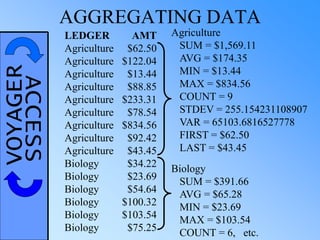
VOYAGERACCESS AGGREGATING DATA
LEDGER AMT
Agriculture $62.50
Agriculture $122.04
Agriculture $13.44
Agriculture $88.85
Agriculture $233.31
Agriculture $78.54
Agriculture $834.56
Agriculture $92.42
Agriculture $43.45
Biology $34.22
Biology $23.69
Biology $54.64
Biology $100.32
Biology $103.54
Biology $75.25
Agriculture
SUM = $1,569.11
AVG = $174.35
MIN = $13.44
MAX = $834.56
COUNT = 9
STDEV = 255.154231108907
VAR = 65103.6816527778
FIRST = $62.50
LAST = $43.45
Biology
SUM = $391.66
AVG = $65.28
MIN = $23.69
MAX = $103.54
COUNT = 6, etc.
VOYAGERACCESSAGGREGATE FUNCTIONS
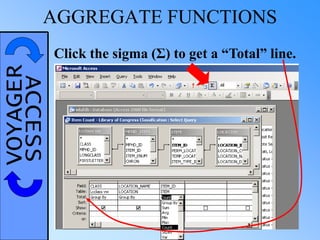
Click the sigma (Σ) to get a “Total” line.
VOYAGERACCESSAGGREGATE FUNCTIONS:
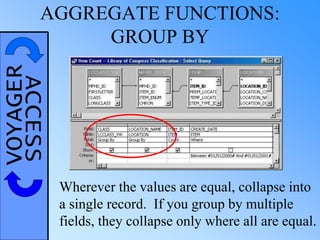
GROUP BY
Wherever the values are equal, collapse into
a single record. If you group by multiple
fields, they collapse only where all are equal.
VOYAGERACCESSAGGREGATE FUNCTIONS:
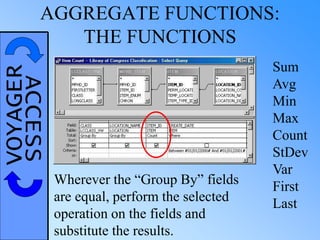
THE FUNCTIONS
Sum
Avg
Min
Max
Count
StDev
Var
First
Last
Wherever the “Group By” fields
are equal, perform the selected
operation on the fields and
substitute the results.
VOYAGERACCESSAGGREGATE FUNCTIONS:
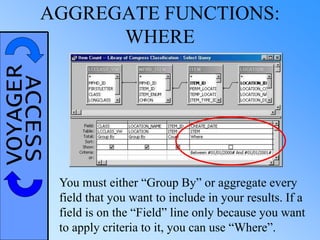
WHERE
You must either “Group By” or aggregate every
field that you want to include in your results. If a
field is on the “Field” line only because you want
to apply criteria to it, you can use “Where”.
VOYAGERACCESS SUBQUERIES
TABLE:
A collection of data, organized into
rows and named columns
QUERY RESULTS:
A collection of data, organized into
rows and named columns
IMPLICATION:
Wherever you can use a table, you can
use a query instead
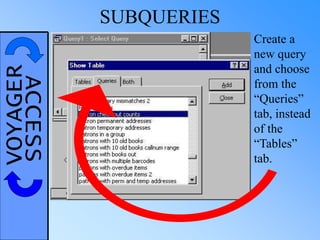
VOYAGERACCESS SUBQUERIES
Create a
new query
and choose
from the
“Queries”
tab, instead
of the
“Tables”
tab.
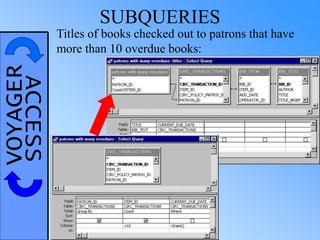
VOYAGERACCESS SUBQUERIES
Titles of books checked out to patrons that have
more than 10 overdue books:
VOYAGERACCESS SUBQUERIES
CAN BE USED:
•To simplify query logic
•To isolate repeated tasks
•To allow design view with SQL-specific parts
e.g. Subquery to get raw circ stats
MUST BE USED:
•When you want to group and extract the same
data
e.g. Amounts paid to vendors to which we have
paid more than $1000 this year
VOYAGERACCESSARE YOU READY TO TRY IT?
ACCESS
QUERY
EXERCISES
3
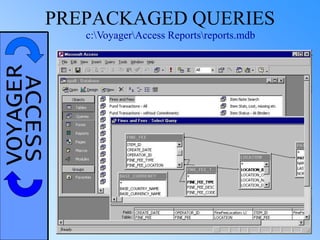
VOYAGERACCESSPREPACKAGED QUERIES
c:VoyagerAccess Reportsreports.mdb
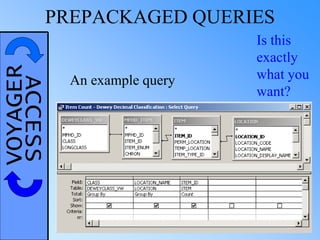
VOYAGERACCESSPREPACKAGED QUERIES
An example query
Is this
exactly
what you
want?
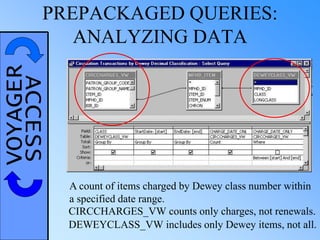
VOYAGERACCESSPREPACKAGED QUERIES:
ANALYZING DATA
A count of items charged by Dewey class number within
a specified date range.
CIRCCHARGES_VW counts only charges, not renewals.
DEWEYCLASS_VW includes only Dewey items, not all.
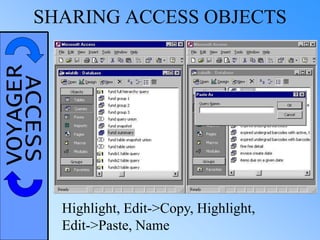
VOYAGERACCESSSHARING ACCESS OBJECTS
Highlight, Edit->Copy, Highlight,
Edit->Paste, Name
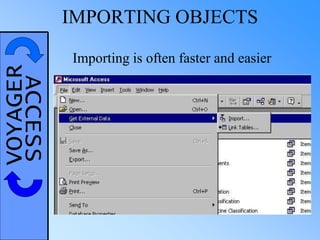
VOYAGERACCESS IMPORTING OBJECTS
Importing is often faster and easier
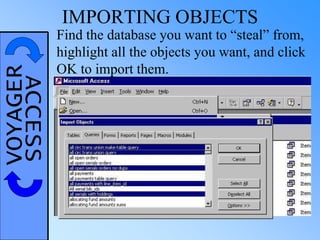
VOYAGERACCESS IMPORTING OBJECTS
Find the database you want to “steal” from,
highlight all the objects you want, and click
OK to import them.
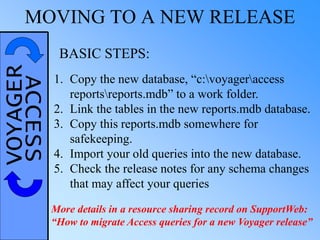
VOYAGERACCESSMOVING TO A NEW RELEASE
1. Copy the new database, “c:voyageraccess
reportsreports.mdb” to a work folder.
2. Link the tables in the new reports.mdb database.
3. Copy this reports.mdb somewhere for
safekeeping.
4. Import your old queries into the new database.
5. Check the release notes for any schema changes
that may affect your queries
BASIC STEPS:
More details in a resource sharing record on SupportWeb:
“How to migrate Access queries for a new Voyager release”
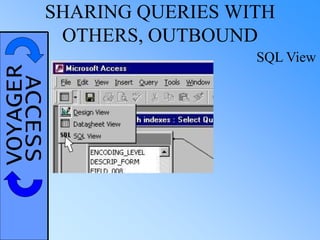
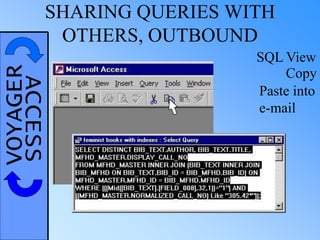
VOYAGERACCESSSHARING QUERIES WITH
OTHERS, OUTBOUND
SQL View
VOYAGERACCESSSHARING QUERIES WITH
OTHERS, OUTBOUND
SQL View
Copy
Paste into
e-mail
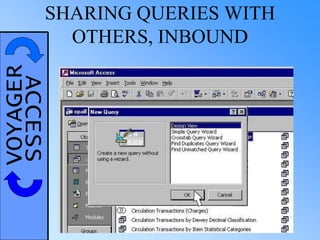
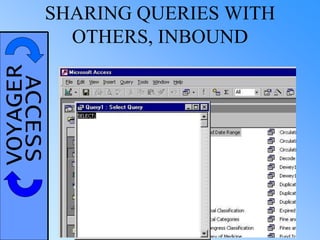
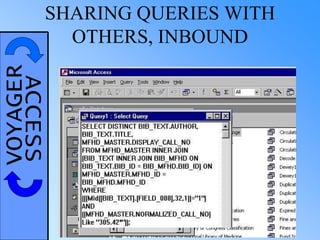
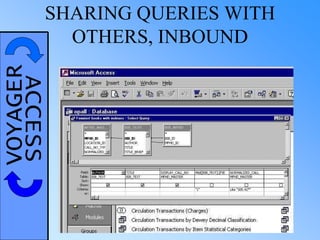
VOYAGERACCESSSHARING QUERIES WITH
OTHERS, INBOUND
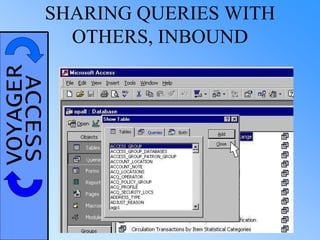
VOYAGERACCESSSHARING QUERIES WITH
OTHERS, INBOUND
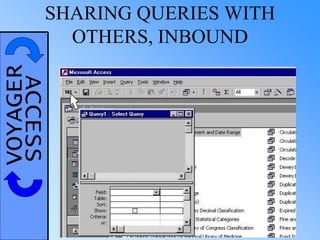
VOYAGERACCESSSHARING QUERIES WITH
OTHERS, INBOUND
VOYAGERACCESSSHARING QUERIES WITH
OTHERS, INBOUND
VOYAGERACCESSSHARING QUERIES WITH
OTHERS, INBOUND
VOYAGERACCESSSHARING QUERIES WITH
OTHERS, INBOUND
VOYAGERACCESS PLAY NICE
ACCESS
OBJECT
SHARING
EXERCISES
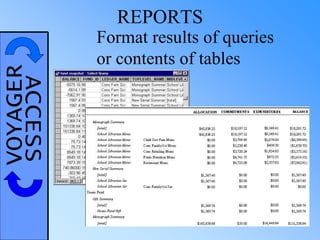
VOYAGERACCESS REPORTS
Format results of queries
or contents of tables
VOYAGERACCESS CREATING A REPORT
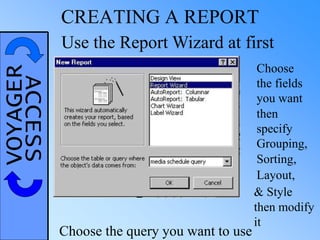
Use the Report Wizard at first
Choose the query you want to use
Choose
the fields
you want
then
specify
Grouping,
Sorting,
Layout,
& Style
then modify
it
VOYAGERACCESS REPORT DESIGN VIEW
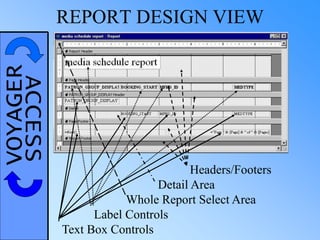
Headers/Footers
Detail Area
Whole Report Select Area
Label Controls
Text Box Controls
VOYAGERACCESS REPORT EXECUTION
Run Query
Report Header
Page Header
[Other Headers]
Detail (repeat until…)
New group value: Group Header
End of page: Page Footer
End of data: Report Footer,
final Page Footer
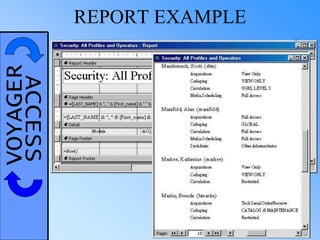
VOYAGERACCESS REPORT EXAMPLE
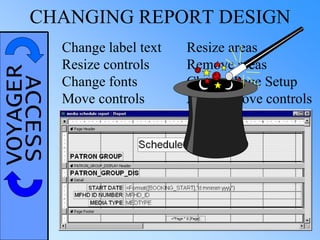
VOYAGERACCESSCHANGING REPORT DESIGN
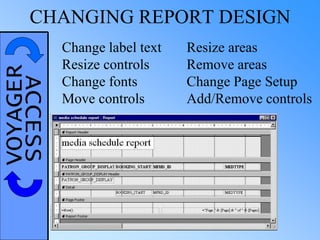
Change label text
Resize controls
Change fonts
Move controls
Resize areas
Remove areas
Change Page Setup
Add/Remove controls
VOYAGERACCESSCHANGING REPORT DESIGN
Change label text
Resize controls
Change fonts
Move controls
Resize areas
Remove areas
Change Page Setup
Add/Remove controls
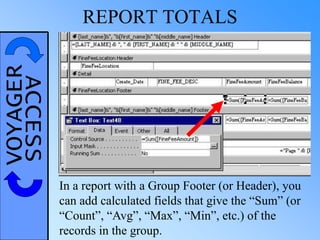
VOYAGERACCESS REPORT TOTALS
In a report with a Group Footer (or Header), you
can add calculated fields that give the “Sum” (or
“Count”, “Avg”, “Max”, “Min”, etc.) of the
records in the group.
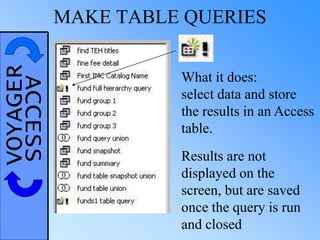
VOYAGERACCESS MAKE TABLE QUERIES
What it does:
select data and store
the results in an Access
table.
Results are not
displayed on the
screen, but are saved
once the query is run
and closed
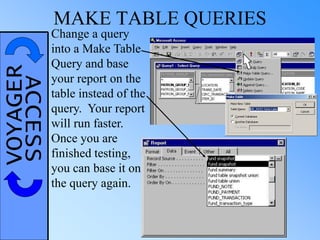
VOYAGERACCESS MAKE TABLE QUERIES
Change a query
into a Make Table
Query and base
your report on the
table instead of the
query. Your report
will run faster.
Once you are
finished testing,
you can base it on
the query again.
VOYAGERACCESS LET’S TRY A REPORT!
REPORT
CHANGING
DEMO &
EXERCISES
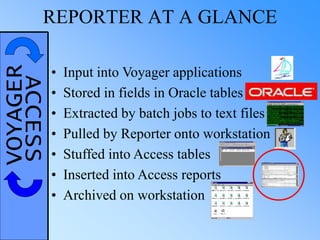
VOYAGERACCESSREPORTER AT A GLANCE
• Input into Voyager applications
• Stored in fields in Oracle tables
• Extracted by batch jobs to text files
• Pulled by Reporter onto workstation
• Stuffed into Access tables
• Inserted into Access reports
• Archived on workstation
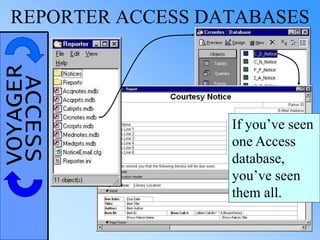
VOYAGERACCESSREPORTER ACCESS DATABASES
If you’ve seen
one Access
database,
you’ve seen
them all.
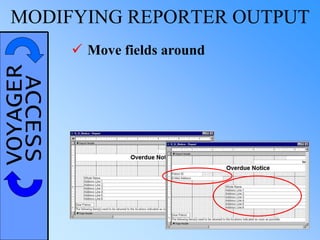
VOYAGERACCESSMODIFYING REPORTER OUTPUT
 Move fields around
VOYAGERACCESSMODIFYING REPORTER OUTPUT
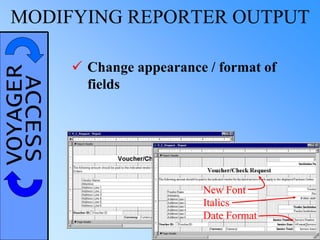
 Change appearance / format of
fields
New Font
Italics
Date Format
VOYAGERACCESSMODIFYING REPORTER OUTPUT
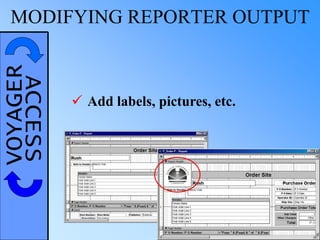
 Add labels, pictures, etc.
VOYAGERACCESSMODIFYING REPORTER OUTPUT
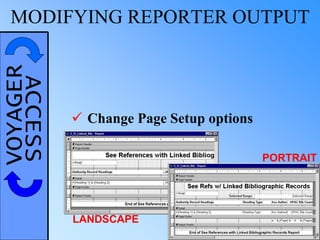
 Change Page Setup options
LANDSCAPE
PORTRAIT
VOYAGERACCESSMODIFYING REPORTER OUTPUT
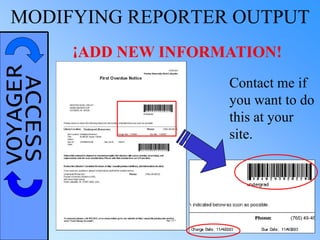
ADD NEW INFORMATION!¡
Contact me if
you want to do
this at your
site.
VOYAGERACCESS TIME TO GO?
The final section of the
workshop covers extracting
information from the “BLOB”, or
full MARC record. The BLOB section is for
advanced users, and involves heavy use of
expressions. If you aren’t sure you’ll want to use
this, you might want to leave now.
If you decide to leave, please fill out an evaluation
form before you go, so the workshop can continue
to improve.
GetSubField(GetFieldRaw(GetBibBlob(BIB_ID),“020”,1),“”,1)
VOYAGERACCESS
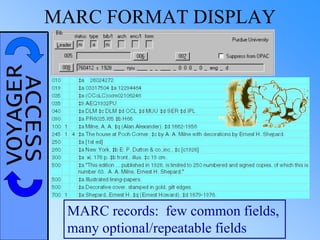
MARC records: few common fields,
many optional/repeatable fields
MARC FORMAT DISPLAY
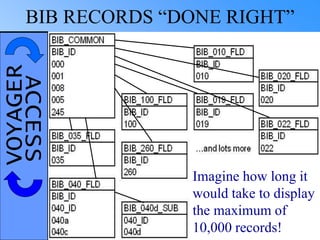
VOYAGERACCESSBIB RECORDS “DONE RIGHT”
Imagine how long it
would take to display
the maximum of
10,000 records!
VOYAGERACCESS A COMPROMISE
To solve the problem that putting MARC records
in “proper design” would cause, Endeavor
compromised. They store bib, MFHD and
authority records in full MARC format but also
break out a number of fields into other tables.
OCLC MARC Record in Raw Form:
00734cam 22002411 45*0001001300000003000600
01300500170001900800410003601000170007704000
23000940430012001170500016001290820013001450
92001900158049000900177100002500186245009800
21126000570030930000390036635000090040550400
3000414651004800444*ocm00442080*OCoLC*1994
0620065418.0*701012s1968 pauab b 000 0 eng *
‡a 68021623 * ‡aDLC‡cDLC‡dOCL‡dIPL*‡an-us---
*0 ‡aJK2556‡b.E2* ‡a325.3/73* ‡a325.373‡bEb61f*
‡aIPL1*1 ‡aEblen, Jack Ericson.*14‡aThe first and se
cond United States empires;‡bgovernors and territorial
government, 1784-1912.*‡a[Pittsburgh]‡bUniversity
of Pittsburgh Press‡c[1968]* ‡aviii, 344 p.‡billus.,ma
p.‡c24 cm.* ‡a8.95* ‡aBibliography: p. 321-333.*
0‡aUnited States‡xTerritories and possessions.**
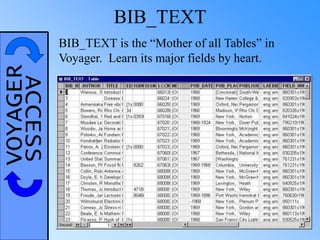
VOYAGERACCESS BIB_TEXT
BIB_TEXT is the “Mother of all Tables” in
Voyager. Learn its major fields by heart.
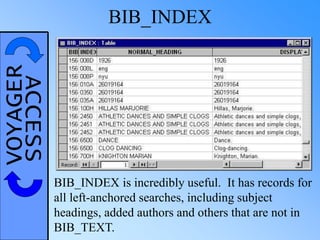
VOYAGERACCESS BIB_INDEX
BIB_INDEX is incredibly useful. It has records for
all left-anchored searches, including subject
headings, added authors and others that are not in
BIB_TEXT.
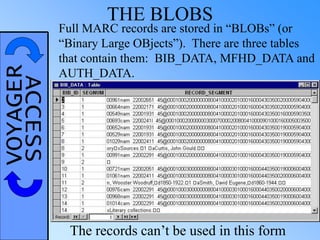
VOYAGERACCESS THE BLOBS
Full MARC records are stored in “BLOBs” (or
“Binary Large OBjects”). There are three tables
that contain them: BIB_DATA, MFHD_DATA and
AUTH_DATA.
The records can’t be used in this form
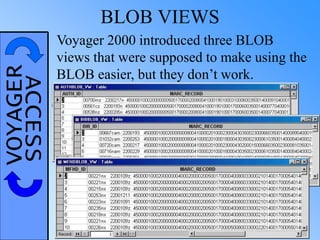
VOYAGERACCESS BLOB VIEWS
Voyager 2000 introduced three BLOB
views that were supposed to make using the
BLOB easier, but they don’t work.
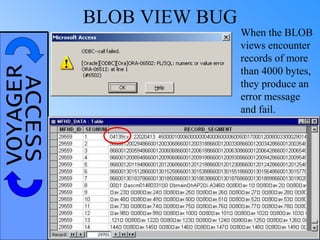
VOYAGERACCESS BLOB VIEW BUG
When the BLOB
views encounter
records of more
than 4000 bytes,
they produce an
error message
and fail.
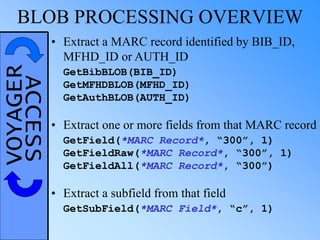
VOYAGERACCESSBLOB PROCESSING OVERVIEW
• Extract a MARC record identified by BIB_ID,
MFHD_ID or AUTH_ID
GetBibBLOB(BIB_ID)
GetMFHDBLOB(MFHD_ID)
GetAuthBLOB(AUTH_ID)
• Extract one or more fields from that MARC record
GetField(*MARC Record*, “300”, 1)
GetFieldRaw(*MARC Record*, “300”, 1)
GetFieldAll(*MARC Record*, “300”)
• Extract a subfield from that field
GetSubField(*MARC Field*, “c”, 1)
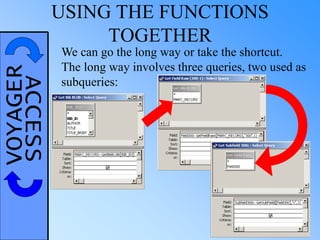
VOYAGERACCESS USING THE FUNCTIONS
TOGETHER
We can go the long way or take the shortcut.
The long way involves three queries, two used as
subqueries:
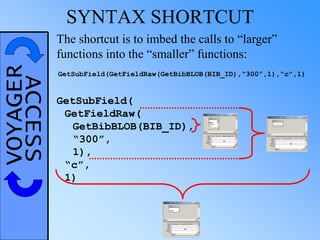
VOYAGERACCESS SYNTAX SHORTCUT
GetSubField(
GetFieldRaw(
GetBibBLOB(BIB_ID),
“300”,
1),
“c”,
1)
The shortcut is to imbed the calls to “larger”
functions into the “smaller” functions:
GetSubField(GetFieldRaw(GetBibBLOB(BIB_ID),“300”,1),“c”,1)
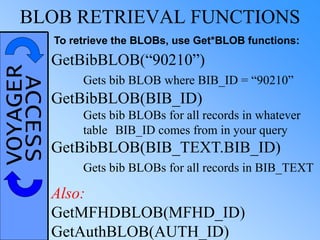
VOYAGERACCESSBLOB RETRIEVAL FUNCTIONS
To retrieve the BLOBs, use Get*BLOB functions:
GetBibBLOB(“90210”)
Gets bib BLOB where BIB_ID = “90210”
GetBibBLOB(BIB_ID)
Gets bib BLOBs for all records in whatever
table BIB_ID comes from in your query
GetBibBLOB(BIB_TEXT.BIB_ID)
Gets bib BLOBs for all records in BIB_TEXT
Also:
GetMFHDBLOB(MFHD_ID)
GetAuthBLOB(AUTH_ID)
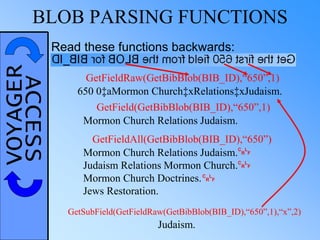
VOYAGERACCESSBLOB PARSING FUNCTIONS
GetFieldRaw(GetBibBlob(BIB_ID),“650”,1)
650 0‡aMormon Church‡xRelations‡xJudaism.
GetField(GetBibBlob(BIB_ID),“650”,1)
Mormon Church Relations Judaism.
Judaism Relations Mormon Church.
Mormon Church Doctrines.
Jews Restoration.
GetFieldAll(GetBibBlob(BIB_ID),“650”)
GetSubField(GetFieldRaw(GetBibBlob(BIB_ID),“650”,1),“x”,2)
Judaism.
C
R
L
F
Read these functions backwards:
C
R
L
F
C
R
L
F
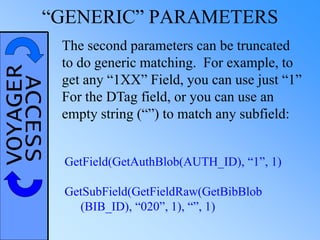
VOYAGERACCESS“GENERIC” PARAMETERS
The second parameters can be truncated
to do generic matching. For example, to
get any “1XX” Field, you can use just “1”
For the DTag field, or you can use an
empty string (“”) to match any subfield:
GetField(GetAuthBlob(AUTH_ID), “1”, 1)
GetSubField(GetFieldRaw(GetBibBlob
(BIB_ID), “020”, 1), “”, 1)
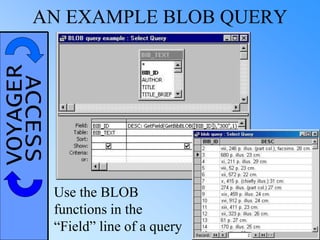
VOYAGERACCESSAN EXAMPLE BLOB QUERY
Use the BLOB
functions in the
“Field” line of a query
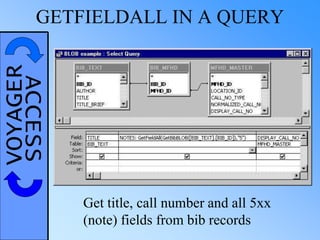
VOYAGERACCESSGETFIELDALL IN A QUERY
Get title, call number and all 5xx
(note) fields from bib records
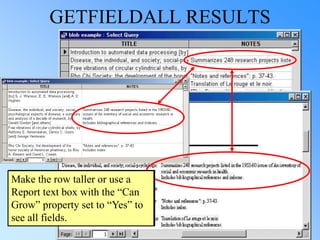
GETFIELDALL RESULTS
Open the row wider or use a
Report text box with the “Can
Grow” property set to “Yes” to
see all fields.
Make the row taller or use a
Report text box with the “Can
Grow” property set to “Yes” to
see all fields.
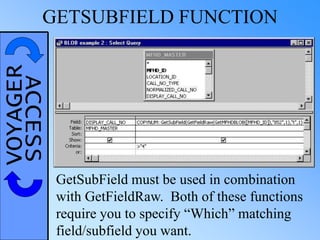
VOYAGERACCESSGETSUBFIELD FUNCTION
GetSubField must be used in combination
with GetFieldRaw. Both of these functions
require you to specify “Which” matching
field/subfield you want.
VOYAGERACCESSLET’S BATTLE THE BLOB!
BLOB
EXERCISES
VOYAGERACCESS IF YOU GET STUCK
Alan Manifold
alan@mashiyyat.net
+61 0419 671 913
VOYAGERACCESS EVALUATIONS
Please fill out an
evaluation form, so
the workshop can
continue to improve.

Using Access to Create Reports from Voyager (Microsoft Access with the Voyager ILS)

  • 1.
    VOYAGERACCESS Using Access to CreateReports from Voyager Alan Manifold Consultant / Trainer Alan Manifold Library Automation Consulting alan@mashiyyat.net Presented more than 60 times
  • 2.
    VOYAGERACCESS Rows = Records Columns= Fields TABLES DEFINITION: In a relational database, a table is a collection of data, organized into rows and named columns
  • 3.
    VOYAGERACCESSGOOD & BADDATABASE DESIGN Good database design requires adhering to some specific design standards. Basically, you want to break data into separate tables when it is optional or repeatable or both.
  • 4.
    VOYAGERACCESSBAD DATABASE DESIGN INSERT:Can't without checkout (Gary) DELETE: Without checkout you lose address (Everett) UPDATE: If multiple checkouts, change address many times (Alvar)
  • 5.
    VOYAGERACCESSBETTER DATABASE DESIGN Inthis design, there is no redundancy of data, and no problem adding, deleting or updating records.
  • 6.
    VOYAGERACCESSHOW DO QUERIESWORK? We don’t have to know how the query is executed, but we need to understand the concepts.
  • 7.
    VOYAGERACCESSHOW DO QUERIESWORK? These are the general steps in a query: Join tables Apply criteria Select fields Sort results For this query: Join BIB_TEXT to BIB_MFHD Join that result to MFHD_MASTER Discard suppressed records, records with call numbers and recent records Select TITLE and AUTHOR fields No sorting was requested
  • 8.
    JOIN BIB_TEXT TOBIB_MFHD 1365303 1511347 . . . 1365304 1511348 . . . 1365305 1511349 . . . 1365309 1511353 . . . 1365311 1511354 . . . 1365312 1511356 . . . 1365314 1511360 . . . 1365314 1512724 . . . 1365315 1511361 . . . 1365316 1511362 . . . 1365317 1511363 . . . 1365318 1511364 . . . 1365319 1511371 . . . 1365320 1511372 . . . + =
  • 9.
    JOIN RESULT TOMFHD_MASTER + = 1365303 1511347 . . . 1365304 1511348 . . . 1365305 1511349 . . . 1365309 1511353 . . . 1365311 1511354 . . . 1365312 1511356 . . . 1365314 1511360 . . . 1365314 1512724 . . . 1365315 1511361 . . . 1365316 1511362 . . . 1365317 1511363 . . . 1365318 1511364 . . . 1365319 1511371 . . . 1365320 1511372 . . . Same number of records, more fields
  • 10.
    WHAT DOES THEQUERY DO? Final Join Select the records with: SUPPRESS_IN_OPAC = “N” DISPLAY_CALL_NO Is Null CREATE_DATE < #7/1/2003# Then, pull out the two fields we want:
  • 11.
  • 12.
    VOYAGERACCESSWORKING WITH ACCESS DATABASES AccessDBs are just files like any others. Copy them, create them, back them up, rename them, etc.
  • 13.
    VOYAGERACCESSc:voyageraccess reportsreports.mdb DON’T WORKIN THIS FOLDER! The standard “reports.mdb” file is created when you run the “VoyagerInstall.exe” program on your workstation. It will be replaced the next time you run “VoyagerInstall.exe”. Copy “reports.mdb” to another folder and do all your work there.
  • 14.
    VOYAGERACCESSMICROSOFT ACCESS TABLES Tablescan be created directly in Access or linked. They all hold data.
  • 15.
    VOYAGERACCESS LOOKING ATTABLES You can look at the contents of tables at any time. This is a good tool for finding out what each table contains.
  • 16.
    VOYAGERACCESSWHEN IS ATABLE NOT A TABLE? The Voyager database includes “Views”: SERIALS_VW: select bm.bib_id, lics.mfhd_id, c.component_id, c.component_name, c.component_name_norm, c.predict, c.next_issue_id, c.note, i.issue_id, i.enumchron, i.expected_date, i.receipt_date, i.received from bib_mfhd bm, component c, issues_vw i, subscription s, line_item_copy_status lics where bm.mfhd_id = lics.mfhd_id and lics.line_item_id = s.line_item_id and s.subscription_id = c.subscription_id(+) and c.component_id = i.component_id (+) Views look and act like tables, but are more like queries AUTHBLOB_VW AUTHHEADING_VW AUTHHISTORY_VW AUTHORITY1XX4XX_VW AUTHORITY5XX1XX_VW AUTHORITYDUPE_VW BIBBLOB_VW BIBHISTORY_VW BIBLOC_VW BIB_VW CIRCCHARGES_VW CIRCRENEW_VW DEWEYCLASS_VW FUNDLEDGER_VW HEADING_VW ISSUES_VW ITEM_VW LCCLASS_VW MARCBOOK_VW MARCCOMPUTER_VW MARCMAP_VW MARCMUSIC_VW MARCSERIAL_VW MARCVISUAL_VW MFHDBLOB_VW MFHDHISTORY_VW NLMCLASS_VW RECORDCOUNT_VW SERIALS_VW SUDOCCLASS_VW VENDORINVOICE_VW VENDORORDER_VW
  • 17.
    VOYAGERACCESSFAST VIEWS (ATPURDUE) AUTHHISTORY_VW BIB_VW BIBHISTORY_VW BIBLOC_VW DEWEYCLASS_VW FUNDLEDGER_VW MARCBOOK_VW MARCCOMPUTER_VW MARCMAP_VW MARCMUSIC_VW MARCSERIAL_VW MARCVISUAL_VW MFHDHISTORY_VW NLMCLASS_VW SUDOCCLASS_VW All of these views returned at least the first screen of results in just a few seconds.
  • 18.
    VOYAGERACCESSSLOW VIEWS (ATPURDUE) MINUTES TO OPEN AUTHHEADING_VW 2 AUTHORITY1XX4XX_VW 6 AUTHORITY5XX1XX_VW 4 AUTHORITYDUPE_VW 10 CIRCCHARGES_VW 37 CIRCRENEW_VW 46 HEADING_VW  ISSUES_VW 2 ITEM_VW 49 LCCLASS_VW 2 RECORDCOUNT_VW 2 SERIALS_VW 3 VENDORINVOICE_VW 1 VENDORORDER_VW 9 Each of these views took a minute or more to present even the first results.
  • 19.
    VOYAGERACCESS TIME TOTRY IT OUT! ACCESS TABLE EXERCISES
  • 20.
    VOYAGERACCESS QUERIES Queries havelots of functions:  Select specific records Books with no authors  Select specific fields Author, title, publisher  Join information from multiple tables Patron name, group and barcode  Group or sort records Count of books by location  Any combination of the above
  • 21.
    VOYAGERACCESS A SIMPLEQUERY Author, title and call number for a book where the BIB_ID is 4:
  • 22.
    VOYAGERACCESS CREATING AQUERY Use Design View The Simple Query Wizard is not helpful
  • 23.
    VOYAGERACCESS PARTS OFA QUERY Tables Links/Joins FieldsCriteria
  • 24.
    VOYAGERACCESSWHICH TABLES TOCHOOSE? Five reasons to add a table to a query: To select a field from it To apply criteria to a field To link other tables together To eliminate or add records to the result To affect sorting or grouping
  • 25.
    VOYAGERACCESS LINKING TABLES Manytables will link automatically If no automatic link, drag the linking field from one table on top of the one in the other table
  • 26.
    VOYAGERACCESS RELATIONSHIPS Tables haverelationships with each other. The relationships are established by having fields in common.
  • 27.
    VOYAGERACCESS DOMAINS The commonfields must come from the same “Domain” of values. Fields don’t have to have the same name, but have to represent the same thing. BIB_ID LOCATION_ID aka PERM_LOCATION aka TEMP_LOCATION aka CHARGE_LOCATION FISCAL_PERIOD_ID aka FISCAL_YEAR_ID MFHD_ID ITEM_TYPE_ID OPERATOR aka CREATE_OPID aka UPDATE_OPID aka CHARGE_OPID
  • 28.
    VOYAGERACCESS TYPE MISMATCHES Ifyou try to compare a date field to a text or numeric field, Access will complain of a type mismatch. If you try to compare a text field to a numeric field, Access won’t catch it, but Oracle will complain with an error message. The same messages come up if you join tables by incompatible fields. It might also say, “Invalid date”
  • 29.
    VOYAGERACCESS UNLINKED TABLES Ifyou have an unlinked table, each record from the rest of the query will be joined with each record in the unlinked table. This could be pecadillions* of records! * A large number resulting from a small mistake (pecadillo)
  • 30.
    VOYAGERACCESSWHICH FIELDS TOADD? Three reasons to add fields: To include them in the results To apply criteria to them To affect grouping or sorting To include a field in your results, check the “Show” checkbox.
  • 31.
    VOYAGERACCESS CRITERIA Put criteriaon the “Criteria” line under the field to which they apply.
  • 32.
    VOYAGERACCESSUSING CRITERIA EFFECTIVELY Aplain value implies “equals”. <> “Gift” Not equal Not “Approved” Not equal > #1/1/2006# Greater than < “a” Less than >= “10000” Greater than or equal to <= “200” Less than or equal to Criteria with operators: “ugrl,resv” Text constant (case sensitive) “83456” Numeric constant #7/27/2006# Date constant (be careful)
  • 33.
    VOYAGERACCESS PATTERN MATCHING “main”,“maintain”, “maintenance”, “mainframe”, “main street”, … “refe”, “ugrl,refe”, “phys,refe”, … “her”, “hiker”, “homer”, “helicopter”, “his mother”, … “ser”, “serial”, “loser”, “reserves”, “alternative service”, … For text fields, you can use “Like” and an asterisk to do “pattern matching”. An asterisk (*) matches any sequence of zero or more characters. Like “main*” Like “*refe” Like “h*er” Like “*ser*” Criterion Matches
  • 34.
    VOYAGERACCESS MULTIPLE CRITERIA >“5” And < “8” < 0 Or > 100 Like “main*” And Not “main refe” >= #1/1/2006# And < #1/2/2006# Between “5” And “8” “Missing” Or “Lost—System Applied” Or “Lost—Library Applied” “Missing” Or Like “Lost*” “main” Or “sci” Or “agri” In(“main”, “sci”, “agri”) Use comparison and Boolean operators to apply multiple criteria:
  • 35.
    VOYAGERACCESSUSING DATES ASCRITERIA Date constants Use hashes/number signs: #2/1/2006# Affected by “Regional Settings” Defaults to current year: #2/1# Year alone is not enough: #2006# Date/time problem All Date/Time values include a time -- #2/1/2006# equals midnight at the beginning of the day, 2/1/2006 Ranges Between #7/27/2006# And #7/28/2006# Between #7/27/2006# And #7/27/2006 23:59:59#
  • 36.
    VOYAGERACCESS DON’T BEA LOSER! Once a query has started, you have to wait for it to end or use the Task Manager to “End Task”, which will lose work in progress. SAVE QUERIES BEFORE RUNNING THEM!
  • 37.
    VOYAGERACCESS QUERY TIMEOUT Themessage: “user requested cancel…” indicates query timeout. Change the “ODBC Timeout” property to 0 to eliminate timeouts or to another value (in seconds).
  • 38.
    VOYAGERACCESS DISABLING TIMEOUTS Withthe Oracle 8 ODBC drivers, you can turn off query timeout altogether. You can’t do this with the Microsoft Oracle 9 drivers, but it doesn’t seem to be a problem for me so far. Once you have installed them, go to the ODBC Control Panel and configure the connection.
  • 39.
    VOYAGERACCESS LET’S GIVEIT A TRY! ACCESS QUERY EXERCISES 1
  • 40.
    VOYAGERACCESS EXPRESSIONS An expression,or calculated field, takes the values of one or more fields and uses them to create new values. I - (K * L)
  • 41.
    VOYAGERACCESSEXPRESSIONS IN FIELDS Wherever youcan use a field, you can use an expression If you don’t choose a field name, it will be “Expr1”
  • 42.
    VOYAGERACCESSSOME USEFUL FUNCTIONS UCaseConvert to upper case UCase(CITY) UCase(“Navasota, Tex.”) = “NAVASOTA, TEX.” LCase Convert to lower case LCase(CITY) LCase(“College Station, Tex.”) = “college station, tex.” Left Left part of text Left(CALLNUM,3) Left(“004.12 A324d”,3) = “004” Right Right part of text Right(CALLNUM,3) Right(“004.12 A324d”,3) = “24d” Mid Part of text Mid(CALLNUM,5,4) Mid(“004.12 A324d”,5,4) = “12 A” Mid Remainder of text Mid(CALLNUM,5) Mid(“004.12 A324d”,5) = “12 A324d” Date Current date Date() Date() = #7/27/2006# CCur Convert to currency CCur(AMOUNT) CCur(53.9) = $53.90
  • 43.
    VOYAGERACCESSMORE INFO ONFUNCTIONS The best way to get information about the functions available in Access is to open the Table of Contents and go to the “Microsoft Visual Basic Documentation” section. Under that, you can find the functions available, and how to use them.
  • 44.
  • 45.
    VOYAGERACCESSNUMERIC FIELDS INACCESS Access does not recognize numbers-- --all fields are Text or Date/Time
  • 46.
    VOYAGERACCESSTHE PLUS SIGNAND NUMBERS Text to Number: Val(HISTORICAL_CHARGES) WRONG: HISTORICAL_CHARGES + HISTORICAL_BROWSES Multiplication, subtraction, division, and functions like Sum work, anyway, but addition doesn’t.
  • 47.
    VOYAGERACCESS MONETARY VALUES Monetaryvalues problems: Converted to text Integers, stored in the smallest unit To include a monetary figure in a query: CCur([AMOUNT]/100)
  • 48.
    VOYAGERACCESSSORTING QUERY RESULTS Youcan sort query results by one or more fields. Fields will be considered in order from left to right.
  • 49.
    VOYAGERACCESS MULTIPLE CRITERIA Forcomplex multiple criteria, you can use additional criteria lines (first one is labeled “or:”)
  • 50.
    VOYAGERACCESSPROMPTING FOR CRITERIA SYNTAX: Leftsquare bracket – Prompt – Right square bracket Example: [Bib ID Number?]
  • 51.
    VOYAGERACCESS USING PROMPTS Makeyour prompts the best they can be. Imagine that the users do not know what kind of information is expected. Provide enough information in the prompt that they can figure it out. [p1] [sdate] [start] *Endeavor’s standard [start date] [Start Date:] [First date of data:] [Starting date for report (mm/dd/yyyy):] BETTER?
  • 52.
    VOYAGERACCESSMORE COMPLEX PROMPTS <>[Item Type to Exclude?] > [Minimum Price?] Like [Generic Location Code:] & “*” Not Like [Vendor to Skip] & “*” Between [Start Date:] And [End Date:] If you use the same exact prompt more than once, it only prompts you once and substitutes the same value in each spot.
  • 53.
    VOYAGERACCESS THE FormatFUNCTION Format() allows you to print and display dates and other values in whatever manner you like or need for a given query. Format(MyDate, "mmm d yyyy") "Jan 27 1993" Format(MyDate, "yyyymmdd") "19930127" Format(MyTime, "h:m:s") "17:4:23" Format(MyTime, "hh:mm:ss AMPM") "05:04:23 PM" Format(23) "23" (as text) Format(5459.4, "##,##0.00") "5,459.40" Format(7334.9, "###0.00") "7334.90" Format("HELLO", "<") "hello" Format("This is it", ">") "THIS IS IT" Format(expression, "format")
  • 54.
    VOYAGERACCESS THE DateAddFUNCTION DateAdd(interval, number, date) ADDS “number” TIMES THE “interval” TO THE “date” “yyyy” — YEAR “q” — QUARTER “m” — MONTH “d” — DAY “ww” — WEEK “s” — SECOND EXAMPLES: ONE YEAR AGO TODAY: DateAdd(“yyyy”, -1, Date()) ONE MONTH’S WORTH: Between [Start of Month] And DateAdd(“m”, 1, [Start of Month]) OVER THE WEEKEND: Between [Friday’s Date?] And DateAdd(“d”, 3, [Friday’s Date?]) ARBITRARY PERIOD’S DATA (SAFELY): Between [Start Date:] And DateAdd(“s”, -1, [End Date:])
  • 55.
    VOYAGERACCESSMUCH ADO ABOUTNOTHING There is a difference between fields that have no value and fields that have an “empty” value, but it’s hard to know which will be which. Number with zero value: 0 <> 0 Text with “empty” value: “” <> “” Value: Never had one, never will: Is Null Is Not Null So, to be safe: Is Null Or “” Is Not Null And <> “”
  • 56.
  • 57.
    VOYAGERACCESSSOME TOOLS YOU’LLNEED Client programs ER Diagrams and Data Dictionary TAbles *These three tools are the primary ones used in the CERTA-Query System, presented at VUGM 2002: (Session 9 – “Buried Treasure: Finding Reporting Gold in the Voyager Tables”)
  • 58.
  • 59.
  • 60.
    VOYAGERACCESS ENTITY-RELATIONSHIP DIAGRAMS WHAT THEYSHOW: Names of all the fields in a table Which tables are linked Exact relationships between tables Relationships for a topic area FOURPROBLEMS: Don’tshowlinkingfields Don’ttellwhateachfieldisfor Notindexed Don’tincludealltables
  • 61.
  • 62.
    VOYAGERACCESSE-R DIAGRAMS (Voyager6.1) Bindery maintenance Call Slip Character set mapping Circulation alerts Circulation transaction archive Circulation transactions Circulation transactions – short version Course reserves Distribution items Headings, authorities, and bibliographic records Holds and Recalls In transit item tracking Ledgers and funds Left-anchored indexes Media scheduling Media scheduling inventory Order/Receive problem & claim lists Owning library, location, bibliographic holdings and item record relationships Patron Fines and Fees Patrons Proxy patrons Purchase order & invoice Security – cataloging profiles Security – circulation profiles Serials check-in & claims Serials routing Shelflist Short loans UB patron data UB request
  • 63.
    VOYAGERACCESS DATA DICTIONARY Endeavoralso provides a “Data Dictionary”, which lists all of the fields you can find in each table. It is sometimes easier to scan this document to find links than it is to scan the E-R Diagrams.
  • 64.
    VOYAGERACCESS CONTENTS OFTABLES Easiest way to see what kind of data is in any given table
  • 65.
    VOYAGERACCESSVOYAGER TABLE ROADMAP Circulation SysAdmin KEY:VOYAGER TABLE RELATIONSHIPS ARE COMPLEX Citation Server Media Scheduling Cataloging UB Acquisitions OPAC
  • 66.
  • 67.
    VOYAGERACCESSCIRCULATION RELATIONSHIPS BIB_TEXT MFHD_MASTER ITEM BIB_MFHD MFHD_ITEM CIRC_TRANSACTIONS (and RENEW_TRANSACTIONS) CIRC_TRANS_ARCHIVE (andRENEW_TRANS_ARCHIVE) PATRON PATRON_BARCODE ITEM_TYPE ITEM_BARCODE ITEM_STATUS ITEM_STATS PATRON_GROUP LOCATION ITEM_STAT_CODE ITEM_STATUS_TYPE COURSE RESERVES STUFF HOLDS/RECALLS FINES & FEES PATRON_STATS How much data do you want? SHORT LOANS CALL SLIPS MEDIA PATRON_STAT_CODE PROXY_PATRON
  • 68.
    VOYAGERACCESS GETTING ALLTHE CIRCULATION HISTORY CIRC_TRANSACTIONS CIRC_TRANS_ARCHIVE There is a record in CIRC_TRANSACTIONS for each item that is currently checked out There is a record in CIRC_TRANS_ARCHIVE for each item that used to be checked out, but has been returned. To get all the transactions for any given period, you need data from both tables. There are two similar tables for renewal data. RENEW_TRANSACTIONS RENEW_TRANS_ARCHIVE
  • 69.
    VOYAGERACCESS UNION QUERIES Thetwo tables (or the fields you select from them) must have the exact same fields. Joins imply a “horizontal” relationship between two tables. That doesn’t describe the circulation transactions. These tables have more of a “vertical” relationship. To make them into a single table, use a UNION ALL Query.
  • 70.
    VOYAGERACCESS UNION QUERIES We’dlike to be able to create two queries in Design View, then just attach them together as in the example above. But UNION queries are “SQL Specific”, so they must be written in SQL.
  • 71.
    VOYAGERACCESS UNION QUERIES CHOOSE Query--> SQLSpecific--> Union Here are those same two queries, but expressed in SQL with UNION ALL. If you are comfortable using SQL, this is not a problem. But what if you don’t know and don’t want to know any SQL?
  • 72.
    VOYAGERACCESS UNION QUERYCHEAT The asterisk operator, which stands for “All fields from the table”, makes it easy to create a Union All from two Design View queries. In general, the syntax is: SELECT * FROM [<query 1>] UNION ALL SELECT * FROM [<query 2>] UNION ALL SELECT * FROM [<query 3>];
  • 73.
    VOYAGERACCESS CIRCCHARGES_VW CIRCCHARGES_VW performsthe UNION between CIRC_TRANSACTIONS and CIRC_TRANS_ARCHIVE (and more!).
  • 74.
    VOYAGERACCESSTHE WHOLE NINEYARDS On my Advanced Reporting Techniques (ART) workshop website, I have the SQL for a UNION of all circulation transaction information that you can copy and customize: http://www.mashiyyat.net/art/allcircdata.txt
  • 75.
    VOYAGERACCESSTABLE BASICS: ACQUISITIONS Relationshipsfor Acquisitions tables are very complex— more than would fit on a few slides. We need to use what we know, e.g.: • Funds are in a hierarchy under a ledger • Purchase orders go to a single vendor • Bib information goes on a line item • Payments are made on invoices • Each line item can use a different fund or even several funds E-R Diagrams, p. 18
  • 76.
    VOYAGERACCESSTABLE BASICS: ACQUISITIONS LINE_ITEM_FUNDS fundsassigned to PO line items in “Copies/Funds” box (amounts in foreign currency) PO_FUNDS funds assigned to PO line items, plus funds for PO adjustments until invoice is approved (base currency) LINE_ITEM_COPY funds assigned to line item copies on the PO (no amounts) FUND_PAYMENT funds used for prepayments and invoice adjustments (foreign) INVOICE_LINE_ITEM_FUNDS funds assigned or used for invoice line items (foreign) INVOICE_FUNDS funds assigned or used for invoice line items, plus funds for invoice adjustments, after approval (base)
  • 77.
    VOYAGERACCESS FUNDS INVOYAGER FUND_IDS are unique… …only within a fiscal year Always link fund tables by both FUND_ID and LEDGER_ID
  • 78.
    VOYAGERACCESS WHAT A DIFFERENCEA LINE MAKES! This little line is all there is to show the fund hierarchy found in the Acquisitions client TABLE BASICS: ACQUISITIONS
  • 79.
    VOYAGERACCESS FUND_ID = 32,PARENT_FUND = 31 FUND_ID = 31, PARENT_FUND = 28 FUND_ID = 28, PARENT_FUND = 0 LEDGER_ID = 29 Each fund has a parent or “lives” directly under the ledger. TABLE BASICS: ACQUISITIONS
  • 80.
    VOYAGERACCESSPURCHASE ORDER LINKS PURCHASE_ORDER LINE_ITEM PO_ID PO_NOTES PO_STATUS PO_TYPE PO_STATUS PO_TYPEPO_ID BIBTABLES BIB_ID FUND LEDGER_ID FUND_ID INVOICES LINE_ITEM_ID LINE_ITEM_FUNDS LINE_ITEM_COPY_STATUS LINE_ITEM_COPY LINE_ITEM_ID LINE_ITEM_ID COPY_ID
  • 81.
    VOYAGERACCESS INVOICES INVOICE INVOICE_NOTEINVOICE_STATUS INVOICE_STATUS INVOICE_ID INVOICE_ID INVOICE_LINE_ITEM LINEITEM TABLES LINE_ITEM_ID INVOICE_LINE_ITEM_FUNDS INV_LINE_ITEM_ID FUND LEDGER_ID FUND_ID
  • 82.
    VOYAGERACCESSCURRENCY CONVERSION Foreign currencies:CCur(([LINE_PRICE] / ([CONVERSION_RATE] / 100000)) / 100) This is the conversion rate actually used. Base currency: CCur([AMT]/100)
  • 83.
    VOYAGERACCESSCATALOGING STATISTICS You maywant statistics on records cataloged by operator, location or call number. The key to all of these is determining when an item was cataloged. This depends on your workflow. For bibs and MFHDs, you want to find the create or modify date with a query that has something like this. For releases prior to the Unicode release, use this instead
  • 84.
    VOYAGERACCESS VOYAGER LOCATIONS Thereare three locations in Voyager. You can pretty much ignore the MFHD.
  • 85.
    VOYAGERACCESSCIRCULATION LOCATIONS Does itemhave Temporary Location? Read item barcode Find item record for this barcode Set “Governing Location” to Temp Location Set “Governing Location” to Perm Location Get circulation policy group for “Governing Location” Circulation always uses item temp location if present or perm location if not. YES NO
  • 86.
    VOYAGERACCESS OPAC LOCATIONS WebVoyagedisplays the MFHD location for some odd situations, but usually displays the item locations. Limiting by location uses the MFHD location.
  • 87.
    VOYAGERACCESSEXPLORE ON YOUROWN VOYAGER EXPLORATION EXERCISES
  • 88.
    TOO MANY RESULTS Unwantedrecords usually come from one of two conditions. The first is incorrect joins:
  • 89.
    VOYAGERACCESS TOO MANYRESULTS The other source is from joining two tables where duplicates might be expected, but not saving the distinct fields:
  • 90.
    VOYAGERACCESS TOO MANYRESULTS To fix the second problem, change the “Unique Values” property from “No” to “Yes”.
  • 91.
    VOYAGERACCESS TOO FEWRESULTS Having results turn up missing stems from two main conditions. The first is a bad join:
  • 92.
    VOYAGERACCESS TOO FEWRESULTS The second cause is joining tables where values may be missing:
  • 93.
    VOYAGERACCESS TOO FEWRESULTS The problem is with this join. Get the Join Properties.
  • 94.
    VOYAGERACCESS TOO FEWRESULTS Read carefully and choose the option that gets you what you want.
  • 95.
    VOYAGERACCESS TOO FEWRESULTS The join line changes from “point to point” to “point to arrow”.
  • 96.
    VOYAGERACCESSFINDING CHILDLESS RECORDS Acommon request is to find bib records with no MFHDs and MFHDs with no items. You need to do an OUTER JOIN and look for Null values.
  • 97.
    VOYAGERACCESS AGGREGATING DATA LEDGERAMT Agriculture $62.50 Agriculture $122.04 Agriculture $13.44 Agriculture $88.85 Agriculture $233.31 Agriculture $78.54 Agriculture $834.56 Agriculture $92.42 Agriculture $43.45 Biology $34.22 Biology $23.69 Biology $54.64 Biology $100.32 Biology $103.54 Biology $75.25 Agriculture SUM = $1,569.11 AVG = $174.35 MIN = $13.44 MAX = $834.56 COUNT = 9 STDEV = 255.154231108907 VAR = 65103.6816527778 FIRST = $62.50 LAST = $43.45 Biology SUM = $391.66 AVG = $65.28 MIN = $23.69 MAX = $103.54 COUNT = 6, etc.
  • 98.
    VOYAGERACCESSAGGREGATE FUNCTIONS Click thesigma (Σ) to get a “Total” line.
  • 99.
    VOYAGERACCESSAGGREGATE FUNCTIONS: GROUP BY Whereverthe values are equal, collapse into a single record. If you group by multiple fields, they collapse only where all are equal.
  • 100.
    VOYAGERACCESSAGGREGATE FUNCTIONS: THE FUNCTIONS Sum Avg Min Max Count StDev Var First Last Whereverthe “Group By” fields are equal, perform the selected operation on the fields and substitute the results.
  • 101.
    VOYAGERACCESSAGGREGATE FUNCTIONS: WHERE You musteither “Group By” or aggregate every field that you want to include in your results. If a field is on the “Field” line only because you want to apply criteria to it, you can use “Where”.
  • 102.
    VOYAGERACCESS SUBQUERIES TABLE: A collectionof data, organized into rows and named columns QUERY RESULTS: A collection of data, organized into rows and named columns IMPLICATION: Wherever you can use a table, you can use a query instead
  • 103.
    VOYAGERACCESS SUBQUERIES Create a newquery and choose from the “Queries” tab, instead of the “Tables” tab.
  • 104.
    VOYAGERACCESS SUBQUERIES Titles ofbooks checked out to patrons that have more than 10 overdue books:
  • 105.
    VOYAGERACCESS SUBQUERIES CAN BEUSED: •To simplify query logic •To isolate repeated tasks •To allow design view with SQL-specific parts e.g. Subquery to get raw circ stats MUST BE USED: •When you want to group and extract the same data e.g. Amounts paid to vendors to which we have paid more than $1000 this year
  • 106.
    VOYAGERACCESSARE YOU READYTO TRY IT? ACCESS QUERY EXERCISES 3
  • 107.
  • 108.
    VOYAGERACCESSPREPACKAGED QUERIES An examplequery Is this exactly what you want?
  • 109.
    VOYAGERACCESSPREPACKAGED QUERIES: ANALYZING DATA Acount of items charged by Dewey class number within a specified date range. CIRCCHARGES_VW counts only charges, not renewals. DEWEYCLASS_VW includes only Dewey items, not all.
  • 110.
    VOYAGERACCESSSHARING ACCESS OBJECTS Highlight,Edit->Copy, Highlight, Edit->Paste, Name
  • 111.
  • 112.
    VOYAGERACCESS IMPORTING OBJECTS Findthe database you want to “steal” from, highlight all the objects you want, and click OK to import them.
  • 113.
    VOYAGERACCESSMOVING TO ANEW RELEASE 1. Copy the new database, “c:voyageraccess reportsreports.mdb” to a work folder. 2. Link the tables in the new reports.mdb database. 3. Copy this reports.mdb somewhere for safekeeping. 4. Import your old queries into the new database. 5. Check the release notes for any schema changes that may affect your queries BASIC STEPS: More details in a resource sharing record on SupportWeb: “How to migrate Access queries for a new Voyager release”
  • 114.
  • 115.
    VOYAGERACCESSSHARING QUERIES WITH OTHERS,OUTBOUND SQL View Copy Paste into e-mail
  • 116.
  • 117.
  • 118.
  • 119.
  • 120.
  • 121.
  • 122.
  • 123.
    VOYAGERACCESS REPORTS Format resultsof queries or contents of tables
  • 124.
    VOYAGERACCESS CREATING AREPORT Use the Report Wizard at first Choose the query you want to use Choose the fields you want then specify Grouping, Sorting, Layout, & Style then modify it
  • 125.
    VOYAGERACCESS REPORT DESIGNVIEW Headers/Footers Detail Area Whole Report Select Area Label Controls Text Box Controls
  • 126.
    VOYAGERACCESS REPORT EXECUTION RunQuery Report Header Page Header [Other Headers] Detail (repeat until…) New group value: Group Header End of page: Page Footer End of data: Report Footer, final Page Footer
  • 127.
  • 128.
    VOYAGERACCESSCHANGING REPORT DESIGN Changelabel text Resize controls Change fonts Move controls Resize areas Remove areas Change Page Setup Add/Remove controls
  • 129.
    VOYAGERACCESSCHANGING REPORT DESIGN Changelabel text Resize controls Change fonts Move controls Resize areas Remove areas Change Page Setup Add/Remove controls
  • 130.
    VOYAGERACCESS REPORT TOTALS Ina report with a Group Footer (or Header), you can add calculated fields that give the “Sum” (or “Count”, “Avg”, “Max”, “Min”, etc.) of the records in the group.
  • 131.
    VOYAGERACCESS MAKE TABLEQUERIES What it does: select data and store the results in an Access table. Results are not displayed on the screen, but are saved once the query is run and closed
  • 132.
    VOYAGERACCESS MAKE TABLEQUERIES Change a query into a Make Table Query and base your report on the table instead of the query. Your report will run faster. Once you are finished testing, you can base it on the query again.
  • 133.
    VOYAGERACCESS LET’S TRYA REPORT! REPORT CHANGING DEMO & EXERCISES
  • 134.
    VOYAGERACCESSREPORTER AT AGLANCE • Input into Voyager applications • Stored in fields in Oracle tables • Extracted by batch jobs to text files • Pulled by Reporter onto workstation • Stuffed into Access tables • Inserted into Access reports • Archived on workstation
  • 135.
    VOYAGERACCESSREPORTER ACCESS DATABASES Ifyou’ve seen one Access database, you’ve seen them all.
  • 136.
  • 137.
    VOYAGERACCESSMODIFYING REPORTER OUTPUT Change appearance / format of fields New Font Italics Date Format
  • 138.
  • 139.
    VOYAGERACCESSMODIFYING REPORTER OUTPUT Change Page Setup options LANDSCAPE PORTRAIT
  • 140.
    VOYAGERACCESSMODIFYING REPORTER OUTPUT ADDNEW INFORMATION!¡ Contact me if you want to do this at your site.
  • 141.
    VOYAGERACCESS TIME TOGO? The final section of the workshop covers extracting information from the “BLOB”, or full MARC record. The BLOB section is for advanced users, and involves heavy use of expressions. If you aren’t sure you’ll want to use this, you might want to leave now. If you decide to leave, please fill out an evaluation form before you go, so the workshop can continue to improve. GetSubField(GetFieldRaw(GetBibBlob(BIB_ID),“020”,1),“”,1)
  • 142.
    VOYAGERACCESS MARC records: fewcommon fields, many optional/repeatable fields MARC FORMAT DISPLAY
  • 143.
    VOYAGERACCESSBIB RECORDS “DONERIGHT” Imagine how long it would take to display the maximum of 10,000 records!
  • 144.
    VOYAGERACCESS A COMPROMISE Tosolve the problem that putting MARC records in “proper design” would cause, Endeavor compromised. They store bib, MFHD and authority records in full MARC format but also break out a number of fields into other tables. OCLC MARC Record in Raw Form: 00734cam 22002411 45*0001001300000003000600 01300500170001900800410003601000170007704000 23000940430012001170500016001290820013001450 92001900158049000900177100002500186245009800 21126000570030930000390036635000090040550400 3000414651004800444*ocm00442080*OCoLC*1994 0620065418.0*701012s1968 pauab b 000 0 eng * ‡a 68021623 * ‡aDLC‡cDLC‡dOCL‡dIPL*‡an-us--- *0 ‡aJK2556‡b.E2* ‡a325.3/73* ‡a325.373‡bEb61f* ‡aIPL1*1 ‡aEblen, Jack Ericson.*14‡aThe first and se cond United States empires;‡bgovernors and territorial government, 1784-1912.*‡a[Pittsburgh]‡bUniversity of Pittsburgh Press‡c[1968]* ‡aviii, 344 p.‡billus.,ma p.‡c24 cm.* ‡a8.95* ‡aBibliography: p. 321-333.* 0‡aUnited States‡xTerritories and possessions.**
  • 145.
    VOYAGERACCESS BIB_TEXT BIB_TEXT isthe “Mother of all Tables” in Voyager. Learn its major fields by heart.
  • 146.
    VOYAGERACCESS BIB_INDEX BIB_INDEX isincredibly useful. It has records for all left-anchored searches, including subject headings, added authors and others that are not in BIB_TEXT.
  • 147.
    VOYAGERACCESS THE BLOBS FullMARC records are stored in “BLOBs” (or “Binary Large OBjects”). There are three tables that contain them: BIB_DATA, MFHD_DATA and AUTH_DATA. The records can’t be used in this form
  • 148.
    VOYAGERACCESS BLOB VIEWS Voyager2000 introduced three BLOB views that were supposed to make using the BLOB easier, but they don’t work.
  • 149.
    VOYAGERACCESS BLOB VIEWBUG When the BLOB views encounter records of more than 4000 bytes, they produce an error message and fail.
  • 150.
    VOYAGERACCESSBLOB PROCESSING OVERVIEW •Extract a MARC record identified by BIB_ID, MFHD_ID or AUTH_ID GetBibBLOB(BIB_ID) GetMFHDBLOB(MFHD_ID) GetAuthBLOB(AUTH_ID) • Extract one or more fields from that MARC record GetField(*MARC Record*, “300”, 1) GetFieldRaw(*MARC Record*, “300”, 1) GetFieldAll(*MARC Record*, “300”) • Extract a subfield from that field GetSubField(*MARC Field*, “c”, 1)
  • 151.
    VOYAGERACCESS USING THEFUNCTIONS TOGETHER We can go the long way or take the shortcut. The long way involves three queries, two used as subqueries:
  • 152.
    VOYAGERACCESS SYNTAX SHORTCUT GetSubField( GetFieldRaw( GetBibBLOB(BIB_ID), “300”, 1), “c”, 1) Theshortcut is to imbed the calls to “larger” functions into the “smaller” functions: GetSubField(GetFieldRaw(GetBibBLOB(BIB_ID),“300”,1),“c”,1)
  • 153.
    VOYAGERACCESSBLOB RETRIEVAL FUNCTIONS Toretrieve the BLOBs, use Get*BLOB functions: GetBibBLOB(“90210”) Gets bib BLOB where BIB_ID = “90210” GetBibBLOB(BIB_ID) Gets bib BLOBs for all records in whatever table BIB_ID comes from in your query GetBibBLOB(BIB_TEXT.BIB_ID) Gets bib BLOBs for all records in BIB_TEXT Also: GetMFHDBLOB(MFHD_ID) GetAuthBLOB(AUTH_ID)
  • 154.
    VOYAGERACCESSBLOB PARSING FUNCTIONS GetFieldRaw(GetBibBlob(BIB_ID),“650”,1) 6500‡aMormon Church‡xRelations‡xJudaism. GetField(GetBibBlob(BIB_ID),“650”,1) Mormon Church Relations Judaism. Mormon Church Relations Judaism. Judaism Relations Mormon Church. Mormon Church Doctrines. Jews Restoration. GetFieldAll(GetBibBlob(BIB_ID),“650”) GetSubField(GetFieldRaw(GetBibBlob(BIB_ID),“650”,1),“x”,2) Judaism. C R L F Read these functions backwards: C R L F C R L F
  • 155.
    VOYAGERACCESS“GENERIC” PARAMETERS The secondparameters can be truncated to do generic matching. For example, to get any “1XX” Field, you can use just “1” For the DTag field, or you can use an empty string (“”) to match any subfield: GetField(GetAuthBlob(AUTH_ID), “1”, 1) GetSubField(GetFieldRaw(GetBibBlob (BIB_ID), “020”, 1), “”, 1)
  • 156.
    VOYAGERACCESSAN EXAMPLE BLOBQUERY Use the BLOB functions in the “Field” line of a query
  • 157.
    VOYAGERACCESSGETFIELDALL IN AQUERY Get title, call number and all 5xx (note) fields from bib records
  • 158.
    GETFIELDALL RESULTS Open therow wider or use a Report text box with the “Can Grow” property set to “Yes” to see all fields. Make the row taller or use a Report text box with the “Can Grow” property set to “Yes” to see all fields.
  • 159.
    VOYAGERACCESSGETSUBFIELD FUNCTION GetSubField mustbe used in combination with GetFieldRaw. Both of these functions require you to specify “Which” matching field/subfield you want.
  • 160.
    VOYAGERACCESSLET’S BATTLE THEBLOB! BLOB EXERCISES
  • 161.
    VOYAGERACCESS IF YOUGET STUCK Alan Manifold alan@mashiyyat.net +61 0419 671 913
  • 162.
    VOYAGERACCESS EVALUATIONS Please fillout an evaluation form, so the workshop can continue to improve.