



Command / QueryResponsibility SegregationUdi Dahan – The Software SimplistEnterprise Development Expert & SOA Specialist
What will you see here?Some HistoryDistributed Systems ArchitectureUI DesignDomain ModelWhat won’t you see here?Code
History
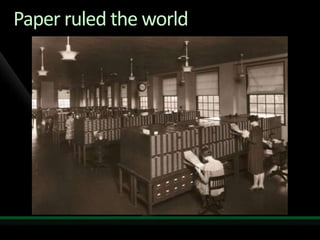
Paper ruled the world
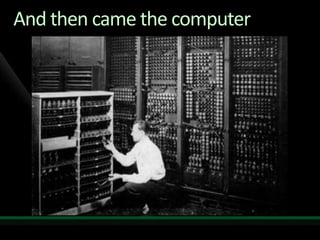
And then came the computer
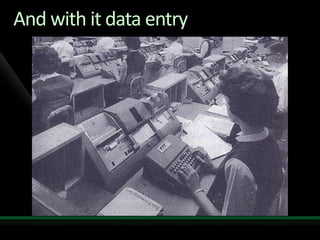
And with it data entry
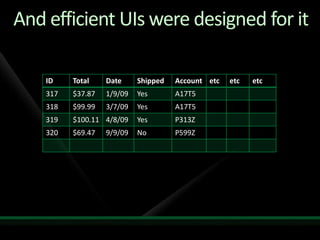
And efficient UIs were designed for it
Source of truth
And then… the paper was goneWell, not GONE goneIt just wasn’t the source of truth any moreNow, it’s the machine
But the UI lingers to this day
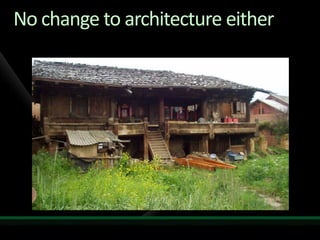
No change to architecture either
Distributed Systems Architecture
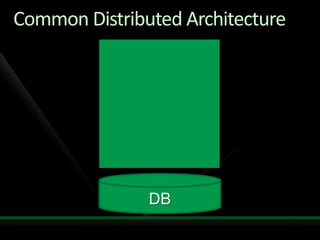
Common Distributed ArchitectureDB
Let’s deal with the obvious…
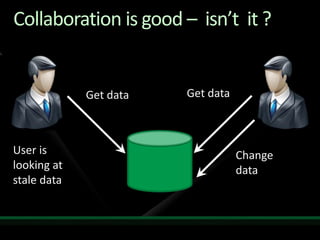
Collaboration is good –  isn’t  it ?Get dataGet dataUser is looking at stale dataChange data
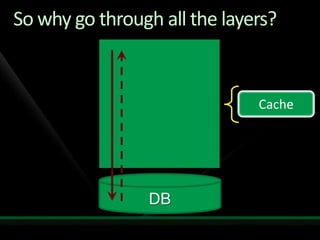
So why go through all the layers?CacheDB
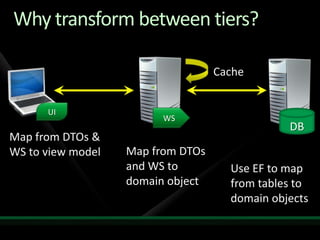
Why transform between tiers?CacheUIWSDBMap from DTOs & WS to view modelMap from DTOs and WS to domain objectUse EF to map from tables to domain objects
What was the point of all this again?
Queries – showing data to the user
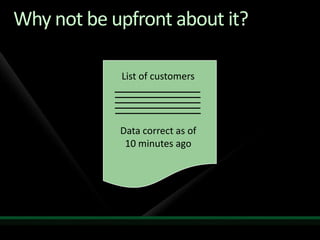
Why not be upfront about it?List of customersData correct as of 10 minutes ago
Only data, no behaviorThere is no objectSo why use an Object/Relational Mapper?
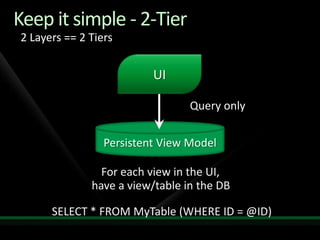
Keep it simple - 2-Tier2 Layers == 2 TiersUIQuery onlyPersistent View ModelFor each view in the UI, have a view/table in the DBSELECT * FROM MyTable (WHERE ID = @ID)
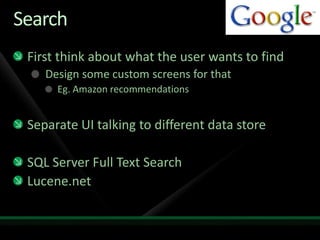
SearchFirst think about what the user wants to findDesign some custom screens for thatEg. Amazon recommendationsSeparate UI talking to different data storeSQL Server Full Text SearchLucene.net
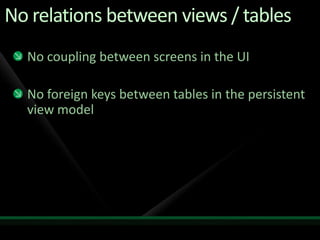
No relations between views / tablesNo coupling between screens in the UINo foreign keys between tables in the persistent view model
Data duplication in views & tablesThe same information can be shown on different screens in the UIThe same information can be stored in different tables in the persistent view modelTables contain a column for every piece of information shown in the UIAvoid calculations when doing queriesHave the data calculated ahead of time
Deployment and SecurityDeploy the persistent view model DB to the web tier (only SELECT is permitted)Don’t have to go through the firewall – fasterRole-based securityDifferent screens for different roles go to different tables – SELECT permissions per roleJust as secure as in-memory cachesIf not more so
Use for preliminary validationBefore going to submit data, check if it already exists in the persistent view modelUniquenessCan expose to user (Yahoo user signup)Related Entity ExistenceAddress validation – existence of street nameResults in less commands being rejected
Commands – accepting user input
Can we fully trust users decisions?
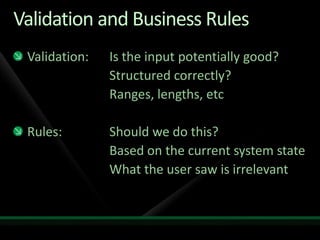
Validation and Business RulesValidation: 	Is the input potentially good?				Structured correctly?				Ranges, lengths, etcRules:		Should we do this?				Based on the current system state				What the user saw is irrelevant
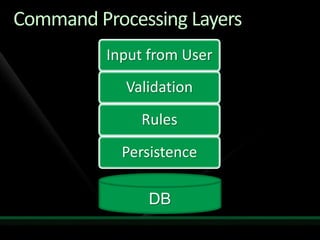
Command Processing LayersDB
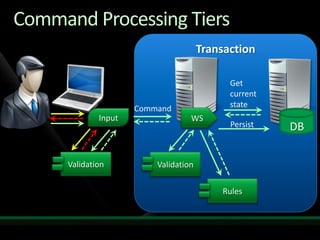
TransactionCommand Processing TiersGet current stateCommandWSInputDBPersistValidationValidationRules
Should we do what the user asks?
User Interface Design
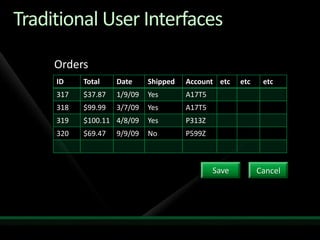
Traditional User InterfacesOrdersSaveCancel
Capturing user intentWhy is it important? Differentiating between:	Correcting a mistyped shipping address	The user moved – reroute shipments underwaySometimes users accidentally modify fields when tabbing between columns
Reservation systems
Reservation systems
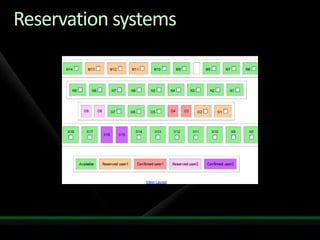
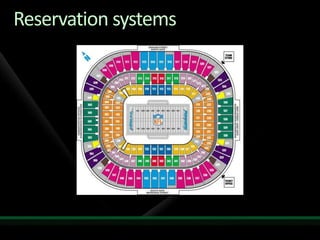
Not capturing user intentIn a traditional UI – what we have is the checkboxWhy do users select multiple seats?	Because they’re reserving for a family / friendsBut then, concurrency happens	Somebody else got in first on one of the seatsTry to find a block of seats somewhere else
Capturing user intentGroup reservation:Small group – sitting togetherLarge group – several small groupsEnter number of peopleEnter preferred seat type – indicates costSystem emails back when reservation can be filled	Include waiting list functionality
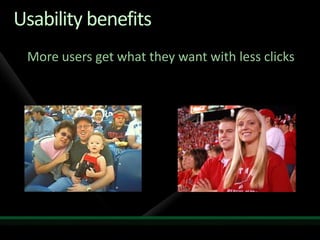
Usability benefits	More users get what they want with less clicks
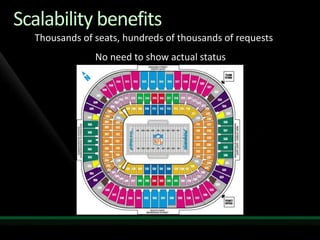
Scalability benefitsThousands of seats, hundreds of thousands of requests	            No need to show actual status
Revisiting the command
What’s a good command?The kind you can reply with:	“Thank you.	  Your confirmation email will arrive shortly”Inherently asynchronousNot really related to an entity
Eg. Posting a comment to a blogAfter the browser submits the comment, immediately shows it on the page using AJAXWhy wait for a response from the server?It’s not like the user’s going to call their friends and say “hey, look at the comment I just posted”And even if they did, by then it probably would have already been processed by the server
Eg. Withdrawing cash from an ATMBefore the ATM sends the command:Using the account information retrievedAccount type, Max single withdrawal, Max daily withdrawalDecides to send the command (or not)If so, dispenses cash without waiting for a responseYes – really.Exposed to race conditionsCheaper for the bank to let them throughAnd you pay ruinous interest in those cases
Queries not only for viewsUsed to decide if commands should be sentYes – this is business logic. Get over itClient-side controllers are supposed to do logicMay require additional data
Domain Models
What aren’t they for?Validation	Commands are validated before the domain model is calledQueries	Entity relationships for reading are unnecessary
What are they for?In addition to doing what the command said, doing other things as wellEg. When a new order is submitted, if the customer has ordered more than X in the past, give them a discount
Only persist what they needThe domain model isn’t responsible for persisting all dataonly what it needs for its purposesThe rest of the world is using the data in the query store anyway
Putting it all together
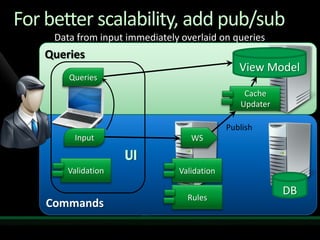
For better scalability, add pub/subData from input immediately overlaid on queriesQueriesView ModelUIQueriesCommandsPublishWSInputValidationValidationRulesCacheUpdaterDB
Summary
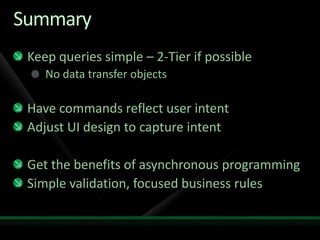
SummaryKeep queries simple – 2-Tier if possibleNo data transfer objectsHave commands reflect user intentAdjust UI design to capture intent Get the benefits of asynchronous programmingSimple validation, focused business rules
Thank youUdi Dahan – The Software SimplistEnterprise Development Expert & SOA Specialistwww.UdiDahan.comemail@UdiDahan.com

Command Query Responsibility Segregation

  • 1.
    Command / QueryResponsibilitySegregationUdi Dahan – The Software SimplistEnterprise Development Expert & SOA Specialist
  • 3.
    What will yousee here?Some HistoryDistributed Systems ArchitectureUI DesignDomain ModelWhat won’t you see here?Code
  • 4.
  • 5.
  • 6.
    And then camethe computer
  • 7.
    And with itdata entry
  • 8.
    And efficient UIswere designed for it
  • 9.
  • 10.
    And then… thepaper was goneWell, not GONE goneIt just wasn’t the source of truth any moreNow, it’s the machine
  • 11.
    But the UIlingers to this day
  • 12.
    No change toarchitecture either
  • 13.
  • 14.
  • 15.
    Let’s deal withthe obvious…
  • 16.
    Collaboration is good– isn’t it ?Get dataGet dataUser is looking at stale dataChange data
  • 17.
    So why gothrough all the layers?CacheDB
  • 18.
    Why transform betweentiers?CacheUIWSDBMap from DTOs & WS to view modelMap from DTOs and WS to domain objectUse EF to map from tables to domain objects
  • 19.
    What was thepoint of all this again?
  • 20.
    Queries – showingdata to the user
  • 21.
    Why not beupfront about it?List of customersData correct as of 10 minutes ago
  • 22.
    Only data, nobehaviorThere is no objectSo why use an Object/Relational Mapper?
  • 23.
    Keep it simple- 2-Tier2 Layers == 2 TiersUIQuery onlyPersistent View ModelFor each view in the UI, have a view/table in the DBSELECT * FROM MyTable (WHERE ID = @ID)
  • 24.
    SearchFirst think aboutwhat the user wants to findDesign some custom screens for thatEg. Amazon recommendationsSeparate UI talking to different data storeSQL Server Full Text SearchLucene.net
  • 25.
    No relations betweenviews / tablesNo coupling between screens in the UINo foreign keys between tables in the persistent view model
  • 26.
    Data duplication inviews & tablesThe same information can be shown on different screens in the UIThe same information can be stored in different tables in the persistent view modelTables contain a column for every piece of information shown in the UIAvoid calculations when doing queriesHave the data calculated ahead of time
  • 27.
    Deployment and SecurityDeploythe persistent view model DB to the web tier (only SELECT is permitted)Don’t have to go through the firewall – fasterRole-based securityDifferent screens for different roles go to different tables – SELECT permissions per roleJust as secure as in-memory cachesIf not more so
  • 28.
    Use for preliminaryvalidationBefore going to submit data, check if it already exists in the persistent view modelUniquenessCan expose to user (Yahoo user signup)Related Entity ExistenceAddress validation – existence of street nameResults in less commands being rejected
  • 29.
  • 30.
    Can we fullytrust users decisions?
  • 31.
    Validation and BusinessRulesValidation: Is the input potentially good? Structured correctly? Ranges, lengths, etcRules: Should we do this? Based on the current system state What the user saw is irrelevant
  • 32.
  • 33.
    TransactionCommand Processing TiersGetcurrent stateCommandWSInputDBPersistValidationValidationRules
  • 34.
    Should we dowhat the user asks?
  • 35.
  • 36.
  • 38.
    Capturing user intentWhyis it important? Differentiating between: Correcting a mistyped shipping address The user moved – reroute shipments underwaySometimes users accidentally modify fields when tabbing between columns
  • 39.
  • 40.
  • 41.
    Not capturing userintentIn a traditional UI – what we have is the checkboxWhy do users select multiple seats? Because they’re reserving for a family / friendsBut then, concurrency happens Somebody else got in first on one of the seatsTry to find a block of seats somewhere else
  • 42.
    Capturing user intentGroupreservation:Small group – sitting togetherLarge group – several small groupsEnter number of peopleEnter preferred seat type – indicates costSystem emails back when reservation can be filled Include waiting list functionality
  • 43.
    Usability benefits More usersget what they want with less clicks
  • 44.
    Scalability benefitsThousands ofseats, hundreds of thousands of requests No need to show actual status
  • 45.
  • 46.
    What’s a goodcommand?The kind you can reply with: “Thank you. Your confirmation email will arrive shortly”Inherently asynchronousNot really related to an entity
  • 47.
    Eg. Posting acomment to a blogAfter the browser submits the comment, immediately shows it on the page using AJAXWhy wait for a response from the server?It’s not like the user’s going to call their friends and say “hey, look at the comment I just posted”And even if they did, by then it probably would have already been processed by the server
  • 48.
    Eg. Withdrawing cashfrom an ATMBefore the ATM sends the command:Using the account information retrievedAccount type, Max single withdrawal, Max daily withdrawalDecides to send the command (or not)If so, dispenses cash without waiting for a responseYes – really.Exposed to race conditionsCheaper for the bank to let them throughAnd you pay ruinous interest in those cases
  • 49.
    Queries not onlyfor viewsUsed to decide if commands should be sentYes – this is business logic. Get over itClient-side controllers are supposed to do logicMay require additional data
  • 50.
  • 51.
    What aren’t theyfor?Validation Commands are validated before the domain model is calledQueries Entity relationships for reading are unnecessary
  • 52.
    What are theyfor?In addition to doing what the command said, doing other things as wellEg. When a new order is submitted, if the customer has ordered more than X in the past, give them a discount
  • 53.
    Only persist whatthey needThe domain model isn’t responsible for persisting all dataonly what it needs for its purposesThe rest of the world is using the data in the query store anyway
  • 54.
  • 55.
    For better scalability,add pub/subData from input immediately overlaid on queriesQueriesView ModelUIQueriesCommandsPublishWSInputValidationValidationRulesCacheUpdaterDB
  • 56.
  • 57.
    SummaryKeep queries simple– 2-Tier if possibleNo data transfer objectsHave commands reflect user intentAdjust UI design to capture intent Get the benefits of asynchronous programmingSimple validation, focused business rules
  • 58.
    Thank youUdi Dahan– The Software SimplistEnterprise Development Expert & SOA Specialistwww.UdiDahan.comemail@UdiDahan.com

Editor's Notes

  • #9 The goal being to get the data from the paper to the machine as quickly as possible.And the important thing about data entry is that the printed page is …
  • #10 If there was any conflict between the computer and the printed page – the printed page won.
  • #13 You’d think that something as significant as a change to the source of truth would influence software architecture in some way
  • #17 This is a fact of life – like gravity – you can’t fight it.
  • #18 If the result is that users are going to be seeing stale data anyway – why go all the way to the database?And if we’re going to be putting a cache in there anyway – we’re practically ensuring staleness, we just don’t tell anybody, right?
  • #19 That’s a lot of transformation!
  • #20 Maintainability? With all of this possibly redundant mapping code?It couldn’t be performance, because all of these transformations are taking up extra cycles.
  • #22 We see this on Twitter and Facebook – telling us how long ago something happened
  • #24 They’re tightly coupled anyway – sticking a bunch of layers in between won’t change that.This can be as simple as statically defined views on top of your tables.
  • #30 Reminding ourselves that users are looking at stale data…
  • #32 Sometimes developers mix up these two, but they’re different – first we validate the command, AFTER that, we perform rules, AFTER that we store/update data.
  • #34 But what kind of rules will we need? The kind that answer the following question…
  • #35 But, if we’ve already validated their input, is there any reason why we shouldn’t do what they want?
  • #37 These kinds of screens are often described as CRUD – for create, read, update, and delete in the developer lingoAlso known in the user lingo as CRAP. Though, you’ve got to admit, it’s got a certain …
  • #38 Matrix feel to it. The thing is, other than straight data manipulation, those screens don’t let us capture WHY the user is changing the data or what they’re trying to achieve.
  • #39 The user who can correct a mistyped shipping address may not be permitted to change the user’s address.By automatically shoving all data into the same grid without thinking through these rules, we make it harder on ourselves to later implement these rules.For example…
  • #40 I’m using this image because it’s small enough to understand what’s going on – to see the detail of what’s available, reserved, confirmed, etc.Now imagine larger scales…
  • #41 Each one of the slots here is a block of seats – not just one.
  • #56 This way, reads and writes don’t interfere with each other in the DB