
Uploaded byMedia4math
110 views
10 using trace
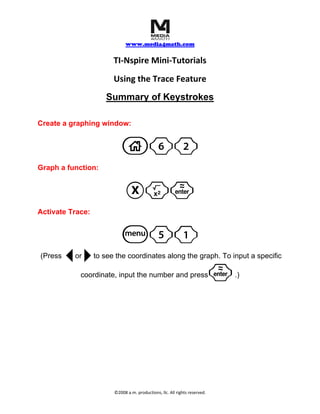
This document provides instructions for using the trace feature on the TI-Nspire graphing calculator. It explains that to activate trace, first create a graphing window by pressing c62, then graph a function by pressing Xq, and finally activate trace by pressing b51 to see coordinates along the graph or input specific coordinates. The trace feature allows viewing coordinates of a graphed function.


![[Palestra] Fatores técnicos relacionados com lucro no confinamento - Anderson...](https://cdn.slidesharecdn.com/ss_thumbnails/andersonvargas-111013120936-phpapp01-thumbnail.jpg?width=640&height=640&fit=bounds)


10 using trace
- 1. www.media4math.com TI‐Nspire Mini‐Tutorials Using the Trace Feature Summary of Keystrokes Create a graphing window: c62 Graph a function: Xq· Activate Trace: b51 (Press ¡ ¢ or to see the coordinates along the graph. To input a specific coordinate, input the number and press · .) ©2008 a.m. productions, llc. All rights reserved.