Bret Koebbe
Sporty’s Pilot Shop
10 Things Every iPad Pilot Should Know
Techniques, apps & accessories
Bret Koebbe
• Editor
iPad Pilot News
• ATP / CFI / Vice President
Sporty’s Academy

• App / Video Producer
Sporty’s Pilot Shop
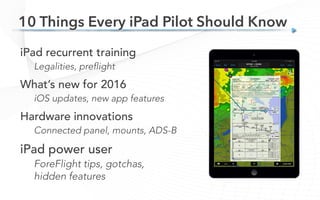
10 Things Every iPad Pilot Should Know
iPad recurrent training
Legalities, preflight
What’s new for 2016
iOS updates, new app features
Hardware innovations
Connected panel, mounts, ADS-B
iPad power user
ForeFlight tips, gotchas,
hidden features
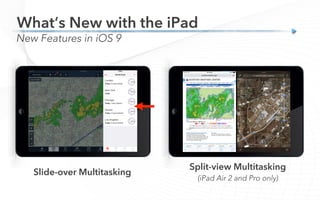
10 Things Every iPad Pilot Should Know
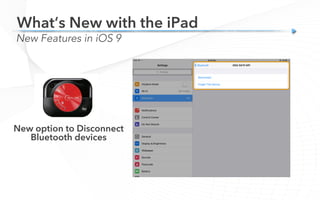
ipadpilotnews.com
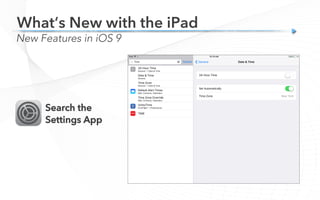
Additional resources
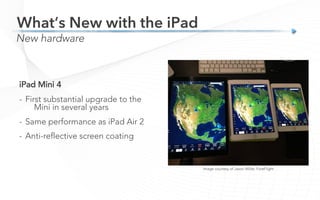
Sit back, relax and learn!
•  How-to articles
•  iPad Tips & News
•  iPad Newsletter
1 
1. Yes, you are legal…
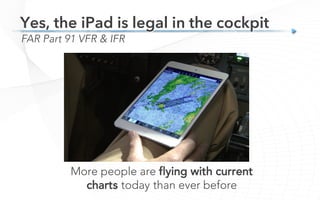
More people are flying with current
charts today than ever before
FAR Part 91 VFR & IFR
Yes, the iPad is legal in the cockpit
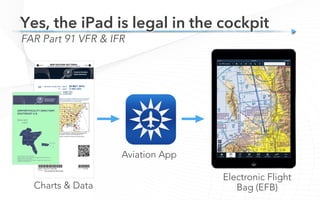
Charts & Data
Aviation App
Electronic Flight
Bag (EFB)
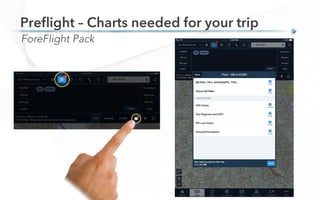
FAR Part 91 VFR & IFR
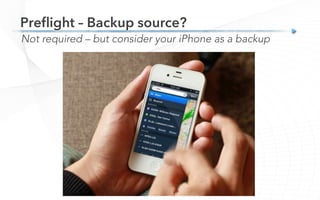
Yes, the iPad is legal in the cockpit
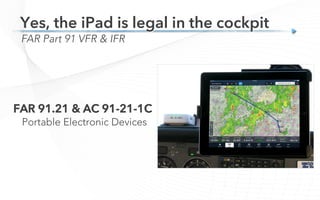
FAR 91.21 & AC 91-21-1C
Portable Electronic Devices
FAR Part 91 VFR & IFR
Yes, the iPad is legal in the cockpit
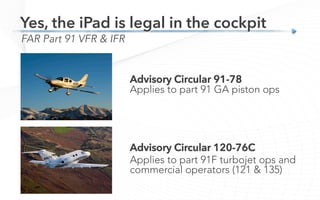
Advisory Circular 91-78
Applies to part 91 GA piston ops
Advisory Circular 120-76C
Applies to part 91F turbojet ops and
commercial operators (121 & 135)
FAR Part 91 VFR & IFR
Yes, the iPad is legal in the cockpit
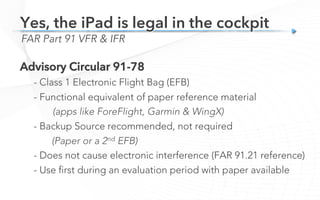
Advisory Circular 91-78
- Class 1 Electronic Flight Bag (EFB)
- Functional equivalent of paper reference material
(apps like ForeFlight, Garmin & WingX)
- Backup Source recommended, not required
(Paper or a 2nd EFB)
- Does not cause electronic interference (FAR 91.21 reference)
- Use first during an evaluation period with paper available
FAR Part 91 VFR & IFR
Yes, the iPad is legal in the cockpit
2
2. How to care for your iPad battery
Battery Life
How to care for your iPad battery
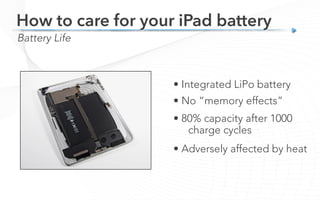
• Integrated LiPo battery
• No “memory effects”
• 80% capacity after 1000
charge cycles
• Adversely affected by heat
Battery Life
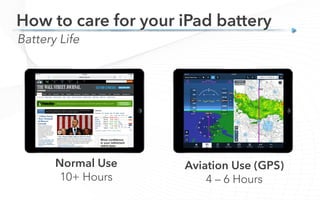
Normal Use
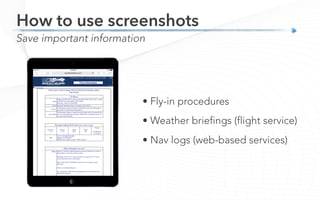
10+ Hours
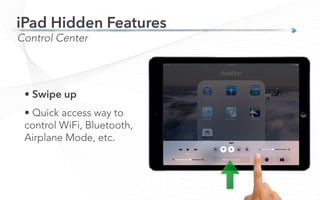
How to care for your iPad battery
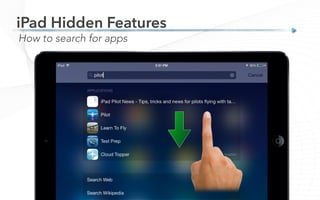
Aviation Use (GPS)
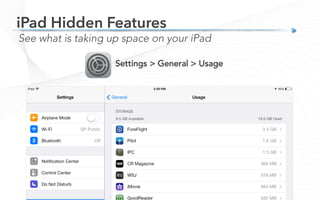
4 – 6 Hours
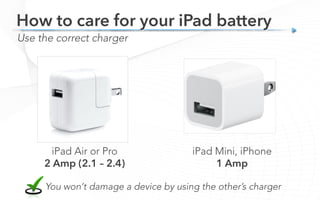
iPad Air or Pro
2 Amp (2.1 – 2.4)
Use the correct charger
How to care for your iPad battery
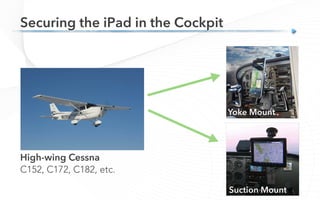
iPad Mini, iPhone
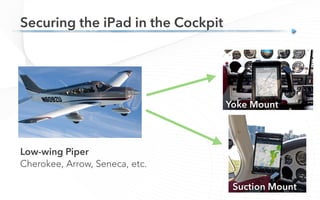
1 Amp
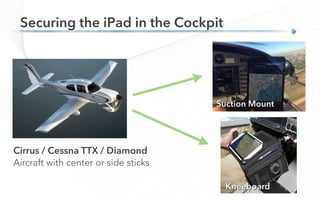
You won’t damage a device by using the other’s charger
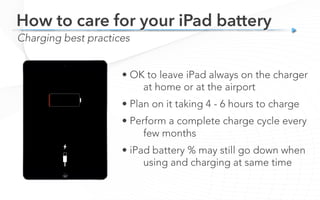
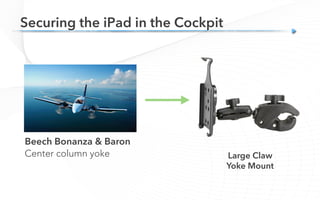
Charging best practices
How to care for your iPad battery
• OK to leave iPad always on the charger
at home or at the airport
• Plan on it taking 4 - 6 hours to charge
• Perform a complete charge cycle every
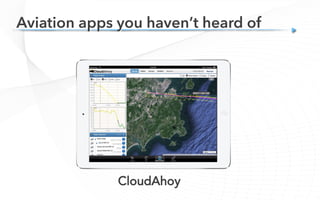
few months
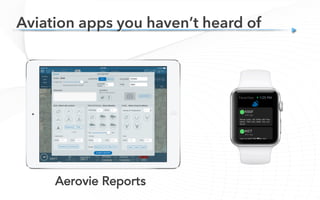
• iPad battery % may still go down when
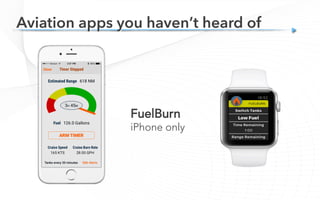
using and charging at same time
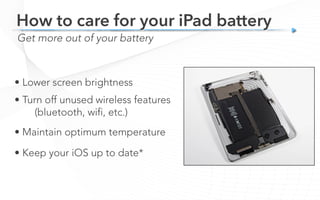
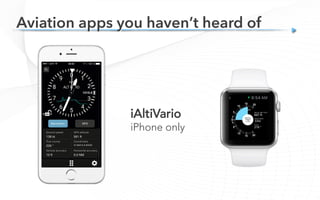
Get more out of your battery
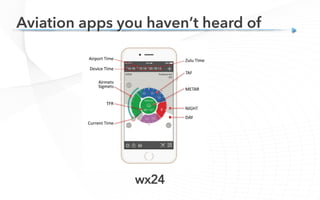
How to care for your iPad battery
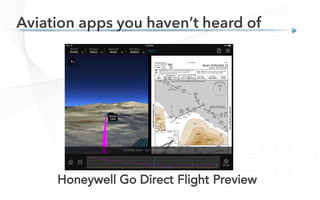
• Lower screen brightness
• Turn off unused wireless features
(bluetooth, wifi, etc.)
• Maintain optimum temperature
• Keep your iOS up to date*
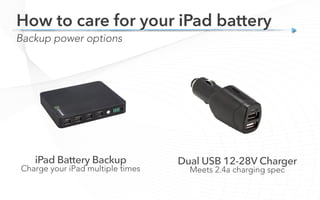
Charge your iPad multiple times Meets 2.4a charging spec
Backup power options
How to care for your iPad battery
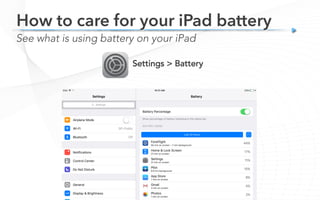
See what is using battery on your iPad
Settings > Battery
How to care for your iPad battery
3
3. What’s New – 2016 Update
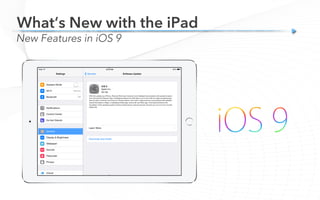
What’s New with the iPad
New Features in iOS 9
Split-view Multitasking
(iPad Air 2 and Pro only)
What’s New with the iPad
New Features in iOS 9
Slide-over Multitasking
What’s New with the iPad
New Features in iOS 9
New option to Disconnect
Bluetooth devices
Search the
Settings App
What’s New with the iPad
New Features in iOS 9
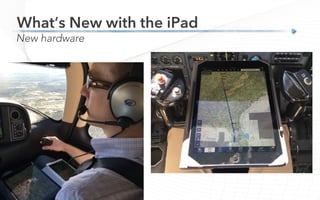
What’s New with the iPad
New hardware
Image courtesy of Jason Miller, ForeFlight
iPad Mini 4
-  First substantial upgrade to the
Mini in several years
-  Same performance as iPad Air 2
-  Anti-reflective screen coating
What’s New with the iPad
New hardware
10” iPad Pro
- Successor to the iPad Air 2
-  Upgraded processor
-  Excellent sunlight readability
13” iPad Pro
-  Too big for most cockpits
-  Very few mounts available
What’s New with the iPad
New hardware
Image courtesy of Jason Miller, ForeFlight
What’s New with the iPad
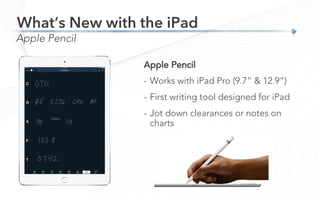
Apple Pencil
Apple Pencil
-  Works with iPad Pro (9.7” & 12.9”)
-  First writing tool designed for iPad
-  Jot down clearances or notes on
charts
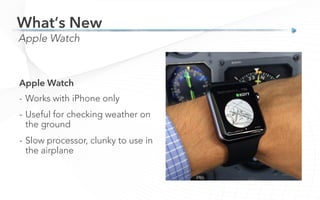
Apple Watch
What’s New
Apple Watch
-  Works with iPhone only
-  Useful for checking weather on
the ground
-  Slow processor, clunky to use in
the airplane
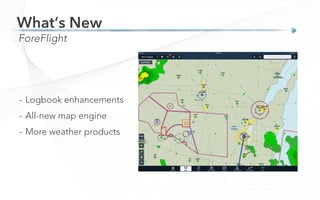
ForeFlight
What’s New
-  Logbook enhancements
-  All-new map engine
-  More weather products
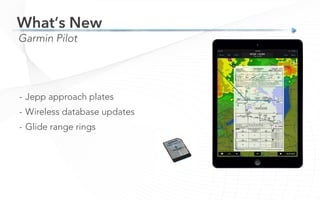
Garmin Pilot
What’s New
-  Jepp approach plates
-  Wireless database updates
-  Glide range rings
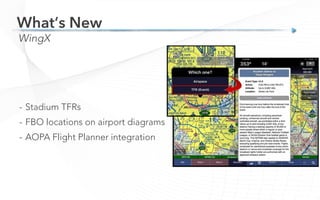
WingX
What’s New
-  Stadium TFRs
-  FBO locations on airport diagrams
-  AOPA Flight Planner integration
4
4. How to preflight your iPad
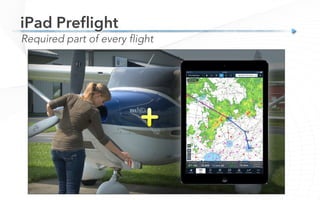
Required part of every flight
iPad Preflight
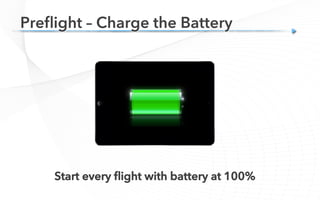
Start every flight with battery at 100%
Preflight – Charge the Battery
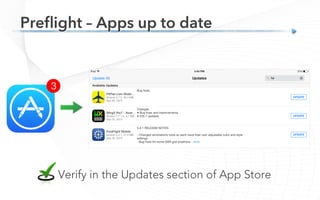
Preflight – Apps up to date

Verify in the Updates section of App Store
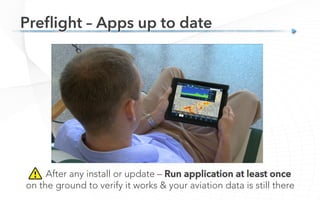
After any install or update – Run application at least once
on the ground to verify it works & your aviation data is still there
Preflight – Apps up to date
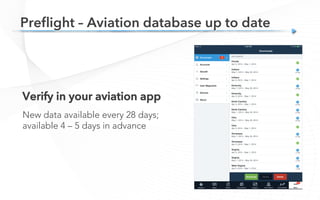
Verify in your aviation app
New data available every 28 days;
available 4 – 5 days in advance
Preflight – Aviation database up to date
Preflight – Charts needed for your trip
ForeFlight Pack
Preflight – Backup source?
Not required – but consider your iPhone as a backup
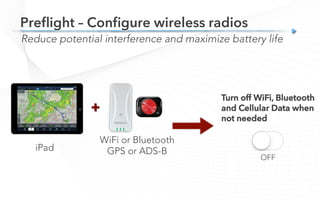
Preflight – Configure wireless radios
Reduce potential interference and maximize battery life
+
iPad
WiFi or Bluetooth
GPS or ADS-B
Turn off WiFi, Bluetooth
and Cellular Data when
not needed
OFF
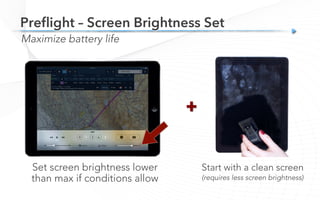
Preflight – Screen Brightness Set
Maximize battery life
Start with a clean screen
(requires less screen brightness)
Set screen brightness lower
than max if conditions allow
+
5
5. Connected Cockpit
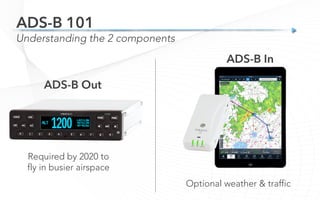
Understanding the 2 components
ADS-B 101
ADS-B Out
Required by 2020 to
fly in busier airspace
ADS-B In
Optional weather & traffic
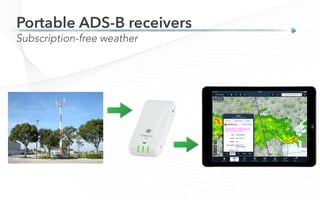
Subscription-free weather
Portable ADS-B receivers
Coverage
ADS-B Reception
FAA estimate
at 5,000 ft.
Ground-based
system
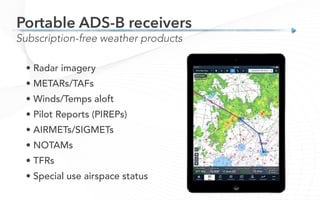
• Radar imagery
• METARs/TAFs
• Winds/Temps aloft
• Pilot Reports (PIREPs)
• AIRMETs/SIGMETs
• NOTAMs
• TFRs
• Special use airspace status
Subscription-free weather products
Portable ADS-B receivers
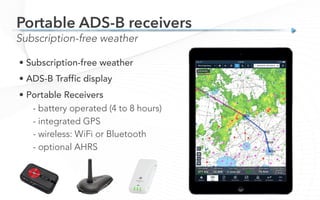
• Subscription-free weather
• ADS-B Traffic display
• Portable Receivers

- battery operated (4 to 8 hours)
- integrated GPS
- wireless: WiFi or Bluetooth
- optional AHRS
Subscription-free weather
Portable ADS-B receivers
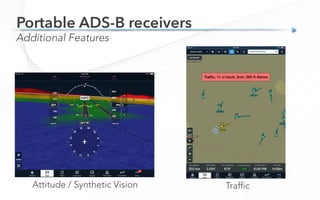
Additional Features
Attitude / Synthetic Vision Traffic
Portable ADS-B receivers
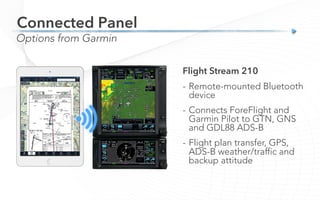
Connected Panel
Options from Garmin
Flight Stream 210
-  Remote-mounted Bluetooth
device
-  Connects ForeFlight and
Garmin Pilot to GTN, GNS
and GDL88 ADS-B
-  Flight plan transfer, GPS,
ADS-B weather/traffic and
backup attitude
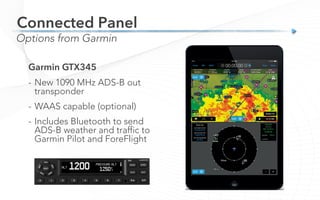
Connected Panel
Options from Garmin
Garmin GTX345
-  New 1090 MHz ADS-B out
transponder
-  WAAS capable (optional)
-  Includes Bluetooth to send
ADS-B weather and traffic to
Garmin Pilot and ForeFlight
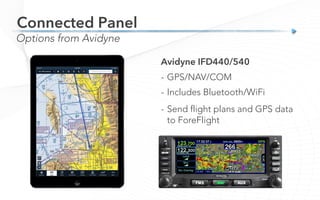
Connected Panel
Options from Avidyne
Avidyne IFD440/540
-  GPS/NAV/COM
-  Includes Bluetooth/WiFi
-  Send flight plans and GPS data
to ForeFlight
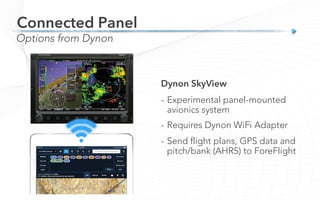
Connected Panel
Options from Dynon
Dynon SkyView
-  Experimental panel-mounted
avionics system
-  Requires Dynon WiFi Adapter
-  Send flight plans, GPS data and
pitch/bank (AHRS) to ForeFlight
6
6. Improve your preflight planning
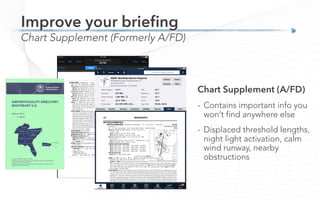
Chart Supplement (Formerly A/FD)
Improve your briefing
Chart Supplement (A/FD)
-  Contains important info you
won’t find anywhere else
-  Displaced threshold lengths,
night light activation, calm
wind runway, nearby
obstructions
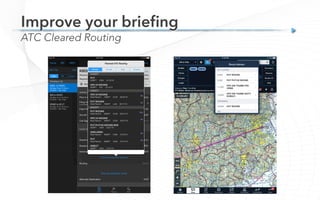
ATC Cleared Routing
Improve your briefing
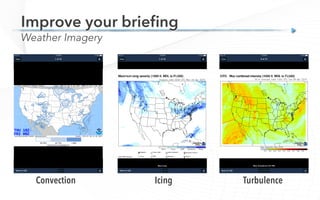
Weather Imagery
Improve your briefing
Convection Icing Turbulence
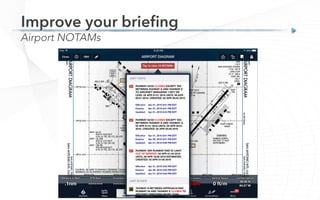
Airport NOTAMs
Improve your briefing
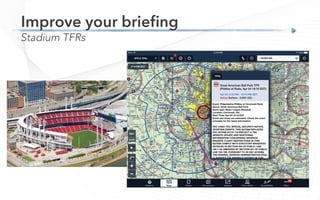
Stadium TFRs
Improve your briefing
ICAO Flight Plan
Improve your briefing
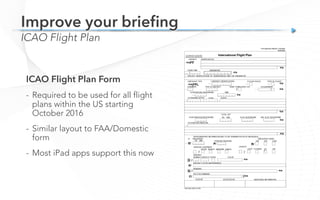
ICAO Flight Plan Form
-  Required to be used for all flight
plans within the US starting
October 2016
-  Similar layout to FAA/Domestic
form
-  Most iPad apps support this now
ICAO Flight Plan
Improve your briefing
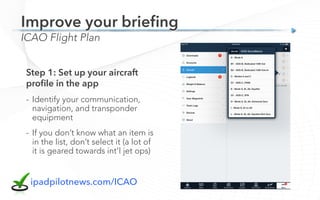
Step 1: Set up your aircraft
profile in the app
-  Identify your communication,
navigation, and transponder
equipment
-  If you don’t know what an item is
in the list, don’t select it (a lot of
it is geared towards int’l jet ops)
ipadpilotnews.com/ICAO
ICAO Flight Plan
Improve your briefing
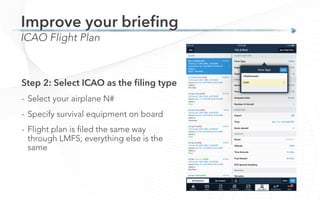
Step 2: Select ICAO as the filing type
-  Select your airplane N#
-  Specify survival equipment on board
-  Flight plan is filed the same way
through LMFS; everything else is the
same
7
7. iPad Pilot Gotchas
Temperature
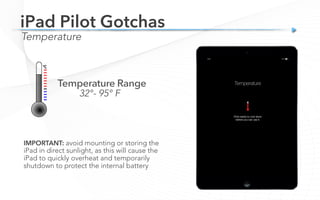
iPad Pilot Gotchas
32°- 95° F
IMPORTANT: avoid mounting or storing the
iPad in direct sunlight, as this will cause the
iPad to quickly overheat and temporarily
shutdown to protect the internal battery
Temperature
iPad Pilot Gotchas
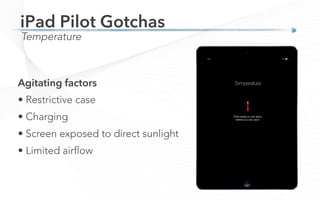
Agitating factors
• Restrictive case
• Charging
• Screen exposed to direct sunlight
• Limited airflow
Temperature
iPad Pilot Gotchas
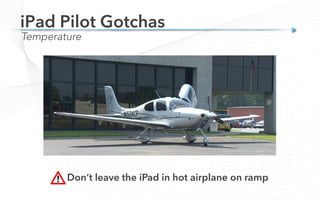
Don’t leave the iPad in hot airplane on ramp
Temperature
iPad Pilot Gotchas
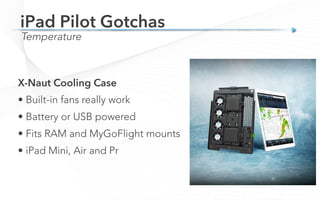
X-Naut Cooling Case
• Built-in fans really work
• Battery or USB powered
• Fits RAM and MyGoFlight mounts
• iPad Mini, Air and Pr
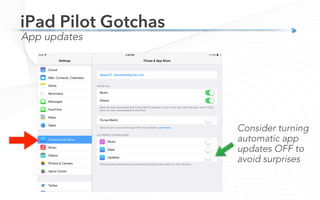
Consider turning
automatic app
updates OFF to
avoid surprises
App updates
iPad Pilot Gotchas
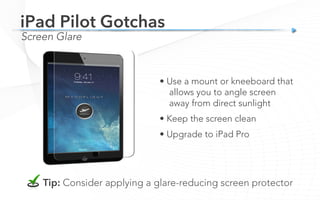
Screen Glare
iPad Pilot Gotchas
Tip: Consider applying a glare-reducing screen protector
• Use a mount or kneeboard that
allows you to angle screen
away from direct sunlight
• Keep the screen clean
• Upgrade to iPad Pro
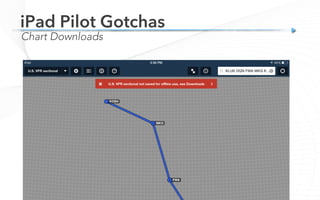
Chart Downloads
iPad Pilot Gotchas
8
8. iPad Hidden Features
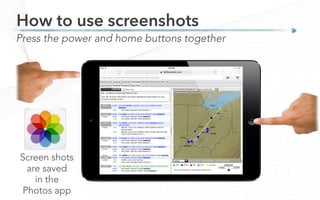
Press the power and home buttons together
How to use screenshots
Screen shots
are saved
in the
Photos app
Save important information
How to use screenshots
• Fly-in procedures
• Weather briefings (flight service)
• Nav logs (web-based services)
Control Center
• Swipe up
• Quick access way to
control WiFi, Bluetooth,
Airplane Mode, etc.
iPad Hidden Features
How to search for apps
iPad Hidden Features
See what is taking up space on your iPad
Settings > General > Usage
iPad Hidden Features
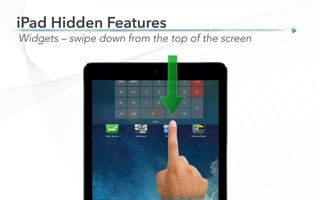
Widgets – swipe down from the top of the screen
iPad Hidden Features
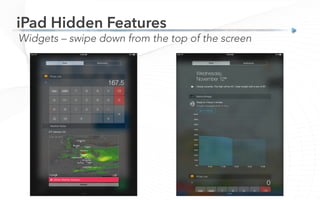
Widgets – swipe down from the top of the screen
iPad Hidden Features
99. Securing the iPad in the cockpit
Securing the iPad in the Cockpit
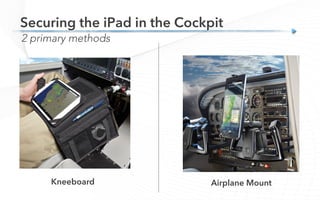
Airplane MountKneeboard
2 primary methods
Securing the iPad in the Cockpit
High-wing Cessna
C152, C172, C182, etc.
Yoke Mount
Suction Mount
Securing the iPad in the Cockpit
Low-wing Piper
Cherokee, Arrow, Seneca, etc.
Yoke Mount
Suction Mount
Securing the iPad in the Cockpit
Cirrus / Cessna TTX / Diamond
Aircraft with center or side sticks
Suction Mount
Kneeboard
Securing the iPad in the Cockpit
Beech Bonanza & Baron
Center column yoke Large Claw
Yoke Mount
Securing the iPad in the Cockpit
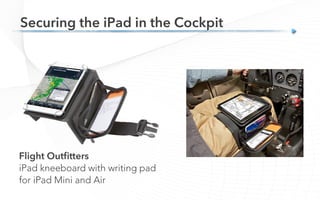
Flight Outfitters
iPad kneeboard with writing pad
for iPad Mini and Air
Securing the iPad in the Cockpit
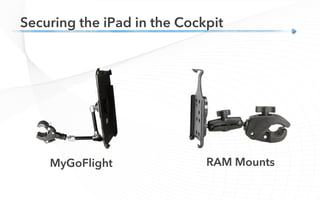
MyGoFlight RAM Mounts
110. Aviation apps you haven’t heard of
0
Aviation apps you haven’t heard of
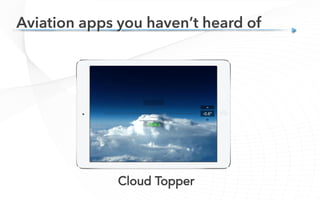
Cloud Topper
Aviation apps you haven’t heard of
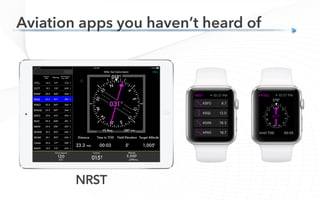
NRST
Aviation apps you haven’t heard of
CloudAhoy
Aviation apps you haven’t heard of
Aerovie Reports
Aviation apps you haven’t heard of
FuelBurn
iPhone only
Aviation apps you haven’t heard of
iAltiVario
iPhone only
Aviation apps you haven’t heard of
wx24
Aviation apps you haven’t heard of
Honeywell Go Direct Flight Preview
Bret Koebbe
iPad Pilot News

10 Things Every iPad Pilot Should Know
Techniques, apps & accessories

10 Things every iPad pilot should know

  • 1.
    Bret Koebbe Sporty’s PilotShop 10 Things Every iPad Pilot Should Know Techniques, apps & accessories
  • 2.
    Bret Koebbe • Editor iPadPilot News • ATP / CFI / Vice President Sporty’s Academy • App / Video Producer Sporty’s Pilot Shop 10 Things Every iPad Pilot Should Know
  • 3.
    iPad recurrent training Legalities,preflight What’s new for 2016 iOS updates, new app features Hardware innovations Connected panel, mounts, ADS-B iPad power user ForeFlight tips, gotchas, hidden features 10 Things Every iPad Pilot Should Know
  • 4.
    ipadpilotnews.com Additional resources Sit back,relax and learn! •  How-to articles •  iPad Tips & News •  iPad Newsletter
  • 5.
    1 1. Yes,you are legal…
  • 6.
    More people areflying with current charts today than ever before FAR Part 91 VFR & IFR Yes, the iPad is legal in the cockpit
  • 7.
    Charts & Data AviationApp Electronic Flight Bag (EFB) FAR Part 91 VFR & IFR Yes, the iPad is legal in the cockpit
  • 8.
    FAR 91.21 &AC 91-21-1C Portable Electronic Devices FAR Part 91 VFR & IFR Yes, the iPad is legal in the cockpit
  • 9.
    Advisory Circular 91-78 Appliesto part 91 GA piston ops Advisory Circular 120-76C Applies to part 91F turbojet ops and commercial operators (121 & 135) FAR Part 91 VFR & IFR Yes, the iPad is legal in the cockpit
  • 10.
    Advisory Circular 91-78 -Class 1 Electronic Flight Bag (EFB) - Functional equivalent of paper reference material (apps like ForeFlight, Garmin & WingX) - Backup Source recommended, not required (Paper or a 2nd EFB) - Does not cause electronic interference (FAR 91.21 reference) - Use first during an evaluation period with paper available FAR Part 91 VFR & IFR Yes, the iPad is legal in the cockpit
  • 11.
    2 2. How tocare for your iPad battery
  • 12.
    Battery Life How tocare for your iPad battery • Integrated LiPo battery • No “memory effects” • 80% capacity after 1000 charge cycles • Adversely affected by heat
  • 13.
    Battery Life Normal Use 10+Hours How to care for your iPad battery Aviation Use (GPS) 4 – 6 Hours
  • 14.
    iPad Air orPro 2 Amp (2.1 – 2.4) Use the correct charger How to care for your iPad battery iPad Mini, iPhone 1 Amp You won’t damage a device by using the other’s charger
  • 15.
    Charging best practices Howto care for your iPad battery • OK to leave iPad always on the charger at home or at the airport • Plan on it taking 4 - 6 hours to charge • Perform a complete charge cycle every few months • iPad battery % may still go down when using and charging at same time
  • 16.
    Get more outof your battery How to care for your iPad battery • Lower screen brightness • Turn off unused wireless features (bluetooth, wifi, etc.) • Maintain optimum temperature • Keep your iOS up to date*
  • 17.
    Charge your iPadmultiple times Meets 2.4a charging spec Backup power options How to care for your iPad battery
  • 18.
    See what isusing battery on your iPad Settings > Battery How to care for your iPad battery
  • 19.
    3 3. What’s New– 2016 Update
  • 20.
    What’s New withthe iPad New Features in iOS 9
  • 21.
    Split-view Multitasking (iPad Air2 and Pro only) What’s New with the iPad New Features in iOS 9 Slide-over Multitasking
  • 22.
    What’s New withthe iPad New Features in iOS 9 New option to Disconnect Bluetooth devices
  • 23.
    Search the Settings App What’sNew with the iPad New Features in iOS 9
  • 24.
    What’s New withthe iPad New hardware Image courtesy of Jason Miller, ForeFlight iPad Mini 4 -  First substantial upgrade to the Mini in several years -  Same performance as iPad Air 2 -  Anti-reflective screen coating
  • 25.
    What’s New withthe iPad New hardware 10” iPad Pro - Successor to the iPad Air 2 -  Upgraded processor -  Excellent sunlight readability 13” iPad Pro -  Too big for most cockpits -  Very few mounts available
  • 26.
    What’s New withthe iPad New hardware Image courtesy of Jason Miller, ForeFlight
  • 27.
    What’s New withthe iPad Apple Pencil Apple Pencil -  Works with iPad Pro (9.7” & 12.9”) -  First writing tool designed for iPad -  Jot down clearances or notes on charts
  • 28.
    Apple Watch What’s New AppleWatch -  Works with iPhone only -  Useful for checking weather on the ground -  Slow processor, clunky to use in the airplane
  • 29.
    ForeFlight What’s New -  Logbookenhancements -  All-new map engine -  More weather products
  • 30.
    Garmin Pilot What’s New - Jepp approach plates -  Wireless database updates -  Glide range rings
  • 31.
    WingX What’s New -  StadiumTFRs -  FBO locations on airport diagrams -  AOPA Flight Planner integration
  • 32.
    4 4. How topreflight your iPad
  • 33.
    Required part ofevery flight iPad Preflight
  • 34.
    Start every flightwith battery at 100% Preflight – Charge the Battery
  • 35.
    Preflight – Appsup to date Verify in the Updates section of App Store
  • 36.
    After any installor update – Run application at least once on the ground to verify it works & your aviation data is still there Preflight – Apps up to date
  • 37.
    Verify in youraviation app New data available every 28 days; available 4 – 5 days in advance Preflight – Aviation database up to date
  • 38.
    Preflight – Chartsneeded for your trip ForeFlight Pack
  • 39.
    Preflight – Backupsource? Not required – but consider your iPhone as a backup
  • 40.
    Preflight – Configurewireless radios Reduce potential interference and maximize battery life + iPad WiFi or Bluetooth GPS or ADS-B Turn off WiFi, Bluetooth and Cellular Data when not needed OFF
  • 41.
    Preflight – ScreenBrightness Set Maximize battery life Start with a clean screen (requires less screen brightness) Set screen brightness lower than max if conditions allow +
  • 42.
  • 43.
    Understanding the 2components ADS-B 101 ADS-B Out Required by 2020 to fly in busier airspace ADS-B In Optional weather & traffic
  • 44.
  • 45.
    Coverage ADS-B Reception FAA estimate at5,000 ft. Ground-based system
  • 46.
    • Radar imagery •METARs/TAFs • Winds/Temps aloft • Pilot Reports (PIREPs) • AIRMETs/SIGMETs • NOTAMs • TFRs • Special use airspace status Subscription-free weather products Portable ADS-B receivers
  • 47.
    • Subscription-free weather •ADS-B Traffic display • Portable Receivers - battery operated (4 to 8 hours) - integrated GPS - wireless: WiFi or Bluetooth - optional AHRS Subscription-free weather Portable ADS-B receivers
  • 48.
    Additional Features Attitude /Synthetic Vision Traffic Portable ADS-B receivers
  • 49.
    Connected Panel Options fromGarmin Flight Stream 210 -  Remote-mounted Bluetooth device -  Connects ForeFlight and Garmin Pilot to GTN, GNS and GDL88 ADS-B -  Flight plan transfer, GPS, ADS-B weather/traffic and backup attitude
  • 50.
    Connected Panel Options fromGarmin Garmin GTX345 -  New 1090 MHz ADS-B out transponder -  WAAS capable (optional) -  Includes Bluetooth to send ADS-B weather and traffic to Garmin Pilot and ForeFlight
  • 51.
    Connected Panel Options fromAvidyne Avidyne IFD440/540 -  GPS/NAV/COM -  Includes Bluetooth/WiFi -  Send flight plans and GPS data to ForeFlight
  • 52.
    Connected Panel Options fromDynon Dynon SkyView -  Experimental panel-mounted avionics system -  Requires Dynon WiFi Adapter -  Send flight plans, GPS data and pitch/bank (AHRS) to ForeFlight
  • 53.
    6 6. Improve yourpreflight planning
  • 54.
    Chart Supplement (FormerlyA/FD) Improve your briefing Chart Supplement (A/FD) -  Contains important info you won’t find anywhere else -  Displaced threshold lengths, night light activation, calm wind runway, nearby obstructions
  • 55.
  • 56.
    Weather Imagery Improve yourbriefing Convection Icing Turbulence
  • 57.
  • 58.
  • 59.
    ICAO Flight Plan Improveyour briefing ICAO Flight Plan Form -  Required to be used for all flight plans within the US starting October 2016 -  Similar layout to FAA/Domestic form -  Most iPad apps support this now
  • 60.
    ICAO Flight Plan Improveyour briefing Step 1: Set up your aircraft profile in the app -  Identify your communication, navigation, and transponder equipment -  If you don’t know what an item is in the list, don’t select it (a lot of it is geared towards int’l jet ops) ipadpilotnews.com/ICAO
  • 61.
    ICAO Flight Plan Improveyour briefing Step 2: Select ICAO as the filing type -  Select your airplane N# -  Specify survival equipment on board -  Flight plan is filed the same way through LMFS; everything else is the same
  • 62.
  • 63.
    Temperature iPad Pilot Gotchas 32°-95° F IMPORTANT: avoid mounting or storing the iPad in direct sunlight, as this will cause the iPad to quickly overheat and temporarily shutdown to protect the internal battery
  • 64.
    Temperature iPad Pilot Gotchas Agitatingfactors • Restrictive case • Charging • Screen exposed to direct sunlight • Limited airflow
  • 65.
    Temperature iPad Pilot Gotchas Don’tleave the iPad in hot airplane on ramp
  • 66.
    Temperature iPad Pilot Gotchas X-NautCooling Case • Built-in fans really work • Battery or USB powered • Fits RAM and MyGoFlight mounts • iPad Mini, Air and Pr
  • 67.
    Consider turning automatic app updatesOFF to avoid surprises App updates iPad Pilot Gotchas
  • 68.
    Screen Glare iPad PilotGotchas Tip: Consider applying a glare-reducing screen protector • Use a mount or kneeboard that allows you to angle screen away from direct sunlight • Keep the screen clean • Upgrade to iPad Pro
  • 69.
  • 70.
  • 71.
    Press the powerand home buttons together How to use screenshots Screen shots are saved in the Photos app
  • 72.
    Save important information Howto use screenshots • Fly-in procedures • Weather briefings (flight service) • Nav logs (web-based services)
  • 73.
    Control Center • Swipeup • Quick access way to control WiFi, Bluetooth, Airplane Mode, etc. iPad Hidden Features
  • 74.
    How to searchfor apps iPad Hidden Features
  • 75.
    See what istaking up space on your iPad Settings > General > Usage iPad Hidden Features
  • 76.
    Widgets – swipedown from the top of the screen iPad Hidden Features
  • 77.
    Widgets – swipedown from the top of the screen iPad Hidden Features
  • 78.
    99. Securing theiPad in the cockpit
  • 79.
    Securing the iPadin the Cockpit Airplane MountKneeboard 2 primary methods
  • 80.
    Securing the iPadin the Cockpit High-wing Cessna C152, C172, C182, etc. Yoke Mount Suction Mount
  • 81.
    Securing the iPadin the Cockpit Low-wing Piper Cherokee, Arrow, Seneca, etc. Yoke Mount Suction Mount
  • 82.
    Securing the iPadin the Cockpit Cirrus / Cessna TTX / Diamond Aircraft with center or side sticks Suction Mount Kneeboard
  • 83.
    Securing the iPadin the Cockpit Beech Bonanza & Baron Center column yoke Large Claw Yoke Mount
  • 84.
    Securing the iPadin the Cockpit Flight Outfitters iPad kneeboard with writing pad for iPad Mini and Air
  • 85.
    Securing the iPadin the Cockpit MyGoFlight RAM Mounts
  • 86.
    110. Aviation appsyou haven’t heard of 0
  • 87.
    Aviation apps youhaven’t heard of Cloud Topper
  • 88.
    Aviation apps youhaven’t heard of NRST
  • 89.
    Aviation apps youhaven’t heard of CloudAhoy
  • 90.
    Aviation apps youhaven’t heard of Aerovie Reports
  • 91.
    Aviation apps youhaven’t heard of FuelBurn iPhone only
  • 92.
    Aviation apps youhaven’t heard of iAltiVario iPhone only
  • 93.
    Aviation apps youhaven’t heard of wx24
  • 94.
    Aviation apps youhaven’t heard of Honeywell Go Direct Flight Preview
  • 95.
    Bret Koebbe iPad PilotNews 10 Things Every iPad Pilot Should Know Techniques, apps & accessories