Introducing
    iPad
        by
 Moustafa Ahmed
    Mahmoud
Discussion Materials
History of iPad

Specification of iPad

Functions of iPad


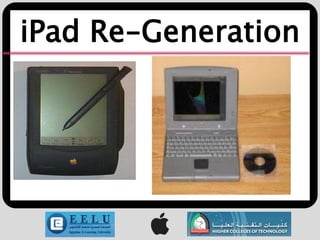
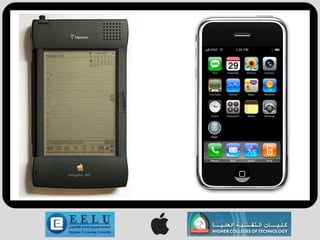
iPad Re-Generation

Reviews
History of iPad
                                 iPad
          iPad is a tablet computer developed by Apple Inc.
iPad considered to be in a category between smart phone and laptop.


                           History of iPad
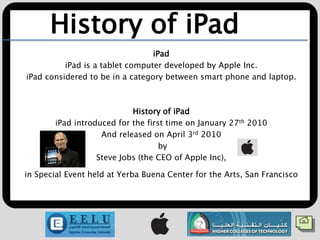
       iPad introduced for the first time on January 27th 2010
                   And released on April 3rd 2010
                                   by
                  Steve Jobs (the CEO of Apple Inc),

in Special Event held at Yerba Buena Center for the Arts, San Francisco
Specification of iPad
Type               : Tablet media player/PC
Release date       : a. Wi-Fi model (US)          : April 3 2010
                   : b. Wi-Fi Model (UK)          : May 2010
                   : c. Wi-Fi + 3G model          : April 2010
Operating system   : iPhone OS (modified)
                   : 3.2 (build 7B298g)
                   : Released January 27, 2010; 2 months ago)
Power              : Internal rechargeable non-removable 25 Wh
                   : lithium-polymer battery
CPU                : 1 GHz Apple A4
                   : PowerVR SGX 535 GPU
Storage            : capacity Flash memory
                   : 16, 32, and 64 GB
Memory             : 256 MB DRAM built into Apple A4 die
Display            : 1024 × 768 px, 9.7 in (25 cm),
                   : 132 Ppi, 4:3 aspect ratio, XGA, LED-backlit IPS LCD display
Input              : Multi-touch touchscreen display, headset controls, proximity
                   : and ambient light sensors, 3-axis accelerometer, digital compass
Camera                      : None
Connectivity                :Wi-Fi (802.11a/b/g/n),
                            : Bluetooth 2.1+EDR, USB :2.0/Dockconnector
                            : Wi-Fi + 3G model also includes:
                            : A-GPS, micro-SIM slot, Quad-band GSM 850 900
                            : 1800 1900 MHz GPRS/EDGE, Tri-band UMTS
                            : 850 1900 2100 MHz HSDPA
Online services             : iTunes Store, App Store, MobileMe,
                            : iBookstore
Dimensions                  : 9.56 in (24.3 cm) (h)
                            : 7.47 in (19.0 cm) (w)
                            : 0.5 in (1.3 cm) (d)
Weight Wi-Fi model          : 1.5 lb (680 g)
Wi-Fi + 3G model : 1.6 lb (730 g)
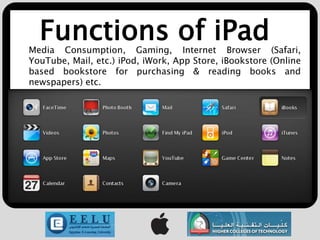
Functions of iPad
Media Consumption, Gaming, Internet Browser (Safari,
YouTube, Mail, etc.) iPod, iWork, App Store, iBookstore (Online
based bookstore for purchasing & reading books and
newspapers) etc.
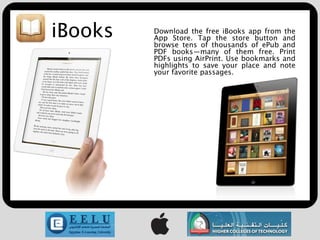
iBooks   Download the free iBooks app from the
         App Store. Tap the store button and
         browse tens of thousands of ePub and
         PDF books—many of them free. Print
         PDFs using AirPrint. Use bookmarks and
         highlights to save your place and note
         your favorite passages.
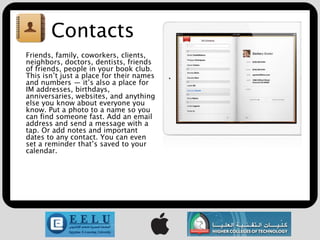
Contacts
Friends, family, coworkers, clients,
neighbors, doctors, dentists, friends
of friends, people in your book club.
This isn’t just a place for their names
and numbers — it’s also a place for
IM addresses, birthdays,
anniversaries, websites, and anything
else you know about everyone you
know. Put a photo to a name so you
can find someone fast. Add an email
address and send a message with a
tap. Or add notes and important
dates to any contact. You can even
set a reminder that’s saved to your
calendar.
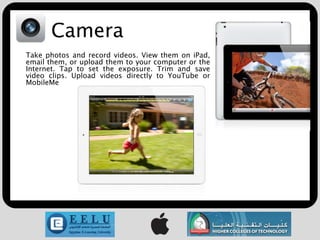
Camera
Take photos and record videos. View them on iPad,
email them, or upload them to your computer or the
Internet. Tap to set the exposure. Trim and save
video clips. Upload videos directly to YouTube or
MobileMe
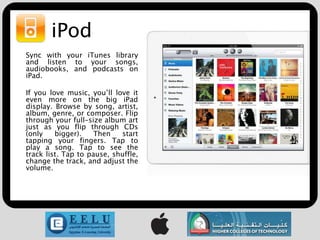
iPod
Sync with your iTunes library
and listen to your songs,
audiobooks, and podcasts on
iPad.

If you love music, you’ll love it
even more on the big iPad
display. Browse by song, artist,
album, genre, or composer. Flip
through your full-size album art
just as you flip through CDs
(only    bigger).    Then   start
tapping your fingers. Tap to
play a song. Tap to see the
track list. Tap to pause, shuffle,
change the track, and adjust the
volume.
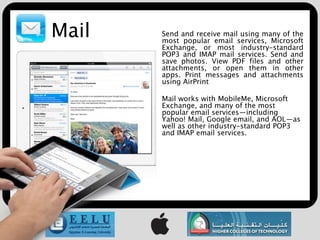
Mail   Send and receive mail using many of the
       most popular email services, Microsoft
       Exchange, or most industry-standard
       POP3 and IMAP mail services. Send and
       save photos. View PDF files and other
       attachments, or open them in other
       apps. Print messages and attachments
       using AirPrint

       Mail works with MobileMe, Microsoft
       Exchange, and many of the most
       popular email services—including
       Yahoo! Mail, Google email, and AOL—as
       well as other industry-standard POP3
       and IMAP email services.
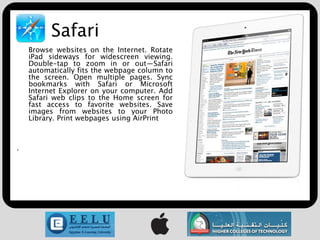
Safari
    Browse websites on the Internet. Rotate
    iPad sideways for widescreen viewing.
    Double-tap to zoom in or out—Safari
    automatically fits the webpage column to
    the screen. Open multiple pages. Sync
    bookmarks with Safari or Microsoft
    Internet Explorer on your computer. Add
    Safari web clips to the Home screen for
    fast access to favorite websites. Save
    images from websites to your Photo
    Library. Print webpages using AirPrint


.
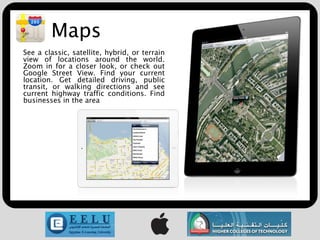
Maps
See a classic, satellite, hybrid, or terrain
view of locations around the world.
Zoom in for a closer look, or check out
Google Street View. Find your current
location. Get detailed driving, public
transit, or walking directions and see
current highway traffic conditions. Find
businesses in the area
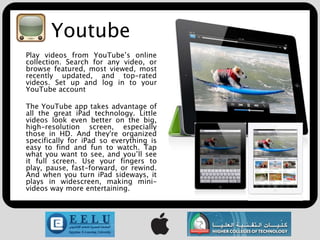
Youtube
Play videos from YouTube’s online
collection. Search for any video, or
browse featured, most viewed, most
recently updated, and top-rated
videos. Set up and log in to your
YouTube account

The YouTube app takes advantage of
all the great iPad technology. Little
videos look even better on the big,
high-resolution screen, especially
those in HD. And they're organized
specifically for iPad so everything is
easy to find and fun to watch. Tap
what you want to see, and you’ll see
it full screen. Use your fingers to
play, pause, fast-forward, or rewind.
And when you turn iPad sideways, it
plays in widescreen, making mini-
videos way more entertaining.
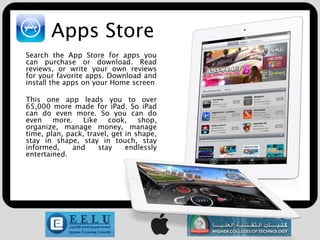
Apps Store
Search the App Store for apps you
can purchase or download. Read
reviews, or write your own reviews
for your favorite apps. Download and
install the apps on your Home screen

This one app leads you to over
65,000 more made for iPad. So iPad
can do even more. So you can do
even    more.    Like    cook,    shop,
organize, manage money, manage
time, plan, pack, travel, get in shape,
stay in shape, stay in touch, stay
informed,     and     stay    endlessly
entertained.
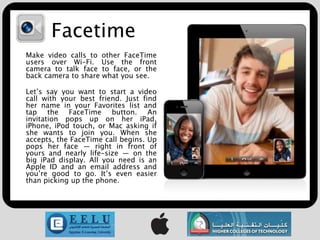
Facetime
Make video calls to other FaceTime
users over Wi-Fi. Use the front
camera to talk face to face, or the
back camera to share what you see.

Let’s say you want to start a video
call with your best friend. Just find
her name in your Favorites list and
tap the FaceTime button. An
invitation pops up on her iPad,
iPhone, iPod touch, or Mac asking if
she wants to join you. When she
accepts, the FaceTime call begins. Up
pops her face — right in front of
yours and nearly life-size — on the
big iPad display. All you need is an
Apple ID and an email address and
you’re good to go. It’s even easier
than picking up the phone.
iPad Re-Generation
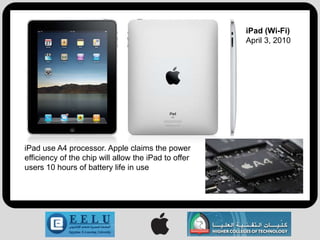
iPad (Wi-Fi)
                                                      April 3, 2010


iPad use A4 processor. Apple claims the power
efficiency of the chip will allow the iPad to offer
users 10 hours of battery life in use
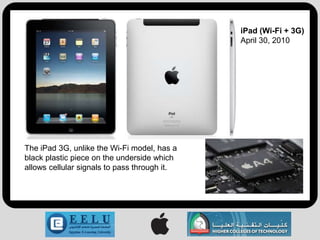
iPad (Wi-Fi + 3G)
                                              April 30, 2010


The iPad 3G, unlike the Wi-Fi model, has a
black plastic piece on the underside which
allows cellular signals to pass through it.
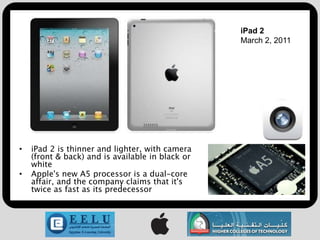
iPad 2
                                                  March 2, 2011


•   iPad 2 is thinner and lighter, with camera
    (front & back) and is available in black or
    white
•   Apple's new A5 processor is a dual-core
    affair, and the company claims that it's
    twice as fast as its predecessor
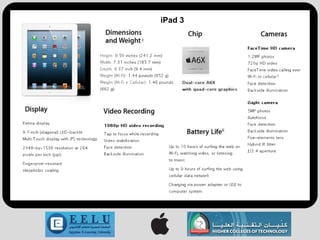
iPad 3
Reviews
• Walt Mossberg of The Wall Street Journal called it a “pretty close”
  laptop killer.

• Andy Ihnatko of Chicago Sun-Times calls the iPad “one of the best
  computers ever”.

• PC Magazine also praised “You have yourself a winner that will
  undoubtedly be a driving force in shaping the emerging tablet
  landscape”.
THANK
 YOU
FOR YOUR
ATTENTION
   

I pad

  • 1.
    Introducing iPad by Moustafa Ahmed Mahmoud
  • 2.
    Discussion Materials History ofiPad Specification of iPad Functions of iPad iPad Re-Generation Reviews
  • 3.
    History of iPad iPad iPad is a tablet computer developed by Apple Inc. iPad considered to be in a category between smart phone and laptop. History of iPad iPad introduced for the first time on January 27th 2010 And released on April 3rd 2010 by Steve Jobs (the CEO of Apple Inc), in Special Event held at Yerba Buena Center for the Arts, San Francisco
  • 4.
    Specification of iPad Type : Tablet media player/PC Release date : a. Wi-Fi model (US) : April 3 2010 : b. Wi-Fi Model (UK) : May 2010 : c. Wi-Fi + 3G model : April 2010 Operating system : iPhone OS (modified) : 3.2 (build 7B298g) : Released January 27, 2010; 2 months ago) Power : Internal rechargeable non-removable 25 Wh : lithium-polymer battery CPU : 1 GHz Apple A4 : PowerVR SGX 535 GPU Storage : capacity Flash memory : 16, 32, and 64 GB Memory : 256 MB DRAM built into Apple A4 die Display : 1024 × 768 px, 9.7 in (25 cm), : 132 Ppi, 4:3 aspect ratio, XGA, LED-backlit IPS LCD display Input : Multi-touch touchscreen display, headset controls, proximity : and ambient light sensors, 3-axis accelerometer, digital compass
  • 5.
    Camera : None Connectivity :Wi-Fi (802.11a/b/g/n), : Bluetooth 2.1+EDR, USB :2.0/Dockconnector : Wi-Fi + 3G model also includes: : A-GPS, micro-SIM slot, Quad-band GSM 850 900 : 1800 1900 MHz GPRS/EDGE, Tri-band UMTS : 850 1900 2100 MHz HSDPA Online services : iTunes Store, App Store, MobileMe, : iBookstore Dimensions : 9.56 in (24.3 cm) (h) : 7.47 in (19.0 cm) (w) : 0.5 in (1.3 cm) (d) Weight Wi-Fi model : 1.5 lb (680 g) Wi-Fi + 3G model : 1.6 lb (730 g)
  • 6.
    Functions of iPad MediaConsumption, Gaming, Internet Browser (Safari, YouTube, Mail, etc.) iPod, iWork, App Store, iBookstore (Online based bookstore for purchasing & reading books and newspapers) etc.
  • 7.
    iBooks Download the free iBooks app from the App Store. Tap the store button and browse tens of thousands of ePub and PDF books—many of them free. Print PDFs using AirPrint. Use bookmarks and highlights to save your place and note your favorite passages.
  • 8.
    Contacts Friends, family, coworkers,clients, neighbors, doctors, dentists, friends of friends, people in your book club. This isn’t just a place for their names and numbers — it’s also a place for IM addresses, birthdays, anniversaries, websites, and anything else you know about everyone you know. Put a photo to a name so you can find someone fast. Add an email address and send a message with a tap. Or add notes and important dates to any contact. You can even set a reminder that’s saved to your calendar.
  • 9.
    Camera Take photos andrecord videos. View them on iPad, email them, or upload them to your computer or the Internet. Tap to set the exposure. Trim and save video clips. Upload videos directly to YouTube or MobileMe
  • 10.
    iPod Sync with youriTunes library and listen to your songs, audiobooks, and podcasts on iPad. If you love music, you’ll love it even more on the big iPad display. Browse by song, artist, album, genre, or composer. Flip through your full-size album art just as you flip through CDs (only bigger). Then start tapping your fingers. Tap to play a song. Tap to see the track list. Tap to pause, shuffle, change the track, and adjust the volume.
  • 11.
    Mail Send and receive mail using many of the most popular email services, Microsoft Exchange, or most industry-standard POP3 and IMAP mail services. Send and save photos. View PDF files and other attachments, or open them in other apps. Print messages and attachments using AirPrint Mail works with MobileMe, Microsoft Exchange, and many of the most popular email services—including Yahoo! Mail, Google email, and AOL—as well as other industry-standard POP3 and IMAP email services.
  • 12.
    Safari Browse websites on the Internet. Rotate iPad sideways for widescreen viewing. Double-tap to zoom in or out—Safari automatically fits the webpage column to the screen. Open multiple pages. Sync bookmarks with Safari or Microsoft Internet Explorer on your computer. Add Safari web clips to the Home screen for fast access to favorite websites. Save images from websites to your Photo Library. Print webpages using AirPrint .
  • 13.
    Maps See a classic,satellite, hybrid, or terrain view of locations around the world. Zoom in for a closer look, or check out Google Street View. Find your current location. Get detailed driving, public transit, or walking directions and see current highway traffic conditions. Find businesses in the area
  • 14.
    Youtube Play videos fromYouTube’s online collection. Search for any video, or browse featured, most viewed, most recently updated, and top-rated videos. Set up and log in to your YouTube account The YouTube app takes advantage of all the great iPad technology. Little videos look even better on the big, high-resolution screen, especially those in HD. And they're organized specifically for iPad so everything is easy to find and fun to watch. Tap what you want to see, and you’ll see it full screen. Use your fingers to play, pause, fast-forward, or rewind. And when you turn iPad sideways, it plays in widescreen, making mini- videos way more entertaining.
  • 15.
    Apps Store Search theApp Store for apps you can purchase or download. Read reviews, or write your own reviews for your favorite apps. Download and install the apps on your Home screen This one app leads you to over 65,000 more made for iPad. So iPad can do even more. So you can do even more. Like cook, shop, organize, manage money, manage time, plan, pack, travel, get in shape, stay in shape, stay in touch, stay informed, and stay endlessly entertained.
  • 16.
    Facetime Make video callsto other FaceTime users over Wi-Fi. Use the front camera to talk face to face, or the back camera to share what you see. Let’s say you want to start a video call with your best friend. Just find her name in your Favorites list and tap the FaceTime button. An invitation pops up on her iPad, iPhone, iPod touch, or Mac asking if she wants to join you. When she accepts, the FaceTime call begins. Up pops her face — right in front of yours and nearly life-size — on the big iPad display. All you need is an Apple ID and an email address and you’re good to go. It’s even easier than picking up the phone.
  • 17.
  • 19.
    iPad (Wi-Fi) April 3, 2010 iPad use A4 processor. Apple claims the power efficiency of the chip will allow the iPad to offer users 10 hours of battery life in use
  • 20.
    iPad (Wi-Fi +3G) April 30, 2010 The iPad 3G, unlike the Wi-Fi model, has a black plastic piece on the underside which allows cellular signals to pass through it.
  • 21.
    iPad 2 March 2, 2011 • iPad 2 is thinner and lighter, with camera (front & back) and is available in black or white • Apple's new A5 processor is a dual-core affair, and the company claims that it's twice as fast as its predecessor
  • 22.
  • 23.
    Reviews • Walt Mossbergof The Wall Street Journal called it a “pretty close” laptop killer. • Andy Ihnatko of Chicago Sun-Times calls the iPad “one of the best computers ever”. • PC Magazine also praised “You have yourself a winner that will undoubtedly be a driving force in shaping the emerging tablet landscape”.
  • 24.