Practical Education Support
Application
Yu Xia, EDT 6200, Harding University
Why We Use Those Learning Apps?
● Using learning application in the classroom usually means new
teaching methods’ production.
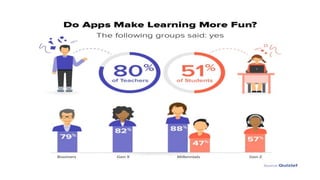
● There are fun games available on mobile applications that indulge
the students into a healthy thought process and help them
understand things from a different perspective.
● Online community in learning apps make parents and teachers
communicate more often than before.
● More resources, more chance
Target, Grades and Goals
● Target Grade: 3
● Student Group: ESL students who just come to America in short time and need large
amounts of reading, listening, writing and speaking skills practice.
● Goals of Teaching: Students can develop their English learning by knowing more
words and understanding other people’s talk in the classroom. They can have
academic success in English learning environment.
● Goals of Communicating: Parents understand teachers’ works and give assistants
and supports through eductaion process.
Top 10 Applications of Learning
● Reading Eggs
● Edmodo
● Socrative Student
● Quizlet
● Duolingo
● ClassDojo
● Let’s Read
● Remind
● Kahoot
● Book Creator
Apps 1: Reading Eggs
● Reading Eggs application designs a complete learn to read
system for children aged 2-13.
● It covers the five essential components of reading: phonics,
phonemic awareness, vocabulary, fluency and comprehension.
● Parents can see instant results in their dashboard and receive
detailed progress reports.
● Children love learning through playing games and enjoying the
participated feelings.
Apps 2: Edmodo
● It’s a social learning platform designed as a social community
that students can share learning experience and tips together.
● Creates a connection and collaboration environment for both
teachers and students.
● It’s similar with Canvas System, as learning management
platform.Mostly, teachers can use Edmodo as an online
blackboard and inbox.
● The beauty of the social networking features is that
students can collaborate on projects, asking questions
and working together.
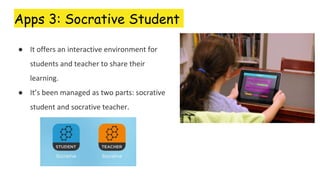
Apps 3: Socrative Student
● It offers an interactive environment for
students and teacher to share their
learning.
● It’s been managed as two parts: socrative
student and socrative teacher.
Apps 3: Socrative Student
● Being beneficial, students can share their understanding by answering formative
assessment questions in a variety of formats, such as quizzes or quick question polls,
exit tickets and space races.
● Teachers can give students feedback from watching their academic performance
records with data analyses.
● Students and teachers have one more place to talk and communicate through using
this apps rather than only talking in the classroom.
Apps 4: Quizlet
● Quizlet is a very good solution for students who need
index cards to run through vocabulary words in
preparation for a spelling test.
● It works for studying concepts form all subjects.
● With using Quizlet app, students can search an online
database of over more than 13 million users.
● Students can share their learning subject flashcards to
others through Quizlet. Overall, the app is for reviewing
flashcards and students can use it to create their own
sets of flashcards.
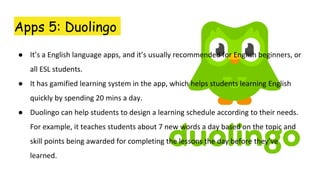
Apps 5: Duolingo
● It’s a English language apps, and it’s usually recommended for English beginners, or
all ESL students.
● It has gamified learning system in the app, which helps students learning English
quickly by spending 20 mins a day.
● Duolingo can help students to design a learning schedule according to their needs.
For example, it teaches students about 7 new words a day based on the topic and
skill points being awarded for completing the lessons the day before they’ve
learned.
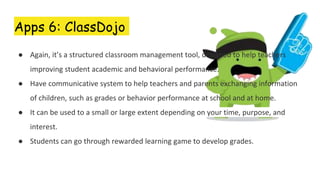
Apps 6: ClassDojo
● Again, it’s a structured classroom management tool, designed to help teachers
improving student academic and behavioral performance.
● Have communicative system to help teachers and parents exchanging information
of children, such as grades or behavior performance at school and at home.
● It can be used to a small or large extent depending on your time, purpose, and
interest.
● Students can go through rewarded learning game to develop grades.
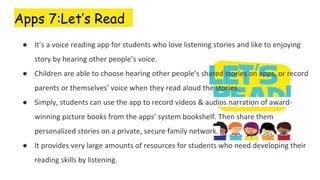
Apps 7:Let’s Read
● It’s a voice reading app for students who love listening stories and like to enjoying
story by hearing other people’s voice.
● Children are able to choose hearing other people’s shared stories on apps, or record
parents or themselves’ voice when they read aloud the stories.
● Simply, students can use the app to record videos & audios narration of award-
winning picture books from the apps’ system bookshelf. Then share them
personalized stories on a private, secure family network.
● It provides very large amounts of resources for students who need developing their
reading skills by listening.
Apps 8: Remind
● It’s a safe and social friendly tools to help teachers creating a classroom friendly
communication.
● Teachers can send messages or targeted information to students and parents.
● Teachers can schedule reminders about meetings, assignment deadlines, send
students messages such as daily homework, after class assignments, reminders of
upcoming tests, photos of class activities or notes.
● it will help students to stay on top of what is going on at school from class
assignments to extracurricular activities.
Apps 9: Kahoot
● It’s a app for teachers to administer quizzes, tests, discussions or surveys.
Teachers use the feedback collected in the app to design class or modify
teaching instructions.
● It also have a game based classroom response system played by the whole
class in real time. Teachers usually join the game into class activity.
● For example, when multiple-choice questions are projected on the screen,
students answer the questions with their smartphone, tablet or computer,
their answers will be responded to teachers through the system.
Apps 10: Book Creator
● It is a rare content creation app that is just as at home in a child’s hand as
it is a teacher’s.
● The apps said: “Education is changing. Bring creativity to your classroom
our apps. ”
● With this app both can create useful and compelling eBooks, magazines,
and guides without taking an age to learn how to use the software.
● Students have an online free library with using this app. They can
research information anytime and record their ideas in note system.

Practical education support application

  • 1.
    Practical Education Support Application YuXia, EDT 6200, Harding University
  • 2.
    Why We UseThose Learning Apps? ● Using learning application in the classroom usually means new teaching methods’ production. ● There are fun games available on mobile applications that indulge the students into a healthy thought process and help them understand things from a different perspective. ● Online community in learning apps make parents and teachers communicate more often than before. ● More resources, more chance
  • 3.
    Target, Grades andGoals ● Target Grade: 3 ● Student Group: ESL students who just come to America in short time and need large amounts of reading, listening, writing and speaking skills practice. ● Goals of Teaching: Students can develop their English learning by knowing more words and understanding other people’s talk in the classroom. They can have academic success in English learning environment. ● Goals of Communicating: Parents understand teachers’ works and give assistants and supports through eductaion process.
  • 4.
    Top 10 Applicationsof Learning ● Reading Eggs ● Edmodo ● Socrative Student ● Quizlet ● Duolingo ● ClassDojo ● Let’s Read ● Remind ● Kahoot ● Book Creator
  • 5.
    Apps 1: ReadingEggs ● Reading Eggs application designs a complete learn to read system for children aged 2-13. ● It covers the five essential components of reading: phonics, phonemic awareness, vocabulary, fluency and comprehension. ● Parents can see instant results in their dashboard and receive detailed progress reports. ● Children love learning through playing games and enjoying the participated feelings.
  • 6.
    Apps 2: Edmodo ●It’s a social learning platform designed as a social community that students can share learning experience and tips together. ● Creates a connection and collaboration environment for both teachers and students. ● It’s similar with Canvas System, as learning management platform.Mostly, teachers can use Edmodo as an online blackboard and inbox. ● The beauty of the social networking features is that students can collaborate on projects, asking questions and working together.
  • 7.
    Apps 3: SocrativeStudent ● It offers an interactive environment for students and teacher to share their learning. ● It’s been managed as two parts: socrative student and socrative teacher.
  • 8.
    Apps 3: SocrativeStudent ● Being beneficial, students can share their understanding by answering formative assessment questions in a variety of formats, such as quizzes or quick question polls, exit tickets and space races. ● Teachers can give students feedback from watching their academic performance records with data analyses. ● Students and teachers have one more place to talk and communicate through using this apps rather than only talking in the classroom.
  • 9.
    Apps 4: Quizlet ●Quizlet is a very good solution for students who need index cards to run through vocabulary words in preparation for a spelling test. ● It works for studying concepts form all subjects. ● With using Quizlet app, students can search an online database of over more than 13 million users. ● Students can share their learning subject flashcards to others through Quizlet. Overall, the app is for reviewing flashcards and students can use it to create their own sets of flashcards.
  • 11.
    Apps 5: Duolingo ●It’s a English language apps, and it’s usually recommended for English beginners, or all ESL students. ● It has gamified learning system in the app, which helps students learning English quickly by spending 20 mins a day. ● Duolingo can help students to design a learning schedule according to their needs. For example, it teaches students about 7 new words a day based on the topic and skill points being awarded for completing the lessons the day before they’ve learned.
  • 12.
    Apps 6: ClassDojo ●Again, it’s a structured classroom management tool, designed to help teachers improving student academic and behavioral performance. ● Have communicative system to help teachers and parents exchanging information of children, such as grades or behavior performance at school and at home. ● It can be used to a small or large extent depending on your time, purpose, and interest. ● Students can go through rewarded learning game to develop grades.
  • 13.
    Apps 7:Let’s Read ●It’s a voice reading app for students who love listening stories and like to enjoying story by hearing other people’s voice. ● Children are able to choose hearing other people’s shared stories on apps, or record parents or themselves’ voice when they read aloud the stories. ● Simply, students can use the app to record videos & audios narration of award- winning picture books from the apps’ system bookshelf. Then share them personalized stories on a private, secure family network. ● It provides very large amounts of resources for students who need developing their reading skills by listening.
  • 14.
    Apps 8: Remind ●It’s a safe and social friendly tools to help teachers creating a classroom friendly communication. ● Teachers can send messages or targeted information to students and parents. ● Teachers can schedule reminders about meetings, assignment deadlines, send students messages such as daily homework, after class assignments, reminders of upcoming tests, photos of class activities or notes. ● it will help students to stay on top of what is going on at school from class assignments to extracurricular activities.
  • 15.
    Apps 9: Kahoot ●It’s a app for teachers to administer quizzes, tests, discussions or surveys. Teachers use the feedback collected in the app to design class or modify teaching instructions. ● It also have a game based classroom response system played by the whole class in real time. Teachers usually join the game into class activity. ● For example, when multiple-choice questions are projected on the screen, students answer the questions with their smartphone, tablet or computer, their answers will be responded to teachers through the system.
  • 16.
    Apps 10: BookCreator ● It is a rare content creation app that is just as at home in a child’s hand as it is a teacher’s. ● The apps said: “Education is changing. Bring creativity to your classroom our apps. ” ● With this app both can create useful and compelling eBooks, magazines, and guides without taking an age to learn how to use the software. ● Students have an online free library with using this app. They can research information anytime and record their ideas in note system.