Microcomputer Systems
Course Title:Computer Organization and Architecture
Dr. Nazib Abdun Nasir
Assistant Professor
CS, AIUB
nazib.nasir@aiub.edu
2.
Lecture Outline
1. Introductionto the architecture of microcomputers
and IBM PC
2. Peripherals and their relations to the software or Programs
3. What computer does while executing instructions
4. Advantages and disadvantages of assembly language programming
**As a microcomputer user, you already know most of these terms
3.
Components of Microcomputer
System
•SYSTEMUNIT
•I/O DEVICES OR PERIPHERALS
➢ Keyboard
➢ Display Unit
➢ Disk drives
•INTEGRATED-CIRCUIT (IC)
➢ Contains transistors. Digital circuits
[0’s& 1’s]
➢ Binary Digits/ Bits: 0 or 1
4.
CPU:
➢ Brain ofthe computers
➢ Controls all the operations
➢ A single chip processor (microprocessor)
MEMORY CIRCUITS : Stores information
I/O CIRCUITS : Communicate with I/O devices
Components of Microcomputer
System
5.
The System Board
SystemBoard/motherboard resides in the system unit
It contains microprocessors and memory circuits
• It has expansion slots to connect additional circuit
boards called add-in cards/add-in boards
I/O circuits are located in add-in cards
6.
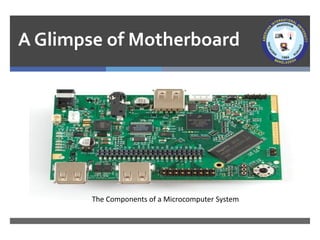
A Glimpse ofMotherboard
The Components of a Microcomputer System
7.
Memory
Bytes and Words:
➢Informationprocessed is stored in memory
➢A memory circuit element can store one bit
of data [i.e. 0 or 1]
➢Memory circuits are organized as a group of
8 bits of data
➢8 bits of string = 1 Byte
➢Memory bytes are known as address( i.e.
street address of a house).
8.
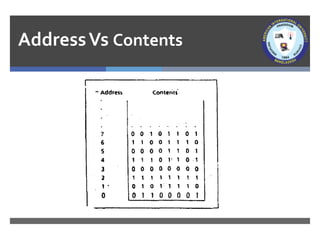
AddressVs Contents
The storeddata in a memory byte are called contents/value.
Address Contents
The address of a memory byte is FIXED
and different from other addresses(
unique).
Contents are NOT unique as they deal
with current data.
The number of bits in an address
depend on the processor
[ i.e. Intel 8086 = 20-bit &
Intel 80286=24-bit ]
Contents of memory byte are always 8
bits
Memory byte addressing
Supposea processor uses 20 bits for an address. How many
memory bytes can be addressed using this processor?
➢A bit can have two possible values (i.e. 0 or 1)
➢So, in a 20-bit address, we can have 220 or 10,48,576
In computer terminology 220 = 1 Mega
Therefore, 20-bit address can be used to address 1 MB.
11.
MemoryWord
In a Microcomputer,Two bytes = a word
So to store a word data, IBM PC needs :
➢ A pair of successive memory bytes
➢ A pair of memory bytes = Memory word
The lower address of the two memory bytes is the memory address.
➢ i.e. a memory word with address 2 is made up of address 2 and 3
A microprocessor can detect memory byte or memory word from memory
location/address.
12.
Bit Positions inbyte and Word
•Bit positions are numbered from Right to left
•Bit 0-7 = low byte [ Lower address of word]
•Bit 8-15 = high byte [ Higher address of word]
13.
Memory Operations
The processorcan perform two operations on memory
➢Read or fetch the contents from a location
Processor only gets a copy of the data
Original contents of the location are unchanged
➢Write or Store data at a location
The data written become the new contents
The Original/previous contents are lost
14.
RAM and ROM
RAM:Random Access Memory
➢ RAM locations can be read and written
➢ Program instructions and data are stored
➢ RAM memory are lost when the machine is turned off
ROM: Read Only Memory
➢ Once initialized can’t be changed (Read Only)
➢ Retain values unlike RAM [example]
➢ ROM based programs are known as firmware
➢ Responsible for loading start-up programs
15.
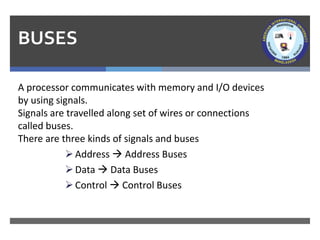
BUSES
A processor communicateswith memory and I/O devices
by using signals.
Signals are travelled along set of wires or connections
called buses.
There are three kinds of signals and buses
➢Address → Address Buses
➢Data → Data Buses
➢Control → Control Buses
16.
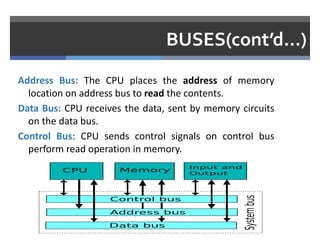
BUSES(cont’d…)
Address Bus: TheCPU places the address of memory
location on address bus to read the contents.
Data Bus: CPU receives the data, sent by memory circuits
on the data bus.
Control Bus: CPU sends control signals on control bus
perform read operation in memory.
17.
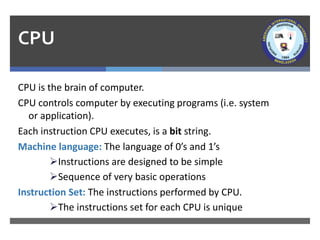
CPU
CPU is thebrain of computer.
CPU controls computer by executing programs (i.e. system
or application).
Each instruction CPU executes, is a bit string.
Machine language: The language of 0’s and 1’s
➢Instructions are designed to be simple
➢Sequence of very basic operations
Instruction Set: The instructions performed by CPU.
➢The instructions set for each CPU is unique
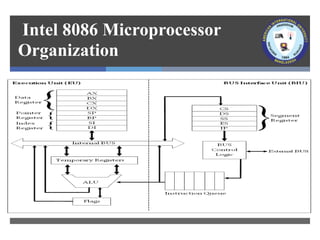
Execution Unit (EU)
▪EU contains ALU circuits.
▪ ALU performs arithmetic and logical operations.
▪ Data operations are stored in registers.
▪ A register is like memory location; however, we refer
to it by name not number.
➢i.e. AX, BX, CX, DX, SI, DI, SP, BP
▪ Also, EU Contains temporary registers for holding
operands for the ALU and FLAGS registers.
▪ FLAG register’s individual bits reflect the result of
computation
20.
Bus Interface Unit(BIU)
▪ BIU enables communication between the EU and
memory or I/O circuits.
▪ Primarily responsible for transmitting address,
data and control signals on the buses.
▪ BIU registers are: CS,DS, ES and IP
➢BIU registers hold the addresses of the
memory locations
21.
EU and BIU
▪EU and BIU are connected by internal bus and they work
together.
▪ While EU executes an Instruction, BIU fetches up to six
bytes of the next instruction and places instructions in
instruction queue (IQ).
▪ The overall process is called instruction prefetch and it’s
purpose is to speed up the processor.
▪ However, if EU needs to communicate with memory, BIU
suspends instruction prefetch and performs required
operations.
22.
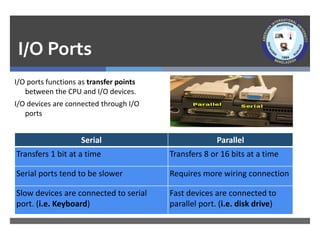
I/O Ports
I/O portsfunctions as transfer points
between the CPU and I/O devices.
I/O devices are connected through I/O
ports
Serial Parallel
Transfers 1 bit at a time Transfers 8 or 16 bits at a time
Serial ports tend to be slower Requires more wiring connection
Slow devices are connected to serial
port. (i.e. Keyboard)
Fast devices are connected to
parallel port. (i.e. disk drive)
23.
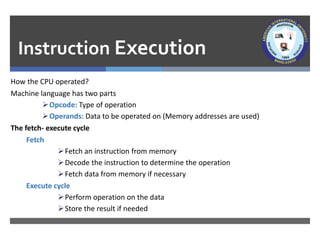
Instruction Execution
How theCPU operated?
Machine language has two parts
➢Opcode: Type of operation
➢Operands: Data to be operated on (Memory addresses are used)
The fetch- execute cycle
Fetch
➢Fetch an instruction from memory
➢Decode the instruction to determine the operation
➢Fetch data from memory if necessary
Execute cycle
➢Perform operation on the data
➢Store the result if needed
24.
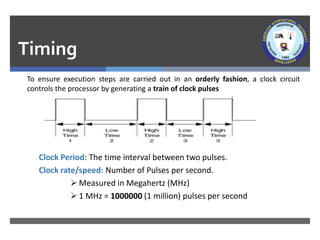
Timing
To ensure executionsteps are carried out in an orderly fashion, a clock circuit
controls the processor by generating a train of clock pulses
Clock Period: The time interval between two pulses.
Clock rate/speed: Number of Pulses per second.
➢ Measured in Megahertz (MHz)
➢ 1 MHz = 1000000 (1 million) pulses per second
25.
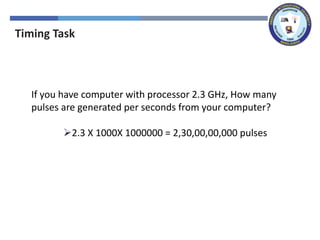
Timing Task
If youhave computer with processor 2.3 GHz, How many
pulses are generated per seconds from your computer?
➢2.3 X 1000X 1000000 = 2,30,00,00,000 pulses
26.
Programming Languages
▪ MachineLanguage: Bit strings (i.e. 0 & 1)
▪ Assembly language:
➢ Symbolic names are used to represent operations, registers and
memory locations(i.e. MOV AX, A)
➢ Assembly program must be converted into machine language
using assembler.
▪ High-Level language:
➢ Allows programmer to write program in more natural language
text.
➢ A Compiler is needed to translate high-level programs into
machine language
27.
Advantages
• Closer tonatural language.
So, algorithm conversion in
easier.
• Less instruction and time
required than assembly
language.
• Programs can be executed in
any machine
• So close to the machine
language. So programs are
faster and shorter.
• Reading or writing to specific
memory location, I/O ports is
easy.
• It can be a sub program of a
high-level language.
• Going into more details like how
computer thinks.
High-level Assembly
28.
References
• Assembly LanguageProgramming and Organization of the IBM PC, Ytha Yu
and Charles Marut, McGraw Hill, 1992. (ISBN: 0-07-072692-2).
• https://www.researchgate.net/publication/323880534_Lecture_1_Introdu
ction_to_Microcomputer_Microprocessor
29.
Books
• Assembly LanguageProgramming and Organization of the IBM PC,
Ytha Yu and Charles Marut, McGraw Hill, 1992. (ISBN: 0-07-072692-
2).
• Essentials of Computer Organization and Architecture, (Third
Edition), Linda Null and Julia Lobur
• W. Stallings, “Computer Organization and Architecture: Designing for
performance”, 67h Edition, Prentice Hall of India, 2003, ISBN 81 –
203 – 2962 – 7
• Computer Organization and Architecture by John P. Haynes.
![Components of Microcomputer
System
•SYSTEM UNIT
•I/O DEVICES OR PERIPHERALS
➢ Keyboard
➢ Display Unit
➢ Disk drives
•INTEGRATED-CIRCUIT (IC)
➢ Contains transistors. Digital circuits
[0’s& 1’s]
➢ Binary Digits/ Bits: 0 or 1](https://image.slidesharecdn.com/1-250316172701-d7d45e62/85/1-Microcomputer-Systems-AIUB-COA-COURSE-SLIDES-3-320.jpg)
![Memory
Bytes and Words:
➢Information processed is stored in memory
➢A memory circuit element can store one bit
of data [i.e. 0 or 1]
➢Memory circuits are organized as a group of
8 bits of data
➢8 bits of string = 1 Byte
➢Memory bytes are known as address( i.e.
street address of a house).](https://image.slidesharecdn.com/1-250316172701-d7d45e62/85/1-Microcomputer-Systems-AIUB-COA-COURSE-SLIDES-7-320.jpg)
![AddressVs Contents
The stored data in a memory byte are called contents/value.
Address Contents
The address of a memory byte is FIXED
and different from other addresses(
unique).
Contents are NOT unique as they deal
with current data.
The number of bits in an address
depend on the processor
[ i.e. Intel 8086 = 20-bit &
Intel 80286=24-bit ]
Contents of memory byte are always 8
bits](https://image.slidesharecdn.com/1-250316172701-d7d45e62/85/1-Microcomputer-Systems-AIUB-COA-COURSE-SLIDES-8-320.jpg)
![Bit Positions in byte and Word
•Bit positions are numbered from Right to left
•Bit 0-7 = low byte [ Lower address of word]
•Bit 8-15 = high byte [ Higher address of word]](https://image.slidesharecdn.com/1-250316172701-d7d45e62/85/1-Microcomputer-Systems-AIUB-COA-COURSE-SLIDES-12-320.jpg)
![RAM and ROM
RAM: Random Access Memory
➢ RAM locations can be read and written
➢ Program instructions and data are stored
➢ RAM memory are lost when the machine is turned off
ROM: Read Only Memory
➢ Once initialized can’t be changed (Read Only)
➢ Retain values unlike RAM [example]
➢ ROM based programs are known as firmware
➢ Responsible for loading start-up programs](https://image.slidesharecdn.com/1-250316172701-d7d45e62/85/1-Microcomputer-Systems-AIUB-COA-COURSE-SLIDES-14-320.jpg)