R
R
R
CSE870: UML Component Diagrams
Implementation Diagrams
R
R
R
CSE870: UML Component Diagrams
Implementation Diagrams
• Both are structural diagrams
• Component Diagrams:
– set of components and their relationships
– Illustrate static implementation view
– Component maps to one or more classes, interfaces, or
collaborations
• Deployment Diagrams:
– Set of nodes and their relationships
– Illustrate static deployment view of architecture
– Node typically encloses one or more components
R
R
R
CSE870: UML Component Diagrams
Package
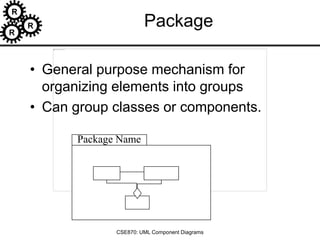
• General purpose mechanism for
organizing elements into groups
• Can group classes or components.
Package Name
R
R
R
CSE870: UML Component Diagrams
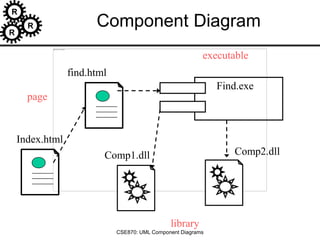
Component Diagram
• Classes
• Interfaces
• Dependency, generalization, association, and
realization relationships
Special kind of class diagram focusing on
system’s components.
Example.java
R
R
R
CSE870: UML Component Diagrams
Interfaces
• Definition:
– Collection of operation signatures and/or attribute defns
– Defines a cohesive set of behaviors
• Realized by:
– Implemented by classes and components
– Implement operations/attributes defined by interface
• Relationships:
– A class can implement 0 or more interfaces
– An interface can be implemented by 1 or more classes
• Notation:
– Lollipop
– Dashed arrow
[Ambler, 2002-2005]
R
R
R
CSE870: UML Component Diagrams
Sample interfaces
[Ambler, 2002-2005]
R
R
R
CSE870: UML Component Diagrams
Example Component Diagram
[Ambler, 2002-2005]
R
R
R
CSE870: UML Component Diagrams
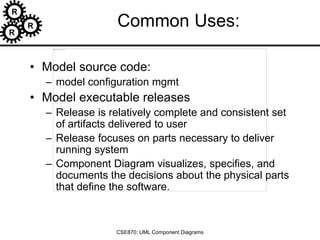
Component Diagram
Index.html
Find.exe
find.html
Comp1.dll Comp2.dll
executable
library
page
R
R
R
CSE870: UML Component Diagrams
Common Uses:
• Model source code:
– model configuration mgmt
• Model executable releases
– Release is relatively complete and consistent set
of artifacts delivered to user
– Release focuses on parts necessary to deliver
running system
– Component Diagram visualizes, specifies, and
documents the decisions about the physical parts
that define the software.
R
R
R
CSE870: UML Component Diagrams
Common Uses: (cont’d)
• Model Physical databases:
– database is concrete realization of schema
– schemas offer an API to persistent information
– model of physical dbases represents storage of that
information in tables of a relational dbase or pages of
an OO dbase.
– Component Diagram can represent this kind of
physical database
• Model Adaptable systems:
– can model static aspects of adaptable systems
– can model dynamic aspects (in conjunction with
behavioral models)
R
R
R
CSE870: UML Component Diagrams
Modeling Source Code
• (Forward/Reverse Eng): identify set of
source code files of interest
– model as components stereotyped as
files
• Larger systems: use packages to show
groups of source code files
• Model compilation dependencies
among files
R
R
R
CSE870: UML Component Diagrams
Modeling Source Code Example
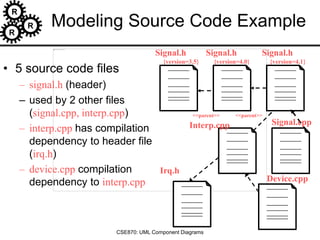
• 5 source code files
– signal.h (header)
– used by 2 other files
(signal.cpp, interp.cpp)
– interp.cpp has compilation
dependency to header file
(irq.h)
– device.cpp compilation
dependency to interp.cpp
Signal.h
{version=3.5}
Signal.h
{version=4.0}
Signal.h
{version=4.1}
<<parent>> <<parent>>
Interp.cpp Signal.cpp
Irq.h
Device.cpp
R
R
R
CSE870: UML Component Diagrams
Component Diagram Guidelines
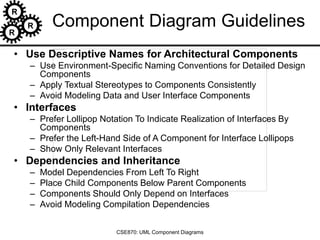
• Use Descriptive Names for Architectural Components
– Use Environment-Specific Naming Conventions for Detailed Design
Components
– Apply Textual Stereotypes to Components Consistently
– Avoid Modeling Data and User Interface Components
• Interfaces
– Prefer Lollipop Notation To Indicate Realization of Interfaces By
Components
– Prefer the Left-Hand Side of A Component for Interface Lollipops
– Show Only Relevant Interfaces
• Dependencies and Inheritance
– Model Dependencies From Left To Right
– Place Child Components Below Parent Components
– Components Should Only Depend on Interfaces
– Avoid Modeling Compilation Dependencies
R
R
R
CSE870: UML Component Diagrams
Common Stereotypes
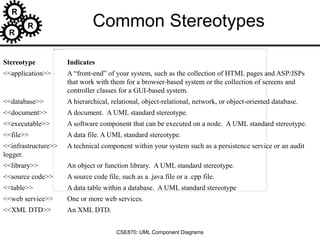
Stereotype Indicates
<<application>> A “front-end” of your system, such as the collection of HTML pages and ASP/JSPs
that work with them for a browser-based system or the collection of screens and
controller classes for a GUI-based system.
<<database>> A hierarchical, relational, object-relational, network, or object-oriented database.
<<document>> A document. A UML standard stereotype.
<<executable>> A software component that can be executed on a node. A UML standard stereotype.
<<file>> A data file. A UML standard stereotype.
<<infrastructure>> A technical component within your system such as a persistence service or an audit
logger.
<<library>> An object or function library. A UML standard stereotype.
<<source code>> A source code file, such as a .java file or a .cpp file.
<<table>> A data table within a database. A UML standard stereotype
<<web service>> One or more web services.
<<XML DTD>> An XML DTD.
R
R
R
CSE870: UML Component Diagrams
Deployment Diagrams
R
R
R
CSE870: UML Component Diagrams
Deployment Diagram
• Shows the configuration of:
– run time processing nodes and
– the components that live on them
• Graphically: collection of vertices and
arcs
R
R
R
CSE870: UML Component Diagrams
Contents
• Deployment diagrams contain:
– Nodes
– Dependency and association relationships
– may also contain components, each of
which must live on some node.
R
R
R
CSE870: UML Component Diagrams
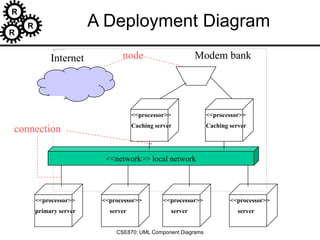
A Deployment Diagram
<<network>> local network
<<processor>>
primary server
<<processor>>
Caching server
<<processor>>
Caching server
<<processor>>
server
<<processor>>
server
<<processor>>
server
Modem bank
Internet node
connection
R
R
R
CSE870: UML Component Diagrams
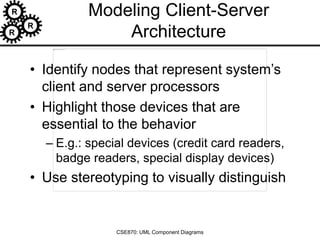
Modeling Client-Server
Architecture
• Identify nodes that represent system’s
client and server processors
• Highlight those devices that are
essential to the behavior
– E.g.: special devices (credit card readers,
badge readers, special display devices)
• Use stereotyping to visually distinguish
R
R
R
CSE870: UML Component Diagrams
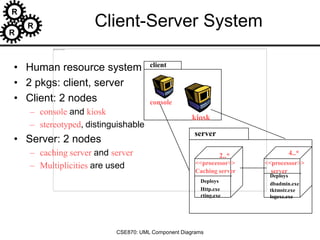
Client-Server System
• Human resource system
• 2 pkgs: client, server
• Client: 2 nodes
– console and kiosk
– stereotyped, distinguishable
• Server: 2 nodes
– caching server and server
– Multiplicities are used
client
<<processor>>
Caching server
Deploys
Http.exe
rting.exe
<<processor>>
server
Deploys
dbadmin.exe
tktmstr.exe
logexc.exe
console
kiosk
server
2..* 4..*
R
R
R
CSE870: UML Component Diagrams
Guidelines for Deployment Diagrams
• General [Ambler 2002-2005]
– Indicate Software Components on Project-Specific
Diagrams
– Focus on Nodes and Communication Associations
on Enterprise-Level Diagrams
• Nodes and Components
– Name Nodes With Descriptive Terms
– Model Only Vital Software Components
– Apply Consistent Stereotypes to Components
– Apply Visual Stereotypes to Nodes
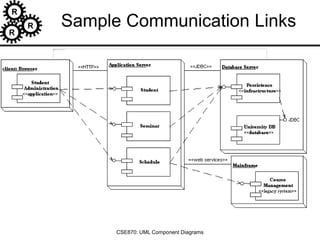
• Dependencies and Communication Associations
– Indicate Communication Protocols Via
Stereotypes
– Model Only Critical Dependencies Between
Components
R
R
R
CSE870: UML Component Diagrams
Sample Communication Links

06-uml-component.ppt

  • 1.
    R R R CSE870: UML ComponentDiagrams Implementation Diagrams
  • 2.
    R R R CSE870: UML ComponentDiagrams Implementation Diagrams • Both are structural diagrams • Component Diagrams: – set of components and their relationships – Illustrate static implementation view – Component maps to one or more classes, interfaces, or collaborations • Deployment Diagrams: – Set of nodes and their relationships – Illustrate static deployment view of architecture – Node typically encloses one or more components
  • 3.
    R R R CSE870: UML ComponentDiagrams Package • General purpose mechanism for organizing elements into groups • Can group classes or components. Package Name
  • 4.
    R R R CSE870: UML ComponentDiagrams Component Diagram • Classes • Interfaces • Dependency, generalization, association, and realization relationships Special kind of class diagram focusing on system’s components. Example.java
  • 5.
    R R R CSE870: UML ComponentDiagrams Interfaces • Definition: – Collection of operation signatures and/or attribute defns – Defines a cohesive set of behaviors • Realized by: – Implemented by classes and components – Implement operations/attributes defined by interface • Relationships: – A class can implement 0 or more interfaces – An interface can be implemented by 1 or more classes • Notation: – Lollipop – Dashed arrow [Ambler, 2002-2005]
  • 6.
    R R R CSE870: UML ComponentDiagrams Sample interfaces [Ambler, 2002-2005]
  • 7.
    R R R CSE870: UML ComponentDiagrams Example Component Diagram [Ambler, 2002-2005]
  • 8.
    R R R CSE870: UML ComponentDiagrams Component Diagram Index.html Find.exe find.html Comp1.dll Comp2.dll executable library page
  • 9.
    R R R CSE870: UML ComponentDiagrams Common Uses: • Model source code: – model configuration mgmt • Model executable releases – Release is relatively complete and consistent set of artifacts delivered to user – Release focuses on parts necessary to deliver running system – Component Diagram visualizes, specifies, and documents the decisions about the physical parts that define the software.
  • 10.
    R R R CSE870: UML ComponentDiagrams Common Uses: (cont’d) • Model Physical databases: – database is concrete realization of schema – schemas offer an API to persistent information – model of physical dbases represents storage of that information in tables of a relational dbase or pages of an OO dbase. – Component Diagram can represent this kind of physical database • Model Adaptable systems: – can model static aspects of adaptable systems – can model dynamic aspects (in conjunction with behavioral models)
  • 11.
    R R R CSE870: UML ComponentDiagrams Modeling Source Code • (Forward/Reverse Eng): identify set of source code files of interest – model as components stereotyped as files • Larger systems: use packages to show groups of source code files • Model compilation dependencies among files
  • 12.
    R R R CSE870: UML ComponentDiagrams Modeling Source Code Example • 5 source code files – signal.h (header) – used by 2 other files (signal.cpp, interp.cpp) – interp.cpp has compilation dependency to header file (irq.h) – device.cpp compilation dependency to interp.cpp Signal.h {version=3.5} Signal.h {version=4.0} Signal.h {version=4.1} <<parent>> <<parent>> Interp.cpp Signal.cpp Irq.h Device.cpp
  • 13.
    R R R CSE870: UML ComponentDiagrams Component Diagram Guidelines • Use Descriptive Names for Architectural Components – Use Environment-Specific Naming Conventions for Detailed Design Components – Apply Textual Stereotypes to Components Consistently – Avoid Modeling Data and User Interface Components • Interfaces – Prefer Lollipop Notation To Indicate Realization of Interfaces By Components – Prefer the Left-Hand Side of A Component for Interface Lollipops – Show Only Relevant Interfaces • Dependencies and Inheritance – Model Dependencies From Left To Right – Place Child Components Below Parent Components – Components Should Only Depend on Interfaces – Avoid Modeling Compilation Dependencies
  • 14.
    R R R CSE870: UML ComponentDiagrams Common Stereotypes Stereotype Indicates <<application>> A “front-end” of your system, such as the collection of HTML pages and ASP/JSPs that work with them for a browser-based system or the collection of screens and controller classes for a GUI-based system. <<database>> A hierarchical, relational, object-relational, network, or object-oriented database. <<document>> A document. A UML standard stereotype. <<executable>> A software component that can be executed on a node. A UML standard stereotype. <<file>> A data file. A UML standard stereotype. <<infrastructure>> A technical component within your system such as a persistence service or an audit logger. <<library>> An object or function library. A UML standard stereotype. <<source code>> A source code file, such as a .java file or a .cpp file. <<table>> A data table within a database. A UML standard stereotype <<web service>> One or more web services. <<XML DTD>> An XML DTD.
  • 15.
    R R R CSE870: UML ComponentDiagrams Deployment Diagrams
  • 16.
    R R R CSE870: UML ComponentDiagrams Deployment Diagram • Shows the configuration of: – run time processing nodes and – the components that live on them • Graphically: collection of vertices and arcs
  • 17.
    R R R CSE870: UML ComponentDiagrams Contents • Deployment diagrams contain: – Nodes – Dependency and association relationships – may also contain components, each of which must live on some node.
  • 18.
    R R R CSE870: UML ComponentDiagrams A Deployment Diagram <<network>> local network <<processor>> primary server <<processor>> Caching server <<processor>> Caching server <<processor>> server <<processor>> server <<processor>> server Modem bank Internet node connection
  • 19.
    R R R CSE870: UML ComponentDiagrams Modeling Client-Server Architecture • Identify nodes that represent system’s client and server processors • Highlight those devices that are essential to the behavior – E.g.: special devices (credit card readers, badge readers, special display devices) • Use stereotyping to visually distinguish
  • 20.
    R R R CSE870: UML ComponentDiagrams Client-Server System • Human resource system • 2 pkgs: client, server • Client: 2 nodes – console and kiosk – stereotyped, distinguishable • Server: 2 nodes – caching server and server – Multiplicities are used client <<processor>> Caching server Deploys Http.exe rting.exe <<processor>> server Deploys dbadmin.exe tktmstr.exe logexc.exe console kiosk server 2..* 4..*
  • 21.
    R R R CSE870: UML ComponentDiagrams Guidelines for Deployment Diagrams • General [Ambler 2002-2005] – Indicate Software Components on Project-Specific Diagrams – Focus on Nodes and Communication Associations on Enterprise-Level Diagrams • Nodes and Components – Name Nodes With Descriptive Terms – Model Only Vital Software Components – Apply Consistent Stereotypes to Components – Apply Visual Stereotypes to Nodes • Dependencies and Communication Associations – Indicate Communication Protocols Via Stereotypes – Model Only Critical Dependencies Between Components
  • 22.
    R R R CSE870: UML ComponentDiagrams Sample Communication Links

Editor's Notes