Introduction
• The purposeof a component diagram is to show the relationship between
different components in a system.
• The term "component" refers to a module of classes that represent independent
systems or subsystems with the ability to interface with the rest of the system.
• There exists a whole development approach that revolves around components:
component-based development (CBD).
• In this approach, component diagrams allow the planner to identify the
different components so the whole system does what it's supposed to do.
• More commonly, in an OO programming approach, the component diagram
allows a senior developer to group classes together based on common purpose
so that the developer and others can look at a software development project at
a high level.
3.
Benefits of componentdiagrams
• Though component diagrams may seem complex at first glance, they are
invaluable when it comes to building your system.
Component diagrams can help your team:
• Imagine the system’s physical structure.
• Pay attention to the system’s components and how they relate.
• Emphasize the service behavior as it relates to the interface.
4.
How to usecomponent diagrams
• A component diagram in UML gives a bird’s-eye view of your software
system.
• Understanding the exact service behavior that each piece of your software
provides will make you a better developer.
• Component diagrams can describe software systems that are implemented in
any programming language or style.
• UML is a set of conventions for object-oriented diagrams that has a wide
variety of applications.
• In component diagrams, the Unified Modeling Language dictates that
components and packages are wired together with lines representing
assembly connectors and delegation connectors.
Cont…
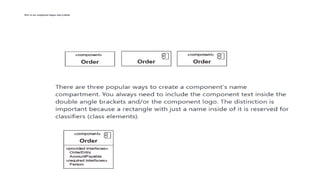
• As withthe class notation, components also have an optional space to list
interfaces, similar to the way you add attributes and methods to class
notation.
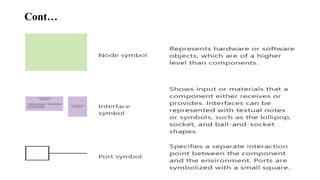
• Interfaces represent the places where the groups of classes in the component
communicate with other system components.
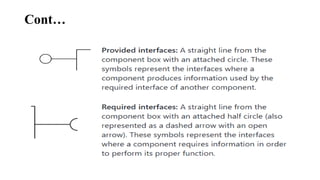
• An alternative way to represent interfaces is by extending symbols from the
component box.
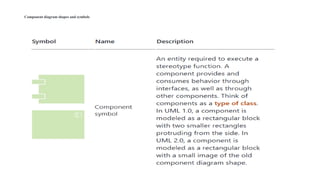
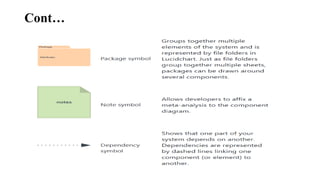
• Here is a quick rundown of the most commonly used symbols.
Cont…
• In UML,a component diagram visually represents how the components of a
software system relate to one another.
• To build one, try using Lucidchart’s custom component diagram shape
library. Component diagrams should communicate:
• The scope of your system
• The overall structure of your software system
• Goals that the system helps human or non-human entities (known as actors)
achieve
13.
Component diagram examples
•UML component diagrams bring simplicity to even the most complex processes.
• Take a look at the examples below to see how you can map the behaviors of specific processes
with component diagrams in UML.
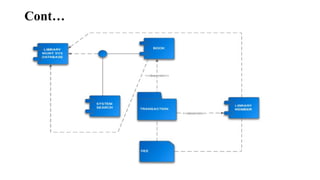
Component diagram for a library management system
• Library systems were some of the first systems in the world to become widely run by computers.
• Today, many of these systems are managed in the cloud by third-party services, rather than
internally.
• Though the term “library system” typically calls to mind a way to monitor printed books, library
systems today organize all kinds of data checked in and checked out by users.
• These transactions create a network of relationships between the components of the library
system.
• To understand how these relationships work and how the system functions overall, examine the
UML diagram below. You or your team can also use this diagram as a template.
Component diagram foran ATM system
• A component diagram is similar to a class diagram in that it illustrates how
items in a given system relate to each other, but component diagrams
show more complex and varied connections that most class diagrams can.
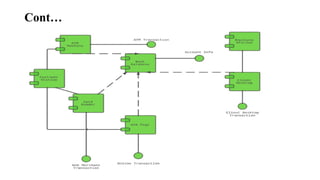
• In the diagram below, each component is enclosed in a small box.
• The dotted lines with arrows show how some components are dependent on
others.
• For example, the card reader, web page, client desktop, and ATM system are
all dependent on the bank database.
• The dotted lines with circles at the end, known as “lollipop” symbols,
indicate a realization