www.dadda.it roberto@dadda.it Excellence in usability 1st semester 2021-2022 1
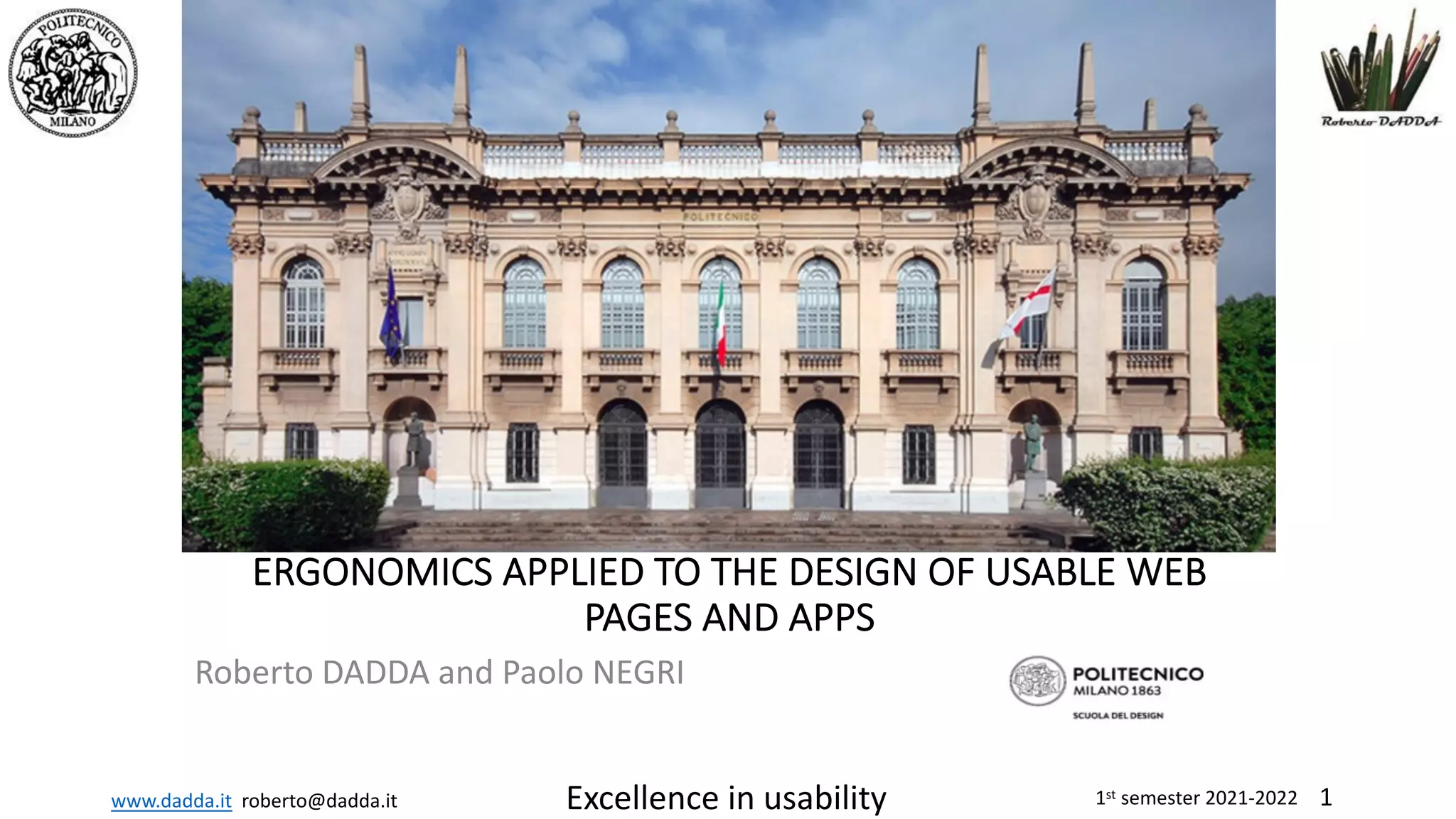
ERGONOMICS APPLIED TO THE DESIGN OF USABLE WEB
PAGES AND APPS
Roberto DADDA and Paolo NEGRI
www.dadda.it roberto@dadda.it Excellence in usability 1st semester 2021-2022 2
Artifacts
Interaction design
www.dadda.it roberto@dadda.it Excellence in usability 1st semester 2021-2022 3
Interaction design 3
www.dadda.it roberto@dadda.it Excellence in usability 1st semester 2021-2022 4
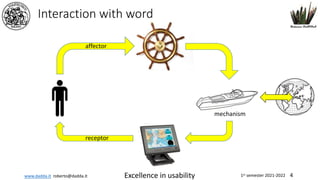
Interaction with word
receptor
affector
mechanism
www.dadda.it roberto@dadda.it Excellence in usability 1st semester 2021-2022 5
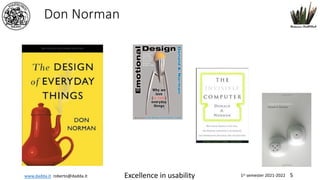
Don Norman
www.dadda.it roberto@dadda.it Excellence in usability 1st semester 2021-2022 6
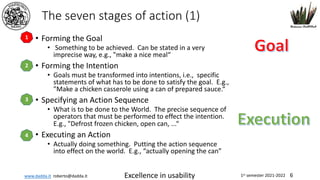
The seven stages of action (1)
• Forming the Goal
• Something to be achieved. Can be stated in a very
imprecise way, e.g., "make a nice meal“
• Forming the Intention
• Goals must be transformed into intentions, i.e., specific
statements of what has to be done to satisfy the goal. E.g.,
"Make a chicken casserole using a can of prepared sauce.“
• Specifying an Action Sequence
• What is to be done to the World. The precise sequence of
operators that must be performed to effect the intention.
E.g., "Defrost frozen chicken, open can, ...“
• Executing an Action
• Actually doing something. Putting the action sequence
into effect on the world. E.g., “actually opening the can”
2
1
3
4
www.dadda.it roberto@dadda.it Excellence in usability 1st semester 2021-2022 7
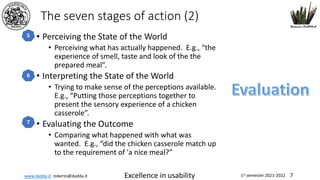
The seven stages of action (2)
• Perceiving the State of the World
• Perceiving what has actually happened. E.g., “the
experience of smell, taste and look of the the
prepared meal”.
• Interpreting the State of the World
• Trying to make sense of the perceptions available.
E.g., “Putting those perceptions together to
present the sensory experience of a chicken
casserole”.
• Evaluating the Outcome
• Comparing what happened with what was
wanted. E.g., “did the chicken casserole match up
to the requirement of 'a nice meal?”
5
6
7
www.dadda.it roberto@dadda.it Excellence in usability 1st semester 2021-2022 8
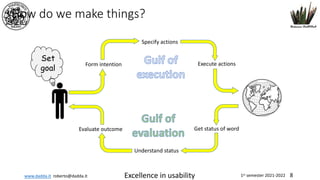
How do we make things?
Set
goal
Form intention
Specify actions
Execute actions
Get status of word
Understand status
Evaluate outcome
www.dadda.it roberto@dadda.it Excellence in usability 1st semester 2021-2022 9
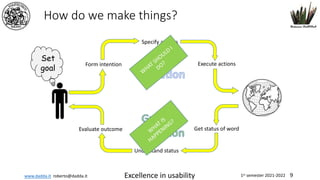
How do we make things?
Set
goal
Form intention
Specify actions
Execute actions
Get status of word
Understand status
Evaluate outcome
W
HAT SHOULD
I
DO?
W
HAT IS
HAPPENING?
www.dadda.it roberto@dadda.it Excellence in usability 1st semester 2021-2022 10
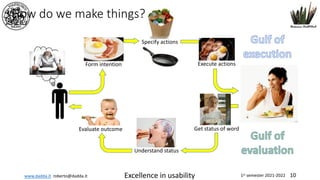
How do we make things?
Set
goal
Form intention
Specify actions
Execute actions
Get status of word
Understand status
Evaluate outcome
www.dadda.it roberto@dadda.it Excellence in usability 1st semester 2021-2022 11
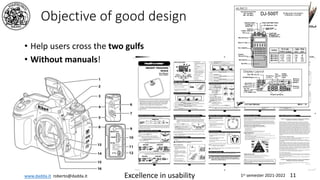
Objective of good design
• Help users cross the two gulfs
• Without manuals!
www.dadda.it roberto@dadda.it Excellence in usability 1st semester 2021-2022 12
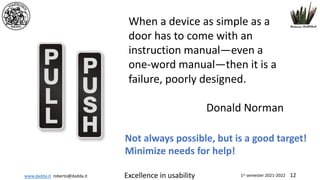
When a device as simple as a
door has to come with an
instruction manual—even a
one-word manual—then it is a
failure, poorly designed.
Donald Norman
Not always possible, but is a good target!
Minimize needs for help!
www.dadda.it roberto@dadda.it Excellence in usability 1st semester 2021-2022 13
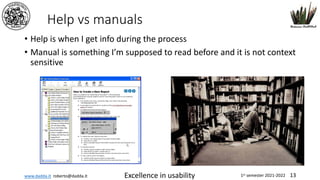
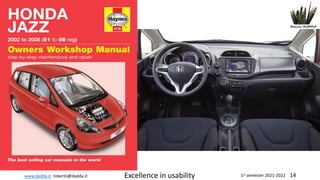
Help vs manuals
• Help is when I get info during the process
• Manual is something I’m supposed to read before and it is not context
sensitive
www.dadda.it roberto@dadda.it Excellence in usability 1st semester 2021-2022 14
www.dadda.it roberto@dadda.it Excellence in usability 1st semester 2021-2022 15
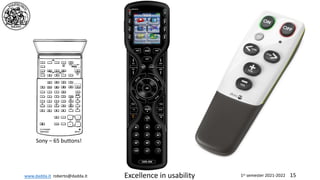
Sony – 65 buttons!
www.dadda.it roberto@dadda.it Excellence in usability 1st semester 2021-2022 16
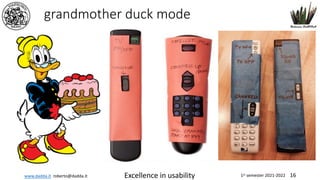
grandmother duck mode
www.dadda.it roberto@dadda.it Excellence in usability 1st semester 2021-2022 17
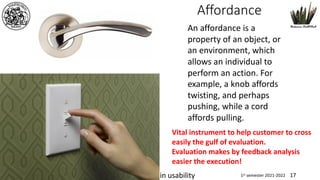
Affordance
Interaction design
An affordance is a
property of an object, or
an environment, which
allows an individual to
perform an action. For
example, a knob affords
twisting, and perhaps
pushing, while a cord
affords pulling.
Vital instrument to help customer to cross
easily the gulf of evaluation.
Evaluation makes by feedback analysis
easier the execution!
www.dadda.it roberto@dadda.it Excellence in usability 1st semester 2021-2022 18
Interaction design WEB DESIGN NABA 2014 Roberto DADDA 18
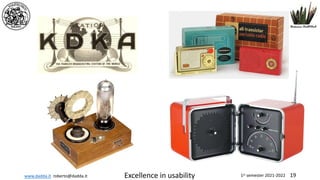
www.dadda.it roberto@dadda.it Excellence in usability 1st semester 2021-2022 19
www.dadda.it roberto@dadda.it Excellence in usability 1st semester 2021-2022 20
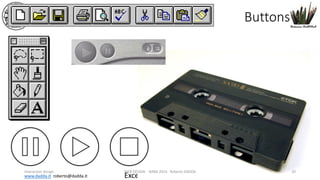
Buttons
Interaction design WEB DESIGN NABA 2014 Roberto DADDA 20
www.dadda.it roberto@dadda.it Excellence in usability 1st semester 2021-2022 21
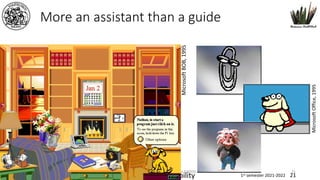
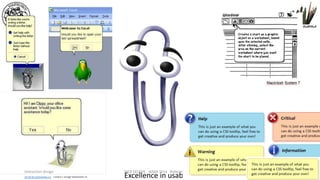
More an assistant than a guide
Interaction design WEB DESIGN NABA 2014 Roberto DADDA 21
Microsoft
BOB,
1995
Microsoft
Office,
1995
www.dadda.it roberto@dadda.it Excellence in usability 1st semester 2021-2022 22
Interaction design WEB DESIGN NABA 2014 Roberto DADDA 22
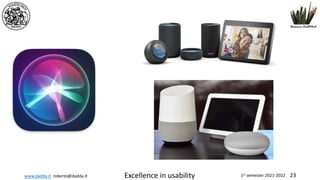
www.dadda.it roberto@dadda.it Excellence in usability 1st semester 2021-2022 23
www.dadda.it roberto@dadda.it Excellence in usability 1st semester 2021-2022 24
The ISO Dialogue Principles
• ISO9241-10
24
www.dadda.it roberto@dadda.it Excellence in usability 1st semester 2021-2022 25
Suitability for the Task
• A dialog supports suitability for the task, if it supports the user in the
effective and efficient completion of the task. The dialog presents
the user only those concepts which are related to the user's task.
www.dadda.it roberto@dadda.it Excellence in usability 1st semester 2021-2022 26
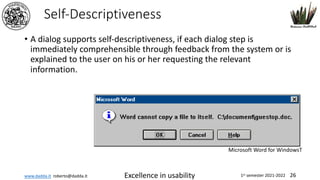
Self-Descriptiveness
• A dialog supports self-descriptiveness, if each dialog step is
immediately comprehensible through feedback from the system or is
explained to the user on his or her requesting the relevant
information.
Microsoft Word for WindowsT
www.dadda.it roberto@dadda.it Excellence in usability 1st semester 2021-2022 27
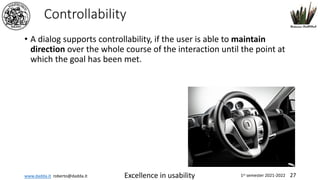
Controllability
• A dialog supports controllability, if the user is able to maintain
direction over the whole course of the interaction until the point at
which the goal has been met.
www.dadda.it roberto@dadda.it Excellence in usability 1st semester 2021-2022 28
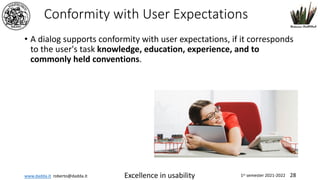
Conformity with User Expectations
• A dialog supports conformity with user expectations, if it corresponds
to the user's task knowledge, education, experience, and to
commonly held conventions.
www.dadda.it roberto@dadda.it Excellence in usability 1st semester 2021-2022 29
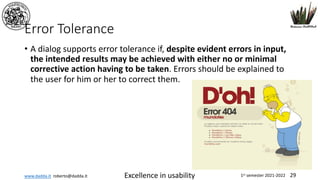
Error Tolerance
• A dialog supports error tolerance if, despite evident errors in input,
the intended results may be achieved with either no or minimal
corrective action having to be taken. Errors should be explained to
the user for him or her to correct them.
www.dadda.it roberto@dadda.it Excellence in usability 1st semester 2021-2022 30
Suitability for Individualization
• A dialog supports suitability for individualization, if the dialog system
is constructed to allow for modification to the user's individual
needs and skills for a given task.
30
www.dadda.it roberto@dadda.it Excellence in usability 1st semester 2021-2022 31
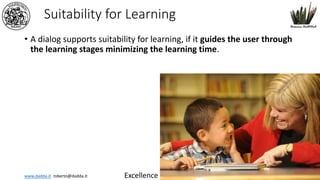
Suitability for Learning
• A dialog supports suitability for learning, if it guides the user through
the learning stages minimizing the learning time.
31
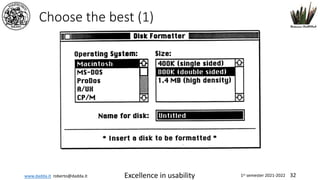
www.dadda.it roberto@dadda.it Excellence in usability 1st semester 2021-2022 32
Choose the best (1)
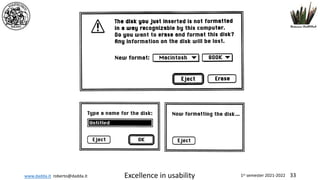
www.dadda.it roberto@dadda.it Excellence in usability 1st semester 2021-2022 33
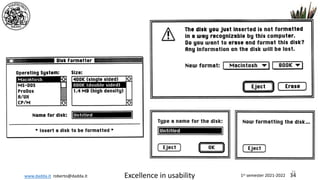
www.dadda.it roberto@dadda.it Excellence in usability 1st semester 2021-2022 34
34
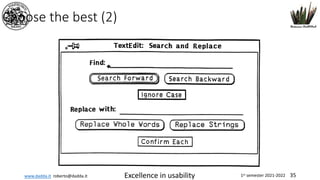
www.dadda.it roberto@dadda.it Excellence in usability 1st semester 2021-2022 35
Choose the best (2)
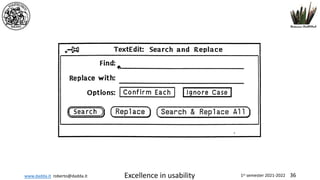
www.dadda.it roberto@dadda.it Excellence in usability 1st semester 2021-2022 36
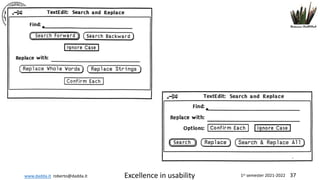
www.dadda.it roberto@dadda.it Excellence in usability 1st semester 2021-2022 37
www.dadda.it roberto@dadda.it Excellence in usability 1st semester 2021-2022 38
Usability
Roberto DADDA
roberto@dadda.it
www.dadda.it
Skype, Facebook e Twitter robertodadda

05 2 artifacts

  • 1.
    www.dadda.it roberto@dadda.it Excellencein usability 1st semester 2021-2022 1 ERGONOMICS APPLIED TO THE DESIGN OF USABLE WEB PAGES AND APPS Roberto DADDA and Paolo NEGRI
  • 2.
    www.dadda.it roberto@dadda.it Excellencein usability 1st semester 2021-2022 2 Artifacts Interaction design
  • 3.
    www.dadda.it roberto@dadda.it Excellencein usability 1st semester 2021-2022 3 Interaction design 3
  • 4.
    www.dadda.it roberto@dadda.it Excellencein usability 1st semester 2021-2022 4 Interaction with word receptor affector mechanism
  • 5.
    www.dadda.it roberto@dadda.it Excellencein usability 1st semester 2021-2022 5 Don Norman
  • 6.
    www.dadda.it roberto@dadda.it Excellencein usability 1st semester 2021-2022 6 The seven stages of action (1) • Forming the Goal • Something to be achieved. Can be stated in a very imprecise way, e.g., "make a nice meal“ • Forming the Intention • Goals must be transformed into intentions, i.e., specific statements of what has to be done to satisfy the goal. E.g., "Make a chicken casserole using a can of prepared sauce.“ • Specifying an Action Sequence • What is to be done to the World. The precise sequence of operators that must be performed to effect the intention. E.g., "Defrost frozen chicken, open can, ...“ • Executing an Action • Actually doing something. Putting the action sequence into effect on the world. E.g., “actually opening the can” 2 1 3 4
  • 7.
    www.dadda.it roberto@dadda.it Excellencein usability 1st semester 2021-2022 7 The seven stages of action (2) • Perceiving the State of the World • Perceiving what has actually happened. E.g., “the experience of smell, taste and look of the the prepared meal”. • Interpreting the State of the World • Trying to make sense of the perceptions available. E.g., “Putting those perceptions together to present the sensory experience of a chicken casserole”. • Evaluating the Outcome • Comparing what happened with what was wanted. E.g., “did the chicken casserole match up to the requirement of 'a nice meal?” 5 6 7
  • 8.
    www.dadda.it roberto@dadda.it Excellencein usability 1st semester 2021-2022 8 How do we make things? Set goal Form intention Specify actions Execute actions Get status of word Understand status Evaluate outcome
  • 9.
    www.dadda.it roberto@dadda.it Excellencein usability 1st semester 2021-2022 9 How do we make things? Set goal Form intention Specify actions Execute actions Get status of word Understand status Evaluate outcome W HAT SHOULD I DO? W HAT IS HAPPENING?
  • 10.
    www.dadda.it roberto@dadda.it Excellencein usability 1st semester 2021-2022 10 How do we make things? Set goal Form intention Specify actions Execute actions Get status of word Understand status Evaluate outcome
  • 11.
    www.dadda.it roberto@dadda.it Excellencein usability 1st semester 2021-2022 11 Objective of good design • Help users cross the two gulfs • Without manuals!
  • 12.
    www.dadda.it roberto@dadda.it Excellencein usability 1st semester 2021-2022 12 When a device as simple as a door has to come with an instruction manual—even a one-word manual—then it is a failure, poorly designed. Donald Norman Not always possible, but is a good target! Minimize needs for help!
  • 13.
    www.dadda.it roberto@dadda.it Excellencein usability 1st semester 2021-2022 13 Help vs manuals • Help is when I get info during the process • Manual is something I’m supposed to read before and it is not context sensitive
  • 14.
    www.dadda.it roberto@dadda.it Excellencein usability 1st semester 2021-2022 14
  • 15.
    www.dadda.it roberto@dadda.it Excellencein usability 1st semester 2021-2022 15 Sony – 65 buttons!
  • 16.
    www.dadda.it roberto@dadda.it Excellencein usability 1st semester 2021-2022 16 grandmother duck mode
  • 17.
    www.dadda.it roberto@dadda.it Excellencein usability 1st semester 2021-2022 17 Affordance Interaction design An affordance is a property of an object, or an environment, which allows an individual to perform an action. For example, a knob affords twisting, and perhaps pushing, while a cord affords pulling. Vital instrument to help customer to cross easily the gulf of evaluation. Evaluation makes by feedback analysis easier the execution!
  • 18.
    www.dadda.it roberto@dadda.it Excellencein usability 1st semester 2021-2022 18 Interaction design WEB DESIGN NABA 2014 Roberto DADDA 18
  • 19.
    www.dadda.it roberto@dadda.it Excellencein usability 1st semester 2021-2022 19
  • 20.
    www.dadda.it roberto@dadda.it Excellencein usability 1st semester 2021-2022 20 Buttons Interaction design WEB DESIGN NABA 2014 Roberto DADDA 20
  • 21.
    www.dadda.it roberto@dadda.it Excellencein usability 1st semester 2021-2022 21 More an assistant than a guide Interaction design WEB DESIGN NABA 2014 Roberto DADDA 21 Microsoft BOB, 1995 Microsoft Office, 1995
  • 22.
    www.dadda.it roberto@dadda.it Excellencein usability 1st semester 2021-2022 22 Interaction design WEB DESIGN NABA 2014 Roberto DADDA 22
  • 23.
    www.dadda.it roberto@dadda.it Excellencein usability 1st semester 2021-2022 23
  • 24.
    www.dadda.it roberto@dadda.it Excellencein usability 1st semester 2021-2022 24 The ISO Dialogue Principles • ISO9241-10 24
  • 25.
    www.dadda.it roberto@dadda.it Excellencein usability 1st semester 2021-2022 25 Suitability for the Task • A dialog supports suitability for the task, if it supports the user in the effective and efficient completion of the task. The dialog presents the user only those concepts which are related to the user's task.
  • 26.
    www.dadda.it roberto@dadda.it Excellencein usability 1st semester 2021-2022 26 Self-Descriptiveness • A dialog supports self-descriptiveness, if each dialog step is immediately comprehensible through feedback from the system or is explained to the user on his or her requesting the relevant information. Microsoft Word for WindowsT
  • 27.
    www.dadda.it roberto@dadda.it Excellencein usability 1st semester 2021-2022 27 Controllability • A dialog supports controllability, if the user is able to maintain direction over the whole course of the interaction until the point at which the goal has been met.
  • 28.
    www.dadda.it roberto@dadda.it Excellencein usability 1st semester 2021-2022 28 Conformity with User Expectations • A dialog supports conformity with user expectations, if it corresponds to the user's task knowledge, education, experience, and to commonly held conventions.
  • 29.
    www.dadda.it roberto@dadda.it Excellencein usability 1st semester 2021-2022 29 Error Tolerance • A dialog supports error tolerance if, despite evident errors in input, the intended results may be achieved with either no or minimal corrective action having to be taken. Errors should be explained to the user for him or her to correct them.
  • 30.
    www.dadda.it roberto@dadda.it Excellencein usability 1st semester 2021-2022 30 Suitability for Individualization • A dialog supports suitability for individualization, if the dialog system is constructed to allow for modification to the user's individual needs and skills for a given task. 30
  • 31.
    www.dadda.it roberto@dadda.it Excellencein usability 1st semester 2021-2022 31 Suitability for Learning • A dialog supports suitability for learning, if it guides the user through the learning stages minimizing the learning time. 31
  • 32.
    www.dadda.it roberto@dadda.it Excellencein usability 1st semester 2021-2022 32 Choose the best (1)
  • 33.
    www.dadda.it roberto@dadda.it Excellencein usability 1st semester 2021-2022 33
  • 34.
    www.dadda.it roberto@dadda.it Excellencein usability 1st semester 2021-2022 34 34
  • 35.
    www.dadda.it roberto@dadda.it Excellencein usability 1st semester 2021-2022 35 Choose the best (2)
  • 36.
    www.dadda.it roberto@dadda.it Excellencein usability 1st semester 2021-2022 36
  • 37.
    www.dadda.it roberto@dadda.it Excellencein usability 1st semester 2021-2022 37
  • 38.
    www.dadda.it roberto@dadda.it Excellencein usability 1st semester 2021-2022 38 Usability Roberto DADDA roberto@dadda.it www.dadda.it Skype, Facebook e Twitter robertodadda