eGovFrame Lab Workbook
    Runtime Environment


        eGovFrame Center
             2012


                           Page l   1   1
Runtime Environment
                      1. Development Environment Setup

                      2. Development Environment Practice

                      3. Runtime Environment Practice
                         [LAB2-0] easyPortal Implementation Overview

                         [LAB2-1] IoC Container (Based on XML)

                         [LAB2-2] IoC Container (Based on Annotation)

                         [LAB2-3] AOP

                         [LAB2-4] Data Access

                         [LAB2-5] Spring MVC


                                                                        Page l   2   2
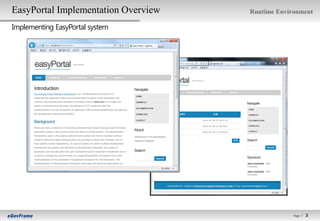
EasyPortal Implementation Overview   Runtime Environment

Implementing EasyPortal system


                                                  Page l   3   3
EasyPortal Implementation Overview                                                                    Runtime Environment

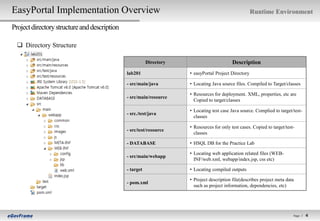
Project directory structure and description

   Directory Structure

                                                         Directory                         Description
                                              lab201                 • easyPortal Project Directory

                                              - src/main/java        • Locating Java source files. Compiled to Target/classes

                                                                     • Resources for deployment. XML, properties, etc are
                                              - src/main/resource
                                                                       Copied to target/classes

                                                                     • Locating test case Java source. Complied to target/test-
                                              - src./test/java
                                                                       classes

                                                                     • Resources for only test cases. Copied to target/test-
                                              - src/test/resource
                                                                       classes

                                              - DATABASE             • HSQL DB for the Practice Lab

                                                                     • Locating web application related files (WEB-
                                              - src/main/webapp
                                                                       INF/web.xml, webapp/index.jsp, css etc)

                                              - target               • Locating compiled outputs

                                                                     • Project description file(describes project meta data
                                              - pom.xml
                                                                       such as project information, dependencies, etc)


                                                                                                                           Page l   4   4
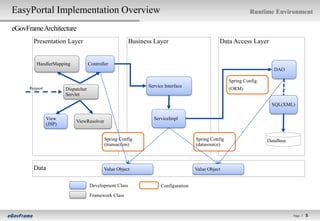
EasyPortal Implementation Overview                                                                              Runtime Environment

eGovFrame Architecture
        Presentation Layer                               Business Layer                          Data Access Layer


         HandlerMapping              Controller
                                                                                                                          DAO

                                                                                                      Spring Config.
      Request                                                   Service Interface
                        Dispatcher                                                                    (ORM)
                        Servlet

                                                                                                                         SQL(XML)

                View                                              ServiceImpl
                             ViewResolver
                (JSP)


                                             Spring Config                            Spring Config                    DataBase
                                             (transaction)                            (datasource)


        Data                                Value Object                              Value Object


                                     Development Class                Configuration
                                     Framework Class


                                                                                                                                  Page l   5   5
EasyPortal Implementation Overview                                                                             Runtime Environment

Architecture for the Information Notification Service

        Presentation Layer                           Business Layer                             Data Access Layer

                      NotificatioinController
                                                                                                                  NotificationDAO


      Request                                               NotificationService
                        Dispatcher
                        Servlet                                                               Spring Config.
                                                                                              (context-sqlMap.xml)

            View(JSP)                                     NotificationServiceImpl                         Notification_SQL_Hsqldb.xml
            - notificationList.jsp                                                                        (SQL)
            - notificationRegist.jsp
            - notificationUpdt.jsp
            - notificationDetail.jsp
                                                                             Spring Config
                                                                             ( context-datasource.xml,
                       Spring Config(MVC)                                      context-transaction.xml,
                       (common-servlet.xml)                                    context-aspect.xml, …)             DataBase(HSQL)


        Data(Value Object)                               NotificationVO                 CommonVO


                                       Development          Spring Module                 Configuration


                                                                                                                                    Page l   6   6
[Lab 2-1] IoC Container (Based on XML) (1/3)                                                                                      Runtime Environment

Practice XML based IoC Contanier

   Step 1-1. Define Interface and Method (egovframework.gettingstart.guide.service.NotificationService)

     public Map<String, Object> selectNotificationList(NotificationVO searchVO) throws Exception;

     public void insertNotification(NotificationVO notification) throws Exception;

     public NotificationVO selectNotification(NotificationVO searchVO) throws Exception;

     public void updateNotification(NotificationVO notification) throws Exception;

     public void deleteNotification(NotificationVO notification) throws Exception;


   Step 1-2. Define a Service implementation class (egovframework.gettingstart.guide.service.impl.NotificationServiceImpl)

     - Implement a NotificationService which is a service interface, and check the implementation of interface methods(defined in Step 1-1)
     - Extends AbstractServiceImpl which is provided by eGovFrame (It’s compulsory)

     Ex: public class NotificationServiceImpl extends AbstractServiceImpl implements NotificationService {


  Step 1-3. Check a DAO implementation class (egovframework.gettingstart.guide.service.impl.NotificationDAO)
     - Check current DAO handling style (Providing necessary data in the form of ArrayList)

     ※ Do not need to add extra code or modify


                                                                                                                                               Page l   7   7
[Lab 2-1] IoC Container (Based on XML) (2/3)                                                                          Runtime Environment

Practice XML based IoC Contanier


   Step 1-4. Configure a XML and define services (src/test/resources/egovframework/spring/context-service.xml)

    - Configure a Service bean
    Ex:
    <bean id="notificationService" class="egovframework.gettingstart.guide.service.impl.NotificationServiceImpl“ />

    - Configure DAO dependency injection(DI)
    Ex:
    <bean id="notificationService" class="egovframework.gettingstart.guide.service.impl.NotificationServiceImpl">
       <property name="dao" ref="notificationDao" />
    </bean>


   Step 1-5. Define a test class (src/test/java/egovframework.gettingstart.guide.XMLServiceTest)

    - Create an ApplicationContext instance
    Ex:
    ApplicationContext context = new ClassPathXmlApplicationContext(
       new String[] {"/egovframework/spring/context-service.xml"}
    );

    - Call a service
    Ex:
    NotificationService service = (NotificationService)context.getBean("notificationService");


                                                                                                                                   Page l   8   8
[Lab 2-1] IoC Container (Based on XML) (3/3)                                         Runtime Environment

Practice XML based IoC Contanier


   Step 1-6. Run test

    - Run test : Select XMLServiceTest class -> Run As -> Java Application


   Test Result
    - Display the number of notificationService list data (selectNotificationData)


                                                                                                  Page l   9   9
[Lab 2-2] IoC Container (Based on Annotation) (1/3)                                                                         Runtime Environment

PracticeAnnotation based IoC Contanier

   Step 2-1. Assign @Repository (egovframework.gettingstart.guide.service.impl.NotificationDAO)

    - Assign a Spring bean in a DAO class as using @Repository annotation
    - assign bean id with “NotificationDAO”

    Ex: @Repository("NotificationDAO“)


   Step 2-2. Assign @Service (egovframework.gettingstart.guide.service.impl.NotificationServiceImpl)

    - Make ServiceImpl class to a Spring bean as using @Service annotation
    - assign bean id with “NotificationService”

    Ex: @Service("NotificationService“)


   Step 2-3. Assign @Resource (to use an object with DI (Dependency Injection) mechanism)
    (egovframework.gettingstart.guide.service.impl.NotificationServiceImpl)

    - Call a notificationDao object(bean) as using @Resource annotation to notificationDao variable
    - assign @Resource annotation name with bean(@Repository) id (“NotificationDAO”) which is matched to a target object that want to use
    Ex: @Resource(name="NotificationDAO")
       private NotificationDAO notificationDao;


                                                                                                                                            Page l
                                                                                                                                                      10
                                                                                                                                                     10
[Lab 2-2] IoC Container (Based on Annotation) (2/3)                                                             Runtime Environment

PracticeAnnotation based IoC Contanier

   Step 2-4. Configure component-scan (src/test/resources/egovframework/spring/context-component.xml)

    - Create annotation based beans(@Controller, @Service, @Repository) through component-scan configuration
    - base-package describes the scan target package and classes which are below the base-package are scanned

    Ex: <context:component-scan base-package="egovframework.gettingstart" />


   Step 2-5. Create TestCase (egovframework.gettingstart.guide. AnnotationServiceTest)

    - Assign @Resource annotation to notificationService variable to call a bean with DI
    - make @Resource annotation name field with bean(@Service) id which is “NotificationService”

    Ex:
      @Resource(name = "NotificationService")
      NotificationService notificationService;


                                                                                                                            Page l
                                                                                                                                      11
                                                                                                                                     11
[Lab 2-2] IoC Container (Based on Annotation) (3/3)                                     Runtime Environment

PracticeAnnotation based IoC Contanier

   Step 2-6. Run TestCase

     - Run TestCase : Select AnnotationTest Class -> Run As -> JUnit Test


   Test results
    - Run AnnotationTest class’s testSelectList method (comparing the number of list)


                                                                                                    Page l
                                                                                                              12
                                                                                                             12
[Lab 2-3] AOP(Aspect Oriented Programming) (1/2)                                                            Runtime Environment

PracticeAOP

   Step 3-1. Check Advice class (egovframework.gettingstart.aop.AdviceUsingXML)

    - Advice is a class about processing crosscutting concerns which are scattered in several classes


   Step 3-2. Configure Advice bean (src/test/resources/egovframework/spring/context-advice.xml)


    - Configure Advice (Id = “adviceUsingXML” , class is “egovframework.gettingstart.aop.AdviceUsingXML”)

    Ex : <bean id="adviceUsingXML" class="egovframework.gettingstart.aop.AdviceUsingXML" />


   Step 3-3. Check AOP configuration (src/test/resources/egovframework/spring/context-advice.xml)
    <aop:config>
      <aop:pointcut id="targetMethod"
        expression="execution(* egovframework..impl.*Impl.*(..))" />
      <aop:aspect ref="adviceUsingXML">
        <aop:before pointcut-ref="targetMethod" method="beforeTargetMethod" />
        <aop:after-returning pointcut-ref="targetMethod"
          method="afterReturningTargetMethod" returning="retVal" />
        <aop:after-throwing pointcut-ref="targetMethod"
           method="afterThrowingTargetMethod" throwing="exception" />
        <aop:after pointcut-ref="targetMethod" method="afterTargetMethod" />
        <aop:around pointcut-ref="targetMethod" method="aroundTargetMethod" />
      </aop:aspect>
    </aop:config>


                                                                                                                        Page l
                                                                                                                                  13
                                                                                                                                 13
[Lab 2-3] AOP(Aspect Oriented Programming) (2/2)                                                                               Runtime Environment

PracticeAOP

   Step 3-4. Modify TestCase (egovframework.gettingstart.guide.AnnotationServiceTest)

    - Modify @ContextConfiguration’s location field. Add context-advice.xml like below (Because value is an array, separated by ",”)

    Ex:
    @RunWith(SpringJUnit4ClassRunner.class)
    @ContextConfiguration(locations = {
       "classpath*:/egovframework/spring/context-component.xml",
       "classpath*:/egovframework/spring/context-advice.xml"
    })


   Step 3-5. Run TestCase

    - Run test : select AnnotationTest class -> Run As -> JUnit Test
    - Check the result on console window


                                                                                                                                           Page l
                                                                                                                                                     14
                                                                                                                                                    14
[Lab 2-4] Data Access (1/4)                                                                                                   Runtime Environment

Practice iBatis

   Step 4-1. Check sqlMapClient configuration and configure configLocations (src/main/resources/spring/context-sqlMap.xml)
     - Configure sqlMapClient for interoperation between iBatis(As a Query service, SQL is separated from Java code) and Spring
     - iBatis is composed of SqlMapConfig.xml and SqlMap.xml (file name can be given arbitrarily), and assign ‘SqlMapConfig.xml’ to ‘configLocations’
     property in sqlMapClient
     -Assign ‘/sqlmap/config/*.xml’ to property, named configLocations (List type) in this practice

     Ex:
     <property name="configLocations">
       <list>
          <value>classpath:/sqlmap/config/*.xml</value>
       </list>
     </property>


   Step 4-2. Configure SqlMapConfig(src/main/resources/sqlmap/config/ sql-map-config-guide-notification.xml)
     - SqlMapConfig.xml includes SqlMap.xml files which contains executable query as resource property
     - Assign ‘sqlmap/sql/guide/Notification_SQL_Hsqldb.xml’ as a resource in this practice

     Ex: <sqlMap resource="/sqlmap/sql/guide/Notification_SQL_Hsqldb.xml"/>


   Step 4-3. Inherit ‘EgovAbstractDAO’ class (egovframework.gettingstart.guide.service.impl.NotificationDAO)

     - In order to apply iBatis, a sqlMapClient should be called and ready to use through DI(Dependency Injection)
     - But simply if DAO class inherits EgovAbstractDAO, it’s done.

     Ex: public class NotificationDAO extends EgovAbstractDAO {


                                                                                                                                                    Page l
                                                                                                                                                              15
                                                                                                                                                             15
[Lab 2-4] Data Access (2/4)                                                                                                         Runtime Environment

Practice iBatis

   Step 4-4. Check SqlMap file (src/main/resources/sqlmap/sql/guide/Notification_SQL_Hsqldb.xml)
     - Create query through <select ../>, <insert ../>, <update ../>, etc
     - Define input(parameterClass) and output(resultClass or resultMap) for each statement
     - It is possible to handle various conditions through dynamic query
     - Statements are called by query id in DAO

     Ex (DAO call):
     public List<NotificationVO> selectNotificationList(NotificationVO vo) throws Exception {
       return list("NotificationDAO.selectNotificationList", vo);
     }


   Step 4-5. Write DAO (egovframework.gettingstart.guide.service.impl.NotificationDAO)
     - Remove static part which randomly created data
     - Process data access through superclass EgovAbstractDAO’s method (list, selectByPk, insert, update, delete) for each method
     Ex :
        return list("NotificationDAO.selectNotificationList", vo);
        ...
        return (Integer)selectByPk("NotificationDAO.selectNotificationListCnt", vo);
        ...
        return (String)insert("NotificationDAO.insertNotification", notification);
        ...
        return (NotificationVO)selectByPk("NotificationDAO.selectNotification", searchVO);
        ...
        update("NotificationDAO.updateNotification", notification);
        ...
        delete("NotificationDAO.deleteNotification", notification);
        ...
        return list("NotificationDAO.getNotificationData", vo);

                                                                                                                                                Page l
                                                                                                                                                          16
                                                                                                                                                         16
[Lab 2-4] Data Access (3/4)                            Runtime Environment

Practice iBatis


   Step 4-6. Run HSQL DB (DATABASE/db)

     - Select /DATABASE/db folder in the project
     - Select context menu(click mouse right button)
     - Select Path Tools -> Command Line Shell menu
     - On command window run HSQL : runHsqlDB.cmd


                                                                   Page l
                                                                             17
                                                                            17
[Lab 2-4] Data Access (4/4)                                                              Runtime Environment

Practice iBatis

   Step 4-7. Run TestCase

     -Run test: Select DataAccessTest class -> Run As -> JUnit Test


   Test Result
    - Run testSelectList method in DataAccessTest class (comparing the number of list)


                                                                                                     Page l
                                                                                                               18
                                                                                                              18
[Lab 2-5] Spring MVC (1/7)                                                                                                     Runtime Environment

Practice Spring MVC

   Step 5-1. Configure ContextLoaderListener (src/main/webapp/WEB-INF/web.xml)

    - In order to apply Spring MVC, create ApplicationContext through ContextLoaderListener configuration
    - ContextLoaderListener is set through Servlet’s <listener> tag
    - <listener-class> is defined with org.springframework.web.context.ContextLoaderListener

    Ex:
    <listener>
         <listener-class>org.springframework.web.context.ContextLoaderListener</listener-class>
    </listener>


   Step 5-2. Define contextConfigLocation context-param (src/main/webapp/WEB-INF/web.xml)
    - When configuring ContextLoaderLister, it is assigned through contextConfigLocation which is for ApplicationContext’s meta information xml
    - ContextLoaderListener only defines Persistence and Business field configuration
    - Presentation is defined in DispatchServlet which will be configured in Step 5-3 (Inherit ContextLoaderListener’s ApplicationContext and have
     separate WebApplicationContext for each presentation area)
    - Define "classpath*:spring/context-*.xml“ in this practice

    Ex :
    <context-param>
         <param-name>contextConfigLocation</param-name>
         <param-value>
           classpath*:spring/context-*.xml
         </param-value>
      </context-param>


                                                                                                                                                     Page l
                                                                                                                                                               19
                                                                                                                                                              19
[Lab 2-5] Spring MVC (2/7)                                                                                               Runtime Environment

Practice Spring MVC

   Step 5-3. Configure DispatcherServlet (src/main/webapp/WEB-INF/web.xml)
    - Assign a separate Front Controller to process user request through Spring IoC container
    - <servlet-class> is defined with ‘org.springframework.web.servlet.DispatcherServlet’
    - DispatcherServlet defines ApplicationContext’s meta data through separate contextConfigLocation configuration
    - Assign “/WEB-INF/config/springmvc/common-*.xml” in this practice

    Ex:
          <servlet-class>org.springframework.web.servlet.DispatcherServlet</servlet-class>
          <init-param>
             <param-name>contextConfigLocation</param-name>
             <param-value>/WEB-INF/config/springmvc/common-*.xml</param-value>
          </init-param>

   Step 5-4. Define HandlerMapping (src/main/webapp/WEB-INF/config/springmvc/common-servlet.xml)
    - Spring MVC’s HanlderMapping finds a controller that carry out user request’s business logic
    - Basic HandlerMaapping is ‘DefaultAnnotationHandlerMapping’ and map the user request(which is URL) to the URL which defined Controller’s
      @RequestMapping annotation
    - HandlerMapping is defiend through <bean> tag (org.springframework.web.servlet.mvc.annotation.DefaultAnnotationHandlerMapping)
    Ex :
    <bean id="annotationMapper"
      class="org.springframework.web.servlet.mvc.annotation.DefaultAnnotationHandlerMapping">
      <property name="interceptors">
         <list>
            <ref bean="localeChangeInterceptor" />
         </list>
      </property>
    </bean>

                                                                                                                                                Page l
                                                                                                                                                          20
                                                                                                                                                         20
[Lab 2-5] Spring MVC (3/7)                                                                                                      Runtime Environment

Practice Spring MVC

   Step 5-5. Assign a Controller (egovframework.gettingstart.guide.service.web.NotificationController)
    - Controller is assigned as configuring @Controller annotation to the class

    Ex:
    @Controller
    public class NotificationController {

   Step 5-6. Configure @RequestMapping (egovframework.gettingstart.guide.service.web.NotificationController)

    - Assign HandlerMapping as configuring @RequestMapping annotation to a Conroller’s specific method
    -Assign URL ‘/guide/selectNotificationList.do’ to the method ‘selectNotificationList’

    Ex:
      @RequestMapping("/guide/selectNotificationList.do")
      public String selectNotificationList(HttpSession session, Locale locale,

   Step 5-7. pass and process model data (egovframework.gettingstart.guide.service.web.NotificationController)

    - In order to pass model data from a Controller to a View, use ModelMap, etc that is defined as a parameter in the method

    Ex:
      model.addAttribute("result", vo);


   Step 5-8. Call a service method (egovframework.gettingstart.guide.service.web.NotificationController)


    - Change 7 parts(methods) in a Controller. Each method should call a Service’s implemented method


                                                                                                                                            Page l
                                                                                                                                                      21
                                                                                                                                                     21
[Lab 2-5] Spring MVC (4/7)                                                                                                             Runtime Environment

Practice Spring MVC

   Step 5-9. Select and process View (egovframework.gettingstart.guide.service.web.NotificationController)
    - Call a view as providing View information from a Controller, using methods such as return, etc
    - A real view is called through ViewResolver configuration that converts a provided view name(logical view) to real view(physical view)
    - Return “guide/notificationList” view name in the end of method ‘selectNotificationList’

    Ex:
    return "guide/notificationList";

   Step 5-10. Configure ViewResolver (src/main/webapp/WEB-INF/config/springmvc/common-servlet.xml)
    - Call a real view(ex: JSP, etc) as providing view in a controller through ViewResolver configuration
    - In case of using JSP as a view, register ‘UrlBasedViewResolver’ as a <bean>
    - At this moment, assign the actual called jsp through using prefix and suffix configuration in the front and back of the logical view name
    Ex:
    <bean class="org.springframework.web.servlet.view.UrlBasedViewResolver" p:order="1"
       p:viewClass="org.springframework.web.servlet.view.JstlView"
       p:prefix="/WEB-INF/jsp/" p:suffix=".jsp"/>

   Step 5-11. Use JSP model (src/main/webapp/WEB-INF/jsp/guide/notificationDetail.jsp)

   - Display model data in a JSP, as using EL(Expression Language)
   - Additionally, utilize JSTL’s core tag libraries
   - Display notificationSubject attribute of ‘result’ model data that is added in Step 5-7 through <c:out ../> tag in this practice

   Ex:
    <c:out value=“${result.notificationSubject}" />


                                                                                                                                                   Page l
                                                                                                                                                             22
                                                                                                                                                            22
[Lab 2-5] Spring MVC (5/7)                                     Runtime Environment

Practice Spring MVC
   Step 5-12. Select Servers View
    - Select ‘Window -> Show View’ menu and select ‘Servers’

   Step 5-13. Configure Tomcat

    - Click right mouse button -> New -> Server


                                                                Select gettingstart


                                                               Start a server


                                                                                 Page l
                                                                                           23
                                                                                          23
[Lab 2-5] Spring MVC (6/7)                                                                   Runtime Environment

Practice Spring MVC
   Step 5-14. Start Tomcat
    - Select “Tomcat v6.0 Server at localhost” and then choose “▶” at the top-right corner


                                                                     Start


   Step 5-15. Call a web browser

    - http://localhost:8080/lab201


                                                                                                         Page l
                                                                                                                   24
                                                                                                                  24
[Lab 2-5] Spring MVC (7/7)                                                                                                     Runtime Environment

Practice Spring MVC

   Step 5-16. UI Customizing

    - Copy UI applied files(jsp, css) : copy lab201/UI/design/main/webapp directory to lab201/src/main/webapp directory
     ( or when run ‘copy-design’ task in lab201/build.xml(Ant Script), UI applied files are copied to the target directory.)


   Step 5-17. Run the application

    - Right button click on the project lab201 -> Run As -> Run on Server and check the URL(http://localhost:8080/lab201) on a web browser


                                                                                                                                             Page l
                                                                                                                                                       25
                                                                                                                                                      25

04.egovFrame Runtime Environment Workshop

  • 1.
    eGovFrame Lab Workbook Runtime Environment eGovFrame Center 2012 Page l 1 1
  • 2.
    Runtime Environment 1. Development Environment Setup 2. Development Environment Practice 3. Runtime Environment Practice [LAB2-0] easyPortal Implementation Overview [LAB2-1] IoC Container (Based on XML) [LAB2-2] IoC Container (Based on Annotation) [LAB2-3] AOP [LAB2-4] Data Access [LAB2-5] Spring MVC Page l 2 2
  • 3.
    EasyPortal Implementation Overview Runtime Environment Implementing EasyPortal system Page l 3 3
  • 4.
    EasyPortal Implementation Overview Runtime Environment Project directory structure and description  Directory Structure Directory Description lab201 • easyPortal Project Directory - src/main/java • Locating Java source files. Compiled to Target/classes • Resources for deployment. XML, properties, etc are - src/main/resource Copied to target/classes • Locating test case Java source. Complied to target/test- - src./test/java classes • Resources for only test cases. Copied to target/test- - src/test/resource classes - DATABASE • HSQL DB for the Practice Lab • Locating web application related files (WEB- - src/main/webapp INF/web.xml, webapp/index.jsp, css etc) - target • Locating compiled outputs • Project description file(describes project meta data - pom.xml such as project information, dependencies, etc) Page l 4 4
  • 5.
    EasyPortal Implementation Overview Runtime Environment eGovFrame Architecture Presentation Layer Business Layer Data Access Layer HandlerMapping Controller DAO Spring Config. Request Service Interface Dispatcher (ORM) Servlet SQL(XML) View ServiceImpl ViewResolver (JSP) Spring Config Spring Config DataBase (transaction) (datasource) Data Value Object Value Object Development Class Configuration Framework Class Page l 5 5
  • 6.
    EasyPortal Implementation Overview Runtime Environment Architecture for the Information Notification Service Presentation Layer Business Layer Data Access Layer NotificatioinController NotificationDAO Request NotificationService Dispatcher Servlet Spring Config. (context-sqlMap.xml) View(JSP) NotificationServiceImpl Notification_SQL_Hsqldb.xml - notificationList.jsp (SQL) - notificationRegist.jsp - notificationUpdt.jsp - notificationDetail.jsp Spring Config ( context-datasource.xml, Spring Config(MVC) context-transaction.xml, (common-servlet.xml) context-aspect.xml, …) DataBase(HSQL) Data(Value Object) NotificationVO CommonVO Development Spring Module Configuration Page l 6 6
  • 7.
    [Lab 2-1] IoCContainer (Based on XML) (1/3) Runtime Environment Practice XML based IoC Contanier  Step 1-1. Define Interface and Method (egovframework.gettingstart.guide.service.NotificationService) public Map<String, Object> selectNotificationList(NotificationVO searchVO) throws Exception; public void insertNotification(NotificationVO notification) throws Exception; public NotificationVO selectNotification(NotificationVO searchVO) throws Exception; public void updateNotification(NotificationVO notification) throws Exception; public void deleteNotification(NotificationVO notification) throws Exception;  Step 1-2. Define a Service implementation class (egovframework.gettingstart.guide.service.impl.NotificationServiceImpl) - Implement a NotificationService which is a service interface, and check the implementation of interface methods(defined in Step 1-1) - Extends AbstractServiceImpl which is provided by eGovFrame (It’s compulsory) Ex: public class NotificationServiceImpl extends AbstractServiceImpl implements NotificationService {  Step 1-3. Check a DAO implementation class (egovframework.gettingstart.guide.service.impl.NotificationDAO) - Check current DAO handling style (Providing necessary data in the form of ArrayList) ※ Do not need to add extra code or modify Page l 7 7
  • 8.
    [Lab 2-1] IoCContainer (Based on XML) (2/3) Runtime Environment Practice XML based IoC Contanier  Step 1-4. Configure a XML and define services (src/test/resources/egovframework/spring/context-service.xml) - Configure a Service bean Ex: <bean id="notificationService" class="egovframework.gettingstart.guide.service.impl.NotificationServiceImpl“ /> - Configure DAO dependency injection(DI) Ex: <bean id="notificationService" class="egovframework.gettingstart.guide.service.impl.NotificationServiceImpl"> <property name="dao" ref="notificationDao" /> </bean>  Step 1-5. Define a test class (src/test/java/egovframework.gettingstart.guide.XMLServiceTest) - Create an ApplicationContext instance Ex: ApplicationContext context = new ClassPathXmlApplicationContext( new String[] {"/egovframework/spring/context-service.xml"} ); - Call a service Ex: NotificationService service = (NotificationService)context.getBean("notificationService"); Page l 8 8
  • 9.
    [Lab 2-1] IoCContainer (Based on XML) (3/3) Runtime Environment Practice XML based IoC Contanier  Step 1-6. Run test - Run test : Select XMLServiceTest class -> Run As -> Java Application  Test Result - Display the number of notificationService list data (selectNotificationData) Page l 9 9
  • 10.
    [Lab 2-2] IoCContainer (Based on Annotation) (1/3) Runtime Environment PracticeAnnotation based IoC Contanier  Step 2-1. Assign @Repository (egovframework.gettingstart.guide.service.impl.NotificationDAO) - Assign a Spring bean in a DAO class as using @Repository annotation - assign bean id with “NotificationDAO” Ex: @Repository("NotificationDAO“)  Step 2-2. Assign @Service (egovframework.gettingstart.guide.service.impl.NotificationServiceImpl) - Make ServiceImpl class to a Spring bean as using @Service annotation - assign bean id with “NotificationService” Ex: @Service("NotificationService“)  Step 2-3. Assign @Resource (to use an object with DI (Dependency Injection) mechanism) (egovframework.gettingstart.guide.service.impl.NotificationServiceImpl) - Call a notificationDao object(bean) as using @Resource annotation to notificationDao variable - assign @Resource annotation name with bean(@Repository) id (“NotificationDAO”) which is matched to a target object that want to use Ex: @Resource(name="NotificationDAO") private NotificationDAO notificationDao; Page l 10 10
  • 11.
    [Lab 2-2] IoCContainer (Based on Annotation) (2/3) Runtime Environment PracticeAnnotation based IoC Contanier  Step 2-4. Configure component-scan (src/test/resources/egovframework/spring/context-component.xml) - Create annotation based beans(@Controller, @Service, @Repository) through component-scan configuration - base-package describes the scan target package and classes which are below the base-package are scanned Ex: <context:component-scan base-package="egovframework.gettingstart" />  Step 2-5. Create TestCase (egovframework.gettingstart.guide. AnnotationServiceTest) - Assign @Resource annotation to notificationService variable to call a bean with DI - make @Resource annotation name field with bean(@Service) id which is “NotificationService” Ex: @Resource(name = "NotificationService") NotificationService notificationService; Page l 11 11
  • 12.
    [Lab 2-2] IoCContainer (Based on Annotation) (3/3) Runtime Environment PracticeAnnotation based IoC Contanier  Step 2-6. Run TestCase - Run TestCase : Select AnnotationTest Class -> Run As -> JUnit Test  Test results - Run AnnotationTest class’s testSelectList method (comparing the number of list) Page l 12 12
  • 13.
    [Lab 2-3] AOP(AspectOriented Programming) (1/2) Runtime Environment PracticeAOP  Step 3-1. Check Advice class (egovframework.gettingstart.aop.AdviceUsingXML) - Advice is a class about processing crosscutting concerns which are scattered in several classes  Step 3-2. Configure Advice bean (src/test/resources/egovframework/spring/context-advice.xml) - Configure Advice (Id = “adviceUsingXML” , class is “egovframework.gettingstart.aop.AdviceUsingXML”) Ex : <bean id="adviceUsingXML" class="egovframework.gettingstart.aop.AdviceUsingXML" />  Step 3-3. Check AOP configuration (src/test/resources/egovframework/spring/context-advice.xml) <aop:config> <aop:pointcut id="targetMethod" expression="execution(* egovframework..impl.*Impl.*(..))" /> <aop:aspect ref="adviceUsingXML"> <aop:before pointcut-ref="targetMethod" method="beforeTargetMethod" /> <aop:after-returning pointcut-ref="targetMethod" method="afterReturningTargetMethod" returning="retVal" /> <aop:after-throwing pointcut-ref="targetMethod" method="afterThrowingTargetMethod" throwing="exception" /> <aop:after pointcut-ref="targetMethod" method="afterTargetMethod" /> <aop:around pointcut-ref="targetMethod" method="aroundTargetMethod" /> </aop:aspect> </aop:config> Page l 13 13
  • 14.
    [Lab 2-3] AOP(AspectOriented Programming) (2/2) Runtime Environment PracticeAOP  Step 3-4. Modify TestCase (egovframework.gettingstart.guide.AnnotationServiceTest) - Modify @ContextConfiguration’s location field. Add context-advice.xml like below (Because value is an array, separated by ",”) Ex: @RunWith(SpringJUnit4ClassRunner.class) @ContextConfiguration(locations = { "classpath*:/egovframework/spring/context-component.xml", "classpath*:/egovframework/spring/context-advice.xml" })  Step 3-5. Run TestCase - Run test : select AnnotationTest class -> Run As -> JUnit Test - Check the result on console window Page l 14 14
  • 15.
    [Lab 2-4] DataAccess (1/4) Runtime Environment Practice iBatis  Step 4-1. Check sqlMapClient configuration and configure configLocations (src/main/resources/spring/context-sqlMap.xml) - Configure sqlMapClient for interoperation between iBatis(As a Query service, SQL is separated from Java code) and Spring - iBatis is composed of SqlMapConfig.xml and SqlMap.xml (file name can be given arbitrarily), and assign ‘SqlMapConfig.xml’ to ‘configLocations’ property in sqlMapClient -Assign ‘/sqlmap/config/*.xml’ to property, named configLocations (List type) in this practice Ex: <property name="configLocations"> <list> <value>classpath:/sqlmap/config/*.xml</value> </list> </property>  Step 4-2. Configure SqlMapConfig(src/main/resources/sqlmap/config/ sql-map-config-guide-notification.xml) - SqlMapConfig.xml includes SqlMap.xml files which contains executable query as resource property - Assign ‘sqlmap/sql/guide/Notification_SQL_Hsqldb.xml’ as a resource in this practice Ex: <sqlMap resource="/sqlmap/sql/guide/Notification_SQL_Hsqldb.xml"/>  Step 4-3. Inherit ‘EgovAbstractDAO’ class (egovframework.gettingstart.guide.service.impl.NotificationDAO) - In order to apply iBatis, a sqlMapClient should be called and ready to use through DI(Dependency Injection) - But simply if DAO class inherits EgovAbstractDAO, it’s done. Ex: public class NotificationDAO extends EgovAbstractDAO { Page l 15 15
  • 16.
    [Lab 2-4] DataAccess (2/4) Runtime Environment Practice iBatis  Step 4-4. Check SqlMap file (src/main/resources/sqlmap/sql/guide/Notification_SQL_Hsqldb.xml) - Create query through <select ../>, <insert ../>, <update ../>, etc - Define input(parameterClass) and output(resultClass or resultMap) for each statement - It is possible to handle various conditions through dynamic query - Statements are called by query id in DAO Ex (DAO call): public List<NotificationVO> selectNotificationList(NotificationVO vo) throws Exception { return list("NotificationDAO.selectNotificationList", vo); }  Step 4-5. Write DAO (egovframework.gettingstart.guide.service.impl.NotificationDAO) - Remove static part which randomly created data - Process data access through superclass EgovAbstractDAO’s method (list, selectByPk, insert, update, delete) for each method Ex : return list("NotificationDAO.selectNotificationList", vo); ... return (Integer)selectByPk("NotificationDAO.selectNotificationListCnt", vo); ... return (String)insert("NotificationDAO.insertNotification", notification); ... return (NotificationVO)selectByPk("NotificationDAO.selectNotification", searchVO); ... update("NotificationDAO.updateNotification", notification); ... delete("NotificationDAO.deleteNotification", notification); ... return list("NotificationDAO.getNotificationData", vo); Page l 16 16
  • 17.
    [Lab 2-4] DataAccess (3/4) Runtime Environment Practice iBatis  Step 4-6. Run HSQL DB (DATABASE/db) - Select /DATABASE/db folder in the project - Select context menu(click mouse right button) - Select Path Tools -> Command Line Shell menu - On command window run HSQL : runHsqlDB.cmd Page l 17 17
  • 18.
    [Lab 2-4] DataAccess (4/4) Runtime Environment Practice iBatis  Step 4-7. Run TestCase -Run test: Select DataAccessTest class -> Run As -> JUnit Test  Test Result - Run testSelectList method in DataAccessTest class (comparing the number of list) Page l 18 18
  • 19.
    [Lab 2-5] SpringMVC (1/7) Runtime Environment Practice Spring MVC  Step 5-1. Configure ContextLoaderListener (src/main/webapp/WEB-INF/web.xml) - In order to apply Spring MVC, create ApplicationContext through ContextLoaderListener configuration - ContextLoaderListener is set through Servlet’s <listener> tag - <listener-class> is defined with org.springframework.web.context.ContextLoaderListener Ex: <listener> <listener-class>org.springframework.web.context.ContextLoaderListener</listener-class> </listener>  Step 5-2. Define contextConfigLocation context-param (src/main/webapp/WEB-INF/web.xml) - When configuring ContextLoaderLister, it is assigned through contextConfigLocation which is for ApplicationContext’s meta information xml - ContextLoaderListener only defines Persistence and Business field configuration - Presentation is defined in DispatchServlet which will be configured in Step 5-3 (Inherit ContextLoaderListener’s ApplicationContext and have separate WebApplicationContext for each presentation area) - Define "classpath*:spring/context-*.xml“ in this practice Ex : <context-param> <param-name>contextConfigLocation</param-name> <param-value> classpath*:spring/context-*.xml </param-value> </context-param> Page l 19 19
  • 20.
    [Lab 2-5] SpringMVC (2/7) Runtime Environment Practice Spring MVC  Step 5-3. Configure DispatcherServlet (src/main/webapp/WEB-INF/web.xml) - Assign a separate Front Controller to process user request through Spring IoC container - <servlet-class> is defined with ‘org.springframework.web.servlet.DispatcherServlet’ - DispatcherServlet defines ApplicationContext’s meta data through separate contextConfigLocation configuration - Assign “/WEB-INF/config/springmvc/common-*.xml” in this practice Ex: <servlet-class>org.springframework.web.servlet.DispatcherServlet</servlet-class> <init-param> <param-name>contextConfigLocation</param-name> <param-value>/WEB-INF/config/springmvc/common-*.xml</param-value> </init-param>  Step 5-4. Define HandlerMapping (src/main/webapp/WEB-INF/config/springmvc/common-servlet.xml) - Spring MVC’s HanlderMapping finds a controller that carry out user request’s business logic - Basic HandlerMaapping is ‘DefaultAnnotationHandlerMapping’ and map the user request(which is URL) to the URL which defined Controller’s @RequestMapping annotation - HandlerMapping is defiend through <bean> tag (org.springframework.web.servlet.mvc.annotation.DefaultAnnotationHandlerMapping) Ex : <bean id="annotationMapper" class="org.springframework.web.servlet.mvc.annotation.DefaultAnnotationHandlerMapping"> <property name="interceptors"> <list> <ref bean="localeChangeInterceptor" /> </list> </property> </bean> Page l 20 20
  • 21.
    [Lab 2-5] SpringMVC (3/7) Runtime Environment Practice Spring MVC  Step 5-5. Assign a Controller (egovframework.gettingstart.guide.service.web.NotificationController) - Controller is assigned as configuring @Controller annotation to the class Ex: @Controller public class NotificationController {  Step 5-6. Configure @RequestMapping (egovframework.gettingstart.guide.service.web.NotificationController) - Assign HandlerMapping as configuring @RequestMapping annotation to a Conroller’s specific method -Assign URL ‘/guide/selectNotificationList.do’ to the method ‘selectNotificationList’ Ex: @RequestMapping("/guide/selectNotificationList.do") public String selectNotificationList(HttpSession session, Locale locale,  Step 5-7. pass and process model data (egovframework.gettingstart.guide.service.web.NotificationController) - In order to pass model data from a Controller to a View, use ModelMap, etc that is defined as a parameter in the method Ex: model.addAttribute("result", vo);  Step 5-8. Call a service method (egovframework.gettingstart.guide.service.web.NotificationController) - Change 7 parts(methods) in a Controller. Each method should call a Service’s implemented method Page l 21 21
  • 22.
    [Lab 2-5] SpringMVC (4/7) Runtime Environment Practice Spring MVC  Step 5-9. Select and process View (egovframework.gettingstart.guide.service.web.NotificationController) - Call a view as providing View information from a Controller, using methods such as return, etc - A real view is called through ViewResolver configuration that converts a provided view name(logical view) to real view(physical view) - Return “guide/notificationList” view name in the end of method ‘selectNotificationList’ Ex: return "guide/notificationList";  Step 5-10. Configure ViewResolver (src/main/webapp/WEB-INF/config/springmvc/common-servlet.xml) - Call a real view(ex: JSP, etc) as providing view in a controller through ViewResolver configuration - In case of using JSP as a view, register ‘UrlBasedViewResolver’ as a <bean> - At this moment, assign the actual called jsp through using prefix and suffix configuration in the front and back of the logical view name Ex: <bean class="org.springframework.web.servlet.view.UrlBasedViewResolver" p:order="1" p:viewClass="org.springframework.web.servlet.view.JstlView" p:prefix="/WEB-INF/jsp/" p:suffix=".jsp"/>  Step 5-11. Use JSP model (src/main/webapp/WEB-INF/jsp/guide/notificationDetail.jsp) - Display model data in a JSP, as using EL(Expression Language) - Additionally, utilize JSTL’s core tag libraries - Display notificationSubject attribute of ‘result’ model data that is added in Step 5-7 through <c:out ../> tag in this practice Ex: <c:out value=“${result.notificationSubject}" /> Page l 22 22
  • 23.
    [Lab 2-5] SpringMVC (5/7) Runtime Environment Practice Spring MVC  Step 5-12. Select Servers View - Select ‘Window -> Show View’ menu and select ‘Servers’  Step 5-13. Configure Tomcat - Click right mouse button -> New -> Server Select gettingstart Start a server Page l 23 23
  • 24.
    [Lab 2-5] SpringMVC (6/7) Runtime Environment Practice Spring MVC  Step 5-14. Start Tomcat - Select “Tomcat v6.0 Server at localhost” and then choose “▶” at the top-right corner Start  Step 5-15. Call a web browser - http://localhost:8080/lab201 Page l 24 24
  • 25.
    [Lab 2-5] SpringMVC (7/7) Runtime Environment Practice Spring MVC  Step 5-16. UI Customizing - Copy UI applied files(jsp, css) : copy lab201/UI/design/main/webapp directory to lab201/src/main/webapp directory ( or when run ‘copy-design’ task in lab201/build.xml(Ant Script), UI applied files are copied to the target directory.)  Step 5-17. Run the application - Right button click on the project lab201 -> Run As -> Run on Server and check the URL(http://localhost:8080/lab201) on a web browser Page l 25 25