Welcome to
Bloomerang Academy
Thank you for joining us!
Please type in the chat where you are joining us from and what the
weather is like where you are!
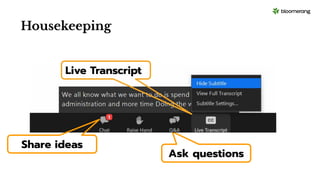
Ask questions
Live Transcript
Share ideas
Housekeeping
Housekeeping
We will share the slides and recording of this session with you via
email later today.
Dial in audio access: +1 669 900 6833
Any questions we are not able to answer live or in the Q&A will
be addressed after the session via a follow-up.
If you need further assistance, please reach out to
support@bloomerang.com. Our support team is amazing!
Poll
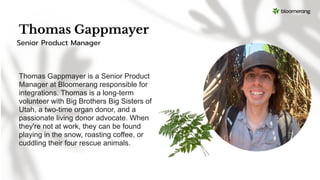
Thomas Gappmayer
Thomas Gappmayer is a Senior Product
Manager at Bloomerang responsible for
integrations. Thomas is a long-term
volunteer with Big Brothers Big Sisters of
Utah, a two-time organ donor, and a
passionate living donor advocate. When
they're not at work, they can be found
playing in the snow, roasting coffee, or
cuddling their four rescue animals.
Senior Product Manager
Email Options in
Bloomerang
What will we cover
today?
1. Quick overview of the integration
2. Connecting your Constant Contact account to
Bloomerang
3. Establishing Sync Rules
4. Behind the Scenes: How Bloomerang’s Integration
works tirelessly to keep your data current
5. Send emails in Constant Contact - get insights in
Bloomerang
6. Demo in the database
7. Q&A
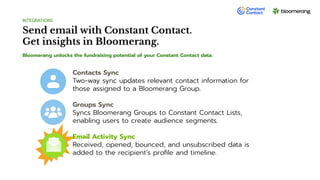
Send email with Constant Contact.
Get insights in Bloomerang.
Bloomerang unlocks the fundraising potential of your Constant Contact data.
INTEGRATIONS
Contacts Sync
Two-way sync updates relevant contact information for
those assigned to a Bloomerang Group.
Groups Sync
Syncs Bloomerang Groups to Constant Contact Lists,
enabling users to create audience segments.
Email Activity Sync
Received, opened, bounced, and unsubscribed data is
added to the recipient’s profile and timeline.
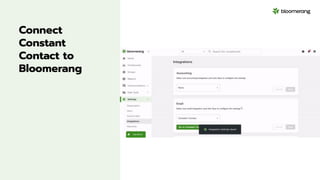
Connect
Constant
Contact to
Bloomerang
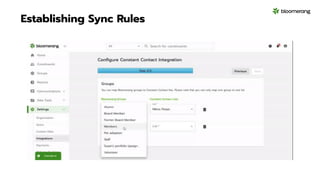
Establishing Sync Rules
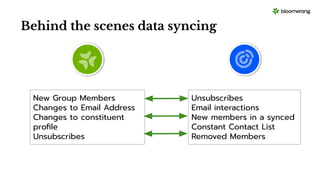
Behind the scenes data syncing
New Group Members
Changes to Email Address
Changes to constituent
profile
Unsubscribes
Unsubscribes
Email interactions
New members in a synced
Constant Contact List
Removed Members
Into the database we go!
Poll
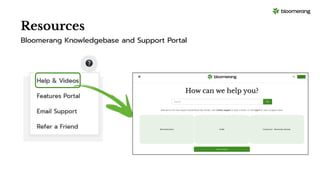
Resources
Bloomerang Knowledgebase and Support Portal
Resources
Constant Contact Basics
Thank you for attending!
And thank you for all you do in
your communities!
Visit our website to see more upcoming
Bloomerang Academy webinars!

02.22.2024 Email Options in Bloomerang.pdf

  • 1.
    Welcome to Bloomerang Academy Thankyou for joining us! Please type in the chat where you are joining us from and what the weather is like where you are!
  • 2.
  • 3.
    Housekeeping We will sharethe slides and recording of this session with you via email later today. Dial in audio access: +1 669 900 6833 Any questions we are not able to answer live or in the Q&A will be addressed after the session via a follow-up. If you need further assistance, please reach out to support@bloomerang.com. Our support team is amazing!
  • 4.
  • 5.
    Thomas Gappmayer Thomas Gappmayeris a Senior Product Manager at Bloomerang responsible for integrations. Thomas is a long-term volunteer with Big Brothers Big Sisters of Utah, a two-time organ donor, and a passionate living donor advocate. When they're not at work, they can be found playing in the snow, roasting coffee, or cuddling their four rescue animals. Senior Product Manager
  • 6.
  • 7.
    What will wecover today? 1. Quick overview of the integration 2. Connecting your Constant Contact account to Bloomerang 3. Establishing Sync Rules 4. Behind the Scenes: How Bloomerang’s Integration works tirelessly to keep your data current 5. Send emails in Constant Contact - get insights in Bloomerang 6. Demo in the database 7. Q&A
  • 8.
    Send email withConstant Contact. Get insights in Bloomerang. Bloomerang unlocks the fundraising potential of your Constant Contact data. INTEGRATIONS Contacts Sync Two-way sync updates relevant contact information for those assigned to a Bloomerang Group. Groups Sync Syncs Bloomerang Groups to Constant Contact Lists, enabling users to create audience segments. Email Activity Sync Received, opened, bounced, and unsubscribed data is added to the recipient’s profile and timeline.
  • 9.
  • 10.
  • 11.
    Behind the scenesdata syncing New Group Members Changes to Email Address Changes to constituent profile Unsubscribes Unsubscribes Email interactions New members in a synced Constant Contact List Removed Members
  • 12.
  • 13.
  • 14.
  • 15.
  • 16.
    Thank you forattending! And thank you for all you do in your communities! Visit our website to see more upcoming Bloomerang Academy webinars!