Data Types inC
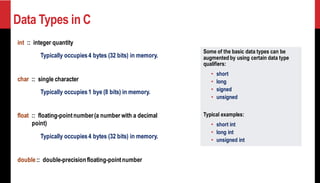
int :: integer quantity
Typically occupies4 bytes (32 bits) in memory.
char :: single character
Typically occupies1 bye (8 bits) in memory.
float :: floating-pointnumber(a number with a decimal
point)
Typically occupies4 bytes (32 bits) in memory.
double:: double-precisionfloating-pointnumber
Some of the basic data types can be
augmented by using certain data type
qualifiers:
• short
• long
• signed
• unsigned
Typical examples:
• short int
• long int
• unsigned int
Single Character andString Constants
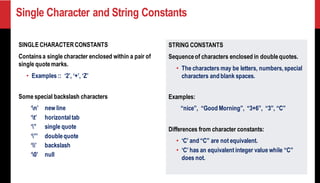
SINGLE CHARACTERCONSTANTS
Containsa single character enclosed within a pair of
single quotemarks.
• Examples :: ‘2’, ‘+’, ‘Z’
Some special backslash characters
‘n’ new line
‘t’ horizontaltab
‘’’ single quote
‘”’ doublequote
‘’ backslash
‘0’ null
STRING CONSTANTS
Sequenceof characters enclosed in doublequotes.
• The characters may be letters, numbers,special
characters and blank spaces.
Examples:
“nice”, “Good Morning”, “3+6”, “3”, “C”
Differences from character constants:
• ‘C’ and “C” are not equivalent.
• ‘C’ has an equivalent integer value while “C”
does not.
5.
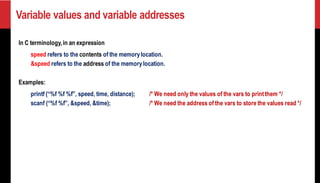
Variable values andvariable addresses
In C terminology,in an expression
speed refers to the contents of the memorylocation.
&speed refers to the address of the memorylocation.
Examples:
printf (“%f %f %f”, speed, time, distance); /* We need only the values of the vars to printthem */
scanf (“%f %f”, &speed, &time); /* We need the address of the vars to store the values read */
6.
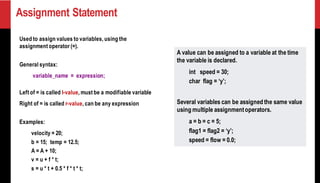
Assignment Statement
Used toassign values to variables, using the
assignment operator (=).
General syntax:
variable_name = expression;
Left of = is called l-value, must be a modifiable variable
Right of = is called r-value, can be any expression
Examples:
velocity = 20;
b = 15; temp = 12.5;
A = A + 10;
v = u + f * t;
s = u * t + 0.5 * f * t * t;
A value can be assigned to a variable at the time
the variable is declared.
int speed = 30;
char flag = ‘y’;
Several variables can be assigned the same value
using multiple assignmentoperators.
a = b = c = 5;
flag1 = flag2 = ‘y’;
speed = flow = 0.0;
7.
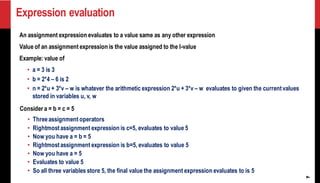
Expression evaluation
7
An assignmentexpression evaluates to a value same as any other expression
Value of an assignment expression is the value assigned to the l-value
Example: value of
• a = 3 is 3
• b = 2*4 – 6 is 2
• n = 2*u + 3*v – w is whatever the arithmetic expression 2*u + 3*v – w evaluates to given the currentvalues
stored in variables u, v, w
Consider a = b = c = 5
• Threeassignment operators
• Rightmostassignment expression is c=5, evaluates to value 5
• Now you have a = b = 5
• Rightmostassignment expression is b=5, evaluates to value 5
• Now you have a = 5
• Evaluates to value 5
• So all three variables store 5, the final value the assignment expression evaluates to is 5
8.
8
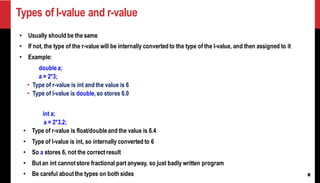
Types of l-valueand r-value
• Usually should be the same
• If not, the type of the r-value will be internally converted to the type of the l-value, and then assigned to it
• Example:
doublea;
a = 2*3;
• Type of r-value is int and the value is 6
• Type of l-value is double,so stores 6.0
int a;
a = 2*3.2;
• Type of r-value is float/doubleand the value is 6.4
• Type of l-value is int, so internally converted to 6
• So a stores 6, not the correct result
• But an int cannotstore fractional part anyway, so just badly written program
• Be careful aboutthe types on both sides
9.
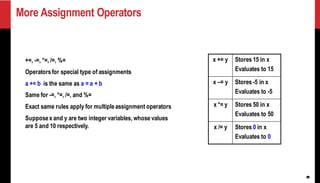
More Assignment Operators
9
+=,-=, *=, /=, %=
Operatorsfor special type of assignments
a += b is the same as a = a + b
Same for -=, *=, /=, and %=
Exact same rules apply for multipleassignment operators
Supposex and y are two integer variables, whose values
are 5 and 10 respectively.
x += y Stores 15 in x
Evaluates to 15
x –= y Stores -5 in x
Evaluates to -5
x *= y Stores 50 in x
Evaluates to 50
x /= y Stores 0 in x
Evaluates to 0
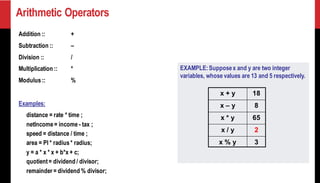
EXAMPLE:Supposex and yare two integer
variables, whose values are 13 and 5 respectively.
Arithmetic Operators
Addition :: +
Subtraction :: –
Division :: /
Multiplication :: *
Modulus:: %
Examples:
distance = rate * time ;
netIncome= income - tax ;
speed = distance / time ;
area = PI * radius* radius;
y = a * x * x + b*x + c;
quotient= dividend / divisor;
remainder = dividend % divisor;
x + y 18
x – y 8
x * y 65
x / y 2
x % y 3
12.
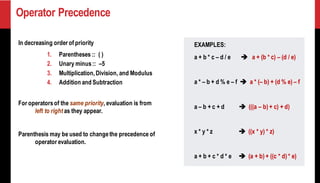
Operator Precedence
In decreasingorder of priority
1. Parentheses :: ( )
2. Unary minus:: –5
3. Multiplication,Division, and Modulus
4. Addition and Subtraction
For operatorsof the same priority, evaluation is from
left to right as they appear.
Parenthesis may be used to changethe precedence of
operator evaluation.
EXAMPLES:
a + b * c – d / e ➔ a + (b * c) – (d / e)
a * – b + d % e – f ➔ a * (– b) + (d % e) – f
a – b + c + d ➔ (((a – b) + c) + d)
x * y * z ➔ ((x * y) * z)
a + b + c * d * e ➔ (a + b) + ((c * d) * e)
13.
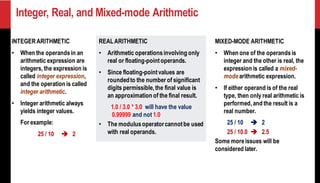
Integer, Real, andMixed-mode Arithmetic
INTEGERARITHMETIC
• When the operandsin an
arithmetic expression are
integers, the expression is
called integer expression,
and the operation is called
integer arithmetic.
• Integer arithmetic always
yields integer values.
For example:
25 / 10 ➔ 2
REALARITHMETIC
• Arithmetic operationsinvolving only
real or floating-pointoperands.
• Since floating-pointvalues are
roundedto the number of significant
digits permissible,the final value is
an approximation of the final result.
1.0 / 3.0 * 3.0 will have the value
0.99999 and not 1.0
• The modulusoperatorcannotbe used
with real operands.
MIXED-MODE ARITHMETIC
• When one of the operandsis
integer and the other is real, the
expression is called a mixed-
modearithmetic expression.
• If either operand is of the real
type, then only real arithmetic is
performed,and the result is a
real number.
25 / 10 ➔ 2
25 / 10.0 ➔ 2.5
Some moreissues will be
considered later.
14.
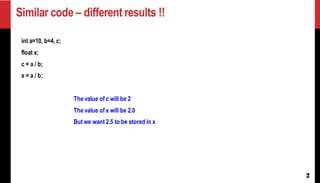
Similar code –different results !!
14
int a=10, b=4, c;
float x;
c = a / b;
x = a / b;
The value of c will be 2
The value of x will be 2.0
But we want 2.5 to be stored in x
15.
15
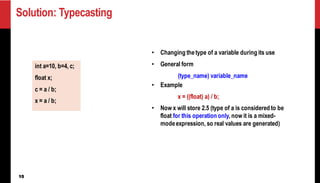
Solution: Typecasting
• Changingthetype of a variable during its use
• General form
(type_name) variable_name
• Example
x = ((float) a) / b;
• Now x will store 2.5 (type of a is considered to be
float for this operation only, now it is a mixed-
modeexpression, so real values are generated)
int a=10, b=4, c;
float x;
c = a / b;
x = a / b;
16.
16
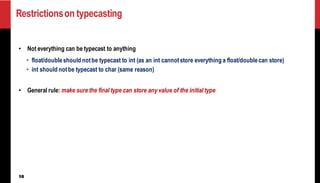
Restrictionson typecasting
• Noteverything can be typecast to anything
• float/doubleshould notbe typecast to int (as an int cannotstore everything a float/doublecan store)
• int should notbe typecast to char (same reason)
• General rule: make sure the final type can store any value of the initial type
17.
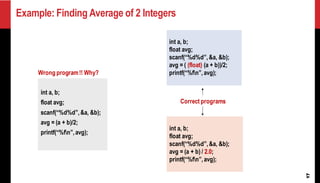
Example: Finding Averageof 2 Integers
17
int a, b;
float avg;
scanf(“%d%d”,&a, &b);
avg = (a + b)/2;
printf(“%fn”,avg);
Wrong program!! Why?
int a, b;
float avg;
scanf(“%d%d”,&a, &b);
avg = ( (float) (a + b))/2;
printf(“%fn”,avg);
int a, b;
float avg;
scanf(“%d%d”,&a, &b);
avg = (a + b) / 2.0;
printf(“%fn”,avg);
Correct programs
18.
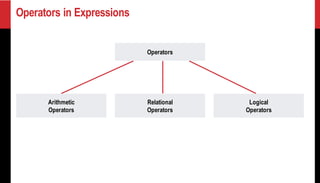
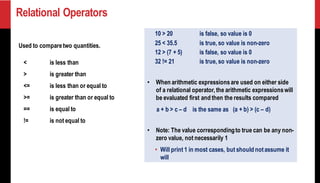
Relational Operators
Used tocomparetwo quantities.
< is less than
> is greater than
<= is less than or equal to
>= is greater than or equal to
== is equal to
!= is not equal to
10 > 20 is false, so value is 0
25 < 35.5 is true, so value is non-zero
12 > (7 + 5) is false, so value is 0
32 != 21 is true, so value is non-zero
• When arithmetic expressionsare used on either side
of a relational operator,the arithmetic expressionswill
be evaluated first and then the results compared
a + b > c – d is the same as (a + b) > (c – d)
• Note: The value correspondingto true can be any non-
zero value, not necessarily 1
• Will print 1 in most cases, but should notassume it
will
19.
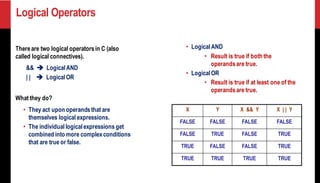
Logical Operators
Thereare twological operatorsin C (also
called logical connectives).
&& ➔ LogicalAND
| | ➔ LogicalOR
What they do?
• They act upon operandsthat are
themselves logical expressions.
• The individuallogicalexpressions get
combined into more complexconditions
that are true or false.
• LogicalAND
• Result is true if both the
operandsare true.
• LogicalOR
• Result is true if at least one of the
operandsare true.
X Y X && Y X | | Y
FALSE FALSE FALSE FALSE
FALSE TRUE FALSE TRUE
TRUE FALSE FALSE TRUE
TRUE TRUE TRUE TRUE
21
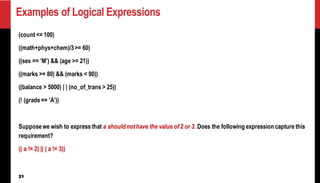
Examples of LogicalExpressions
(count <= 100)
((math+phys+chem)/3>= 60)
((sex == ’M’) && (age >= 21))
((marks >= 80) && (marks < 90))
((balance > 5000) | | (no_of_trans > 25))
(! (grade== ’A’))
Supposewe wish to express that a should nothave the value of 2 or 3. Does the following expression capture this
requirement?
(( a != 2) || ( a != 3))
22.
22
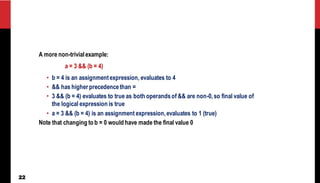
A more non-trivialexample:
a= 3 && (b = 4)
• b = 4 is an assignmentexpression, evaluates to 4
• && has higher precedencethan =
• 3 && (b = 4) evaluates to true as both operandsof && are non-0,so final value of
the logical expression is true
• a = 3 && (b = 4) is an assignment expression,evaluates to 1 (true)
Note that changing to b = 0 would have made the final value 0
23.
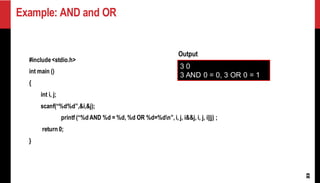
Example: AND andOR
23
#include<stdio.h>
int main ()
{
int i, j;
scanf(“%d%d”,&i,&j);
printf (“%d AND %d = %d, %d OR %d=%dn”,i, j, i&&j, i, j, i||j) ;
return 0;
}
3 0
3 AND 0 = 0, 3 OR 0 = 1
Output
24.
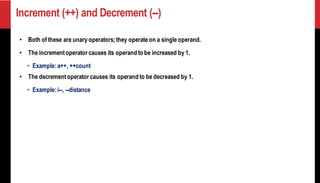
Increment (++) andDecrement (--)
• Both of these are unary operators;they operate on a single operand.
• The incrementoperator causes its operand to be increased by 1.
• Example: a++, ++count
• The decrementoperator causes its operand to be decreased by 1.
• Example: i--, --distance
25.
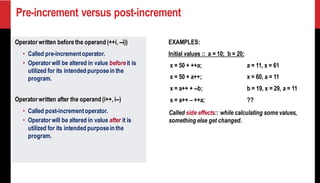
Pre-increment versus post-increment
Operatorwritten before the operand (++i, --i))
• Called pre-incrementoperator.
• Operator will be altered in value beforeit is
utilized for its intended purposein the
program.
Operator written after the operand (i++, i--)
• Called post-incrementoperator.
• Operator will be altered in value after it is
utilized for its intended purposein the
program.
EXAMPLES:
Initial values :: a = 10; b = 20;
x = 50 + ++a; a = 11, x = 61
x = 50 + a++; x = 60, a = 11
x = a++ + --b; b = 19, x = 29, a = 11
x = a++ – ++a; ??
Called side effects:: while calculating some values,
something else get changed.
26.
26
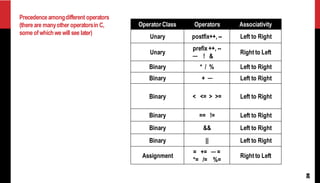
Precedenceamongdifferent operators
(thereare manyotheroperatorsin C,
someofwhichwewill see later)
Operator Class Operators Associativity
Unary postfix++, -- Left to Right
Unary
prefix ++, --
─ ! &
Right to Left
Binary * / % Left to Right
Binary + ─ Left to Right
Binary < <= > >= Left to Right
Binary == != Left to Right
Binary && Left to Right
Binary || Left to Right
Assignment
= += ─ =
*= /= %=
Right to Left
27.
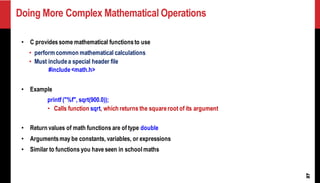
Doing More ComplexMathematical Operations
27
• C providessome mathematical functionsto use
• perform common mathematical calculations
• Must includea special header file
#include<math.h>
• Example
printf ("%f", sqrt(900.0));
• Calls function sqrt, which returns the squareroot of its argument
• Return values of math functions are of type double
• Argumentsmay be constants, variables, or expressions
• Similar to functions you have seen in school maths
28.
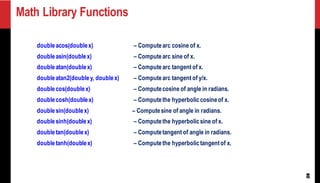
Math Library Functions
28
doubleacos(doublex)– Computearc cosine of x.
doubleasin(doublex) – Computearc sine of x.
doubleatan(doublex) – Computearc tangent of x.
doubleatan2(doubley, doublex) – Computearc tangent of y/x.
doublecos(doublex) – Computecosine of angle in radians.
doublecosh(doublex) – Computethe hyperboliccosineof x.
doublesin(doublex) – Computesine of angle in radians.
doublesinh(doublex) – Computethe hyperbolicsine of x.
doubletan(doublex) – Computetangent of angle in radians.
doubletanh(doublex) – Computethe hyperbolictangentof x.
29.
Math Library Functions
29
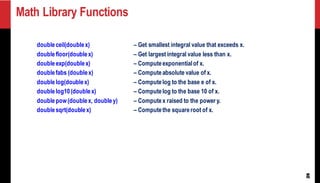
doubleceil(doublex)– Get smallest integral value that exceeds x.
doublefloor(doublex) – Get largest integral value less than x.
doubleexp(doublex) – Computeexponentialof x.
doublefabs (doublex) – Computeabsolute value of x.
doublelog(doublex) – Computelog to the base e of x.
doublelog10(doublex) – Computelog to the base 10 of x.
doublepow(doublex, doubley) – Computex raised to the power y.
doublesqrt(doublex) – Computethe squareroot of x.
30.
Computing distance betweentwo points
30
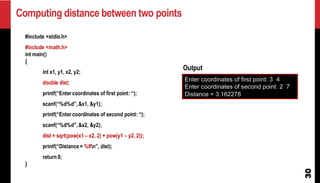
#include <stdio.h>
#include <math.h>
int main()
{
int x1, y1, x2, y2;
double dist;
printf(“Entercoordinates of first point: “);
scanf(“%d%d”,&x1, &y1);
printf(“Entercoordinates of second point: “);
scanf(“%d%d”,&x2, &y2);
dist = sqrt(pow(x1 – x2, 2) + pow(y1 – y2, 2));
printf(“Distance = %lfn”, dist);
return 0;
}
Enter coordinates of first point: 3 4
Enter coordinates of second point: 2 7
Distance = 3.162278
Output
31.
Practice Problems
31
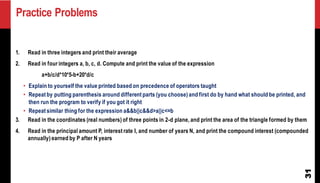
1. Readin three integers and print their average
2. Read in four integers a, b, c, d. Compute and print the value of the expression
a+b/c/d*10*5-b+20*d/c
• Explain to yourself the value printed based on precedence of operators taught
• Repeat by putting parenthesis around different parts (you choose) and first do by hand what should be printed, and
then run the program to verify if you got it right
• Repeat similar thing for the expression a&&b||c&&d>a||c<=b
3. Read in the coordinates (real numbers) of three points in 2-d plane, and print the area of the triangle formed by them
4. Read in the principal amount P, interest rate I, and number of years N, and print the compound interest (compounded
annually) earned by P after N years