Introduction to Java Programming, 4E Y. Daniel Liang
Introduction Course Objectives Organization of the Book
Course Objectives Upon completing the course, you will understand   Create, compile, and run Java programs Primitive data types Java control flow Methods Arrays  (for teaching Java in two semesters, this could be the end) Object-oriented programming Core Java classes (Swing, exception, internationalization, multithreading, multimedia, I/O, networking, Java Collections Framework)
Course Objectives, cont. You will be able to  Develop programs using Forte Write simple programs using primitive data types, control statements, methods, and arrays. Create and use methods Develop a GUI interface and Java applets Write interesting projects Establish a firm foundation on Java concepts
Book Chapters Part I: Fundamentals of Programming Chapter 1 Introduction to Java Chapter 2 Primitive Data Types and Operations Chapter 3 Control Statements Chapter 4 Methods Chapter 5 Arrays
Book Chapters, cont. Part II: Object-Oriented Programming Chapter 6 Objects and Classes Chapter 7 Strings Chapter 8 Class Inheritance and Interfaces Chapter 9 Object-Oriented Software Development
Book Chapters, cont. Part III: GUI Programming Chapter 10 Getting Started with GUI Programming  Chapter 11 Creating User Interfaces  Chapter 12 Applets and Advanced GUI
Book Chapters, cont. Part IV: Developing Comprehensive Projects Chapter 13 Exception Handling Chapter 14 Internationalization Chapter 15 Multithreading  Chapter 16 Multimedia Chapter 17 Input and Output  Chapter 18 Networking Chapter 19 Java Data Structures
Chapter 1 Introduction to Java and Forte What Is Java? Getting Started With Java Programming Create, Compile and Running a Java Application
What Is Java? History Characteristics of Java
History James Gosling and Sun Microsystems Oak Java, May 20, 1995, Sun World HotJava  The first Java-enabled Web browser JDK Evolutions J2SE, J2ME, and J2EE (not mentioned in the book, but could discuss here optionally)
Characteristics of Java Java is simple Java is object-oriented Java is distributed Java is interpreted Java is robust Java is secure Java is architecture-neutral Java is portable Java’s performance Java is multithreaded Java is dynamic
JDK Versions JDK 1.02 (1995) JDK 1.1 (1996) Java 2 SDK v 1.2 (a.k.a JDK 1.2, 1998) Java 2 SDK v 1.3 (a.k.a JDK 1.3, 2000) Java 2 SDK v 1.4 (a.k.a JDK 1.4, 2002)
JDK Editions Java Standard Edition (J2SE) J2SE can be used to develop client-side standalone applications or applets. Java Enterprise Edition (J2EE) J2EE can be used to develop server-side applications such as Java servlets and Java ServerPages.  Java Micro Edition (J2ME).  J2ME can be used to develop applications for mobile devices such as cell phones.  This book uses J2SE to introduce Java programming.
Java IDE Tools Forte by Sun MicroSystems  Borland JBuilder Microsoft Visual J++ WebGain Café  IBM Visual Age for Java
Getting Started with Java Programming A Simple Java Application Compiling Programs Executing Applications
A Simple Application Example 1.1 //This application program prints Welcome //to Java!  package chapter1; public class Welcome { public static void main(String[] args) {  System.out.println("Welcome to Java!"); } } Run Source NOTE: To run the program,  install slide files on hard disk.
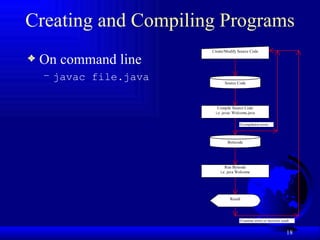
Creating and Compiling Programs On command line javac file.java
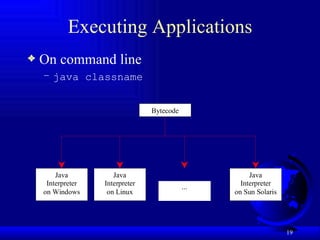
Executing Applications On command line java classname
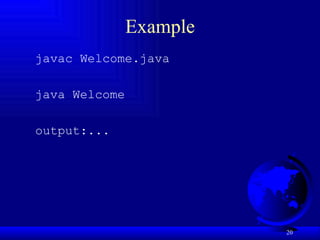
Example javac Welcome.java java Welcome output:...
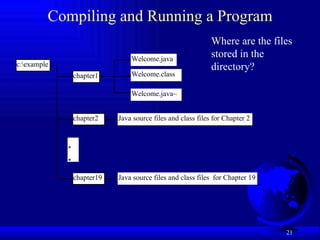
Compiling and Running a Program Where are the files stored in the directory?
Anatomy of a Java Program Comments Package Reserved words Modifiers Statements Blocks Classes Methods The main method
Comments In Java, comments are preceded by two slashes ( // ) in a line, or enclosed between  /*  and  */  in one or multiple lines. When the compiler sees  // , it ignores all text after  //  in the same line. When it sees  /* , it scans for the next  */  and ignores any text between  /*  and  */ .
Package The second line in the program ( package chapter1; ) specifies a package name,  chapter1 , for the class  Welcome . Forte compiles the source code in Welcome.java, generates Welcome.class, and stores Welcome.class in the chapter1 folder.
Reserved Words Reserved words  or  keywords  are words that have a specific meaning to the compiler and cannot be used for other purposes in the program. For example, when the compiler sees the word  class , it understands that the word after  class  is the name for the class. Other reserved words in Example 1.1 are  public ,  static , and  void . Their use will be introduced later in the book.
Modifiers Java uses certain reserved words called  modifiers  that specify the properties of the data, methods, and classes and how they can be used. Examples of modifiers are  public  and  static . Other modifiers are  private ,  final ,  abstract , and  protected . A  public  datum, method, or class can be accessed by other programs. A  private  datum or method cannot be accessed by other programs. Modifiers are discussed in Chapter 6, "Objects and Classes."
Statements A  statement  represents an action or a sequence of actions. The statement  System.out.println("Welcome to Java!")  in the program in Example 1.1 is a statement to display the greeting "Welcome to Java!" Every statement in Java ends with a semicolon (;).
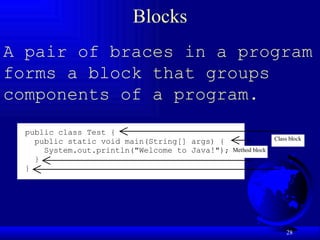
Blocks A pair of braces in a program forms a block that groups components of a program.
Classes The  class  is the essential Java construct. A class is a template or blueprint for objects. To program in Java, you must understand classes and be able to write and use them. The mystery of the class will continue to be unveiled throughout this book. For now, though, understand that a program is defined by using one or more classes.
Methods What is  System.out.println ? It is a  method : a collection of statements that performs a sequence of operations to display a message on the console. It can be used even without fully understanding the details of how it works. It is used by invoking a statement with a string argument. The string argument is enclosed within parentheses. In this case, the argument is  "Welcome to Java!"  You can call the same  println  method with a different argument to print a different message.
main Method The  main  method provides the control of program flow. The Java interpreter executes the application by invoking the  main  method.    The  main  method looks like this:   public static void main(String[] args) { // Statements; }
Displaying Text in a Message Dialog Box you can use the  showMessageDialog  method in the  JOptionPane  class.  JOptionPane  is one of the many predefined classes in the Java system, which can be reused rather than “reinventing the wheel.”  Run Source
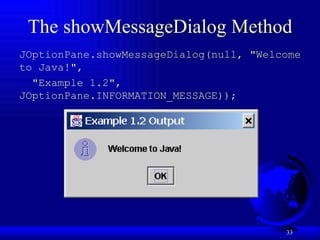
The showMessageDialog Method  JOptionPane.showMessageDialog(null, "Welcome to Java!", "Example 1.2", JOptionPane.INFORMATION_MESSAGE));
The exit Method  Use Exit to terminate the program and stop all threads. NOTE: When your program starts, a thread is spawned to run the program. When the showMessageDialog is invoked, a separate thread is spawned to run this method. The thread is not terminated even you close the dialog box. To terminate the thread, you have to invoke the exit method.

01slide

  • 1.
    Introduction to JavaProgramming, 4E Y. Daniel Liang
  • 2.
    Introduction Course ObjectivesOrganization of the Book
  • 3.
    Course Objectives Uponcompleting the course, you will understand Create, compile, and run Java programs Primitive data types Java control flow Methods Arrays (for teaching Java in two semesters, this could be the end) Object-oriented programming Core Java classes (Swing, exception, internationalization, multithreading, multimedia, I/O, networking, Java Collections Framework)
  • 4.
    Course Objectives, cont.You will be able to Develop programs using Forte Write simple programs using primitive data types, control statements, methods, and arrays. Create and use methods Develop a GUI interface and Java applets Write interesting projects Establish a firm foundation on Java concepts
  • 5.
    Book Chapters PartI: Fundamentals of Programming Chapter 1 Introduction to Java Chapter 2 Primitive Data Types and Operations Chapter 3 Control Statements Chapter 4 Methods Chapter 5 Arrays
  • 6.
    Book Chapters, cont.Part II: Object-Oriented Programming Chapter 6 Objects and Classes Chapter 7 Strings Chapter 8 Class Inheritance and Interfaces Chapter 9 Object-Oriented Software Development
  • 7.
    Book Chapters, cont.Part III: GUI Programming Chapter 10 Getting Started with GUI Programming Chapter 11 Creating User Interfaces Chapter 12 Applets and Advanced GUI
  • 8.
    Book Chapters, cont.Part IV: Developing Comprehensive Projects Chapter 13 Exception Handling Chapter 14 Internationalization Chapter 15 Multithreading Chapter 16 Multimedia Chapter 17 Input and Output Chapter 18 Networking Chapter 19 Java Data Structures
  • 9.
    Chapter 1 Introductionto Java and Forte What Is Java? Getting Started With Java Programming Create, Compile and Running a Java Application
  • 10.
    What Is Java?History Characteristics of Java
  • 11.
    History James Goslingand Sun Microsystems Oak Java, May 20, 1995, Sun World HotJava The first Java-enabled Web browser JDK Evolutions J2SE, J2ME, and J2EE (not mentioned in the book, but could discuss here optionally)
  • 12.
    Characteristics of JavaJava is simple Java is object-oriented Java is distributed Java is interpreted Java is robust Java is secure Java is architecture-neutral Java is portable Java’s performance Java is multithreaded Java is dynamic
  • 13.
    JDK Versions JDK1.02 (1995) JDK 1.1 (1996) Java 2 SDK v 1.2 (a.k.a JDK 1.2, 1998) Java 2 SDK v 1.3 (a.k.a JDK 1.3, 2000) Java 2 SDK v 1.4 (a.k.a JDK 1.4, 2002)
  • 14.
    JDK Editions JavaStandard Edition (J2SE) J2SE can be used to develop client-side standalone applications or applets. Java Enterprise Edition (J2EE) J2EE can be used to develop server-side applications such as Java servlets and Java ServerPages. Java Micro Edition (J2ME). J2ME can be used to develop applications for mobile devices such as cell phones. This book uses J2SE to introduce Java programming.
  • 15.
    Java IDE ToolsForte by Sun MicroSystems Borland JBuilder Microsoft Visual J++ WebGain Café IBM Visual Age for Java
  • 16.
    Getting Started withJava Programming A Simple Java Application Compiling Programs Executing Applications
  • 17.
    A Simple ApplicationExample 1.1 //This application program prints Welcome //to Java! package chapter1; public class Welcome { public static void main(String[] args) { System.out.println("Welcome to Java!"); } } Run Source NOTE: To run the program, install slide files on hard disk.
  • 18.
    Creating and CompilingPrograms On command line javac file.java
  • 19.
    Executing Applications Oncommand line java classname
  • 20.
    Example javac Welcome.javajava Welcome output:...
  • 21.
    Compiling and Runninga Program Where are the files stored in the directory?
  • 22.
    Anatomy of aJava Program Comments Package Reserved words Modifiers Statements Blocks Classes Methods The main method
  • 23.
    Comments In Java,comments are preceded by two slashes ( // ) in a line, or enclosed between /* and */ in one or multiple lines. When the compiler sees // , it ignores all text after // in the same line. When it sees /* , it scans for the next */ and ignores any text between /* and */ .
  • 24.
    Package The secondline in the program ( package chapter1; ) specifies a package name, chapter1 , for the class Welcome . Forte compiles the source code in Welcome.java, generates Welcome.class, and stores Welcome.class in the chapter1 folder.
  • 25.
    Reserved Words Reservedwords or keywords are words that have a specific meaning to the compiler and cannot be used for other purposes in the program. For example, when the compiler sees the word class , it understands that the word after class is the name for the class. Other reserved words in Example 1.1 are public , static , and void . Their use will be introduced later in the book.
  • 26.
    Modifiers Java usescertain reserved words called modifiers that specify the properties of the data, methods, and classes and how they can be used. Examples of modifiers are public and static . Other modifiers are private , final , abstract , and protected . A public datum, method, or class can be accessed by other programs. A private datum or method cannot be accessed by other programs. Modifiers are discussed in Chapter 6, "Objects and Classes."
  • 27.
    Statements A statement represents an action or a sequence of actions. The statement System.out.println("Welcome to Java!") in the program in Example 1.1 is a statement to display the greeting "Welcome to Java!" Every statement in Java ends with a semicolon (;).
  • 28.
    Blocks A pairof braces in a program forms a block that groups components of a program.
  • 29.
    Classes The class is the essential Java construct. A class is a template or blueprint for objects. To program in Java, you must understand classes and be able to write and use them. The mystery of the class will continue to be unveiled throughout this book. For now, though, understand that a program is defined by using one or more classes.
  • 30.
    Methods What is System.out.println ? It is a method : a collection of statements that performs a sequence of operations to display a message on the console. It can be used even without fully understanding the details of how it works. It is used by invoking a statement with a string argument. The string argument is enclosed within parentheses. In this case, the argument is "Welcome to Java!" You can call the same println method with a different argument to print a different message.
  • 31.
    main Method The main method provides the control of program flow. The Java interpreter executes the application by invoking the main method.   The main method looks like this:   public static void main(String[] args) { // Statements; }
  • 32.
    Displaying Text ina Message Dialog Box you can use the showMessageDialog method in the JOptionPane class. JOptionPane is one of the many predefined classes in the Java system, which can be reused rather than “reinventing the wheel.” Run Source
  • 33.
    The showMessageDialog Method JOptionPane.showMessageDialog(null, "Welcome to Java!", "Example 1.2", JOptionPane.INFORMATION_MESSAGE));
  • 34.
    The exit Method Use Exit to terminate the program and stop all threads. NOTE: When your program starts, a thread is spawned to run the program. When the showMessageDialog is invoked, a separate thread is spawned to run this method. The thread is not terminated even you close the dialog box. To terminate the thread, you have to invoke the exit method.

Editor's Notes

  • #2 First Class: Introduction, Prerequisites, Advices, Syllabus Lab 1: Create a Java Project, Compile, and Run. Show syntax errors Print program Capture screen shots, and save it in Word, and print it. Homework One: Check in the class randomly.