Virtual Challenge Events
Raise Money and Engage Supporters
Agenda
▷ What’s a Virtual Challenge?
○ Let’s see some examples
▷ How to Create a Virtual Challenge on GiveSignup/RunSignup
▷ Marketing a Virtual Challenge
▷ What Features are Coming Next?
▷ Q & A
2
Virtual Challenges
Raise money and engage supporters
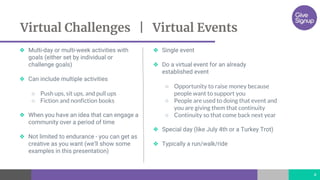
❖ Multi-day or multi-week activities with
goals (either set by individual or
challenge goals)
❖ Can include multiple activities
○ Push ups, sit ups, and pull ups
○ Fiction and nonfiction books
❖ When you have an idea that can engage a
community over a period of time
❖ Not limited to endurance - you can get as
creative as you want (we’ll show some
examples in this presentation)
❖ Single event
❖ Do a virtual event for an already
established event
○ Opportunity to raise money because
people want to support you
○ People are used to doing that event and
you are giving them that continuity
○ Continuity so that come back next year
❖ Special day (like July 4th or a Turkey Trot)
❖ Typically a run/walk/ride
Virtual Challenges | Virtual Events
4
Virtual Challenge Samples
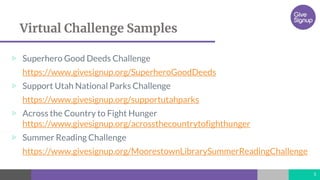
▷ Superhero Good Deeds Challenge
https://www.givesignup.org/SuperheroGoodDeeds
▷ Support Utah National Parks Challenge
https://www.givesignup.org/supportutahparks
▷ Across the Country to Fight Hunger
https://www.givesignup.org/acrossthecountrytofighthunger
▷ Summer Reading Challenge
https://www.givesignup.org/MoorestownLibrarySummerReadingChallenge
5
Create a Virtual Challenge
How to create and customize
www.givesignup.org
www.runsignup.com
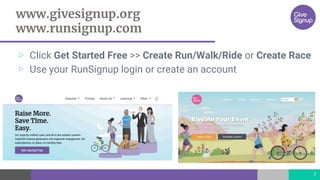
▷ Click Get Started Free >> Create Run/Walk/Ride or Create Race
▷ Use your RunSignup login or create an account
7
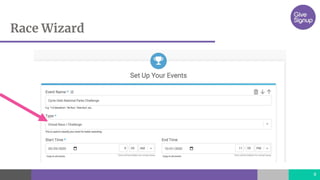
Race Wizard
8
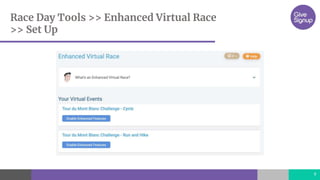
Race Day Tools >> Enhanced Virtual Race
>> Set Up
9
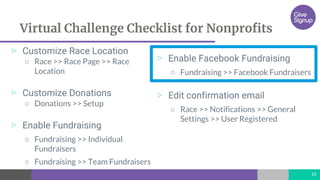
Virtual Challenge Checklist for Nonprofits
▷ Customize Race Location
○ Race >> Race Page >> Race
Location
▷ Customize Donations
○ Donations >> Setup
▷ Enable Fundraising
○ Fundraising >> Individual
Fundraisers
○ Fundraising >> Team Fundraisers
10
▷ Enable Facebook Fundraising
○ Fundraising >> Facebook Fundraisers
▷ Edit confirmation email
○ Race >> Notifications >> General
Settings >> User Registered
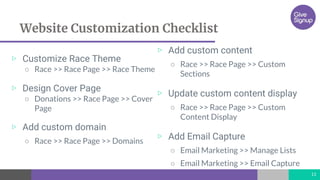
Website Customization Checklist
▷ Customize Race Theme
○ Race >> Race Page >> Race Theme
▷ Design Cover Page
○ Donations >> Race Page >> Cover
Page
▷ Add custom domain
○ Race >> Race Page >> Domains
11
▷ Add custom content
○ Race >> Race Page >> Custom
Sections
▷ Update custom content display
○ Race >> Race Page >> Custom
Content Display
▷ Add Email Capture
○ Email Marketing >> Manage Lists
○ Email Marketing >> Email Capture
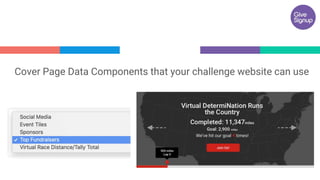
“Cover Page Data Components that your challenge website can use
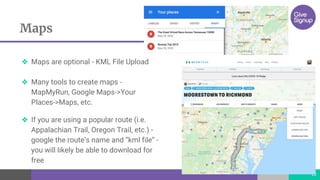
Maps
13
❖ Maps are optional - KML File Upload
❖ Many tools to create maps -
MapMyRun, Google Maps->Your
Places->Maps, etc.
❖ If you are using a popular route (i.e.
Appalachian Trail, Oregon Trail, etc.) -
google the route’s name and “kml file” -
you will likely be able to download for
free
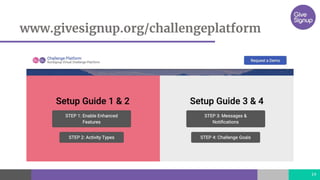
www.givesignup.org/challengeplatform
14
15
Demo
Marketing Your Challenge
What’s the best plan for your nonprofit?
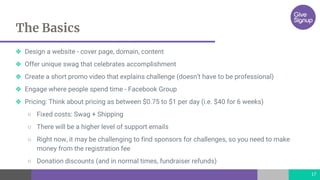
The Basics
17
❖ Design a website - cover page, domain, content
❖ Offer unique swag that celebrates accomplishment
❖ Create a short promo video that explains challenge (doesn’t have to be professional)
❖ Engage where people spend time - Facebook Group
❖ Pricing: Think about pricing as between $0.75 to $1 per day (i.e. $40 for 6 weeks)
○ Fixed costs: Swag + Shipping
○ There will be a higher level of support emails
○ Right now, it may be challenging to find sponsors for challenges, so you need to make
money from the registration fee
○ Donation discounts (and in normal times, fundraiser refunds)
18
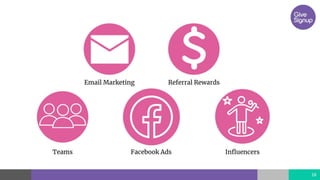
Email Marketing
19
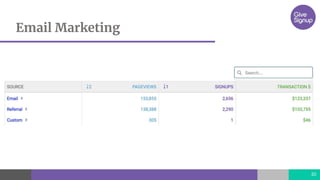
❖ Promote your challenge to your email list
○ Nonprofits usually have really big email lists
❖ Use RunSignup’s free email marketing platform
❖ Include a strong call to action
○ Deadlines
○ Time-limited coupon
❖ Highlight exclusive swag
Email Marketing
20
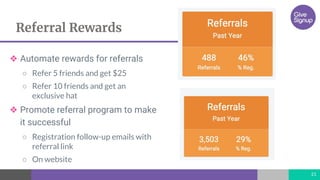
Referral Rewards
21
❖ Automate rewards for referrals
○ Refer 5 friends and get $25
○ Refer 10 friends and get an
exclusive hat
❖ Promote referral program to make
it successful
○ Registration follow-up emails with
referral link
○ On website
Teams
22
❖ Promote teams
○ Team challenge functionality coming later in June
❖ Offer team size discounts
○ Get 10 members and everyone gets a $5 refund/discount
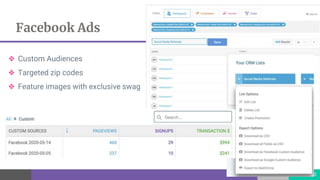
Facebook Ads
23
❖ Custom Audiences
❖ Targeted zip codes
❖ Feature images with exclusive swag
Influencers
24
❖ Not every challenge is going to have Laz…
❖ But chances are you know people in your community who
are influencers - leaders of running groups, coaches, Rotary
Club members, etc.
○ Engage them to participate in the challenge and share with their
networks
What’s Coming Next
Our Development Pipeline
What’s Next
26
❖ Teams
❖ Multi-Goals
❖ Milestones
○ Certificates
○ Notifications
○ Reminders
❖ Upload Individual GPX
❖ Improved UX
❖ Download and API
❖ Participant Photo Uploads
Thanks!
Any questions?
If you want to learn more, visit
https://givesignup.org/challengeplatform
27

Virtual Challenge Events for Nonprofits

  • 1.
    Virtual Challenge Events RaiseMoney and Engage Supporters
  • 2.
    Agenda ▷ What’s aVirtual Challenge? ○ Let’s see some examples ▷ How to Create a Virtual Challenge on GiveSignup/RunSignup ▷ Marketing a Virtual Challenge ▷ What Features are Coming Next? ▷ Q & A 2
  • 3.
    Virtual Challenges Raise moneyand engage supporters
  • 4.
    ❖ Multi-day ormulti-week activities with goals (either set by individual or challenge goals) ❖ Can include multiple activities ○ Push ups, sit ups, and pull ups ○ Fiction and nonfiction books ❖ When you have an idea that can engage a community over a period of time ❖ Not limited to endurance - you can get as creative as you want (we’ll show some examples in this presentation) ❖ Single event ❖ Do a virtual event for an already established event ○ Opportunity to raise money because people want to support you ○ People are used to doing that event and you are giving them that continuity ○ Continuity so that come back next year ❖ Special day (like July 4th or a Turkey Trot) ❖ Typically a run/walk/ride Virtual Challenges | Virtual Events 4
  • 5.
    Virtual Challenge Samples ▷Superhero Good Deeds Challenge https://www.givesignup.org/SuperheroGoodDeeds ▷ Support Utah National Parks Challenge https://www.givesignup.org/supportutahparks ▷ Across the Country to Fight Hunger https://www.givesignup.org/acrossthecountrytofighthunger ▷ Summer Reading Challenge https://www.givesignup.org/MoorestownLibrarySummerReadingChallenge 5
  • 6.
    Create a VirtualChallenge How to create and customize
  • 7.
    www.givesignup.org www.runsignup.com ▷ Click GetStarted Free >> Create Run/Walk/Ride or Create Race ▷ Use your RunSignup login or create an account 7
  • 8.
  • 9.
    Race Day Tools>> Enhanced Virtual Race >> Set Up 9
  • 10.
    Virtual Challenge Checklistfor Nonprofits ▷ Customize Race Location ○ Race >> Race Page >> Race Location ▷ Customize Donations ○ Donations >> Setup ▷ Enable Fundraising ○ Fundraising >> Individual Fundraisers ○ Fundraising >> Team Fundraisers 10 ▷ Enable Facebook Fundraising ○ Fundraising >> Facebook Fundraisers ▷ Edit confirmation email ○ Race >> Notifications >> General Settings >> User Registered
  • 11.
    Website Customization Checklist ▷Customize Race Theme ○ Race >> Race Page >> Race Theme ▷ Design Cover Page ○ Donations >> Race Page >> Cover Page ▷ Add custom domain ○ Race >> Race Page >> Domains 11 ▷ Add custom content ○ Race >> Race Page >> Custom Sections ▷ Update custom content display ○ Race >> Race Page >> Custom Content Display ▷ Add Email Capture ○ Email Marketing >> Manage Lists ○ Email Marketing >> Email Capture
  • 12.
    “Cover Page DataComponents that your challenge website can use
  • 13.
    Maps 13 ❖ Maps areoptional - KML File Upload ❖ Many tools to create maps - MapMyRun, Google Maps->Your Places->Maps, etc. ❖ If you are using a popular route (i.e. Appalachian Trail, Oregon Trail, etc.) - google the route’s name and “kml file” - you will likely be able to download for free
  • 14.
  • 15.
  • 16.
    Marketing Your Challenge What’sthe best plan for your nonprofit?
  • 17.
    The Basics 17 ❖ Designa website - cover page, domain, content ❖ Offer unique swag that celebrates accomplishment ❖ Create a short promo video that explains challenge (doesn’t have to be professional) ❖ Engage where people spend time - Facebook Group ❖ Pricing: Think about pricing as between $0.75 to $1 per day (i.e. $40 for 6 weeks) ○ Fixed costs: Swag + Shipping ○ There will be a higher level of support emails ○ Right now, it may be challenging to find sponsors for challenges, so you need to make money from the registration fee ○ Donation discounts (and in normal times, fundraiser refunds)
  • 18.
  • 19.
    Email Marketing 19 ❖ Promoteyour challenge to your email list ○ Nonprofits usually have really big email lists ❖ Use RunSignup’s free email marketing platform ❖ Include a strong call to action ○ Deadlines ○ Time-limited coupon ❖ Highlight exclusive swag
  • 20.
  • 21.
    Referral Rewards 21 ❖ Automaterewards for referrals ○ Refer 5 friends and get $25 ○ Refer 10 friends and get an exclusive hat ❖ Promote referral program to make it successful ○ Registration follow-up emails with referral link ○ On website
  • 22.
    Teams 22 ❖ Promote teams ○Team challenge functionality coming later in June ❖ Offer team size discounts ○ Get 10 members and everyone gets a $5 refund/discount
  • 23.
    Facebook Ads 23 ❖ CustomAudiences ❖ Targeted zip codes ❖ Feature images with exclusive swag
  • 24.
    Influencers 24 ❖ Not everychallenge is going to have Laz… ❖ But chances are you know people in your community who are influencers - leaders of running groups, coaches, Rotary Club members, etc. ○ Engage them to participate in the challenge and share with their networks
  • 25.
    What’s Coming Next OurDevelopment Pipeline
  • 26.
    What’s Next 26 ❖ Teams ❖Multi-Goals ❖ Milestones ○ Certificates ○ Notifications ○ Reminders ❖ Upload Individual GPX ❖ Improved UX ❖ Download and API ❖ Participant Photo Uploads
  • 27.
    Thanks! Any questions? If youwant to learn more, visit https://givesignup.org/challengeplatform 27

Editor's Notes

  • #5 Bryan talk through this - The biggest benefit is extended engagement, with the opportunity to build relationships and educate your challenge participants about your mission
  • #11 We aren’t going to walk through this - but it is in the slides and will be in the blog as a resource. These are the basics that you need to do when you set up a virtual challenge with donations and fundraising.
  • #12 With GiveSignup, you get a free website that’s customizable, and easy for you to promote your brand. Again, this slide is something we’ve covered in past webinars, but I wanted to leave it here as a reference when you use these slides.
  • #13 Bryan
  • #14 Bryan
  • #18 Bryan
  • #22 Bryan
  • #23 Allison
  • #25 Bryan