Michael Dawson
October 2015
Leveraging Java Optimizations
to Improve Density in Cloud
Environments
About Michael Dawson
Loves the web and building software
2
Senior Software Developer @ IBM
23 years development experience
11 years in runtime development
Contact me:
Michael_dawson@ca.ibm.com
Twitter: @mhdawson1
https://www.linkedin.com/pub/michael-dawson/2/128/605
3
• Motivation
• Shared Classes
• Cloud Environments
• Docker
• Cloud Foundry
• Leveraging SC in Cloud
Agenda
4
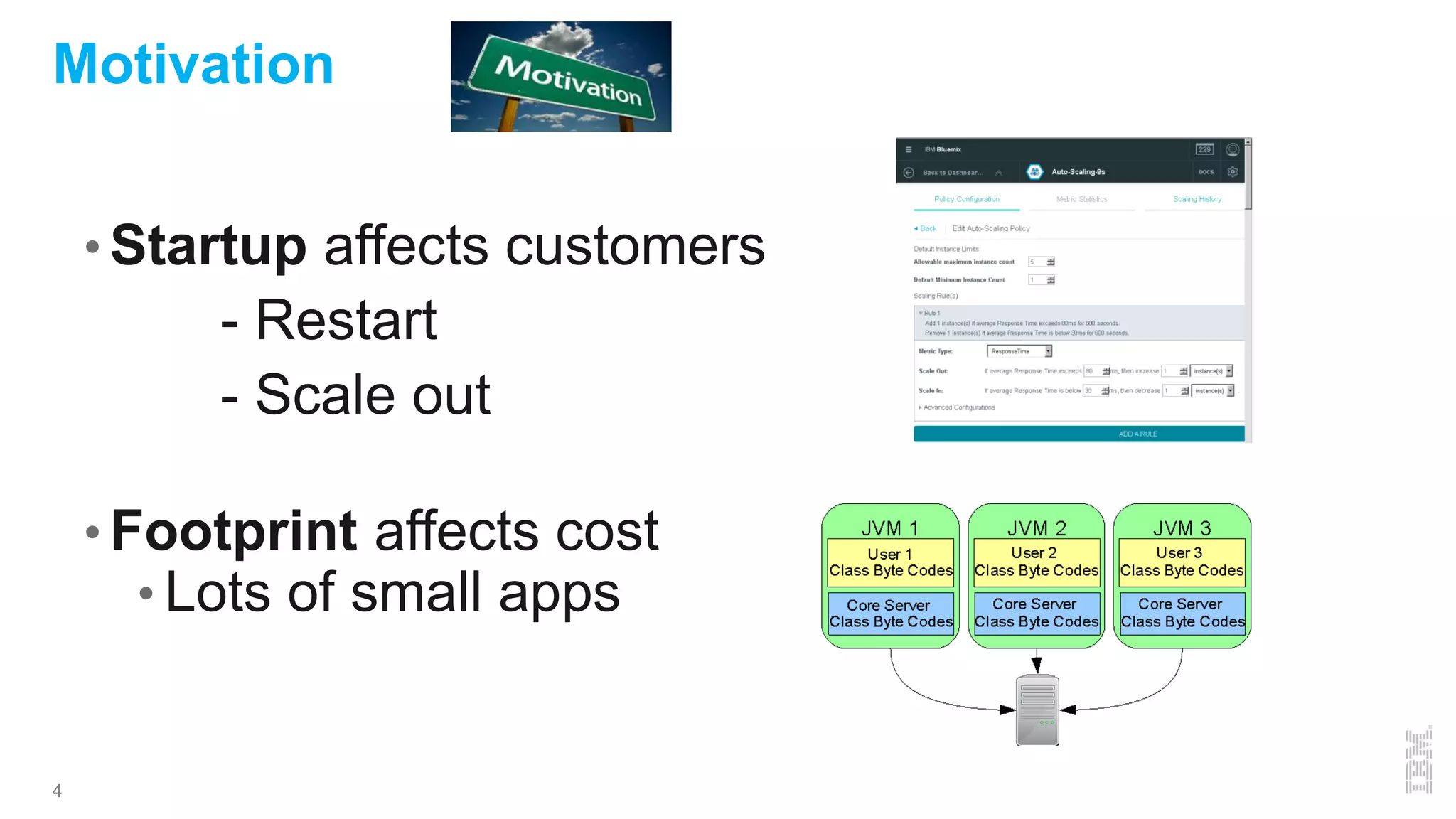
• Startup affects customers
•- Restart
•- Scale out
• Footprint affects cost
• Lots of small apps
Motivation
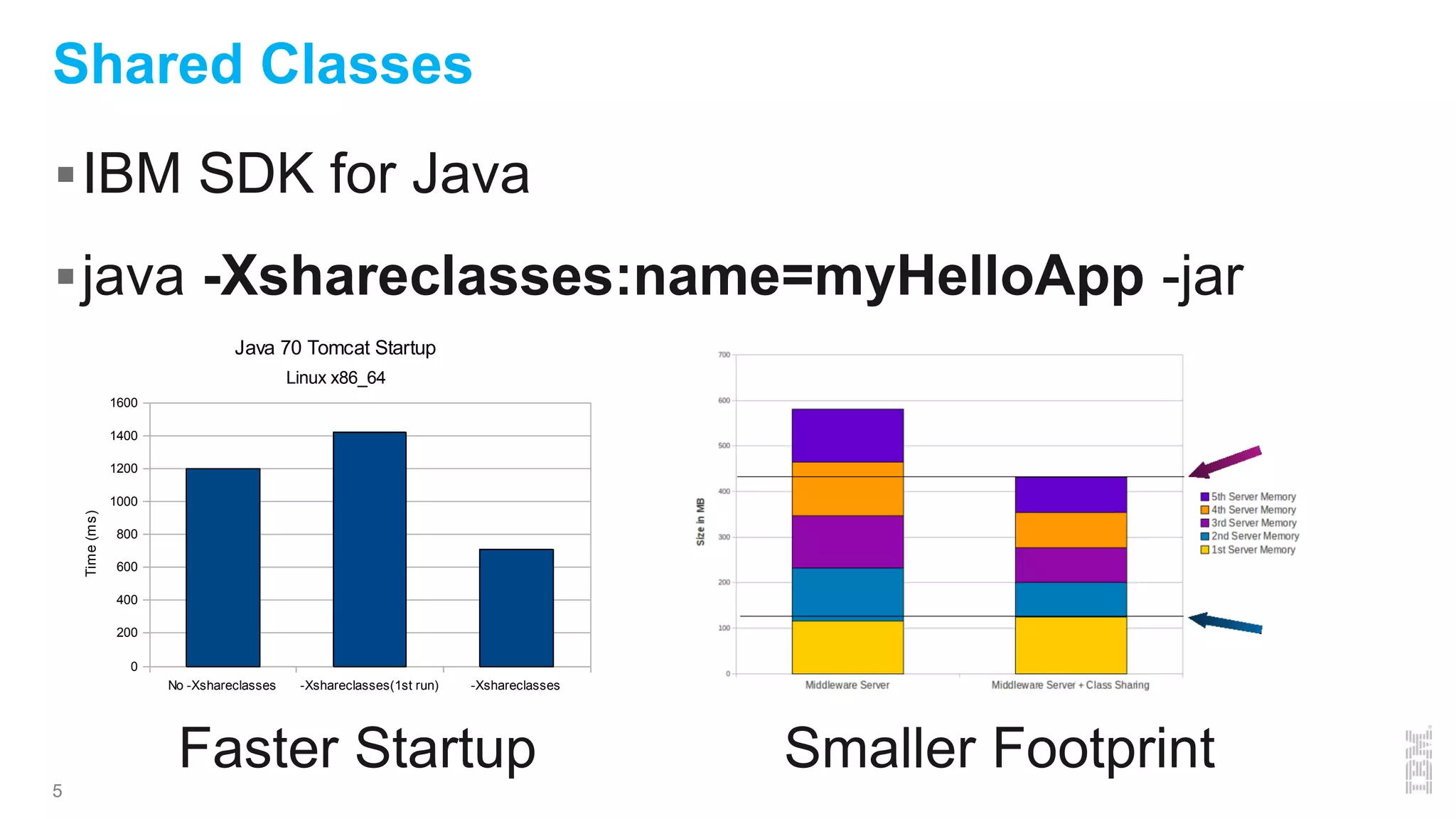
IBM SDK for Java
java -Xshareclasses:name=myHelloApp -jar
5
Shared Classes
No -Xshareclasses -Xshareclasses(1st run) -Xshareclasses
0
200
400
600
800
1000
1200
1400
1600
Java 70 Tomcat Startup
Linux x86_64
Time(ms)
Faster Startup Smaller Footprint
6
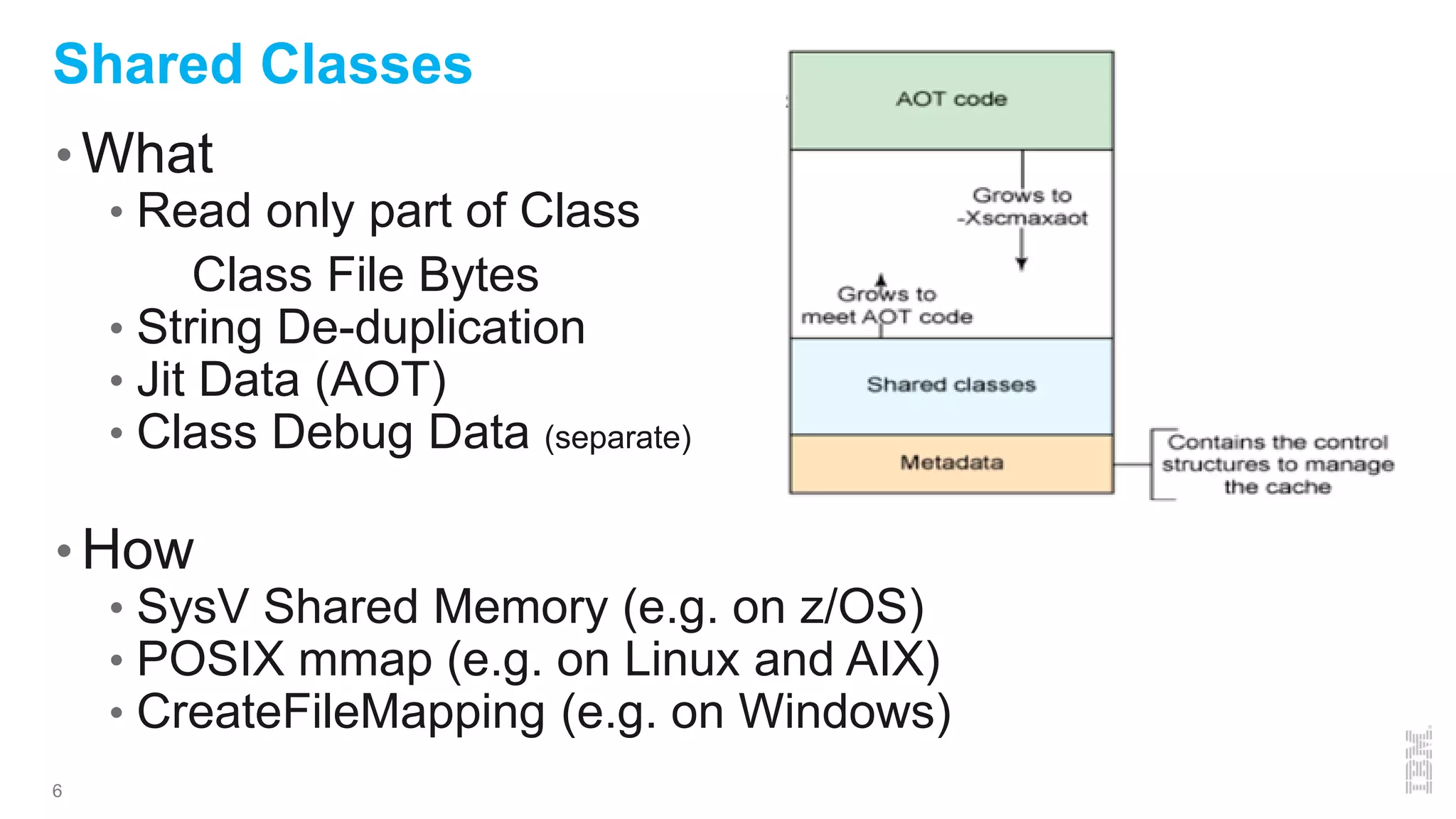
Shared Classes
• What
• Read only part of Class
• Class File Bytes
• String De-duplication
• Jit Data (AOT)
• Class Debug Data (separate)
• How
• SysV Shared Memory (e.g. on z/OS)
• POSIX mmap (e.g. on Linux and AIX)
• CreateFileMapping (e.g. on Windows)
7
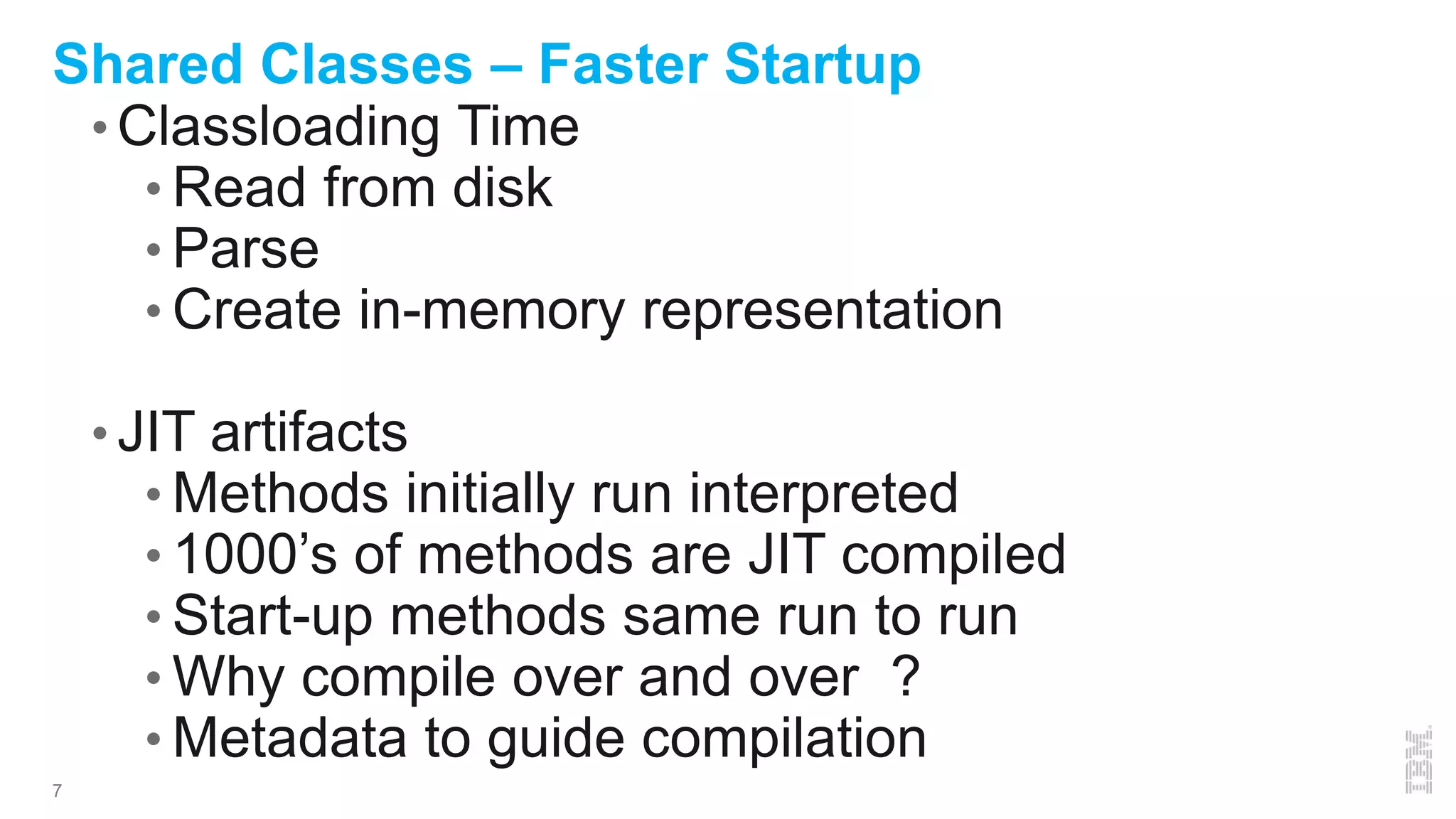
Shared Classes – Faster Startup
• Classloading Time
• Read from disk
• Parse
• Create in-memory representation
• JIT artifacts
• Methods initially run interpreted
• 1000’s of methods are JIT compiled
• Start-up methods same run to run
• Why compile over and over ?
• Metadata to guide compilation
8
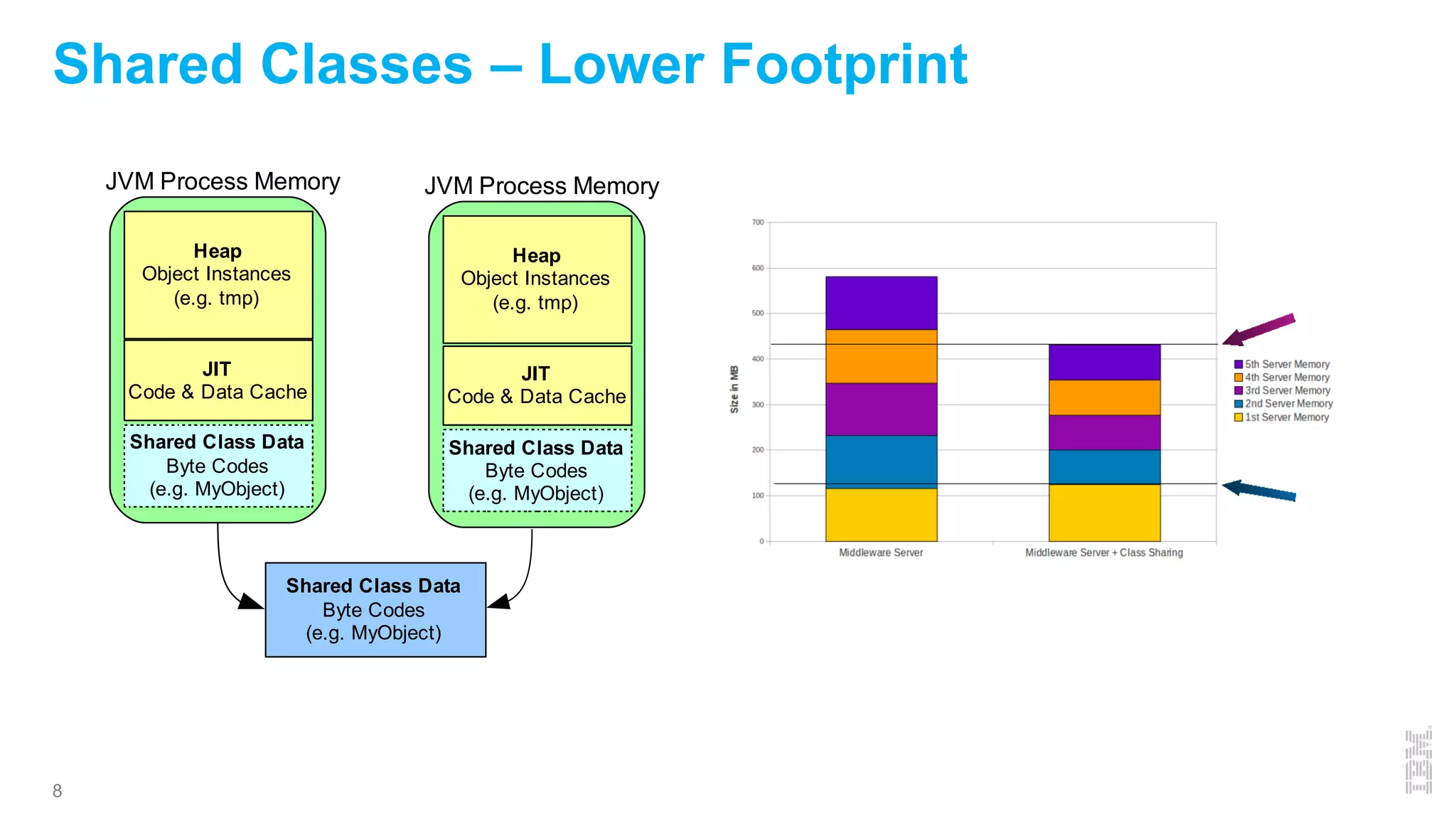
Shared Classes – Lower Footprint
Heap
Object Instances
(e.g. tmp)
JIT
Code & Data Cache
Shared Class Data
Byte Codes
(e.g. MyObject)
JVM Process Memory
Heap
Object Instances
(e.g. tmp)
JIT
Code & Data Cache
Shared Class Data
Byte Codes
(e.g. MyObject)
JVM Process Memory
Shared Class Data
Byte Codes
(e.g. MyObject)
9
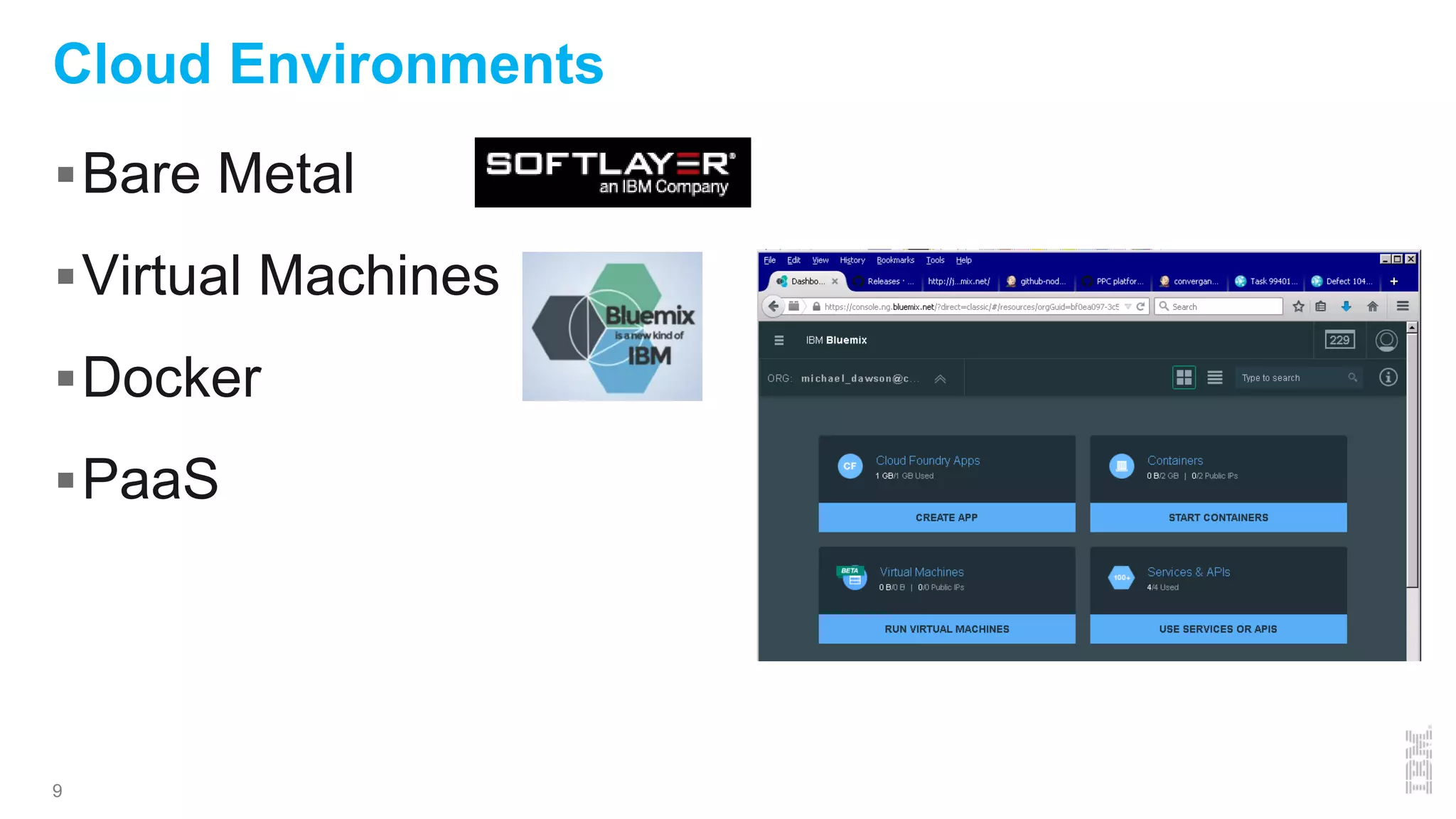
Cloud Environments
Bare Metal
Virtual Machines
Docker
PaaS
10
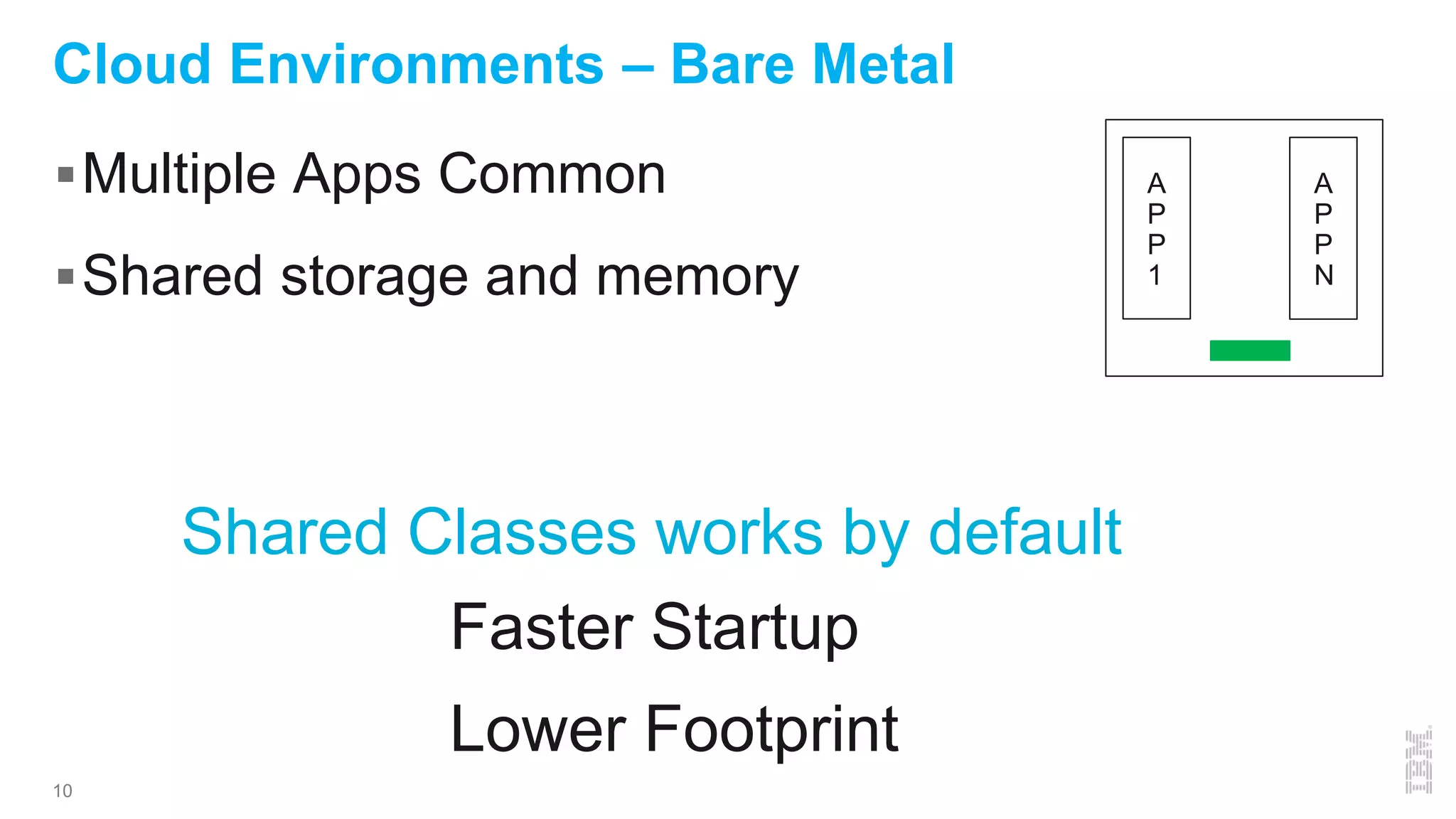
Cloud Environments – Bare Metal
Multiple Apps Common
Shared storage and memory
Shared Classes works by default
A
P
P
1
A
P
P
N
Faster Startup
Lower Footprint
11
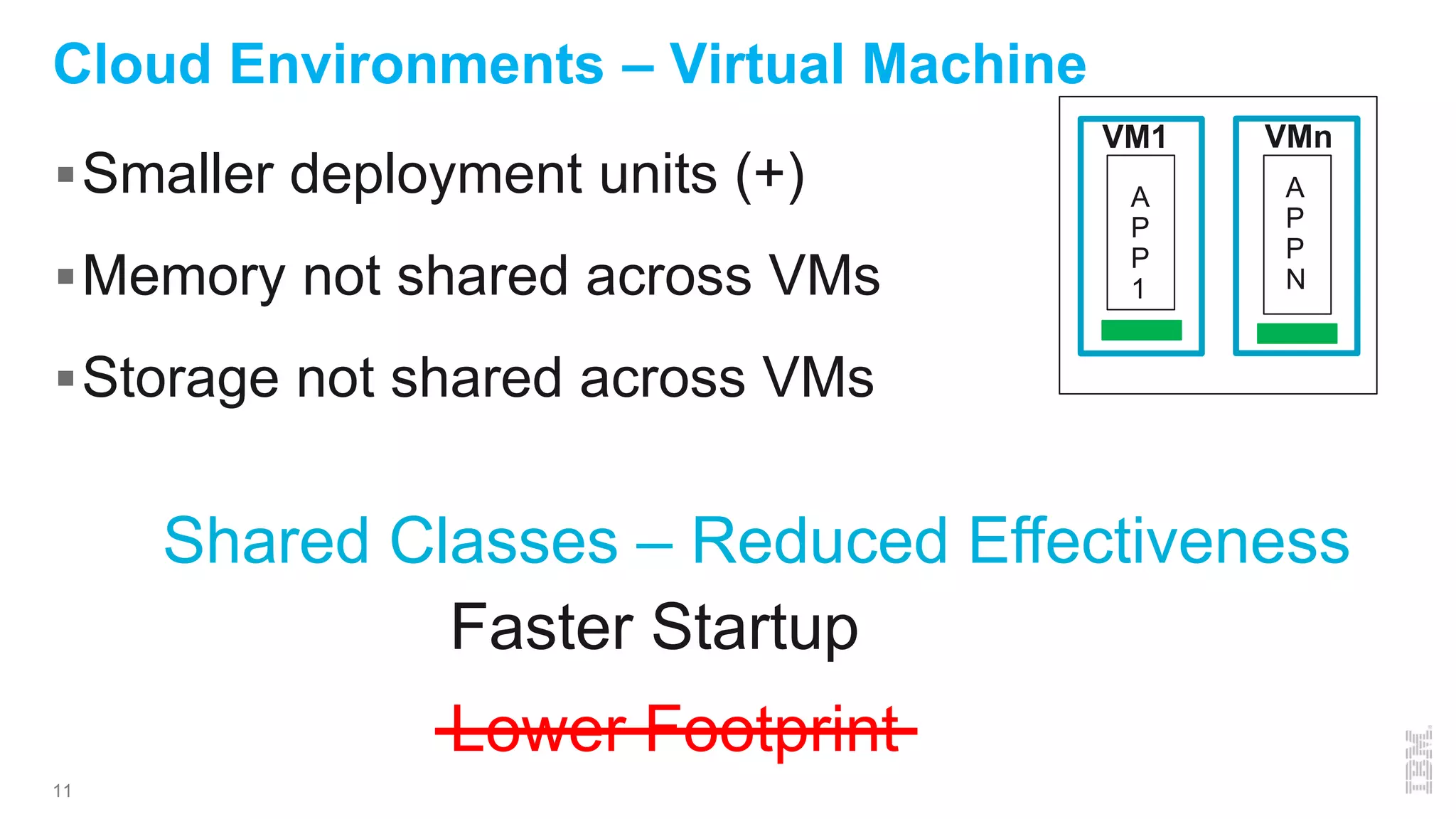
Cloud Environments – Virtual Machine
Smaller deployment units (+)
Memory not shared across VMs
Storage not shared across VMs
A
P
P
1
A
P
P
N
VM1 VMn
Shared Classes – Reduced Effectiveness
Faster Startup
Lower Footprint
12
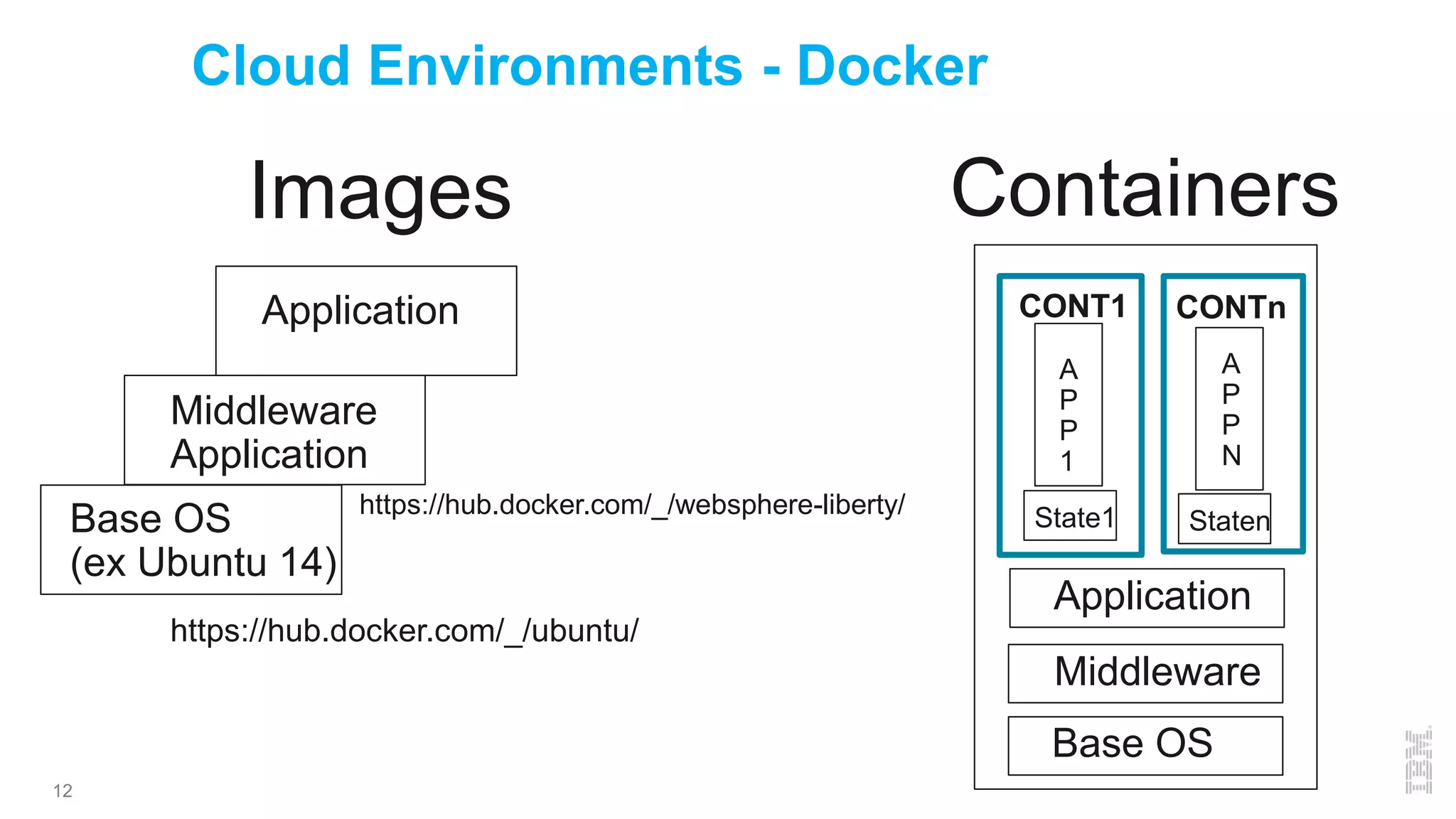
Cloud Environments - Docker
Base OS
(ex Ubuntu 14)
Middleware
Application
Application
https://hub.docker.com/_/websphere-liberty/
https://hub.docker.com/_/ubuntu/
A
P
P
1
A
P
P
N
CONT1 CONTn
Middleware
Base OS
Images
Application
State1 Staten
Containers
13
Cloud Environments – Docker Demo
Docker images
Docker ps
Start/stop show state not preserved
14
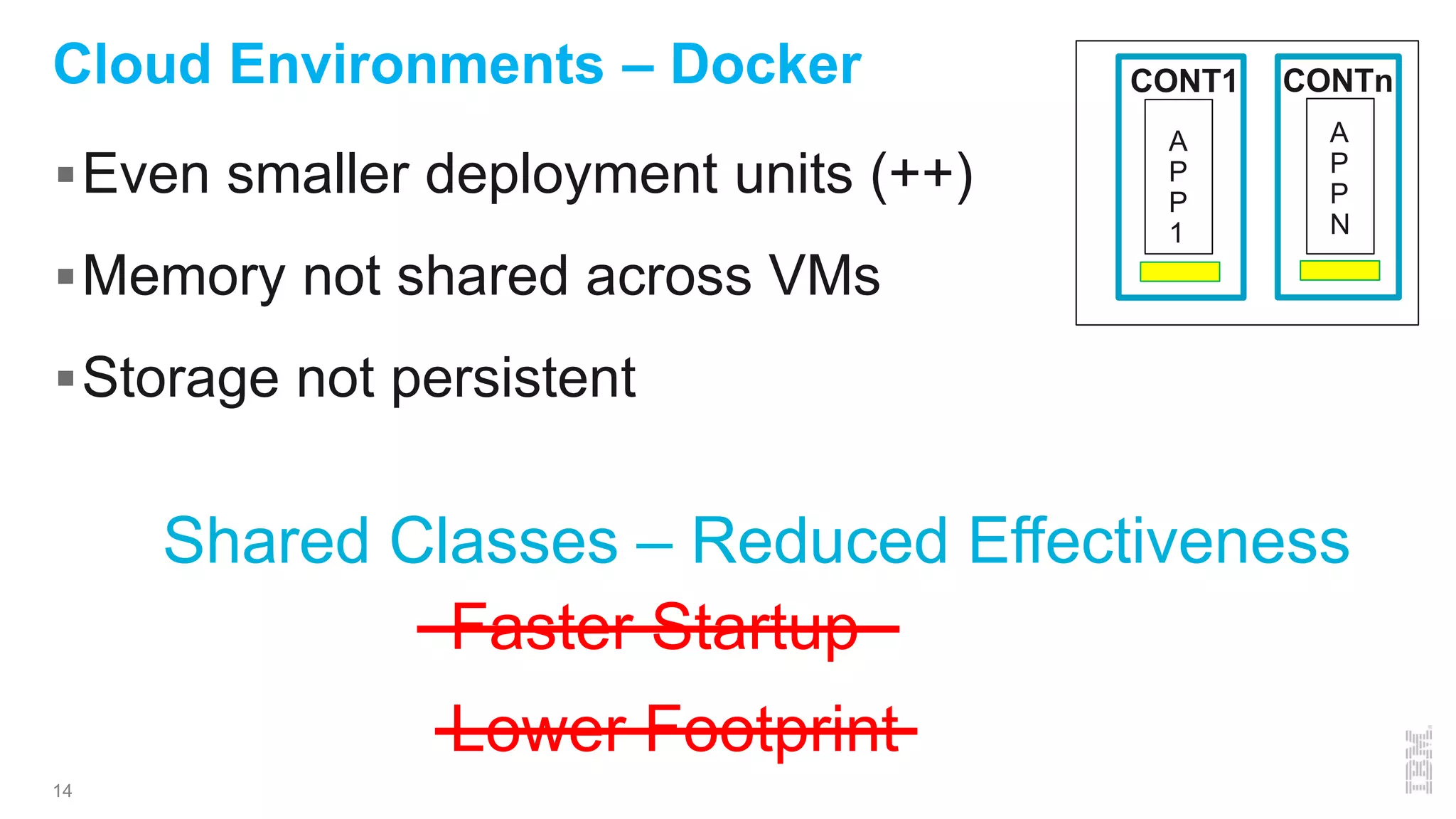
Cloud Environments – Docker
Even smaller deployment units (++)
Memory not shared across VMs
Storage not persistent
A
P
P
1
A
P
P
N
CONT1 CONTn
Shared Classes – Reduced Effectiveness
Faster Startup
Lower Footprint
15
Cloud Environments – PaaS – Cloud Foundry
Staging -> buildpack creates Droplet
Start or Scale
Droplet to DEA, Extract Droplet
Warden with droplet contents
Droplet size affects push/startup times
16
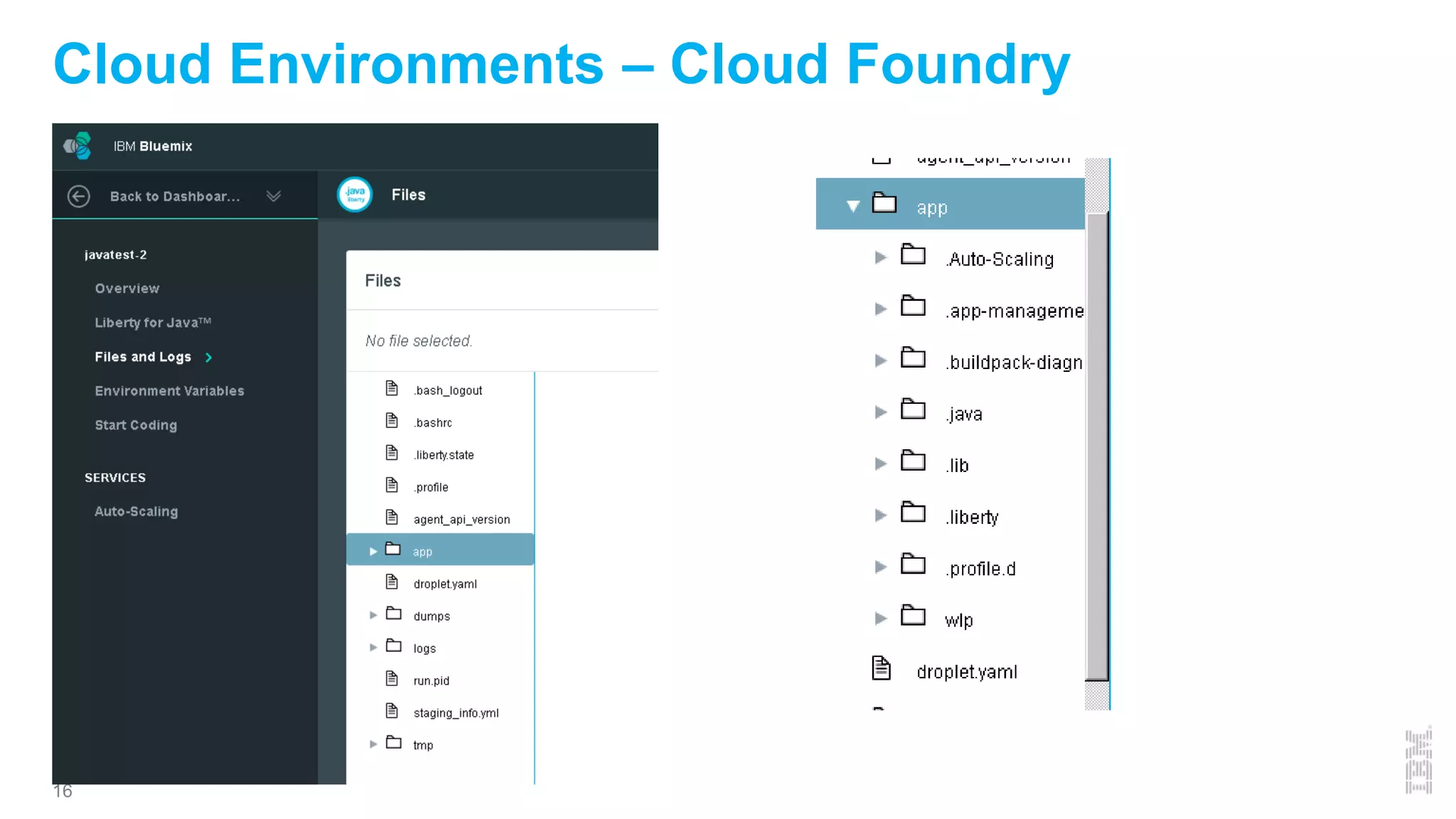
Cloud Environments – Cloud Foundry
17
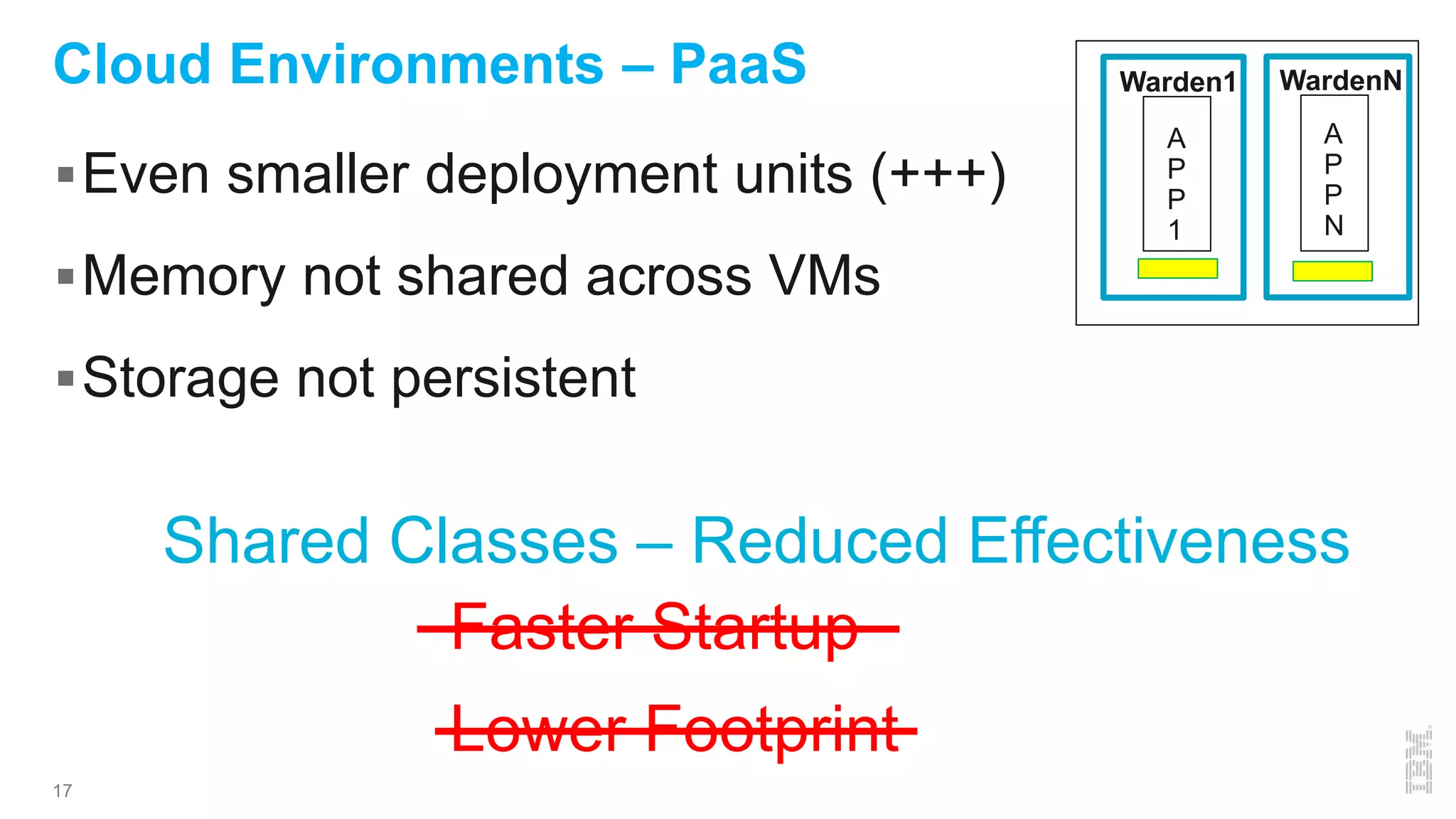
Cloud Environments – PaaS
Even smaller deployment units (+++)
Memory not shared across VMs
Storage not persistent
A
P
P
1
A
P
P
N
Warden1
Shared Classes – Reduced Effectiveness
Faster Startup
Lower Footprint
WardenN
18
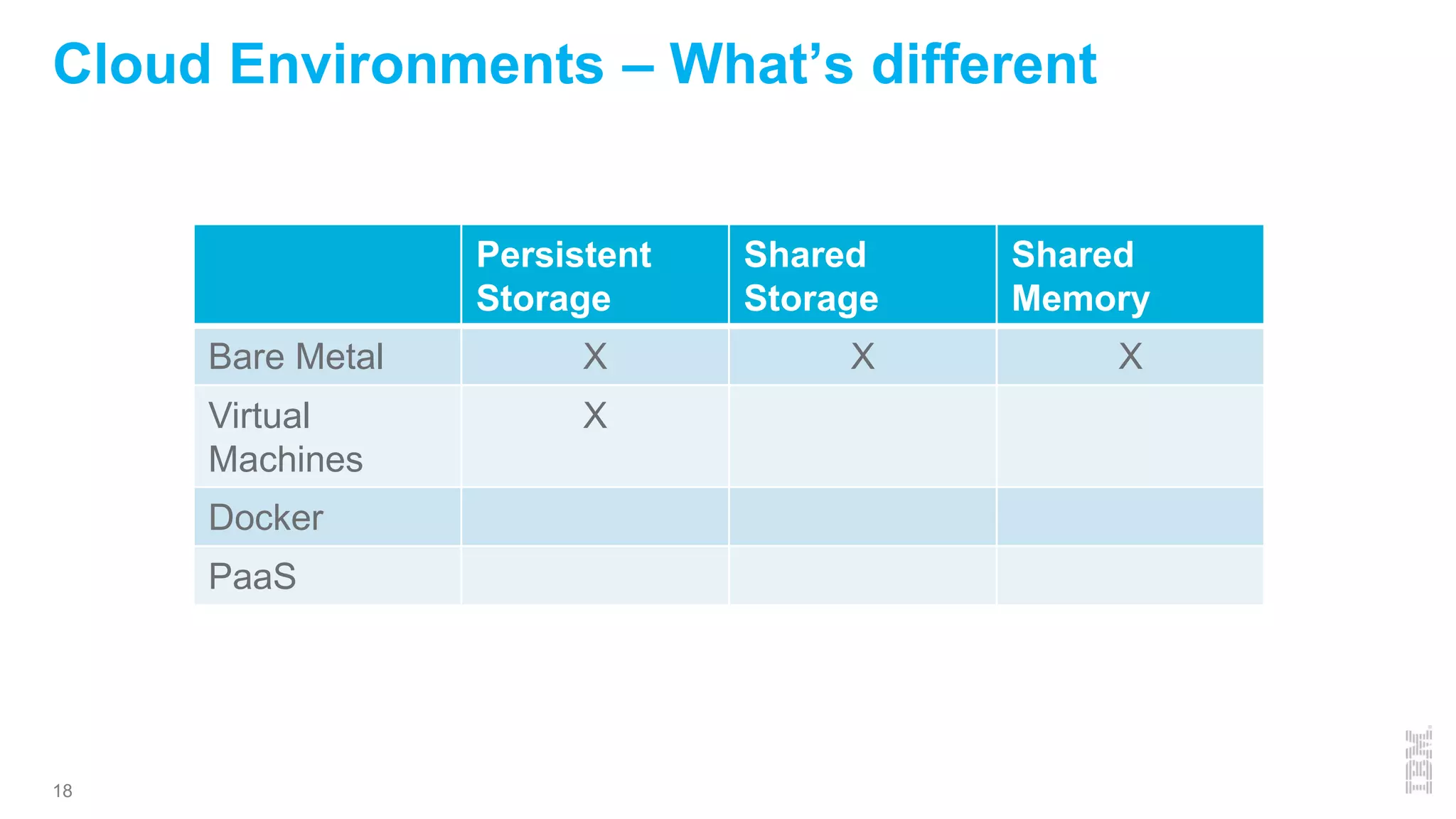
Cloud Environments – What’s different
Persistent
Storage
Shared
Storage
Shared
Memory
Bare Metal X X X
Virtual
Machines
X
Docker
PaaS
19
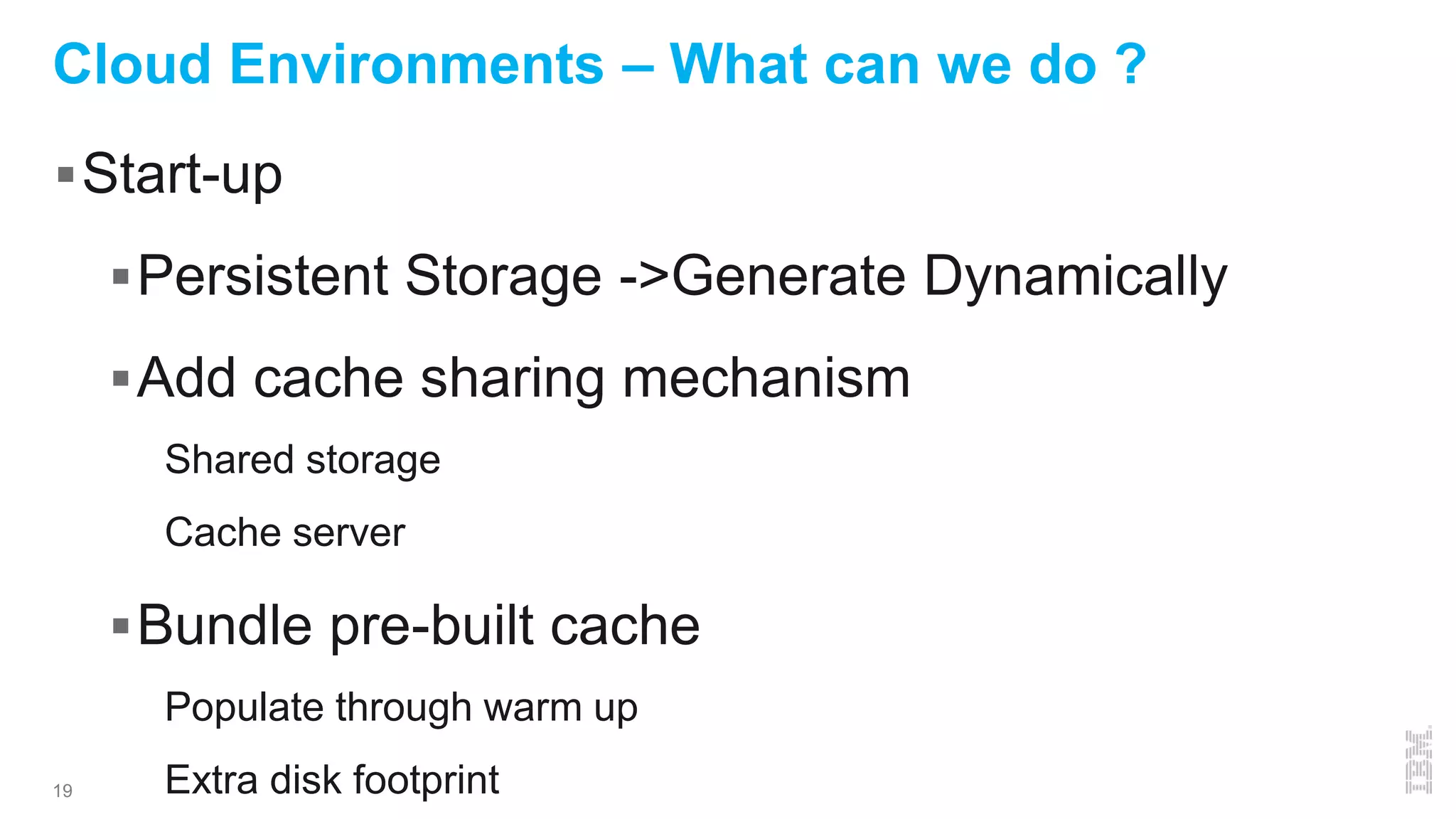
Cloud Environments – What can we do ?
Start-up
Persistent Storage ->Generate Dynamically
Add cache sharing mechanism
Shared storage
Cache server
Bundle pre-built cache
Populate through warm up
Extra disk footprint
20
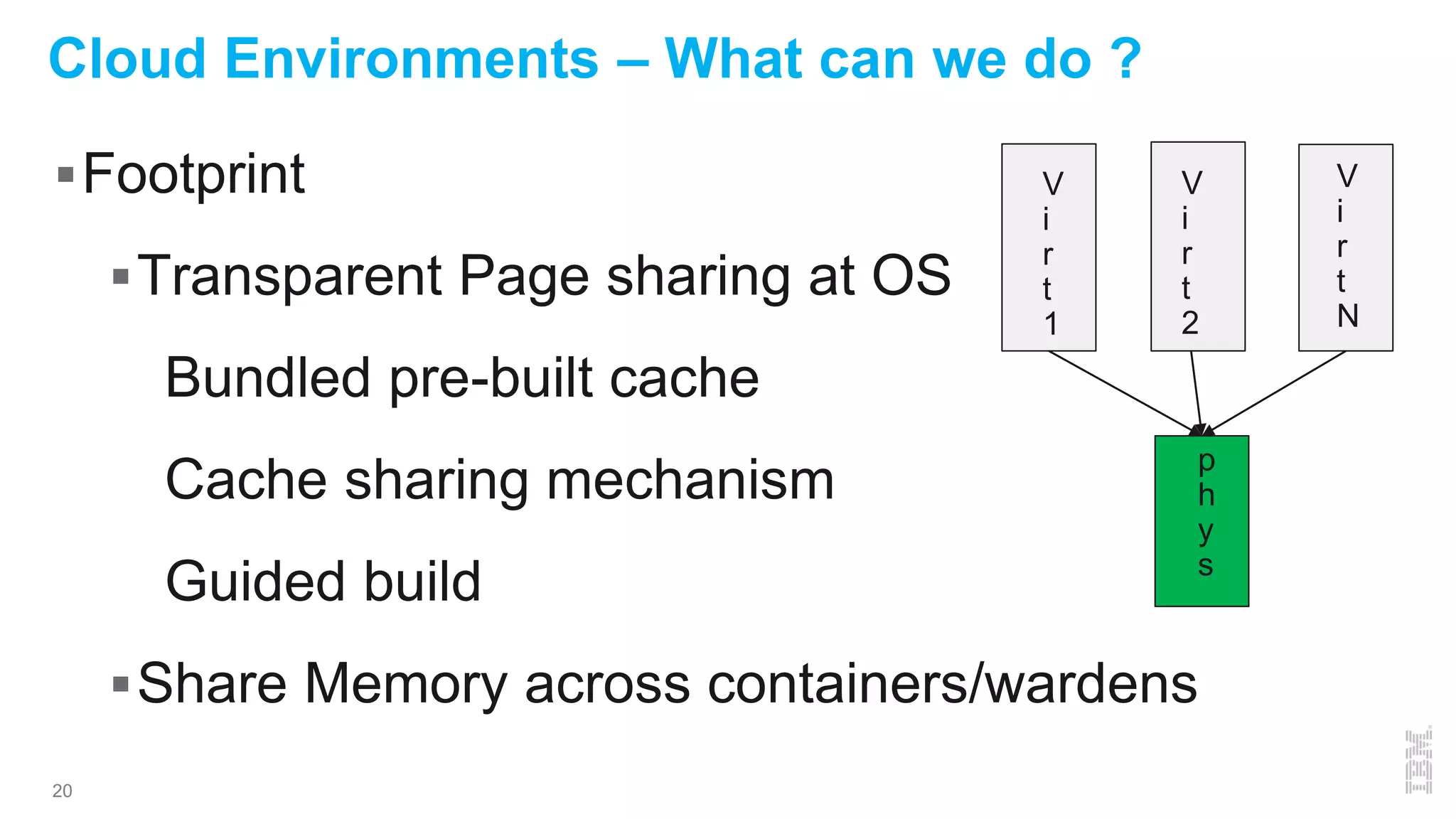
Cloud Environments – What can we do ?
Footprint
Transparent Page sharing at OS
Bundled pre-built cache
Cache sharing mechanism
Guided build
Share Memory across containers/wardens
V
i
r
t
1
V
i
r
t
2
V
i
r
t
N
p
h
y
s
21
Cloud Environments – Virtual Machines
 Persistent storage – Startup benefit by default
 Memory - build Cache to Enable sharing through TPS
Pre-created, bundled or cache server
Guide creation to end up with same result
 To read more:
http://www.computer.org/csdl/proceedings/ispass/2013/5
776/00/06557144.pdf
22
Cloud Environments - Docker
Startup – shared cache pre-built (read-only)
Footprint – Share memory across container !
Shared Cache disk file from shared layer
Memory mapping results in shared memory
Validated through lsof and /proc/pid/smaps
23
Cloud Environments - Docker
A
P
P
1
A
P
P
N
CONT1 CONTn
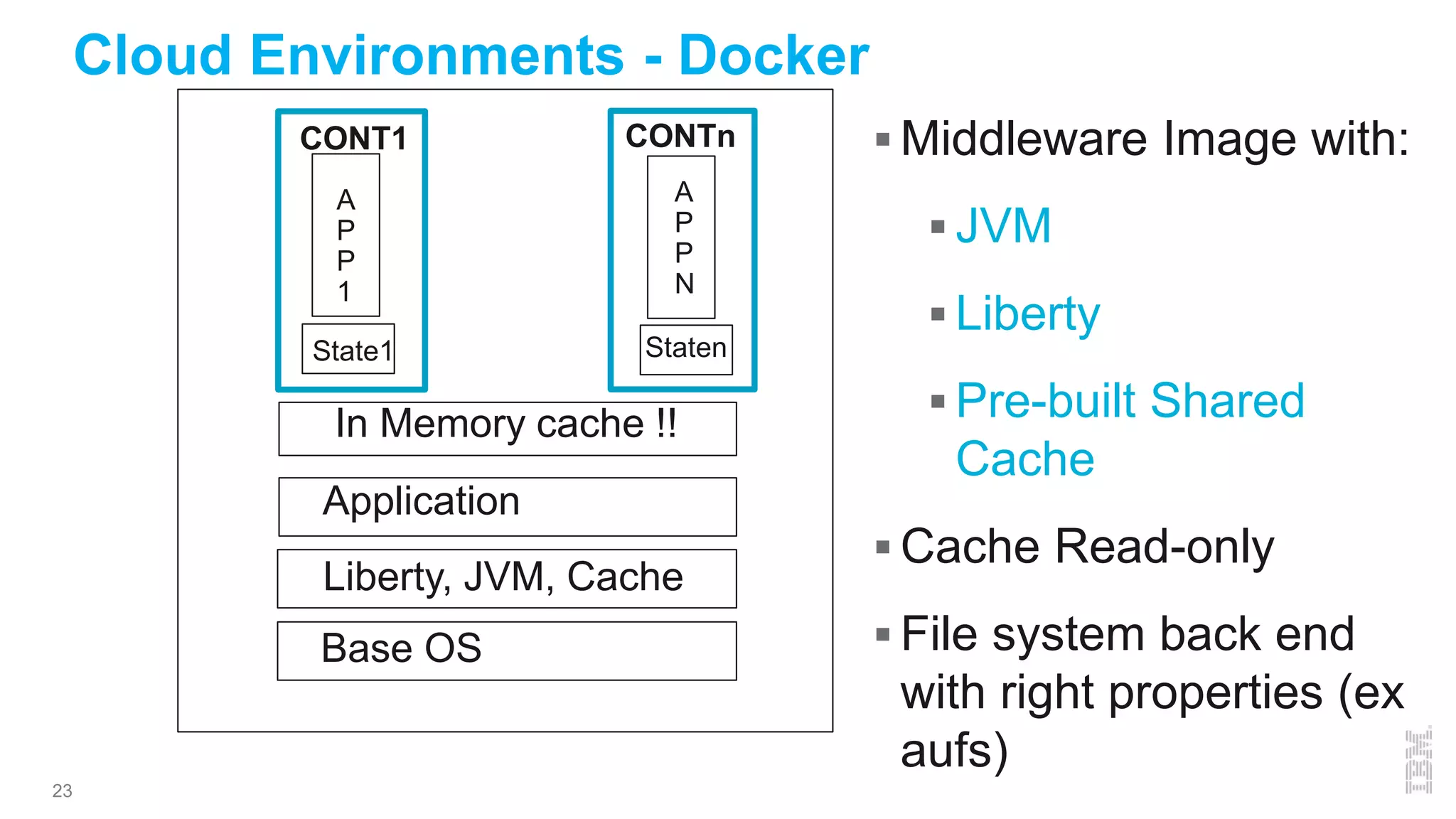
Liberty, JVM, Cache
Base OS
Application
State1 Staten
In Memory cache !!
 Middleware Image with:
 JVM
 Liberty
 Pre-built Shared
Cache
 Cache Read-only
 File system back end
with right properties (ex
aufs)
24
1 2 3 4 5 6 7 8 9 10
0
200
400
600
800
1000
1200
1400
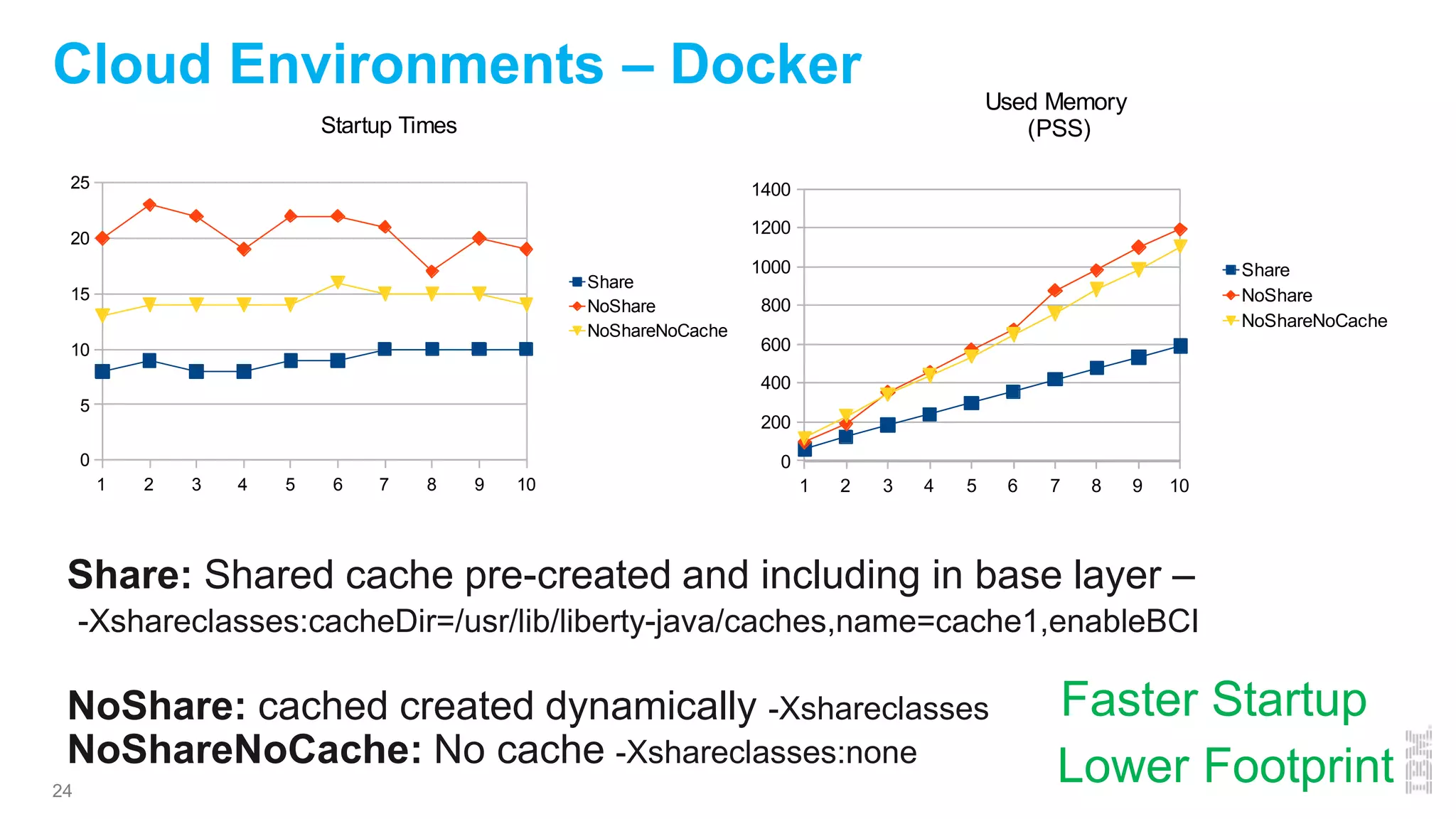
Used Memory
(PSS)
Share
NoShare
NoShareNoCache
Cloud Environments – Docker
1 2 3 4 5 6 7 8 9 10
0
5
10
15
20
25
Startup Times
Share
NoShare
NoShareNoCache
Share: Shared cache pre-created and including in base layer –
-Xshareclasses:cacheDir=/usr/lib/liberty-java/caches,name=cache1,enableBCI
NoShare: cached created dynamically -Xshareclasses
NoShareNoCache: No cache -Xshareclasses:none
Faster Startup
Lower Footprint
25
Cloud Environments – Cloud Foundry
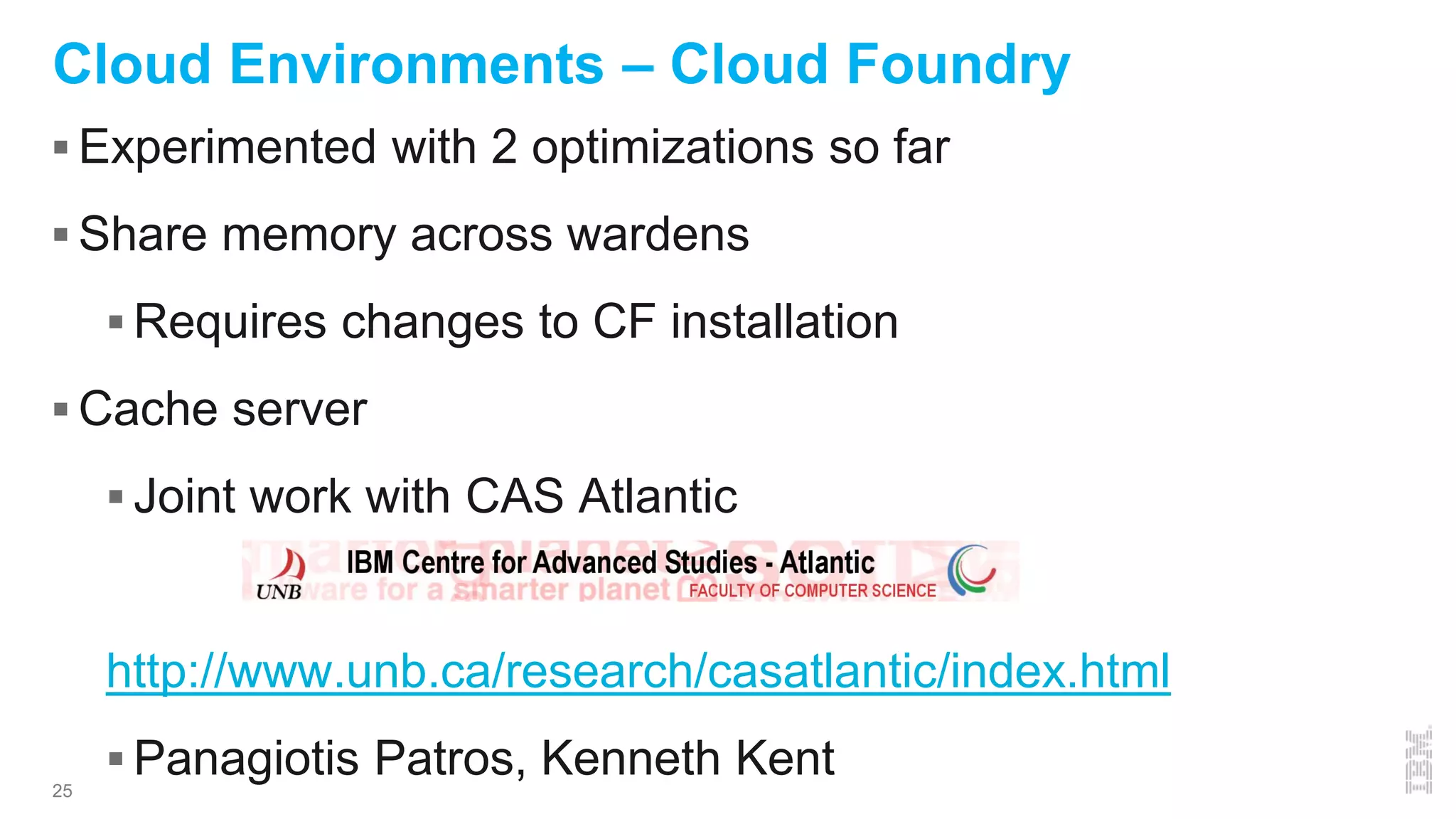
 Experimented with 2 optimizations so far
 Share memory across wardens
 Requires changes to CF installation
 Cache server
 Joint work with CAS Atlantic
http://www.unb.ca/research/casatlantic/index.html
 Panagiotis Patros, Kenneth Kent
26
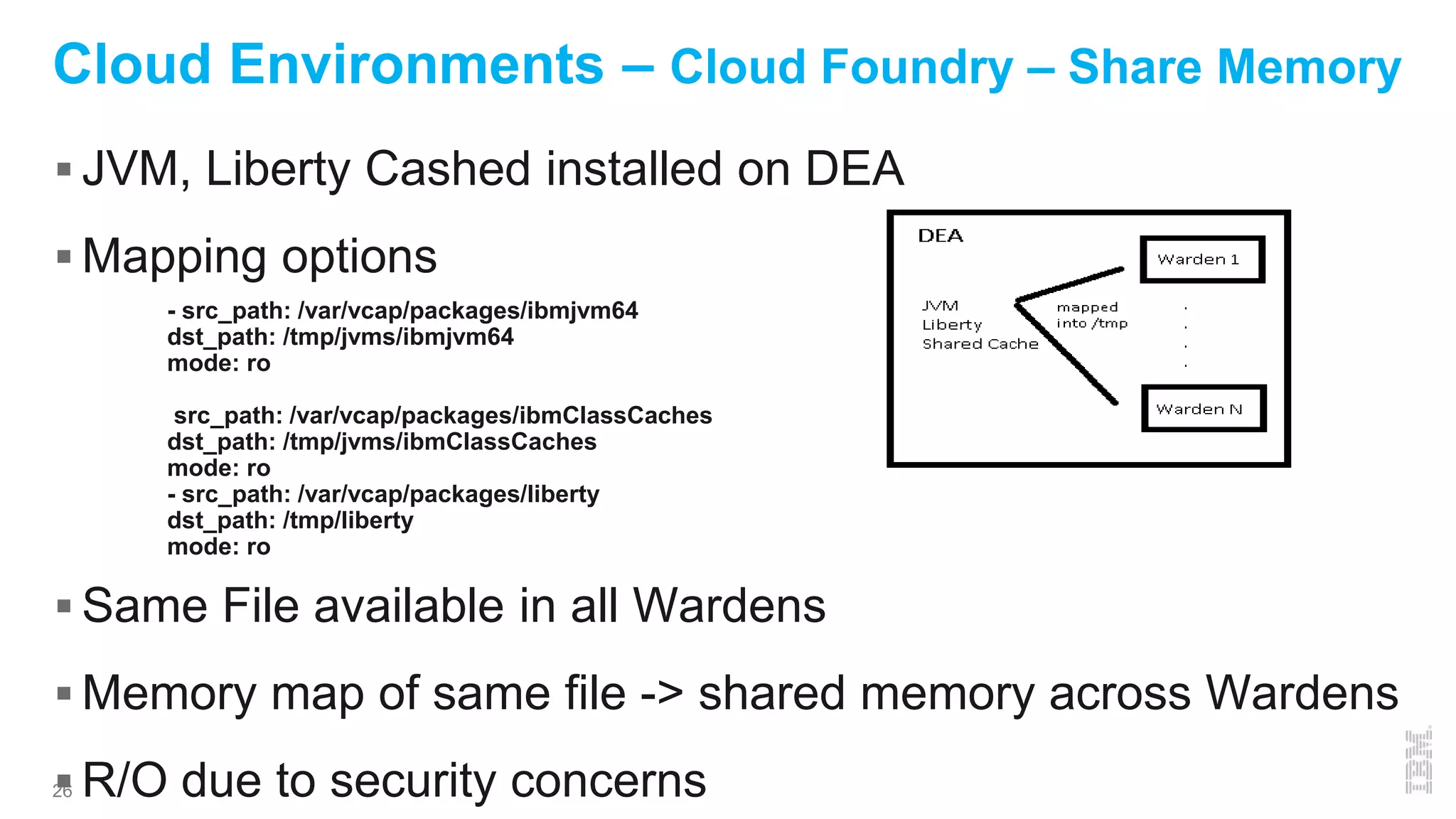
Cloud Environments – Cloud Foundry – Share Memory
 JVM, Liberty Cashed installed on DEA
 Mapping options
 Same File available in all Wardens
 Memory map of same file -> shared memory across Wardens
 R/O due to security concerns
- src_path: /var/vcap/packages/ibmjvm64
dst_path: /tmp/jvms/ibmjvm64
mode: ro
src_path: /var/vcap/packages/ibmClassCaches
dst_path: /tmp/jvms/ibmClassCaches
mode: ro
- src_path: /var/vcap/packages/liberty
dst_path: /tmp/liberty
mode: ro
27
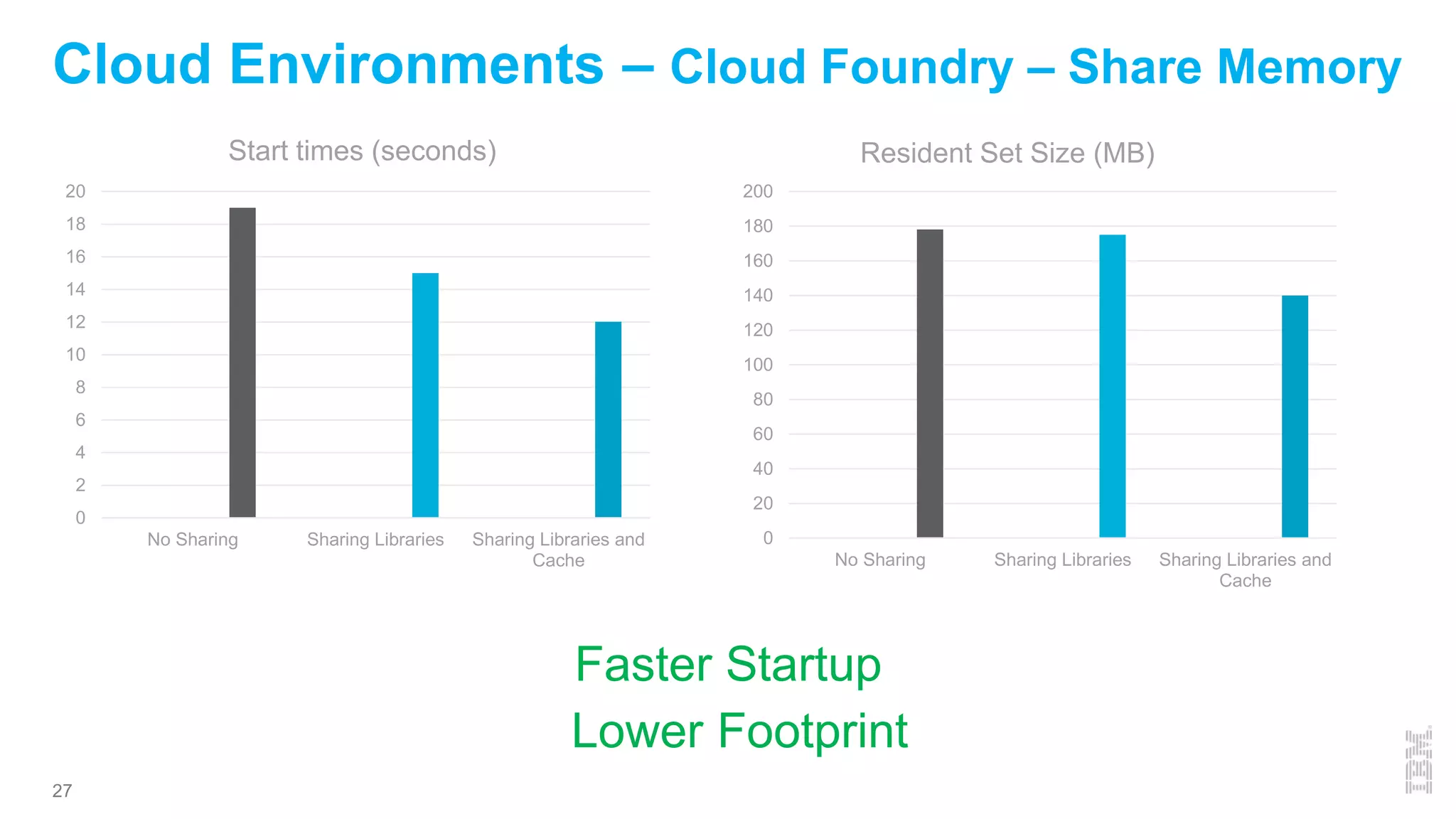
Cloud Environments – Cloud Foundry – Share Memory
0
2
4
6
8
10
12
14
16
18
20
No Sharing Sharing Libraries Sharing Libraries and
Cache
Start times (seconds)
0
20
40
60
80
100
120
140
160
180
200
No Sharing Sharing Libraries Sharing Libraries and
Cache
Resident Set Size (MB)
Faster Startup
Lower Footprint
28
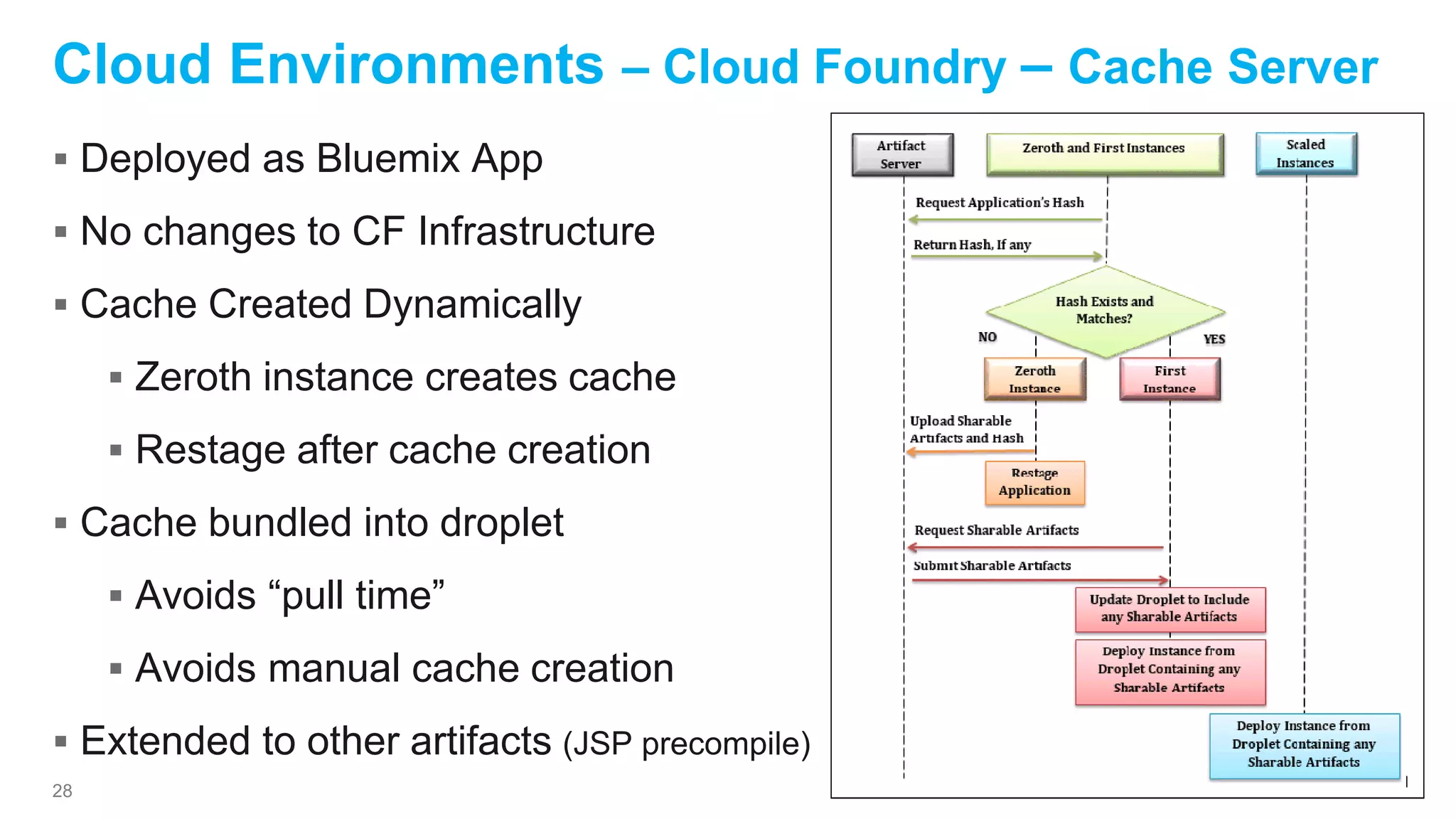
 Deployed as Bluemix App
 No changes to CF Infrastructure
 Cache Created Dynamically
 Zeroth instance creates cache
 Restage after cache creation
 Cache bundled into droplet
 Avoids “pull time”
 Avoids manual cache creation
 Extended to other artifacts (JSP precompile)
Cloud Environments – Cloud Foundry – Cache Server
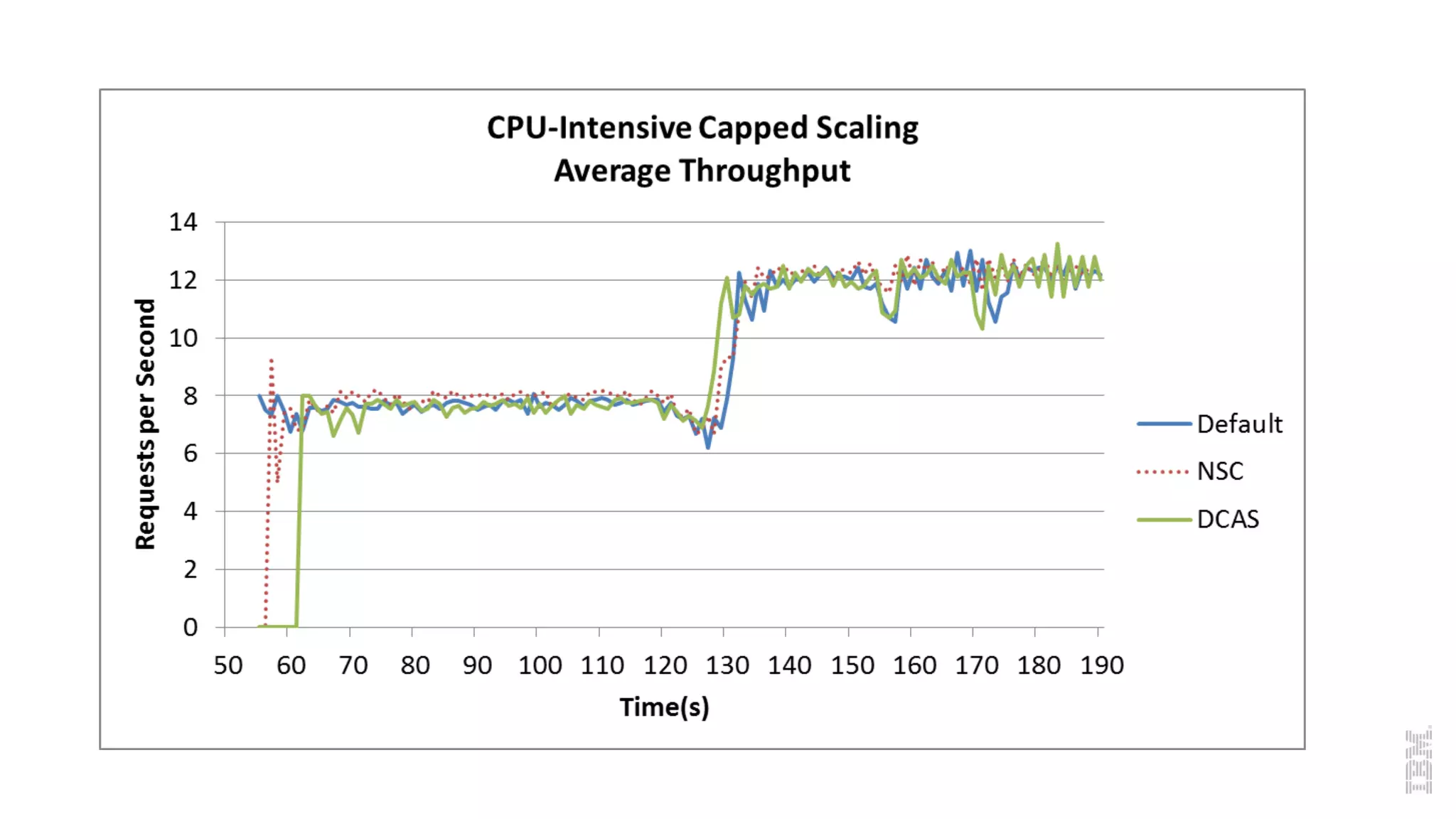
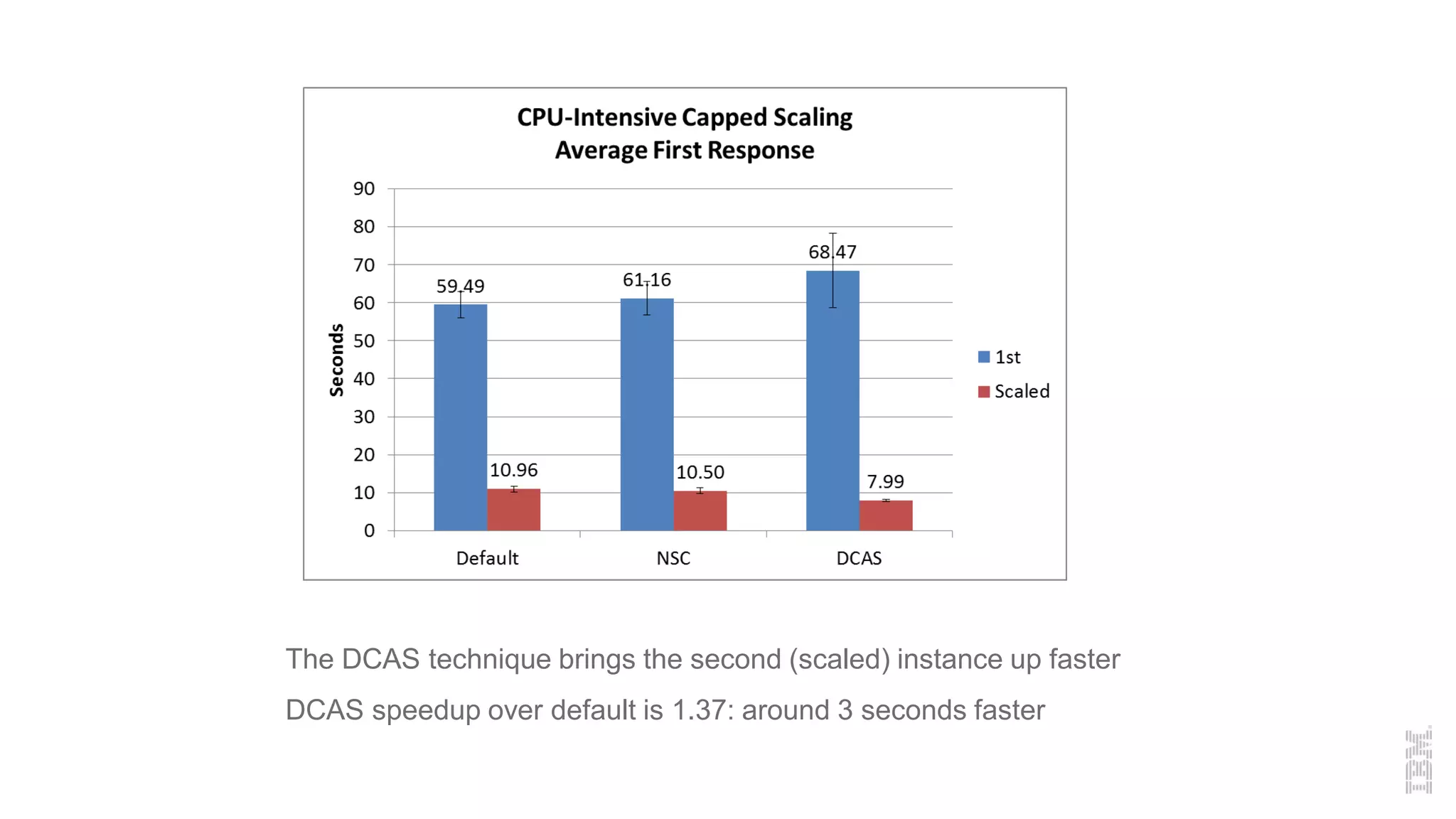
The DCAS technique brings the second (scaled) instance up faster
DCAS speedup over default is 1.37: around 3 seconds faster
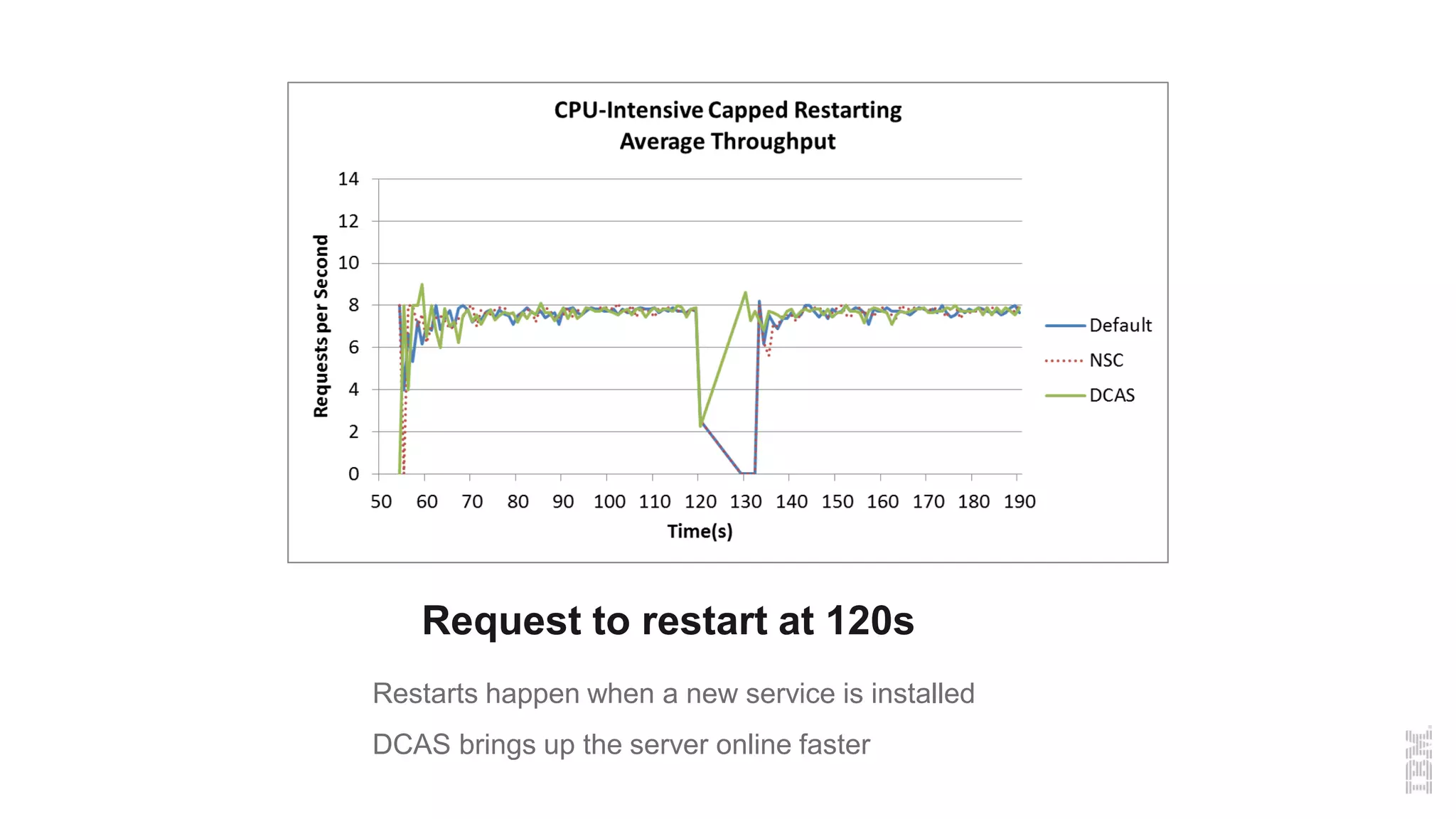
Request to restart at 120s
Restarts happen when a new service is installed
DCAS brings up the server online faster
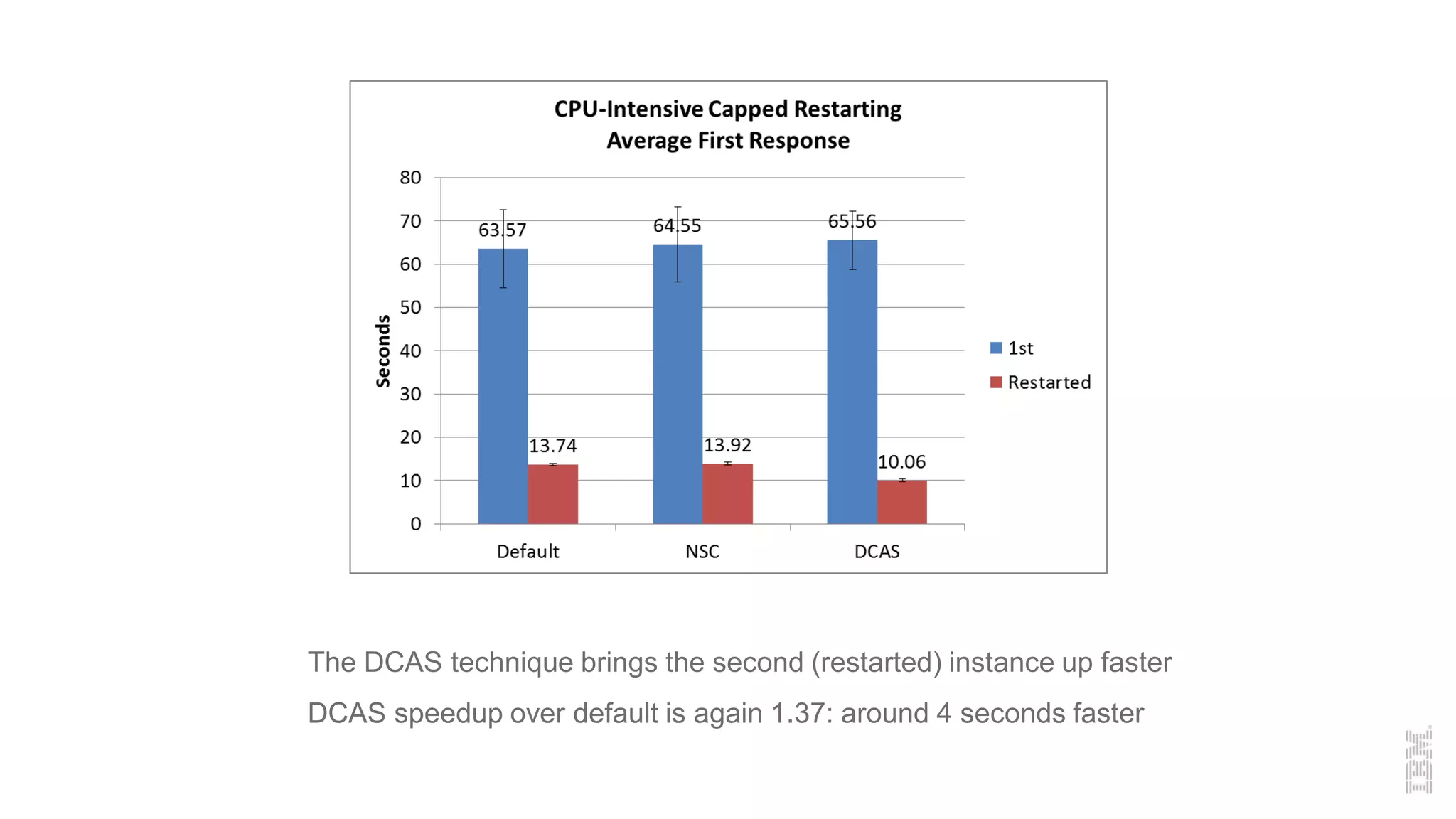
The DCAS technique brings the second (restarted) instance up faster
DCAS speedup over default is again 1.37: around 4 seconds faster
33
Questions
Copyrights and Trademarks
© IBM Corporation 2015. All Rights Reserved
IBM, the IBM logo, ibm.com are trademarks or registered
trademarks of International Business Machines Corp.,
registered in many jurisdictions worldwide. Other product and
service names might be trademarks of IBM or other companies.
A current list of IBM trademarks is available on the Web at
“Copyright and trademark information” at
www.ibm.com/legal/copytrade.shtml
Node.js is an official trademark of Joyent. IBM SDK for Node.js is not formally
related to or endorsed by the official Joyent Node.js open source or
commercial project.
Java, JavaScript and all Java-based trademarks and logos are trademarks or
registered trademarks of Oracle and/or its affiliates.

Java one 2015 - v1

  • 1.
    Michael Dawson October 2015 LeveragingJava Optimizations to Improve Density in Cloud Environments
  • 2.
    About Michael Dawson Lovesthe web and building software 2 Senior Software Developer @ IBM 23 years development experience 11 years in runtime development Contact me: Michael_dawson@ca.ibm.com Twitter: @mhdawson1 https://www.linkedin.com/pub/michael-dawson/2/128/605
  • 3.
    3 • Motivation • SharedClasses • Cloud Environments • Docker • Cloud Foundry • Leveraging SC in Cloud Agenda
  • 4.
    4 • Startup affectscustomers •- Restart •- Scale out • Footprint affects cost • Lots of small apps Motivation
  • 5.
    IBM SDK forJava java -Xshareclasses:name=myHelloApp -jar 5 Shared Classes No -Xshareclasses -Xshareclasses(1st run) -Xshareclasses 0 200 400 600 800 1000 1200 1400 1600 Java 70 Tomcat Startup Linux x86_64 Time(ms) Faster Startup Smaller Footprint
  • 6.
    6 Shared Classes • What •Read only part of Class • Class File Bytes • String De-duplication • Jit Data (AOT) • Class Debug Data (separate) • How • SysV Shared Memory (e.g. on z/OS) • POSIX mmap (e.g. on Linux and AIX) • CreateFileMapping (e.g. on Windows)
  • 7.
    7 Shared Classes –Faster Startup • Classloading Time • Read from disk • Parse • Create in-memory representation • JIT artifacts • Methods initially run interpreted • 1000’s of methods are JIT compiled • Start-up methods same run to run • Why compile over and over ? • Metadata to guide compilation
  • 8.
    8 Shared Classes –Lower Footprint Heap Object Instances (e.g. tmp) JIT Code & Data Cache Shared Class Data Byte Codes (e.g. MyObject) JVM Process Memory Heap Object Instances (e.g. tmp) JIT Code & Data Cache Shared Class Data Byte Codes (e.g. MyObject) JVM Process Memory Shared Class Data Byte Codes (e.g. MyObject)
  • 9.
  • 10.
    10 Cloud Environments –Bare Metal Multiple Apps Common Shared storage and memory Shared Classes works by default A P P 1 A P P N Faster Startup Lower Footprint
  • 11.
    11 Cloud Environments –Virtual Machine Smaller deployment units (+) Memory not shared across VMs Storage not shared across VMs A P P 1 A P P N VM1 VMn Shared Classes – Reduced Effectiveness Faster Startup Lower Footprint
  • 12.
    12 Cloud Environments -Docker Base OS (ex Ubuntu 14) Middleware Application Application https://hub.docker.com/_/websphere-liberty/ https://hub.docker.com/_/ubuntu/ A P P 1 A P P N CONT1 CONTn Middleware Base OS Images Application State1 Staten Containers
  • 13.
    13 Cloud Environments –Docker Demo Docker images Docker ps Start/stop show state not preserved
  • 14.
    14 Cloud Environments –Docker Even smaller deployment units (++) Memory not shared across VMs Storage not persistent A P P 1 A P P N CONT1 CONTn Shared Classes – Reduced Effectiveness Faster Startup Lower Footprint
  • 15.
    15 Cloud Environments –PaaS – Cloud Foundry Staging -> buildpack creates Droplet Start or Scale Droplet to DEA, Extract Droplet Warden with droplet contents Droplet size affects push/startup times
  • 16.
  • 17.
    17 Cloud Environments –PaaS Even smaller deployment units (+++) Memory not shared across VMs Storage not persistent A P P 1 A P P N Warden1 Shared Classes – Reduced Effectiveness Faster Startup Lower Footprint WardenN
  • 18.
    18 Cloud Environments –What’s different Persistent Storage Shared Storage Shared Memory Bare Metal X X X Virtual Machines X Docker PaaS
  • 19.
    19 Cloud Environments –What can we do ? Start-up Persistent Storage ->Generate Dynamically Add cache sharing mechanism Shared storage Cache server Bundle pre-built cache Populate through warm up Extra disk footprint
  • 20.
    20 Cloud Environments –What can we do ? Footprint Transparent Page sharing at OS Bundled pre-built cache Cache sharing mechanism Guided build Share Memory across containers/wardens V i r t 1 V i r t 2 V i r t N p h y s
  • 21.
    21 Cloud Environments –Virtual Machines  Persistent storage – Startup benefit by default  Memory - build Cache to Enable sharing through TPS Pre-created, bundled or cache server Guide creation to end up with same result  To read more: http://www.computer.org/csdl/proceedings/ispass/2013/5 776/00/06557144.pdf
  • 22.
    22 Cloud Environments -Docker Startup – shared cache pre-built (read-only) Footprint – Share memory across container ! Shared Cache disk file from shared layer Memory mapping results in shared memory Validated through lsof and /proc/pid/smaps
  • 23.
    23 Cloud Environments -Docker A P P 1 A P P N CONT1 CONTn Liberty, JVM, Cache Base OS Application State1 Staten In Memory cache !!  Middleware Image with:  JVM  Liberty  Pre-built Shared Cache  Cache Read-only  File system back end with right properties (ex aufs)
  • 24.
    24 1 2 34 5 6 7 8 9 10 0 200 400 600 800 1000 1200 1400 Used Memory (PSS) Share NoShare NoShareNoCache Cloud Environments – Docker 1 2 3 4 5 6 7 8 9 10 0 5 10 15 20 25 Startup Times Share NoShare NoShareNoCache Share: Shared cache pre-created and including in base layer – -Xshareclasses:cacheDir=/usr/lib/liberty-java/caches,name=cache1,enableBCI NoShare: cached created dynamically -Xshareclasses NoShareNoCache: No cache -Xshareclasses:none Faster Startup Lower Footprint
  • 25.
    25 Cloud Environments –Cloud Foundry  Experimented with 2 optimizations so far  Share memory across wardens  Requires changes to CF installation  Cache server  Joint work with CAS Atlantic http://www.unb.ca/research/casatlantic/index.html  Panagiotis Patros, Kenneth Kent
  • 26.
    26 Cloud Environments –Cloud Foundry – Share Memory  JVM, Liberty Cashed installed on DEA  Mapping options  Same File available in all Wardens  Memory map of same file -> shared memory across Wardens  R/O due to security concerns - src_path: /var/vcap/packages/ibmjvm64 dst_path: /tmp/jvms/ibmjvm64 mode: ro src_path: /var/vcap/packages/ibmClassCaches dst_path: /tmp/jvms/ibmClassCaches mode: ro - src_path: /var/vcap/packages/liberty dst_path: /tmp/liberty mode: ro
  • 27.
    27 Cloud Environments –Cloud Foundry – Share Memory 0 2 4 6 8 10 12 14 16 18 20 No Sharing Sharing Libraries Sharing Libraries and Cache Start times (seconds) 0 20 40 60 80 100 120 140 160 180 200 No Sharing Sharing Libraries Sharing Libraries and Cache Resident Set Size (MB) Faster Startup Lower Footprint
  • 28.
    28  Deployed asBluemix App  No changes to CF Infrastructure  Cache Created Dynamically  Zeroth instance creates cache  Restage after cache creation  Cache bundled into droplet  Avoids “pull time”  Avoids manual cache creation  Extended to other artifacts (JSP precompile) Cloud Environments – Cloud Foundry – Cache Server
  • 30.
    The DCAS techniquebrings the second (scaled) instance up faster DCAS speedup over default is 1.37: around 3 seconds faster
  • 31.
    Request to restartat 120s Restarts happen when a new service is installed DCAS brings up the server online faster
  • 32.
    The DCAS techniquebrings the second (restarted) instance up faster DCAS speedup over default is again 1.37: around 4 seconds faster
  • 33.
  • 34.
    Copyrights and Trademarks ©IBM Corporation 2015. All Rights Reserved IBM, the IBM logo, ibm.com are trademarks or registered trademarks of International Business Machines Corp., registered in many jurisdictions worldwide. Other product and service names might be trademarks of IBM or other companies. A current list of IBM trademarks is available on the Web at “Copyright and trademark information” at www.ibm.com/legal/copytrade.shtml Node.js is an official trademark of Joyent. IBM SDK for Node.js is not formally related to or endorsed by the official Joyent Node.js open source or commercial project. Java, JavaScript and all Java-based trademarks and logos are trademarks or registered trademarks of Oracle and/or its affiliates.