Dell Confidential
Oracle 9i RAC
By
Ramesh Malayappan
& Gautam Mekala
2
Overview
• Overview of OS (Linux)
• Overview of Oracle9i Real Application Clusters
• Oracle9i RAC on Linux
• Tuning Tips
• Issues to deal in RAC
• Going Forward (Oracle 10G)
• Q & A
3
Benefits of Real Application Clusters
• New Shared Cache Architecture
• Exploits New Hardware and Software Technologies
• Most Flexible Clustering technology
• Provides scalability and high availability
4
Real Application Clusters
• Real Application Clusters (RAC)
– Cache Fusion
– True scalability
• Transparent Scalability
– All Applications Scale – No tuning required
– No Physical Data Partitioning required (Application user partitioning
is needed though)
– ISV Applications Scale out of the box
• High Availability – Loss of single node on cluster will not stop the
database
• Ability to add additional hardware transparently to users
5
Overview of Oracle9i RAC
• Many instances of Oracle running on many nodes
• All instances share a single physical database and have common
data & control files
• Each instance has its own log files and rollback segments
• All instances can simultaneously execute transactions against the
single database
• Caches are synchronized using Oracle’s Global Cache Management
technology (Cache Fusion)
• No Single Point of Failure (Server side)
6
Oracle9i RAC on Linux
• Clustering consists of 2 Oracle-supplied components
– Cluster Manager (oracm)
• Provides consistent view of Oracle instances
• Accepts registration of Oracle instances
• Responsible for process level cluster status
– Hangcheck-timer
• New in 9.2.0.2, replaces watchdogd
• Monitors the Linux kernel for system hangs
• Implemented as a kernel module so it much less affected by system load
• Resets node from within kernel if abnormal hangs occur
7
Internal Workings Of RAC..
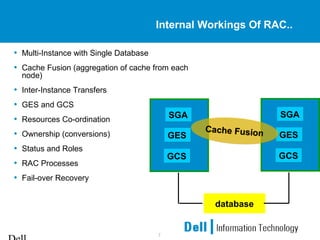
• Multi-Instance with Single Database
• Cache Fusion (aggregation of cache from each
node)
• Inter-Instance Transfers
• GES and GCS
• Resources Co-ordination
• Ownership (conversions)
• Status and Roles
• RAC Processes
• Fail-over Recovery
GESGES
SGASGA
GCSGCS
GESGES
SGASGA
GCSGCS
Cache FusionCache Fusion
database
8
Contents of SGA
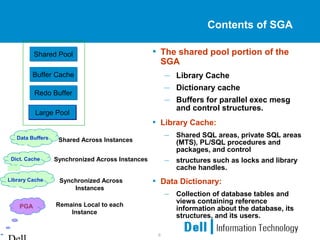
• The shared pool portion of the
SGA
– Library Cache
– Dictionary cache
– Buffers for parallel exec mesg
and control structures.
• Library Cache:
– Shared SQL areas, private SQL areas
(MTS), PL/SQL procedures and
packages, and control
– structures such as locks and library
cache handles.
• Data Dictionary:
– Collection of database tables and
views containing reference
information about the database, its
structures, and its users.
Buffer CacheBuffer Cache
Shared PoolShared Pool
Redo BufferRedo Buffer
Large PoolLarge Pool
Shared Across InstancesData Buffers
Synchronized Across InstancesDict. Cache
Synchronized Across
Instances
Library Cache
Remains Local to each
Instance
PGA
9
Cache Fusion
• Cache Fusion is a fundamental component of Real Application
Cluster
• Cache Fusion allows individual nodes to share the contents of
their buffer caches through the inter-connect cluster Interprocess
Communication (IPC) eliminating the need for extra disk I/Os.
• This greatly improves the performance and scalability
characteristics of shared-disk clusters
• Cache fusion only works with the default resource control
scheme. If GC_FILES_TO_LOCKS is set, the old pre-cache
fusion behavior is utilized. In other words, forced disk-writes will
be used.
10
Dirty Blocks & Past Image
• In a non-RAC instance
– User A selects say 10 rows (10 blocks)
– User B selects same 10 rows (10 blocks)
– User B updates those 10 rows (10 blocks)
• Dirtied blocks
• Not committed
– User C selects same 10 rows
• Rollback segment buffer provide read consistent image
– Now User B performs Commit
– Now User D updates same blocks
• gets the same dirtied blocks
• If it is a RAC
– When user D updates on second Instance, PAST Image is created
for those blocks sent out
11
Cache Coherency Lock Management
• Transfer of blocks among the individual node cache’s
• Global Concurrency of the data blocks / pages
• Global Control mechanism
• Cluster Interconnects
– Connect nodes
• Can be a simple private network connection
• Can be a specialized cables with Hub/Switch
– Functions
• Monitors Health, Status of nodes, Accessing remote file systems
• Cluster alias routing
• Application-specific traffic
• Distributed lock manager (DLM) messages / GCS messages
12
Cluster Interconnects
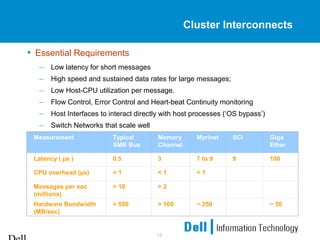
• Essential Requirements
– Low latency for short messages
– High speed and sustained data rates for large messages;
– Low Host-CPU utilization per message.
– Flow Control, Error Control and Heart-beat Continuity monitoring
– Host Interfaces to interact directly with host processes (‘OS bypass’)
– Switch Networks that scale well
Measurement Typical
SMB Bus
Memory
Channel
Myrinet SCI Giga
Ether
Latency ( µs ) 0.5 3 7 to 9 9 100
CPU overhead (µs) < 1 < 1 < 1
Messages per sec
(millions)
> 10 > 2
Hardware Bandwidth
(MB/sec)
> 500 > 100 ~ 250 ~ 50
13
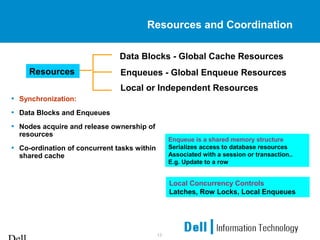
Resources and Coordination
• Synchronization:
• Data Blocks and Enqueues
• Nodes acquire and release ownership of
resources
• Co-ordination of concurrent tasks within
shared cache
Resources Enqueues - Global Enqueue Resources
Data Blocks - Global Cache Resources
Local or Independent Resources
Enqueue is a shared memory structure
Serializes access to database resources
Associated with a session or transaction..
E.g. Update to a row
Local Concurrency Controls
Latches, Row Locks, Local Enqueues
14
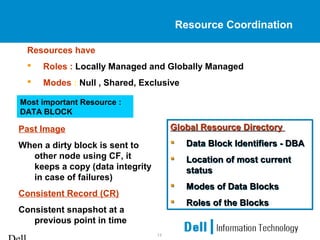
Resource Coordination
Resources have
 Roles : Locally Managed and Globally Managed
 Modes : Null , Shared, Exclusive
Global Resource Directory
 Data Block Identifiers - DBA
 Location of most current
status
 Modes of Data Blocks
 Roles of the Blocks
Global Resource Directory
 Data Block Identifiers - DBA
 Location of most current
status
 Modes of Data Blocks
 Roles of the Blocks
Past Image
When a dirty block is sent to
other node using CF, it
keeps a copy (data integrity
in case of failures)
Consistent Record (CR)
Consistent snapshot at a
previous point in time
Most important Resource :
DATA BLOCK
15
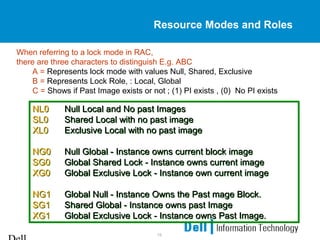
Resource Modes and Roles
When referring to a lock mode in RAC,
there are three characters to distinguish E.g. ABC
A = Represents lock mode with values Null, Shared, Exclusive
B = Represents Lock Role, : Local, Global
C = Shows if Past Image exists or not ; (1) PI exists , (0) No PI exists
NL0 Null Local and No past Images
SL0 Shared Local with no past image
XL0 Exclusive Local with no past image
NG0 Null Global - Instance owns current block image
SG0 Global Shared Lock - Instance owns current image
XG0 Global Exclusive Lock - Instance own current image
NG1 Global Null - Instance Owns the Past mage Block.
SG1 Shared Global - Instance owns past Image
XG1 Global Exclusive Lock - Instance owns Past Image.
NL0 Null Local and No past Images
SL0 Shared Local with no past image
XL0 Exclusive Local with no past image
NG0 Null Global - Instance owns current block image
SG0 Global Shared Lock - Instance owns current image
XG0 Global Exclusive Lock - Instance own current image
NG1 Global Null - Instance Owns the Past mage Block.
SG1 Shared Global - Instance owns past Image
XG1 Global Exclusive Lock - Instance owns Past Image.
16
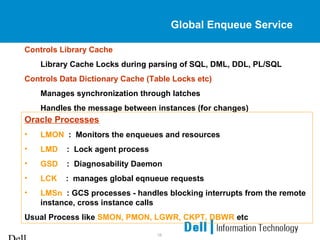
Global Enqueue Service
Controls Library Cache
Library Cache Locks during parsing of SQL, DML, DDL, PL/SQL
Controls Data Dictionary Cache (Table Locks etc)
Manages synchronization through latches
Handles the message between instances (for changes)
Oracle Processes
• LMON : Monitors the enqueues and resources
• LMD : Lock agent process
• GSD : Diagnosability Daemon
• LCK : manages global eqnueue requests
• LMSn : GCS processes - handles blocking interrupts from the remote
instance, cross instance calls
Usual Process like SMON, PMON, LGWR, CKPT, DBWR etc
17
Failover Basics
• Detection of failure, by way of its LMON process
• One of the Instances (Recovering Instance) controls the recovery
of the failed instance by taking over its redo log files.
• All in-progress transactions are rolled back (transaction recovery)
• Instance recovery does not include restarting the failed instance
• Only the resources mastered by GSC are re-built
• SMON process of a surviving Instance performs recovery of
failed instance
18
Fusion Recovery
• Recovery
– The instance, or instances dies
– Failure detected by cluster manager or GCS.
– Reconfiguration occurs and all locks owned by the departed
instance are remastered and the first pass read of threads of failed
instances done by SMON
– SMON claims locks needed to recover blocks found by the first pass
read.
– Locks are obtained and second pass of redo theads of failed
instances is performed and blocks become available as they have
been recovered.
– Predecessor blocks can be in past image block in a different
instance or on disk.
19
Client Connectivity – Server Fail
• Add failover options manually to TNS configuration files
• They are part of the CONNECT_DATA section of a connect
descriptor
• Failover options include
– TYPE: Identify the nature of TAF, if any
– METHOD: Configure how quickly failover can occur
– BACKUP: Identify an alternate net service name
– RETRIES: Limit the number of times a reconnection will be attempted
– DELAY: Specify how long to wait between reconnection attempts
20
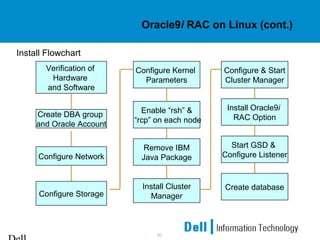
Oracle9i RAC on Linux (cont.)
Install Flowchart
Verification of
Hardware
and Software
Configure Network
Remove IBM
Java Package
Enable “rsh” &
“rcp” on each node
Configure Kernel
Parameters
Configure Storage
Install Cluster
Manager
Configure & Start
Cluster Manager
Install Oracle9i
RAC Option
Create database
Start GSD &
Configure Listener
Create DBA group
and Oracle Account
21
Linux kernel parameters
• Set /proc/sys/kernel/shmmax to 3GB
• Using multiple DBWRs with async I/O is usually better than using I/O
slaves
• Must re-link to use libaio i.e. ASYNC I/O
– make -f ins_rdbms.mk async_on
– init.ora: disk_asynch_io=true by default
– init.ora: filesystemio_options=asynch set this as well if datafiles are on a
filesystem (e.g. ext2)
• 2 DBWRs is a good default for a large buffer cache areas
• If large read sizes occur, increase /proc/sys/fs/aio-max-size
to the largest read size (default is 128KB)
22
Larger Buffer Cache
• Oracle has the capability to use an extended buffer cache greater
than 4GB
• Using Indirect Data Buffers has some overhead, so use this option
only if you have enough RAM to create a buffer cache greater than
4GB
• Steps to enable Indirect Data Buffers (from Oracle9i Administrators
Reference, Rel 2 for Linux):
– mount -t shm -o size=8g shmfs /dev/shm (can put this in /etc/fstab)
– init.ora: use_indirect_data_buffers=true
– init.ora: use only db_block_buffers and db_block_size (no
db_cache_size)
• For OLTP Apps, small blocks (e.g. 2KB) typically work better
23
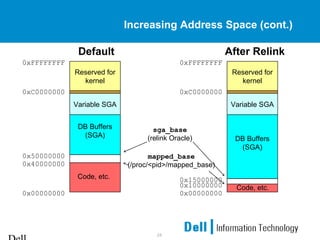
Increasing Address Space
• Oracle defaults to use about 1.7GB of address space for its SGA
• It’s possible to increase the SGA address space to about 2.6GB
(Note 200266.1)
– genksms -s 0x15000000 >ksms.s
– make -f ins_rdbms.mk ksms.o
– make -f ins_rdbms.mk ioracle
– echo 268435456 >/proc/<pid>/mapped_base (as root),
where <pid> is the pid of the session running SQL*Plus
24
Increasing Address Space (cont.)
Variable SGA
Reserved for
kernel
DB Buffers
(SGA)
Default
Code, etc.
0xFFFFFFFF
0xC0000000
0x50000000
0x40000000
0x00000000
Variable SGA
Reserved for
kernel
DB Buffers
(SGA)
After Relink
Code, etc.
0xFFFFFFFF
0xC0000000
0x15000000
0x10000000
0x00000000
mapped_base
(/proc/<pid>/mapped_base)
sga_base
(relink Oracle)
25
Bigpages
• It is a feature in Red Hat Advance Server that provides applications
access to large memory pages on Intel 32-bit CPUs
• The default memory page size is 4KB.
• Requires OS support to enable
• Large pages used for the SGA reduces the number of page table
entries that Linux and the CPU need to keep track of
• Reduces the CPU’s Translation Look-aside Buffer (TLB) miss rate
• Bigpage settings
– /proc/sys/kernel/shm-use-bigpages=0 : bigpage pool is not used
– /proc/sys/kernel/shm-use-bigpages=1 : bigpage memory is useable by
Oracle except in the Indirect Data Buffers case
– /proc/sys/kernel/shm-use-bigpages=2 : same as 1, but memory is also
useable in the Indirect Data Buffers case
26
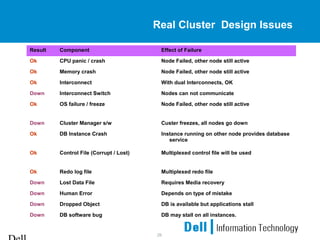
Real Cluster Design Issues
Result Component Effect of Failure
Ok CPU panic / crash Node Failed, other node still active
Ok Memory crash Node Failed, other node still active
Ok Interconnect With dual Interconnects, OK
Down Interconnect Switch Nodes can not communicate
Ok OS failure / freeze Node Failed, other node still active
Down Cluster Manager s/w Custer freezes, all nodes go down
Ok DB Instance Crash Instance running on other node provides database
service
Ok Control File (Corrupt / Lost) Multiplexed control file will be used
Ok Redo log file Multiplexed redo file
Down Lost Data File Requires Media recovery
Down Human Error Depends on type of mistake
Down Dropped Object DB is available but applications stall
Down DB software bug DB may stall on all instances.
27
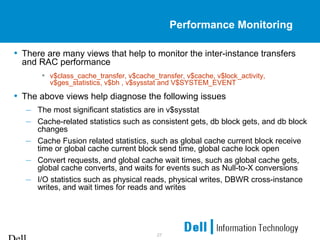
Performance Monitoring
• There are many views that help to monitor the inter-instance transfers
and RAC performance
• v$class_cache_transfer, v$cache_transfer, v$cache, v$lock_activity,
v$ges_statistics, v$bh , v$sysstat and V$SYSTEM_EVENT
• The above views help diagnose the following issues
– The most significant statistics are in v$sysstat
– Cache-related statistics such as consistent gets, db block gets, and db block
changes
– Cache Fusion related statistics, such as global cache current block receive
time or global cache current block send time, global cache lock open
– Convert requests, and global cache wait times, such as global cache gets,
global cache converts, and waits for events such as Null-to-X conversions
– I/O statistics such as physical reads, physical writes, DBWR cross-instance
writes, and wait times for reads and writes
28
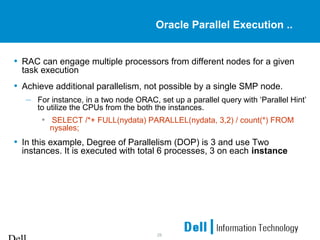
Oracle Parallel Execution ..
• RAC can engage multiple processors from different nodes for a given
task execution
• Achieve additional parallelism, not possible by a single SMP node.
– For instance, in a two node ORAC, set up a parallel query with ‘Parallel Hint’
to utilize the CPUs from the both the instances.
• SELECT /*+ FULL(nydata) PARALLEL(nydata, 3,2) / count(*) FROM
nysales;
• In this example, Degree of Parallelism (DOP) is 3 and use Two
instances. It is executed with total 6 processes, 3 on each instance
29
Issues Faced
• There were multiple issues since we started to work on
RAC. Many of them have been resolved through
upgrades and minor patches.
• Major issues
– NTP Issues-: Problem appears to have been due to NTP (Network
Time Protocol) settings on the server that allowed the time to be
automatically set backwards by the NTP server. This time change
caused it to look like a checkin had been missed. Changing NTP
settings so that setting the time backwards is disallowed appears to
have resolved the problem
– Split-brain condition -: This should never happen but we ran into this
issues also . The Cluster software should take care of this issue.
– Fork-Process Hanging -: we started seeing “unable to receive
acknowledgement from forked process” in alert log
30
10G RAC Features
• Dynamic affinity policy enhancements for optimizing the Cache
Fusion protocol to enhance the performance of several kinds of
workloads
• Better Workload management
• Improvements to adding a node. Oracle introduces portable
cluster-ware that makes adding a node easier.
• Cluster application availability subsystem
31
Q & A
Q & A

final_rac

  • 1.
    Dell Confidential Oracle 9iRAC By Ramesh Malayappan & Gautam Mekala
  • 2.
    2 Overview • Overview ofOS (Linux) • Overview of Oracle9i Real Application Clusters • Oracle9i RAC on Linux • Tuning Tips • Issues to deal in RAC • Going Forward (Oracle 10G) • Q & A
  • 3.
    3 Benefits of RealApplication Clusters • New Shared Cache Architecture • Exploits New Hardware and Software Technologies • Most Flexible Clustering technology • Provides scalability and high availability
  • 4.
    4 Real Application Clusters •Real Application Clusters (RAC) – Cache Fusion – True scalability • Transparent Scalability – All Applications Scale – No tuning required – No Physical Data Partitioning required (Application user partitioning is needed though) – ISV Applications Scale out of the box • High Availability – Loss of single node on cluster will not stop the database • Ability to add additional hardware transparently to users
  • 5.
    5 Overview of Oracle9iRAC • Many instances of Oracle running on many nodes • All instances share a single physical database and have common data & control files • Each instance has its own log files and rollback segments • All instances can simultaneously execute transactions against the single database • Caches are synchronized using Oracle’s Global Cache Management technology (Cache Fusion) • No Single Point of Failure (Server side)
  • 6.
    6 Oracle9i RAC onLinux • Clustering consists of 2 Oracle-supplied components – Cluster Manager (oracm) • Provides consistent view of Oracle instances • Accepts registration of Oracle instances • Responsible for process level cluster status – Hangcheck-timer • New in 9.2.0.2, replaces watchdogd • Monitors the Linux kernel for system hangs • Implemented as a kernel module so it much less affected by system load • Resets node from within kernel if abnormal hangs occur
  • 7.
    7 Internal Workings OfRAC.. • Multi-Instance with Single Database • Cache Fusion (aggregation of cache from each node) • Inter-Instance Transfers • GES and GCS • Resources Co-ordination • Ownership (conversions) • Status and Roles • RAC Processes • Fail-over Recovery GESGES SGASGA GCSGCS GESGES SGASGA GCSGCS Cache FusionCache Fusion database
  • 8.
    8 Contents of SGA •The shared pool portion of the SGA – Library Cache – Dictionary cache – Buffers for parallel exec mesg and control structures. • Library Cache: – Shared SQL areas, private SQL areas (MTS), PL/SQL procedures and packages, and control – structures such as locks and library cache handles. • Data Dictionary: – Collection of database tables and views containing reference information about the database, its structures, and its users. Buffer CacheBuffer Cache Shared PoolShared Pool Redo BufferRedo Buffer Large PoolLarge Pool Shared Across InstancesData Buffers Synchronized Across InstancesDict. Cache Synchronized Across Instances Library Cache Remains Local to each Instance PGA
  • 9.
    9 Cache Fusion • CacheFusion is a fundamental component of Real Application Cluster • Cache Fusion allows individual nodes to share the contents of their buffer caches through the inter-connect cluster Interprocess Communication (IPC) eliminating the need for extra disk I/Os. • This greatly improves the performance and scalability characteristics of shared-disk clusters • Cache fusion only works with the default resource control scheme. If GC_FILES_TO_LOCKS is set, the old pre-cache fusion behavior is utilized. In other words, forced disk-writes will be used.
  • 10.
    10 Dirty Blocks &Past Image • In a non-RAC instance – User A selects say 10 rows (10 blocks) – User B selects same 10 rows (10 blocks) – User B updates those 10 rows (10 blocks) • Dirtied blocks • Not committed – User C selects same 10 rows • Rollback segment buffer provide read consistent image – Now User B performs Commit – Now User D updates same blocks • gets the same dirtied blocks • If it is a RAC – When user D updates on second Instance, PAST Image is created for those blocks sent out
  • 11.
    11 Cache Coherency LockManagement • Transfer of blocks among the individual node cache’s • Global Concurrency of the data blocks / pages • Global Control mechanism • Cluster Interconnects – Connect nodes • Can be a simple private network connection • Can be a specialized cables with Hub/Switch – Functions • Monitors Health, Status of nodes, Accessing remote file systems • Cluster alias routing • Application-specific traffic • Distributed lock manager (DLM) messages / GCS messages
  • 12.
    12 Cluster Interconnects • EssentialRequirements – Low latency for short messages – High speed and sustained data rates for large messages; – Low Host-CPU utilization per message. – Flow Control, Error Control and Heart-beat Continuity monitoring – Host Interfaces to interact directly with host processes (‘OS bypass’) – Switch Networks that scale well Measurement Typical SMB Bus Memory Channel Myrinet SCI Giga Ether Latency ( µs ) 0.5 3 7 to 9 9 100 CPU overhead (µs) < 1 < 1 < 1 Messages per sec (millions) > 10 > 2 Hardware Bandwidth (MB/sec) > 500 > 100 ~ 250 ~ 50
  • 13.
    13 Resources and Coordination •Synchronization: • Data Blocks and Enqueues • Nodes acquire and release ownership of resources • Co-ordination of concurrent tasks within shared cache Resources Enqueues - Global Enqueue Resources Data Blocks - Global Cache Resources Local or Independent Resources Enqueue is a shared memory structure Serializes access to database resources Associated with a session or transaction.. E.g. Update to a row Local Concurrency Controls Latches, Row Locks, Local Enqueues
  • 14.
    14 Resource Coordination Resources have Roles : Locally Managed and Globally Managed  Modes : Null , Shared, Exclusive Global Resource Directory  Data Block Identifiers - DBA  Location of most current status  Modes of Data Blocks  Roles of the Blocks Global Resource Directory  Data Block Identifiers - DBA  Location of most current status  Modes of Data Blocks  Roles of the Blocks Past Image When a dirty block is sent to other node using CF, it keeps a copy (data integrity in case of failures) Consistent Record (CR) Consistent snapshot at a previous point in time Most important Resource : DATA BLOCK
  • 15.
    15 Resource Modes andRoles When referring to a lock mode in RAC, there are three characters to distinguish E.g. ABC A = Represents lock mode with values Null, Shared, Exclusive B = Represents Lock Role, : Local, Global C = Shows if Past Image exists or not ; (1) PI exists , (0) No PI exists NL0 Null Local and No past Images SL0 Shared Local with no past image XL0 Exclusive Local with no past image NG0 Null Global - Instance owns current block image SG0 Global Shared Lock - Instance owns current image XG0 Global Exclusive Lock - Instance own current image NG1 Global Null - Instance Owns the Past mage Block. SG1 Shared Global - Instance owns past Image XG1 Global Exclusive Lock - Instance owns Past Image. NL0 Null Local and No past Images SL0 Shared Local with no past image XL0 Exclusive Local with no past image NG0 Null Global - Instance owns current block image SG0 Global Shared Lock - Instance owns current image XG0 Global Exclusive Lock - Instance own current image NG1 Global Null - Instance Owns the Past mage Block. SG1 Shared Global - Instance owns past Image XG1 Global Exclusive Lock - Instance owns Past Image.
  • 16.
    16 Global Enqueue Service ControlsLibrary Cache Library Cache Locks during parsing of SQL, DML, DDL, PL/SQL Controls Data Dictionary Cache (Table Locks etc) Manages synchronization through latches Handles the message between instances (for changes) Oracle Processes • LMON : Monitors the enqueues and resources • LMD : Lock agent process • GSD : Diagnosability Daemon • LCK : manages global eqnueue requests • LMSn : GCS processes - handles blocking interrupts from the remote instance, cross instance calls Usual Process like SMON, PMON, LGWR, CKPT, DBWR etc
  • 17.
    17 Failover Basics • Detectionof failure, by way of its LMON process • One of the Instances (Recovering Instance) controls the recovery of the failed instance by taking over its redo log files. • All in-progress transactions are rolled back (transaction recovery) • Instance recovery does not include restarting the failed instance • Only the resources mastered by GSC are re-built • SMON process of a surviving Instance performs recovery of failed instance
  • 18.
    18 Fusion Recovery • Recovery –The instance, or instances dies – Failure detected by cluster manager or GCS. – Reconfiguration occurs and all locks owned by the departed instance are remastered and the first pass read of threads of failed instances done by SMON – SMON claims locks needed to recover blocks found by the first pass read. – Locks are obtained and second pass of redo theads of failed instances is performed and blocks become available as they have been recovered. – Predecessor blocks can be in past image block in a different instance or on disk.
  • 19.
    19 Client Connectivity –Server Fail • Add failover options manually to TNS configuration files • They are part of the CONNECT_DATA section of a connect descriptor • Failover options include – TYPE: Identify the nature of TAF, if any – METHOD: Configure how quickly failover can occur – BACKUP: Identify an alternate net service name – RETRIES: Limit the number of times a reconnection will be attempted – DELAY: Specify how long to wait between reconnection attempts
  • 20.
    20 Oracle9i RAC onLinux (cont.) Install Flowchart Verification of Hardware and Software Configure Network Remove IBM Java Package Enable “rsh” & “rcp” on each node Configure Kernel Parameters Configure Storage Install Cluster Manager Configure & Start Cluster Manager Install Oracle9i RAC Option Create database Start GSD & Configure Listener Create DBA group and Oracle Account
  • 21.
    21 Linux kernel parameters •Set /proc/sys/kernel/shmmax to 3GB • Using multiple DBWRs with async I/O is usually better than using I/O slaves • Must re-link to use libaio i.e. ASYNC I/O – make -f ins_rdbms.mk async_on – init.ora: disk_asynch_io=true by default – init.ora: filesystemio_options=asynch set this as well if datafiles are on a filesystem (e.g. ext2) • 2 DBWRs is a good default for a large buffer cache areas • If large read sizes occur, increase /proc/sys/fs/aio-max-size to the largest read size (default is 128KB)
  • 22.
    22 Larger Buffer Cache •Oracle has the capability to use an extended buffer cache greater than 4GB • Using Indirect Data Buffers has some overhead, so use this option only if you have enough RAM to create a buffer cache greater than 4GB • Steps to enable Indirect Data Buffers (from Oracle9i Administrators Reference, Rel 2 for Linux): – mount -t shm -o size=8g shmfs /dev/shm (can put this in /etc/fstab) – init.ora: use_indirect_data_buffers=true – init.ora: use only db_block_buffers and db_block_size (no db_cache_size) • For OLTP Apps, small blocks (e.g. 2KB) typically work better
  • 23.
    23 Increasing Address Space •Oracle defaults to use about 1.7GB of address space for its SGA • It’s possible to increase the SGA address space to about 2.6GB (Note 200266.1) – genksms -s 0x15000000 >ksms.s – make -f ins_rdbms.mk ksms.o – make -f ins_rdbms.mk ioracle – echo 268435456 >/proc/<pid>/mapped_base (as root), where <pid> is the pid of the session running SQL*Plus
  • 24.
    24 Increasing Address Space(cont.) Variable SGA Reserved for kernel DB Buffers (SGA) Default Code, etc. 0xFFFFFFFF 0xC0000000 0x50000000 0x40000000 0x00000000 Variable SGA Reserved for kernel DB Buffers (SGA) After Relink Code, etc. 0xFFFFFFFF 0xC0000000 0x15000000 0x10000000 0x00000000 mapped_base (/proc/<pid>/mapped_base) sga_base (relink Oracle)
  • 25.
    25 Bigpages • It isa feature in Red Hat Advance Server that provides applications access to large memory pages on Intel 32-bit CPUs • The default memory page size is 4KB. • Requires OS support to enable • Large pages used for the SGA reduces the number of page table entries that Linux and the CPU need to keep track of • Reduces the CPU’s Translation Look-aside Buffer (TLB) miss rate • Bigpage settings – /proc/sys/kernel/shm-use-bigpages=0 : bigpage pool is not used – /proc/sys/kernel/shm-use-bigpages=1 : bigpage memory is useable by Oracle except in the Indirect Data Buffers case – /proc/sys/kernel/shm-use-bigpages=2 : same as 1, but memory is also useable in the Indirect Data Buffers case
  • 26.
    26 Real Cluster DesignIssues Result Component Effect of Failure Ok CPU panic / crash Node Failed, other node still active Ok Memory crash Node Failed, other node still active Ok Interconnect With dual Interconnects, OK Down Interconnect Switch Nodes can not communicate Ok OS failure / freeze Node Failed, other node still active Down Cluster Manager s/w Custer freezes, all nodes go down Ok DB Instance Crash Instance running on other node provides database service Ok Control File (Corrupt / Lost) Multiplexed control file will be used Ok Redo log file Multiplexed redo file Down Lost Data File Requires Media recovery Down Human Error Depends on type of mistake Down Dropped Object DB is available but applications stall Down DB software bug DB may stall on all instances.
  • 27.
    27 Performance Monitoring • Thereare many views that help to monitor the inter-instance transfers and RAC performance • v$class_cache_transfer, v$cache_transfer, v$cache, v$lock_activity, v$ges_statistics, v$bh , v$sysstat and V$SYSTEM_EVENT • The above views help diagnose the following issues – The most significant statistics are in v$sysstat – Cache-related statistics such as consistent gets, db block gets, and db block changes – Cache Fusion related statistics, such as global cache current block receive time or global cache current block send time, global cache lock open – Convert requests, and global cache wait times, such as global cache gets, global cache converts, and waits for events such as Null-to-X conversions – I/O statistics such as physical reads, physical writes, DBWR cross-instance writes, and wait times for reads and writes
  • 28.
    28 Oracle Parallel Execution.. • RAC can engage multiple processors from different nodes for a given task execution • Achieve additional parallelism, not possible by a single SMP node. – For instance, in a two node ORAC, set up a parallel query with ‘Parallel Hint’ to utilize the CPUs from the both the instances. • SELECT /*+ FULL(nydata) PARALLEL(nydata, 3,2) / count(*) FROM nysales; • In this example, Degree of Parallelism (DOP) is 3 and use Two instances. It is executed with total 6 processes, 3 on each instance
  • 29.
    29 Issues Faced • Therewere multiple issues since we started to work on RAC. Many of them have been resolved through upgrades and minor patches. • Major issues – NTP Issues-: Problem appears to have been due to NTP (Network Time Protocol) settings on the server that allowed the time to be automatically set backwards by the NTP server. This time change caused it to look like a checkin had been missed. Changing NTP settings so that setting the time backwards is disallowed appears to have resolved the problem – Split-brain condition -: This should never happen but we ran into this issues also . The Cluster software should take care of this issue. – Fork-Process Hanging -: we started seeing “unable to receive acknowledgement from forked process” in alert log
  • 30.
    30 10G RAC Features •Dynamic affinity policy enhancements for optimizing the Cache Fusion protocol to enhance the performance of several kinds of workloads • Better Workload management • Improvements to adding a node. Oracle introduces portable cluster-ware that makes adding a node easier. • Cluster application availability subsystem
  • 31.